A NetworkPolicy decides which Pods may talk to a given Pod, and what that Pod may talk to, at the level of the IP address and the port. Without a policy, all the Pods of a cluster can reach each other, even from one namespace to another. This lesson has you isolate a database on a kind cluster: you first measure that everything gets through, you close the ingress, you open it only to the backend, then you close the egress without cutting DNS. It is for readers who can already expose a Pod behind a Service and resolve its name with CoreDNS.
What you will learn
- Check that the network plugin enforces NetworkPolicies
- Isolate a Pod on ingress, then allow only one client, by label or by namespace
- Write the container port, not the Service port, in a rule
- Set a default deny on egress and reopen DNS
- Tell AND selectors from OR selectors, and filter by address range with
ipBlock - Diagnose a policy that blocks too much or not enough, without picking the wrong test Pod
Prerequisites
You have read Pod Networking and CoreDNS, and you have installed kind 0.33 or later. The demonstrations run on a four-node cluster named demo-np in v1.37.0, described by the kind-multi.yaml file below. No network plugin is added: kind installs its own plugin, kindnet, which the "Prerequisite: a compatible CNI" section shows to enforce policies.
kind: ClusterapiVersion: kind.x-k8s.io/v1alpha4nodes: - role: control-plane - role: worker labels: topology.kubernetes.io/zone: zone-a - role: worker labels: topology.kubernetes.io/zone: zone-b - role: worker labels: topology.kubernetes.io/zone: zone-ckind create cluster --name demo-np --image kindest/node:v1.37.0@sha256:a1ed56cfb0e7b93589bdf97c8cd566405a265939e3620fc4f5de89adff580ae5 --config kind-multi.yamlkubectl wait --for=condition=Ready nodes --all --timeout=120sCreation takes about 40 seconds. The kubectl wait command must print condition met for the four nodes before you continue.
The scenario fits in two namespaces and four Pods. The db Pod serves the db-ok page on its port 80 and hides behind a Service that publishes port 5432. The backend and frontend Pods play the clients of the database, and intrus, in another namespace, deliberately carries the same label as backend. Save the np-base.yaml file, then apply it.
apiVersion: v1kind: Podmetadata: name: db namespace: ws-np labels: app: dbspec: containers: - name: busybox image: busybox:1.38.0@sha256:a46257e06c82ad85242d0d38077d0a52d9896389ca60a1a59d3463db586e5fa4 command: ["sh", "-c", "mkdir -p /www && echo db-ok > /www/index.html && exec httpd -f -p 80 -h /www"] ports: - containerPort: 80---apiVersion: v1kind: Servicemetadata: name: db namespace: ws-npspec: selector: app: db ports: - port: 5432 targetPort: 80---apiVersion: v1kind: Podmetadata: name: backend namespace: ws-np labels: role: backendspec: containers: - name: busybox image: busybox:1.38.0@sha256:a46257e06c82ad85242d0d38077d0a52d9896389ca60a1a59d3463db586e5fa4 command: ["sleep", "3600"]---apiVersion: v1kind: Podmetadata: name: frontend namespace: ws-np labels: role: frontendspec: containers: - name: busybox image: busybox:1.38.0@sha256:a46257e06c82ad85242d0d38077d0a52d9896389ca60a1a59d3463db586e5fa4 command: ["sleep", "3600"]---apiVersion: v1kind: Podmetadata: name: intrus namespace: ws-np-autre labels: role: backendspec: containers: - name: busybox image: busybox:1.38.0@sha256:a46257e06c82ad85242d0d38077d0a52d9896389ca60a1a59d3463db586e5fa4 command: ["sleep", "3600"]kubectl create namespace ws-npkubectl create namespace ws-np-autrekubectl apply -f np-base.yamlkubectl -n ws-np wait --for=condition=Ready pod --all --timeout=90skubectl -n ws-np-autre wait --for=condition=Ready pod --all --timeout=90sSome names in this lesson are in French on purpose, so that the commands and outputs stay those of the tested cluster: intrus means "intruder", ws-np-autre "ws-np-other", db-et "db-and", db-ou "db-or", bloquer-metadonnees "block-metadata", backend-sans-sortie "backend-no-egress", rc_temoin_frontend "rc_control_frontend" and comptoir "counter".
What are NetworkPolicies for?
Without a NetworkPolicy, any Pod can reach any other Pod of the cluster. This is the default behavior of Kubernetes, and a NetworkPolicy exists to restrict it. To see it, run the same request from the three clients to the db Service.
for p in ws-np/backend ws-np/frontend ws-np-autre/intrus; do ns=${p%/*}; pod=${p#*/}; echo "--- $pod"; kubectl -n $ns exec $pod -- wget -qO- -T 3 http://db.ws-np.svc.cluster.local:5432; echo "rc=$?"; donekubectl -n ws-np get networkpolicy--- backenddb-okrc=0--- frontenddb-okrc=0--- intrusdb-okrc=0No resources found in ws-np namespace.The three clients receive db-ok with rc=0, intrus included, although it lives in another namespace. So the namespace protects nothing, and there is still no policy in ws-np. This three-client test is the starting measurement for the whole lesson.
A NetworkPolicy works at layers 3 and 4: IP addresses and ports. It knows nothing about HTTP paths, headers or methods; that filtering belongs to a service mesh or to a network plugin that adds its own extensions.
Prerequisite: a compatible CNI
Kubernetes defines NetworkPolicies, but the network plugin (CNI) enforces them. With a plugin that ignores them, the API accepts your manifests, kubectl get networkpolicy lists them, and the traffic keeps flowing.
| Network plugin | Enforces NetworkPolicies | Source |
|---|---|---|
| Calico | yes | project documentation |
| Cilium | yes | project documentation |
| Antrea | yes | project documentation |
| Flannel | no, not natively | upstream README: "the flanneld binary does not natively enforce Network Policies" |
| kindnet | yes, checked on kind 0.33 and kindest/node:v1.37.0 | kindnet documentation and the test of the "Default deny ingress" section |
So the kind cluster of the course is usable. Its plugin, kindnet (image docker.io/kindest/kindnetd:v20260820-69b56db7 on kindest/node:v1.37.0), starts a policy controller named kube-network-policies, which turns the policies into firewall rules on every node. To find out which plugin runs on your cluster, list the DaemonSets of kube-system with kubectl -n kube-system get daemonset, then read the image of the one that carries the plugin name:
kubectl -n kube-system get daemonset kindnet -o jsonpath='{.spec.template.spec.containers[0].image}{"\n"}'docker.io/kindest/kindnetd:v20260820-69b56db7You read the plugin from the DaemonSet name (kindnet, calico-node, cilium). But this reading proves nothing about policy enforcement: the only reliable check is a real test, like the one in the "Default deny ingress" section, which fails after a policy is applied although it succeeded before.
How does the model work?
Three ideas are enough to read any NetworkPolicy: which Pods the rule applies to, what its mere existence changes, and how several rules combine. The second one surprises people the most: a single policy is enough to close everything in one direction.
Selection by labels
A NetworkPolicy targets Pods with a podSelector based on their labels, in the namespace where the policy is created. A podSelector that matches no Pod applies to nobody, without any error.
spec: podSelector: matchLabels: app: dbA podSelector: {} does the opposite of an empty selection: it picks all the Pods of the namespace.
Ingress and Egress
These two directions are read from the Pod that the policy selects, never from the network. Ingress means what comes into this Pod, Egress what leaves it. The word "Ingress" also names an HTTP routing resource, which has nothing to do with it.
Isolation is decided per direction, independently. A policyTypes field that mentions only Ingress leaves the egress entirely open, and the other way round. Always declare policyTypes rather than let Kubernetes infer it: adding an egress section to a policy that declared [Ingress] does not enable egress.
spec: policyTypes: - Ingress - EgressUnion of rules
As soon as a policy selects a Pod for a direction, everything that no policy allows in that direction is denied. NetworkPolicies do not replace one another: the allowed traffic is the union of the rules of all the policies that select the Pod. There is no priority and no explicit deny rule. To restrict, you must therefore remove an allowance, never add one.
Source plus destination logic
When both Pods are restricted, the connection must be allowed at both ends: by the egress of the source and by the ingress of the destination. If one is missing, the connection fails. When troubleshooting, always read the policies on both sides.
Default deny ingress
A default deny on ingress is a policy that selects Pods for ingress without allowing anything. It sets the line to hold: everything is denied, then each useful flow is opened explicitly. This is safer than a list of bans, which always leaves a forgotten path.
For a specific group of Pods
This policy isolates the app=db Pods of the ws-np namespace. It has no ingress key: a policy without a rule allows nothing.
apiVersion: networking.k8s.io/v1kind: NetworkPolicymetadata: name: db-deny-in namespace: ws-npspec: podSelector: matchLabels: app: db policyTypes: - IngressSave each manifest of this lesson under the name <metadata.name>.yaml (here db-deny-in.yaml), then apply it. Then run the three-client test of the previous section again.
kubectl apply -f db-deny-in.yamlkubectl -n ws-np describe networkpolicy db-deny-innetworkpolicy.networking.k8s.io/db-deny-in createdName: db-deny-inNamespace: ws-npCreated on: 2026-11-12 06:32:52 +0000 UTCLabels: <none>Annotations: <none>Spec: PodSelector: app=db Allowing ingress traffic: <none> (Selected pods are isolated for ingress connectivity) Not affecting egress traffic Policy Types: IngressIn describe, read PodSelector first: it says which Pods are targeted. Then Allowing ingress traffic: <none> means the selected Pods are isolated on ingress. Finally Not affecting egress traffic confirms that the egress stays open. With the same for p in ... loop over three clients, the three now fail.
--- backendwget: download timed outcommand terminated with exit code 1rc=1--- frontendwget: download timed outcommand terminated with exit code 1rc=1--- intruswget: download timed outcommand terminated with exit code 1rc=1A denied ingress shows up as a timeout (download timed out, after 3 s here), not as a refused connection. On a Pod that is already running, the effect is immediate: on kind, the request sent at the very second of the apply already fails. The exact form of the block depends on the network plugin, so do not rely on a single symptom to conclude that a policy is irrelevant.
For a whole namespace
The same policy with podSelector: {} isolates all the Pods of the namespace, which cuts access to the applications already running. Test it on a work namespace before production.
apiVersion: networking.k8s.io/v1kind: NetworkPolicymetadata: name: default-deny-ingress namespace: productionspec: podSelector: {} policyTypes: - IngressThe sequence depends on the situation. On a new namespace, apply the deny first, then open each flow. On a namespace that is running, the order flips: list the real flows, write and apply the allowances, check them including DNS resolution, and apply the deny only afterwards. Starting with the deny on a running application means cutting it off while you find out what it was calling.
Allow one specific flow: the backend to the database
To open the database only to the backend, add a second policy that allows the role=backend Pods on port 80. db-deny-in stays in place: the two policies add up, and the second opens what the first closed. The ports field limits the rule to a protocol and a port; without it, the rule allows all the ports of the selected source.
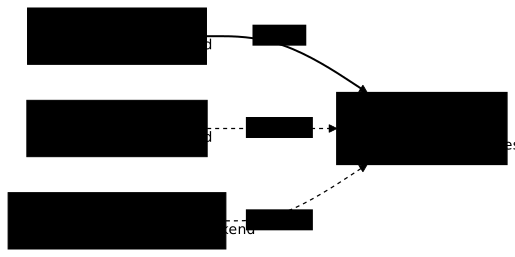
apiVersion: networking.k8s.io/v1kind: NetworkPolicymetadata: name: db-allow-backend namespace: ws-npspec: podSelector: matchLabels: app: db policyTypes: - Ingress ingress: - from: - podSelector: matchLabels: role: backend ports: - protocol: TCP port: 80kubectl apply -f db-allow-backend.yamlfor p in ws-np/backend ws-np/frontend ws-np-autre/intrus; do ns=${p%/*}; pod=${p#*/}; echo "--- $pod"; kubectl -n $ns exec $pod -- wget -qO- -T 3 http://db.ws-np.svc.cluster.local:5432; echo "rc=$?"; donenetworkpolicy.networking.k8s.io/db-allow-backend created--- backenddb-okrc=0--- frontendwget: download timed outcommand terminated with exit code 1rc=1--- intruswget: download timed outcommand terminated with exit code 1rc=1Look at the case of intrus: it carries the role=backend label and still times out. A podSelector alone only designates the Pods of the policy namespace, so the intrus of ws-np-autre is not concerned. The diagram shows the three clients and the result.
The port of a policy is the container port, not the Service port
The port field of a rule designates the port the container listens on, that is, the targetPort of the Service, never the port that the Service publishes. When the packet reaches the Pod, the address translation of the Service has already happened. Here the db Service publishes 5432 to a container that listens on 80: check it before writing the rule.
kubectl -n ws-np get svc db -o jsonpath='{.spec.ports[0].port} {.spec.ports[0].targetPort}{"\n"}'kubectl -n ws-np patch networkpolicy db-allow-backend --type json -p '[{"op":"replace","path":"/spec/ingress/0/ports/0/port","value":5432}]'kubectl -n ws-np exec backend -- wget -qO- -T 3 http://db.ws-np.svc.cluster.local:5432; echo "rc=$?"5432 80networkpolicy.networking.k8s.io/db-allow-backend patchedwget: download timed outcommand terminated with exit code 1rc=1With port: 5432, the policy is accepted without error, and the backend itself no longer reaches the database. No message appears anywhere: this is a classic NetworkPolicy trap, because the policy looks correct when you reread it. Put port 80 back and the flow returns.
kubectl -n ws-np patch networkpolicy db-allow-backend --type json -p '[{"op":"replace","path":"/spec/ingress/0/ports/0/port","value":80}]'kubectl -n ws-np exec backend -- wget -qO- -T 3 http://db.ws-np.svc.cluster.local:5432; echo "rc=$?"The expected output is db-ok then rc=0.
Selecting by namespace
To allow Pods from another namespace, use a namespaceSelector. It selects namespace labels, never a name: writing name: monitoring only works if someone has set that label.
Allow from a specific namespace
Kubernetes itself sets the kubernetes.io/metadata.name label on every namespace, and its value is the name of the namespace. This label is therefore always present: nobody has to set it.
kubectl get ns ws-np-autre --show-labelsNAME STATUS AGE LABELSws-np-autre Active 27s kubernetes.io/metadata.name=ws-np-autreA namespaceSelector used alone allows all the Pods of the selected namespace, on all the ports of the rule. To restrict to specific Pods, you must combine the two selectors, which is what the next section does.
Combine namespace and pod selectors
A single from can contain a namespaceSelector and a podSelector. Everything depends on the dash: in a single element, the two selectors combine as AND; in two elements, they add up as OR. Here is the AND version, which allows only the role=backend Pods of the ws-np-autre namespace.
apiVersion: networking.k8s.io/v1kind: NetworkPolicymetadata: name: db-et namespace: ws-npspec: podSelector: matchLabels: app: db policyTypes: - Ingress ingress: - from: - namespaceSelector: matchLabels: kubernetes.io/metadata.name: ws-np-autre podSelector: matchLabels: role: backend ports: - protocol: TCP port: 80Replace db-allow-backend with db-et, then test backend and intrus with the usual loop.
kubectl -n ws-np delete networkpolicy db-allow-backendkubectl apply -f db-et.yamlThe result is the reverse of db-allow-backend: backend, which lives in ws-np, times out, and intrus, which lives in ws-np-autre with role=backend, receives db-ok.
The OR version puts each selector on its own dash. Written this way, the policy allows the whole ws-np-autre namespace, plus the role=backend Pods of the policy namespace.
ingress: - from: - namespaceSelector: matchLabels: kubernetes.io/metadata.name: ws-np-autre - podSelector: matchLabels: role: backend ports: - protocol: TCP port: 80Save this variant in db-ou.yaml with the same header as db-et (only the name changes), then apply it after deleting db-et:
kubectl -n ws-np delete networkpolicy db-etkubectl apply -f db-ou.yamlWith this variant, backend and intrus receive db-ok, and frontend times out. A single dash of difference therefore opens the database to Pods that the AND version kept out: reread the indentation of every from.
Default deny egress
A default deny on egress isolates the selected Pods for egress without allowing anything. It is just as useful as the deny on ingress, but riskier: the egress also carries DNS resolution. Replace the db-ou policy with a policy that closes both directions of the database.
apiVersion: networking.k8s.io/v1kind: NetworkPolicymetadata: name: db-deny-all namespace: ws-npspec: podSelector: matchLabels: app: db policyTypes: - Ingress - Egresskubectl -n ws-np delete networkpolicy db-oukubectl apply -f db-deny-all.yamltime kubectl -n ws-np exec db -- nslookup kubernetes.default.svc.cluster.local; echo "rc=$?"networkpolicy.networking.k8s.io "db-ou" deleted from ws-np namespacenetworkpolicy.networking.k8s.io/db-deny-all created;; connection timed out; no servers could be reached
command terminated with exit code 1
real 0m5.067suser 0m0.035ssys 0m0.005src=1The database no longer resolves anything: nslookup waits 5 seconds, then returns connection timed out; no servers could be reached. The Pod can no longer reach CoreDNS on port 53. This test covers DNS only: no application flow is involved.
Allow DNS
As soon as you restrict the egress, allow DNS: it is the first reflex, otherwise the application can no longer resolve any Service name. The destinations of an egress rule are described with to, as the sources of an ingress rule are with from. This policy opens port 53, in UDP and TCP, to the CoreDNS Pods only.
apiVersion: networking.k8s.io/v1kind: NetworkPolicymetadata: name: db-allow-dns namespace: ws-npspec: podSelector: matchLabels: app: db policyTypes: - Egress egress: - to: - namespaceSelector: matchLabels: kubernetes.io/metadata.name: kube-system podSelector: matchLabels: k8s-app: kube-dns ports: - protocol: UDP port: 53 - protocol: TCP port: 53kubectl apply -f db-allow-dns.yamlkubectl -n ws-np exec db -- nslookup kubernetes.default.svc.cluster.local; echo "rc=$?"networkpolicy.networking.k8s.io/db-allow-dns createdServer: 10.96.0.10Address: 10.96.0.10:53
Name: kubernetes.default.svc.cluster.localAddress: 10.96.0.1
rc=0The database resolves again: the address 10.96.0.1 comes back with rc=0. The kubernetes.io/metadata.name: kube-system label is set by Kubernetes, so the rule works on your cluster with no extra step.
Opening DNS opens nothing else. To check it, get the address of a CoreDNS Pod and contact its health port from the database, then from frontend, which the policy does not target.
IP=$(kubectl -n kube-system get pods -l k8s-app=kube-dns -o jsonpath='{.items[0].status.podIP}'); echo "coredns=$IP"kubectl -n ws-np exec db -- wget -qO- -T 3 http://$IP:8080/health; echo "rc=$?"kubectl -n ws-np exec frontend -- wget -qO- -T 3 http://$IP:8080/health; echo "rc_temoin_frontend=$?"coredns=10.244.0.2wget: download timed outcommand terminated with exit code 1rc=1OKrc_temoin_frontend=0From the database, the same CoreDNS Pod times out on port 8080, while the frontend control receives OK. The database resolves names but reaches nothing else. A simpler rule, which allows port 53 to any destination, also works (the resolution returns rc=0), but it lets the database send DNS queries to a server of its choice.
egress: - ports: - protocol: UDP port: 53 - protocol: TCP port: 53Use ipBlock
ipBlock allows an address range in CIDR notation, with an except list to exclude sub-ranges. It suits destinations or sources outside the cluster: Pod addresses change every time a Pod is recreated, so do not write them in a durable policy. For the demonstration, get the address of the backend and open the database only to that address.
kubectl -n ws-np delete networkpolicy --allBACK=$(kubectl -n ws-np get pod backend -o jsonpath='{.status.podIP}'); echo "backend=$BACK"The command prints for example backend=10.244.2.2; the address changes with every cluster, so adapt the /32 below to yours.
apiVersion: networking.k8s.io/v1kind: NetworkPolicymetadata: name: db-ipblock namespace: ws-npspec: podSelector: matchLabels: app: db policyTypes: - Ingress ingress: - from: - ipBlock: cidr: 10.244.2.2/32 ports: - protocol: TCP port: 80Save the policy in db-ipblock.yaml, apply it with kubectl apply -f db-ipblock.yaml, then run the test on backend and frontend again: backend receives db-ok, frontend times out. On kind, the database therefore sees the address of the sending Pod as the source, otherwise the /32 of the backend would not let the backend through alone. According to the official NetworkPolicy documentation, the observed source address depends on the network plugin and on the path of the packet: do not count on ipBlock to target cluster Pods on another plugin without testing it.
Another exception matters for tests: the official documentation states that traffic to and from the node where the Pod runs is always allowed, whatever the rule.
Protect the node metadata endpoint
At a cloud provider, a node queries a metadata service on the link-local address 169.254.169.254, which often hands out credentials. A compromised Pod that reaches it then inherits the rights of the node. A policy can exclude this address with except, while leaving the rest of the egress open.
apiVersion: networking.k8s.io/v1kind: NetworkPolicymetadata: name: bloquer-metadonnees namespace: productionspec: podSelector: {} policyTypes: ["Egress"] egress: - to: - ipBlock: cidr: 0.0.0.0/0 except: - 169.254.169.254/32 - ports: - port: 53 protocol: UDP - port: 53 protocol: TCPThe DNS rule stays in a separate block, with no destination: the official documentation advises against using ipBlock for Pod addresses, and does not guarantee that a wide range covers the CoreDNS Pods on every plugin. This case cannot be demonstrated on a kind cluster, which exposes no metadata service at this address. The policy above applies the except mechanism described in the official documentation; validate it on a cloud node before relying on it.
What NetworkPolicies do not do
A standard NetworkPolicy remains a first level of network segmentation, not complete application security. Here is what it does not cover, and what takes care of it.
| Need | Standard NetworkPolicy | Alternative |
|---|---|---|
| Filter by HTTP path or method | no | service mesh, API Gateway |
| Mutual authentication (mTLS) | no | service mesh |
| Inspect the content of requests | no | WAF |
| Log refused connections | no | features of the network plugin |
How do you debug a NetworkPolicy?
When a flow is blocked wrongly, or passes when it should be denied, follow this method: first list the policies, then check that each one targets the right Pod, and only then read what it allows.
-
List the policies of the namespace
Terminal window kubectl -n ws-np get networkpolicyThe
kubectl get netpolalias returns the same list, with the columnsNAME,POD-SELECTORandAGE. -
Read the policy in detail
Terminal window kubectl -n ws-np describe networkpolicy <policy-name>Ask the questions in this order: does
PodSelectortarget the right Pod, thenAllowing ingress trafficandAllowing egress trafficsay what is allowed in each direction. -
Compare with the real labels of the Pods
Terminal window kubectl -n ws-np get pods --show-labelskubectl -n ws-np-autre get pods --show-labelsA Pod without the right label is not selected, and a Pod from another namespace is not targeted by a
podSelectoralone. -
Test the real connection, from both sides
Terminal window kubectl -n ws-np exec backend -- wget -qO- -T 3 http://db.ws-np.svc.cluster.local:5432; echo "rc=$?"If the source and the destination are both restricted, read the policies of each: the egress of the source and the ingress of the destination must allow the flow.
To learn the fields of a rule while you write it, kubectl explain networkpolicy.spec --recursive lists them with their nesting.
The cause of a failure is read from its symptom. Take the backend-sans-sortie policy: it isolates the backend on egress without allowing anything, and the request to the database fails as early as name resolution. First delete the policies of the previous section, to start again from a namespace without any rule.
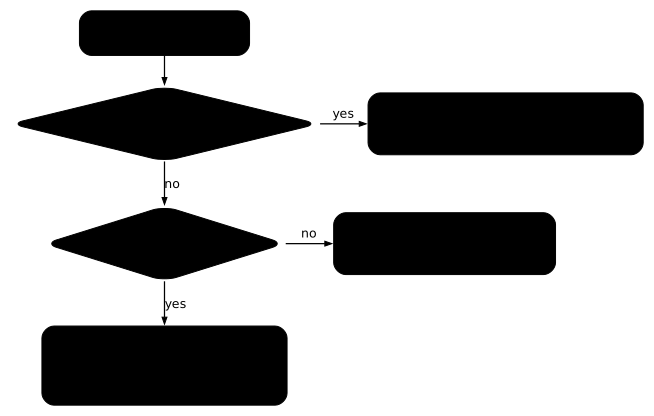
apiVersion: networking.k8s.io/v1kind: NetworkPolicymetadata: name: backend-sans-sortie namespace: ws-npspec: podSelector: matchLabels: role: backend policyTypes: - Egresskubectl -n ws-np delete networkpolicy --allkubectl apply -f backend-sans-sortie.yamlkubectl -n ws-np exec backend -- wget -qO- -T 3 http://db.ws-np.svc.cluster.local:5432; echo "rc=$?"kubectl -n ws-np describe networkpolicy backend-sans-sortienetworkpolicy.networking.k8s.io "db-ipblock" deleted from ws-np namespacenetworkpolicy.networking.k8s.io/backend-sans-sortie createdwget: bad address 'db.ws-np.svc.cluster.local:5432'command terminated with exit code 1rc=1Name: backend-sans-sortieNamespace: ws-npCreated on: 2026-11-12 06:33:33 +0000 UTCLabels: <none>Annotations: <none>Spec: PodSelector: role=backend Not affecting ingress traffic Allowing egress traffic: <none> (Selected pods are isolated for egress connectivity) Policy Types: EgressLook at wget: bad address: the failure happens before any connection, at name resolution, and here it takes 20 seconds because the resolver of the Pod retries several times. A bad address or a connection timed out; no servers could be reached therefore points to a closed egress that cuts DNS. A download timed out on a name that resolves points rather to a closed ingress on the destination.
The diagram sums up the order of the questions to ask. First look at whether the flow passes when it should be denied, then whether the name resolves, and only then read the rules on both sides.
Trap: a new debug Pod gets through the policy during its first seconds
A Pod created with kubectl run does not carry the labels of your application, so the policy that applies to the application does not target it. Here, backend-sans-sortie targets the role=backend Pods. Without the label, the debug Pod gets through: the request returns db-ok.
kubectl -n ws-np run debug --rm -it --restart=Never --image=busybox:1.38.0@sha256:a46257e06c82ad85242d0d38077d0a52d9896389ca60a1a59d3463db586e5fa4 -- wget -qO- -T 3 http://db.ws-np.svc.cluster.local:5432; echo "rc=$?"The output contains db-ok and rc=0, plus some kubectl warning lines that come with the -it option on a very short command.
Giving the Pod the role=backend label is not enough either. Started with --labels=role=backend and an immediate wget, the debug Pod still reaches the database, three tries out of three: the policy is not yet applied to a new Pod when the request leaves. The official documentation explains it by the progressive application of policies by the plugin.
With a 5-second wait before the request, the same Pod fails like the backend.
kubectl -n ws-np run debug --rm -it --restart=Never --labels=role=backend --image=busybox:1.38.0@sha256:a46257e06c82ad85242d0d38077d0a52d9896389ca60a1a59d3463db586e5fa4 -- sh -c 'sleep 5; wget -qO- -T 3 http://db.ws-np.svc.cluster.local:5432'; echo "rc=$?"The output contains wget: bad address 'db.ws-np.svc.cluster.local:5432' and rc=1. The same test without the label, with the same wait, returns db-ok: the label is what subjects the Pod to the policy, the wait alone blocks nothing. So wait a few seconds before testing from a new Pod, otherwise you wrongly conclude that the flow passes. An ephemeral container attached to the real Pod with kubectl debug avoids this trap: it runs in the real Pod, so under its labels and with its policy.
Common problems
The table separates the flows blocked wrongly, whose cause is almost always a missing allowance or a label that does not match, from the flow allowed wrongly, which you diagnose by listing all the policies that select the Pod, since their allowances add up.
| Symptom | Likely cause | Solution |
|---|---|---|
download timed out to an isolated Pod | No ingress rule allows the source | Add a from rule that targets the source |
bad address or DNS that no longer answers | Egress closed without a DNS exception | Allow port 53 in UDP and TCP |
| Everything is denied although the rule looks correct | Service port written instead of the container port | Write the targetPort |
| A Pod from another namespace gets through | namespaceSelector and podSelector on two dashes (OR) | Put them in a single element |
| A Pod that should be denied gets through | Another policy allows it (union), or a plugin without policies | List all the policies, test the plugin |
| A debug Pod always gets through | Missing label, or test run during the first seconds | Set the labels and wait a few seconds |
Document your NetworkPolicies
A NetworkPolicy has no description field, and nobody dares delete a rule whose reason for existing they do not know. An annotation is the only way to explain a rule to whoever reads it in six months.
metadata: name: db-allow-backend namespace: ws-np annotations: description: "Allows the backend to reach the database on the container port" owner: "team-platform"How do you clean up the cluster?
Delete the two work namespaces, which take their policies and their Pods with them, then the demo-np cluster.
kubectl delete namespace ws-np ws-np-autrekind delete cluster --name demo-npkind get clustersThe last command must print No kind clusters found. if no other kind cluster exists on your machine.
Put it into practice
The three exercises below run on a kubeadm virtual machine, not on kind: the network plugin of the cluster is Calico, not kindnet. The policy model stays the same, but the form of a block (timeout or refused connection) can differ from one plugin to another. So judge each flow by the result of a real connection, as in this lesson, and not by a specific message.
Guided labs
The first guided lab has you isolate a database so that only its backend gets in. The second partitions three tiers on ingress and egress. The validation reads the state of the cluster: real connections leave from the clients, and a policy that merely looks correct is not enough.
Challenge: expose an application and isolate its flows
The challenge of the "Networking and exposure" module is the proof without help: no procedure, only a specification. The team of the comptoir namespace has deployed two applications, an inherited Service and a database, without exposing or protecting anything. You must expose the applications by host and by path, repair what is broken, and isolate the database while keeping its name resolution.
The challenge is graded on the final state: seven requirements of equal weight, a threshold of 70 out of 100, and three blocking requirements (the routed paths, the resolution of the probe, the access to the database reserved to the backend). No hint is offered: you have only the specification and what the module taught you. Each requirement is worth about 14 points, so you must meet at least five requirements out of seven, the three blocking ones included, to reach the threshold.
Key takeaways
- A NetworkPolicy filters at the IP and port level, never at the HTTP level.
- The network plugin enforces the policies: with a plugin that does not, the API accepts them and the traffic passes.
kindnetenforces them, Flannel alone does not. - Without a policy, everything passes, including between namespaces. As soon as a policy selects a Pod for a direction, everything that is not allowed in that direction is denied.
- Allowed rules add up across policies: there is no priority and no explicit deny, you restrict by removing an allowance.
- The
portfield of a rule is the container port (targetPort), not the Service port: the mistake produces no message. - A
podSelectoralone only targets the namespace of the policy. A singlefromelement combines as AND, two elements add up as OR. - A deny on egress also cuts DNS: reopen port 53 in UDP and TCP before judging the application.
- A new debug Pod gets through the policy during its first seconds: wait before concluding, and set the labels of the application.
Test your knowledge
This quiz covers the points that cut an application in production or give a false impression of isolation: the union of policies, the flow to allow on both sides, the container port and DNS on egress. Below 90%, go back over the sections concerned.
Knowledge check
Check what you have learned with this interactive quiz
How it works
- The timer starts when you click Start
- Multiple choice, true/false and short answer questions
- You can move between questions
- Detailed results are shown at the end
Starts the quiz and the timer
Review
(0/0)Score by domain
A domain groups several guides and gets several questions, so its score is more reliable than a per-topic score, which often rests on a single question.
Summary
Strengths
No topic passed at 80% on at least two questions yet.
Weak areas
No topic below the pass mark.
Recommended next
Hints before you try again?
Continue the course: Falco - Runtime threat detection in Kubernetes
Continue the course: Kubernetes storage: PV, PVC, StorageClass and permissions
A new full quiz with random questions
Work again only on the questions you missed