Picture a development team working on a new feature. The developer finishes the code in 2 days. But between that moment and the release to production, 6 weeks go by. Where did the time go? The code waits for a review (3 days), then a test environment (1 week), then a business validation (2 weeks), then a deployment slot (2 weeks). The actual work represents less than 10 % of the total time. This is exactly the problem solved by the Value Stream, Flow and Value Stream Mapping, the technique that maps this flow to make those lost weeks visible.
What you will learn
- Map your value stream to see where time is lost between the idea and production.
- Identify the bottleneck that limits the throughput of your whole delivery chain.
- Reduce batch size to deliver more often, with less risk per deployment.
- Limit Work In Progress (WIP) to reveal blockages that stay invisible when everything seems "in progress".
- Measure flow with concrete indicators: Cycle Time, Throughput and Flow Efficiency.
How this concept fits into DevOps
The concept of Flow is the first of Gene Kim's Three Ways, which structure the DevOps philosophy:
- First Way, Flow: speed up the flow of value from idea to production ← the subject of this lesson
- Second Way, Feedback: shorten the feedback loops
- Third Way, Learning: create a culture of continuous learning
Value Stream Mapping (VSM) is a tool from Lean Manufacturing (the Toyota Production System) that DevOps adapted to software development. Understanding flow is essential because all other DevOps practices (CI/CD, automation, monitoring) aim to improve it.
It is not an outdated theory: value stream mapping remains relevant, notably in Platform Engineering initiatives. The idea is the same as in Toyota's factories in the 1980s, but it now serves as a common language between product, platform and operations to spot where value stalls in increasingly automated delivery chains.
What is the Value Stream?
The Value Stream represents all the steps needed to turn an idea into value delivered to the customer. It is like a production line in a factory, but applied to software development.
In software development, the value stream usually includes:
| Step | What happens | Value for the customer |
|---|---|---|
| Ideation | An idea or a need is identified | None (the idea only exists in people's minds) |
| Specification | The need is formalised | None (paper) |
| Development | The code is written | None (the code is not deployed) |
| Testing | The code is validated | None (still not in production) |
| Deployment | The code reaches production | Value at last! |
| Operations | The code is used | Continuous value |
What is Value Stream Mapping (VSM)?
Value Stream Mapping (VSM) consists of drawing each step of a feature's journey, from the idea to production, noting at each step the actual work time and the waiting time. Without this clear view of the flow, a team cannot know where it really loses time: it just notes that "it takes a long time" without being able to point to the step responsible. VSM reveals three pieces of information that classic project management often ignores:
- Actual work time: how long someone actively works on the task
- Waiting time: how long the task waits (review, validation, environment...)
- Handoffs: how many times the task changes hands
Lean experience reports commonly cite a waiting time of 80 to 90 % of the total time: it is an order of magnitude that only your own map will confirm, but that is almost always where the improvement potential lies.
Flow: moving value along
Flow measures the speed at which value travels through your system. Good flow means ideas quickly turn into usable features, without piling up at a specific point in the chain.
Flow metrics
To measure flow day to day, two indicators are enough to start:
Cycle Time measures the time between starting work on a task and delivering it to production. The shorter it is, the faster you deliver.
| Cycle Time | Interpretation |
|---|---|
| < 1 day | Excellent: almost continuous delivery |
| 1-7 days | Good: frequent delivery |
| 1-4 weeks | Average: classic sprint cycles |
| > 1 month | Problematic: significant delays |
Throughput measures the number of tasks delivered per unit of time (per day, per week). It shows your team's delivery capacity.
To go further, Mik Kersten's Flow Framework (popularised by his book Project to Product) formalises five complementary metrics: Flow Velocity (number of finished items), Flow Time (equivalent to Cycle Time), Flow Efficiency (share of time spent on actual work versus waiting), Flow Load (amount of WIP) and Flow Distribution (split between features, defects, technical debt and risk). The most cited benchmark in the Lean literature remains Flow Efficiency: it is often said to be between 15 and 25 %, that is 75 to 85 % pure waiting, an order of magnitude consistent with that of the map.
Flow as seen by the DORA metrics
The DORA metrics measure flow at the organisational level: deployment frequency and lead time are flow indicators applied at company scale. The 2024 State of DevOps report added a fifth official indicator, the Deployment Rework Rate, which measures the share of deployments that are in fact unplanned work to fix a bug introduced earlier rather than new features. A high Deployment Rework Rate is a direct symptom of degraded flow: work is produced, but it does not move towards production, which matches exactly the paradox of activity without value described in the common pitfalls.
Bottlenecks
A bottleneck is a step in the flow that limits the system's overall throughput. It is the slowest point, the one that makes everything else wait.
Identifying your bottlenecks
Common bottlenecks in software development can often be spotted from the same recurring symptoms, even before reaching for a measurement tool:
| Symptom | Probable bottleneck | Impact |
|---|---|---|
| Long queues for code reviews | Not enough reviewers available | Developers wait, switch context |
| Test environments unavailable | Undersized shared infrastructure | Tests are delayed or rushed |
| Lingering manual approvals | Bureaucratic validation process | Weeks lost waiting for signatures |
| Risky and rare deployments | Fear of breaking production | Big batches, big risks, big delays |
| An indispensable person | Knowledge concentrated in one expert | Everything stops when that person is away |
The theory of constraints
Eliyahu Goldratt, in his book The Goal, formalised a counter-intuitive but fundamental idea:
Optimising a step that is not the bottleneck does not improve the system's overall throughput.
This means that if your bottleneck is code review, speeding up your deployments will change nothing. Tasks will keep piling up in front of code review.
Batch size
Batch size refers to the amount of work grouped together before being delivered. In software development, it is the number of features or changes included in a release.
Why are small batches better?
Reducing batch size changes nothing about the total volume of work to deliver over the year, but it radically changes how that work behaves at each step of the flow. The following table compares the two strategies on five concrete criteria, from risk to the team's stress level:
| Aspect | Big batches (quarterly release) | Small batches (daily release) |
|---|---|---|
| Risk | High: many changes = many potential bugs | Low: few changes = problems easy to isolate |
| Feedback | Slow: 3 months before knowing if users like it | Fast: user feedback within hours |
| Fixing | Expensive: the developer has forgotten the context | Cheap: the context is fresh |
| Coordination | Complex: many conflicts, hard merges | Simple: isolated changes |
| Stress | Intense: the release is a critical event | Minimal: the release is a non-event |
The risk paradox
Intuitively, you might think that fewer releases reduce risk ("the less you touch, the less you break"). The opposite is true:
- Big batches = big risks: hundreds of changes, dozens of developers involved, weeks of work at stake. If it breaks, it is panic.
- Small batches = small risks: a few modified lines, one developer involved, a few hours of work. If it breaks, you roll back and fix it calmly.
Work In Progress (WIP)
Work In Progress refers to the number of tasks started but not yet finished. It is an often neglected but crucial metric for flow.
The effects of high WIP
High WIP does not just slow down an isolated task: it degrades the functioning of the whole team, often without anyone noticing because everyone has the impression of being busy. Here are the five most frequent effects observed when too many tasks are open at the same time:
| High WIP causes... | Because... |
|---|---|
| Context switching | You keep jumping from one task to another, losing time at each switch |
| Longer Cycle Time | Each task waits longer for its turn |
| Lower quality | Attention is scattered, errors multiply |
| Stress and overload | The list of things "in progress" is overwhelming |
| Hidden problems | Bottlenecks are invisible because everything is "in progress" |
Limiting WIP to reveal problems
Limiting WIP means setting a maximum number of tasks that can be in progress at the same time at each step of the flow.
Concrete example: a team limits the number of tasks "In code review" to 3. If 3 tasks are already in review, developers who finish their code cannot add a 4th. They must first help empty the review queue.
This effect is beneficial:
- Forces finishing before starting: no more pile-up of unfinished work
- Reveals bottlenecks: if a column is always full, it is the bottleneck
- Encourages collaboration: people help each other to unblock the flow
Concrete scenario: a team improving its flow
Initial situation: Product team A deploys once a month. The average Cycle Time exceeds 5 weeks. Developers are frustrated because their features take "forever" to reach production.
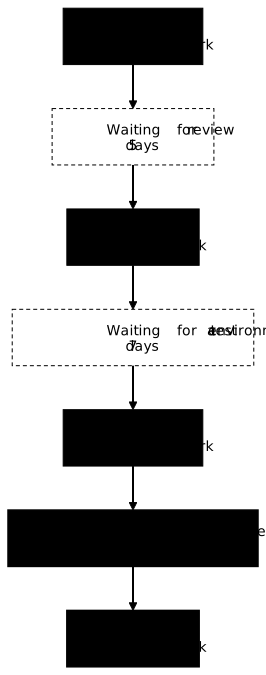
Step 1, map the flow: The team draws its value stream and measures the times at each step:
- Development: 3 days (work)
- Waiting for review: 5 days (waiting)
- Review: 1 day (work)
- Waiting for testing: 7 days (waiting)
- Testing: 2 days (work)
- Waiting for deployment: 18 days (waiting)
- Deployment: 1 day (work)
Finding: 7 days of work, 30 days of waiting, a Flow Efficiency of about 19 %. The bottleneck is waiting for the monthly deployment slot. The diagram lays the map out flat:
Step 2, attack the bottleneck: The team automates its deployments in a CI/CD pipeline and moves to weekly releases. The deployment wait drops from 18 to 4 days on average.
Step 3, a new bottleneck appears: Now, waiting for testing becomes the bottleneck (7 days). The team invests in test automation and parallel environments.
Result after 6 months:
- Daily deployments
- Average Cycle Time: 5 days
- The team delivers 10x more features per quarter
Common pitfalls
These five mistakes come back in most teams discovering flow: all of them consist of acting where the effort shows, rather than where throughput is decided.
Key points
-
The Value Stream is the complete path from idea to production. Only production generates value for the customer.
-
Waiting time dominates: the commonly cited order of magnitude is 80 to 90 % of Cycle Time spent waiting, not working, and a Flow Efficiency around 15 to 25 %. Measure your own.
-
A single bottleneck limits everything: identify it and focus your efforts on it. Improving elsewhere is useless.
-
Small batches = less risk: counter-intuitively, frequent releases of small changes are safer than big, rare releases.
-
Limiting WIP reveals problems: fewer tasks in progress = better focus, more visibility on bottlenecks.
-
Measure to progress: Cycle Time, Throughput and Flow Efficiency are your key indicators. What you do not measure, you cannot improve.
-
The Deployment Rework Rate is a signal of degraded flow: a high rework rate (the fifth DORA metric since the 2024 State of DevOps report) reveals work that moves backwards instead of towards production.
Knowledge check
Check that you have the essentials of this guide. The questions only cover what has just been explained here.
Knowledge check
Check what you have learned with this interactive quiz
How it works
- The timer starts when you click Start
- Multiple choice, true/false and short answer questions
- You can move between questions
- Detailed results are shown at the end
Starts the quiz and the timer
Review
(0/0)Score by domain
A domain groups several guides and gets several questions, so its score is more reliable than a per-topic score, which often rests on a single question.
Summary
Strengths
No topic passed at 80% on at least two questions yet.
Weak areas
No topic below the pass mark.
Recommended next
Hints before you try again?
Continue the course: Team Topologies: structuring your DevOps teams
A new full quiz with random questions
Work again only on the questions you missed
Checklist
Before considering your Value Stream and Flow approach as launched, check that these six points are covered. This list is a checkpoint: if one box stays empty, that is probably where your next speed gain lies.
- Value stream mapped with work time AND waiting time
- Main bottleneck identified (the step with the longest queue)
- WIP limit defined for each step of the flow
- Target batch size defined (aim for daily or weekly releases)
- Flow metrics in place (Cycle Time, Throughput, Flow Efficiency)
- Action plan to reduce the main bottleneck
FAQ: frequently asked questions
The questions below cover the most frequent doubts about the Value Stream and Flow: how they differ, mapping and measuring the flow.