Cosign is the command-line tool of the Sigstore project that signs
a container image and verifies that signature before deploying it. It
answers a precise question: does the @sha256:… image the cluster is about to
run really come out of your pipeline, unmodified? This lesson is for a
DevOps engineer who wants to sign in CI and have Kubernetes refuse what is
not signed.
Everything is measured on 1 October 2026 with Cosign v3.1.3: key-based
signing on a local registry, keyless verification of two public images,
and a Kyverno 1.19.1 policy replayed on a kind cluster. Three results
shape the lesson: cosign verify exits with code 10 when no signature
exists, with code 1 when the signature comes from another identity, and
Kyverno refuses a pod whose signature does not match.
What you will learn
- Explain what a signature proves, and the role of Fulcio and Rekor.
- Install Cosign in a pinned version, binary checked against its hash.
- Sign an image by digest, with a key then keyless from GitHub Actions.
- Verify a signature by constraining the signer's identity, and read its exit codes.
- Block at Kubernetes admission the images not signed by the right CI.
- Produce the evidence for SOCLE-REL-GEN-1 (in French), the signing of published artifacts, and for SOCLE-REL-VER-1, their verification before use.
Why sign your container images?
A registry authenticates nobody: it stores what is pushed to it and serves what is requested. As long as no signature comes with the image, the cluster cannot tell the artifact produced by your pipeline from an artifact substituted along the way. The two subsections first set out the risk, then what cryptographic signing brings in return.
The problem: compromised registries and tampered images
Without a signature, nothing proves that an order-service:2.1.0 image was
built by your CI, that it was not modified after the build, or that it
matches the versioned code. The feared scenario is simple: an attacker gets
the right to push to the registry, replaces the image under the same tag,
and the clusters deploy it with full confidence. Signing by digest and
verifying before deployment closes that door.
The solution: cryptographic signing
A Cosign signature establishes three properties, and verification checks all three. None of them says the image is free of vulnerabilities: a signed image can contain a flaw, the signature only proves where it comes from.
- Authenticity: the image comes from the declared identity, a key or a CI workflow.
- Integrity: the image has not changed since it was signed, since the signature covers its digest.
- Traceability: in keyless mode, the signature is recorded in the public Rekor log, which anyone can consult.
The Sigstore ecosystem
Cosign is part of Sigstore (in French), an OpenSSF project that provides a public signing infrastructure. Three services work with it, and the diagram shows their roles: Cosign is the client, Fulcio issues a certificate tied to an OIDC identity, Rekor records every signature, and the registry keeps the signature next to the image.
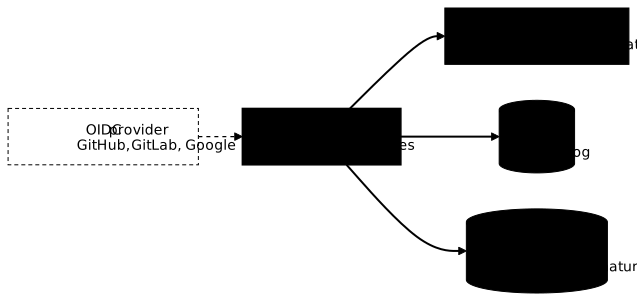
| Component | Role | Guide |
|---|---|---|
| Cosign | Client that signs and verifies images, files and attestations | This lesson |
| Fulcio | Certificate authority issuing a short-lived certificate for an OIDC identity | Fulcio (in French) |
| Rekor | Append-only transparency log of all signatures | Rekor (in French) |
| Policy Controller | Kubernetes admission controller of the Sigstore project | Kubernetes section below |
Keyless or keys: which mode to choose?
Cosign v3 favours keyless mode: no private key to keep, but a verifiable identity. Key-based mode remains useful offline or when company policy imposes its own keys. Both modes produce the same thing in the registry, a signature tied to the digest.
Keyless signing (recommended in CI)
In keyless mode, Cosign generates a short-lived key pair, presents the job's OIDC token to Fulcio, which returns a certificate valid for ten minutes carrying the workflow identity. The signature is recorded in Rekor, then the private key is discarded. The diagram follows the exchange in order:
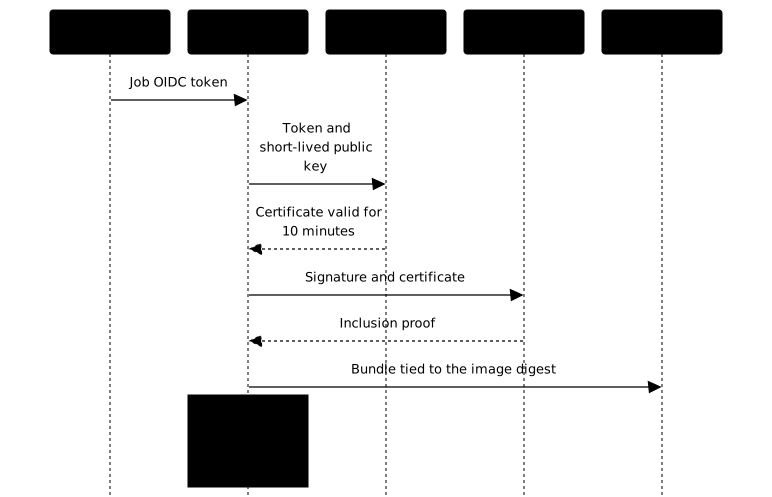
What you verify afterwards is no longer a key but an identity: the
workflow path (https://github.com/<org>/<repo>/.github/workflows/release.yml@refs/tags/v1.0.0)
and the token issuer (https://token.actions.githubusercontent.com). There
is no secret to store, and a stolen signature is useless outside that
identity.
Key-based signing (offline, KMS)
Keys remain the right choice for an isolated environment without access to the public Sigstore instance, for a policy that requires keys managed by the organisation, or to rely on an existing KMS (AWS KMS, GCP KMS, Azure Key Vault, HashiCorp Vault). The private key then becomes a critical secret: if it leaks, anyone can sign any image.
Installing Cosign in a pinned version
Cosign is a single Go binary. Like any tool that enters the delivery
chain, it is installed in a fixed version, and the downloaded binary is
checked against the hash published with the release. Measured for
v3.1.3: sha256sum --check answers cosign-linux-amd64: OK.
VERSION=v3.1.3curl -sSfLO "https://github.com/sigstore/cosign/releases/download/${VERSION}/cosign-linux-amd64"curl -sSfLO "https://github.com/sigstore/cosign/releases/download/${VERSION}/cosign_checksums.txt"sha256sum --check --ignore-missing cosign_checksums.txt# cosign-linux-amd64: OKsudo install -m 0755 cosign-linux-amd64 /usr/local/bin/cosigncosign version | grep GitVersion# GitVersion: v3.1.3The official image is pinned by digest
(ghcr.io/sigstore/cosign/cosign:v3.1.3@sha256:9e5c2f2edc34351160407ca3416c61855bdf9403c3c5936e0f0be7fc261611b8),
and in CI the sigstore/cosign-installer action accepts the cosign-release
input to fix the installed version:
- uses: sigstore/cosign-installer@6f9f17788090df1f26f669e9d70d6ae9567deba6 # v4.1.2 with: cosign-release: v3.1.3Signing and verifying with a key
Key-based mode can be replayed entirely locally, without an account or public
network, which makes it the best ground to understand verification. All
the following commands ran against a local registry registry:3 served
over HTTP, hence the --allow-insecure-registry option, and with an empty
signing configuration so as to publish nothing on the public Sigstore
instance.
Generating a key pair
cosign generate-key-pair writes cosign.key, encrypted with a
passphrase, and cosign.pub. In CI, the passphrase is supplied through
the COSIGN_PASSWORD variable. The private key remains a secret to
keep in a dedicated manager, never in the repository.
cosign generate-key-pair# Private key written to cosign.key# Public key written to cosign.pubSigning by digest
A signature covers a digest, never a tag. Cosign v3.1.3 still accepts a tag, but prints an explicit warning and announces the end of that option:
cosign signing-config create --out signing-config.json   # no public service
cosign sign --key cosign.key --signing-config signing-config.json \  --allow-insecure-registry -y \  localhost:5000/python:3.13-slim@sha256:afe189875f1d2f9b45e287834fb9f2c273a5d59d354ae4050ab9affbf0a6ba06# Signing artifact...# Pushing signature to: localhost:5000/python
cosign sign --key cosign.key --signing-config signing-config.json \  --allow-insecure-registry -y localhost:5000/python:3.13-slim# WARNING: Image reference localhost:5000/python:3.13-slim uses a tag, not a digest,# to identify the image to sign. [...] The ability to refer to images by tag# will be removed in a future release.
Without --signing-config, Cosign v3 uses the public configuration of
Sigstore and would try to record the signature in Rekor. The old
--tlog-upload=false option is deprecated: measured, Cosign v3.1.3
refuses it with the default configuration and asks for a signing
configuration without a log.
Verifying, and reading the exit codes
cosign verify --key cosign.pub checks the signature against the public
key. Three measured cases sum up what you need to know to put it in a
script: the exit code distinguishes a missing signature from a signature
that does not match.
| Measured situation | Code | Message |
|---|---|---|
| Signed image, right key | 0 | The signatures were verified against the specified public key |
| Image never signed | 10 | Error: no signatures found |
| Image signed with another key | 1 | accepted signatures do not match threshold, Found: 0, Expected 1 |
cosign verify --key cosign.pub --insecure-ignore-tlog=true --allow-insecure-registry \ localhost:5000/python:3.13-slim@sha256:afe189875f1d2f9b45e287834fb9f2c273a5d59d354ae4050ab9affbf0a6ba06Standard output is a JSON whose type field is
https://sigstore.dev/cosign/sign/v1 in v3, and whose docker-manifest-digest
repeats the verified digest. The --insecure-ignore-tlog=true option only
makes sense here because no log was used at signing time.
Where does Cosign v3 store the signature?
Cosign v3 no longer pushes a .sig image: it writes a Sigstore bundle
(signature, certificate, Rekor proof) into an OCI manifest whose subject
field points to the image. cosign tree shows it:
cosign tree --allow-insecure-registry \ localhost:5000/python:3.13-slim@sha256:afe189875f1d2f9b45e287834fb9f2c273a5d59d354ae4050ab9affbf0a6ba06# └── https://sigstore.dev/cosign/sign/v1 artifacts via OCI referrer: localhost:5000/python@sha256:acf10e37...A registry that does not serve the referrers API remains compatible.
Measured on GHCR: GET /v2/openvex/vexctl/referrers/<digest> returns
404, yet the ghcr.io/openvex/vexctl:v0.4.4 image carries a
sha256-<digest> tag that indexes the bundle, and cosign verify verifies it
without trouble. The widespread idea that signatures on GHCR exist "only in
Rekor" is wrong. The cosign triangulate command, which was used to find that
tag, is deprecated in favour of cosign tree and oras discover.
Signing keyless from GitHub Actions
In CI, keyless signing only needs the id-token: write permission on the
job, to obtain the OIDC token. The workflow below builds, pushes, then
signs by digest the output of docker/build-push-action, and immediately
verifies the signature against the exact identity of the workflow, built
from github.workflow_ref.
name: release
on:  push:    tags: ["v*"]
permissions: {}
jobs:  build-sign:    runs-on: ubuntu-24.04    permissions:      contents: read      packages: write # push the image and its signature to GHCR      id-token: write # obtain the OIDC token for Fulcio    steps:      - uses: actions/checkout@3d3c42e5aac5ba805825da76410c181273ba90b1 # v7.0.1        with:          persist-credentials: false
      - uses: docker/setup-buildx-action@f87e5991a6d7451dcb8d9637bfbc97413f497069 # v4.4.1
      - uses: docker/login-action@dbcb813823bdd20940b903addbd779551569679f # v4.6.0        with:          registry: ghcr.io          username: ${{ github.actor }}          password: ${{ secrets.GITHUB_TOKEN }}
      - name: Build and push        id: build        uses: docker/build-push-action@c3c9e263c25d99ce0380d002d59b67737d91b0dc # v7.4.0        with:          push: true          tags: ghcr.io/${{ github.repository }}:${{ github.ref_name }}
      - uses: sigstore/cosign-installer@6f9f17788090df1f26f669e9d70d6ae9567deba6 # v4.1.2        with:          cosign-release: v3.1.3
      - name: Sign then verify by digest        env:          IMAGE: ghcr.io/${{ github.repository }}@${{ steps.build.outputs.digest }}          IDENTITE: ${{ github.server_url }}/${{ github.workflow_ref }}        run: |          cosign sign --yes "${IMAGE}"          cosign verify "${IMAGE}" \            --certificate-identity "${IDENTITE}" \            --certificate-oidc-issuer https://token.actions.githubusercontent.com
This workflow passes actionlint 1.7.12, zizmor 1.30.0 and poutine
1.1.6 without any finding. Values coming from the context go through env:,
never straight into the script, which rules out the template injection
that zizmor flags. A real keyless signature requires an OIDC identity: this
workflow was not run for the lesson, keyless verification was measured on
public images, below.
Verifying a keyless signature
A keyless verification requires two constraints: the signer's
identity (--certificate-identity or its -regexp variant) and the OIDC
issuer (--certificate-oidc-issuer). Without them, Cosign refuses to
verify, as measured in the SBOM lesson. Two public images, signed by their own
CI, serve as a demonstration, read-only.
An image signed by a GitHub Actions workflow
The vexctl image is signed by the project's release workflow.
Verification against the openvex organisation succeeds, and a wrong
identity fails with code 1 while showing the identity actually found:
cosign verify ghcr.io/openvex/vexctl:v0.4.4@sha256:ce15c9c85ffc66cb630c0ce9c50a85e9241be77ca4e6e841ab14a0bf2a96bf7e \  --certificate-identity-regexp '^https://github.com/openvex/vexctl/' \  --certificate-oidc-issuer https://token.actions.githubusercontent.com# Verification for ghcr.io/openvex/vexctl@sha256:ce15c9c8... --#   - The cosign claims were validated#   - Existence of the claims in the transparency log was verified offline#   - The code-signing certificate was verified using trusted certificate authority certificates
cosign verify ghcr.io/openvex/vexctl:v0.4.4@sha256:ce15c9c85ffc66cb630c0ce9c50a85e9241be77ca4e6e841ab14a0bf2a96bf7e \  --certificate-identity-regexp '^https://github.com/attaquant/' \  --certificate-oidc-issuer https://token.actions.githubusercontent.com# Error: no matching attestations: failed to verify certificate identity: [...]# got "https://github.com/openvex/vexctl/.github/workflows/release.yaml@refs/tags/v0.4.4"
An identity that is not GitHub
The Cosign image itself is not signed by GitHub Actions but by a Google service account. Verifying it with a GitHub pattern fails; the right identity and the right issuer succeed. That is why you must read a vendor's actual identity before writing your policy, rather than assume it.
cosign verify ghcr.io/sigstore/cosign/cosign:v3.1.3@sha256:9e5c2f2edc34351160407ca3416c61855bdf9403c3c5936e0f0be7fc261611b8 \ --certificate-identity keyless@projectsigstore.iam.gserviceaccount.com \ --certificate-oidc-issuer https://accounts.google.com# exit code 0, "type": "https://sigstore.dev/cosign/sign/v1"Prefer --certificate-identity, which expects an exact value, as soon as
the identity is known. A -regexp pattern that is too broad, such as .* or
a whole organisation, accepts the signature of any matching workflow,
including that of a test repository.
Attesting an SBOM or a VEX
Beyond the image, Cosign signs attestations: a document (SBOM, VEX,
provenance) wrapped in an in-toto statement whose subject is the digest.
The command is cosign attest --type <type>, and cosign verify-attestation --type <type> requires the same type. The types recognised by Cosign
v3.1.3 are slsaprovenance, slsaprovenance02, slsaprovenance1, link,
spdx, spdxjson, cyclonedx, vuln, openvex, custom, or a URI. The
full measurements are in the lessons on the
SBOM and
VEX.
The cosign attach sbom command, still quoted in many examples, is
deprecated, like the whole cosign attach family, whose removal Cosign
v3.1.3 announces for v4.0.0.
Signing with a KMS
With a KMS (Key Management Service), the private key never leaves the
vault: Cosign delegates the signing operation to it, and the same --key
URI is used to sign and to verify. This section was not replayed, for lack of
a dedicated cloud account; the syntax is that of the Cosign documentation.
cosign generate-key-pair --kms awskms:///alias/cosign-releasecosign sign --key awskms:///alias/cosign-release \ ghcr.io/openvex/vexctl:v0.4.4@sha256:ce15c9c85ffc66cb630c0ce9c50a85e9241be77ca4e6e841ab14a0bf2a96bf7ecosign verify --key awskms:///alias/cosign-release \ ghcr.io/openvex/vexctl:v0.4.4@sha256:ce15c9c85ffc66cb630c0ce9c50a85e9241be77ca4e6e841ab14a0bf2a96bf7eThe recognised prefixes are awskms://, gcpkms://, azurekms://,
hashivault:// and k8s:// for a Kubernetes secret. The KMS access
control then becomes the real boundary: whoever can call the signing
operation can sign.
Verifying signatures in Kubernetes
Signing protects nothing as long as the cluster accepts unsigned images. The check sits at admission, the step where the Kubernetes API accepts or refuses a pod before creating it. Two implementations dominate: Kyverno and the Sigstore Policy Controller.
With Kyverno
Kyverno 1.19 verifies signatures with an ImageValidatingPolicy
resource. The following policy was replayed on a disposable kind cluster:
the vexctl image signed by its CI is admitted, the same image is refused
as soon as the expected identity no longer matches.
apiVersion: policies.kyverno.io/v1kind: ImageValidatingPolicymetadata: name: verify-image-signaturesspec: validationActions: [Deny] webhookConfiguration: timeoutSeconds: 15 matchConstraints: resourceRules: - apiGroups: [""] apiVersions: ["v1"] operations: ["CREATE", "UPDATE"] resources: ["pods"] matchImageReferences: - glob: "ghcr.io/openvex/*" attestors: - name: cosign cosign: keyless: identities: - issuer: "https://token.actions.githubusercontent.com" subjectRegExp: "^https://github.com/openvex/" ctlog: url: "https://rekor.sigstore.dev" validations: - expression: >- images.containers.map(image, verifyImageSignatures(image, [attestors.cosign])).all(e, e > 0) message: "Image non signée par la CI de l'organisation openvex."kubectl run vexctl-signe --restart=Never \ --image ghcr.io/openvex/vexctl:v0.4.4@sha256:ce15c9c85ffc66cb630c0ce9c50a85e9241be77ca4e6e841ab14a0bf2a96bf7e# pod/vexctl-signe created
# Same image, policy expecting the identity ^https://github.com/attaquant/# Error from server: admission webhook "ivpol.validate.kyverno.svc-fail-finegrained-verify-image-signatures"# denied the request: Policy verify-image-signatures failed: Image non signée par la CI de l'organisation openvex.One detail decides everything: the validation must call
verifyImageSignatures(), the function that triggers verification.
Measured, a policy whose validation boils down to expression: "true" checks
nothing and blocks everything: Kyverno refuses the pod with "no policy
performed a signature or attestation check on it", even for a correctly
signed image.
With Sigstore Policy Controller
The Policy Controller is maintained by the Sigstore project. Once
installed, it still blocks nothing: you must label the namespaces to
protect (policy.sigstore.dev/include=true) and declare a
ClusterImagePolicy resource that says which images to verify and under which
identity. It was not replayed for this lesson; version 0.10.8 is the latest
published chart as of 1 October 2026.
helm repo add sigstore https://sigstore.github.io/helm-chartshelm install policy-controller sigstore/policy-controller \ -n cosign-system --create-namespace --version 0.10.8Security: what the signature does not cover
A signature is only worth as much as the pipeline that produces it: a compromised workflow issues perfectly valid signatures on malicious images. The following points therefore cover the chain around Cosign.
id-token: writeat job level, never for the whole workflow: a test job, more exposed, has no business being able to sign.- Actions pinned by commit SHA, with the version as a comment:
uses: actions/checkout@v4(# ❌ to avoid) lets the action's publisher change the code that runs. - Immediate verification after signing, in the same job, against the exact identity: an unverified signature proves nothing.
- Exact identity at admission: a policy that accepts a whole organisation also accepts its test repositories.
- Provenance on top of the signature: the signature says who signed, SLSA provenance (SLSA) says how the artifact was built. Signing an image is not enough to reach an SLSA Build level.
Troubleshooting
Cosign failures almost always come down to three causes: an identity that does not match, an OIDC permission missing from the job, or a signature looked for in the wrong place. The exit code helps decide: 10 means no signature was found, 1 that a signature exists but does not match.
| Symptom | Cause | Solution |
|---|---|---|
no signatures found, code 10 | Unsigned image, or digest different from the signed one | Check the digest with cosign tree |
expected SAN value to match regex ..., got "...", code 1 | Expected identity differs from the actual identity | Read the value after got and fix the policy |
accepted signatures do not match threshold, code 1 | Signature made with another key | Verify with the right cosign.pub |
--certificate-identity or --certificate-identity-regexp is required | Keyless verification without an identity constraint | Add identity and issuer |
--tlog-upload=false is not supported | Option deprecated in v3 | Use --signing-config without a log |
| Failure to obtain the OIDC token in CI | id-token: write permission missing from the job | Add the permission to the job that signs |
Kyverno refuses everything with no policy performed a signature or attestation check | Validation without verifyImageSignatures() | Call the function in validations |
Key points
- Cosign signs an image by its digest and then verifies who signed it; it says nothing about its vulnerabilities.
- Keyless mode replaces the key with an OIDC identity: Fulcio certifies, Rekor records, the short-lived key is discarded.
- A keyless verification requires the identity and the issuer; prefer
an exact
--certificate-identityto a pattern that is too broad. cosign verifyexits with 10 without a signature and with 1 when the signature does not match: a script can tell the two apart.- Cosign v3 stores a bundle tied to the digest, through the referrers API
or a
sha256-<digest>tag on registries such as GHCR. - Install a version ≥ 3.0.4 (advisory GHSA-whqx-f9j3-ch6m), pinned and checked against its hash.
- At admission, Kyverno must call
verifyImageSignatures(): without that call, the policy blocks everything. - The evidence expected by SOCLE-REL-GEN-1 is the signing of published artifacts; SOCLE-REL-VER-1 expects their verification by consumers before use, here at Kubernetes admission.
Knowledge check
Check that the essentials of this lesson are understood. The questions only cover what has just been explained here.
Knowledge check
Check what you have learned with this interactive quiz
How it works
- The timer starts when you click Start
- Multiple choice, true/false and short answer questions
- You can move between questions
- Detailed results are shown at the end
Starts the quiz and the timer
Review
(0/0)Score by domain
A domain groups several guides and gets several questions, so its score is more reliable than a per-topic score, which often rests on a single question.
Summary
Strengths
No topic passed at 80% on at least two questions yet.
Weak areas
No topic below the pass mark.
Recommended next
Hints before you try again?
Continue the course: From SLSA provenance to decision: blocking non-compliant artifacts
A new full quiz with random questions
Work again only on the questions you missed
FAQ: frequently asked questions
The questions below cover the most common doubts about Cosign: keyless mode, identity verification, GHCR and Kubernetes, with the same pinned version as the lesson.
What the signature guarantees
- Authenticity: the image comes from the declared identity, a key or a CI workflow.
- Integrity: the image has not changed since it was signed, as the signature covers its digest.
- Traceability: in keyless mode, the signature is recorded in the public Rekor log.
Measured example (Cosign v3.1.3)
cosign verify ghcr.io/openvex/vexctl:v0.4.4@sha256:ce15c9c85ffc66cb630c0ce9c50a85e9241be77ca4e6e841ab14a0bf2a96bf7e \
  --certificate-identity-regexp '^https://github.com/openvex/vexctl/' \
  --certificate-oidc-issuer https://token.actions.githubusercontent.com
# exit code 0
Keyless or keys
| Aspect | Keyless | With keys |
|---|---|---|
| Secret to keep | None | Private key or KMS access |
| What you verify | An identity (workflow) and an OIDC issuer | A public key |
| Certificate lifetime | 10 minutes (Fulcio) | Lifetime of the key |
| Log | Public Rekor | Optional |
| Offline | No, unless a private Sigstore instance | Yes |
Keyless
Cosign generates a short-lived key, presents the job's OIDC token to Fulcio, receives a certificate carrying the workflow identity, records the signature in Rekor, then discards the private key.With keys
cosign generate-key-pair
cosign sign --key cosign.key <image>@sha256:<digest>
cosign verify --key cosign.pub <image>@sha256:<digest>
The job's steps
permissions:
  contents: read
  packages: write # push the image and its signature
  id-token: write # OIDC token for Fulcio
steps:
  - uses: sigstore/cosign-installer@6f9f17788090df1f26f669e9d70d6ae9567deba6 # v4.1.2
    with:
      cosign-release: v3.1.3
  - name: Sign then verify by digest
    env:
      IMAGE: ghcr.io/${{ github.repository }}@${{ steps.build.outputs.digest }}
      IDENTITE: ${{ github.server_url }}/${{ github.workflow_ref }}
    run: |
      cosign sign --yes "${IMAGE}"
      cosign verify "${IMAGE}" \
        --certificate-identity "${IDENTITE}" \
        --certificate-oidc-issuer https://token.actions.githubusercontent.com
Key points
id-token: writeat job level, not workflow level.- Sign by digest, the
digestoutput ofdocker/build-push-action. - Context values go through
env:, to avoid template injection. - The lesson's full workflow passes actionlint, zizmor and poutine without findings.
Keyless: identity and issuer are mandatory
cosign verify ghcr.io/openvex/vexctl:v0.4.4@sha256:ce15c9c85ffc66cb630c0ce9c50a85e9241be77ca4e6e841ab14a0bf2a96bf7e \
  --certificate-identity-regexp '^https://github.com/openvex/vexctl/' \
  --certificate-oidc-issuer https://token.actions.githubusercontent.com
With a key
cosign verify --key cosign.pub <image>@sha256:<digest>
Measured exit codes
| Situation | Code |
|---|---|
| Valid signature | 0 |
| No signature found | 10 |
| Signature from another identity or another key | 1 |
Reading an unexpected identity
When the identity check fails, the message gives the actual value aftergot, for instance https://github.com/openvex/vexctl/.github/workflows/release.yaml@refs/tags/v0.4.4. That is the value to put in the policy, rather than a .* pattern that would accept anyone.What was measured
GET /v2/openvex/vexctl/referrers/<digest>on GHCR returns 404: the referrers API is not served.- Yet the
ghcr.io/openvex/vexctl:v0.4.4image carries asha256-<digest>tag, an index pointing to a manifest whoseartifactTypeisapplication/vnd.dev.sigstore.bundle.v0.3+jsonand whosesubjectis the image. cosign verifyon this image exits with code 0.
Consequence
The idea that signatures on GHCR exist "only in Rekor" is wrong. To see what is attached to an image:cosign tree ghcr.io/openvex/vexctl:v0.4.4@sha256:ce15c9c85ffc66cb630c0ce9c50a85e9241be77ca4e6e841ab14a0bf2a96bf7e
cosign triangulate, which was used to find that tag, is deprecated and will be removed in v4.0.0. The old COSIGN_EXPERIMENTAL variable has had no effect since Cosign v2.Attest
syft scan registry:localhost:5000/python:3.13-slim@sha256:afe189875f1d2f9b45e287834fb9f2c273a5d59d354ae4050ab9affbf0a6ba06 -o cyclonedx-json > sbom.cdx.json
cosign attest --key cosign.key --type cyclonedx --predicate sbom.cdx.json \
  localhost:5000/python:3.13-slim@sha256:afe189875f1d2f9b45e287834fb9f2c273a5d59d354ae4050ab9affbf0a6ba06
Verify
cosign verify-attestation --key cosign.pub --type cyclonedx \
  localhost:5000/python:3.13-slim@sha256:afe189875f1d2f9b45e287834fb9f2c273a5d59d354ae4050ab9affbf0a6ba06
predicateType https://cyclonedx.org/bom and the image digest as its subject. A --type spdxjson on an image that only carries a CycloneDX SBOM fails with "none of the attestations matched the predicate type".Types recognised by Cosign v3.1.3
slsaprovenance, slsaprovenance02, slsaprovenance1, link, spdx, spdxjson, cyclonedx, vuln, openvex, custom, or a URI.cosign attach sbom is deprecated: use the attestation.The advisory
GHSA-whqx-f9j3-ch6m (CVE-2026-22703), moderate severity (CVSS 5.5), published on 13 January 2026: "Cosign verification accepts any valid Rekor entry under certain conditions". A verification could accept a Rekor entry that did not reference the right signature.Versions
| Branch | Affected | Fixed |
|---|---|---|
| v2.x | up to 2.6.1 | 2.6.2 |
| v3.x | up to 3.0.3 | 3.0.4 |
Protecting yourself
Install a fixed version, pinned and checked against its hash:VERSION=v3.1.3
curl -sSfLO "https://github.com/sigstore/cosign/releases/download/${VERSION}/cosign-linux-amd64"
curl -sSfLO "https://github.com/sigstore/cosign/releases/download/${VERSION}/cosign_checksums.txt"
sha256sum --check --ignore-missing cosign_checksums.txt
# cosign-linux-amd64: OK
With Kyverno 1.19 (replayed on kind)
apiVersion: policies.kyverno.io/v1
kind: ImageValidatingPolicy
metadata:
  name: verify-image-signatures
spec:
  validationActions: [Deny]
  matchConstraints:
    resourceRules:
      - apiGroups: [""]
        apiVersions: ["v1"]
        operations: ["CREATE", "UPDATE"]
        resources: ["pods"]
  matchImageReferences:
    - glob: "ghcr.io/openvex/*"
  attestors:
    - name: cosign
      cosign:
        keyless:
          identities:
            - issuer: "https://token.actions.githubusercontent.com"
              subjectRegExp: "^https://github.com/openvex/"
        ctlog:
          url: "https://rekor.sigstore.dev"
  validations:
    - expression: >-
        images.containers.map(image, verifyImageSignatures(image, [attestors.cosign])).all(e, e > 0)
      message: "Image non signée par la CI de l'organisation openvex."
The measured trap
A validation reduced toexpression: "true" checks nothing and blocks everything: Kyverno answers "no policy performed a signature or attestation check on it", even for a signed image.With Sigstore Policy Controller
helm repo add sigstore https://sigstore.github.io/helm-charts
helm install policy-controller sigstore/policy-controller \
  -n cosign-system --create-namespace --version 0.10.8
policy.sigstore.dev/include=true) and declare a ClusterImagePolicy.Principle
With a KMS, the private key stays in the vault: Cosign delegates the signing operation to it. The same URI is used to sign and to verify, and the KMS access control becomes the real boundary.cosign generate-key-pair --kms awskms:///alias/cosign-release
cosign sign --key awskms:///alias/cosign-release <image>@sha256:<digest>
cosign verify --key awskms:///alias/cosign-release <image>@sha256:<digest>
Recognised prefixes
| Provider | Prefix |
|---|---|
| AWS KMS | awskms:// |
| GCP KMS | gcpkms:// |
| Azure Key Vault | azurekms:// |
| HashiCorp Vault | hashivault:// |
| Kubernetes secret | k8s:// |
Comparison
| Criterion | Cosign (Sigstore) | Notation (Notary Project) |
|---|---|---|
| Main mode | Keyless, OIDC identity | X.509 certificates |
| Transparency log | Public Rekor | No public log by default |
| Key management | None in keyless, key or KMS otherwise | Organisation's PKI |
| Governance | OpenSSF | CNCF |
When to choose Cosign
- GitHub Actions or GitLab CI pipelines with an OIDC token.
- Need for a public trace of signatures.
- No PKI to operate.
When to choose Notation
- Internal PKI and X.509 certificates already in place.
- Isolated environment without access to the public Sigstore instance.