Feature flags are switches placed in the code that enable or disable a feature without redeploying the application. This page explains, for a beginner to intermediate audience, how they make it possible to decouple deployment from release, what their four types and their lifetimes are, how to manage flag debt, and which tooling to choose in 2026 (OpenFeature, Unleash, Flagsmith, GrowthBook, LaunchDarkly or home-made). The goal: ship more often while keeping control over what your users actually see.
What you will learn
- Distinguish deployment and release, and why decoupling them changes everything.
- Identify the four types of flags and their expected lifetime.
- Steer the lifecycle of a flag to avoid flag debt.
- Implement a dark launch and a progressive activation by cohort.
- Choose between OpenFeature, an open-source server and home-made.
What is a feature flag (or feature toggle)
A feature flag, also called a feature toggle, is a condition in the code that decides, at runtime, whether a piece of functionality is activated or not. Concretely, instead of shipping a new payment funnel directly, you wrap it in a test such as "if the nouveau-paiement flag is enabled, show the new version, otherwise keep the old one". The code of both versions coexists in production, and the value of the flag decides.
Pete Hodgson, in the reference article published on Martin Fowler's site, breaks this mechanism down into three building blocks worth knowing. The toggle point is the precise place in the code where the decision is made. The toggle router is what provides the answer, from a simple environment variable to a remote server that evaluates rules. The toggle context gathers the information that feeds the decision, such as the user's identity or their region. This separation matters: the more your decision logic is isolated from the toggle point, the more readable the code stays.
The first benefit is to merge unfinished code into the main branch without breaking production. It is the key to trunk-based development, a strategy of very short branches detailed in the Trunk-Based Development lesson. The code goes to production, but stays invisible as long as the flag is off.
Deploying is not releasing: decoupling deployment and activation
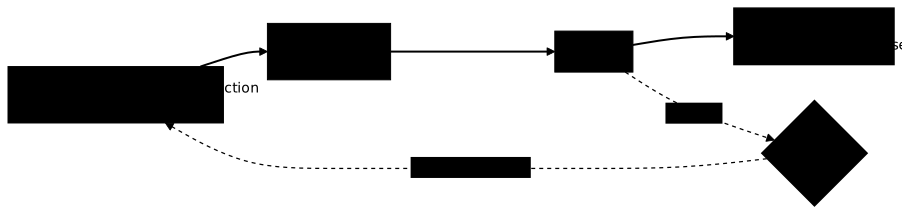
The founding principle of feature flags fits in one sentence: deploying is not releasing. Deployment is a technical act: you push an artifact to the production servers. Release is a product act: you decide that a feature becomes visible to all or part of your users. Without flags, these two events are welded together: as soon as the code arrives, it is active. With flags, you separate the technical risk from the product risk.
Let's take a concrete example. Your team deploys every day, including the code of a search redesign still under construction. This code travels to production behind a disabled flag. On launch day, the product manager enables the flag from an interface, without waiting for a deployment, without a nightly maintenance window. If a problem arises, they switch the flag back within seconds. The deployment happened three weeks ago, the release happens now, and the rollback does not go back through a pipeline.
This decoupling directly feeds several DORA metrics. It increases deployment frequency (you ship unfinished code without waiting), it reduces time to restore (turning off a flag is faster than rolling back an image), and it lowers the change failure rate by limiting exposure. Feature flags thus complement the deployment strategies: where a canary plays at the infrastructure level, a flag plays at the application level, cohort by cohort.
Flag types (release, ops / kill switch, experiment, permission) and their lifetime
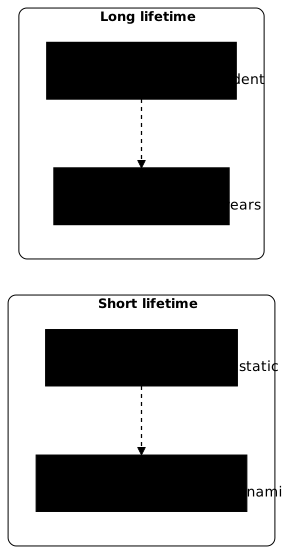
Flags are not all alike. Pete Hodgson, in the reference article published on martinfowler.com, distinguishes four categories whose most important property is the expected lifetime. Confusing these categories is the number one cause of flag debt: a release flag treated as a permanent switch never gets cleaned up.
Release flags hide unfinished code in production while it is being finished. They are static (the same value for everyone) and ephemeral: Hodgson considers they should not survive more than a week or two. Example: the flag that hides the cart redesign until it is finalised. Once the feature is shipped, the flag and its old code path must disappear.
Ops flags, often called kill switches, give operations teams a way to cut or degrade a feature during an incident. They are introduced when a new feature has uncertain performance implications. Example: a flag that instantly disables a new recommendation system if the database saturates on a high-load evening. Most are short-lived, but some kill switches stay in place indefinitely as a safety net.
Experiment flags serve A/B testing or multivariate testing. Each user is placed in a cohort and follows a different code path, then you measure which one performs best. Example: 50 % of visitors see a green buy button, the other half a blue one, and you compare the conversion rate. They are very dynamic and live as long as it takes to reach statistical significance, from a few hours to a few weeks.
Permission flags reserve a feature for a category of users according to an attribute: paid plan, account age, membership of a beta programme. Example: a SaaS vendor opens an advanced feature to enterprise-plan customers only. They are the most durable: they can stay for years, because they are part of the business logic. Treating them as temporary code would be a mistake.
The lifecycle of a flag and flag debt (zombie flags, cleanup)

A flag is not eternal: it follows a lifecycle. It is born when you wrap a feature, lives while you steer its activation, then, for most types, it must die. It is this last step that teams forget, and flag debt comes from this oversight.
-
Creation: the flag is added to the code, off by default, with an explicit name and an identified owner.
-
Progressive activation: it is opened to a cohort, then widened while watching the observability metrics.
-
Generalisation: the flag is enabled for 100 % of users, the feature is validated.
-
Removal: the flag and the old code path are deleted, then the server-side configuration is cleaned up.
Flag debt is the accumulation of obsolete flags left in the code after the launch. We speak of zombie flags: they no longer serve, but their condition stays in the code. The cost is real. Each flag adds an execution path to test, which causes a combinatorial explosion of cases. A forgotten flag can also reactivate dead code by mistake, or worse, a badly cleaned permission flag opens unplanned access. The Knight Capital incident of 2012, where an old reused flag triggered obsolete code and cost 440 million dollars in 45 minutes, remains the extreme illustration of this risk.
Hodgson offers an effective image: see your flags as an inventory with a carrying cost. The discipline consists in setting an expiry date on every temporary flag, capping the number of active flags per team, and creating a removal task as soon as a flag is generalised. Some teams add a test that fails automatically when a flag passes its date, forcing the cleanup.
Dark launching and progressive activation by cohort

A dark launch consists in sending real production traffic to a new feature without showing the result to users. The new code is activated in the background, its real behaviour is measured, but the interface stays unchanged. Example: your new search engine quietly processes all real queries and you compare its response times and results with the old one, without any visitor seeing the difference. You validate load and correctness before exposing anything.
Then comes progressive activation by cohort (progressive rollout). Rather than opening the feature to everyone at once, you open it to cohorts of increasing size. A cohort is a subset of users defined by a rule: a random percentage, internal employees, a region, or a list of accounts. The typical progression looks like this: first internal teams, then 1 % of users, then 10 %, 50 %, and finally 100 %.
At each step, you watch your indicators. If the error rate climbs or an SLO degrades, you stop or step back without redeploying. This application-level mechanism fits well with Kubernetes rolling updates and rollbacks: the orchestrator handles the progressive replacement of pods, the flag handles the fine exposure of the feature inside these pods. Both layers complement each other instead of competing.
Concrete use cases: kill switch, application canary, A/B testing, early access
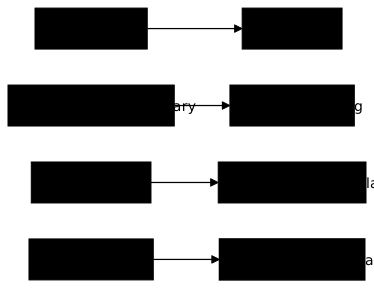
Feature flags shine in very concrete situations. Describing them helps choose the right type of flag for the right need.
The kill switch is the first safety reflex. You deploy an integration with a third-party payment service known to be unstable. You wrap it in an ops flag. The day this service goes down, the on-call engineer turns off the flag and switches to a degraded mode, without waking anyone up for a full rollback. The feature becomes active again in one click once the third party is restored.
The application canary consists in having two versions of the same logic coexist and exposing only one to a small fraction of the traffic. Unlike the infrastructure canary that routes requests to different servers, here everything runs on the same servers and the flag decides. Example: your new shipping-fee algorithm only applies to 5 % of orders, while you check it does not charge absurd amounts.
A/B testing turns the flag into a product decision tool. You confront two variants of a page and let the numbers decide. Example: two wordings for your free trial offer, and you keep the one that generates the most sign-ups. GrowthBook, described below, specialises in this case.
Early access reserves a new feature for a cohort of beta testers. Example: you open a redesigned dashboard to the volunteer customers of a beta programme, you collect their feedback, then you generalise. It is a typical use of the permission flag.
Tooling: OpenFeature as the standard, Unleash, Flagsmith, GrowthBook, and home-made
The feature flag ecosystem has structured itself around a standard. OpenFeature is a project of the CNCF (Cloud Native Computing Foundation), at the incubating maturity level in 2026. Beware of a frequent misunderstanding: OpenFeature is not a flag server, it is a unified API and a set of SDKs (JavaScript, Go, Java, Python, .NET, PHP, Ruby). Your code always calls the same API, and you plug in behind it a provider that talks to the tool of your choice. The benefit: avoiding vendor lock-in. You can start with a local provider such as flagd (the project's reference daemon) then migrate to a commercial server without rewriting your toggle points.
On the self-hostable open-source server side, three names come up. Unleash is a mature and modular server, with rich activation strategies and an administration console, suited to organisations that want to host everything. Flagsmith covers flags but also remote configuration management. GrowthBook stands out through its A/B testing and experimentation orientation: beyond the switch, it provides the statistical analysis of the results. These three tools expose an OpenFeature provider, which keeps your code portable.
On the commercial SaaS side, LaunchDarkly remains the historical reference, with very fine targeting, auditing and large-scale management, in exchange for a subscription. It is often the choice of large organisations that want to outsource the whole platform.
Finally, home-made still has its place. For one or two release flags with a short lifetime, a simple configuration variable read at startup is largely enough, without introducing a dependency. The switch becomes necessary as soon as you need hot changes without redeployment, cohort targeting, auditing of activations or a reliable kill switch. The safest strategy in 2026: code against the OpenFeature API from the start, with a minimal provider, to keep the freedom to plug in a real server the day the need grows.
Good practices and pitfalls (naming, combinatorial explosion of tests, security, cleanup)
Feature flags are powerful but turn against you if badly managed. A few principles avoid the most common and costly pitfalls.
Take care of naming. A name such as flag1 or test says nothing six months later. Prefer a name that carries the intent and the type, for example release-refonte-panier or ops-kill-recommandations. Document the owner and the planned removal date. An anonymous flag is a future zombie.
Control the combinatorial explosion of tests. Each flag, in theory, doubles the number of combinations to validate. With ten independent flags, you will never test the 1024 combinations. The remedy: limit the number of active flags at the same time, test first the on/on and off/off combinations that correspond to the real production states, and remove flags as soon as they are generalised. A disciplined pipeline, as described in the CI/CD lesson, helps keep this number low.
Take security seriously. A permission flag is an access control: if it is badly evaluated or forgotten, it exposes a feature to unintended users. Never put a secret in the value of a flag, and log the changes of a kill switch for auditing. A badly cleaned flag that reactivates old code is a real operational risk, as the Knight Capital incident showed.
Make cleanup a routine, not a good resolution. Include flag removal in the Definition of Done of the feature, create a removal task as soon as it is generalised, and consider a test that fails when a flag passes its expiry date. It is the only way to keep flag debt under control over time.
Key points
- A feature flag is a switch that enables a feature without redeploying.
- It decouples deployment (technical) from release (product), and reduces risk.
- There are four types: release, ops (kill switch), experiment, permission, with very different lifetimes.
- Confusing these lifetimes creates flag debt and its zombie flags.
- Dark launch and progressive activation by cohort expose a new feature without a big bang.
- OpenFeature (CNCF) is the API standard that avoids lock-in; Unleash, Flagsmith and GrowthBook are open-source servers.
- Home-made is enough for one or two short flags; move to a tool as soon as you need targeting and hot changes.
- Name, date and clean up every flag to avoid the combinatorial explosion and security risks.
Knowledge check
Check that you have the essentials of this guide. The questions only cover what has just been explained here.
Knowledge check
Check what you have learned with this interactive quiz
How it works
- The timer starts when you click Start
- Multiple choice, true/false and short answer questions
- You can move between questions
- Detailed results are shown at the end
Starts the quiz and the timer
Review
(0/0)Score by domain
A domain groups several guides and gets several questions, so its score is more reliable than a per-topic score, which often rests on a single question.
Summary
Strengths
No topic passed at 80% on at least two questions yet.
Weak areas
No topic below the pass mark.
Recommended next
Hints before you try again?
Continue the course: GitOps: principles, ArgoCD vs Flux and implementation
Continue the course: Why CI/CD pipelines fail: the organisational causes
A new full quiz with random questions
Work again only on the questions you missed
FAQ: frequently asked questions
The questions below cover the points on which teams hesitate the most when they adopt feature flags: the types, the debt and the choice of tool.