An SBOM (Software Bill of Materials) is the machine-readable inventory of what a piece of software contains: system packages, libraries, transitive dependencies, versions, licences. It pays off the day a critical CVE drops and the question becomes "which shipped artifacts embed this component?". This lesson is for a DevOps engineer who has to produce this document in CI, verify it and distribute it with the image.
Everything is measured on 1 October 2026 with Syft 1.52.0, Grype
0.119.0 and Cosign v3.1.3, against a local registry. Three figures sum
up the lesson: 4 components for a requirements.txt, 96 for the
python:3.13-slim image, and 0 hashes at package level in both cases. An
SBOM is not exhaustive by nature: its coverage depends on what you scan.
What you will learn
- Distinguish the two standard formats, and know which one your tool really writes, which is not always the latest published version.
- Generate an SBOM with Syft from the artifact you ship, pinned by digest.
- Measure your SBOM's coverage against the seventeen fields required in 2026, rather than assuming it.
- Use the inventory to answer a CVE with
jqand Grype. - Distribute the SBOM as a signed attestation attached to the image, and verify it.
- Prove requirements SOCLE-PKG-GEN-1 and SOCLE-PKG-SBM-1 to -3 (in French) of the Socle DevSecOps framework, the first of which requires one SBOM per artifact and the second that it carries licences and hashes.
What exactly is an SBOM?
An SBOM is a structured document that describes one specific artifact, an image or a binary, and answers the question "what is inside?". It is not read by hand: it is queried, compared and scanned. The information it carries falls into four families:
- the components: name, version, producer when known;
- stable identifiers, above all the purl (Package URL, such as
pkg:deb/debian/openssl@3.5.6-1~deb13u2), sometimes a CPE; - the dependency relationships, direct and transitive;
- metadata: licences, hashes, location in the image.
The life cycle that gives the document its value has four steps: you generate it at build time, distribute it with the image, scan it continuously, and react when a vulnerability hits a listed component.

What an SBOM is not
The SBOM is often confused with the documents around it in the supply chain. It only inventories: every other guarantee comes from a separate tool or document, covered in this module.
- It is not a vulnerability scan: Grype or Trivy read it to produce one.
- It is not proof of integrity: that is the role of the signature and the attestation.
- It is not an exploitability verdict: that is the role of VEX, covered in the next lesson.
- It is not an exhaustive inventory: its coverage depends on the scanned source, the tool and the time of generation, as the measurements below show.
What do the 2026 "Minimum Elements" require?
The reference document changed name, version and authors on 29 July 2026. What used to be cited as "NTIA 2021" is now the 2026 Minimum Elements for a Software Bill of Materials, version 2.1, published by CISA with the NSA, the FBI and fifteen international partners, including ANSSI for France.
Its history fits in three lines, and it avoids citing a draft as a standard. Version 2.0 was never final: it served as the basis for the 2025 request for comment.
| Version | Date | What it is |
|---|---|---|
| 1.0 | 12 July 2021 | the NTIA minimum elements |
| 2.0 | 22 August 2025 | a draft open for comment |
| 2.1 | 29 July 2026 | the final version, the one to cite |
The document defines seventeen data fields, against seven in 2021. The new fields cover the licence, the component hash, the author's signature and the generation context:
| Field | What it carries |
|---|---|
| Component Name, Component Version | the component and its version |
| Component Producer | who produces it |
| Component License | new: under which licence |
| Component Identifiers | purl, CPE, lookup keys |
| Component Hash Algorithm, Component Hash Value | new: the hash, and the algorithm that produced it |
| Component Dependency Relationship | who depends on whom |
| SBOM Author, SBOM Author Signature | who produced the SBOM, and their signature |
| SBOM Data Format Name, SBOM Data Format Version | the format and its version |
| SBOM Generation Context | new: at which life-cycle phase |
| SBOM Timestamp, SBOM Version | when, and which revision |
| SBOM Tool Name, SBOM Tool Version | with what |
One change matters more than the others: the 2021 Depth element is replaced by Coverage. The rationale in the document's Appendix B describes exactly the trap of the following measurements: "The Depth element was previously defined as capturing software component information for top-level dependencies only. This definition reflected the capabilities of SBOM tooling at the time rather than the depth of information needed to make informed security decisions."
How many of these seventeen fields does your SBOM really carry?
An SBOM generated from a requirements.txt covers nine out of seventeen.
Measured with Syft 1.52.0 on a file of four pinned dependencies (flask,
requests, pyyaml, gunicorn), in CycloneDX: the licence, the
hash and the producer are missing from all four components, and no
dependency relationship is declared.
| Present | Missing |
|---|---|
| Name, Version, Identifiers (purl) | Producer, License |
| Data Format Name and Version | Hash Algorithm, Hash Value |
| Timestamp, Tool Name, Tool Version, SBOM Version | Dependency Relationship, Author, Author Signature, Generation Context |
This is not a tool defect: a declaration file carries neither licence nor hash. Syft cannot invent what the source does not contain. The three author, signature and context fields never come from a scanner: it is up to the pipeline to add them, the signature through an attestation.
Coverage depends on what you scan, not on the command
The demonstration fits in three lines: same tool, same output format, three different sources. The percentages count software components (packages and libraries), without the file-type entries Syft adds for an image.
Source scanned by syft scan | Components | Licence | Component hash | Producer |
|---|---|---|---|---|
file:requirements.txt | 4 | 0 % | 0 % | 0 % |
the same packages installed (pip install --target) | 15 | 93 % | 0 % | 60 % |
the python:3.13-slim image | 96 | 92 % | 0 % | 92 % |
From 4 to 96 components depending on what you point at. The declaration
file only sees direct dependencies; the installed environment reveals the
transitive ones (jinja2, werkzeug, urllib3…) and their licences; the
image adds the Debian packages and the interpreter. An SBOM produced from
the repository describes what the project asks for, an SBOM produced from
the image describes what it contains: this is why SBOM Generation
Context became a mandatory field.
The hash column deserves a second look. In an image, Syft does compute
hashes, but on the 2,651 files it lists as file-type components, not on
the packages themselves. An auditor looking for Component Hash Value on
openssl will not find it. The practical consequence remains clear:
generate the SBOM from the artifact you ship, and check the required
fields instead of assuming them.
Why is the SBOM becoming essential?
The SBOM changes the question you ask during an incident. Without it, you search where a component might be; with it, you query an inventory that already exists. The major supply chain incidents, Log4Shell in 2021 or XZ Utils in 2024, showed the cost of the first approach.
The problem: reacting blind
When a critical CVE drops, the first question is always "are we
affected?". Without a central inventory, the answer means digging through
every package.json, requirements.txt or go.mod, rescanning every
image one by one and asking every team. It takes hours or days, while
the vulnerability stays exploitable, with no certainty of having covered
everything. The opening lesson of the module,
software supply chain security,
details these attack vectors.
The answer: a queryable inventory
With one SBOM per artifact, kept next to the image, the same question
becomes a query on structured data. The following command, run on the
python:3.13-slim SBOM, lists in one line every OpenSSL variant present,
with its purl:
jq -r '.components[] | select(.type != "file") | select(.name | test("^(openssl|libssl)")) | "\(.name) \(.version)"' python-3.13-slim.cdx.json# libssl3t64 3.5.6-1~deb13u2# openssl 3.5.6-1~deb13u2# openssl-provider-legacy 3.5.6-1~deb13u2The select(.type != "file") filter drops the file entries that would
otherwise flood the result. On a directory of SBOMs, a for loop over the
*.cdx.json files asks the same question of the whole estate,
without rescanning a single image.
Standard formats: SPDX or CycloneDX?
Two formats dominate: CycloneDX and SPDX. Both are published standards, readable by all common tools, and Syft writes both. Their practical difference lies less in content than in the version your tool produces by default, and that is what you need to check.
CycloneDX (OWASP)
CycloneDX is a standard backed by OWASP, designed from the start for application security. It is standardised by Ecma as ECMA-424: the first edition, in June 2024, corresponds to CycloneDX 1.6, the second, in December 2025, to CycloneDX 1.7, published by OWASP on 21 October 2025.
- CycloneDX 1.4 (2022): adds VEX, to qualify the exploitability of a vulnerability;
- CycloneDX 1.5 (2023): formulation (how the artifact was built) and inventory of machine learning models;
- CycloneDX 1.6 (2024): cryptographic inventory (CBOM) and attestations;
- CycloneDX 1.7 (2025): current version.
Syft 1.52.0 writes CycloneDX 1.7 by default. The @version suffix forces
an older version when the tool consuming the SBOM requires it. Measured:
versions 1.2 to 1.7 are accepted, and @2.0 is refused with the list
of known formats, which is consistent with an unpublished 2.0.
# Local registry served over HTTP: SYFT_REGISTRY_INSECURE_USE_HTTP=trueIMAGE="registry:localhost:5000/python:3.13-slim@sha256:afe189875f1d2f9b45e287834fb9f2c273a5d59d354ae4050ab9affbf0a6ba06"
# CycloneDX 1.7 by defaultsyft scan "$IMAGE" -o cyclonedx-json > sbom.cdx.jsonjq -r .specVersion sbom.cdx.json# 1.7
# Force an older versionsyft scan "$IMAGE" -o cyclonedx-json@1.5 > sbom-1.5.cdx.json
The old syft packages command still works, but Syft 1.52.0 prints a
deprecation warning, quoted below: the examples still circulating
with syft packages need updating.
Command "packages" is deprecated, use `syft scan` insteadSPDX (Linux Foundation / ISO)
SPDX (Software Package Data Exchange) is a Linux Foundation standard,
published as ISO/IEC 5962:2021 (which corresponds to SPDX 2.2.1). It has
historically been strong on licence compliance: its list of identifiers
(MIT, Apache-2.0, GPL-3.0-only) is reused by CycloneDX itself.
- SPDX 2.3 (2022): the version Syft writes by default;
- SPDX 3.0 (2024): redesign into profiles (Core, Software, Security, Licensing, Build, AI, Dataset), with VEX relationships in the Security profile.
The current version of the specification is not the one the tool
produces. Measured with Syft 1.52.0: spdx-json without a suffix writes
SPDX-2.3, and you must ask for spdx-json@3.0 to get an SPDX 3 document,
whose JSON-LD context points to 3.0.1. It is the opposite of CycloneDX,
where the default follows the latest version.
syft scan "$IMAGE" -o spdx-json > sbom.spdx.jsonjq -r .spdxVersion sbom.spdx.json# SPDX-2.3
syft scan "$IMAGE" -o spdx-json@3.0 > sbom.spdx3.jsonjq -r '."@context"' sbom.spdx3.json# https://spdx.org/rdf/3.0.1/spdx-context.jsonld
Comparison table
The table sums up the points that drive a choice. The two version rows are the ones people forget: the specification version and the version your tool writes are two different things, and the gap is real on the SPDX side.
| Criterion | CycloneDX | SPDX |
|---|---|---|
| Body | OWASP, standardised by Ecma | Linux Foundation, standardised by ISO |
| Current specification version | 1.7 (October 2025) | 3.0.1 |
| Version written by default by Syft 1.52.0 | 1.7 | 2.3 |
| Published standard | ECMA-424 (1st edition June 2024, 2nd December 2025) | ISO/IEC 5962:2021 |
| Original focus | Security, supply chain | Licences, compliance |
| VEX | Built in since 1.4 | VEX relationships in 3.0 |
My recommendation: produce at least the format your consumers expect,
and check its version with jq before publishing it. Both are generated from
the same artifact in two commands, which saves you from choosing when a
customer requires SPDX and your tools read CycloneDX.
Generation and analysis tools
Syft, from Anchore, is the reference tool of this lesson, but it is not the only one. The choice depends on what you scan: an image or a binary suits Syft and Trivy well, a multi-language source project suits cdxgen. The dedicated Syft (in French) guide details its sources and options.
| Tool | Publisher | Strengths | Formats |
|---|---|---|---|
| Syft | Anchore | Images, archives, file systems | CycloneDX, SPDX |
| Trivy | Aqua Security | Vulnerability scanner with SBOM generation | CycloneDX, SPDX |
| cdxgen | OWASP CycloneDX | Multi-language source projects | CycloneDX |
The old spdx-sbom-generator from the SPDX project is archived on GitHub: do not use it as a starting point any more. On the analysis side, three tools read an existing SBOM:
| Tool | Function | Guide |
|---|---|---|
| Grype | Vulnerability scan of an SBOM | Grype guide (in French) |
| Trivy | Multi-target scan, SBOM included | Trivy guide |
| Dependency-Track | Continuous tracking of an SBOM estate | Dependency-Track guide (in French) |
Scanning an SBOM with Grype
Grype reads an SBOM with the sbom: prefix and matches it against its
vulnerability database, without rescanning the image. Measured with
Grype 0.119.0 on the python:3.13-slim SBOM: 335 matches, of which
176 have a published fix. The --fail-on high option makes the
command exit with code 2, which is enough to block a CI job.
grype sbom:./sbom.cdx.json# 335 lines, including openssl 3.5.6-1~deb13u2, fixed in 3.5.7-1~deb13u2
grype sbom:./sbom.cdx.json --only-fixed --fail-on highecho $?# 2
The --only-fixed option drops vulnerabilities without a published fix,
on which the team cannot act right away. The same SBOM rescanned a month
later gives a different result: the database evolves, the inventory stays fixed, and
that is precisely what lets you rescan a whole estate without rebuilding an
image.
Centralising with Dependency-Track
Dependency-Track is a platform that ingests SBOMs, correlates them
continuously with vulnerability databases and alerts when a new CVE hits
an already shipped component. Its API expects the SBOM as multipart, not
raw JSON: a curl -d @sbom.cdx.json with a JSON header, still common in
examples, does not match the documented API.
# Upload an SBOM, project created on the fly if it does not existcurl -X POST "https://dtrack.interne.exemple/api/v1/bom" \ -H "X-Api-Key: $DTRACK_API_KEY" \ -F "autoCreate=true" \ -F "projectName=order-service" \ -F "projectVersion=2.1.0" \ -F "bom=@sbom.cdx.json"The PUT form also exists, with the SBOM base64-encoded in a JSON body.
Both forms are described in Dependency-Track's CI/CD documentation. The
API key comes from a pipeline secret, never from the code.
Distributing an SBOM
An SBOM that stays on the developer's laptop, or in an expired CI artifact, is useless on incident day. To be useful, it must be accessible to teams and customers, tied to the exact artifact it describes, and verifiable: you must be able to prove it was not modified after it was generated.
Three distribution strategies
Three strategies are found in practice, from the simplest to the most robust. The diagram shows what separates them: only the last two put the SBOM in the registry, next to the image designated by its digest, and only the third signs it.
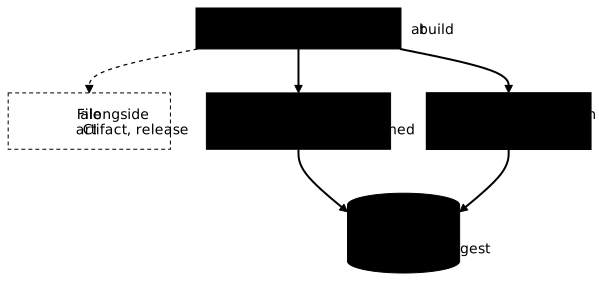
| Strategy | Advantages | Drawbacks |
|---|---|---|
| File alongside (CI, release) | Easy to set up | Detached from the image, risk of drift |
OCI referrer (oras attach) | In the registry, tied to the digest | Unsigned: nothing proves who produced it |
Signed attestation (cosign attest) | Verifiable integrity and origin | Requires a key or an OIDC identity |
The cosign attach sbom command, long cited for the second strategy, is
deprecated: Cosign v3.1.3 still accepts it but prints "SBOM attachments
are deprecated and support will be removed", and points to attestations.
For an unsigned SBOM in the registry, oras does the same job with the
standard OCI referrers mechanism:
oras attach --plain-http --artifact-type application/vnd.cyclonedx+json \ localhost:5000/python:3.13-slim@sha256:afe189875f1d2f9b45e287834fb9f2c273a5d59d354ae4050ab9affbf0a6ba06 \ sbom.cdx.json:application/vnd.cyclonedx+jsonoras discover --plain-http localhost:5000/python:3.13-slim@sha256:afe189875f1d2f9b45e287834fb9f2c273a5d59d354ae4050ab9affbf0a6ba06Measured with oras 1.3.4 on a local registry registry:3 served over
HTTP, hence the --plain-http option: oras discover shows the SBOM under
the image, next to the signatures that Cosign v3 stores in the same
place.
SBOM as a signed attestation
The attestation goes further: Cosign wraps the SBOM in an in-toto statement whose subject is the image digest, then signs it. Modifying the SBOM breaks the signature, and an SBOM attested for another image fails verification. Keyless signing requires an OIDC identity; the example below uses a key pair, and a signing configuration without a transparency log, to stay on a local registry without publishing anything on the public Sigstore instance.
# Empty signing configuration: no public service is contactedcosign signing-config create --out signing-config.json
# Attest the CycloneDX SBOM on the image designated by digestcosign attest --key cosign.key --signing-config signing-config.json \  --type cyclonedx --predicate sbom.cdx.json --allow-insecure-registry \  localhost:5000/python:3.13-slim@sha256:afe189875f1d2f9b45e287834fb9f2c273a5d59d354ae4050ab9affbf0a6ba06
# Verify: the public key AND the predicate typecosign verify-attestation --key cosign.pub --type cyclonedx \  --insecure-ignore-tlog=true --allow-insecure-registry \  localhost:5000/python:3.13-slim@sha256:afe189875f1d2f9b45e287834fb9f2c273a5d59d354ae4050ab9affbf0a6ba06
Three measured results are worth remembering. A successful
verification returns the signed statement, whose predicateType is
https://cyclonedx.org/bom and whose subject is the exact image digest.
Without --key or an identity, cosign verify-attestation fails with "
--certificate-identity or --certificate-identity-regexp is required": there
is no "default" verification. And --type spdxjson on an image that only
carries a CycloneDX SBOM fails with "none of the attestations matched the
predicate type".
The --insecure-ignore-tlog=true option is only justified here because no
transparency log was used, and --allow-insecure-registry only because
the test registry answers over HTTP. In production, signing goes through
Rekor and verification checks it, as the
Cosign lesson details.
Why attest rather than drop a file?
Because you build a verifiable artifact graph around the image: SBOM, signature and SLSA provenance are stored in the same place, tied to the same digest, and signed by the same build chain. The day a customer asks "prove to me what this image contains", the answer is a verification command, not a search through CI artifacts. It is also what SOCLE-PKG-SBM-2 requires: an SBOM attached to the artifact and retrievable by its consumers.
Reacting fast to a CVE with SBOMs
A critical CVE dropping on a Friday evening is the use case that
justifies all the rest. With centralised SBOMs, the response follows four
steps, each of which can be tooled, from plain jq to the tracking platform.
The historical example remains Log4Shell (CVE-2021-44228, CVSS score
10.0), which affected log4j-core from version 2.0-beta9 to 2.14.1.
Step 1: identify the affected artifacts
The first question is which artifacts embed the component. A loop over
the stored SBOMs answers it, with the version and the purl, which
unambiguously designates the package in its ecosystem. For the measurement, a
sboms/ directory holds two SBOMs: the one for python:3.13-slim and the one
for a Java service that embeds the official log4j-core-2.14.1.jar JAR
from Maven Central.
for sbom in sboms/*.cdx.json; do jq -r --arg f "$sbom" '.components[] | select(.name == "log4j-core") | "\($f) \(.version) \(.purl)"' "$sbom"done# sboms/billing-api.cdx.json 2.14.1 pkg:maven/org.apache.logging.log4j/log4j-core@2.14.1Only the Java service shows up: Syft recognised the JAR and gave it
the exact Maven purl, without needing the project's pom.xml.
The purl is particularly useful: it is the key the OSV and GitHub Advisory databases use to designate a package, which allows direct correlation without guessing the name.
Step 2: check whether the version is vulnerable
A version found is not necessarily a vulnerable version. Rather than comparing numbers by hand, you let Grype match the SBOM against its database: it knows the affected ranges and the fixed versions, including fixes backported by distributions, which an alphabetical comparison does not see.
$ grype sbom:sboms/billing-api.cdx.json --only-fixed -qNAME INSTALLED FIXED IN TYPE VULNERABILITY SEVERITY EPSS RISKlog4j-core 2.14.1 2.15.0 java-archive GHSA-jfh8-c2jp-5v3q Critical 100.0% (100th) 100.0 (kev)log4j-core 2.14.1 2.16.0 java-archive GHSA-7rjr-3q55-vv33 Critical 100.0% (99th) 99.0 (kev)log4j-core 2.14.1 2.17.0 java-archive GHSA-p6xc-xr62-6r2g High 100.0% (99th) 80.5log4j-core 2.14.1 2.17.1 java-archive GHSA-8489-44mv-ggj8 Medium 97.9% (99th) 56.8...Measured with Grype 0.119.0: 7 advisories on this single JAR. The first,
GHSA-jfh8-c2jp-5v3q, is the GitHub advisory for Log4Shell, fixed in
2.15.0 and flagged (kev): it appears in CISA's catalogue of
actively exploited vulnerabilities. The FIXED IN column gives the
target version of the upgrade directly.
Step 3: prioritise remediation
Not all affected artifacts are equal. You prioritise by exposure,
business criticality and exploitability, using the criteria of the
CVE, CVSS and EPSS guide. The
EPSS and RISK columns of Grype 0.119.0, and the (kev) marker,
already give a first probability of exploitation to cross-check with the
context.
| Criterion | High priority | Low priority |
|---|---|---|
| Exposure | Production exposed to the Internet | Internal development environment |
| Business criticality | Critical 24/7 service | Monthly batch job |
| Exploitability | Public exploit, high EPSS | Theoretical vulnerability |
| Fix effort | Simple version bump | Major refactoring |
Step 4: automate with Dependency-Track
At estate scale, the jq loop is no longer enough. Dependency-Track
keeps every SBOM sent by CI, re-evaluates the estate at each update of its
vulnerability sources, and alerts when a new CVE hits an already shipped
component. Response time then drops from several days of searching to a
query on the platform.
Reducing the noise: SBOM and VEX
A scan of a complete SBOM returns hundreds of matches: 335 for the
python:3.13-slim image alone. Many are not exploitable in your context:
vulnerable code never called, feature disabled, exploitation condition
absent. Without a way to document this, teams sort through the same
noise at every scan, until they ignore the real alerts: that is alert
fatigue.
VEX (Vulnerability Exploitability eXchange) addresses this problem: a
document that ties a vulnerability to a product and a status
(not_affected, affected, fixed, under_investigation), with a
justification. Grype and Trivy can apply it to filter their report. It comes
in three formats, OpenVEX, CycloneDX VEX and CSAF VEX, and is the
subject of the next lesson,
measurements included.
Put it into practice
This lab comes from the running thread of the Python course: the
security_check.py tool, built lab after lab, learns to read a real
CycloneDX SBOM produced by syft. Since an SBOM lists components, not flaws,
the tool crosses each PyPI component, read from its purl, with the OSV
database, and turns every known vulnerability into a finding, with the
severity of its GitHub advisory. The check verifies the requests sent to a fake
OSV API, the summary by severity, and the threshold that stops a pipeline.
Key points
- An SBOM is not an exhaustive inventory: its coverage depends on the scanned source, the tool and the timing. The 2026 document replaced the Depth element with Coverage for precisely this reason.
- From 4 to 96 components depending on what you point at, with Syft 1.52.0: generate the SBOM from the shipped artifact, designated by its digest, not from the code repository.
- The reference document is the 2026 Minimum Elements, version 2.1 of 29 July 2026, co-signed by ANSSI, with seventeen fields instead of seven.
- The specification version is not the one the tool writes. Syft 1.52.0
produces CycloneDX 1.7 but SPDX 2.3. Check the output with
jq, do not assume it. - CycloneDX has been a published standard since June 2024 (ECMA-424), whose second edition of December 2025 covers 1.7.
syft packagesandcosign attach sbomare deprecated: you writesyft scan, and distribute as an attestation withcosign attest.- The evidence expected by SOCLE-PKG-SBM-1 and SBM-2 is a complete SBOM per artifact (components, licences, hashes), in a standard format, attached to the artifact and retained, retrievable by consumers.
Knowledge check
Check that the essentials of this lesson are understood. The questions only cover what has just been explained here.
Knowledge check
Check what you have learned with this interactive quiz
How it works
- The timer starts when you click Start
- Multiple choice, true/false and short answer questions
- You can move between questions
- Detailed results are shown at the end
Starts the quiz and the timer
Review
(0/0)Score by domain
A domain groups several guides and gets several questions, so its score is more reliable than a per-topic score, which often rests on a single question.
Summary
Strengths
No topic passed at 80% on at least two questions yet.
Weak areas
No topic below the pass mark.
Recommended next
Hints before you try again?
Continue the course: VEX: saying what is really exploitable, measured with Grype
A new full quiz with random questions
Work again only on the questions you missed