GitOps turns Git into the declarative source of truth for the desired state of your systems. In practice: instead of logging into a server to change a configuration or run a deployment by hand, you change a file in a Git repository. A tool called an operator (or controller) watches this repository continuously and applies the changes to your environments automatically.
Every change goes through a pull request, which allows a review before it is applied. The Git history keeps track of who changed what, when and why. When something goes wrong, rolling back means running git revert.
This lesson covers the fundamentals: the four principles, the pull strategy versus the push strategy, the choice between ArgoCD and Flux, a step-by-step implementation, then the success criteria and the pitfalls to avoid.
What you will learn
- The four GitOps principles and why each one matters
- The difference between the pull strategy (recommended) and the push strategy
- How to structure your repositories: app-repo and config-repo
- How to choose between ArgoCD and Flux for your context
- The criteria to validate that your implementation is solid
- The common pitfalls and how to avoid them
Prerequisites
This lesson assumes you know what a commit, a branch and a pull request are in Git, and that you have already handled a Kubernetes manifest (a YAML file that describes a Deployment or a Service). It also builds on the idea of Infrastructure as Code, presented in the Infrastructure as Code guide: describing infrastructure in versioned files rather than configuring it by hand.
Why GitOps: the problem in the field
Before adopting GitOps, most teams deploy their applications imperatively: someone connects to the cluster, runs kubectl apply, and hopes everything works. This approach raises traceability and security problems you may recognise if you already manage Kubernetes environments.
Teams without GitOps often run into these symptoms:
- Manual deployments:
kubectl applyrun directly, without traceability - Undetected drift: the actual state diverges from the declared state without anyone knowing
- No simple rollback: rolling back means finding the right configuration again
- Overly broad access: developers have admin rights on the cluster to deploy
- Impossible audit: nobody knows who changed what, or when
- Inconsistent environments: dev, staging and prod drift apart
What are the four GitOps principles?
GitOps rests on four principles defined by the OpenGitOps project, which came out of the CNCF (Cloud Native Computing Foundation) GitOps working group and formalised them in its version 1.0.0. Together, they guarantee a reliable, traceable and reproducible deployment, whatever the tool that applies them.

The diagram sums up the loop these principles describe: the declared state is born from a merged pull request, the operator keeps comparing it with the cluster, and a manual change is just one more drift to fix.
1. Declarative
The desired state is described in declarative files (YAML, HCL for HashiCorp Configuration Language, JSON): the file says what must exist, not the sequence of commands to get there. It is the opposite of an imperative script, which describes a sequence of actions.
Why: a declarative file can be versioned, compared, audited. An imperative script depends on the initial state of the system when it runs, which makes the result unpredictable if that starting point differs.
2. Versioned and immutable
Every change goes through Git: commit, pull request, review, merge. Each applied state matches a precise, immutable commit: it cannot be changed afterwards without leaving a trace.
Why: full history, rollback with git revert, native audit, collaboration through pull requests.
3. Pulled automatically
A software agent watches the repository and pulls the changes without human intervention, rather than receiving a deployment order from an external system.
Why: nothing forgotten, no handling error, a reproducible deployment at every merge. No cluster credential needs to leave the agent's perimeter.
4. Continuously reconciled
The agent continuously compares the actual state with the declared state and fixes drift automatically, without waiting for a human to notice.
Why: if someone changes the cluster by hand, the agent restores the compliant state within seconds or minutes depending on its sync interval. This self-healing is the main operational benefit of GitOps.
Pull or push: who triggers the deployment?
There are two main approaches to applying Git changes to your environments. The difference lies in who initiates the deployment, and this choice directly shapes your attack surface and the access to secure. Do not confuse this choice with deployment strategies such as canary or blue-green: those describe how the new version replaces the old one, pull and push describe who pushes the configuration.
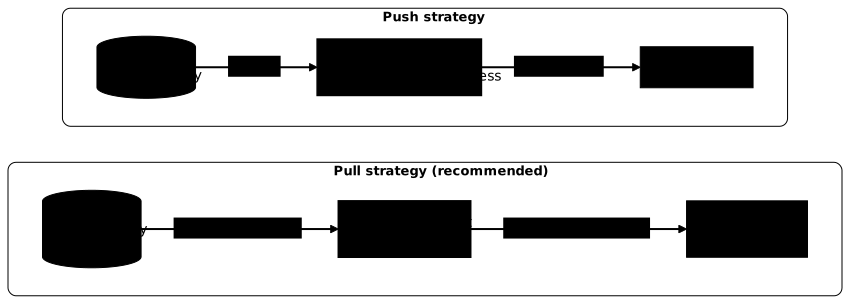
Pull strategy (recommended)
With the pull strategy, an agent installed in the cluster watches Git and applies the changes itself. This reversal changes the security of the setup: cluster access never leaves the cluster.
Its advantages:
- the CI pipeline needs no access to the cluster;
- continuous reconciliation fixes drift without intervention;
- no cluster credential is exposed in the CI.
The reference tools are ArgoCD, Flux and Fleet (Rancher).
Push strategy
With the push strategy, the CI pipeline pushes the changes to the cluster, for example with kubectl apply or helm upgrade at the end of a job. It is the historical CI/CD model.
Its advantages:
- it is simpler to set up at first;
- it works outside Kubernetes (VMs, cloud resources).
Its drawbacks:
- the CI holds privileged access to the cluster, hence a high-value secret;
- there is no continuous reconciliation: drift is neither detected nor fixed.
ArgoCD or Flux: which operator to choose?
For Kubernetes, the two reference GitOps operators are ArgoCD and Flux. Both projects reached the Graduated level at the CNCF in late 2022 (Flux on 30 November, ArgoCD on 6 December), the foundation's highest maturity level: open governance, audited security, wide production adoption. Both implement the four principles and provide solid continuous reconciliation.
The table below compares the two tools on the criteria that drive the day-to-day choice. Read it column by column: neither is better in absolute terms, each carries a different philosophy.
| Criterion | ArgoCD | Flux |
|---|---|---|
| User interface | Built-in web interface | CLI and API; web interfaces offered by third-party projects |
| Architecture | Central server with its components | Set of modular controllers (GitOps Toolkit) |
| Multi-cluster | One instance can drive several clusters | One Flux per cluster, or a central cluster driving the others |
| Approach | Opinionated, centred on the Application object | Close to the native Kubernetes APIs (one CRD per function) |
| Notifications | Built in | Notification controller included in the installation |
| Getting started | Accessible thanks to the interface | More technical, everything goes through manifests |
How to choose:
- you are new to GitOps and want immediate visibility: ArgoCD;
- you prefer a 100 % declarative, controller-oriented approach: Flux;
- you manage many teams with distinct scopes: both fit, ArgoCD integrates its RBAC and its
AppProjectmore tightly. It is also the natural ground of platform engineering, which builds self-service internal platforms on top of these building blocks.
Both projects are also strengthening supply chain security. ArgoCD can for example verify the GPG signature of commits before syncing, and encrypt with TLS the exchanges between its internal components: two protections against the injection of unauthorised manifests. These features change from one major version to the next: read the changelog of the installed version before going to production.
For GitOps outside Kubernetes (Terraform, Ansible), tools such as Atlantis, the Pulumi Kubernetes Operator or Spacelift apply the same pull-request review logic.
Step-by-step implementation
The five steps below follow the order of a first adoption: you structure the repositories, install the operator, set the workflow, then handle secrets and environments.
Step 1: structure the repositories
Separate the application code and the deployment manifests into two distinct repositories. The first produces an image; the second describes where and how it runs:
app-repo/           # Source code + CI  src/  Dockerfile  .github/workflows/build.yml
config-repo/        # GitOps manifests  base/    kustomization.yaml    deployment.yaml    service.yaml  overlays/    dev/    staging/    prod/
Why two repositories: the application code changes often (feature commits) while deployment configurations follow another rhythm (promotions, releases). Mixing both adds noise to the history and complicates auditing.
Step 2: install the operator
The GitOps operator (ArgoCD or Flux) is installed in the cluster it must watch: it is the one that will then hold the access to the Git repository and to the local Kubernetes API, never the CI. The installation creates a set of controllers that run continuously and must be included in your monitoring like your other critical workloads.
With ArgoCD, through Helm (the Kubernetes package manager), pinning the chart version so that two installations give the same result:
helm repo add argo https://argoproj.github.io/argo-helmhelm install argocd argo/argo-cd --version 10.9.6 \ --namespace argocd --create-namespaceChart 10.9.6 installs Argo CD v3.5.3. Check that the pods start with kubectl get pods -n argocd: they must all reach the Running state before you configure a first application.
With Flux, through its CLI and the flux bootstrap command (a GitHub token must be available in the GITHUB_TOKEN variable):
flux bootstrap github \ --owner=my-org \ --repository=config-repo \ --branch=main \ --path=clusters/my-clusterThis command creates the configuration repository if it does not exist, commits the manifests of the Flux controllers into it, then deploys them: Flux thus manages itself through GitOps. flux check then confirms that each controller is operational.
Step 3: define the contribution workflow
Once the operator is in place, the contribution workflow describes the path each change follows, from editing a manifest to its application on the cluster. Formalising these steps prevents the informal deployments that bypass review:
- the developer changes a manifest in a short-lived branch;
- they open a pull request, reviewed and validated automatically by
kubeconform(a validator that checks manifests against the Kubernetes schemas); - the pull request is merged into
main; - the operator detects the new commit and reconciles the cluster;
- a notification reports success or failure.
Step 4: manage secrets
Secrets must never be in plain text in Git. It is the most sensitive point of a GitOps implementation, because a Git repository is meant to be cloned, forked, browsed by several contributors: a plain-text secret survives in the history even after the file is deleted. Three approaches dominate:
| Tool | Principle |
|---|---|
| Sealed Secrets | Asymmetric encryption: the encrypted secret is stored in Git, then decrypted in the cluster by a controller that alone holds the private key |
| SOPS | Encryption of the values of a YAML file with an age or PGP key, or a key managed by a cloud KMS (AWS KMS, GCP KMS, Azure Key Vault) |
| External Secrets | Synchronisation from an external vault (Vault, AWS Secrets Manager): Git only contains the reference, not the value |
The secrets management guide details these tools and the criteria to choose between them.
Step 5: configure the environments
Use Kustomize (a tool built into kubectl that applies patches to base manifests without duplicating them) or Helm to manage the differences between environments. Here, the production overlay reuses the base and only changes the number of replicas:
apiVersion: kustomize.config.k8s.io/v1beta1kind: Kustomizationresources: - ../../basepatches: - path: patch-replicas.yamlThe patch only contains what differs from the base, plus what is needed to identify the target resource (kind and metadata.name):
apiVersion: apps/v1kind: Deploymentmetadata: name: cataloguespec: replicas: 3kubectl kustomize overlays/prod displays the result: the base catalogue Deployment appears with replicas: 3. The operator points to the overlay of each environment. This approach avoids maintaining near-identical copies of the manifests: only the difference is versioned, which makes every gap explicit and reviewable in a pull request.
Success criteria
Your GitOps implementation is solid when you can tick each of the following points without any permanent exception. Use this list as an audit grid before considering a migration finished.
- No deployment is done by manual
kubectl applyoutside incidents - Every production change has an associated, merged pull request
- Rollback is done with
git revert, not by acting directly on the cluster - Drift is detected and fixed automatically
- Secrets are never in plain text in the Git repository
- Developers have no admin access to the production cluster
- The Git history answers "who changed what, when"
- The environments (dev, staging, prod) are managed from the same configuration repository
Concrete scenarios
The two scenarios below show how these steps fit together in real situations: a migration from manual deployments, then putting environments that have drifted back in order.
Scenario 1: progressive migration to GitOps
Context: a team develops about ten microservices on Kubernetes. Deployments are done with kubectl apply from workstations. Incidents occur because of inconsistent configurations between staging and production.
Possible approach:
- install ArgoCD on the cluster;
- migrate two pilot services to validate the workflow;
- create the config-repo with the
base/overlaysstructure; - train the team on the pull request and ArgoCD sync workflow;
- progressively remove direct
kubectlaccess on the production clusters.
What it changes: every deployment is traced in Git, the environments stay in sync, and rollback happens without knowing the exact command applied during the incident.
Scenario 2: multi-environment management
Context: three environments (dev, staging, prod) whose configurations drift. Production contains "temporary" settings that were never documented.
Possible approach:
- audit the actual configurations against the declared ones, environment by environment;
- create a single config-repo with one Kustomize overlay per environment;
- explicit promotion through pull requests, from dev to staging then to prod;
- ArgoCD alerts configured for any detected drift.
What it changes: the differences between environments become explicit, versioned in Git, and any deviation is visible then fixed automatically.
Common pitfalls
Some pitfalls come back systematically during a first GitOps adoption, often because they only show up once the system is in production. Knowing them in advance avoids discovering them during an incident.
| Pitfall | Impact | Fix |
|---|---|---|
| Plain-text secrets in Git | Credential leak, non-compliance | Use Sealed Secrets, SOPS or External Secrets |
| A single app + config repository | Mixed lifecycles, noise in the history | Split into two repositories |
| Ignoring drift | The actual state diverges without alert | Configure the operator's alerts |
| Too much customisation per environment | Complex maintenance, hard merges | Keep overlays minimal, only patch what differs |
| No validation before merge | Invalid manifests merged and applied | Add kubeconform to the CI (kubeval is no longer maintained) |
| kubectl access kept in prod | Silent bypass of the GitOps workflow | Remove the access after migration |
| No tested rollback strategy | Panic during an incident | Document and test git revert before you need it |
| Forgetting the CRDs | The operator fails on unknown resources | Version the CRDs in the config-repo with the other manifests |
Key points
- Git is the declarative source of truth for the scope managed by the operator, not for the whole system in the absolute sense.
- Four OpenGitOps principles: declarative, versioned and immutable, pulled automatically, continuously reconciled.
- Pull strategy: the operator pulls the changes from Git, the CI does not touch the cluster.
- ArgoCD and Flux are both CNCF Graduated since late 2022, a maturity signal for a production choice.
- Two repositories: app-repo (code) and config-repo (manifests) have different lifecycles.
- Continuous reconciliation: drift is detected and fixed automatically, self-healing is the main operational benefit.
- Separate secrets: never in plain text in Git, always encrypted or externalised.
- Rollback = git revert: no manual handling, one commit is enough.
Knowledge check
Check that you have the essentials of this guide. The questions only cover what has just been explained here.
Knowledge check
Check what you have learned with this interactive quiz
How it works
- The timer starts when you click Start
- Multiple choice, true/false and short answer questions
- You can move between questions
- Detailed results are shown at the end
Starts the quiz and the timer
Review
(0/0)Score by domain
A domain groups several guides and gets several questions, so its score is more reliable than a per-topic score, which often rests on a single question.
Summary
Strengths
No topic passed at 80% on at least two questions yet.
Weak areas
No topic below the pass mark.
Recommended next
Hints before you try again?
Continue the course: CI/CD anti-patterns: recognising and fixing pipeline mistakes
Continue the course: Securing secrets in your CI/CD pipelines
A new full quiz with random questions
Work again only on the questions you missed
FAQ: frequently asked questions
The questions below cover the points teams hesitate on the most when they adopt GitOps: the difference with classic CI/CD, the choice of operator and secrets.
kubectl apply, which requires privileged access on the CI side. GitOps relies on a pull strategy: an agent in the cluster watches Git and pulls the changes itself. This reversal removes cluster credentials from the CI and adds continuous reconciliation, which fixes drift automatically.git revert is enough to roll back, and developers no longer need direct admin access to the production cluster.