On 28 February 2017, a simple typo took part of Amazon S3 down for about four hours. An engineer debugging the billing system ran a command meant to remove a few servers; a mistyped parameter removed far more than planned, including servers critical for metadata. The firm Cyence estimated the cost of this outage at 150 million dollars for S&P 500 companies alone. Amazon has since added automatic safeguards to this tool, exactly the role a validation test could have played before execution.
This story illustrates an uncomfortable truth: tests are not an option, they are life insurance. A bug that reaches production costs far more to fix than in development. Yet too many teams still see tests as a chore, not as an investment.
This guide is for developers and DevOps engineers who want to build an effective testing strategy: the test pyramid, shift-left testing, TDD, CI/CD integration, code coverage and the real contribution of AI-assisted testing tools in 2026.
What you will learn
- Understand why tests drastically reduce the cost of bugs
- Apply the test pyramid and shift-left testing to your project
- Practise TDD with the Red-Green-Refactor cycle
- Integrate unit, integration and E2E tests into a CI/CD pipeline
- Assess code coverage without falling into the hollow-metric trap
- Identify the real contribution and limits of AI-assisted testing tools
Why test? The cost of not testing
Before talking about "how", let's understand "why". Automated tests are not just a good practice, they are economically essential.
The growing cost of bugs
The later a bug is detected, the more it costs: fixed while writing the code, it takes a few minutes; discovered in production, it triggers an incident, a rollback and an emergency fix. This directional principle is solid. The precise multipliers that circulate ("×10 in QA, ×100 in production") are not: they have never been traced to a verifiable study, as the shift-left lesson explains. The table is therefore read in orders of magnitude.
| Moment of detection | Relative cost (order of magnitude) | Concrete example |
|---|---|---|
| While writing the code | Lowest | A few minutes to fix a typo |
| During code review | Low | Discussion, change, new review |
| During QA testing | Moderate | Ticket, investigation, fix, new test |
| In staging | High | Several teams involved |
| In production | Very high | Incident, rollback, hotfix, post-mortem |
What tests really bring
Automated tests are not only about "finding bugs": they change the way a team works day to day.
- Confidence: deploying on a Friday without anxiety
- Living documentation: the tests describe the expected behaviour
- Calm refactoring: changing code without fear of breaking everything
- Fast feedback: knowing within 5 minutes whether a change works
- Collaboration: tests clarify expectations between teams
The test pyramid
The test pyramid is a model that guides how you spread your testing efforts. Devised by Mike Cohn in 2009, it remains the reference in DevOps for structuring an effective testing strategy, even if some modern teams nuance it with variants such as the "testing trophy".

The idea is simple: the closer a test is to the code (unit), the more of them there should be. The more it tests the whole system (E2E), the rarer it should be.
Why this pyramid shape?
- Unit tests are fast (milliseconds), stable and cheap to write. They form the solid base.
- Integration tests take longer because they involve dependencies (databases, APIs).
- E2E tests are slow, brittle (a CSS change can break them) and expensive to maintain. They only test the critical journeys.
Unit tests, the solid base
What it is: a unit test checks a small isolated unit of code (function, method, class) without external dependencies.
Characteristics
The following table summarises what makes a good unit test: it must stay fast, isolated and easy to rerun in a loop without installing any external dependency.
| Aspect | Target value |
|---|---|
| Execution time | < 10 ms per test |
| Isolation | No external dependency (DB, API, files) |
| Quantity | Hundreds to thousands |
| Run frequency | On every commit |
Concrete example
The example below shows a simple business function (discount calculation) and the tests that cover its nominal case, its limits and its error case.
# Code under testdef calculer_remise(prix, pourcentage):    """Computes the price after a discount."""    if pourcentage < 0 or pourcentage > 100:        raise ValueError("Invalid percentage")    return prix * (1 - pourcentage / 100)
# Unit testsdef test_remise_standard():    assert calculer_remise(100, 20) == 80
def test_remise_zero():    assert calculer_remise(100, 0) == 100
def test_remise_totale():    assert calculer_remise(100, 100) == 0
def test_remise_negative_invalide(): with pytest.raises(ValueError): calculer_remise(100, -10)Integration tests, checking the connections
What it is: an integration test checks that several components work together: your code with a database, an external API, a file system.
When to use them
Choosing the right test support depends on the external dependency involved: a real database in a container, a mock server, or a temporary directory.
| Situation | Type of integration test |
|---|---|
| SQL queries | Test with a real DB (or a container) |
| API calls | Test with a mock server or sandbox |
| File system | Test with a temporary directory |
| Messages (Kafka, RabbitMQ) | Test with a broker in a container |
Concrete example
This example shows an integration test against an in-memory SQLite database, a common practice to avoid depending on an external database server during tests.
# Integration test with a databaseimport pytestfrom sqlalchemy import create_enginefrom myapp.repository import UserRepository
@pytest.fixturedef db_session():    """Creates a test database."""    engine = create_engine("sqlite:///:memory:")    # Table setup    Base.metadata.create_all(engine)    session = Session(engine)    yield session    session.close()
def test_creer_et_recuperer_utilisateur(db_session):    repo = UserRepository(db_session)
    # Arrange    user = User(email="test@example.com", nom="Dupont")
    # Act    repo.save(user)    retrieved = repo.find_by_email("test@example.com")
# Assert assert retrieved is not None assert retrieved.nom == "Dupont"End-to-End (E2E) tests, the user experience
What it is: an E2E test simulates a complete user journey, from the click in the browser down to the database and back.
Popular tools
The E2E tool landscape has moved a lot in recent years: Playwright has become the default choice for new projects, ahead of Cypress and Selenium.
| Tool | Language | Strengths | Trend |
|---|---|---|---|
| Playwright | JS/Python/Java/.NET | Multi-browser, fast, low rate of flaky tests | Default choice for new projects |
| Cypress | JavaScript | Polished DevX, visual debugging | Declining against Playwright, still widely used |
| Selenium | Multi-language | Historical standard, very wide ecosystem | Gradually declining for several years |
| Puppeteer | JavaScript | Native Chrome/Chromium | Niche, Chrome-only cases |
Example with Playwright
This test simulates a complete purchase journey, from the product search to the order validation: it is the kind of critical scenario an E2E test must cover first.
# E2E test: complete purchase journeyfrom playwright.sync_api import Page, expect
def test_parcours_achat(page: Page):    # 1. Go to the home page    page.goto("https://shop.example.com")
    # 2. Search for a product    page.fill('[data-testid="search"]', "laptop")    page.click('[data-testid="search-button"]')
    # 3. Add to the cart    page.click('[data-testid="product-card"]:first-child')    page.click('[data-testid="add-to-cart"]')
    # 4. Check the cart    page.click('[data-testid="cart-icon"]')    expect(page.locator('[data-testid="cart-count"]')).to_have_text("1")
# 5. Go to checkout page.click('[data-testid="checkout"]') expect(page).to_have_url("/checkout")Shift-Left Testing
Shift-left is a philosophy that consists in moving tests as early as possible in the development cycle. The term comes from the image of a left-to-right timeline: testing activities are "shifted to the left" (towards the beginning).
The idea behind this concept: traditionally, tests were run at the end of the development cycle, just before going to production. The problem? At that stage, fixing a bug is very expensive (see the section on the cost of bugs).
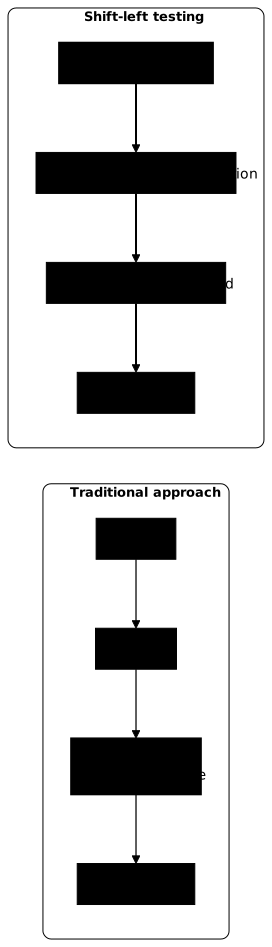
Concretely, what does doing shift-left mean?
- Writing unit tests during development, not afterwards
- Running automatic checks before each commit (pre-commit hooks)
- Getting feedback within minutes, not days or weeks
- Involving developers in quality, not only the QA team
Shift-left practices
Implementing shift-left does not require complex tooling: it is above all a sequence of habits, from the developer's workstation to the CI/CD pipeline.
-
Unit tests before committing: run
pytestornpm testlocally before each push. -
Automatic linting and formatting: detect syntax errors even before the tests.
-
Pre-commit hooks: block commits that break the tests.
-
Tests in CI from the first push: feedback in under 10 minutes.
-
Security tests in the pipeline: automatic SAST and secrets scanning.
Configuring a pre-commit hook
The file below triggers pytest and the ruff linter before each commit: a bug or a style error is blocked locally, before it even reaches the remote repository.
repos:  - repo: local    hooks:      - id: pytest        name: pytest        entry: pytest tests/unit -q        language: system        pass_filenames: false        always_run: true
      - id: ruff        name: ruff linter        entry: ruff check .        language: system        types: [python]
TDD, Test-Driven Development
TDD (Test-Driven Development) reverses the traditional order: you write the test first, then the code that makes it pass. This counter-intuitive approach produces better designed and more robust code.
Why write the test before the code?
- You think about the expected behaviour before coding (better design)
- You only write the necessary code (no over-engineering)
- Your tests are meaningful because they existed before the code
- You have a living documentation of the expected behaviour
The Red-Green-Refactor cycle
TDD follows a three-step cycle, often called "Red-Green-Refactor" after the colours of test indicators.

Write a test that describes the expected behaviour. It must fail because the code does not exist yet.
def test_email_valide():    assert is_valid_email("user@example.com") == True
def test_email_sans_arobase_invalide():    assert is_valid_email("userexample.com") == False
Write the minimum code to make the test pass. No optimisation, no edge cases, just enough for green.
def is_valid_email(email): return "@" in emailDoes the test pass? Improve the code: naming, structure, performance. The tests guarantee that nothing breaks.
import re
def is_valid_email(email: str) -> bool: """Checks whether the email has a valid format.""" pattern = r'^[a-zA-Z0-9._%+-]+@[a-zA-Z0-9.-]+\.[a-zA-Z]{2,}$' return bool(re.match(pattern, email))Tests in CI/CD
Integrating tests into your CI/CD pipeline is the heart of DevOps. Here is how to structure your pipelines to get fast feedback without sacrificing reliability.
Typical test pipeline
The GitHub Actions workflow below chains three levels of tests in the order of the pyramid: first unit tests, then integration tests with a PostgreSQL database running as a service, finally E2E tests with Playwright.
name: Tests
on:  push:    branches: [main, develop]  pull_request:    branches: [main]
# Read-only: a test pipeline writes nothingpermissions:  contents: read
jobs:  unit-tests:    runs-on: ubuntu-latest    steps:      - uses: actions/checkout@3d3c42e5aac5ba805825da76410c181273ba90b1  # v7.0.1        with:          persist-credentials: false
      - name: Setup Python        uses: actions/setup-python@5fda3b95a4ea91299a34e894583c3862153e4b97  # v7.0.0        with:          python-version: '3.12'          cache: 'pip'
      - name: Install dependencies        run: pip install -r requirements.txt
      - name: Run unit tests        run: pytest tests/unit -v --cov=src --cov-report=xml
      - name: Upload coverage        uses: codecov/codecov-action@fb8b3582c8e4def4969c97caa2f19720cb33a72f  # v7.0.0        with:          files: coverage.xml
  integration-tests:    runs-on: ubuntu-latest    needs: unit-tests  # Run after the unit tests    services:      postgres:        image: postgres:16@sha256:33f923b05f64ca54ac4401c01126a6b92afe839a0aa0a52bc5aeb5cc958e5f20        env:          POSTGRES_PASSWORD: test        options: >-          --health-cmd pg_isready          --health-interval 10s          --health-timeout 5s          --health-retries 5        ports:          - 5432:5432
    steps:      - uses: actions/checkout@3d3c42e5aac5ba805825da76410c181273ba90b1  # v7.0.1        with:          persist-credentials: false
      - name: Run integration tests        run: pytest tests/integration -v        env:          DATABASE_URL: postgresql://postgres:test@localhost:5432/test
  e2e-tests:    runs-on: ubuntu-latest    needs: integration-tests    steps:      - uses: actions/checkout@3d3c42e5aac5ba805825da76410c181273ba90b1  # v7.0.1        with:          persist-credentials: false
      - name: Install Playwright        run: pip install playwright && playwright install chromium
      - name: Start application        run: docker compose up -d
      - name: Wait for app        run: |          timeout 60 bash -c 'until curl -s http://localhost:8080/health; do sleep 2; done'
      - name: Run E2E tests        run: pytest tests/e2e -v
      - name: Upload screenshots on failure        if: failure()        uses: actions/upload-artifact@043fb46d1a93c77aae656e7c1c64a875d1fc6a0a  # v7.0.1        with:          name: playwright-screenshots          path: tests/e2e/screenshots/
Optimising execution times
A slow test pipeline discourages developers from running it often, which goes against shift-left. The following four levers clearly reduce the total duration without losing coverage.
| Technique | Potential gain | How |
|---|---|---|
| Parallelisation | -50% | Run tests on several workers |
| Dependency caching | -30% | Reuse node_modules, .venv |
| Selective tests | -70% | Only run the impacted tests |
| Pre-built containers | -40% | Docker images with dependencies |
# Parallelisation example with pytest- name: Run tests in parallel run: pytest tests/ -n auto # Uses all available CPUsCode coverage
Code coverage measures the percentage of your code executed by the tests. It is a useful indicator, but beware of the pitfalls.
Types of coverage
Not all coverage is equal: line coverage is easy to measure but coarse, whereas branch coverage or path coverage reveal edge cases that simple line counting ignores.
| Type | What it measures | Usefulness |
|---|---|---|
| Line coverage | Lines executed | Basic, easy to game |
| Branch coverage | if/else branches | More precise, detects edge cases |
| Condition coverage | Individual conditions | Very precise, complex |
| Path coverage | Execution paths | Exhaustive but expensive |
Realistic targets
A realistic coverage target strongly depends on the context: a new project can aim high from the start, whereas a legacy codebase must progress in small steps to avoid discouragement.
| Metric | Target |
|---|---|
| Overall coverage | > 80% |
| Critical code | > 95% |
| UI code | > 60% |
| Metric | Target |
|---|---|
| Overall coverage | Improve by 5% per quarter |
| New code | > 80% |
| Modified code | > 70% |
Complementary types of tests
Beyond the classic pyramid, other types of tests enrich your testing strategy to cover performance, API contracts and the quality of your test suites themselves.
Performance tests
Performance tests check that the application responds within acceptable times under load, before a real traffic peak reveals it in production.
# With locustfrom locust import HttpUser, task, between
class WebsiteUser(HttpUser):    wait_time = between(1, 3)
    @task    def load_homepage(self):        self.client.get("/")
    @task(3)  # 3x more frequent    def search_product(self):        self.client.get("/search?q=laptop")
Contract tests
Contract tests check that APIs respect their contract between producer and consumer, a critical topic as soon as several teams expose independent services.
# With Pactconsumer: frontendprovider: user-apiinteractions: - description: Get user by ID request: method: GET path: /users/123 response: status: 200 body: id: 123 name: "type:string" email: "type:email"Mutation tests
Mutation tests check the quality of your tests themselves by deliberately introducing mutations (bugs) into the source code.
# With mutmut (Python)mutmut run --paths-to-mutate=src/
# Mutation example: changing > into >=# If the tests still pass, they are insufficient
AI-assisted testing in 2026
Artificial intelligence transforms the way tests are written and run, but it also changes, and this is the paradox, the reason why testing remains essential.
Automatic test generation
AI tools generate test suites from existing code, with agents able to cover nominal cases, edge cases and error cases within seconds.
| Tool | Approach | Usage |
|---|---|---|
| GitHub Copilot | Real-time unit test suggestions | IDE (VS Code, JetBrains) |
| Qodo (formerly Codium AI) | Generation of complete test suites and assisted PR review | IDE extension, CLI, CI |
| Diffblue Cover | Automatic Java tests with high coverage | CI/CD |
# Example: an AI agent automatically generates the edge-case tests# From the calculer_remise() function, it suggests:def test_remise_avec_prix_nul():    assert calculer_remise(0, 20) == 0
def test_remise_avec_grands_nombres(): assert calculer_remise(1_000_000, 50) == 500_000Smart test prioritisation
AI analyses the execution history to optimise which tests to run first, a direct and measurable gain on the duration of the CI pipeline.
- Test Impact Analysis: only run the tests impacted by the changes
- Flaky test detection: identify and isolate unstable tests
- Risk-based testing: prioritise the tests of high-risk areas
Self-healing tests
E2E tests are progressively becoming self-healing: instead of breaking as soon as a selector changes, they adapt automatically by relying on the visual context of the page.
// Pseudo-code: the exact API depends on the self-healing tool chosen.// Before: brittle test that breaks if the selector changespage.click('#submit-btn');
// After: the tool finds the element even if the ID changes,// from its context (text, role, position)page.click(ai.locator('submit button'));
Tools such as Healenium apply this kind of automatic fix when a selector changes. They reduce the maintenance burden of E2E suites, provided you keep a regular human review: a test "repaired" silently can hide a real regression.
Troubleshooting
The following table gathers the most frequent symptoms met by teams putting a testing strategy in place, with the probable cause and the associated fix.
| Symptom | Probable cause | Solution |
|---|---|---|
| Slow tests | Too many E2E tests | Rebalance towards the pyramid |
| Brittle tests | Data dependencies | Use isolated fixtures |
| False positives | Poorly isolated tests | Clean the state between tests |
| Coverage stagnates | Untested legacy code | Add tests when making changes |
| CI timeout | Sequential tests | Parallelise with -n auto |
Key points
These points summarise the testing strategy to keep from this guide, to have at hand when framing your next team decisions.
-
The test pyramid: many unit tests (70%), fewer integration tests (20%), few E2E tests (10%).
-
Shift-left: test as early as possible, each stage increases the cost of bugs.
-
TDD for critical code: writing the test first forces you to think about the expected behaviour.
-
Automate in CI/CD: manual tests do not scale and get forgotten.
-
Coverage is an indicator, not a goal: aim for meaningful tests, not a percentage.
-
Tests are a documented investment: a good test describes the expected behaviour, and every bug it catches before production saves you money.
-
AI generates tests, but it also generates more bugs: AI-produced code requires more testing rigour, not less.
Knowledge check
Check that you have the essentials of this guide. The questions only cover what has just been explained here.
Knowledge check
Check what you have learned with this interactive quiz
How it works
- The timer starts when you click Start
- Multiple choice, true/false and short answer questions
- You can move between questions
- Detailed results are shown at the end
Starts the quiz and the timer
Review
(0/0)Score by domain
A domain groups several guides and gets several questions, so its score is more reliable than a per-topic score, which often rests on a single question.
Summary
Strengths
No topic passed at 80% on at least two questions yet.
Weak areas
No topic below the pass mark.
Recommended next
Hints before you try again?
Continue the course: Deployment strategies: blue-green, canary, rolling
Continue the course: CI/CD best practices: the invariants of a reliable pipeline
A new full quiz with random questions
Work again only on the questions you missed
FAQ: frequently asked questions
The questions below cover the most frequent doubts about the testing strategy: the split of the pyramid, the place of TDD and the level of coverage to aim for.
assert and show 100 % coverage while being completely useless. That is why it is better to aim for meaningful tests than for a percentage.