A Dockerfile decides what goes into the image you ship: your dependencies,
but also whatever you forgot to remove, a compiler, a .git folder, a token.
This guide gives the best practices that make an image faster to build,
lighter and safer, for a developer or a DevOps engineer who already writes
Dockerfiles. Every rule is measured with Docker 29.1.3: a build context
that drops from 70 MB to 89 bytes, a Go image that falls from 261 MB to 11 MB,
a --mount that works without the # syntax line said to be mandatory.
What you will learn
- Order the instructions so that the cache helps on every build
- Shrink the build context with a
.dockerignore - Separate build and runtime with a multi-stage build
- Run as non-root, and diagnose permission errors
- Build without leaving a secret in the image, and pin the base image
Principle #1: Maximise the cache with instruction order
Docker builds an image layer by layer, one layer per instruction. When the input of an instruction changes, that layer and every following one is rebuilt. The order of the instructions therefore decides what each code change forces Docker to rebuild.
The rule: what changes rarely at the top, what changes often at the bottom. Dependencies change rarely, the code with every commit.
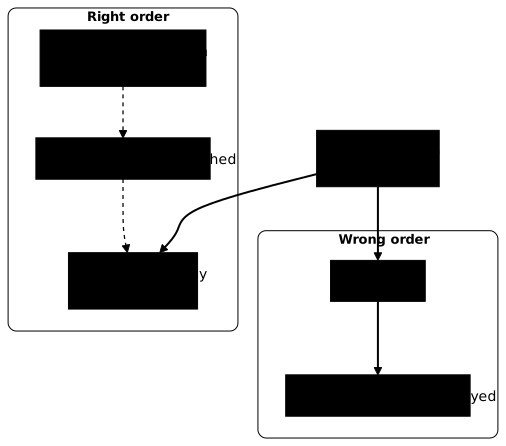
# ❌ Wrong order: the whole project is copied before the installFROM node:24-alpine@sha256:ebfe2f90462722a7a4de65e91990e97fe0d401c70e0e762c5b53302f905ec1c1WORKDIR /appCOPY . .RUN npm ci --omit=devCMD ["node", "src/index.js"]# Right order: dependency files first, code afterwardsFROM node:24-alpine@sha256:ebfe2f90462722a7a4de65e91990e97fe0d401c70e0e762c5b53302f905ec1c1WORKDIR /appCOPY package.json package-lock.json ./RUN npm ci --omit=devCOPY . .CMD ["node", "src/index.js"]Measured on a small project that depends only on express, changing only
src/index.js between two builds: with the wrong order, npm ci runs
again and the build takes 1.9 s; with the right order, npm ci comes from
the cache (CACHED in the output) and the build takes 0.5 s. The gap grows
with the number of dependencies: on a real project, it is the difference
between a few seconds and several minutes on every commit.
| What changes rarely | What changes often |
|---|---|
Base image (FROM) | Source code |
| Installation of system tools | Configuration files |
Dependencies (package.json, go.mod) | Static assets |
Principle #2: Use .dockerignore
The build context is the folder that Docker sends to the builder before the
first instruction. Anything it contains can end up in the image through a
COPY . ., including a .git folder, a local node_modules or a .env. The
.dockerignore file excludes these paths at send time: the build is
faster, and a local secret can no longer be copied by mistake.
# Dependencies (reinstalled in the image)node_modules/vendor/__pycache__/*.pyc
# Git and IDE.git/.vscode/.idea/
# Local build filesdist/build/*.log
# Secrets and local configuration.env.env.**.pem*.keysecrets/.npmrc.pypirckubeconfig
With BuildKit, the default builder, the detailed output shows the size of
the context on a transferring context line. Measured on a folder that
contains 48 MB of node_modules and 20 MB of .git:
docker build --progress=plain . 2>&1 | grep 'transferring context'# without .dockerignore: transferring context: 70.02MB 0.2s done# with .dockerignore: transferring context: 89B doneThe .git folder deserves particular attention: on top of its weight, it
holds the whole history, including a secret removed from the code long
ago. The old Sending build context to Docker daemon line only appears with
the legacy builder, which you no longer meet by default.
Principle #3: Multi-stage builds for lighter images
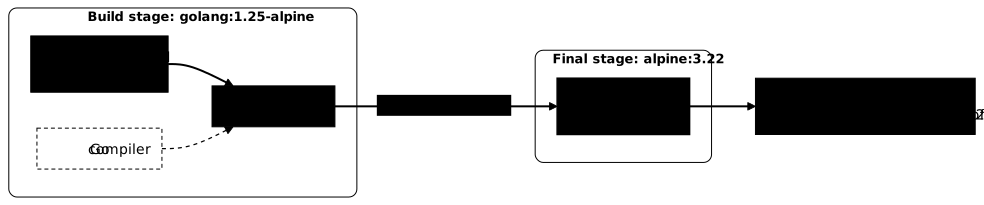
A multi-stage build uses several FROM lines in the same Dockerfile. The
first stage holds the build tooling (compiler, development dependencies),
the last one only holds what is needed to run. The gain is not only disk
space: a compiler, a package manager or sources missing from the production
image are as many tools an attacker will not find.
Go example: from 261 MB to 11 MB
This example compiles a Go program in a first stage, then copies only the
binary into a minimal Alpine stage that runs it as nobody.
# Stage 1: buildFROM golang:1.25-alpine@sha256:1ae0735f00daffa3aaf1363a5184c0d2dc55c78e3db4ec70241cdac97bf84b59 AS builderWORKDIR /srcCOPY go.mod ./RUN go mod downloadCOPY . .RUN CGO_ENABLED=0 go build -o /app .
# Stage 2: runtimeFROM alpine:3.22@sha256:5291449c3df73caf6ed85e649dec1b9e818b39a5d8c871e97afc13e9cd5e8fa8COPY --from=builder /app /appUSER nobodyENTRYPOINT ["/app"]
Measured on a minimal Go program, as the size of the exported file system
(docker export): the same build in a single stage on
golang:1.25-alpine weighs 261.4 MB; as a multi-stage build, the final
image weighs 10.8 MB, of which 8.6 MB is Alpine. The binary does run as the
nobody user (uid=65534).
| Image | Contents | Measured size |
|---|---|---|
| Single stage | Go SDK, sources and binary | 261.4 MB |
| Multi-stage | Alpine and binary | 10.8 MB |
Node.js example: separating build and production
The same pattern applies to Node.js: the first stage installs the
development dependencies and builds, the second reinstalls only the
production ones and copies the dist/ folder.
# Stage 1: build, with the development dependenciesFROM node:24-alpine@sha256:ebfe2f90462722a7a4de65e91990e97fe0d401c70e0e762c5b53302f905ec1c1 AS builderWORKDIR /appCOPY package.json package-lock.json ./RUN npm ciCOPY . .RUN npm run build
# Stage 2: runtime, production dependencies onlyFROM node:24-alpine@sha256:ebfe2f90462722a7a4de65e91990e97fe0d401c70e0e762c5b53302f905ec1c1WORKDIR /appENV NODE_ENV=productionCOPY package.json package-lock.json ./RUN npm ci --omit=dev && npm cache clean --forceCOPY --from=builder --chown=node:node /app/dist ./distUSER nodeEXPOSE 3000CMD ["node", "dist/index.js"]
The choice of base image weighs as much as the multi-stage build. Measured
on the Node.js 24 variants: node:24 weighs 1155.5 MB, node:24-slim
231.8 MB and node:24-alpine 173.2 MB. Every megabyte less is also one
package less to scan and patch.
Principle #4: Run as non-root
By default, the process of a container runs as root. If an attacker
compromises the application, they get root privileges inside the
container, and the slightest isolation flaw becomes a door to the host. The
USER instruction runs the application under an unprivileged user.
FROM node:24-alpine@sha256:ebfe2f90462722a7a4de65e91990e97fe0d401c70e0e762c5b53302f905ec1c1WORKDIR /appCOPY --chown=node:node . .USER nodeEXPOSE 3000CMD ["node", "index.js"]Some images already provide a user, but it is not always usable as is.
Measured: the node image carries the node user (UID 1000), ready to
use. The nginx image carries an nginx user, but a plain USER nginx
makes the startup fail: nginx can no longer create
/var/cache/nginx/client_temp, which belongs to root. For nginx, use the
unprivileged variant published by the project, nginxinc/nginx-unprivileged,
or prepare the permissions of these folders in the Dockerfile.
COPY --chown=user:group gives the files to the right user at copy time,
without a separate RUN chown that would duplicate the files in one more
layer. A non-root user is a start: in production, you complete it at
launch with a read-only file system, dropped capabilities and
no-new-privileges, detailed in the next lesson on Docker security.
Principle #5: Add a healthcheck
The HEALTHCHECK instruction declares a command that Docker runs
regularly to find out whether the application responds, and not only
whether its process exists. The container then goes through the states
starting, healthy or unhealthy, visible in docker ps.
FROM nginx:1.29-alpine@sha256:5616878291a2eed594aee8db4dade5878cf7edcb475e59193904b198d9b830deHEALTHCHECK --interval=30s --timeout=3s --start-period=5s --retries=3 \ CMD wget --no-verbose --tries=1 --spider http://localhost/ || exit 1COPY index.html /usr/share/nginx/html/| Option | Meaning |
|---|---|
--interval=30s | Checks every 30 seconds |
--timeout=3s | The command must answer within 3 seconds |
--start-period=5s | Allows 5 s of startup before counting failures |
--retries=3 | 3 consecutive failures = unhealthy |
This mechanism belongs to Docker Engine, Compose and Swarm. Kubernetes
does not read the HEALTHCHECK of an image: its probes (readinessProbe,
livenessProbe, startupProbe) are declared in the manifest. In a
Kubernetes environment, the HEALTHCHECK only serves on the developer
workstation.
docker inspect --format '{{.State.Health.Status}}' mon_conteneur# starting, healthy or unhealthyAdvanced best practices
The three practices below concern the security of the build more than its speed: reusing a cache without writing it into the image, passing a secret without shipping it, and knowing exactly which base image you build on.
Use BuildKit cache mounts
A cache mount keeps a package manager's cache between builds, without
writing it into a layer of the image. Measured with Docker 29.1.3: a
RUN --mount=type=cache builds without the
# syntax=docker/dockerfile:1 line at the top of the file, because the
frontend built into BuildKit understands --mount. The # syntax line
is still useful to pin the frontend version, it is no longer required.
FROM node:24-alpine@sha256:ebfe2f90462722a7a4de65e91990e97fe0d401c70e0e762c5b53302f905ec1c1WORKDIR /appCOPY package.json package-lock.json ./RUN --mount=type=cache,target=/root/.npm \ npm ci --omit=devCOPY . .# Python (pip)RUN --mount=type=cache,target=/root/.cache/pip \ pip install -r requirements.txt
# Go modulesRUN --mount=type=cache,target=/go/pkg/mod \ go build -o /app/main .Keep secrets out of the image
A secret passed through ARG or ENV stays in the image
metadata, even if the file that used it is deleted in the same
instruction. Measured in the lesson on pipeline secrets: a token passed
with --build-arg appears twice in docker history --no-trunc, and not
once with a secret mount.
# ❌ The token stays readable in the image historyARG NPM_TOKENRUN echo "//registry.npmjs.org/:_authToken=$NPM_TOKEN" > .npmrc && npm ci && rm .npmrc
# The secret only exists during this RUN, never in a layerRUN --mount=type=secret,id=npmrc,target=/root/.npmrc \ npm ci --omit=devdocker build --secret id=npmrc,src=$HOME/.npmrc -t mon-app:1.4.0 .Pin the versions of base images
A tag such as node:24-alpine designates the latest image published
under that name: it changes with every update, without warning. The
digest (@sha256:...) designates one image and one only, which makes the
build reproducible and protects against a substituted image.
# ❌ Can change at any timeFROM node:24-alpine
# Readable tag and immutable digestFROM node:24-alpine@sha256:ebfe2f90462722a7a4de65e91990e97fe0d401c70e0e762c5b53302f905ec1c1| Reference | Example | Reproducible | Security fixes |
|---|---|---|---|
| Major tag | node:24 | No | Received automatically, unchecked |
| Tag and variant | node:24-alpine | No | Received automatically, unchecked |
| Tag and digest | node:24-alpine@sha256:... | Yes | Deliberate digest update |
The trade-off of the digest is real: it receives no fix until you change it. A tool such as Renovate or Dependabot opens a pull request for each new version, which keeps reproducibility without freezing the flaws. To check a Dockerfile even before the build, the Hadolint (in French) linter flags these gaps.
Troubleshooting
Dockerfile problems almost all fall into three families: a cache that does not help, an image that is too heavy, or a permission error at startup. Start from the symptom, then check the cause with the measurement given.
Build still slow despite the right order
The cache does not help if an instruction placed early changes on every
build. The usual causes are a context that is too wide, carrying files
that move, and a COPY that is too wide.
- Context too wide: read the line
transferring contextofdocker build --progress=plain; several tens of megabytes point to an incomplete.dockerignore. COPY *.json ./too wide: it can include JSON files that change often. Be explicit:COPY package.json package-lock.json ./.
Multi-stage image still large
A heavy final image despite the multi-stage build almost always comes from the base image of the last stage or from files copied in excess.
- Base image:
node:24weighs 1155.5 MB,node:24-alpine173.2 MB (measurements above). - Development files copied: only copy
dist/orbuild/from the build stage. - Package manager cache: clean it in the same instruction,
npm ci --omit=dev && npm cache clean --force, or use a cache mount.
"permission denied" error with a non-root USER
The container stops with EACCES or Permission denied as soon as it
switches to non-root. The cause is almost always a file or folder that
still belongs to root, rarely the port.
- Files owned by root: use
COPY --chown=node:node. - Runtime folder not accessible: this is the measured case of nginx with
USER nginx, which cannot create/var/cache/nginx/client_temp. - Low port: contrary to a common belief, it is not the cause. Measured,
Docker sets
ip_unprivileged_port_startto 0 in the container, and a server started with--user nodelistens on port 80 without error.
HEALTHCHECK always "unhealthy"
The container starts but stays unhealthy. Check, in this order, that
the tested URL exists, that --start-period leaves time to start, and
that the healthcheck command (wget, curl) exists in the image.
docker inspect --format '{{json .State.Health}}' mon_conteneurKey points
- Instruction order: dependencies before source code; measured,
npm cicomes from the cache and the build drops from 1.9 s to 0.5 s. .dockerignore: excludenode_modules,.gitand secrets; measured, the context drops from 70 MB to 89 bytes.- Multi-stage: separate build and runtime; measured, a Go image drops from 261 MB to 11 MB, without a compiler.
- Non-root
USER: the failure comes from file permissions, not from the port, which Docker allows from 0. - Build secrets:
--mount=type=secret, neverARGorENV, which stay in the history. - Base image pinned by digest, updated through an automated pull request.
Test your knowledge
Check that you have the essentials of this guide: cache,
.dockerignore, multi-stage, non-root, build secrets and pinning
of the base image.
Knowledge check
Check what you have learned with this interactive quiz
How it works
- The timer starts when you click Start
- Multiple choice, true/false and short answer questions
- You can move between questions
- Detailed results are shown at the end
Starts the quiz and the timer
Review
(0/0)Score by domain
A domain groups several guides and gets several questions, so its score is more reliable than a per-topic score, which often rests on a single question.
Summary
Strengths
No topic passed at 80% on at least two questions yet.
Weak areas
No topic below the pass mark.
Recommended next
Hints before you try again?
Continue the course: Securing Docker in production
A new full quiz with random questions
Work again only on the questions you missed