The attack surface is the set of all the points through which an attacker can try to get into your system: an open network port, a service reachable from the Internet, a login page, an API, a user account or a third-party library you use. Every exposed point is one more door to watch and defend. Reducing this surface means closing the doors you do not need. This page explains what the notion covers, what the typical entry points are and how to cut them down, with no prerequisite other than knowing what a computer system is.
What you will learn
This page lays down a simple mental model, reusable whatever your environment (server, application, cloud). Concretely, you will be able to:
- Define the attack surface as the set of exposed entry points.
- Recognise the typical entry points: open ports, exposed services, APIs, forms, accounts, dependencies.
- Understand why a smaller surface means fewer risks to manage.
- Apply concrete reduction moves: close, remove, limit.
- Connect this notion to minimisation (in French), to the threats (in French) that target these points and to the SOCLE threat model (in French), which lists attack vectors by domain.
What is the attack surface
The attack surface is the sum of all the exposed entry points of a system, that is, every place where someone from outside can interact with it to try to compromise it. It is not a specific flaw: it is the size of the target offered to an attacker.
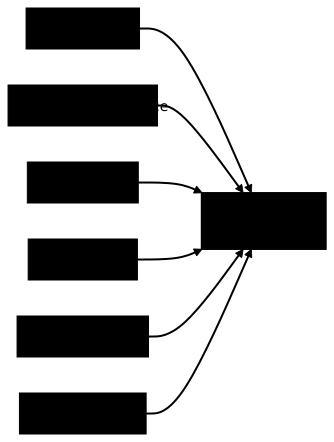
Two dimensions characterise this surface, and they must be kept apart. First, the number of exposed points, each of which has to be defended separately. Second, their state: an up-to-date, authenticated service does not carry the same risk as a forgotten, unmaintained service running a version nobody follows anymore.
In IT, a system piles up these openings fast: a service installed for a test and never removed, a port left open by default, an account created for a former colleague. Each one looks harmless, but added together, they form a much larger surface than you would think. The good news: unlike a flaw, a surface can be measured and reduced on purpose.
Typical entry points
An entry point is any place where the outside world can send a request, a piece of data or a connection attempt to your system. Here are the most common categories, defined one by one.
An open port is a network channel number on which a machine listens and accepts connections. Port 22 is used for remote administration (SSH), port 443 for the secure web (HTTPS). An open port that nobody uses remains an accessible door for automated scanners.
An exposed service is a piece of software that listens on a port and answers requests: a web server, a database, an administration tool. Exposed here means "reachable from outside", for example from the Internet and not only from the internal network.
An API (application programming interface, a set of addresses that a program can call to talk to another one) multiplies the entry points: each endpoint (each call address of the API) is one more door. A debug endpoint or metrics endpoint left reachable in production often reveals internal information that is valuable to an attacker.
A form (input field, login page, search box) accepts data that comes from the user. Poorly filtered, this data opens the way to injection attacks, where the attacker slips in code where the system expected plain text.
A user account is a human entry point: each username, each password, each access token (a digital key that proves an identity) is a key that can be stolen, guessed or reused. Forgotten accounts of former employees are a classic.
A dependency is a code library written by others and built into your software. You inherit its possible flaws without having written them. This is the ground of so-called supply chain attacks, where a component is compromised upstream to reach everyone who uses it.
Why reduce it
The reasoning is simple: fewer entry points, fewer risks. Every open door is one more thing to keep up to date, to monitor and to defend. Closing a useless door removes at once all the work it required and all the threat it carried.
A large surface is expensive in practice. Every exposed service has to receive its security patches, show up in your monitoring logs and be thought through in your configuration. Multiply that by dozens of forgotten services, and the team drowns: it no longer has the means to follow everything, and it is precisely the forgotten door that the attacker uses to get in.
You also have to drop a dangerous reflex, security through obscurity, the idea that an undocumented service would be invisible. Automated scanners crawl the Internet nonstop and find an open port within minutes, whether it is listed anywhere or not. An exposed service is a discoverable service, period. The optional lesson on security through obscurity (in French) explains why hiding a mechanism does not protect it.
How to reduce it
Reducing the attack surface takes no magic tool: it is a discipline of sorting, made of concrete moves repeated over time. The guiding principle is deny by default (close everything by default, open only what is explicitly needed and justified).
The first move is to close unneeded ports. Take an inventory of the ports actually open on each machine, then close anything that does not match an active, known use. A firewall (a filter that allows or blocks connections according to rules) that refuses everything except the bare minimum cuts the network surface down.
The second move is to remove the services you do not use. An uninstalled service can no longer be attacked: it is the strongest protection there is. Likewise, disable the unused features of a piece of software (debug interface, optional module, test endpoint).
The third move is to limit dependencies. Every library you add grows the surface: only bring in the ones you really need, keep them up to date and watch their known flaws. Less third-party code, fewer inherited doors.
The attack surface is an inventory: it counts the holds offered, it does not say how to get rid of them. Two neighbouring principles complete the move. Minimisation (in French) is the removal rule, which takes away what is not needed (components, data, rights). Security by default (in French) is the initial configuration rule, which denies everything from installation onwards. In the vocabulary of security control types (in French), closing a port or removing a service is a preventive control; monitoring what you cannot close is a detective control.
A concrete scenario
A small team deploys a test server in the cloud for a pilot project. To move fast, it opens all the ports "for the duration of the trials", installs a database reachable from the Internet and keeps the default credentials provided at installation.
The project is then abandoned, but nobody thinks of shutting the server down. Six months later, it is still running, forgotten by everyone. An automated scanner spots the open database port, tries the default credentials, and gets full access. The pilot's data contained real customer information.
Nothing sophisticated about this attack: no exotic flaw, just a door left open and forgotten. The lesson fits in one sentence: the attack surface grows by itself if nobody watches it. A simple decommissioning reflex (shutting down and deleting what is no longer used) would have made the risk disappear.
Common pitfalls
Understanding the notion is not enough; you also have to avoid the reasoning errors that drain it of meaning. Here are four common ones.
The first pitfall is the incomplete inventory. You list the "official" servers and forget the test environments, the old inherited machines and the cloud resources created on the fly. Yet you can only protect what you know about: a forgotten asset remains a wide-open door.
The second pitfall is believing the surface is fixed. It changes with every deployment, every new dependency, every configuration change. A single audit gives a snapshot at a given moment, never a lasting guarantee. Reduction is a continuous process, not a one-off project.
The third pitfall is shadow IT (services deployed by teams outside the official procedures: personal cloud instance, unapproved online tool). Invisible to security, it grows the surface without anyone knowing.
The fourth pitfall is the obsession with the outer perimeter. You armour the Internet-facing front and neglect the inside. An attacker who gets through the first door then finds an internal surface that is often much larger and much less locked down.
Key points
-
The attack surface is the sum of the exposed entry points of a system: ports, services, APIs, forms, accounts and dependencies.
-
Every open door is a cost, it has to be maintained, monitored and defended; closing it removes the associated risk and work.
-
Security through obscurity does not exist: automated scanners find an exposed service within minutes, documented or not.
-
Reducing means sorting: close unneeded ports, remove unused services, limit dependencies, following the deny by default principle.
-
The surface changes all the time: a single audit is not enough, reduction is a continuous discipline.
-
Do not forget the inside: the internal surface, often larger, deserves as much attention as the perimeter exposed on the Internet.
-
This concept feeds your threat analysis: the SOCLE threat model (in French) lists, domain by domain, the attack vectors that target precisely these entry points.
Knowledge check
Check that you have the essentials of this guide. The questions cover only what has just been explained here.
Knowledge check
Check what you have learned with this interactive quiz
How it works
- The timer starts when you click Start
- Multiple choice, true/false and short answer questions
- You can move between questions
- Detailed results are shown at the end
Starts the quiz and the timer
Review
(0/0)Score by domain
A domain groups several guides and gets several questions, so its score is more reliable than a per-topic score, which often rests on a single question.
Summary
Strengths
No topic passed at 80% on at least two questions yet.
Weak areas
No topic below the pass mark.
Recommended next
Hints before you try again?
Continue the course: Threat modeling with STRIDE: a practical DevSecOps guide
A new full quiz with random questions
Work again only on the questions you missed