Sigstore is the open source ecosystem that lets you sign a software artifact without owning a long-term private key: you prove your identity to an OIDC provider (OpenID Connect, the protocol behind the "Sign in with GitHub" or "with Google" buttons), an authority issues you a certificate valid for about ten minutes, and the signature is written to a public log. This lesson is for a DevOps engineer who needs to understand the whole picture before using Cosign: it presents the four building blocks, the path of a signature, and what the signature proves, or does not.
It materializes the provenance and integrity of deliverables requirements of the DevSecOps SOCLE framework (in French), the reference this site uses to say what a pipeline must prove. Three further pages detail the building blocks: the certificate authority Fulcio, the transparency log Rekor, and the tool that orchestrates everything, Cosign.
What you will learn
- Explain why a long-lived signing key is an operational burden, and how a short-lived certificate removes it.
- Describe the path of a keyless signature, from OIDC authentication to the entry in Rekor.
- Tell apart the four building blocks: Fulcio, Rekor, Cosign and gitsign.
- Choose the right tool for what you sign, and recognize what changes in CI/CD.
- State what the signature guarantees (authenticity, integrity, non-repudiation, timestamp) and what it does not (code quality, the signer's intentions, build security).
Why sign without a long-lived key?
A classic signing key is expensive to keep in good shape. You have to generate it (RSA, ECDSA), protect the private key (HSM, KMS, Vault), distribute the public key to consumers, rotate it, revoke it if it leaks, and finally prove that the key really belongs to the team. Each step is an opportunity for error or compromise, and a stolen key lets someone sign in your name until it is revoked.
Sigstore removes these steps with short-lived certificates, valid for about ten minutes. The matching private key exists only for the duration of the signature and is then destroyed: there is nothing left to steal or to rotate. The diagram shows the difficulty this creates: once the certificate has expired, nothing by itself proves that the signature was created while it was valid.

The answer is the Rekor transparency log: a transparency log is a public, append-only register where entries cannot be altered or removed without being detected. The signature is recorded there at the moment it is created, with a timestamp and an inclusion proof (a cryptographic proof that the entry really is part of the log). It can therefore be verified long after the certificate has expired. The diagram shows the same timeline once Rekor is added, with the timestamp signed by the Rekor v1 log (the signed entry timestamp, or SET). On the public instance, a separate timestamp authority (TSA) complements it by default, as step 4 of the keyless signature below explains.

| Traditional approach | Sigstore approach |
|---|---|
| Private key to protect for years | Key destroyed after a few minutes |
| Complex, manual rotation | No rotation (short-lived certificate) |
| Problematic revocation | No certificate revocation to organize (ephemeral certificate) |
| Distribution of public keys | Identity verified through OIDC |
| Trust based on the key | Trust based on the identity and a public log |
The price to pay is an Internet connection at signing time, to reach
Fulcio, Rekor and the timestamp authority
(timestamp.sigstore.dev). For closed networks, the Sigstore tools also accept
classic keys, or a Sigstore stack deployed internally.
What are the building blocks of Sigstore?
Sigstore is an OpenSSF project (Open Source Security Foundation, a Linux Foundation body). It is made of four building blocks that chain together: none is enough on its own, it is their sequence that produces the final guarantee.
- Fulcio is the certificate authority: it verifies an OIDC token and issues a short-lived certificate tied to the identity. It has its own lesson, Fulcio.
- Rekor is the transparency log, a public append-only register in which every signature receives an inclusion proof. Details in Rekor.
- Cosign signs and verifies container images, files and attestations. It is the tool you handle day to day, see Cosign.
- gitsign signs Git commits without a GPG key, presented in gitsign (in French).
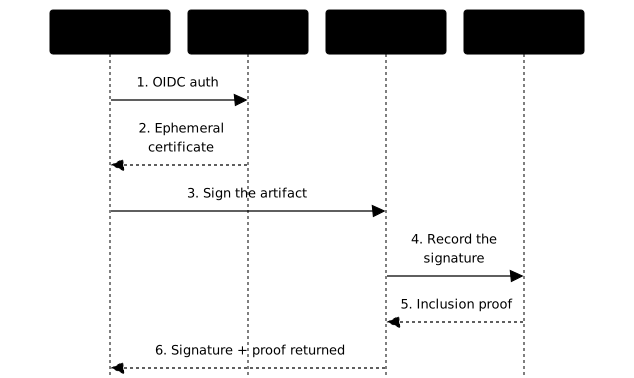
The diagram traces the complete path of a signature, from OIDC authentication to the entry in Rekor. Follow the arrows in order: each building block only intervenes at one precise step.
How does keyless signing work?
Keyless signing ("without a long-term key") takes place in five steps. The word is misleading: a short-lived key does exist, but it lives for only a few seconds. What replaces key management is the proof of identity given by your OIDC provider.
-
OIDC authentication
You authenticate with an OIDC provider (GitHub, Google, Microsoft, GitLab). In CI, the platform itself provides the workflow's identity token.
-
Certificate issuance (Fulcio)
Fulcio verifies the OIDC token and generates a short-lived X.509 certificate (X.509 is the standard format of certificates, the one used by HTTPS) tied to your identity (your email, or the identity of the CI/CD workflow). It expires after about 10 minutes. Fulcio also records the certificate in its own certificate transparency log, which returns a signed certificate timestamp (SCT), a receipt embedded in the certificate that proves it was logged.
-
Signing the artifact (Cosign or gitsign)
The tool signs the artifact with the private key matching the certificate, then destroys that key immediately. The signature is kept apart from the artifact itself, as a detached signature: the artifact is not modified, and the signature and certificate travel next to it (in the registry, for an image).
-
Recording (Rekor)
The signature goes to Rekor, which writes it to an immutable log and returns a timestamp signed by Rekor (the signed entry timestamp, or SET). Even if the certificate expires, the signature stays verifiable thanks to this proof of time.
This proof does not always come from the same place. With Rekor v1, the version described in this lesson, it is the SET, the log's own timestamp. Rekor v2 no longer timestamps by itself: the date comes from a timestamp authority (TSA, in the RFC 3161 format), a separate building block. This TSA is not reserved for v2. In October 2026, the public signing config of Sigstore references
timestamp.sigstore.dev, and the Cosign documentation says that Cosign uses a TSA "when appropriate", with no option to pass: on the public instance, do not treat it as optional. A private instance disables it explicitly with--no-default-tsa. -
Verification
Anyone can check that the signature is valid, that it was created during the certificate's validity, and that it appears in Rekor. The verifier compares the certificate chain against a root of trust: the set of public keys and CA certificates it has decided to trust, distributed through TUF (The Update Framework, a secure update protocol detailed in the Fulcio lesson).
What is a transparency log?
A transparency log is a public register where each entry is cryptographically linked to the previous ones thanks to a Merkle tree. This structure guarantees that nobody can modify a past entry without it being detectable, that nobody can delete one, and that anyone can verify that an entry exists.
The principle is not new. Certificate Transparency already records every TLS certificate issued in order to detect fraudulent ones, and Sigstore applies the same idea to code signing. The table shows what the log brings compared with a signature alone.
| Without a transparency log | With Rekor |
|---|---|
| Impossible to prove when a signature was created | Cryptographic timestamp |
| If someone signs in your name, how would you know? | All your signatures are auditable |
| Revoking a key is complex | Past signatures remain valid |
| Blind trust in the signer | Public traceability |
The detailed working of Merkle trees and inclusion proofs is in the Rekor lesson.
Should you use the public or a private instance?
Sigstore offers free public instances, convenient for the open source
ecosystem, and can also be deployed privately. The public addresses are
fulcio.sigstore.dev for certificates and rekor.sigstore.dev for the log,
with the web interface search.sigstore.dev to
explore entries.
The point of attention is privacy: signatures in the public Rekor are visible to everyone, and the email of your OIDC identity appears there. If anonymity or confidentiality matter, or if the environment is cut off from the Internet, you deploy your own stack (the Fulcio and Rekor lessons cover private deployment) or fall back to classic keys.
Which Sigstore tool for which artifact?
Sigstore is a family of tools, and the right choice depends on what you are signing. Remember that Cosign alone covers most cases (images, files, SBOMs, attestations) and that gitsign is the only specific tool, reserved for Git commits.
| What you sign | Tool to use |
|---|---|
| A container image | Cosign |
| A Git commit | gitsign |
| A binary or an archive | Cosign (file signature, called a "blob") |
| An SBOM or an attestation | Cosign with cosign attest |
| A supply chain policy | in-toto with Cosign |
The last row points to in-toto, the framework that describes the attestations Cosign then signs. An attestation is a signed statement about an artifact (who built it, from which source, what it contains).
How do you sign in CI/CD with GitHub Actions?
In CI, nobody is there to click "sign in": the platform provides the OIDC
token of the workflow, and Fulcio reads the identity of the repository and
the workflow from it. You only need to grant the id-token: write permission
to the job, without storing any signing secret.
name: Build and Sign
on:  push:    tags: ['v*']
# Minimal permissions at the top levelpermissions:  contents: read
jobs:  build-sign:    runs-on: ubuntu-24.04
    # Job-specific permissions    permissions:      contents: read      packages: write       # To push to GHCR      id-token: write       # For Sigstore OIDC      attestations: write   # For GitHub Attestations
    steps:      - name: Checkout code        uses: actions/checkout@3d3c42e5aac5ba805825da76410c181273ba90b1 # v7.0.1        with:          persist-credentials: false
      - name: Set up Docker Buildx        uses: docker/setup-buildx-action@bb05f3f5519dd87d3ba754cc423b652a5edd6d2c # v4.2.0
      - name: Install Cosign        uses: sigstore/cosign-installer@6f9f17788090df1f26f669e9d70d6ae9567deba6 # v4.1.2
      - name: Log in to GHCR        uses: docker/login-action@dbcb813823bdd20940b903addbd779551569679f # v4.6.0        with:          registry: ghcr.io          username: ${{ github.actor }}          password: ${{ secrets.GITHUB_TOKEN }}
      - name: Build and push        id: build        uses: docker/build-push-action@53b7df96c91f9c12dcc8a07bcb9ccacbed38856a # v7.3.0        with:          push: true          tags: ghcr.io/${{ github.repository }}:${{ github.ref_name }}          provenance: true  # Generates the SLSA attestation          sbom: true        # Generates the SBOM with Syft
      - name: Generate SLSA attestation        uses: actions/attest-build-provenance@0f67c3f4856b2e3261c31976d6725780e5e4c373 # v4.1.1        with:          subject-name: ghcr.io/${{ github.repository }}          subject-digest: ${{ steps.build.outputs.digest }}          push-to-registry: true
      - name: Sign image        env:          # Going through the environment avoids template injection in the script          REPO: ${{ github.repository }}          DIGEST: ${{ steps.build.outputs.digest }}        run: |          IMAGE="ghcr.io/${REPO}@${DIGEST}"          cosign sign --yes "${IMAGE}"
          # Immediate verification          cosign verify \            --certificate-identity-regexp="^https://github.com/${REPO}/" \            --certificate-oidc-issuer="https://token.actions.githubusercontent.com" \            "${IMAGE}"
Read this workflow in four points. The permissions are minimal at the
workflow level, then widened only for the signing job. The actions are
pinned to the commit SHA. The Log in to GHCR step authenticates the job to
the registry with the GITHUB_TOKEN: without it, neither the image nor its
signature can be pushed. The signature is made on the image digest, not on
a mutable tag, and it is verified right away with the expected identity of
the workflow and the GitHub OIDC issuer, which reveals a problem at signing
time rather than at deployment.
GitHub Actions is not the only platform that provides a usable OIDC token: GitLab CI, Google Cloud Build and CircleCI do too. The step-by-step implementation is in the Cosign lesson, and commit signing in gitsign (in French).
How are Sigstore and SLSA related?
SLSA (Supply chain Levels for Software Artifacts, see the SLSA page, in French) defines maturity levels for the security of the build chain. Sigstore provides the signing building blocks that make it possible to reach those levels, as the table summarizes.
| SLSA level | Requirement | Sigstore contribution |
|---|---|---|
| Build L1 | Provenance exists | Cosign (signature) |
| Build L2 | Signed provenance, generated by a hosted build platform | Cosign + Fulcio to sign; the platform generates the provenance |
| Build L3 | Hardened build platform: runs are isolated from one another and the signing key is inaccessible to the build steps | Sigstore signs, but isolation comes from the platform (for example a reusable workflow) |
Be careful not to confuse the tool and the level: according to GitHub's
documentation, artifact attestations alone, produced by
actions/attest-build-provenance, give SLSA Build L2. L3 also requires
a build isolated from what the caller runs, for example in a reusable
workflow that the repository is not free to modify.
For advanced attestations, combine Sigstore with in-toto. Choosing a level and reading a provenance are covered in the lesson SLSA provenance: deciding the level.
Who uses Sigstore today?
Adoption by major ecosystems is a good indicator of the maturity of a security tool. npm signs the provenance of its packages with Sigstore, PyPI offers Trusted Publishers (publishing by OIDC identity) and publication attestations, Kubernetes signs its releases, GitHub issues provenance attestations, and Wolfi/Chainguard signs its images. When package registries sign at that scale, verification on the consumer side becomes a realistic practice.
The public Rekor log holds billions of entries (about 3.2 billion
according to the /api/v1/log API on 16 October 2026), a volume that grows
every day. The exact figure changes quickly and can be read through that API or
on the search.sigstore.dev interface.
What does a Sigstore signature guarantee?
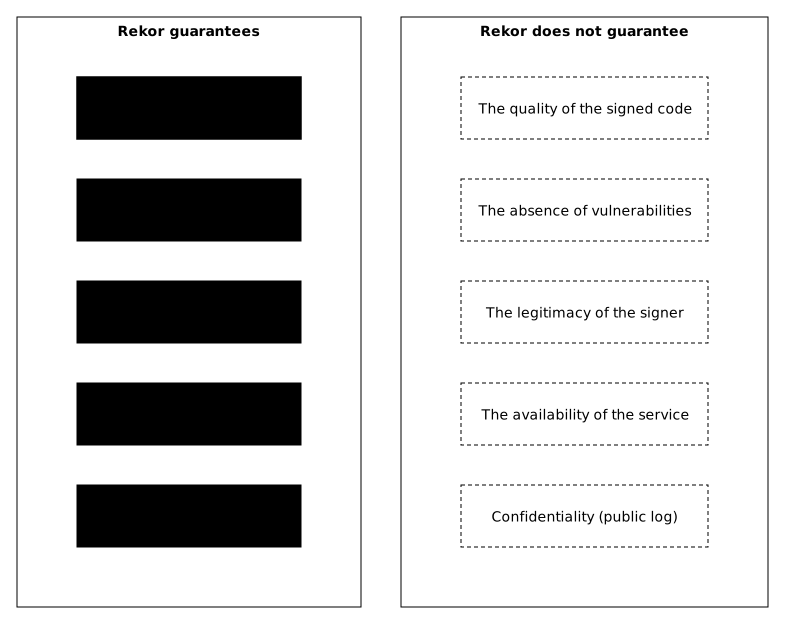
A signature gives four precise guarantees. The first two (authenticity and integrity) answer "who produced this file, and was it altered?". The next two (non-repudiation and timestamp) come from the Rekor log, completed by a timestamp authority (TSA) for the date, and answer "can it be proved publicly, and since when?".
| Guarantee | Explanation |
|---|---|
| Authenticity | The artifact was signed by the declared identity |
| Integrity | The artifact has not been modified since it was signed |
| Non-repudiation | The signature is recorded publicly: the signer cannot deny having made it |
| Timestamp | We know when the signature was created |
The diagram isolates the part that belongs to the Rekor log: what it guarantees, on the left, and what it does not guarantee, on the right.
What does it not guarantee?
This is the most important section, because a signature creates a trust that can be misplaced. A valid signature proves who produced the artifact and that it has not changed since, nothing more. A correctly signed malicious package stays malicious: the signature tells you whom to hold accountable, not whether the content is safe.
| Non-guarantee | Explanation |
|---|---|
| Code quality | A signed artifact can contain bugs or flaws |
| Intentions | The signer may be malicious |
| Build security | Sigstore does not protect the build pipeline |
These limits explain why a signature never comes alone: it is combined with an inventory (SBOM), a build provenance and verification policies at deployment.
Key points
- Keyless, not key-free: a key exists for a few seconds, and what replaces its management is the OIDC identity and a short-lived certificate.
- Four building blocks: Fulcio issues the certificate, Cosign and gitsign sign, Rekor logs and timestamps.
- The log keeps the signature verifiable after the certificate expires thanks to the inclusion proof.
- In CI, the platform provides the OIDC token (
id-token: write): no signing secret to store, and you sign the digest, not the tag. - The signature proves who and when, not that the code is safe: combine it with SBOM, provenance and a verification policy.
- Expected evidence: a signature verified with the expected identity and OIDC issuer, and the matching entry in Rekor.
Knowledge check
Check that the essentials of this lesson are in place. The questions only cover what has just been explained here.
Knowledge check
Check what you have learned with this interactive quiz
How it works
- The timer starts when you click Start
- Multiple choice, true/false and short answer questions
- You can move between questions
- Detailed results are shown at the end
Starts the quiz and the timer
Review
(0/0)Score by domain
A domain groups several guides and gets several questions, so its score is more reliable than a per-topic score, which often rests on a single question.
Summary
Strengths
No topic passed at 80% on at least two questions yet.
Weak areas
No topic below the pass mark.
Recommended next
Hints before you try again?
Continue the course: Fulcio: the Sigstore certificate authority
A new full quiz with random questions
Work again only on the questions you missed