Rekor is the transparency log of the Sigstore ecosystem. A transparency log is a public register where entries can only be added, never altered or removed without anyone noticing. Rekor records every signature in it, which lets you prove that a signature existed at a given moment, audit the signatures of an identity, and detect fraudulent signatures. This transparency log feeds the traceability and provenance requirements of the DevSecOps SOCLE framework (in French).
This lesson is for a DevOps engineer who has read the Sigstore overview and the lesson on Fulcio, the authority that issues the short-lived certificate. Rekor is the piece that keeps a trace of what Cosign (images) and gitsign (in French, for commits) sign with that certificate. Cosign has its own lesson: here you only keep what touches the log. The keyless model, the certificate and the trust root are covered in the Sigstore and Fulcio lessons and are not repeated here.
What you will learn
This lesson starts from the problem Rekor solves, then moves to practice
with rekor-cli, up to the monitoring of your signatures. You will learn
to:
- explain why keyless signing needs a transparency log;
- query the public log by email, hash, index or UUID;
- verify an inclusion proof, with
rekor-clior with Cosign; - monitor the signatures of your identity from a CI/CD pipeline;
- decide whether a private Rekor instance is justified, and understand its architecture;
- place what Rekor guarantees and what it does not protect;
- produce the evidence for SOCLE-REL-VER-2 (in French), the transparency log of signatures, and contribute to SOCLE-REL-VER-1 (in French), verification before use.
Why is Rekor essential?
With Sigstore's keyless signing (no private key to keep), you sign with a Fulcio certificate that expires after 10 minutes. Without Rekor, it is impossible to prove that the signature was valid when it was created: by the time someone verifies it, the certificate has already expired. The Sigstore lesson shows this problem on a timeline.
Rekor solves it by recording the signature at the moment it is created, with a cryptographic timestamp:

What properties does the log have?
These five properties are not marketing arguments: they are the guarantees that make a piece of evidence acceptable in an audit. Read the right-hand column first, it answers the only question that matters, what the property is for. Above all, remember append-only and timestamped: the first forbids rewriting history, the second gives the proof of time that survives the expiry of the Fulcio certificate.
| Property | Description | Why it matters |
|---|---|---|
| Immutable | An entry cannot be modified | Guarantees historical integrity |
| Append-only | You can only add, never rewrite | Prevents rewriting history |
| Verifiable | Merkle tree structure | Cryptographic proofs of inclusion |
| Public | Anyone can read and audit | Transparency: everyone can check |
| Timestamped | Timestamp signed by Rekor (SET) on every entry; an RFC 3161 timestamp comes from a timestamp authority (TSA), which the public signing config references (timestamp.sigstore.dev, October 2026) and which Cosign uses by default when appropriate; to be configured explicitly on a private instance | Verifiable proof of time |
How does a transparency log work?
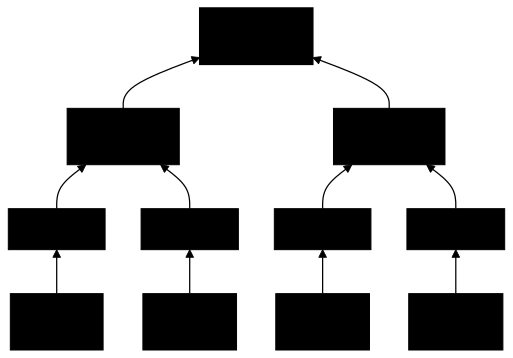
Rekor uses a Merkle tree: a structure where every node is the hash of its children. If you modify a single entry, the root hash changes. The principle comes from Certificate Transparency, the public system that logs the TLS certificates issued by certificate authorities.
What is an inclusion proof?
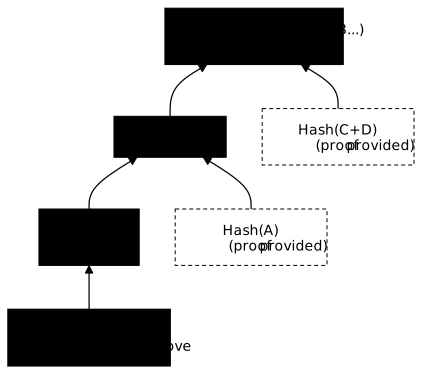
An inclusion proof is the minimal set of hashes that lets anyone recompute the root hash from one entry, to confirm that this entry is really part of the log. To prove that an entry exists, Rekor supplies the intermediate hashes, so you can recompute the root without downloading the whole log:
Two related words appear in Rekor's API and in the specifications. A signed tree head (STH; in Rekor, its text form is called a checkpoint) is a statement, signed by the log, that gives the tree size and the root hash at a given moment. A consistency proof shows that a newer tree head extends an older one without rewriting it, which is how an auditor checks that the log is really append-only over time. Finally, a witness is an independent party that co-signs these checkpoints, so that a log cannot show different histories to different readers without being caught.
What are Rekor's use cases?
Rekor serves four recurring needs, from the audit of a team to the analysis of an incident. Each one comes down to the same operation: querying the log to find who signed what, and when. The table at the end sums them up.
1. Security audit
Your company wants to audit the signatures made by its developers. The search by email expects a full address, not a domain: you therefore query each address of the team, one after the other.
# List the entries associated with one address of the teamrekor-cli search --email alice@your-company.comThe command does not filter by date. To bound the audit to a period,
read the IntegratedTime field of each entry with rekor-cli get (see
below).
2. Compromise detection
You set up an alert that notifies you as soon as a signature is created with your identity (the script is in the section "How do you alert on new signatures?"). If you receive an alert for a signature you did not make, you know your account is compromised.
3. Regulatory compliance
The European Cyber Resilience Act (CRA) and frameworks such as SLSA (in French) require being able to justify the origin of delivered artifacts. Rekor replaces neither the SBOM nor the technical documentation the CRA requires, but it provides a cryptographic proof of who signed what and when, which you can add to a compliance file.
4. Incident response
After a security incident, you can trace the complete history of signatures to identify the point of compromise.
| Scenario | Question | Rekor's answer |
|---|---|---|
| Audit | Who signed our artifacts this month? | List of signatures by email/hash |
| Compromise | Did someone sign in my place? | Yes, entry #12345 on 15/12 |
| Compliance | Proof of traceability? | Inclusion proof + timestamp |
| Incident | When was the malicious image signed? | Precise timestamp |
What do you need for the hands-on part?
The sections that follow use the command line. Before you start:
- Internet access: to reach the public Rekor instance
- jq (optional): to parse JSON responses in your scripts
# Install jq if needed# Debian/Ubuntusudo apt install jq
# macOSbrew install jq
How do you install rekor-cli?
Pick the tab that matches your system. The Linux tab is the reference path: it downloads a pinned release and checks its fingerprint before installing.
Download the binary and the checksum file published by the project
(sigstore/rekor repository), then verify
the fingerprint before installing. A pinned version makes the procedure
reproducible; adapt REKOR_VERSION when a newer version comes out.
# Pinned version (a later patch release exists: check the releases page)REKOR_VERSION=v1.5.3BASE="https://github.com/sigstore/rekor/releases/download/${REKOR_VERSION}"
# Download the binary and the official checksum filecurl -LO "${BASE}/rekor-cli-linux-amd64"curl -LO "${BASE}/rekor_checksums.txt"
# Verify the SHA256 fingerprint before any installationsha256sum --check --ignore-missing rekor_checksums.txt# rekor-cli-linux-amd64: OK
# Install only if the verification succeededchmod +x rekor-cli-linux-amd64sudo mv rekor-cli-linux-amd64 /usr/local/bin/rekor-cli
# Checkrekor-cli version
Expected output:
GitVersion: v1.5.3GitCommit: 7d9dcffcc27c4912e7d17fc768db01aa2d5cf26cGitTreeState: cleanBuildDate: 2026-07-01T21:50:32ZGoVersion: go1.26.3Platform: linux/amd64# With Homebrewbrew install rekor-cli
# Checkrekor-cli version# If you have Go installed (pinned version, like the binary)go install github.com/sigstore/rekor/cmd/rekor-cli@v1.5.3
# Check (make sure $GOPATH/bin is in your PATH)rekor-cli versionHow do you query the public log?
The public Rekor instance is available at rekor.sigstore.dev. It is the
instance Cosign and gitsign use by default. According to the
official documentation, it offers
a 99.5% availability SLO (a service level objective, with no contractual
commitment) on its main API endpoints (/api/v1/log, /api/v1/log/publicKey,
/api/v1/log/proof, /api/v1/log/entries and /api/v1/log/entries/retrieve,
according to the Rekor README) and is monitored by an on-call team. Its
live status is published at status.sigstore.dev. A version 2 of Rekor (the rekor-tiles
project, a tile-based log) has been generally available since 10 October 2025,
but the public instance still serves v1 by default for signing (state as of
16 October 2026, according to the
Sigstore post); this page describes
v1. In v2, the date is no longer attested by the log's SET but by a separate
timestamp authority (TSA).
What identifiers does Rekor use?
Each entry in Rekor can be identified in several ways. The table tells you which identifier to use depending on what you already know: a position, a content-derived identifier, an artifact or a signer.
| Identifier | Format | Example | Use |
|---|---|---|---|
| Index | Sequential integer | 7403797 | Position in the log |
| UUID | 80-character hexadecimal string | 24296fb24b8ad77a3d22... | Unique identifier |
| Hash | SHA256 of the artifact | d1bf68416e025fa0... | Search by artifact |
| OIDC identity | dev@example.com | Search by signer |
How do you get the state of the log?
Start by checking that you can reach the log and see its current state:
rekor-cli loginfoOutput taken on 16 October 2026 (values change on every call, and
rekor-cli prints validation messages for the archived trees before this
block):
Verification Successful!Active Tree Size: 3161031609Total Tree Size: 3282935871Root Hash: 9edf75837e8ec7c457f9e00022bd2dd5e664f3b643028d2aa6963ae59047f166TreeID: 1193050959916656506The public log is split into several Merkle trees: archived trees, which are frozen, and one active tree, which receives the new signatures. The table therefore separates what concerns the active tree from what concerns the whole.
| Field | Meaning |
|---|---|
| Active Tree Size | Number of entries in the active tree |
| Total Tree Size | Number of entries in all trees, archived ones included |
| Root Hash | Root hash of the active Merkle tree |
| TreeID | Identifier of the active tree |
The Root Hash is the most important piece of data: it is the hash that "summarizes" the whole content of the active tree. If a single entry were modified, this hash would change.
How do you search by email?
This is the most common search. It lets you find all the signatures associated with an OIDC identity (your GitHub account, Google account, etc.):
rekor-cli search --email your@email.comOutput (one full UUID per line; with no result, the command prints
no matching entries found and exits with an error code):
Found matching entries (listed by UUID):24296fb24b8ad77a05565a4436ef17cadb26307217f7c1907a700923d6d2ad611a81a56a81ed603824296fb24b8ad77a3d228fca35e4f9f32d582a2cb0391ca72ae73357a447a057fc0cafa50f86129dHow do you search by artifact hash?
If you have a file and want to know whether it was signed (for example with
cosign sign-blob), use its SHA256 hash:
# Compute the hash of a local filesha256sum my-file.txt# Example output (the hash depends on your file's content):# d1bf68416e025fa0e0a5a54c5dd650c4121f41414cae9c5c167c0f3d653734a8  my-file.txt
# Search in Rekor (this example hash really is in the public log)rekor-cli search --sha d1bf68416e025fa0e0a5a54c5dd650c4121f41414cae9c5c167c0f3d653734a8
This search is useful to check the provenance of an artifact: was it signed?
By whom? When? With your own file, the hash differs and the command only
finds an entry if that file was signed then logged; otherwise it answers
no matching entries found.
This method does not work for a container image signed by Cosign. Cosign
does not sign the image itself but a small JSON document (the payload) that
contains the image digest. The Rekor entry indexes the hash of that
document, not the image digest: rekor-cli search --sha with the image digest
therefore does not find it. For an image, use cosign verify, which rebuilds
the payload, finds the Rekor entry and checks its inclusion proof, or search by
identity with --email.
How do you search by index?
Each entry has a unique index (a sequential number). Index 0 is the
first entry of the log, index 1 the second, and so on.
# Fetch entry number 7403797rekor-cli get --log-index 7403797This command returns the complete entry: artifact hash, signature, certificate used, integration time. The section "How do you read the details of an entry?" explains its output.
How do you search by UUID?
The UUID is the unique identifier of an entry. Unlike the index, which is only a position in the log, it is derived from the content of the entry: its first 16 hexadecimal characters designate the tree (a Trillian tree, which Sigstore calls a shard; Trillian is the Merkle-tree log engine behind Rekor v1) that contains it, and the following 64 are the entry's Merkle leaf hash in that tree.
rekor-cli get --uuid 24296fb24b8ad77a3d228fca35e4f9f32d582a2cb0391ca72ae73357a447a057fc0cafa50f86129dHow do you read the details of an entry?
Once you have found an entry (by email, hash, index or UUID), you can display all its details:
rekor-cli get --log-index 7403797Output (real entry from the public log, long fields truncated):
LogID: c0d23d6ad406973f9559f3ba2d1ca01f84147d8ffc5b8445c224f98b9591801dIndex: 7403797IntegratedTime: 2022-11-19T07:58:34ZUUID: 24296fb24b8ad77a3d228fca35e4f9f32d582a2cb0391ca72ae73357a447a057fc0cafa50f86129dBody: { "HashedRekordObj": { "data": { "hash": { "algorithm": "sha256", "value": "d1bf68416e025fa0e0a5a54c5dd650c4121f41414cae9c5c167c0f3d653734a8" } }, "signature": { "content": "MEUCIQDk3shE3zCvSfxvMWMs...", "publicKey": { "content": "LS0tLS1CRUdJTiBDRVJUSUZJQ0FURS0tLS0t..." } } }}IntegratedTime is the time at which the entry was integrated into the log.
The publicKey.content field holds the signer's certificate, encoded in
base64 (the prefix LS0tLS1CRUdJTi corresponds to -----BEGIN): decoded, it
reveals the identity's email, which is what the last command below does.
The HashedRekordObj in the body is the entry type: it tells Rekor how to
read the entry. A hashedrekord entry stores the hash of an artifact, the
signature over it and the public key or certificate; it is the type used for
blob and image signatures. The intoto and dsse types store attestations
instead (a signed statement about an artifact, wrapped in a DSSE envelope, the
Dead Simple Signing Envelope format). Index and UUID work the same way for all
types.
How do you use the JSON format for automation?
To integrate Rekor into your scripts or CI/CD pipelines, use the JSON format:
# Fetch an entry as JSONrekor-cli get --log-index 7403797 --format json
# Extract the artifact hash with jqrekor-cli get --log-index 7403797 --format json | jq -r '.Body.HashedRekordObj.data.hash.value'
# Extract the signer's email (the certificate is base64-encoded)rekor-cli get --log-index 7403797 --format json | jq -r '.Body.HashedRekordObj.signature.publicKey.content' | base64 -d | openssl x509 -noout -email# testinguser883@gmail.com
How do you verify a signature?
Verification is the most important operation in Rekor. It lets you cryptographically prove that a signature exists in the log and that it is valid.
How does the inclusion proof work?
When you verify an entry, Rekor returns an inclusion proof. This proof is a set of hashes that let you recompute the Root Hash from the entry.
The diagram in the section "What is an inclusion proof?" shows this computation
for entry B, with Hash(A) and Hash(C+D) as the proof.
Verification steps for an entry B:
- Compute
Hash(B) - Compute
Hash(A+B)with theHash(A)supplied in the proof - Compute
Root = Hash(Hash(A+B) + Hash(C+D)) - Compare with the public Root Hash
- If equal, entry B really exists in the log
How do you verify in practice?
The simplest way to see an inclusion proof at work is to ask rekor-cli to
recompute the Root Hash of an existing entry, for example the entry of
index 7403797 used above:
rekor-cli verify --log-index 7403797The output first shows the current Root Hash, then each
SHA256(0x01 | left hash | right hash) computation of the proof, and ends
with two lines, Computed Root Hash and Expected Root Hash. If the two
values are identical, the entry really belongs to the log. If they differ,
the proof does not hold.
To verify that a specific signature is in the log, you need to gather the artifact, its detached signature and the matching public key, which must already have been recorded together in the log:
rekor-cli verify --artifact my-file.txt \ --signature signature.sig \ --public-key public-key.pem \ --pki-format x509The --pki-format option states the format of the key and of the signature:
its default value is pgp, hence x509 for a PEM public key. If the entry
is in the log, the command prints the inclusion proof (index, intermediate
hashes, tree size); otherwise it exits with an error.
What does a verification prove?
A successful verification gives three distinct guarantees that must not be confused. The inclusion proof attests that the entry is in the log, the signature validity that the signature matches the artifact, and the timestamp that it existed at a given date. None of the three says that the signed content is safe: they prove origin and integrity, not quality.
| Element verified | Meaning |
|---|---|
| Inclusion proof | The entry really exists in the log |
| Signature validity | The signature matches the artifact |
| Timestamp | The signature was created at a specific moment |
How does Cosign verify automatically?
In practice, you do not need to call rekor-cli verify directly. Cosign,
the tool that signs and verifies images, automatically verifies the Rekor
proofs when it verifies a signature. In keyless mode, you give it the
expected identity and its OIDC provider:
# Cosign automatically verifies the inclusion in Rekor; in keyless mode,# the expected identity and its OIDC provider are mandatorycosign verify my-registry/my-image:v1.0.0 \  --certificate-identity alice@your-company.com \  --certificate-oidc-issuer https://accounts.google.com
# To disable the Rekor verification (not recommended)cosign verify --insecure-ignore-tlog my-registry/my-image:v1.0.0 \ --certificate-identity alice@your-company.com \ --certificate-oidc-issuer https://accounts.google.comHow do you explore with the web interface?
For a visual exploration, Rekor has a web interface:
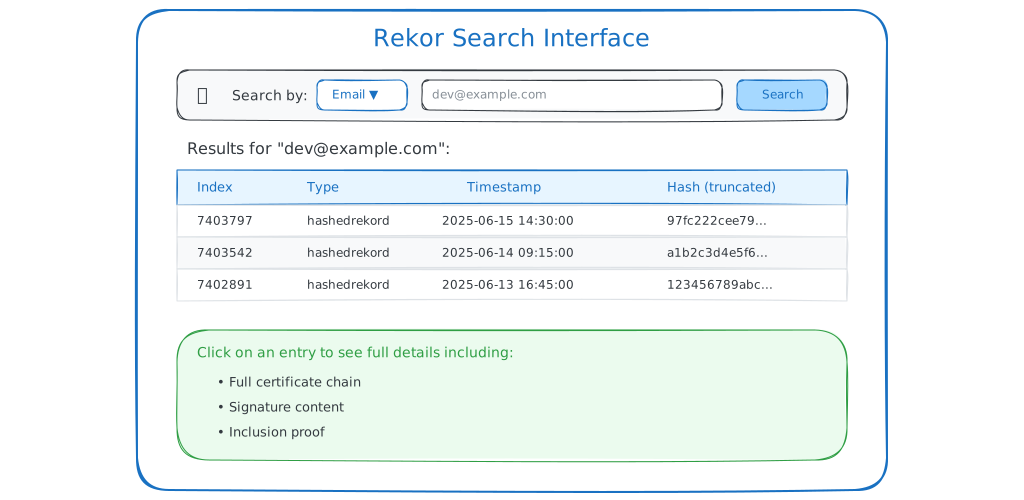
Features:
- Search by email, hash, UUID, index
- Display of the full details of an entry
- Display of the decoded certificate
- Export of the data as JSON
How do you integrate Rekor in CI/CD?
Integrating Rekor into your CI/CD pipelines lets you automate the verification and the monitoring of signatures.
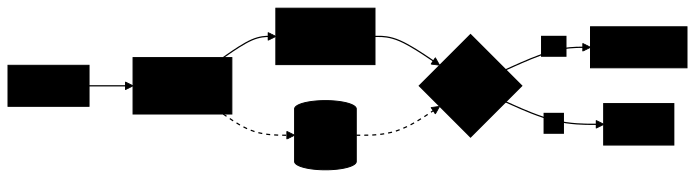
Where does Rekor fit in a pipeline?
Rekor fits at two moments of the pipeline, and the diagram below tells them apart. At build time, a step records the signature of the freshly produced artifact. At deployment time, or during a periodic audit, another step queries the log to confirm that an artifact was indeed signed before allowing it. This second step is what brings the defensive value: without verification on entry, the recording is of no use.
How do you verify signatures in a pipeline?
This workflow assumes that my-artifact, signature.sig and
public-key.pem are available in the repository or downloaded by a previous
step: these are the three pieces of the verification described above.
GitHub Actions with security best practices:
name: Verify Signatures
on:  push:    branches: [main]  schedule:    - cron: '0 2 * * *'  # Daily check at 2 am
permissions: {}
jobs:  verify:    runs-on: ubuntu-24.04    permissions:      contents: read    steps:      - name: Checkout code        uses: actions/checkout@3d3c42e5aac5ba805825da76410c181273ba90b1 # v7.0.1        with:          persist-credentials: false
      - name: Install rekor-cli        run: |          REKOR_VERSION=v1.5.3          BASE="https://github.com/sigstore/rekor/releases/download/${REKOR_VERSION}"          curl -LO "${BASE}/rekor-cli-linux-amd64"          curl -LO "${BASE}/rekor_checksums.txt"          sha256sum --check --ignore-missing rekor_checksums.txt          chmod +x rekor-cli-linux-amd64          sudo mv rekor-cli-linux-amd64 /usr/local/bin/rekor-cli
      - name: Search for signatures        run: |          # Search for the signature of a file (cosign sign-blob)          HASH="$(sha256sum my-artifact | cut -d ' ' -f 1)"          rekor-cli search --sha "${HASH}"
      - name: Verify inclusion proof        run: |          rekor-cli verify --artifact my-artifact \            --signature signature.sig \            --public-key public-key.pem \            --pki-format x509
How do you run a continuous audit with GitHub attestations?
The next workflow checks on a schedule that the latest release image still carries a valid SLSA attestation and a valid Cosign signature. Read it in three parts: it finds the latest release and the image digest, verifies the attestation, then lets Cosign check the signature and its Rekor proof.
name: SLSA Audit
on:  schedule:    - cron: '0 */6 * * *'  # Every 6 hours  workflow_dispatch:
permissions: {}
jobs:  audit:    runs-on: ubuntu-24.04    permissions:      contents: read      packages: read    steps:      - name: Get latest release        id: release        run: |          LATEST_TAG=$(gh api "repos/${GITHUB_REPOSITORY}/releases/latest" --jq '.tag_name')          echo "tag=${LATEST_TAG}" >> "$GITHUB_OUTPUT"        env:          GH_TOKEN: ${{ secrets.GITHUB_TOKEN }}
      - name: Get image digest        id: digest        env:          RELEASE_TAG: ${{ steps.release.outputs.tag }}          GH_ACTOR: ${{ github.actor }}          GH_TOKEN: ${{ secrets.GITHUB_TOKEN }}        run: |          echo "${GH_TOKEN}" | docker login ghcr.io -u "${GH_ACTOR}" --password-stdin          IMAGE="ghcr.io/${GITHUB_REPOSITORY}:${RELEASE_TAG}"          DIGEST=$(docker pull "${IMAGE}" 2>&1 | grep "Digest:" | cut -d' ' -f2)          echo "digest=${DIGEST}" >> "$GITHUB_OUTPUT"
      - name: Verify SLSA attestation        run: |          gh attestation verify \            "oci://ghcr.io/${GITHUB_REPOSITORY}@${IMAGE_DIGEST}" \            --owner "${GITHUB_REPOSITORY_OWNER}"        env:          GH_TOKEN: ${{ secrets.GITHUB_TOKEN }}          IMAGE_DIGEST: ${{ steps.digest.outputs.digest }}
      - name: Check Rekor entries        env:          IMAGE_DIGEST: ${{ steps.digest.outputs.digest }}        run: |          # Install cosign with checksum verification          COSIGN_VERSION=v3.1.3          BASE="https://github.com/sigstore/cosign/releases/download/${COSIGN_VERSION}"          curl -LO "${BASE}/cosign-linux-amd64"          curl -LO "${BASE}/cosign_checksums.txt"          sha256sum --check --ignore-missing cosign_checksums.txt          chmod +x cosign-linux-amd64          sudo mv cosign-linux-amd64 /usr/local/bin/cosign
          # cosign itself checks the Rekor proof attached to the signature          # (offline verification, no rekor-cli call)          cosign verify \            "ghcr.io/${GITHUB_REPOSITORY}@${IMAGE_DIGEST}" \            --certificate-identity-regexp "^https://github.com/${GITHUB_REPOSITORY}/" \            --certificate-oidc-issuer https://token.actions.githubusercontent.com
      - name: Report audit results        if: always()        env:          JOB_STATUS: ${{ job.status }}          RELEASE_TAG: ${{ steps.release.outputs.tag }}        run: |          if [ "${JOB_STATUS}" == "success" ]; then            echo "Audit passed for ${RELEASE_TAG}"            echo "- SLSA attestation: verified"            echo "- Rekor entries: found"          else            echo "Audit failed for ${RELEASE_TAG}"            exit 1          fi
Two details of the workflow matter. The latest release comes from the
releases/latest endpoint, because the first item of the tag list is not
necessarily the most recent one. And downloading from GHCR requires
authentication: the job receives the packages: read permission and
logs in with docker login, the token going through an environment variable
and not through an expression in the command.
The Check Rekor entries step uses cosign verify rather than
rekor-cli search --sha: a Cosign image signature is logged under the hash of
its payload, not under the image digest, and a search by digest would
not find it. cosign verify fails if the signature is missing, if the identity
does not match or if the Rekor entry cannot be found, which makes the job fail
as expected. The workflow assumes that the image is signed keyless by a
workflow of this same repository.
How do you alert on new signatures?
The search by email does not accept a domain: the script below takes a list of addresses, remembers the UUIDs already seen for each one in a state folder, and reports any new entry on the next run. The first run serves as the baseline and raises no alert. Run it at regular intervals (cron or scheduled job).
#!/usr/bin/env bash# monitor-signatures.sh: reports new Rekor entries for the monitored identitiesset -euo pipefail
EMAILS=("alice@your-company.com" "bob@your-company.com")STATE_DIR="${HOME}/.rekor-monitor"mkdir -p "${STATE_DIR}"
for email in "${EMAILS[@]}"; do  known="${STATE_DIR}/${email}.uuids"
  # One search per full address. With no result (or an unreachable server),  # rekor-cli exits with an error: we move on to the next address without  # touching the state.  if ! result="$(rekor-cli search --email "${email}" --format json 2>/dev/null)"; then    continue  fi
  current="$(mktemp)"  echo "${result}" | jq -r '.UUIDs[]' | sort > "${current}"
  if [ -f "${known}" ]; then    # comm -13: lines present only in the current list    comm -13 "${known}" "${current}" | while read -r uuid; do      echo "New signature for ${email}: ${uuid}"      # Send an alert (Slack, email, etc.)    done  fi
  mv "${current}" "${known}"done
comm -13 only prints the UUIDs present in the current list and absent from
the previous one, that is, the new signatures. Replace the comment with the
call to your alerting tool.
How do you deploy Rekor privately?
The public Rekor instance suits most open-source use cases. However, some situations require a private instance.
When should you deploy privately?
Five situations justify giving up the public instance, and they boil down to two underlying reasons: confidentiality (your identities and signatures must not be public) and independence (an environment with no Internet access, a sovereignty or region constraint). If neither applies to your context, the public instance remains the simplest choice, and the community audits it.
| Situation | Why a private instance |
|---|---|
| Air-gapped | No Internet access from the build environment |
| Confidentiality | Emails/signatures must not be public |
| Compliance | Data must stay in a geographic region |
| Performance | Full control over latency and availability |
| Sovereignty | Independence from the Sigstore infrastructure |
What is the architecture of a private deployment?
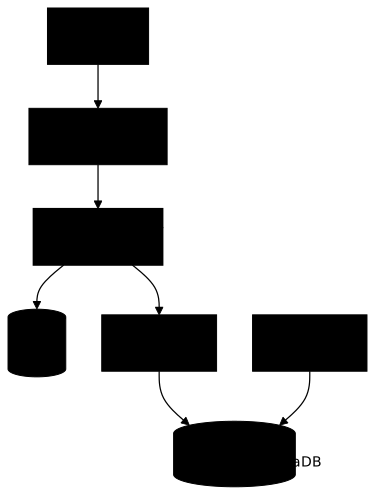
A Rekor instance is not a standalone binary: it relies on Trillian, the
Merkle-tree log engine developed by Google, itself backed by a MySQL/MariaDB
database that stores the entries. The diagram below shows how rekor-server
relies on the log-server and the log-signer of Trillian. Keep this
dependency in mind: backing up Rekor means first backing up this database,
otherwise the whole log is lost.
How do you deploy with Docker Compose?
Here is a sketch to understand the building blocks, not a deployment ready
to start: it lacks the Trillian SQL schema (which the mariadb image does
not contain), the creation of the tree (createtree) and its identifier to
pass to rekor-server. For an instance that really starts, begin from the
official docker-compose.yml
of the Rekor repository at tag v1.5.3:
services:  mysql:    image: mariadb:10.11@sha256:7f22313fc130a377a44999965bcb0a08dd5b21e8502824c1b864f792f9bc66ab    environment:      MYSQL_ROOT_PASSWORD: secret      MYSQL_DATABASE: trillian      MYSQL_USER: trillian      MYSQL_PASSWORD: trillian    volumes:      - mysql-data:/var/lib/mysql
  redis:    image: redis:7-alpine@sha256:6ab0b6e7381779332f97b8ca76193e45b0756f38d4c0dcda72dbb3c32061ab99
  trillian-log-server:    image: gcr.io/trillian-opensource-ci/log_server:v1.7.3@sha256:f5e3cfb3342baf4b6d6ea289be70f0a9b9698701028511c1209f7e2dce2b06a0    command:      - --storage_system=mysql      - --mysql_uri=trillian:trillian@tcp(mysql:3306)/trillian      - --rpc_endpoint=0.0.0.0:8090      - --http_endpoint=0.0.0.0:8091    depends_on:      - mysql
  trillian-log-signer:    image: gcr.io/trillian-opensource-ci/log_signer:v1.7.3@sha256:2f8139ba3ceccaa40736c4ee4ee55256d9bbee1e16c1ab79baa6d56c77af6dd9    command:      - --storage_system=mysql      - --mysql_uri=trillian:trillian@tcp(mysql:3306)/trillian      - --rpc_endpoint=0.0.0.0:8090      - --force_master=true    depends_on:      - mysql
  rekor-server:    image: gcr.io/projectsigstore/rekor-server:v1.5.3@sha256:ef3ac5d318fe8fb50997d6bf3e39c04e8ccc87708ff991e16d74e956f85ca74e    command:      - serve      - --trillian_log_server.address=trillian-log-server      - --trillian_log_server.port=8090      - --redis_server.address=redis      - --redis_server.port=6379      - --rekor_server.address=0.0.0.0      - --rekor_server.port=3000    ports:      - "3000:3000"    depends_on:      - trillian-log-server      - redis
volumes:  mysql-data:
How do you use your private instance?
Once the instance runs, point rekor-cli at it instead of the public one, with
an environment variable or with an option on each command.
# Configure rekor-cli to use your serverexport REKOR_SERVER=https://rekor.your-company.com
# Or per commandrekor-cli --rekor_server https://rekor.your-company.com loginfoTroubleshooting
Two checks cover most failures: read the symptom in the table, then rule out the network with a single HTTP call.
What are the common problems?
Most errors met with rekor-cli are either network access problems to the
instance or malformed identifiers. First read the exact symptom returned
by the command, then trace back to the cause in the table: a
verification failed has nothing to do with connectivity, it signals that the
artifact no longer matches its signature.
| Symptom | Likely cause | Solution |
|---|---|---|
connection refused | Rekor server unreachable | Check the Internet connection |
entry not found | Invalid UUID/index | Check the identifier format |
no matching entries found | No entry for this address or hash | Check the full address (not a domain) and the SHA256 hash |
verification failed | Artifact modified | The artifact does not match the signature |
timeout | Slow network | Retry or increase the timeout |
How do you check connectivity?
Before suspecting rekor-cli, isolate the network layer with a simple
HTTP call to the API. If this curl request returns a JSON object
containing a treeSize, the instance is reachable and the problem lies
elsewhere (identifier format, modified artifact). If it fails, you have
confirmed a connectivity or proxy issue, independent of the tool.
# Test access to the public servercurl -s https://rekor.sigstore.dev/api/v1/log | jq '{treeSize, rootHash, treeID}'
# Expected output (values of 16 October 2026, they change continuously):# {#   "treeSize": 3161030760,#   "rootHash": "719aa3ac258908a5e1eff1ddc94deead07f72d169a75f3b0b0761ef9a79d2ffc",#   "treeID": "1193050959916656506"# }
What are the security considerations and limits?
Understanding what Rekor protects (and what it does not) is essential for an informed use.
What does Rekor guarantee?
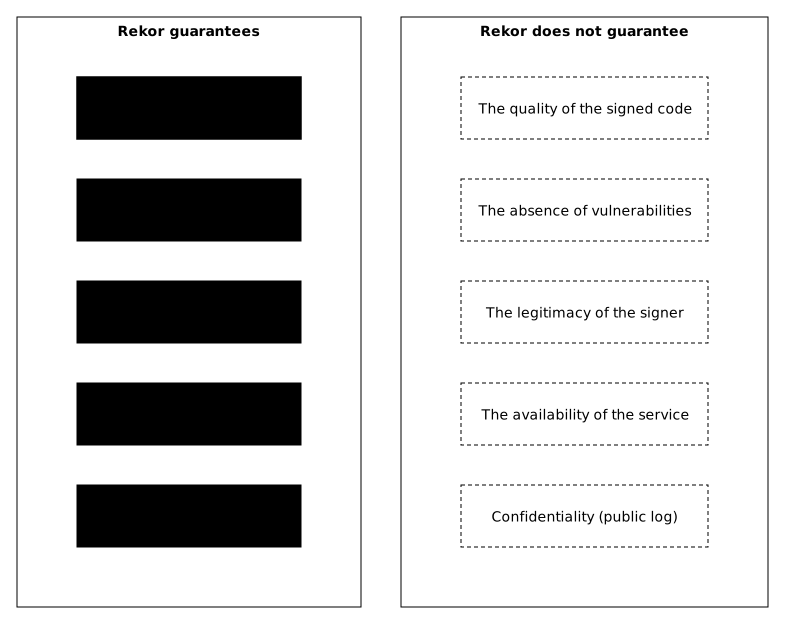
Before reading the diagram, keep in mind a distinction that avoids misunderstandings: Rekor provides a guarantee of integrity and traceability, not of trust in the signer. It proves that a signature existed at a given moment and has not been altered since. It judges neither the legitimacy of the signer nor the quality of the signed artifact, two points the diagram deliberately places outside its scope.
What attacks does it stop, and what are the limits?
This table is read in three steps, column by column: the attack, what Rekor opposes to it, and above all the limit of that protection. The third column is the one that counts, because it corrects the most common illusion. Rekor is a tool for detection after the fact, not for prevention: it makes a tampering visible and provable, but prevents neither the fraudulent signature nor the modification of an artifact.
| Attack | Rekor protection | Limit |
|---|---|---|
| Identity theft | Signature publicly visible | If the OIDC account is compromised, the attacker can sign |
| Artifact modification | Hash recorded in the log | Detection after the fact only |
| Log tampering | Merkle tree + signatures | Requires compromising the infrastructure |
| Entry deletion | Append-only structure | A malicious operator could "fork" the log |
What good practices follow?
These recommendations follow directly from the limits seen just above. Since Rekor detects without preventing, what matters happens around the log, not in it. The first two lines form the foundation: verifying in CI closes the door to unsigned artifacts, and monitoring new signatures turns detection after the fact into a near real-time alert as soon as an identity is usurped.
| Practice | Why |
|---|---|
| Verify signatures in CI | Detects unsigned or forged artifacts |
| Monitor new signatures | Fast alert if an identity is usurped |
| Enable 2FA on OIDC accounts | Reduces the risk of compromise |
| Archive inclusion proofs | Audit trail for compliance |
| Use a private Rekor if confidentiality is required | Emails are public otherwise |
What does Rekor not protect against?
Three limits deserve to be stated explicitly, because each is a common misconception about what a transparency log can do.
Key points
Here are the 7 essential points to remember about Rekor:
-
Rekor is an append-only transparency log: every signature is timestamped and recorded in a public, immutable register that anyone can consult
-
Merkle tree: a cryptographic structure that guarantees the log cannot be modified without it being detectable
-
Proof of time: solves the problem of short-lived certificates by proving that a signature existed at a given moment
-
Open auditability: anyone can search and verify signatures (beware: the emails are public)
-
Private instance possible: for air-gapped environments or those that need confidentiality
-
Detect, not prevent: Rekor makes a fraudulent signature visible but prevents neither a signature by a compromised OIDC account nor the signing of malicious code; verify in CI and monitor your identities
-
Expected evidence (SOCLE-REL-VER-2): a transparency log of signatures and attestations, here Rekor, where every published signature has a retrievable entry and whose inclusion proof is verified by the consumers

Knowledge check
Check that the essentials of this lesson are in place. The questions only cover what has just been explained here.
Knowledge check
Check what you have learned with this interactive quiz
How it works
- The timer starts when you click Start
- Multiple choice, true/false and short answer questions
- You can move between questions
- Detailed results are shown at the end
Starts the quiz and the timer
Review
(0/0)Score by domain
A domain groups several guides and gets several questions, so its score is more reliable than a per-topic score, which often rests on a single question.
Summary
Strengths
No topic passed at 80% on at least two questions yet.
Weak areas
No topic below the pass mark.
Recommended next
Hints before you try again?
Continue the course: Cosign: signing and verifying your container images
A new full quiz with random questions
Work again only on the questions you missed