Fuzzing sends a function thousands of unexpected, automatically crafted inputs and observes whether the program crashes or breaks a rule it should always respect. It finds what no hand-written test would have imagined: a truncated file, an invalid encoding, a lying length. This lesson is for a beginner to intermediate developer or DevOps engineer who wants to understand what a fuzzer does, which variant to choose, where to place it in a CI chain (continuous integration, the automated build and test pipeline) and what a "no crash" result really proves. It requires no installed tool.
What you will learn
- Define fuzzing and tell it apart from a unit test, a SAST and a DAST
- Distinguish the three ways of making inputs: mutation, generation, coverage guidance
- Interpret the vocabulary of a campaign: corpus, minimisation, dictionary, sanitizer
- Place fuzzing in a CI chain without blocking pull requests
- Name the limits: a fuzzer proves the presence of a bug, never its absence
What is fuzzing and what is it for?
Fuzzing (or fuzz testing) automatically generates a very large number of inputs and injects them into a target function to detect abnormal behaviours: a crash, an unhandled exception, memory corruption or a violated invariant, that is, a property that must always be true, such as "decoding what I encoded gives back the original". A unit test checks a case you imagined; the fuzzer explores thousands of cases you would never have written.
The historic example is Heartbleed (CVE-2014-0160, April 2014): a TLS extension of OpenSSL trusted a length sent by the client without checking that it matched the data received. This is the class of bugs a fuzzer targets: code that processes an untrusted input (an uploaded file, a network request, an API message) and misbehaves on an unexpected value. Since then, platforms such as OSS-Fuzz (Google's continuous fuzzing service for open source) have run fuzzers permanently on critical libraries.
How does fuzzing differ from SAST and DAST?
Fuzzing runs the code, unlike SAST, which reads it without running it. And it targets a precise function or format with internal feedback, whereas DAST attacks the whole application from the outside, through its HTTP requests. The three complement each other: the lesson Automated security testing places them relative to one another, and the one on choosing the analyses says when to run them.
How does a fuzzer make its inputs?
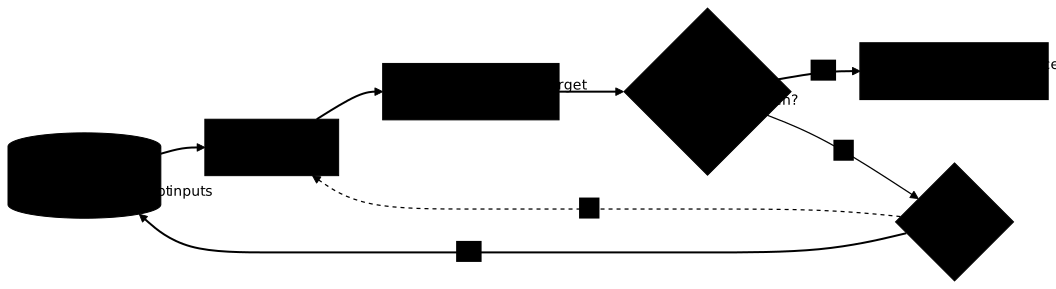
A fuzzer answers two questions: how to produce an input, and which one to keep for what follows. The three names you meet, mutation, generation and coverage guidance, are not three exclusive tools: the first two answer the first question, the third answers the second, and a modern fuzzer combines mutation and coverage guidance. Generation joins in when the input format is strict, not systematically. The diagram below shows the loop; notice that the crash test comes first and makes the loop exit as a reproducer, then that only an input that reaches a new path goes back into the corpus.
| Approach | How the input is produced or kept | When it shines |
|---|---|---|
| Mutation | start from existing inputs (the corpus) and alter them: flipped bits, inserted bytes, cut-out chunks | tolerant formats, good default starting point |
| Generation | build inputs that are valid by construction from a grammar or a schema | strict formats (header, serialised message) that random bytes would get rejected right away |
| Coverage-guided | the code is instrumented, that is, compiled with probes that report which parts ran; the fuzzer keeps any input that reaches code never executed before | application code in general, the default choice of common fuzzers |
Coverage guidance turns a random search into a directed exploration. Without it, a condition like "the first byte equals 0x7F" is reached only once in 256 at random, then two chained conditions once in 65,536; with it, the fuzzer notices that an input has just passed the first condition, the guard, and mutates it to pass the next one. Conversely, a fuzzer without instrumentation (called black-box) has no feedback and simply sends inputs while observing the response.
The lesson Automated security testing classifies fuzzers differently: dumb fuzzing (no knowledge of the input format) corresponds to byte mutation, including that of AFL or libFuzzer, which stay dumb about the format but are guided by coverage. Smart fuzzing (inputs that respect a format) corresponds to generation, and API fuzzing to a black box at the application level, close to DAST.
Which concepts help you read a fuzzing campaign?
The vocabulary of fuzzing comes back in every tool's documentation. A few notions are enough to read a guide and interpret a campaign.
The corpus is the set of test inputs. The seed corpus gathers the seeds that you provide, a few valid and representative inputs; the fuzzer adds the inputs it deems useful. A good seed corpus speeds up the start, because it gives credible starting points rather than empty bytes. Minimisation reduces a failing input to the smallest form that still triggers the bug: the resulting reproducer is quickly understood and kept as a regression test. A dictionary is a list of keywords or separators that the fuzzer injects to get past literal comparisons it would not guess.
Sanitizers, such as ASan (AddressSanitizer) and UBSan
(UndefinedBehaviorSanitizer), instrument a program to make memory corruption
and undefined behaviour visible. They only make sense for native code (C,
C++, Rust in unsafe, or a native extension called from Python or Go). "Safe"
Python, Go or Rust code gains nothing from them: the language already ensures
memory safety.
Finally, two objectives coexist. Crash hunting waits for the program to
collapse. Property-based fuzzing checks an invariant, for example the
round-trip decode(encode(x)) == x: it reveals silent logic bugs that
would never crash the program but would corrupt the data.
Where do you place fuzzing in the CI chain?
Fuzzing splits into two uses: a short one that runs on every pull request (the request to merge a branch), and a long one that runs out of the developers' way. On every pull request, you replay the seeds and reproducers kept in version control as simple tests: it is fast and deterministic, and it prevents a fixed bug from coming back. Depending on the tool, you add a fuzzing run bounded in time, a few minutes, to catch the obvious regressions. Campaigns of several hours run as a scheduled task (nightly or weekly), with a corpus kept from one run to the next so that each campaign starts from the previous one.
A crash found by a long campaign does not block the pull request in
progress, since it does not come from it: it opens a ticket with the
reproducer attached. The practical lesson on
native Go fuzzing shows the
implementation, with the seeds and the testdata/fuzz/ folder replayed by a
plain go test (the generated corpus, however, never is). The guide
Python with Atheris (in French),
outside the course path, writes an equivalent harness and replays it in CI.
What are the limits of fuzzing?
Fuzzing proves the presence of bugs, never their absence. A 24-hour campaign without a crash does not mean the code is correct: the fuzzer has simply not yet found a faulty path. It complements code review, unit tests and static analysis, without replacing them.
It also demands a fast target (thousands of executions per second) that is deterministic: no global state kept between two calls, no network access, no dependence on the clock or on randomness. Without determinism, a crash is not reproducible, which ruins the whole point. It yields little on an internal function whose inputs are already validated upstream; its terrain is the input boundary: parsers, decoders, deserialisers, format readers.
Lastly, a fuzzer only sees what the harness makes it check. On pure Go, the
native fuzzer detects neither data races nor goroutine leaks: you need to
complement it with the -race detector. And no fuzzer replaces some thinking
about your threat model. The Fuzzing check of
OpenSSF Scorecard detects the
presence of a harness or a fuzzing integration in an open source project,
without proving that the fuzzer runs continuously: it is a useful hint before
depending on a project, not a guarantee.
Key points
- Fuzzing automatically generates unexpected inputs to reveal crashes, exceptions and violated invariants; it runs the code, unlike SAST.
- Mutation and generation produce the inputs; coverage guidance chooses which ones to keep. A modern fuzzer combines mutation and guidance; AFL, libFuzzer and Go's native fuzzer stay dumb about the format and only add generation if the format requires it.
- The seed corpus speeds up the start; minimisation gives the smallest reproducer, kept as a regression test.
- Sanitizers (ASan, UBSan) only help on native code.
- A clean rejection of an invalid input is not a bug: the harness fails on a panic, an unexpected exception or a broken invariant.
- In CI: replay the seeds and reproducers kept in version control on every pull request, bound the short campaigns, schedule the long ones with a preserved corpus.
- The target must be fast and deterministic; the terrain of fuzzing is the untrusted input boundary.
- Fuzzing proves the presence of bugs, never their absence.
Knowledge check
Check that the essentials of this lesson are in place. The questions only cover what has just been explained here.
Knowledge check
Check what you have learned with this interactive quiz
How it works
- The timer starts when you click Start
- Multiple choice, true/false and short answer questions
- You can move between questions
- Detailed results are shown at the end
Starts the quiz and the timer
Review
(0/0)Score by domain
A domain groups several guides and gets several questions, so its score is more reliable than a per-topic score, which often rests on a single question.
Summary
Strengths
No topic passed at 80% on at least two questions yet.
Weak areas
No topic below the pass mark.
Recommended next
Hints before you try again?
Continue the course: Native Go fuzzing: testing with go test -fuzz
A new full quiz with random questions
Work again only on the questions you missed