An image signed with Cosign and shipped with an SBOM proves who published
it, but not what happened during the build. in-toto is the framework
that answers that question: each pipeline step produces a signed
attestation (a signed statement describing what that step did), and a
verifier compares these attestations to a policy before accepting the
artifact. This lesson is for a DevOps engineer who already knows how to sign an
image: it presents the model (layout, link, verification), then its modern
form, the SLSA provenance (SLSA, Supply-chain Levels for Software
Artifacts, is a framework of build assurance levels), generated in GitHub
Actions and verified with slsa-verifier, Cosign or a Kubernetes policy.
Imagine an attacker who compromises your pipeline and silently disables the vulnerability scan step. The image is still signed, the SBOM is still generated, but the scan never ran. Without a trace of what really happened, the tampering is invisible. With a layout that declares the scan step as mandatory, the absence of its attestation makes verification fail. Proving the integrity of every build step is exactly what the DevSecOps SOCLE framework (in French) expects under provenance.
in-toto is a CNCF project with graduated status (the highest CNCF maturity level) since 10 February 2025, adopted notably by GitHub and Google for their attestations.
What you will learn
- Describe the in-toto model: a layout (the policy), links (the step attestations) and a verification.
- Explain what a build attestation provides that neither a signature alone nor an SBOM gives.
- Generate a SLSA provenance, in the in-toto attestation format, with GitHub Actions.
- Verify an attestation with
slsa-verifierand Cosign, then enforce that verification in Kubernetes. - Diagnose the most common verification failures.
- Produce the evidence for SOCLE-REL-PRV-1 (in French), a provenance that describes builder, source and build parameters, and place SOCLE-REL-PRV-2 (in French), the complementary attestations (SBOM, tests, scan).
What are the prerequisites?
You must know how to sign and verify an image with Cosign, and have read the overview of Sigstore, including the short-lived certificates from Fulcio. The SLSA framework (in French) is described in the SOCLE reference; reading it is not required, this lesson restates the essentials. A GitHub account is enough for the examples.
What is in-toto?
in-toto (Latin for "as a whole") is a framework that guarantees the end-to-end integrity of a software production chain.
The idea is simple: each pipeline step (clone, build, test, package) is one unit of work that the policy names and expects. Each step generates an attestation, a signed document that certifies:
- Which files were present as input (the "materials")
- Which files were produced as output (the "products")
- Who ran the step (which key signed)
- When the step ran
At the end of the pipeline, a verifier compares these attestations to a policy (the "layout") that defines the required steps. If a step is missing, if the hashes do not match, or if a signature is invalid, verification fails. The diagram shows the whole picture: follow the dotted lines from each step to its link, then the solid arrows to the verifier that returns its verdict.
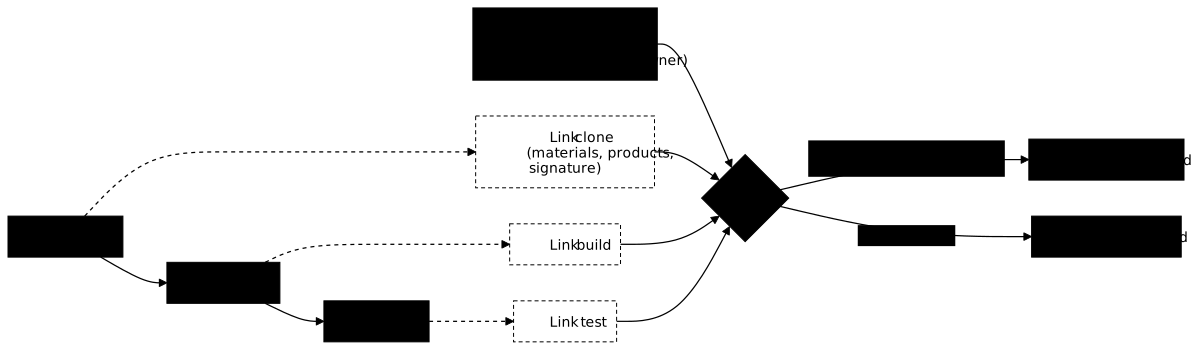
Why in-toto is needed
A Docker image signature (with Cosign) proves who signed, and the table shows what it leaves unanswered. Each row is a question an auditor can ask, and only a pipeline attestation answers it. Mind the right-hand column: it assumes a layout that declares these steps and attestations produced for each of them. Without a layout, what you prove is limited to what the attestation claims (see the SLSA provenance below).
| Question | Signature alone | With in-toto and a layout that declares these steps |
|---|---|---|
| Who signed the artifact? | Yes | Yes |
| Was the source code scanned? | No | Yes, if the scan step is declared and attested |
| Were the tests run? | No | Yes, if the test step is declared and attested |
| Does the build come from the right commit? | No | Yes, if the clone link or the provenance attests it |
| Was the pipeline bypassed? | No | Yes, for the steps the layout requires |
in-toto fills this gap by providing full traceability of the pipeline, which complements the inventory of an SBOM without replacing it.
The three key concepts
1. Layout (the policy)
The layout sets the rules of the game. It is a JSON document signed by the project owner that specifies:
- Which steps are required (clone, build, test, sign...)
- Who may run each step (which keys are authorized). The entities that run steps and sign their attestations are called functionaries: a CI runner, a developer, a build system.
- Which files must be present as input/output
The example below declares three steps. Read the pubkeys field as "only these
functionaries may sign this step", and the MATCH ... FROM rules as "this
step's inputs must be exactly what the previous step produced". The empty
inspect list means the layout defines no inspection, a check the verifier
runs itself on the final artifacts rather than a step executed in the pipeline.
{ "_type": "layout", "expires": "2027-01-01T00:00:00Z", "keys": { "builder-key-id": { "keytype": "ecdsa", "keyval": { "public": "..." } } }, "steps": [ { "name": "clone", "expected_command": ["git", "clone"], "pubkeys": ["builder-key-id"], "expected_materials": [], "expected_products": [["MATCH", "src/*", "WITH", "PRODUCTS", "FROM", "clone"]] }, { "name": "build", "expected_command": ["make", "build"], "pubkeys": ["builder-key-id"], "expected_materials": [["MATCH", "src/*", "WITH", "PRODUCTS", "FROM", "clone"]], "expected_products": [["CREATE", "dist/app"]] }, { "name": "test", "expected_command": ["make", "test"], "pubkeys": ["builder-key-id"], "expected_materials": [["MATCH", "dist/app", "WITH", "PRODUCTS", "FROM", "build"]], "expected_products": [] } ], "inspect": []}The layout is the source of truth. An attacker who modifies the pipeline must also compromise the layout, which requires stealing the project owner's key.
2. Link (the attestation)
A link (the link metadata of a step) is the attestation generated after a
step runs. It contains the SHA-256 hashes of the input and output files. In the
example below, materials are the inputs, products the outputs, and
byproducts what the command printed or returned along the way:
{ "_type": "link", "name": "build", "materials": { "src/main.go": { "sha256": "a1b2c3..." }, "src/utils.go": { "sha256": "d4e5f6..." } }, "products": { "dist/app": { "sha256": "789abc..." } }, "byproducts": { "return-value": 0, "stdout": "Build successful" }, "command": ["make", "build"], "environment": {}}Each link is signed by the entity that ran the step (the CI runner, a developer, a build system).
3. Verification
At the end of the pipeline, a verifier compares the links to the layout. The three checks below run in this order, and the first one that fails is enough to reject the artifact:
-
Verify the signatures: each link must be signed by a key authorized in the layout.
-
Verify the chain: the "products" of step N must match the "materials" of step N+1 (the hashes must be identical).
-
Verify completeness: every step defined in the layout must have a matching link.
If a single check fails, the artifact is rejected.
in-toto and SLSA: the link
SLSA (Supply-chain Levels for Software Artifacts, in French) defines maturity levels for the security of the supply chain. in-toto is the attestation format recommended by SLSA to reach level 2 and above, as the table summarizes.
| SLSA level | Requirement | in-toto role |
|---|---|---|
| Build L1 | Provenance exists | The provenance is an in-toto attestation |
| Build L2 | Signed provenance, generated by a hosted build platform | The attestation is signed (signed envelope) |
| Build L3 | Hardened build platform: runs are isolated from one another and the signing key is inaccessible to the build steps | The format stays the same; isolation comes from the builder (slsa-github-generator, a reusable workflow) |
The format does not make a build trustworthy by itself: in-toto describes and signs what happened, while the level reached depends on the platform that produced the attestation. From SLSA provenance to decision shows which provenance reaches which level.
One nuance avoids a confusion: in this GitHub flow, there is no layout file to write. The layout's policy is replaced by the verifier's checks (source repository, tag, builder identity), detailed in the sections below. The layout remains the tool for the general case, when you orchestrate your own steps and their keys.
You must therefore know what this provenance does not prove. The one from
slsa-github-generator attests the source repository, the tag or commit
and the identity of the builder that produced the artifact. It says
nothing about a vulnerability scan or about test execution: to prove
those steps, you need a layout that declares them, or dedicated attestations
(SBOM, scan result) that are verified in turn.
Generating attestations with GitHub Actions
GitHub Actions can generate SLSA attestations in the in-toto format through the
official slsa-github-generator project. This section shows how to implement it
for a Docker image. How to read the result, and the admission decision built on
it, are covered in
From SLSA provenance to decision.
Full workflow
Two separate jobs, and this separation is not cosmetic: the build job
never has the id-token: write permission, the provenance job carries
it. An attacker who takes over the build step therefore cannot ask GitHub for
an OIDC token and sign whatever they want. The only link between the two
jobs is the image digest, a value that cannot be forged without changing
the image itself. Note also the permissions: {} at workflow level: it removes
all default permissions, and each job only asks back for what it needs.
name: Build and attest container
on:  push:    tags: ['v*']
permissions: {}
env:  REGISTRY: ghcr.io  IMAGE_NAME: ${{ github.repository }}
jobs:  build:    runs-on: ubuntu-24.04    outputs:      digest: ${{ steps.push.outputs.digest }}    permissions:      contents: read      packages: write
    steps:      - name: Checkout repository        uses: actions/checkout@3d3c42e5aac5ba805825da76410c181273ba90b1 # v7.0.1        with:          persist-credentials: false
      - name: Log in to Container registry        uses: docker/login-action@dbcb813823bdd20940b903addbd779551569679f # v4.6.0        with:          registry: ${{ env.REGISTRY }}          username: ${{ github.actor }}          password: ${{ secrets.GITHUB_TOKEN }}
      - name: Build and push Docker image        id: push        uses: docker/build-push-action@c3c9e263c25d99ce0380d002d59b67737d91b0dc # v7.4.0        with:          context: .          push: true          tags: ${{ env.REGISTRY }}/${{ env.IMAGE_NAME }}:${{ github.ref_name }}
  provenance:    needs: build    permissions:      actions: read      id-token: write      packages: write
    uses: slsa-framework/slsa-github-generator/.github/workflows/generator_container_slsa3.yml@v2.1.0    with:      image: ghcr.io/${{ github.repository }}      digest: ${{ needs.build.outputs.digest }}      registry-username: ${{ github.actor }}    secrets:      registry-password: ${{ secrets.GITHUB_TOKEN }}
What this workflow does
-
Build: builds the Docker image and pushes it to the GitHub registry (ghcr.io). The SHA-256 digest is captured as an output.
-
Provenance: calls the slsa-framework reusable workflow, which generates an in-toto attestation signed by GitHub Actions itself (via OIDC).
-
Storage: the attestation is attached to the image through OCI signatures and recorded in the Rekor transparency log.
Content of the generated attestation
The generated SLSA attestation is an in-toto document (a Statement) that
names the attested subject, here the image by its digest, and carries a
predicate, the content of what is claimed: how the image was built. Its
type is https://slsa.dev/provenance/v1. In the file stored with the image,
this statement is wrapped in a signed envelope (the DSSE format, Dead
Simple Signing Envelope): the statement is base64-encoded in a payload field
next to the signatures, so that the exact bytes that were signed are the ones
you read back. Here is a simplified excerpt of the statement:
{ "_type": "https://in-toto.io/Statement/v1", "subject": [ { "name": "ghcr.io/user/myapp", "digest": { "sha256": "abc123..." } } ], "predicateType": "https://slsa.dev/provenance/v1", "predicate": { "buildDefinition": { "buildType": "https://slsa-framework.github.io/github-actions-buildtypes/workflow/v1", "externalParameters": { "workflow": { "ref": "refs/tags/v1.0.0", "repository": "https://github.com/user/myapp" } } }, "runDetails": { "builder": { "id": "https://github.com/slsa-framework/slsa-github-generator/.github/workflows/generator_container_slsa3.yml@refs/tags/v2.1.0" }, "metadata": { "invocationId": "https://github.com/user/myapp/actions/runs/12345" } } }}This attestation proves that:
- The image
ghcr.io/user/myapp@sha256:abc123...was built - By the specified GitHub Actions workflow
- From tag
v1.0.0of theuser/myapprepository - Via the official
slsa-github-generatorv2.1.0 builder
Verifying an attestation
Generating attestations is pointless if nobody verifies them. Here is how
to check that an image was indeed built as expected, with
slsa-verifier (repository),
then with Cosign. The
provenance specification and the
in-toto attestation framework
detail the fields.
With slsa-verifier
The slsa-verifier tool checks that the attestation matches your requirements:
# Install slsa-verifier (pinned version, not @latest)go install github.com/slsa-framework/slsa-verifier/v2/cli/slsa-verifier@v2.7.1
# Verify a Docker imageslsa-verifier verify-image ghcr.io/user/myapp@sha256:abc123... \  --source-uri github.com/user/myapp \  --source-tag v1.0.0
Expected result:
Verified signature against tlog entry index 12345678 at URL: https://rekor.sigstore.devVerified build using builder "https://github.com/slsa-framework/slsa-github-generator/.github/workflows/generator_container_slsa3.yml@refs/tags/v2.1.0"Verifying artifact ghcr.io/user/myapp@sha256:abc123...PASSED: SLSA verification passedWith Cosign
Cosign can also verify in-toto attestations. Watch the shortcut passed to
--type: slsaprovenance designates the SLSA v0.2 predicate, whereas
slsa-github-generator v2 produces https://slsa.dev/provenance/v1. The
shortcut to use is therefore slsaprovenance1, otherwise verification
rejects an attestation that is nevertheless valid. The command also
checks the signer's identity and the OIDC issuer.
# Check that the image has a SLSA v1 attestationcosign verify-attestation ghcr.io/user/myapp@sha256:abc123... \ --type slsaprovenance1 \ --certificate-identity-regexp="^https://github.com/slsa-framework/slsa-github-generator/" \ --certificate-oidc-issuer=https://token.actions.githubusercontent.comExtracting and inspecting the attestation
To see the raw content of the attestation, which is the DSSE envelope described
above, decode its payload field to read the statement:
# Download the attestationcosign download attestation ghcr.io/user/myapp@sha256:abc123... > attestation.json
# Decode the payload (base64)cat attestation.json | jq -r '.payload' | base64 -d | jq .
Automatic verification in Kubernetes
Generating and verifying by hand is fine for tests. In production, you want to automatically block images without a valid attestation.
With Kyverno
Kyverno is a Kubernetes policy engine that can verify attestations before allowing a deployment:
apiVersion: policies.kyverno.io/v1kind: ImageValidatingPolicymetadata: name: verify-slsa-provenancespec: validationActions: [Deny] matchConstraints: resourceRules: - apiGroups: [""] apiVersions: ["v1"] operations: ["CREATE", "UPDATE"] resources: ["pods"] matchImageReferences: - glob: "ghcr.io/myorg/*" attestors: - name: slsaKeyless cosign: keyless: identities: - issuer: "https://token.actions.githubusercontent.com" subjectRegExp: "^https://github.com/slsa-framework/slsa-github-generator/" attestations: - name: slsaProvenance intoto: type: https://slsa.dev/provenance/v1 validations: - expression: >- images.containers.map(image, verifyAttestationSignatures(image, attestations.slsaProvenance, [attestors.slsaKeyless])).all(e, e > 0) message: "Image must have a valid SLSA provenance attestation."The point not to miss is the last section. An ImageValidatingPolicy verifies
nothing as long as the validations field does not contain a CEL
expression (Common Expression Language, the expression language of Kubernetes)
that calls verifyAttestationSignatures. Writing expression: "true" gives a
policy that installs without error, declares itself compliant, and lets every
image through: the classic trap.
Once the expression is in place, the policy:
- Applies to all
ghcr.io/myorg/*images - Requires an attestation whose predicate is
https://slsa.dev/provenance/v1 - Checks that the signature of this attestation really comes from
slsa-github-generator, through a GitHub Actions keyless identity
The progressive rollout of this policy, the controlled exceptions and the
tracking of denials are covered in the lesson
From SLSA provenance to decision.
To test it without a cluster, the CLI kyverno apply kyverno-slsa-policy.yaml --resource pod.yaml loads the policy and evaluates the CEL expression. An
image referenced by tag alone (ghcr.io/myorg/app:1.0.0) is denied with
does not have a digest: the policy therefore requires a reference pinned
by digest.
With Sigstore Policy Controller
As an alternative to Kyverno, the Sigstore Policy Controller specializes in verifying signatures and attestations:
apiVersion: policy.sigstore.dev/v1beta1kind: ClusterImagePolicymetadata: name: slsa-provenance-requiredspec: images: - glob: "ghcr.io/myorg/**" authorities: - name: slsa-generator keyless: url: https://fulcio.sigstore.dev identities: - issuerRegExp: "^https://token.actions.githubusercontent.com$" subjectRegExp: "^https://github.com/slsa-framework/slsa-github-generator/" attestations: - name: slsa-provenance predicateType: https://slsa.dev/provenance/v1Attestations for binaries (beyond containers)
in-toto is not limited to Docker images. You can attest any artifact: Go binaries, npm packages, tar archives...
Example: Go binary with attestation
The difference with the container workflow lies in what identifies the
artifact. An OCI image carries its own digest, the registry computes it. A
binary has nothing of the kind: it is up to the build job to produce the
SHA-256 hashes and pass them on. That is the role of the Generate hashes
step, whose hashes output is base64-encoded because the
generator_generic_slsa3.yml reusable workflow expects a list of subjects in
that form. If you change the compile line without regenerating the hashes, the
attestation will describe binaries that no longer exist and verification will
fail.
name: Release Go binary with SLSA
on:  push:    tags: ['v*']
permissions: {}
jobs:  build:    runs-on: ubuntu-24.04    outputs:      hashes: ${{ steps.hash.outputs.hashes }}    permissions:      contents: read
    steps:      - uses: actions/checkout@3d3c42e5aac5ba805825da76410c181273ba90b1 # v7.0.1        with:          persist-credentials: false
      - uses: actions/setup-go@b7ad1dad31e06c5925ef5d2fc7ad053ef454303e # v7.0.0        with:          go-version: '1.27'          cache: false
      - name: Build binaries        run: |          GOOS=linux GOARCH=amd64 go build -o myapp-linux-amd64 .          GOOS=darwin GOARCH=amd64 go build -o myapp-darwin-amd64 .          GOOS=windows GOARCH=amd64 go build -o myapp-windows-amd64.exe .
      - name: Generate hashes        id: hash        run: |          echo "hashes=$(sha256sum myapp-* | base64 -w0)" >> "$GITHUB_OUTPUT"
      - uses: actions/upload-artifact@cf430e030ddbb5b0abf93d22962f4752f3646cd9 # v7.0.2        with:          name: binaries          path: myapp-*
  provenance:    needs: build    permissions:      actions: read      id-token: write      contents: write
    uses: slsa-framework/slsa-github-generator/.github/workflows/generator_generic_slsa3.yml@v2.1.0    with:      base64-subjects: ${{ needs.build.outputs.hashes }}      upload-assets: true
Verifying a binary
The .intoto.jsonl file published next to the binary contains the attestation
in JSON Lines format, one line per attested subject. Unlike the image case,
nothing automatically ties this file to the binary: you must pass both
to slsa-verifier, which recomputes the hash of the local file and compares it
to the one recorded in the attestation. The --source-uri and --source-tag
options are not decorative either: without them, an authentic attestation
coming from another repository would pass verification.
# Download the binary and its attestationgh release download v1.0.0 -R user/myapp
# Verify with slsa-verifierslsa-verifier verify-artifact myapp-linux-amd64 \  --provenance-path myapp-linux-amd64.intoto.jsonl \  --source-uri github.com/user/myapp \  --source-tag v1.0.0
Integration with the Sigstore ecosystem
in-toto integrates tightly with the Sigstore tools for signing and transparency:
| Component | Role in in-toto |
|---|---|
| Cosign | Signs attestations, attaches them to OCI images, verifies signatures |
| Fulcio | Issues short-lived certificates for keyless signing (no key to manage) |
| Rekor | Records the attestation signature in a public transparency log (non-repudiation) |
Keyless signing flow
The flow is the one presented in the Sigstore lesson: the GitHub workflow authenticates with its OIDC token, Fulcio issues it a 10-minute short-lived certificate tied to the workflow identity, the attestation is signed with the associated key, then Rekor timestamps and records it, and the private key is destroyed right away. This flow removes the key management problem: no secret to store, no rotation to schedule.
Troubleshooting
Most verification failures do not signal an attack but a mismatch between
what was attested and what is requested: wrong repository URL, generator
version that moved between the build and the check, attestation that was never
pushed. Read the slsa-verifier error message first: it generally names the
field that does not match. One case deserves to be known separately, the last
row of the table: an expired Fulcio certificate is normal operation, these
certificates only live a few minutes and it is the timestamped Rekor entry
that is authoritative.
| Symptom | Likely cause | Solution |
|---|---|---|
FAILED: no matching attestations | Attestation not generated or not attached | Check the logs of the provenance job |
FAILED: source mismatch | The --source-uri does not match | Use the exact repository URL |
FAILED: builder mismatch | Different slsa-github-generator version | Check the version in the workflow |
| Kyverno timeout | Verification too slow | Increase webhookConfiguration.timeoutSeconds |
certificate has expired | Expired Fulcio certificate | Normal, the Rekor proof remains valid |
Key points
-
in-toto = pipeline traceability: it proves not only who signed, but how the artifact was built, within the limit of the steps that the layout declares or that the provenance attests.
-
Layout + Links: the layout defines the rules, the links attest the execution of each step.
-
SLSA standard: in-toto is the attestation format recommended by SLSA for Build L2+ levels.
-
Native GitHub Actions:
slsa-github-generatorgenerates compliant attestations without complex configuration. -
Mandatory verification: use
slsa-verifier, Kyverno or Sigstore Policy Controller to block unattested artifacts. -
Keyless signing: via Fulcio and Rekor, no more keys to manage.
-
Expected evidence (SOCLE-REL-PRV-1): a provenance describing builder, source and build parameters, whose source repository, tag and builder identity
slsa-verifier(or the admission policy) confirms; for SOCLE-REL-PRV-2, the complementary attestations (SBOM, tests, scan) linked to the same artifact.
Knowledge check
Check that the essentials of this lesson are in place. The questions only cover what has just been explained here.
Knowledge check
Check what you have learned with this interactive quiz
How it works
- The timer starts when you click Start
- Multiple choice, true/false and short answer questions
- You can move between questions
- Detailed results are shown at the end
Starts the quiz and the timer
Review
(0/0)Score by domain
A domain groups several guides and gets several questions, so its score is more reliable than a per-topic score, which often rests on a single question.
Summary
Strengths
No topic passed at 80% on at least two questions yet.
Weak areas
No topic below the pass mark.
Recommended next
Hints before you try again?
Continue the course: Environment variable poisoning in pipelines
A new full quiz with random questions
Work again only on the questions you missed