Five analyses cover five different risks: the secrets committed by mistake, the flaws written in your own code (SAST, static analysis, which reads the code without running it), the known flaws of the libraries you import (SCA, software composition analysis), the flaws that only show on the running application (DAST, dynamic analysis) and the crashes on unexpected inputs (fuzzing). The previous lesson, Automated security testing, presented SAST, DAST, SCA and fuzzing, and already pointed out that these four families leave secrets analysis entirely uncovered. To decide what to install, we put it back on the same level as the others, and we set fuzzing apart, because it targets a function rather than an application. This lesson is for a developer or a DevOps engineer who must decide what to install, where and in what order, without turning the pipeline into a wall of alerts. It gives the map; the lessons that follow in the module detail each tool.
What you will learn
- Match each analysis family to the risk it covers and to the one it does not see
- Place each analysis at the right moment: developer workstation, CI, pre-production, scheduled task
- Choose an adoption order for a team starting from zero
- Combine the analyses without duplicates or an avalanche of alerts
- Design graduated blocking that relies on a baseline
Which risk does each code analysis cover?
Each analysis family answers a precise question about a precise object: a commit, your code, your dependencies or your deployed application. Choosing starts with naming the risk you want to rule out, then taking the analysis that observes it. The table below puts them side by side, with what each one does not see, because that column is what justifies combining several.
| Family | It examines | It finds | It does not see |
|---|---|---|---|
| Secrets | the content of commits and the Git history | passwords, API keys, committed tokens | a poorly protected secret that was never written in the repository |
| SAST (static analysis) | your source code, without running it | injections, dangerous calls, bad practices | deployment configuration flaws and third-party libraries |
| SCA (composition analysis) | the declared dependencies | known CVEs in libraries | the flaws in your own code |
| DAST (dynamic analysis) | the running application | exploitable flaws, missing headers, misconfiguration | the code paths no request reaches |
| Fuzzing | a function or a parser | crashes on unexpected inputs | the business rules that no invariant of the test harness expresses |
The definitions of SAST, DAST, SCA and fuzzing are covered in more detail in Automated security testing, the first lesson of the module, which lists secrets analysis among the families that these four leave uncovered; here it has its own lessons. The first four rows are the families to deploy first; fuzzing, more specialised, has its own lesson, Fuzzing. All these analyses produce false positives, that is, alerts that match no real flaw: the section on graduated blocking below answers that.
Secrets, SAST, SCA, DAST: what really separates these analyses?
The boundary is what the tool reads. A secrets scanner reads text and
recognises patterns (an AWS key, a GitHub token): it does not understand the
code. A SAST tool understands the structure of the program and follows the
data, which lets it spot that an HTTP parameter ends up in an SQL query. An
SCA tool does not read your code at all, it reads your dependency files
(package-lock.json, go.sum, requirements.txt) and compares them with a
database of CVEs, numbered public vulnerabilities. A DAST tool sends
requests to the deployed application and observes the responses, like an
attacker.
There are two practical consequences. First, SAST and DAST do not compete: the first sees all the code but ignores the real configuration, the second sees the real behaviour but only on the pages it reaches. Second, a CVE in a dependency is not a defect of your code: only SCA reports it, and only an update or a documented exception closes it. To read and sort these CVEs, see CVE, CVSS, EPSS, KEV.
At which moment of the cycle does each analysis run?
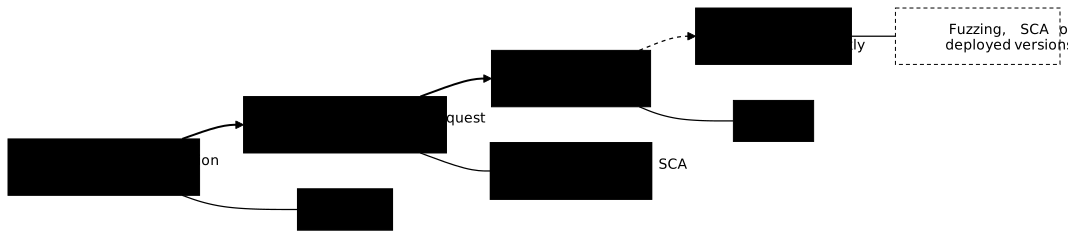
An analysis goes where its feedback is fast enough for the developer to fix the issue without switching tasks, and where it has everything it needs to work. A secrets scan only needs the diff, the lines changed by the commit: it fits on the workstation. A DAST needs an application that responds: it can only come after deployment. The diagram below shows the four moments and the family that settles in each; notice that the further right you go, the more the analysis costs to run and the later its feedback arrives in the cycle. The frequency, however, does not necessarily decrease: the fourth moment is a scheduled task, so often a daily one, whereas the DAST of the third moment only runs on each deployment to pre-production. The detail of the placement in a pipeline is in the section "Integration in the CI/CD pipeline" of Automated security testing; the diagram takes up these moments and adds what the previous lesson does not show: the secrets scan doubled in CI, IaC (infrastructure as code) analysis in CI and the scheduled SCA on deployed versions.
On the workstation: a pre-commit hook for secrets
A pre-commit hook is a script that Git runs before recording a commit. This
is where a secret stops before entering the history, which matters because
a pushed secret stays in the old commits even after deletion.
Gitleaks runs there in an
instant, because it only reads the files of the commit;
TruffleHog (in French) and
detect-secrets (in French) play
the same role with other trade-offs. The catch: a hook can be bypassed
(git commit --no-verify) or is not installed on every workstation. It
speeds up the feedback, it guarantees nothing: the same scan must
therefore also run in CI. The mechanics of secrets in Git are detailed in
Secrets in code and in the Git history.
In CI: everything that can be read without running the application
The CI job triggered by each pull request (the request to merge a branch into the main branch) is the checkpoint that cannot be bypassed from a workstation. This is where SAST goes (lesson SAST, with Semgrep as the reference tool), SCA (lesson SCA, with Trivy or Grype (in French)) and the analysis of infrastructure files with Checkov. All of them read files from the repository, so none needs an environment. A reasonable budget is a few minutes: beyond that, developers stop waiting for the result and merge without reading it.
In pre-production: DAST, when the application responds
DAST requires an application that is deployed and fed with test data, so it comes after the deployment to pre-production, never on production. It takes several minutes to several tens of minutes depending on the scope: it is run on each deployment to pre-production, not on every commit. DAST measures what a ZAP scan finds and why the coverage (the pages actually visited) decides its value; Nuclei (in French) complements it with targeted detection templates.
As a scheduled task: what changes without your code changing
Two analyses are worth re-running without a triggering commit. The first is SCA: a dependency that is healthy today receives a CVE tomorrow, so a nightly scan of the already deployed versions catches what a pull request scan will never see. Dependency-Track (in French) serves this continuous tracking from SBOMs, the inventories of components. The second is fuzzing: a campaign lasts hours, too long for a pull request where you merely replay the cases already found. The lesson Fuzzing explains how to schedule it.
How do you combine these analyses without drowning the team?
A team that enables four scanners at once receives hundreds of alerts on the first day, handles ten, then learns to ignore the rest. This is alert fatigue: the danger is not the noise itself, it is that a real critical alert goes unnoticed in the middle of it. Four settings limit it, and each one is decided before making a scanner blocking.
Four settings that avoid the avalanche
Each one reduces noise by a different means: the first sets aside the existing debt, the second limits the severity handled, the third designates who rules on a false positive, the fourth removes duplicate alerts. The first is the one that changes everything: without a baseline, a team that plugs a scanner into code that already exists receives all of its historical debt on the first day, and gives up before handling the first really new finding.
- A baseline, that is, the state of the existing findings, recorded then
ignored. Only the new findings are handled, the historical debt is
tracked separately. The mechanism (
--baseline-commitfor Semgrep) is measured in the section "Block only new findings: the baseline" of Automated security testing. - A severity threshold, raised in steps: first the critical findings, then the high ones. For SCA, the CVSS severity (a score from 0 to 10) is not enough: the EPSS (the probability that a CVE is exploited) and whether the vulnerable function is actually called change the sorting.
- An owner per family, who triages false positives and decides on exceptions. Without an owner, exceptions pile up without a date.
- No tool duplicates: two secrets scanners or two SCA tools on the same repository produce the same alert twice and the same triage twice.
How does blocking harden step by step?
Making a scanner blocking from day one guarantees it will be disabled at the first emergency. A deployment in four steps gives time to tune the noise before it costs anyone anything, and you move to the next step when the team knows how to triage the findings of the current step: an owner is designated, the recurring false positives are handled by rules or dated exceptions, and no new finding waits without a decision.
| Step | Scanner behaviour | What you gain |
|---|---|---|
| Observation | it runs, publishes a report, never blocks | measure the volume and the share of false positives |
| Warning | it comments on the pull request about new findings | get the team used to it without blocking it |
| Partial blocking | it blocks new critical findings | prevent a serious regression |
| Full blocking | it blocks from the high level up, with dated exceptions | maintain the level reached |
A secrets scanner is an exception: a committed secret is an incident,
so it blocks from the first day for new commits. The history of an old
repository is handled separately: you first revoke the secrets found, then set
them aside with a .gitleaksignore or a baseline. And whatever the step, an
exception carries an expiry date and a reason, otherwise it becomes
permanent. For the complete orchestration in a pipeline, see
Secure CI/CD pipeline.
Where do you start when the team starts from zero?
Start with the analysis that brings the most for the least noise:
secrets, then SCA, then SAST, then DAST. Secrets first, because
a token with a fixed prefix (ghp_, AKIA) gives very few false positives and
a leak is costly. Generic rules, like Gitleaks' generic-api-key, produce
more: you tune them with an exclusion list. SCA next, because fixing a
dependency often boils down to a version update, and
Securing npm, PyPI and Go dependencies
covers the preventive part. SAST comes after, because it requires rule tuning.
DAST comes last: it demands a stable environment and a clear
authorisation framework. Fuzzing falls outside this order: you add it where the
code reads untrusted inputs, parsers and decoders first.
Imagine a team of six developers delivering a Flask API (a small Python web application) with Terraform files. In the first week, they install Gitleaks as a hook and in CI; in the second, they run Trivy on the dependencies in observation mode, and discover about thirty CVEs, three of them critical to fix right away. After a month, Semgrep runs on every pull request with a baseline, and blocking is limited to new critical findings. The DAST arrives the following quarter, on pre-production only. At no point did the team receive more than it could handle.
Before adopting a library, an earlier check also exists: OpenSSF Scorecard evaluates the security practices of an open source project before you depend on it. It is not part of the table of analyses, because it judges a project, not your code.
Key points
- Five analyses, five risks: secrets (commits), SAST (your code), SCA (your dependencies), DAST (the running application), fuzzing (the unexpected inputs of a function). Each has a blind spot that the others cover.
- The right moment depends on what the tool requires: secrets on the workstation, SAST and SCA in CI, DAST in pre-production, fuzzing and CVE tracking as a scheduled task.
- A pre-commit hook speeds up, CI guarantees: it can be bypassed, so the same secrets scan also runs in the pull request.
- A baseline avoids the avalanche: you block the new findings, the historical debt is handled separately.
- Blocking hardens in steps (observation, warning, partial blocking, full blocking), except for secrets, which block from the start.
- Every exception carries a date and a reason, otherwise it becomes permanent.
- Recommended adoption order: secrets, SCA, SAST, then DAST.
- One tool per family on a given repository: two scanners double the noise for little extra coverage.
Knowledge check
Check that the essentials of this lesson are in place. The questions only cover what has just been explained here.
Knowledge check
Check what you have learned with this interactive quiz
How it works
- The timer starts when you click Start
- Multiple choice, true/false and short answer questions
- You can move between questions
- Detailed results are shown at the end
Starts the quiz and the timer
Review
(0/0)Score by domain
A domain groups several guides and gets several questions, so its score is more reliable than a per-topic score, which often rests on a single question.
Summary
Strengths
No topic passed at 80% on at least two questions yet.
Weak areas
No topic below the pass mark.
Recommended next
Hints before you try again?
Continue the course: Secrets in code and Git history
A new full quiz with random questions
Work again only on the questions you missed