A StatefulSet creates Pods numbered from 0 to n-1, in order, and gives each recreated Pod the same name and the same volume back. A Deployment treats its Pods as interchangeable: each replacement gets a random name and finds nothing of its predecessor. When each replica holds data that the others do not, or must be reached by a name that does not move, you need a StatefulSet.
The table that compares Deployment, StatefulSet and DaemonSet is in the lesson DaemonSets. Here, you deploy a StatefulSet step by step and put it to the test.
What you will learn
- Choose between a Deployment and a StatefulSet based on the need for a stable identity, a volume per replica and a startup order.
- Write a headless Service and a StatefulSet with
volumeClaimTemplates, and read three Pods ordered from 0 to 2, all ready. - Resolve a Pod by its stable name from another Pod, and recognize the short-name trap with
nslookup. - Prove the stable identity: write data on replica 1, delete its Pod, read the data back on the recreated Pod.
- Update a StatefulSet with
RollingUpdate(withpartition) orOnDelete, and roll back an update. - Say what happens to the volumes when you scale down or delete a StatefulSet.
- Delete a StatefulSet while leaving its Pods in place, and diagnose a StatefulSet that stays
Pending.
Prerequisites
This lesson assumes you already know how Deployments and Services work, name resolution with CoreDNS, and persistent volumes: PersistentVolumeClaims and dynamic provisioning with a StorageClass. You also need a kind cluster, like the one in First cluster.
Prepare a four-node cluster
The demonstration needs several nodes so that the Pods spread out. The kind-multi.yaml file from First cluster describes a control plane and three workers. Create it under the name demo-multi (kind 0.33.0, nodes in Kubernetes v1.37.0), then wait until the four nodes are ready.
kind create cluster --name demo-multi --image kindest/node:v1.37.0@sha256:a1ed56cfb0e7b93589bdf97c8cd566405a265939e3620fc4f5de89adff580ae5 --config kind-multi.yamlkubectl wait --for=condition=Ready nodes --all --timeout=120snode/demo-multi-control-plane condition metnode/demo-multi-worker condition metnode/demo-multi-worker2 condition metnode/demo-multi-worker3 condition metThe four nodes respond. The control plane carries a taint, node-role.kubernetes.io/control-plane:NoSchedule: this mark forbids placing ordinary Pods there, so the replicas will go to the three workers. Also check the default storage class, because every volume in this lesson depends on it.
kubectl get storageclassNAME PROVISIONER RECLAIMPOLICY VOLUMEBINDINGMODE ALLOWVOLUMEEXPANSION AGEstandard (default) rancher.io/local-path Delete WaitForFirstConsumer false 22sThe standard class creates a volume on demand, but only once a Pod that uses it is placed on a node (WaitForFirstConsumer): hence the few seconds of Pending when each replica is created.
Next, prepare a working directory and a namespace for the lesson.
mkdir -p ~/atelier-k8s/workloads/statefulsets && cd ~/atelier-k8s/workloads/statefulsetskubectl create namespace ws-statefulnamespace/ws-stateful createdThe names and messages of this lesson are in French on purpose, so that the outputs stay those of the tested cluster: atelier-k8s means "workshop-k8s", contraste "contrast", reponse de "response from", dns-deux "dns-two", marque-web-1 "marker-web-1", rapide "fast", demo-fantome "demo-ghost" and casse "broken". In the custom-columns output, the headers HEURE, RAISON, NOM and PROPRIETAIRE mean "time", "reason", "name" and "owner". In the DNS test, rc nom complet, rc nom court and rc ping nom court mean "rc full name", "rc short name" and "rc ping short name".
What a Deployment cannot do
To measure what the StatefulSet brings, first deploy three nginx replicas with a Deployment.
cat > deploy-contraste.yaml <<'EOF'apiVersion: apps/v1kind: Deploymentmetadata: name: contraste namespace: ws-statefulspec: replicas: 3 selector: matchLabels: app: contraste template: metadata: labels: app: contraste spec: containers: - name: nginx image: nginx:1.30.5@sha256:9bf97bd7714f5e24c1ccd545ecb9eb5435cb6d109c97cebb15e7e455e0239edbEOFkubectl apply -f deploy-contraste.yaml && kubectl -n ws-stateful rollout status deployment/contraste --timeout=90s && kubectl -n ws-stateful get pods -l app=contrastedeployment.apps/contraste createdWaiting for deployment "contraste" rollout to finish: 0 out of 3 new replicas have been updated...Waiting for deployment "contraste" rollout to finish: 0 of 3 updated replicas are available...Waiting for deployment "contraste" rollout to finish: 1 of 3 updated replicas are available...Waiting for deployment "contraste" rollout to finish: 2 of 3 updated replicas are available...deployment "contraste" successfully rolled outNAME READY STATUS RESTARTS AGEcontraste-7bb9f9c56f-2mgd7 1/1 Running 0 16scontraste-7bb9f9c56f-6n87v 1/1 Running 0 16scontraste-7bb9f9c56f-rbkfr 1/1 Running 0 16sThe three Pods carry a random suffix and were created together (same AGE). Delete them to see what becomes of their identity.
kubectl -n ws-stateful delete pod -l app=contraste --wait=false && sleep 3 && kubectl -n ws-stateful get pods -l app=contrastepod "contraste-7bb9f9c56f-2mgd7" deleted from ws-stateful namespacepod "contraste-7bb9f9c56f-6n87v" deleted from ws-stateful namespacepod "contraste-7bb9f9c56f-rbkfr" deleted from ws-stateful namespaceNAME READY STATUS RESTARTS AGEcontraste-7bb9f9c56f-dhfcf 1/1 Running 0 3scontraste-7bb9f9c56f-qjl67 1/1 Running 0 3scontraste-7bb9f9c56f-s5mrj 1/1 Running 0 3sThe Deployment recreated three Pods in three seconds, but none takes back an old name (dhfcf, qjl67, s5mrj against 2mgd7, 6n87v, rbkfr) and none has a volume of its own. For database replicas, no client could tell which one is which. Delete the Deployment before moving on to the StatefulSet.
kubectl -n ws-stateful delete deployment contrastedeployment.apps "contraste" deleted from ws-stateful namespaceWrite the headless Service and the StatefulSet
A StatefulSet relies on a headless Service, that is, a Service without a cluster address (clusterIP: None). Instead of spreading traffic behind a single address, it publishes one name per Pod in the DNS. It is what makes the stable names reachable, and the StatefulSet points to it with its serviceName field.
cat > service-headless.yaml <<'EOF'apiVersion: v1kind: Servicemetadata: name: nginx namespace: ws-stateful labels: app: nginxspec: clusterIP: None selector: app: nginx ports: - port: 80 name: webEOFkubectl apply -f service-headless.yaml && kubectl -n ws-stateful get svc nginxservice/nginx createdNAME TYPE CLUSTER-IP EXTERNAL-IP PORT(S) AGEnginx ClusterIP None <none> 80/TCP 0sThe CLUSTER-IP column is None: the Service has no virtual address. It is normal for TYPE to show ClusterIP for a headless Service.
The StatefulSet looks like a Deployment, with two additions: serviceName, which names the headless Service, and volumeClaimTemplates, a template for a volume claim (PersistentVolumeClaim, or PVC) that Kubernetes instantiates once per replica.
cat > statefulset-web.yaml <<'EOF'apiVersion: apps/v1kind: StatefulSetmetadata: name: web namespace: ws-statefulspec: serviceName: nginx replicas: 3 selector: matchLabels: app: nginx template: metadata: labels: app: nginx spec: containers: - name: nginx image: nginx:1.30.5@sha256:9bf97bd7714f5e24c1ccd545ecb9eb5435cb6d109c97cebb15e7e455e0239edb ports: - containerPort: 80 name: web volumeMounts: - name: www mountPath: /usr/share/nginx/html volumeClaimTemplates: - metadata: name: www spec: accessModes: - ReadWriteOnce resources: requests: storage: 1GiEOFThe selector of the StatefulSet and that of the headless Service carry the same app: nginx label: this is what attaches the Pods to the Service. Apply the file. The while loop adds the time in front of each line of get -w, so that you can read the gap between the Pods.
kubectl apply -f statefulset-web.yaml && timeout 60 kubectl -n ws-stateful get pods -l app=nginx -w | while read -r l; do echo "$(date +%T) $l"; donestatefulset.apps/web created23:43:57 NAME READY STATUS RESTARTS AGE23:43:57 web-0 0/1 Pending 0 0s23:44:01 web-0 0/1 Pending 0 4s23:44:01 web-0 0/1 ContainerCreating 0 4s23:44:01 web-0 0/1 ContainerCreating 0 4s23:44:01 web-0 1/1 Running 0 4s23:44:01 web-1 0/1 Pending 0 0s23:44:01 web-1 0/1 Pending 0 0s23:44:05 web-1 0/1 Pending 0 4s23:44:05 web-1 0/1 ContainerCreating 0 4s23:44:06 web-1 0/1 ContainerCreating 0 5s23:44:06 web-1 1/1 Running 0 5s23:44:06 web-2 0/1 Pending 0 0s23:44:06 web-2 0/1 Pending 0 0s23:44:10 web-2 0/1 Pending 0 4s23:44:10 web-2 0/1 ContainerCreating 0 4s23:44:10 web-2 0/1 ContainerCreating 0 4s23:44:10 web-2 1/1 Running 0 4sThe Pods are created one by one: web-1 only appears (Pending, 23:44:01) when web-0 reaches 1/1 Running, and web-2 only appears once web-1 is ready (23:44:06). Each Pod takes about 4 to 5 seconds, including the time to create its volume, so 13 seconds for the three. The command stops by itself after 60 seconds (timeout 60).
Now look at where the Pods landed, then at the volume claims.
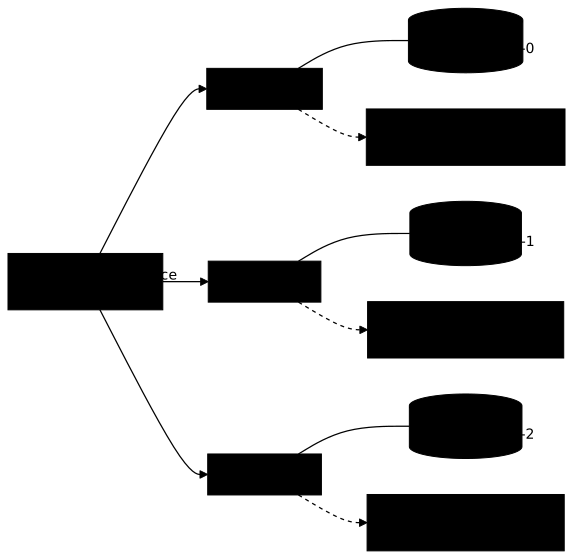
kubectl -n ws-stateful get pods -l app=nginx -o widekubectl -n ws-stateful get pvcNAME READY STATUS RESTARTS AGE IP NODE NOMINATED NODE READINESS GATESweb-0 1/1 Running 0 60s 10.244.1.5 demo-multi-worker <none> <none>web-1 1/1 Running 0 56s 10.244.3.8 demo-multi-worker2 <none> <none>web-2 1/1 Running 0 51s 10.244.2.5 demo-multi-worker3 <none> <none>NAME STATUS VOLUME CAPACITY ACCESS MODES STORAGECLASS VOLUMEATTRIBUTESCLASS AGEwww-web-0 Bound pvc-9dfa1443-6aa2-4e85-94d0-e222ddd05f9e 1Gi RWO standard <unset> 60swww-web-1 Bound pvc-4b4ab1ef-18f5-4b4a-b0b4-f32b5ac9f35e 1Gi RWO standard <unset> 56swww-web-2 Bound pvc-fc3d5088-d23c-46f1-8d67-3b82ef3430a4 1Gi RWO standard <unset> 51sHere, each Pod is on a different worker, but nothing enforces it: no rule separates the Pods, and two of them can share a node on your cluster. The claims are named <template>-<pod>: www-web-0, www-web-1, www-web-2. This name links a Pod to its volume, and it is the one found again when a Pod is recreated.
The next diagram brings together what you have just seen: read it from left to right, one Pod per row. Each Pod is linked to its own volume claim, whose name reuses its own, and each Pod has its DNS name, which the headless Service publishes.
Finally, read what the server added to the object (excerpt of the useful fields).
kubectl -n ws-stateful get statefulset web -o yamlspec: persistentVolumeClaimRetentionPolicy: whenDeleted: Retain whenScaled: Retain podManagementPolicy: OrderedReady replicas: 3 revisionHistoryLimit: 10 updateStrategy: rollingUpdate: maxUnavailable: 1 partition: 0 type: RollingUpdatestatus: availableReplicas: 3 currentRevision: web-8588878779 readyReplicas: 3 replicas: 3 updateRevision: web-8588878779 updatedReplicas: 3You wrote none of this, these are the server's default values. They set the behavior for the rest of the lesson:
| Field | Default value | What it controls |
|---|---|---|
podManagementPolicy | OrderedReady | creation one by one, in order |
updateStrategy.type | RollingUpdate | automatic update, from the last Pod to the first |
rollingUpdate.partition | 0 | all the Pods are updated |
persistentVolumeClaimRetentionPolicy | Retain / Retain | volumes survive scale-down and deletion |
Resolve a Pod by its name
Each Pod is reachable at <pod>.<service>.<namespace>.svc.cluster.local. To check that each name leads to its own Pod, first write a different page in each one.
kubectl -n ws-stateful exec web-0 -- sh -c 'echo "reponse de web-0" > /usr/share/nginx/html/index.html'kubectl -n ws-stateful exec web-1 -- sh -c 'echo "reponse de web-1" > /usr/share/nginx/html/index.html'kubectl -n ws-stateful exec web-2 -- sh -c 'echo "reponse de web-2" > /usr/share/nginx/html/index.html'These commands print nothing. Then query the DNS from a disposable Pod: the full name of web-0, then the short name web-0.nginx, then ping. The three commands run in the same Pod and their output is read from its logs, because with kubectl run --rm -it a very short output is sometimes displayed twice, or not at all.
kubectl -n ws-stateful run dns-deux --restart=Never --image=busybox:1.38.0@sha256:a46257e06c82ad85242d0d38077d0a52d9896389ca60a1a59d3463db586e5fa4 -- sh -c 'nslookup web-0.nginx.ws-stateful.svc.cluster.local; echo "rc nom complet=$?"; nslookup web-0.nginx; echo "rc nom court=$?"; ping -c 1 web-0.nginx; echo "rc ping nom court=$?"' && kubectl -n ws-stateful wait --for=jsonpath='{.status.phase}'=Succeeded pod/dns-deux --timeout=60s; kubectl -n ws-stateful logs dns-deux; kubectl -n ws-stateful delete pod dns-deuxpod/dns-deux createdpod/dns-deux condition metServer: 10.96.0.10Address: 10.96.0.10:53
Name: web-0.nginx.ws-stateful.svc.cluster.localAddress: 10.244.2.25
rc nom complet=0Server: 10.96.0.10Address: 10.96.0.10:53
** server can't find web-0.nginx: NXDOMAIN
** server can't find web-0.nginx: NXDOMAIN
rc nom court=1PING web-0.nginx (10.244.2.25): 56 data bytes64 bytes from 10.244.2.25: seq=0 ttl=63 time=0.081 ms
--- web-0.nginx ping statistics ---1 packets transmitted, 1 packets received, 0% packet lossround-trip min/avg/max = 0.081/0.081/0.081 msrc ping nom court=0pod "dns-deux" deleted from ws-stateful namespaceThe full name resolves (rc nom complet=0). The short name fails with NXDOMAIN for nslookup (rc nom court=1), but ping resolves it and reaches the Pod (rc ping nom court=0). The cluster DNS is therefore not at fault. The IP addresses in this block come from a different run than the previous table: all that matters is that the full name and the short name of ping give the same address.
To understand why ping succeeds with the short name, read /etc/resolv.conf in a Pod. The excerpt leaves out the information lines that kubectl adds with -it.
kubectl -n ws-stateful run dns-test --rm -it --restart=Never --image=busybox:1.38.0@sha256:a46257e06c82ad85242d0d38077d0a52d9896389ca60a1a59d3463db586e5fa4 -- cat /etc/resolv.confsearch ws-stateful.svc.cluster.local svc.cluster.local cluster.localnameserver 10.96.0.10options ndots:5The Pod completes a short name with ws-stateful.svc.cluster.local: web-0.nginx becomes web-0.nginx.ws-stateful.svc.cluster.local. A wget on the three short names confirms that each one leads to its own Pod.
kubectl -n ws-stateful run dns-test --rm -it --restart=Never --image=busybox:1.38.0@sha256:a46257e06c82ad85242d0d38077d0a52d9896389ca60a1a59d3463db586e5fa4 -- sh -c 'ping -c 1 web-0.nginx; for i in 0 1 2; do wget -qO- http://web-$i.nginx; done'reponse de web-0reponse de web-1reponse de web-2Each stable name answers with the page of its Pod. The excerpt keeps only the wget lines: those of ping are identical to the previous block.
Prove the stable identity
This is the proof that the StatefulSet gives a recreated Pod its name and its volume back. Write a marker in web-1 and note the Pod's uid, the unique identifier of this instance.
kubectl -n ws-stateful exec web-1 -- sh -c 'echo marque-web-1 > /usr/share/nginx/html/index.html'kubectl -n ws-stateful get pod web-1 -o jsonpath='{.metadata.uid}{"\n"}'4843c2aa-842e-4e86-aa1f-180ab3c16c5eDelete the Pod, wait until it is ready, then read the uid again, the marker and the name of the claim in use.
kubectl -n ws-stateful delete pod web-1 && kubectl -n ws-stateful wait --for=condition=Ready pod/web-1 --timeout=90s && date +%Tkubectl -n ws-stateful get pod web-1 -o jsonpath='{.metadata.uid}{"\n"}' && kubectl -n ws-stateful exec web-1 -- cat /usr/share/nginx/html/index.html && kubectl -n ws-stateful get pod web-1 -o jsonpath='{.spec.volumes[?(@.name=="www")].persistentVolumeClaim.claimName}{"\n"}'pod "web-1" deleted from ws-stateful namespacepod/web-1 condition met23:45:0946f046bf-1ca4-4c9c-be31-018deb9987b5marque-web-1www-web-1The Pod was recreated in under two seconds, under the same name web-1. Its uid changed (46f046bf-... instead of 4843c2aa-...): it is another Pod. Yet the marker is intact, because it remounted the same claim, www-web-1. The name and the volume belong to replica 1, not to the instance that serves it.
Update a StatefulSet
The StatefulSet updates its Pods from the highest number to the lowest. The partition field lets you stop along the way: only Pods whose number is greater than or equal to the partition receive the new version. Set partition: 2, then add an environment variable to the template. The controller-revision-hash label shows which revision each Pod carries.
kubectl -n ws-stateful patch statefulset web -p '{"spec":{"updateStrategy":{"type":"RollingUpdate","rollingUpdate":{"partition":2}}}}'kubectl -n ws-stateful set env statefulset/web VERSION=2 && sleep 20 && kubectl -n ws-stateful get pods -l app=nginx -L controller-revision-hashstatefulset.apps/web patchedstatefulset.apps/web env updatedNAME READY STATUS RESTARTS AGE CONTROLLER-REVISION-HASHweb-0 1/1 Running 0 92s web-8588878779web-1 1/1 Running 0 21s web-8588878779web-2 1/1 Running 0 19s web-7b5cbbd48dOnly web-2 carries the new revision web-7b5cbbd48d: it is a canary, the new version tried first on a single Pod. web-0 and web-1 keep the old one (web-1 is 21 seconds old because you recreated it in the previous step). Once the canary is validated, bring the partition back to 0 to finish.
kubectl -n ws-stateful patch statefulset web -p '{"spec":{"updateStrategy":{"rollingUpdate":{"partition":0}}}}' && kubectl -n ws-stateful rollout status statefulset/web --timeout=120sstatefulset.apps/web patchedWaiting for partitioned roll out to finish: 1 out of 3 new pods have been updated...Waiting for 1 pods to be ready...Waiting for 1 pods to be ready...Waiting for 1 pods to be ready...Waiting for partitioned roll out to finish: 2 out of 3 new pods have been updated...Waiting for 1 pods to be ready...Waiting for 1 pods to be ready...Waiting for 1 pods to be ready...partitioned roll out complete: 3 new pods have been updated...The word "partitioned" is still displayed even with partition: 0: it is kubectl's wording for any StatefulSet RollingUpdate. To read the real order, query the StatefulSet's events.
kubectl -n ws-stateful get events --field-selector involvedObject.kind=StatefulSet,involvedObject.name=web --sort-by=.lastTimestamp -o custom-columns=HEURE:.lastTimestamp,RAISON:.reason,MESSAGE:.messageHEURE RAISON MESSAGE2026-11-11T23:43:57Z SuccessfulCreate Create Claim www-web-0 Pod web-0 in StatefulSet web success2026-11-11T23:44:01Z SuccessfulCreate Create Claim www-web-1 Pod web-1 in StatefulSet web success2026-11-11T23:44:06Z SuccessfulCreate Create Claim www-web-2 Pod web-2 in StatefulSet web success2026-11-11T23:45:09Z SuccessfulDelete Delete Pod web-2 in StatefulSet web successful2026-11-11T23:45:10Z SuccessfulCreate Create Pod web-2 in StatefulSet web successful2026-11-11T23:45:29Z SuccessfulDelete Delete Pod web-1 in StatefulSet web successful2026-11-11T23:45:30Z SuccessfulCreate Create Pod web-1 in StatefulSet web successful2026-11-11T23:45:31Z SuccessfulDelete Delete Pod web-0 in StatefulSet web successful2026-11-11T23:45:32Z SuccessfulCreate Create Pod web-0 in StatefulSet web successfulThe first three lines are the creation, which creates the claim along with the Pod. Then web-2 is replaced (partition 2), then web-1, then web-0: the order is the reverse of creation, and each Pod is recreated one second after its deletion.
To go back, rollout history lists the revisions and rollout undo restores the previous one, as for a Deployment.
kubectl -n ws-stateful rollout history statefulset/webkubectl -n ws-stateful rollout undo statefulset/web && kubectl -n ws-stateful rollout status statefulset/web --timeout=120s && kubectl -n ws-stateful get statefulset web -o jsonpath='{.spec.template.spec.containers[0].env}{"\n"}'statefulset.apps/webREVISION CHANGE-CAUSE1 <none>2 <none>
Warning: resource statefulsets/web was previously managed with 'kubectl apply'. Rolling back will not update the kubectl.kubernetes.io/last-applied-configuration annotation, which may cause unexpected behavior on future 'kubectl apply' operations. Consider using 'kubectl apply' with your previous configuration file instead.statefulset.apps/web rolled backWaiting for partitioned roll out to finish: 0 out of 3 new pods have been updated...Waiting for 1 pods to be ready...Waiting for 1 pods to be ready...Waiting for 1 pods to be ready...Waiting for partitioned roll out to finish: 1 out of 3 new pods have been updated...Waiting for 1 pods to be ready...Waiting for 1 pods to be ready...Waiting for 1 pods to be ready...Waiting for partitioned roll out to finish: 2 out of 3 new pods have been updated...Waiting for 1 pods to be ready...Waiting for 1 pods to be ready...Waiting for 1 pods to be ready...partitioned roll out complete: 3 new pods have been updated...The last line, empty, shows that the VERSION variable has disappeared from the template: the rollback did restore revision 1. The warning says that undo does not update the last-applied-configuration annotation, so a later kubectl apply will start again from your file. Replay the original file rather than chaining undo commands.
The other strategy, OnDelete, does not replace any Pod by itself: the new revision waits until you delete a Pod. The patch with "rollingUpdate":null is accepted and is enough to change strategy.
kubectl -n ws-stateful patch statefulset web -p '{"spec":{"updateStrategy":{"type":"OnDelete","rollingUpdate":null}}}' && kubectl -n ws-stateful set env statefulset/web VERSION=3 && sleep 15 && kubectl -n ws-stateful get pods -l app=nginx -L controller-revision-hashkubectl -n ws-stateful get statefulset web -o jsonpath='{.spec.updateStrategy}{"\n"}{.status.currentRevision}{"\n"}{.status.updateRevision}{"\n"}'statefulset.apps/web patchedstatefulset.apps/web env updatedNAME READY STATUS RESTARTS AGE CONTROLLER-REVISION-HASHweb-0 1/1 Running 0 16s web-8588878779web-1 1/1 Running 0 17s web-8588878779web-2 1/1 Running 0 18s web-8588878779{"type":"OnDelete"}web-8588878779web-7d64587dcfNo Pod was recreated within 15 seconds. The target revision does exist, though: updateRevision is web-7d64587dcf, while the three Pods still carry currentRevision, web-8588878779. Delete web-2 so that it is reborn on the new revision.
kubectl -n ws-stateful delete pod web-2 && kubectl -n ws-stateful wait --for=condition=Ready pod/web-2 --timeout=90s && kubectl -n ws-stateful get pods -l app=nginx -L controller-revision-hashpod "web-2" deleted from ws-stateful namespacepod/web-2 condition metNAME READY STATUS RESTARTS AGE CONTROLLER-REVISION-HASHweb-0 1/1 Running 0 18s web-8588878779web-1 1/1 Running 0 19s web-8588878779web-2 1/1 Running 0 1s web-7d64587dcfOnly web-2 carries the new revision. OnDelete fits when each replica needs a manual operation before it restarts, for example waiting for a replica to catch up.
Choose the Pod management policy and scale
By default, OrderedReady creates the Pods one by one. When the replicas do not have to wait for their neighbor, Parallel starts them all together, and no order is guaranteed at creation. This field can no longer be changed afterwards: create a StatefulSet called rapide, without a volume, that uses this policy, then try to modify it.
cat > statefulset-parallel.yaml <<'EOF'apiVersion: apps/v1kind: StatefulSetmetadata: name: rapide namespace: ws-statefulspec: serviceName: nginx replicas: 3 podManagementPolicy: Parallel selector: matchLabels: app: rapide template: metadata: labels: app: rapide spec: containers: - name: nginx image: nginx:1.30.5@sha256:9bf97bd7714f5e24c1ccd545ecb9eb5435cb6d109c97cebb15e7e455e0239edbEOFkubectl apply -f statefulset-parallel.yamlstatefulset.apps/rapide createdNow change the policy of the StatefulSet you just created.
kubectl -n ws-stateful patch statefulset rapide -p '{"spec":{"podManagementPolicy":"OrderedReady"}}'The StatefulSet "rapide" is invalid: spec.podManagementPolicy: Invalid value: "OrderedReady": field is immutableThe API refuses: to change the policy, delete the StatefulSet and recreate it.
kubectl -n ws-stateful delete statefulset rapidestatefulset.apps "rapide" deleted from ws-stateful namespaceNow scale web back up to five replicas. The new Pods receive their own volume.
kubectl -n ws-stateful scale statefulset web --replicas=5 && sleep 25 && kubectl -n ws-stateful get pods -l app=nginx && kubectl -n ws-stateful get pvcstatefulset.apps/web scaledNAME READY STATUS RESTARTS AGEweb-0 1/1 Running 0 83sweb-1 1/1 Running 0 84sweb-2 1/1 Running 0 66sweb-3 1/1 Running 0 25sweb-4 1/1 Running 0 20sNAME STATUS VOLUME CAPACITY ACCESS MODES STORAGECLASS VOLUMEATTRIBUTESCLASS AGEwww-web-0 Bound pvc-9dfa1443-6aa2-4e85-94d0-e222ddd05f9e 1Gi RWO standard <unset> 3m1swww-web-1 Bound pvc-4b4ab1ef-18f5-4b4a-b0b4-f32b5ac9f35e 1Gi RWO standard <unset> 2m57swww-web-2 Bound pvc-fc3d5088-d23c-46f1-8d67-3b82ef3430a4 1Gi RWO standard <unset> 2m52swww-web-3 Bound pvc-17860f8d-0d21-49ef-ae1f-1aa3f1d86e93 1Gi RWO standard <unset> 25swww-web-4 Bound pvc-620f0e59-6017-4b2d-9cc6-d04c0b978540 1Gi RWO standard <unset> 20sweb-3 then web-4 appeared, each with its Bound claim. Next, scale down to two replicas while watching the Pods, to see in which order they disappear.
kubectl -n ws-stateful scale statefulset web --replicas=2 && timeout 40 kubectl -n ws-stateful get pods -l app=nginx -w | while read -r l; do echo "$(date +%T) $l"; donestatefulset.apps/web scaled00:00:40 NAME READY STATUS RESTARTS AGE00:00:40 web-0 1/1 Running 0 26s00:00:40 web-1 1/1 Running 0 22s00:00:40 web-2 1/1 Running 0 18s00:00:40 web-3 1/1 Running 0 9s00:00:40 web-4 1/1 Terminating 0 5s00:00:40 web-4 1/1 Terminating 0 5s00:00:40 web-4 0/1 Completed 0 5s00:00:41 web-4 0/1 Completed 0 6s00:00:41 web-4 0/1 Completed 0 6s00:00:41 web-3 1/1 Terminating 0 10s00:00:41 web-3 1/1 Terminating 0 10s00:00:41 web-3 0/1 Completed 0 10s00:00:42 web-3 0/1 Completed 0 11s00:00:42 web-3 0/1 Completed 0 11s00:00:42 web-2 1/1 Terminating 0 20s00:00:42 web-2 1/1 Terminating 0 20s00:00:42 web-2 0/1 Completed 0 20s00:00:43 web-2 0/1 Completed 0 21s00:00:43 web-2 0/1 Completed 0 21sThe ages come from a different run than the previous block: only the order matters here. web-4 goes to Terminating at 00:00:40, web-3 at 00:00:41 and web-2 at 00:00:42, each after the previous one has finished: the scale-down happens in the reverse order of creation, about one second per Pod. This order protects an application that relies on its replica 0 as a reference, for example a database primary.
The claims www-web-2 to www-web-4 are not deleted by the scale-down: by default (Retain), scaling a StatefulSet down deletes no volume. The next section finds them again, still Bound, after the StatefulSet is deleted.
Go back to three replicas: web-2 gets its volume back, and the page written at the beginning.
kubectl -n ws-stateful scale statefulset web --replicas=3 && sleep 20 && kubectl -n ws-stateful exec web-2 -- cat /usr/share/nginx/html/index.htmlstatefulset.apps/web scaledreponse de web-2Delete a StatefulSet without losing its data
Deleting a StatefulSet deletes its Pods but, by default, keeps their volumes. With --cascade=orphan, the Pods stay in place as well.
kubectl -n ws-stateful delete statefulset web --cascade=orphan && kubectl -n ws-stateful get pods -l app=nginxkubectl -n ws-stateful get pods -l app=nginx -o custom-columns=NOM:.metadata.name,UID:.metadata.uid,PROPRIETAIRE:.metadata.ownerReferences[0].namestatefulset.apps "web" deleted from ws-stateful namespaceNAME READY STATUS RESTARTS AGEweb-0 1/1 Running 0 2m9sweb-1 1/1 Running 0 2m10sweb-2 1/1 Running 0 20sNOM UID PROPRIETAIREweb-0 ea8bc6eb-0bfa-41f0-8470-72017c84c599 <none>web-1 15ebebbb-cb64-4caf-a6f7-79d3a44e6cbd <none>web-2 95b027f5-d112-48c6-92e3-c06d3f39f29d <none>The three Pods are still running, but they no longer have an owner (<none>): nothing recreates them if they fail. Apply the same file again: the new StatefulSet takes over the ones that match it.
kubectl apply -f statefulset-web.yaml && sleep 15 && kubectl -n ws-stateful get pods -l app=nginx && kubectl -n ws-stateful get statefulset webkubectl -n ws-stateful get pods -l app=nginx -o custom-columns=NOM:.metadata.name,UID:.metadata.uid,PROPRIETAIRE:.metadata.ownerReferences[0].namestatefulset.apps/web createdNAME READY STATUS RESTARTS AGEweb-0 1/1 Running 0 2m24sweb-1 1/1 Running 0 2m25sweb-2 1/1 Running 0 15sNAME READY AGEweb 3/3 15sNOM UID PROPRIETAIREweb-0 ea8bc6eb-0bfa-41f0-8470-72017c84c599 webweb-1 15ebebbb-cb64-4caf-a6f7-79d3a44e6cbd webweb-2 51ddc857-118d-4482-8af3-2f69568f6c1c webweb-0 and web-1 are adopted: same age, same uid, owner web. web-2 was recreated (15 seconds, new uid). The new StatefulSet adopts all the Pods that match its selector, then, in RollingUpdate, replaces those that do not carry the revision of its template. web-2 carried the revision set by OnDelete (VERSION=3), which does not match the reapplied template; web-0 and web-1 already carried the revision of the file. With the OnDelete strategy, the new StatefulSet would have kept web-2 as it was.
Now delete the StatefulSet without the option: the Pods disappear, the volumes stay.
kubectl -n ws-stateful delete statefulset web && sleep 15 && kubectl -n ws-stateful get pods,pvcstatefulset.apps "web" deleted from ws-stateful namespaceNAME STATUS VOLUME CAPACITY ACCESS MODES STORAGECLASS VOLUMEATTRIBUTESCLASS AGEpersistentvolumeclaim/www-web-0 Bound pvc-9dfa1443-6aa2-4e85-94d0-e222ddd05f9e 1Gi RWO standard <unset> 4m17spersistentvolumeclaim/www-web-1 Bound pvc-4b4ab1ef-18f5-4b4a-b0b4-f32b5ac9f35e 1Gi RWO standard <unset> 4m13spersistentvolumeclaim/www-web-2 Bound pvc-fc3d5088-d23c-46f1-8d67-3b82ef3430a4 1Gi RWO standard <unset> 4m8spersistentvolumeclaim/www-web-3 Bound pvc-17860f8d-0d21-49ef-ae1f-1aa3f1d86e93 1Gi RWO standard <unset> 101spersistentvolumeclaim/www-web-4 Bound pvc-620f0e59-6017-4b2d-9cc6-d04c0b978540 1Gi RWO standard <unset> 96sNo Pod, but five Bound claims: this is the default Retain behavior. A StatefulSet recreated under the same name would find these volumes again, with their data. For automatic cleanup, use persistentVolumeClaimRetentionPolicy. Start again from clean volumes, then apply a StatefulSet that deletes the volumes on scale-down and on deletion.
cat > statefulset-retention.yaml <<'EOF'apiVersion: apps/v1kind: StatefulSetmetadata: name: web namespace: ws-statefulspec: serviceName: nginx replicas: 3 persistentVolumeClaimRetentionPolicy: whenDeleted: Delete whenScaled: Delete selector: matchLabels: app: nginx template: metadata: labels: app: nginx spec: containers: - name: nginx image: nginx:1.30.5@sha256:9bf97bd7714f5e24c1ccd545ecb9eb5435cb6d109c97cebb15e7e455e0239edb ports: - containerPort: 80 name: web volumeMounts: - name: www mountPath: /usr/share/nginx/html volumeClaimTemplates: - metadata: name: www spec: accessModes: - ReadWriteOnce resources: requests: storage: 1GiEOFkubectl -n ws-stateful delete pvc --all && kubectl apply -f statefulset-retention.yaml && kubectl -n ws-stateful rollout status statefulset/web --timeout=120spersistentvolumeclaim "www-web-0" deleted from ws-stateful namespacepersistentvolumeclaim "www-web-1" deleted from ws-stateful namespacepersistentvolumeclaim "www-web-2" deleted from ws-stateful namespacepersistentvolumeclaim "www-web-3" deleted from ws-stateful namespacepersistentvolumeclaim "www-web-4" deleted from ws-stateful namespacestatefulset.apps/web createdWaiting for 3 pods to be ready...Waiting for 2 pods to be ready...Waiting for 2 pods to be ready...Waiting for 1 pods to be ready...Waiting for 1 pods to be ready...partitioned roll out complete: 3 new pods have been updated...The field is accepted without any particular cluster setting in Kubernetes 1.37. Scale down to one replica, then delete the StatefulSet, and look at the claims after each step.
kubectl -n ws-stateful scale statefulset web --replicas=1 && sleep 25 && kubectl -n ws-stateful get pvckubectl -n ws-stateful delete statefulset web && sleep 15 && kubectl -n ws-stateful get pvcstatefulset.apps/web scaledNAME STATUS VOLUME CAPACITY ACCESS MODES STORAGECLASS VOLUMEATTRIBUTESCLASS AGEwww-web-0 Bound pvc-68cee386-1b4e-4d48-96f5-4c3bd8c4c31a 1Gi RWO standard <unset> 45sstatefulset.apps "web" deleted from ws-stateful namespaceNo resources found in ws-stateful namespace.After the scale-down, only www-web-0 remains. After the deletion, nothing remains.
Troubleshoot a StatefulSet that stays Pending
Two common failures produce no visible error at creation: a volume that cannot be created, and a missing headless Service.
In the first case, the volume template asks for a storage class that does not exist.
cat > statefulset-casse.yaml <<'EOF'apiVersion: apps/v1kind: StatefulSetmetadata: name: casse namespace: ws-statefulspec: serviceName: nginx replicas: 3 selector: matchLabels: app: nginx template: metadata: labels: app: nginx spec: containers: - name: nginx image: nginx:1.30.5@sha256:9bf97bd7714f5e24c1ccd545ecb9eb5435cb6d109c97cebb15e7e455e0239edb ports: - containerPort: 80 name: web volumeMounts: - name: www mountPath: /usr/share/nginx/html volumeClaimTemplates: - metadata: name: www spec: accessModes: - ReadWriteOnce storageClassName: demo-fantome resources: requests: storage: 1GiEOFkubectl apply -f statefulset-casse.yaml && sleep 10 && kubectl -n ws-stateful get pods,pvc && kubectl -n ws-stateful describe pod casse-0statefulset.apps/casse createdNAME READY STATUS RESTARTS AGEpod/casse-0 0/1 Pending 0 10s
NAME STATUS VOLUME CAPACITY ACCESS MODES STORAGECLASS VOLUMEATTRIBUTESCLASS AGEpersistentvolumeclaim/www-casse-0 Pending demo-fantome <unset> 10sName: casse-0Namespace: ws-statefulPriority: 0Service Account: defaultNode: <none>Labels: app=nginx apps.kubernetes.io/pod-index=0 controller-revision-hash=casse-8588878779 statefulset.kubernetes.io/pod-name=casse-0Annotations: <none>Status: PendingIP:IPs: <none>Controlled By: StatefulSet/casseContainers: nginx: Image: nginx:1.30.5@sha256:9bf97bd7714f5e24c1ccd545ecb9eb5435cb6d109c97cebb15e7e455e0239edb Port: 80/TCP (web) Host Port: 0/TCP (web) Environment: <none> Mounts: /usr/share/nginx/html from www (rw) /var/run/secrets/kubernetes.io/serviceaccount from kube-api-access-9wlkt (ro)Conditions: Type Status PodScheduled FalseVolumes: www: Type: PersistentVolumeClaim (a reference to a PersistentVolumeClaim in the same namespace) ClaimName: www-casse-0 ReadOnly: false kube-api-access-9wlkt: Type: Projected (a volume that contains injected data from multiple sources) TokenExpirationSeconds: 3607 ConfigMapName: kube-root-ca.crt Optional: false DownwardAPI: trueQoS Class: BestEffortNode-Selectors: <none>Tolerations: node.kubernetes.io/not-ready:NoExecute op=Exists for 300s node.kubernetes.io/unreachable:NoExecute op=Exists for 300sEvents: Type Reason Age From Message ---- ------ ---- ---- ------- Warning FailedScheduling 11s default-scheduler 0/4 nodes are available: pod has unbound immediate PersistentVolumeClaims. not foundRead the table at the top: casse-0 is Pending and there is no casse-1, because the StatefulSet only moves forward from a ready Pod. The claim www-casse-0 is Pending too, with the class demo-fantome. In the describe, Node: <none> and PodScheduled False say that the Pod is placed nowhere, and FailedScheduling gives the reason: an unbound claim. The precise cause is in the claim's events.
kubectl -n ws-stateful describe pvc www-casse-0Name: www-casse-0Namespace: ws-statefulStorageClass: demo-fantomeStatus: PendingVolume:Labels: app=nginxAnnotations: <none>Finalizers: [kubernetes.io/pvc-protection]Capacity:Access Modes:VolumeMode: FilesystemUsed By: casse-0Events: Type Reason Age From Message ---- ------ ---- ---- ------- Warning ProvisioningFailed 10s (x2 over 11s) persistentvolume-controller storageclass.storage.k8s.io "demo-fantome" not foundThe ProvisioningFailed event names the missing class. To fix it, delete the StatefulSet and its claim, then recreate it with a class that exists (kubectl get storageclass lists them).
kubectl -n ws-stateful delete statefulset casse && kubectl -n ws-stateful delete pvc --allstatefulset.apps "casse" deleted from ws-stateful namespacepersistentvolumeclaim "www-casse-0" deleted from ws-stateful namespaceIn the second case, the headless Service does not exist. The StatefulSet deploys without error, because it does not check the Service, but the names do not resolve.
kubectl -n ws-stateful delete svc nginx && kubectl apply -f statefulset-web.yaml && kubectl -n ws-stateful rollout status statefulset/web --timeout=120s && kubectl -n ws-stateful run dns-test --rm -it --restart=Never --image=busybox:1.38.0@sha256:a46257e06c82ad85242d0d38077d0a52d9896389ca60a1a59d3463db586e5fa4 -- nslookup web-0.nginx.ws-stateful.svc.cluster.localservice "nginx" deleted from ws-stateful namespacestatefulset.apps/web createdWaiting for 3 pods to be ready...Waiting for 2 pods to be ready...Waiting for 2 pods to be ready...Waiting for 1 pods to be ready...Waiting for 1 pods to be ready...partitioned roll out complete: 3 new pods have been updated...Server: 10.96.0.10Address: 10.96.0.10:53
** server can't find web-0.nginx.ws-stateful.svc.cluster.local: NXDOMAIN
** server can't find web-0.nginx.ws-stateful.svc.cluster.local: NXDOMAIN
pod "dns-test" deleted from ws-stateful namespacepod ws-stateful/dns-test terminated (Error)The three Pods are ready (partitioned roll out complete), and yet the full name gives NXDOMAIN: this time, the name does not resolve because the Service that publishes the names no longer exists, and the full name does not protect against this failure. Before blaming the DNS, check that kubectl get svc shows the Service named by serviceName, with CLUSTER-IP set to None.
Clean up the cluster
Delete the namespace: it takes away the StatefulSet, its Pods, the Service and the claims. Then check that no volume remains.
kubectl delete namespace ws-stateful --wait=true --timeout=180skubectl get pvnamespace "ws-stateful" deletedNo resources foundThe volume provisioner sometimes removes them with a slight delay: if kubectl get pv still shows some in Released, run it again after a few seconds. Keep the demo-multi cluster for the next lesson.
Put it into practice
The guided lab repeats these steps, for about 30 minutes. In Give each replica a stable identity with a StatefulSet, a directory service runs as a Deployment: its Pods carry random names and keep nothing. You replace it with a StatefulSet behind a headless Service, with one volume per replica, and you prove that data written on replica 1 survives the deletion of its Pod. The validation checks the three ready replicas, the headless Service, the resolution of each stable name from another Pod, one volume per replica mounted on the right path, the data read back after the Pod is recreated, and the removal of the Deployment.
Key takeaways
- A StatefulSet gives each Pod a stable name (
web-0,web-1,web-2) and a volume of its own: a recreated Pod keeps its name and its volume, but changes itsuid. volumeClaimTemplatescreates one claim per replica, named<template>-<pod>(www-web-0), andserviceNamedesignates the headless Service that publishes the names.- A stable name resolves in the form
<pod>.<service>.<namespace>.svc.cluster.local. The busyboxnslookupdoes not complete the short name, butpingandwgetdo: the failure comes from the tool, not from the cluster. - By default (
OrderedReady), creation goes from 0 to n-1, one ready Pod at a time, and scale-down goes in the reverse order.Parallelstarts everything together and cannot be changed afterwards. RollingUpdatereplaces Pods from the last to the first;partitionholds back the Pods with a lower number, which allows a canary.OnDeleteonly replaces a Pod when you delete it.- Scaling down or deleting a StatefulSet keeps the volumes (
Retain);persistentVolumeClaimRetentionPolicycan delete them, along with the data. - A recreated StatefulSet adopts all the Pods that match its selector; in
RollingUpdate, it then replaces those whose revision differs from its template, whereas withOnDeleteit keeps them. - A
PendingPod with an unbound claim is diagnosed in the events of the Pod and then of the claim; a missing headless Service does not block the deployment but makes the names unfindable.
Test your knowledge
This quiz covers the choice between Deployment and StatefulSet, the names and volumes of a replica, the order of creation, update and scale-down, and the diagnosis of a waiting Pod. Allow five minutes and aim for 80%; below that, go back over the sections of the lesson that match your mistakes.
Knowledge check
Check what you have learned with this interactive quiz
How it works
- The timer starts when you click Start
- Multiple choice, true/false and short answer questions
- You can move between questions
- Detailed results are shown at the end
Starts the quiz and the timer
Review
(0/0)Score by domain
A domain groups several guides and gets several questions, so its score is more reliable than a per-topic score, which often rests on a single question.
Summary
Strengths
No topic passed at 80% on at least two questions yet.
Weak areas
No topic below the pass mark.
Recommended next
Hints before you try again?
Continue the course: Kubernetes DaemonSets: one Pod on every eligible node
A new full quiz with random questions
Work again only on the questions you missed