RBAC (Role-Based Access Control) decides, for every request the API server receives, who may perform which action on which resource. This lesson teaches all the RBAC of the course: the four objects, the kubectl create role and kubectl create rolebinding commands, the built-in view, edit and admin roles, reusing a ClusterRole in a single namespace, then proof with kubectl auth can-i. It is for anyone who can create a Pod and a namespace on the course's Kubernetes cluster, version 1.37. The examples grant rights to ServiceAccounts, the identity of applications.
What you will learn
- Tell the four RBAC objects apart, and above all
RolefromClusterRole - Create a Role and a RoleBinding with
kubectl create, then read the YAML they produce - Reuse a built-in ClusterRole (
view,edit,admin) in a single namespace - Check rights with
kubectl auth can-i,--listand--as - Read a
Forbiddenmessage, which names the subject, the verb and the resource that were denied
What RBAC does not provide: users
Kubernetes has no User object: the kubectl create user command does not exist. A human identity is only a name that the API server reads from the CN field of a client certificate signed by the cluster CA, or that an external identity provider passes to it. Human users are therefore created at level 4, in the module on cluster administration, with the CertificateSigningRequest API, which the lesson Kubernetes cluster PKI details.
ServiceAccounts, on the other hand, are real Kubernetes objects: they are the identity of applications, and this lesson works with them. Their full name, the one that RBAC and --as expect, is written system:serviceaccount:<namespace>:<name>. The next lesson, ServiceAccounts for developers, explains how a Pod receives this identity and its token.
How RBAC works and its key concepts
RBAC rests on four resources: Role, ClusterRole, RoleBinding and ClusterRoleBinding. A Role or a ClusterRole describes permissions. A RoleBinding or a ClusterRoleBinding grants them to a subject: a service account, a user or a group. These are two separate actions.
RBAC is enabled by default on current Kubernetes distributions, nothing to install. One command confirms it on any cluster:
kubectl api-versions | grep rbacrbac.authorization.k8s.io/v1Also keep in mind the principle that governs everything else: RBAC denies by default. Anything not explicitly granted is forbidden, and there is no deny rule to write, unlike what many firewalls offer.
Role and ClusterRole
These two objects define permissions. A Role belongs to a namespace and only describes rights on the resources of that namespace. A ClusterRole belongs to no namespace, which lets it describe rights on resources that have no namespace, such as nodes or persistent volumes.
The real scope of a ClusterRole is decided by the binding that goes with it, not by the ClusterRole itself. Paired with a ClusterRoleBinding, it applies to the whole cluster. Paired with a RoleBinding, the same ClusterRole only applies in the namespace of that binding. This third case lets you write a read role once and grant it namespace by namespace.
A Role is made of rules. Each rule names an API group ("" stands for the core group, the one of Pods), resources and verbs:
apiVersion: rbac.authorization.k8s.io/v1kind: Rolemetadata: namespace: equipe name: lire-podsrules:- apiGroups: [""] resources: ["pods"] verbs: ["get", "list", "watch"]A ClusterRole has the same shape, without namespace in the metadata:
apiVersion: rbac.authorization.k8s.io/v1kind: ClusterRolemetadata: name: lire-pods-clusterrules:- apiGroups: [""] resources: ["pods"] verbs: ["get", "list", "watch"]RoleBinding and ClusterRoleBinding
A binding associates a role with subjects. The RoleBinding acts in one namespace: it can target a Role of that namespace or a ClusterRole, and the rights stay limited to that namespace. The ClusterRoleBinding grants a ClusterRole on the whole cluster, and can only target a ClusterRole.
Here is a RoleBinding that grants the previous Role to the lecteur ServiceAccount of the equipe namespace:
apiVersion: rbac.authorization.k8s.io/v1kind: RoleBindingmetadata: name: lecteur-lire-pods namespace: equipesubjects:- kind: ServiceAccount name: lecteur namespace: equiperoleRef: kind: Role name: lire-pods apiGroup: rbac.authorization.k8s.ioAnd here is a ClusterRoleBinding that grants a ClusterRole to the same ServiceAccount, this time in all namespaces:
apiVersion: rbac.authorization.k8s.io/v1kind: ClusterRoleBindingmetadata: name: lecteur-lire-pods-partoutsubjects:- kind: ServiceAccount name: lecteur namespace: equiperoleRef: kind: ClusterRole name: lire-pods-cluster apiGroup: rbac.authorization.k8s.ioA ClusterRoleBinding is only needed when the need is truly global: resources without a namespace (nodes, persistent volumes) or an identical right in every namespace. In the other cases, a RoleBinding limits the damage.
Verbs: specifying the possible actions
Verbs define the actions allowed on resources. These are the most used.
| Verb | Action |
|---|---|
get | Read a named resource |
list | List resources |
watch | Observe changes in real time |
create | Create a resource |
update | Modify an existing resource |
patch | Modify part of a resource, which is what kubectl apply and kubectl edit do |
delete | Delete a resource |
get and list are two distinct rights: being able to read a Pod by its name does not give the right to list the Pods of the namespace.
The built-in ClusterRoles: view, edit, admin
Kubernetes creates three ClusterRoles at installation, designed to be reused with a RoleBinding: view (read-only, without Secrets), edit (read and write on most objects of a namespace) and admin (edit, plus the management of rights in the namespace). Using them saves you from rewriting long, fragile lists of rules. Be careful: edit and admin also give access to the Secrets of the namespace, for reading and writing, while view excludes them. Reusing edit therefore amounts to handing over the passwords of the namespace. The demonstration below uses view.
The demonstration: give a ServiceAccount access
This demonstration runs on the course's kind cluster, with your administrator kubeconfig. It chains nine steps and one addition: create two accounts, see that they have nothing, grant rights with kubectl create, prove what passes and what stays denied, then clean up. All published outputs were captured on a kind cluster running version 1.37.
Step 1: Create a namespace and two ServiceAccounts
The equipe namespace holds both accounts: lecteur will receive a hand-written Role, auditeur a built-in ClusterRole.
kubectl create namespace equipekubectl create serviceaccount lecteur -n equipekubectl create serviceaccount auditeur -n equipenamespace/equipe createdserviceaccount/lecteur createdserviceaccount/auditeur createdStep 2: Check that an account with no binding has nothing
Before granting a right, check that it is missing. kubectl auth can-i asks the API server, and --as asks it on behalf of another subject: here the lecteur service account. Your administrator identity is allowed to impersonate another one, which is not the case for an ordinary account.
kubectl auth can-i list pods --as system:serviceaccount:equipe:lecteur -n equipenoThe answer is no and the exit code of the command is 1: kubectl auth can-i returns 1 for a denial, which makes it usable in a script.
Step 3: Create a Role with kubectl create role
Instead of writing the YAML, kubectl create role generates the Role in one command. You give the verbs with --verb and the resources with --resource.
kubectl create role lire-pods --verb=get,list,watch --resource=pods -n equiperole.rbac.authorization.k8s.io/lire-pods createdThe generated YAML shows what the command wrote. It contains a single rule: the empty API group (the core group), the pods resource and the three requested verbs.
kubectl get role lire-pods -n equipe -o yamlapiVersion: rbac.authorization.k8s.io/v1kind: Rolemetadata: creationTimestamp: "2026-11-12T19:24:53Z" name: lire-pods namespace: equipe resourceVersion: "1262" uid: e22a6616-7716-42e7-b455-bbb904852be7rules:- apiGroups: - "" resources: - pods verbs: - get - list - watchStep 4: Bind the Role with kubectl create rolebinding
The Role alone grants nothing. kubectl create rolebinding associates it with the ServiceAccount, which --serviceaccount designates in the form namespace:name.
kubectl create rolebinding lecteur-lire-pods --role=lire-pods --serviceaccount=equipe:lecteur -n equiperolebinding.rbac.authorization.k8s.io/lecteur-lire-pods createdThe -o wide option of kubectl get shows the target role and the subject of each binding, so you do not have to open the YAML.
kubectl get rolebinding -n equipe -o wideNAME ROLE AGE USERS GROUPS SERVICEACCOUNTSlecteur-lire-pods Role/lire-pods 0s equipe/lecteurStep 5: Prove what passes and what stays denied
A proof of least privilege has two sides: the right that was granted works, and the neighboring rights stay denied. Three questions show it, for the granted verb, a verb that was not granted and another namespace.
kubectl auth can-i list pods --as system:serviceaccount:equipe:lecteur -n equipekubectl auth can-i delete pods --as system:serviceaccount:equipe:lecteur -n equipekubectl auth can-i list pods --as system:serviceaccount:equipe:lecteur -n defaultyesnonoThe first answer is yes: the Role does its job. The second is no: the delete verb was never granted. The third is no too: a Role only applies in its namespace, and default is not equipe.
Step 6: Trigger a real denial and read the Forbidden message
can-i asks without acting. To see what the account actually receives, attempt the action with --as:
kubectl delete pod nimporte-lequel --as system:serviceaccount:equipe:lecteur -n equipeError from server (Forbidden): pods "nimporte-lequel" is forbidden: User "system:serviceaccount:equipe:lecteur" cannot delete resource "pods" in API group "" in the namespace "equipe"Reading a Forbidden message
A Forbidden message names the denied subject (system:serviceaccount:equipe:lecteur), the verb (delete), the resource (pods, in the empty API group) and the namespace (equipe). For a resource without a namespace, such as a node, the message ends with at the cluster scope instead of the namespace. It therefore already contains the diagnosis: you only have to find, among these elements, the one that no Role of the subject covers. Here, it is the delete verb, absent from the lire-pods Role. Read the whole message before changing anything.
Step 7: List all rights with can-i --list
Guessing through successive attempts is not necessary: --list asks the API server for all the rules that apply to the subject in a namespace.
kubectl auth can-i --list --as system:serviceaccount:equipe:lecteur -n equipeResources Non-Resource URLs Resource Names Verbsselfsubjectreviews.authentication.k8s.io [] [] [create]selfsubjectaccessreviews.authorization.k8s.io [] [] [create]selfsubjectrulesreviews.authorization.k8s.io [] [] [create]pods [] [] [get list watch]clustertrustbundles.certificates.k8s.io [] [] [get list watch] [/.well-known/openid-configuration/] [] [get] [/.well-known/openid-configuration] [] [get] [/api/*] [] [get] [/api] [] [get] [/apis/*] [] [get] [/apis] [] [get] [/healthz] [] [get] [/healthz] [] [get] [/livez] [] [get] [/livez] [] [get] [/openapi/*] [] [get] [/openapi] [] [get] [/openid/v1/jwks/] [] [get] [/openid/v1/jwks] [] [get] [/readyz] [] [get] [/readyz] [] [get] [/version/] [] [get] [/version/] [] [get] [/version] [] [get] [/version] [] [get]A single line comes from the Role you wrote: pods with [get list watch]. All the others come from base ClusterRoles, granted to all authenticated accounts or to all ServiceAccounts: system:basic-user (the selfsubject* entries, which auth can-i relies on), system:discovery, system:public-info-viewer, system:service-account-issuer-discovery and system:cluster-trust-bundle-discovery. They concern neither your Pods nor your Secrets: there is nothing to remember about them, except that they exist. A URL that appears in two of these roles is listed twice.
Without the -n option, kubectl queries the namespace of the current context, default if the context sets none. The line of your Role then disappears, because it only applies in equipe. To check it, create a second namespace equipe2 with a lecteur that only has get and list on Pods, then compare the output with -n equipe2 and the output without -n.
kubectl create namespace equipe2kubectl create serviceaccount lecteur -n equipe2kubectl create role lire-pods --verb=get,list --resource=pods -n equipe2kubectl create rolebinding lecteur-lire-pods --role=lire-pods --serviceaccount=equipe2:lecteur -n equipe2The comparison is done with diff, which reads both outputs:
diff <(kubectl auth can-i --list --as=system:serviceaccount:equipe2:lecteur -n equipe2) <(kubectl auth can-i --list --as=system:serviceaccount:equipe2:lecteur)6d5< pods [] [] [get list]The only difference is the pods ... [get list] line. So remember to pass -n to see the rights of a namespace. The exit code 1 of this command is the one of diff, which signals a difference.
Step 8: Reuse a built-in ClusterRole with a RoleBinding
The auditeur account must read everything in equipe, and write nothing. Rather than writing a long Role, we reuse the view ClusterRole. The three built-in ClusterRoles exist as soon as the cluster is created:
kubectl get clusterrole view edit adminNAME CREATED ATview 2026-11-12T19:20:17Zedit 2026-11-12T19:20:17Zadmin 2026-11-12T19:20:17ZThe RoleBinding targets this ClusterRole with --clusterrole, and remains an object of the equipe namespace:
kubectl create rolebinding auditeur-view --clusterrole=view --serviceaccount=equipe:auditeur -n equiperolebinding.rbac.authorization.k8s.io/auditeur-view createdThe YAML of the binding shows the point to remember: roleRef.kind is ClusterRole, but the object remains a RoleBinding of the equipe namespace.
kubectl get rolebinding auditeur-view -n equipe -o yamlapiVersion: rbac.authorization.k8s.io/v1kind: RoleBindingmetadata: creationTimestamp: "2026-11-12T19:24:54Z" name: auditeur-view namespace: equipe resourceVersion: "1265" uid: e804ed6a-a126-4c62-a6b9-2714a39ef3a7roleRef: apiGroup: rbac.authorization.k8s.io kind: ClusterRole name: viewsubjects:- kind: ServiceAccount name: auditeur namespace: equipeThe diagram shows the two ways to grant this same ClusterRole. Look at the roleRef arrows: both bindings target the same ClusterRole, and only the nature of the binding changes the scope of the rights obtained.
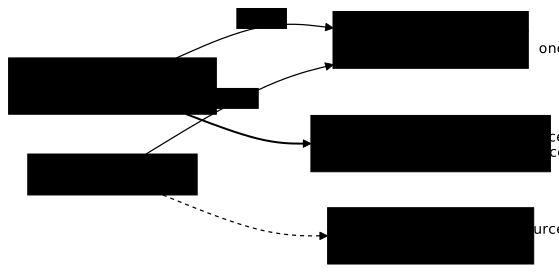
Two checks confirm it: view does not give Secrets, and its rights stop at the namespace of the binding.
kubectl auth can-i get secrets --as system:serviceaccount:equipe:auditeur -n equipekubectl auth can-i list deployments --as system:serviceaccount:equipe:auditeur -n equipekubectl auth can-i list deployments --as system:serviceaccount:equipe:auditeur -n defaultnoyesnoSecrets stay denied: view excludes them on purpose, because reading them amounts to reading passwords. Deployments can be listed in equipe and not in default: the ClusterRole is reused, but its scope is the one of the RoleBinding.
Give access to logs and name a user
The logs of a Pod are not the Pod: they form a subresource, pods/log, which is named separately in the Role. Reading a Pod does not give the right to read its logs. To grant both, the command lists both resources:
kubectl create role pod-reader --verb=get,list,watch --resource=pods,pods/log -n equipeThe subject of a RoleBinding is not always a ServiceAccount. For a user, kubectl create rolebinding takes --user=<name> instead of --serviceaccount:
kubectl create rolebinding read-pods-binding --role=pod-reader --user=dev-user -n equipeThis command succeeds even if dev-user exists nowhere: Kubernetes has no User object, and the binding only contains a name. The authentication of this user, that is, the proof that they really carry this name, is covered at level 4 of the course.
To check the right on the subresource, kubectl auth can-i takes the --subresource option. Ask the question for dev-user, then check that they cannot delete:
kubectl auth can-i get pods --subresource=log --as=dev-user -n equipekubectl auth can-i delete pods --as=dev-user -n equipeyesnoThe first answer comes from the pod-reader Role, the second shows that reading opens nothing else. Note that --as does not check that the identity exists: a misspelled name, if it appears in a binding, would answer yes in the same way. The lecteur account of the previous steps, for its part, would answer no on logs, since its lire-pods Role does not cover pods/log.
Step 9: Clean up
Deleting the namespace takes the ServiceAccounts, the Role and the RoleBindings with it. No file or kubeconfig was created, so there is nothing else to remove.
kubectl delete namespace equipe equipe2 --ignore-not-foundThe command also names the equipe2 namespace from step 7. With --ignore-not-found, it succeeds whether you created it or not.
Put it into practice
You do not reread RBAC, you query it. The first lab binds a Role to the dev-user user to grant read-only access to Pods and their logs, and has you prove both sides with kubectl auth can-i: what passes and what stays denied. The second takes a cluster-admin granted for convenience to a ServiceAccount and brings it down to the strict minimum, the proof being what the API server answers, not what the manifest claims.
Key takeaways
- Kubernetes has no
Userobject: a human identity is aCNin a certificate signed by the cluster CA, or an account from an external provider. Applications use ServiceAccounts. RoleandClusterRoledefine permissions,RoleBindingandClusterRoleBindinggrant them. These are two separate actions.- The
Clusterprefix tells the scope of the object, not the scope of the rights: a ClusterRole granted by a RoleBinding only applies in one namespace. - RBAC denies by default: anything not explicitly granted is forbidden, and there is no deny rule.
kubectl create roleandkubectl create rolebindingwrite the YAML for you, and-o yamlshows it.- Reuse
view,editoradminwith a RoleBinding rather than writing long lists of rules. kubectl auth can-i, with--asand--list, proves rights without guesswork. Pass-nto see the rights of a namespace.- A
Forbiddenmessage carries its diagnosis: the subject, the verb, the resource and the namespace appear in it, orat the cluster scopefor a resource without a namespace.
Knowledge check
Seven questions on two distinctions to master: the real scope of a ClusterRole depending on the binding that goes with it, and what a Forbidden error message designates exactly.
Knowledge check
Check what you have learned with this interactive quiz
How it works
- The timer starts when you click Start
- Multiple choice, true/false and short answer questions
- You can move between questions
- Detailed results are shown at the end
Starts the quiz and the timer
Review
(0/0)Score by domain
A domain groups several guides and gets several questions, so its score is more reliable than a per-topic score, which often rests on a single question.
Summary
Strengths
No topic passed at 80% on at least two questions yet.
Weak areas
No topic below the pass mark.
Recommended next
Hints before you try again?
Continue the course: ServiceAccounts for developers
A new full quiz with random questions
Work again only on the questions you missed