Kubernetes offers three autoscalers, and each one solves a different problem. The Horizontal Pod Autoscaler (HPA) changes the number of Pods of an application, the Vertical Pod Autoscaler (VPA) changes the size of each Pod, and the Cluster Autoscaler changes the number of nodes. This lesson teaches you to choose between them on Kubernetes 1.37, without installing them: each one has its own lesson or guide, linked below.
What you will learn
- Say what each autoscaler adjusts: number of Pods, size of Pods, number of nodes
- Pick the autoscaler that answers a given need
- Explain why accurate requests are a prerequisite for all three
- Say where the HPA gets its metrics, and when it needs an adapter
- Combine autoscalers without letting them work against each other
- Test an autoscaling setup before production
Prerequisites
You know what requests and limits are, that is, the amount of CPU and memory reserved for a container and its ceiling. All the autoscalers compute from these values. You also know that a Pending Pod is waiting for a node with enough room for it.
Why set up autoscaling?
Without autoscaling, you set the number of Pods, their size and the number of nodes by hand. If you size too tight, the application slows down or fails when the load rises. If you size generously to be safe, you permanently pay for resources nobody uses, which is expensive in a cloud where every node is billed. An autoscaler replaces this manual tuning with a rule that the cluster applies on its own.
Which autoscaler for which need?
The right choice depends on what is missing: more Pods, better-sized Pods, or more room to host them. The table compares the three by what they change, the load they suit and their source of measurements.
| HPA | VPA | Cluster Autoscaler | |
|---|---|---|---|
| What it changes | the number of replicas | the requests (and the limits) of each Pod | the number of nodes |
| It suits | a load that varies | a roughly stable load whose requests are badly estimated | a cluster where Pods stay Pending for lack of room |
| Source of measurements | metrics-server for CPU and memory, an adapter for anything else | metrics-server and its history | the unplaced Pods and the underused nodes |
| Lesson or guide | HPA | VPA | Node autoscaling (in French) |
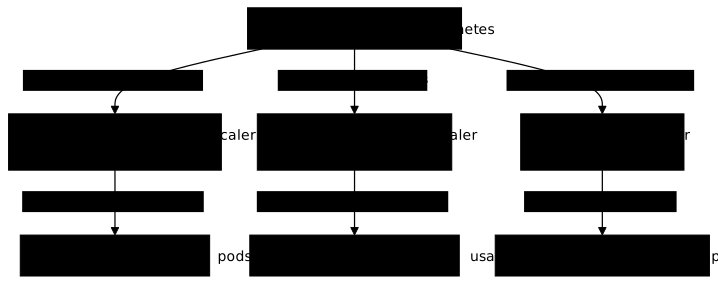
The next diagram places the three autoscalers on what they adjust. Note that the HPA and the VPA act on the Pods of an application, whereas the Cluster Autoscaler acts one level below, on the nodes that host them.
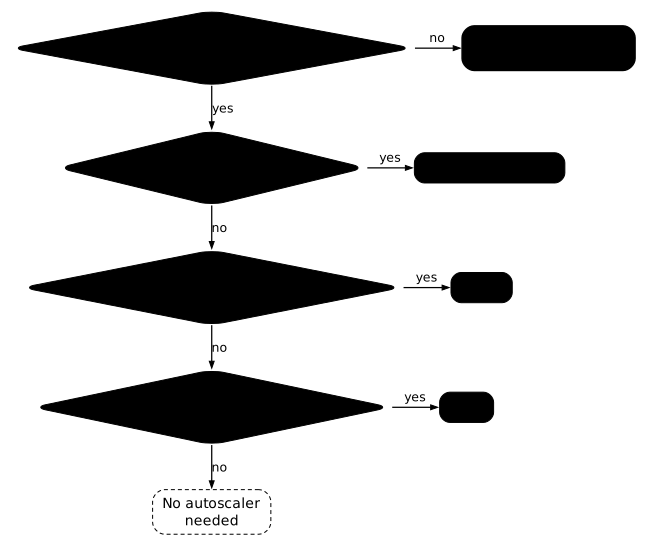
To decide from your own situation, follow the decision tree. The first question is about your requests: if they do not reflect the measured consumption, the "no" exits to the right toward the VPA in Off mode, which is used to fix them before any other autoscaler. If they are accurate, the "yes" goes down, and each following question sends its "yes" to the right toward the autoscaler that answers the need. The answers are not always mutually exclusive: a cluster can combine several needs, as the section on combining autoscalers shows.
Why do you need accurate requests before any autoscaler?
An autoscaler guesses nothing: it compares what a Pod consumes with what it asked for. The HPA computes a percentage of the CPU request, the scheduler places Pods according to their requests, and the VPA starts from the current requests to recommend better ones. Without requests, the HPA displays no percentage, and the scheduler and the Cluster Autoscaler cannot count the room taken.
Wrong requests therefore skew all three decisions at once. Before adding an autoscaler, measure what your Pods really consume, and fix the requests. This is the job of the VPA in recommendation mode, covered in the lesson Resize a Pod's resources: resize and VPA.
When should you choose the HPA?
Choose the HPA when the load of the application varies and adding replicas lowers it: an API that receives more requests at peak hours, for example. The HPA reads a metric, compares it with a target and adjusts the number of replicas between minReplicas and maxReplicas. Its TARGETS column tells you where it stands.
NAME REFERENCE TARGETS MINPODS MAXPODS REPLICAS AGEweb Deployment/web cpu: <unknown>/50% 1 4 1 0sThe metrics had not arrived yet: <unknown> means that the HPA has no measurement and decides nothing. Forty-five seconds later, the same command displays the current value followed by the target.
NAME REFERENCE TARGETS MINPODS MAXPODS REPLICAS AGEweb Deployment/web cpu: 0%/50% 1 4 1 45sThe cpu: 0%/50% format reads "CPU, current value 0%, target 50%". If <unknown> persists, two lasting causes are possible: metrics-server is missing, or the container declares no CPU requests. kubectl describe hpa tells the two apart, as the lesson on the HPA shows.
Where do the HPA metrics come from?
metrics-server only provides the CPU and memory of Pods. For any other metric, such as the number of requests per second or the length of a queue, the HPA goes through an adapter that exposes the metric to the Kubernetes API, for example Prometheus Adapter, which makes the metrics of a Prometheus available. The HPA then accepts metrics of type Pods, Object or External. The syntax and the examples are in the lesson Horizontal Pod Autoscaler.
And to scale down to zero replicas?
The HPA can scale down to minReplicas: 0: the HPAScaleToZero feature gate, the switch that enables this function, is Beta and enabled by default in Kubernetes 1.37. It then needs an Object or External metric, never CPU or memory, since no Pod is running to measure them. When the event source has no adapter ready, KEDA provides one: it drives the standard HPA and advertises "70+ scalers" (message queues, databases, cron), listed on keda.sh. For scale-to-zero of an HTTP service, see the lesson Knative Serving (in French).
When should you choose the VPA?
Choose the VPA when the load is roughly stable but the requests were guessed: the application always consumes around 120m of CPU and 1 CPU was requested. The VPA observes the consumption and writes a recommendation. In Off mode, it changes nothing, and kubectl get vpa displays the computed target.
NAME MODE CPU MEM PROVIDED AGEcharge-vpa Off 126m 250Mi True 60sPROVIDED True indicates that a recommendation exists, and the CPU and MEM columns give the target. A VPA created without updatePolicy is in Recreate mode: it evicts Pods to apply its targets. Auto is deprecated and behaves like Recreate. For a VPA that must interrupt nothing, learn to read the recommendation first, as in the dedicated lesson.
When should you choose the Cluster Autoscaler?
Choose the Cluster Autoscaler when Pods stay Pending because no node has enough room: it adds a node, then removes one when it is no longer needed. An HPA asking for extra replicas is not enough if the nodes are full: the new Pods wait, and the Cluster Autoscaler supplies the missing capacity.
You do not need a cloud to observe it: it runs on kind with the kwok provider, which simulates nodes, and the lesson Node autoscaling (in French) shows it adding then removing nodes. In production, it relies on the provider that creates the machines: the node groups of a managed cloud, for example.
How do you combine autoscalers?
HPA and Cluster Autoscaler go together: the first asks for Pods, the second provides the nodes. The HPA is limited by maxReplicas and by the room available, so set both carefully.
HPA and VPA can be combined on one condition: do not let them tune the same metric. The HPA computes a percentage of the CPU request; if the VPA changes that request, the percentage moves without the load having changed, and the two loops work against each other. Leave the VPA in Off when an HPA tracks the CPU, or have the HPA track a different metric from the one the VPA adjusts.
How do you test autoscaling before production?
An autoscaling setup is tested like an application: under load, in an environment that looks like production. Generate load with a tool such as k6 or Locust, watch the number of replicas or nodes go up then come back down, and tune the targets before going to production. Also watch how often changes happen: an autoscaling that goes up and down constantly signals a target too close to the normal load.
Which autoscaler for three concrete needs?
Three situations show the choice. An API whose traffic doubles at peak hours calls for the HPA. A stable application that consumes 120m of CPU while reserving 1 calls for the VPA in Off mode, to fix the requests. A cluster whose Pods stay Pending despite an HPA asking for replicas calls for the Cluster Autoscaler. All three can coexist on the same cluster, each at its own level.
Key takeaways
- The HPA changes the number of Pods, the VPA their size, the Cluster Autoscaler the number of nodes.
- The HPA suits a load that varies, the VPA a roughly stable load.
- Without accurate requests, none of the three decides well: measure the consumption first.
- metrics-server only serves CPU and memory; a custom metric goes through an adapter such as Prometheus Adapter.
- A VPA without
updatePolicyis inRecreateand evicts Pods;Autois deprecated. HPAScaleToZerois Beta and enabled by default in 1.37, with anObjectorExternalmetric; KEDA advertises more than 70 scalers.- The Cluster Autoscaler can be observed on kind with the kwok provider, without a cloud.
- HPA and VPA must not tune the same metric.
Test your knowledge
Eight questions check that you can choose the autoscaler that answers a situation: Pods Pending for lack of room, an application that reserves too much CPU, a requests-per-second metric, a message queue that must scale down to zero. One question is also about the conflict between HPA and VPA, another about the role of requests. If an answer surprises you, reread the matching section.
Knowledge check
Check what you have learned with this interactive quiz
How it works
- The timer starts when you click Start
- Multiple choice, true/false and short answer questions
- You can move between questions
- Detailed results are shown at the end
Starts the quiz and the timer
Review
(0/0)Score by domain
A domain groups several guides and gets several questions, so its score is more reliable than a per-topic score, which often rests on a single question.
Summary
Strengths
No topic passed at 80% on at least two questions yet.
Weak areas
No topic below the pass mark.
Recommended next
Hints before you try again?
Continue the course: Horizontal Pod Autoscaler (HPA): automatic scaling in Kubernetes
A new full quiz with random questions
Work again only on the questions you missed