A NotReady node is a node whose kubelet no longer reports to the control plane, and the cause is read on the node, not from kubectl. The kubelet is the agent that runs on every node: it starts the containers and regularly reports the state of its machine to the API server. When it stops, no longer starts, or is not restarted at boot, the node becomes NotReady, its Pods degrade and the applications reserved for it go down. This lesson teaches you to read the conditions of the node, to query its service and its journal, to repair without breaking anything, and to check that everything is back for good. It assumes the API server answers: for a cluster where kubectl itself is silent, see Diagnose a Kubernetes control plane failure.
What you will learn
- Read the conditions of a
NotReadynode withkubectl describe node, and the time of its last sign of life - Connect to the node and read the service state with
systemctl status kubelet, then its journal withjournalctl -u kubelet - Repair an invalid kubelet configuration, in
/var/lib/kubelet/config.yaml, without deleting it - Make a kubelet durable with
systemctl enable --nowand check that it will survive a reboot - Check that the Pods of the node come back
- Repair several failures at once, with no procedure, in a challenge graded on the cluster state
Prerequisites
- A kubeadm cluster with SSH access to the workers and
sudorights on them: commands run on a node (systemctl,journalctl, files under/var/lib/kubelet) require root rights - The lesson Diagnose a Kubernetes control plane failure, which introduces
crictl,journalctland the notion of static Pod - The role of the kubelet, seen in How worker nodes work
- The incident diagnosis method (in French), which helps you decide whether the problem really is at the node level
The kubelet is a systemd service: systemd is the service manager of the machine, and systemctl is its control command. The guide Troubleshoot a Linux service that will not start covers how to read it in detail. A service has two independent states there, which are used throughout the lesson: it may be running now or not (active), and it may be started automatically at boot or not (enabled).
What does NotReady mean?
NotReady means the control plane has stopped receiving a signal from the kubelet of the node. The kubelet sends a regular sign of life to the API server, called a heartbeat. When this sign of life is missing for too long, the control plane sets the Ready condition of the node to Unknown, and kubectl get nodes shows NotReady. The node is then marked as unreachable, and the Pods on it end up evicted. The details of how nodes work are in How worker nodes work.
The delay before eviction is not a controller setting: it is a toleration automatically added to every Pod when it is created. You can read it on any Pod, for example a CoreDNS Pod: the first command gives its name, which you copy into the second.
kubectl get pod -n kube-system -l k8s-app=kube-dns -o namekubectl get pod -n kube-system <coredns-pod-name> -o jsonpath='{.spec.tolerations}'[{"key":"CriticalAddonsOnly","operator":"Exists"},{"effect":"NoSchedule","key":"node-role.kubernetes.io/control-plane"},{"effect":"NoExecute","key":"node.kubernetes.io/not-ready","operator":"Exists","tolerationSeconds":300},{"effect":"NoExecute","key":"node.kubernetes.io/unreachable","operator":"Exists","tolerationSeconds":300}]The first two tolerations are specific to CoreDNS, which must be able to run on the control plane. The last two, not-ready and unreachable, are added automatically to all Pods. Look at tolerationSeconds on these two entries: it gives the number of seconds the Pod agrees to stay on a NotReady or unreachable node before being evicted. Since it is a toleration, it is set per workload: a service that must fail over quickly lowers its tolerationSeconds, a long-running job raises them.
An application reserved for a node by a nodeSelector has nowhere else to go. When that node goes down, its Pods are evicted and then stay Pending: the application is degraded until the node is back.
How do you read the conditions of a NotReady node?
kubectl get nodes reports the symptom, but kubectl describe node holds the answer. The conditions listed in the Conditions section tell apart two very different situations: a node short of resources, where MemoryPressure, DiskPressure or PIDPressure are True, and a node that no longer communicates at all, where all the conditions switch to Unknown.
kubectl describe node k8s-w1.labName: k8s-w1.lab[...]Taints: node.kubernetes.io/unreachable:NoExecute node.kubernetes.io/unreachable:NoSchedule[...]Conditions: Type Status LastHeartbeatTime LastTransitionTime Reason Message ---- ------ ----------------- ------------------ ------ ------- NetworkUnavailable False Tue, 10 Nov 2026 22:38:46 +0000 Tue, 10 Nov 2026 22:38:46 +0000 CalicoIsUp Calico is running on this node MemoryPressure Unknown Tue, 10 Nov 2026 22:38:54 +0000 Tue, 10 Nov 2026 22:39:44 +0000 NodeStatusUnknown Kubelet stopped posting node status. DiskPressure Unknown Tue, 10 Nov 2026 22:38:54 +0000 Tue, 10 Nov 2026 22:39:44 +0000 NodeStatusUnknown Kubelet stopped posting node status. PIDPressure Unknown Tue, 10 Nov 2026 22:38:54 +0000 Tue, 10 Nov 2026 22:39:44 +0000 NodeStatusUnknown Kubelet stopped posting node status. Ready Unknown Tue, 10 Nov 2026 22:38:54 +0000 Tue, 10 Nov 2026 22:39:44 +0000 NodeStatusUnknown Kubelet stopped posting node status.[...]Look at three things in this output:
- The
Unknownstatus onMemoryPressure,DiskPressure,PIDPressureandReady, with the messageKubelet stopped posting node status. No resource pressure is reported: it is the kubelet that went silent, and you have to go and look at the node. LastHeartbeatTime, which gives the time of the last sign of life (22:38:54 here). It tells you since when the node has been silent, and so which change may have caused it. In this capture, the control plane switched the conditions toUnknown50 seconds later (LastTransitionTime, 22:39:44).NetworkUnavailable, which stays atFalse. This condition is set by the network plugin (Calico here), not by the kubelet: its value is frozen and says nothing about the failure.
The two node.kubernetes.io/unreachable marks in the Taints confirm that the node is considered unreachable.
If on the contrary a pressure condition is True, the node is short of resources and its Pods may be evicted: see the section "Is the node running out of resources?".
How do you find the cause on the node?
Connect to the node, then ask two questions in this order: is the service holding up, and what does its journal say? The following diagram sums up the path from the symptom. Look first at the diamond at the top, which separates a node short of resources from a silent kubelet, then at the service state, which points to the right way of reading the journal.
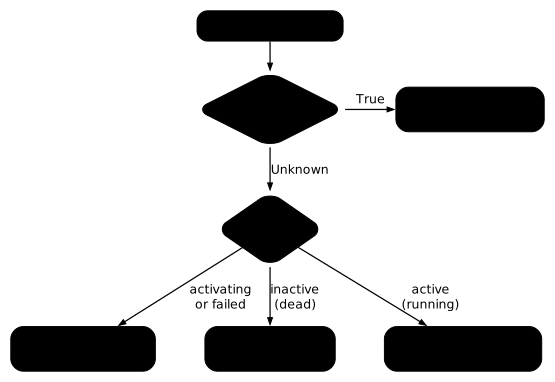
The outputs in this section come from different failures, triggered one after the other on the same worker: their times therefore do not follow one another from one capture to the next.
ssh k8s-w1.labsudo systemctl status kubelet● kubelet.service - kubelet: The Kubernetes Node Agent Loaded: loaded (/usr/lib/systemd/system/kubelet.service; enabled; preset: enabled) Drop-In: /usr/lib/systemd/system/kubelet.service.d └─10-kubeadm.conf Active: activating (auto-restart) (Result: exit-code) since Tue 2026-11-10 22:38:48 UTC; 5s ago Docs: https://kubernetes.io/docs/ Process: 66192 ExecStart=/usr/bin/kubelet $KUBELET_KUBECONFIG_ARGS $KUBELET_CONFIG_ARGS $KUBELET_KUBEADM_ARGS $KUBELET_EXTRA_ARGS (code=exited, status=1/FAILURE) Main PID: 66192 (code=exited, status=1/FAILURE) CPU: 30msTwo lines matter. Active says whether the service is running: inactive (dead) means stopped, activating (auto-restart) means it starts, crashes and systemd restarts it in a loop. Loaded says whether the service will start at the next boot of the machine: enabled or disabled. These are two distinct pieces of information, explained in the section "A stopped or disabled service: what is the difference?".
Then, the journal. It gives the exact error when the service crashes:
sudo journalctl -u kubelet --no-pager -n 20Do not restart the service before reading this output: a kubelet that restarts without its cause being fixed falls over again immediately.
A stopped or disabled service: what is the difference?
A systemd service has two independent states, and an incident can affect one, the other, or both. Stopped (systemctl stop), the service is no longer running but will start again at the next boot of the machine. Disabled (systemctl disable), it will no longer be launched at boot. A service that is stopped and disabled therefore stays absent after a reboot, and a systemctl start alone changes nothing about that: it sets the first state and leaves the second. The command systemctl enable --now <service> sets both: enable creates the activation at boot, --now also starts the service right away.
Here is the case on containerd, the runtime of the node, which the kubelet uses to start containers. After sudo systemctl disable --now containerd, which stops and disables the service in one go, the two states are read separately.
sudo systemctl status containerd --no-pagersystemctl is-enabled containerd○ containerd.service - containerd container runtime Loaded: loaded (/usr/lib/systemd/system/containerd.service; disabled; preset: enabled) Active: inactive (dead) since Tue 2026-11-10 22:40:48 UTC; 225ms ago[...]disabledActive: inactive (dead) answers "is it running now?", and Loaded: ... disabled with the disabled output of systemctl is-enabled answers "will it restart by itself?". The command that sets both is sudo systemctl enable --now containerd: it creates the activation link (Created symlink /etc/systemd/system/multi-user.target.wants/containerd.service) and starts the service. Reading enabled afterwards amounts to saying that the service will survive a reboot of the machine. Without this reading, a repair holds only until the next reboot. The same check applies to the kubelet.
The kubelet refuses to start: what do you read in its journal?
If systemctl status shows activating (auto-restart) or failed, the service starts and then stops immediately. The journal names the file it cannot read and, depending on the error, the line or the field at fault. Here is an example where a field of the kubelet configuration holds a value of the wrong type. To reproduce it on a test worker, first keep a copy of the file (the "To reproduce safely" box, at the end of the lesson, also gives the way back), add a line maxPods: "cent" at the end of the configuration and restart the kubelet:
sudo cp /var/lib/kubelet/config.yaml /var/lib/kubelet/config.yaml.origecho 'maxPods: "cent"' | sudo tee -a /var/lib/kubelet/config.yamlsudo systemctl restart kubeletThen read the journal:
sudo journalctl -u kubelet -n 20 --no-pager[...]Nov 10 22:38:38 k8s-w1.lab kubelet[66168]: E1110 22:38:38.630405 66168 run.go:72] "command failed" err="failed to load kubelet config file, path: /var/lib/kubelet/config.yaml, error: failed to load Kubelet config file /var/lib/kubelet/config.yaml, error failed to decode: json: cannot unmarshal string into Go struct field KubeletConfiguration.maxPods of type int32"Nov 10 22:38:38 k8s-w1.lab systemd[1]: kubelet.service: Main process exited, code=exited, status=1/FAILURENov 10 22:38:38 k8s-w1.lab systemd[1]: kubelet.service: Failed with result 'exit-code'.Nov 10 22:38:48 k8s-w1.lab systemd[1]: kubelet.service: Scheduled restart job, restart counter is at 1.[...]The first line holds everything you need: the file (/var/lib/kubelet/config.yaml), the faulty field (maxPods) and the nature of the problem (a string where an integer is expected). The following lines only say that systemd saw the process exit with an error, then that it restarts it ten seconds later (Scheduled restart job): it is the first line that explains.
Repairing means fixing this field, not deleting the file: without it, the kubelet loses the settings that kubeadm wrote there when the node joined. Open the file, fix the value, then restart the service.
sudo grep -n maxPods /var/lib/kubelet/config.yamlsudo sed -i 's/^maxPods:.*/maxPods: 110/' /var/lib/kubelet/config.yamlsudo grep -n maxPods /var/lib/kubelet/config.yamlsudo systemctl restart kubeletsystemctl is-active kubeletThe value of maxPods must be an integer, for example 110. The sed replaces the maxPods: line that you added above: on a file that does not contain one, the first grep returns nothing and the sed changes nothing. Once the line is fixed, systemctl is-active kubelet must answer active, and the node goes back to Ready within a few seconds.
When a value has to be rewritten rather than fixed, do not guess it: take it from a healthy copy of the file, or from the cluster resource it comes from.
The following table gathers other common causes, with the message that identifies them. The first two rows rely on outputs from this lesson (unreadable configuration above, stopped runtime in the next section). The last three give typical messages, as hints: the exact text changes with the version and the configuration, so search for the keyword rather than the whole sentence.
| Cause | Message in journalctl (or describe node) | What to do |
|---|---|---|
| Unreadable configuration | failed to load kubelet config file | Fix the line indicated in /var/lib/kubelet/config.yaml |
| Runtime stopped | dial unix /var/run/containerd/containerd.sock: connect: no such file or directory | systemctl status containerd, then restart it |
| Expired certificate | certificate has expired | See the kubeadm guide for certificates |
| Wrong API server | dial tcp <ip>:6443: connect: connection refused | Check the server field of /etc/kubernetes/kubelet.conf |
| Pod network missing | NetworkReady=false reason:NetworkPluginNotReady, and the Ready condition at False in describe node with the message container runtime network not ready | Check the network plugin Pods, see CNI, CSI and CRI |
The typical kubelet failures are subtle: a path changed by one character, an unknown flag, a stopped runtime. None can be guessed, all are read in the journal.
Is the container runtime at fault?
The kubelet depends on a container runtime, containerd on a kubeadm cluster. If the runtime is stopped, the kubelet can no longer create containers, and it complains in its journal. The check follows the same logic as for the kubelet: state, then journal.
When containerd is stopped, the kubelet journal fills with errors that name the runtime socket.
sudo journalctl -u kubelet -n 20 --no-pager[...]Nov 10 22:40:44 k8s-w1.lab kubelet[66697]: E1110 22:40:44.749011 66697 remote_runtime.go:435] "ListPodSandbox with filter from runtime service failed" err="rpc error: code = Unavailable desc = connection error: desc = \"transport: Error while dialing: dial unix /var/run/containerd/containerd.sock: connect: no such file or directory\"" filter=""[...]Nov 10 22:40:46 k8s-w1.lab kubelet[66697]: E1110 22:40:46.747942 66697 kubelet.go:3328] "Container runtime sanity check failed" err="rpc error: code = Unavailable desc = connection error: desc = \"transport: Error while dialing: dial unix /var/run/containerd/containerd.sock: connect: no such file or directory\""[...]The pattern to recognize is dial unix /var/run/containerd/containerd.sock: connect: no such file or directory: the kubelet can no longer find the runtime. Then read systemctl status containerd and systemctl is-enabled containerd, as described above, to know whether the service is stopped, disabled, or both. Restarting the kubelet is pointless as long as containerd is stopped: repair the runtime first.
Is the node running out of resources?
When the node runs short of memory, disk or processes, the kubelet sets the MemoryPressure, DiskPressure or PIDPressure conditions to True and starts evicting Pods. The kubelet computes these conditions from its own eviction thresholds, which depend on its configuration. By default on Linux, Kubernetes applies in particular memory.available<100Mi, nodefs.available<10% and imagefs.available<15%. The computation is not limited to free -m or to /var/lib/kubelet.
df -h /var/lib/kubeletfree -msudo crictl rmi --pruneOn a node in DiskPressure, crictl rmi --prune removes unused images: this frees space without touching the running Pods. The kubelet reevaluates its eviction signals about every ten seconds, but it keeps the condition at True for five minutes after the value goes back under the threshold (evictionPressureTransitionPeriod, 5 minutes by default): the condition therefore does not clear right after the cleanup.
How do you check that the node is really back?
A Ready node is not enough to close the incident: you must check the node, the service and the Pods that were reserved for it. Start from the control plane.
kubectl get nodeskubectl get deploy -n <namespace> <deployment>kubectl get pods -n <namespace> -l <label> -o wideNAME STATUS ROLES AGE VERSIONk8s-cp.lab Ready control-plane 56m v1.37.2k8s-w1.lab Ready <none> 55m v1.37.2The output above is that of kubectl get nodes; the other two commands depend on your application. Look at three elements: the node is Ready, the READY and AVAILABLE columns of the Deployment show the wanted number of replicas (for example 3/3 in READY), and the NODE column of the Pods shows the node you have just repaired. A READY of 0/3, or a Pod placed on a node other than the expected one, means the repair is not finished. The node may take a few seconds to go back to Ready: rerun kubectl get nodes before concluding to a failure.
Finish with the check on how long the fix will last, this time on the worker (ssh k8s-w1.lab):
systemctl is-active kubelet && systemctl is-enabled kubeletThe two answers active and enabled ensure that the kubelet is running and that it will restart on its own. A repair that does not pass this last check holds only until the next reboot.
Put it into practice
Two labs replay these failures on a real kubeadm cluster, one control plane and one worker in virtual machines. In the first, the kubelet of a worker stops as soon as it is launched and the node is NotReady: you read in the journal what it objects to in its configuration, you fix the file without breaking anything else, and the validation checks that the node is Ready, that the legitimate DNS address of the cluster is still in the configuration, and that the application comes back with its three replicas. Start it with dsoxlab start cka-troubleshoot-kubelet.
In the second, a worker has gone NotReady and the application reserved for it is degraded. You find on the node why it no longer talks to the control plane, you put its agent back in service for good, and the validation reads the state of the node, the state of the service on the worker itself, and that of the Deployment. Start it with dsoxlab start cka-troubleshoot-node-notready.
Challenge: bring a failing application and its cluster back into service
The challenge is the unaided proof of the module "Operate Kubernetes", and it is graded on the cluster state you leave behind, not on the commands you type. On a kubeadm cluster, four failures are in progress at the same time: a Deployment that restarts in a loop, a Pod whose image does not download, an API server that no longer starts and a worker whose kubelet is down. You repair them with no procedure, and you write down the cause of each one in a file before repairing it.
The validation reads ten states, with no solution and no value to copy. The api Deployment has its two replicas available, none of its Pods restarts in a loop, and it reads its configuration from the requested location. The vitrine Pod runs on an image that the node really pulled and answers over HTTP. The API server answers again, its static Pod is stable and its manifest no longer carries the faulty flag. The worker is Ready with a valid kubelet configuration, that kubelet will survive a reboot of the machine, and the entrepot application gets its three replicas back on it.
Passing requires 70 points out of 100. Two requirements are blocking and must pass whatever the total: the causes written down before each repair, and the API server restored. While you work, dsoxlab check lists what still fails. A failing state tells you what is missing, without saying how to fix it: the lesson to go back to is the one that teaches that state. The challenge relies on this lesson, on Kubernetes incident diagnosis method (in French), Analyze Kubernetes events (in French), Diagnose a Kubernetes CrashLoopBackOff, Diagnose a Kubernetes ImagePullBackOff (in French), Diagnose a Kubernetes control plane failure and Observe the health of a cluster (in French).
Key takeaways
- A
NotReadynode is a node whose kubelet no longer reports its state.kubectl describe nodegives the time of the last sign of life inLastHeartbeatTime. Unknownconditions withKubelet stopped posting node statuspoint to a silent kubelet. A pressure condition atTruepoints to a node short of resources.- The cause is read on the node:
systemctl status kubeletfor the service state,journalctl -u kubeletfor the exact error. - A service can be stopped or disabled.
systemctl is-activeandsystemctl is-enabledtell them apart. systemctl enable --now <service>starts a service and enables it at boot. Readingenabledproves it will survive a reboot, kubelet included.- When the kubelet refuses to start because of
/var/lib/kubelet/config.yaml, you fix the line the journal points to and keep the file, with the kubeadm settings. - The Pods of a
NotReadynode are evicted after the delay of the toleration added to every Pod, readable intolerationSeconds. - An incident is closed when the node is
Ready, the Deployment has its replicas available again, and the kubelet isactiveandenabled.
Test your knowledge
Eight questions to tell apart a stopped node, a disabled node and a kubelet that can no longer read its configuration, then to check that the repair holds.
Knowledge check
Check what you have learned with this interactive quiz
How it works
- The timer starts when you click Start
- Multiple choice, true/false and short answer questions
- You can move between questions
- Detailed results are shown at the end
Starts the quiz and the timer
Review
(0/0)Score by domain
A domain groups several guides and gets several questions, so its score is more reliable than a per-topic score, which often rests on a single question.
Summary
Strengths
No topic passed at 80% on at least two questions yet.
Weak areas
No topic below the pass mark.
Recommended next
Hints before you try again?
Continue the course: Upgrade a Kubernetes cluster without downtime
A new full quiz with random questions
Work again only on the questions you missed