Gateway API is the API that Kubernetes recommends for exposing applications when Ingress is no longer enough: it separates the entry point (the Gateway) from the routing rules (the HTTPRoutes). This lesson has you install the version 1.6.2 CRDs and Traefik on a kind cluster, declare a Gateway and two routes, route by header, split traffic and redirect, then break routes on purpose to learn how to read their conditions. It is for readers who have already published an application with an Ingress.
What you will learn
- Explain what Gateway API changes compared with Ingress: separate roles and distinct resources
- Install the Standard channel CRDs and a controller, and tell the Standard and Experimental channels apart
- Write a GatewayClass, a Gateway and an HTTPRoute, and state the role of a ReferenceGrant
- Check that a Gateway is programmed and that an HTTPRoute is attached, by reading their conditions
- Route by path and by header, split traffic between two versions and redirect
- Diagnose an HTTPRoute that no longer serves
- Map the concepts of an Ingress to those of Gateway API
Prerequisites
You have read the Ingress lesson: you know what a controller is and why the request reaches port 8080 of your machine. The versions used are kind 0.33.0, kubectl 1.37.0, nodes in v1.37.0, Helm 4.3.0 and the Gateway API v1.6.2 CRDs. Helm is only used to install Traefik: its own installation is described in the Install Helm section of the Ingress lesson, and the Helm course (in French) teaches it.
The cluster is the same as for Ingress: one control plane and three workers, one of which publishes ports 80 and 443 on ports 8080 and 8443 of your machine. Here is kind-expo.yaml, followed by the creation of the lesson's namespaces.
kind: ClusterapiVersion: kind.x-k8s.io/v1alpha4nodes: - role: control-plane - role: worker extraPortMappings: - containerPort: 80 hostPort: 8080 listenAddress: "0.0.0.0" - containerPort: 443 hostPort: 8443 listenAddress: "0.0.0.0" - role: worker - role: workerkind create cluster --name demo-expo --image kindest/node:v1.37.0@sha256:a1ed56cfb0e7b93589bdf97c8cd566405a265939e3620fc4f5de89adff580ae5 --config kind-expo.yamlkubectl wait --for=condition=Ready nodes --all --timeout=120skubectl create namespace ws-gatewaykubectl create namespace ws-gateway-bThe four nodes become Ready in about forty seconds.
Some names in this lesson are in French on purpose, so that the commands and outputs stay those of the tested cluster: demo-expo means "expo-demo" (exposure demo), sans-controleur "no-controller", aucun-controleur "no-controller", gatewayclass-orpheline.yaml "orphan-gatewayclass.yaml", avance "advanced", ancien "old", nexiste-pas "does-not-exist", fantome "ghost", autre "other", autorise-ws-gateway "allows-ws-gateway" and app-b-ns-b.yaml "app-b-in-ns-b.yaml".
Why Gateway API?
Gateway API does not replace Ingress in the sense of a deprecation: the Ingress API stays stable, but frozen, and Kubernetes recommends Gateway API for advanced needs (Kubernetes documentation on Ingress). The two coexist, and one controller can serve both.
What Gateway API changes at its core
With an Ingress, a single object carries everything: the controller to use, the hosts, the paths and the backends. What it cannot express (redirects, traffic splitting, header matching) goes through annotations specific to the controller, which another controller will silently ignore. Gateway API splits these responsibilities across several resources, each owned by a different role, and describes these behaviors in the API itself.
What Gateway API brings
Three things show up in this lesson. The separation of roles lets the cluster operator, often the platform team, fix the entry point while each application developer writes their own routes. Header routing, weighted splitting and redirects are fields of the API, so they are portable from one controller to another. Finally, each resource publishes in its status.conditions whether it is accepted and why, while an Ingress emits no event.
When to choose Ingress or Gateway API?
Choose Ingress to publish an application by host and path, with TLS, especially on a cluster already organized around Ingress. Choose Gateway API as soon as you need a redirect, weighted splitting or header matching without annotations, or when you want to separate the role of the cluster operator from that of the application developers.
| Need | Ingress | Gateway API |
|---|---|---|
| Host and path | Yes | Yes |
| Header, weight, redirect | Controller-specific annotations | API fields |
| Separate operator and developers | No | Yes, through Gateway and HTTPRoute |
| Backend in another namespace | Impossible | Yes, with a ReferenceGrant |
| Diagnosis | describe ingress, no event | status.conditions with a reason |
Architecture and concepts
Gateway API defines three roles (the "Roles and personas" page of the official documentation): the infrastructure provider, the cluster operator and the application developer. The following diagram maps each role to its resource. Look at the Gateway in the middle: it is the object that the cluster operator declares and to which each developer attaches their routes.
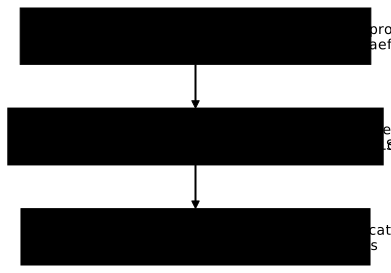
The infrastructure provider, often a cloud provider or the team that ships the controller, owns the GatewayClass: it names the controller that implements the Gateways, like an IngressClass. The cluster operator owns the Gateway, which declares entry points, the listeners, each with a port and a protocol. The application developer writes the HTTPRoute, which describes the routing and attaches to a Gateway through its parentRefs. A fourth object, the ReferenceGrant, allows a route to target a backend in another namespace.
Standard and Experimental channels
Gateway API ships as two channels of CRDs. The Standard channel contains the stable resources, the Experimental channel those that can still change. In v1.6.2, the Standard channel carries ten CRDs: backendtlspolicies, gatewayclasses, gateways, grpcroutes, httproutes, listenersets, referencegrants, tcproutes, tlsroutes and udproutes. The TCP and UDP routes, TCPRoute and UDPRoute, are therefore Standard in this version; they are not used in this lesson, which stays on HTTP.
Install the Standard channel and keep it. Installing the Experimental channel on top of it is refused by default, by a ValidatingAdmissionPolicy shipped with the Standard channel: a rule that the API server applies before it stores an object. The next section shows it.
Installation
An installation takes two steps in this order: the Gateway API CRDs, then the controller. The CRDs go first, as the Traefik documentation and the notes of its chart require.
Install the CRDs
On a fresh cluster, the Gateway API types do not exist: kubectl does not know the resource.
kubectl get gatewayclass; echo "rc=$?"error: the server doesn't have a resource type "gatewayclass"rc=1This error, the server doesn't have a resource type, means that the CRDs are missing. Install them with the Standard channel file of version 1.6.2.
kubectl apply -f https://github.com/kubernetes-sigs/gateway-api/releases/download/v1.6.2/standard-install.yamlcustomresourcedefinition.apiextensions.k8s.io/backendtlspolicies.gateway.networking.k8s.io createdcustomresourcedefinition.apiextensions.k8s.io/gatewayclasses.gateway.networking.k8s.io createdcustomresourcedefinition.apiextensions.k8s.io/gateways.gateway.networking.k8s.io createdcustomresourcedefinition.apiextensions.k8s.io/grpcroutes.gateway.networking.k8s.io createdcustomresourcedefinition.apiextensions.k8s.io/httproutes.gateway.networking.k8s.io createdcustomresourcedefinition.apiextensions.k8s.io/listenersets.gateway.networking.k8s.io createdcustomresourcedefinition.apiextensions.k8s.io/referencegrants.gateway.networking.k8s.io createdcustomresourcedefinition.apiextensions.k8s.io/tcproutes.gateway.networking.k8s.io createdcustomresourcedefinition.apiextensions.k8s.io/tlsroutes.gateway.networking.k8s.io createdcustomresourcedefinition.apiextensions.k8s.io/udproutes.gateway.networking.k8s.io createdvalidatingadmissionpolicy.admissionregistration.k8s.io/safe-upgrades.gateway.networking.k8s.io createdvalidatingadmissionpolicybinding.admissionregistration.k8s.io/safe-upgrades.gateway.networking.k8s.io createdCount the lines: ten CRDs, plus a ValidatingAdmissionPolicy safe-upgrades.gateway.networking.k8s.io and its binding. The policy is the one that protects the channel. The next command reads the annotation that each CRD carries about its version and channel.
kubectl get crd gateways.gateway.networking.k8s.io -o jsonpath='{.metadata.annotations}{"\n"}'In the output, look for the two keys gateway.networking.k8s.io/bundle-version, here v1.6.2, and gateway.networking.k8s.io/channel, here standard. They tell you which version and which channel are installed on the cluster, which you must check before trusting an example from the documentation.
To see the channel protection at work, ask for a dry run of the Experimental channel.
kubectl apply --dry-run=server -f https://github.com/kubernetes-sigs/gateway-api/releases/download/v1.6.2/experimental-install.yamlThe server refuses to modify the Standard CRDs. Here is the end of the message, for the backendtlspolicies CRD.
customresourcedefinitions.apiextensions.k8s.io "backendtlspolicies.gateway.networking.k8s.io" is forbidden: ValidatingAdmissionPolicy 'safe-upgrades.gateway.networking.k8s.io' with binding 'safe-upgrades.gateway.networking.k8s.io' denied request: Installing experimental CRDs on top of standard channel CRDs is prohibited by default. Uninstall ValidatingAdmissionPolicy safe-upgrades.gateway.networking.k8s.io to install experimental CRDs on top of standard channel CRDs.The message states the rule and the way around it: uninstall the policy. Do not do it without a reason, this safeguard exists to avoid mixing the two channels.
Install a controller
If Helm is not installed yet, first follow the Install Helm section of the Ingress lesson. The command is then the one from the Ingress lesson, with a single difference: providers.kubernetesGateway.enabled=true turns on the Gateway API provider of Traefik. Replace 172.18.0.4 with the address of the demo-expo-worker worker, read with kubectl get nodes -o wide.
helm repo add traefik https://traefik.github.io/chartshelm repo update traefik
helm upgrade --install traefik traefik/traefik \  --namespace traefik --create-namespace --version 41.6.0 \  --set ports.web.nodePort=30080 \  --set ports.web.port=80 \  --set ports.websecure.nodePort=30443 \  --set ports.web.hostPort=80 \  --set ports.websecure.hostPort=443 \  --set 'nodeSelector.kubernetes\.io/hostname=demo-expo-worker' \  --set providers.kubernetesIngress.publishedService.enabled=false \  --set providers.kubernetesIngress.ingressEndpoint.ip=172.18.0.4 \  --set deployment.replicas=1 \  --set image.digest=sha256:9c437ac4f09ce6f4980a8544902d3475fdf70a1a7c578729581d2535dfa7d635 \  --set versionOverride=v3.7.18 \  --set-string 'podSecurityContext.sysctls[0].name=net.ipv4.ip_unprivileged_port_start' \  --set-string 'podSecurityContext.sysctls[0].value=0' \  --set providers.kubernetesGateway.enabled=true \  --set gateway.enabled=false \  --wait --timeout 6mkubectl -n traefik rollout status deployment/traefik --timeout=300s
The chart prints a notice: it will stop shipping the Gateway API CRDs in a future major version, and it is up to you to install them before Traefik, which you have done. The controller is ready in about twenty seconds. Now check the Pod and the class created by the chart.
kubectl -n traefik get pods -o widekubectl get gatewayclassNAME READY STATUS RESTARTS AGE IP NODE NOMINATED NODE READINESS GATEStraefik-5f5b4f66bf-rnjhb 1/1 Running 0 23s 10.244.3.2 demo-expo-worker <none> <none>NAME CONTROLLER ACCEPTED AGEtraefik traefik.io/gateway-controller True 23sThe traefik Pod is Running, and a traefik GatewayClass already exists, accepted, even though gateway.enabled=false: the chart creates it along with the Gateway provider. You do not have to write it. Traefik runs without any CRD from the Experimental channel, and its log contains no error about it.
Gateway API resources
A Gateway and its routes are declared in this order: the class, the Gateway, then the routes. Each resource says in its conditions whether it is accepted.
GatewayClass
A GatewayClass points to a controller by its name, spec.controllerName. If no controller carries that name, the class stays pending, and the following test shows it with an orphan class. Save the manifest in the file gatewayclass-orpheline.yaml.
apiVersion: gateway.networking.k8s.io/v1kind: GatewayClassmetadata: name: sans-controleurspec: controllerName: example.net/aucun-controleurkubectl apply -f gatewayclass-orpheline.yamlkubectl get gatewayclass sans-controleurkubectl get gatewayclass sans-controleur -o jsonpath='{range .status.conditions[*]}{.type}={.status} ({.reason}) {.message}{"\n"}{end}'gatewayclass.gateway.networking.k8s.io/sans-controleur createdNAME CONTROLLER ACCEPTED AGEsans-controleur example.net/aucun-controleur Unknown 5sAccepted=Unknown (Pending) Waiting for controllerACCEPTED is Unknown and the condition says Waiting for controller: nobody manages this class. This value does not mean failure, it means that nobody has answered. Delete the class with kubectl delete gatewayclass sans-controleur. The chart's traefik class, for its part, carries Accepted=True (Handled).
Gateway
A Gateway names its class and declares its listeners. This one listens for HTTP on port 80, and only accepts routes from its own namespace. Save the manifest in the file gateway.yaml.
apiVersion: gateway.networking.k8s.io/v1kind: Gatewaymetadata: name: web namespace: ws-gatewayspec: gatewayClassName: traefik listeners: - name: http port: 80 protocol: HTTP allowedRoutes: namespaces: from: SameThe listener port must match an entry point of Traefik, here the web entrypoint that listens on 80. With another port, the Gateway would be stored by the API but not programmed by Traefik.
The allowedRoutes.namespaces.from field decides who can attach: Same for routes of the same namespace, All for every namespace, Selector for the namespaces chosen by label.
kubectl apply -f gateway.yamlkubectl -n ws-gateway wait --for=condition=Programmed gateway/web --timeout=120skubectl -n ws-gateway get gateway webgateway.gateway.networking.k8s.io/web createdgateway.gateway.networking.k8s.io/web condition metNAME CLASS ADDRESS PROGRAMMED AGEweb traefik True 0sPROGRAMMED turns True within a second. The ADDRESS column stays empty: Traefik programs the Gateway without giving it an address, and routing works anyway, through port 8080 of your machine. An empty address therefore does not signal a failure here.
HTTPRoute
An HTTPRoute attaches to the Gateway through parentRefs, then describes hosts, paths and backends. The two applications are those of the Ingress lesson, in the ws-gateway namespace. First create their pages, then save the Deployments and Services in the file apps.yaml.
kubectl -n ws-gateway create configmap page-a --from-literal=index.html='application A'kubectl -n ws-gateway create configmap page-b --from-literal=index.html='application B'apiVersion: apps/v1kind: Deploymentmetadata: name: app-a namespace: ws-gatewayspec: replicas: 1 selector: matchLabels: app: app-a template: metadata: labels: app: app-a spec: containers: - name: nginx image: nginx:1.30.5@sha256:9bf97bd7714f5e24c1ccd545ecb9eb5435cb6d109c97cebb15e7e455e0239edb ports: - containerPort: 80 volumeMounts: - name: page mountPath: /usr/share/nginx/html/a volumes: - name: page configMap: name: page-a---apiVersion: v1kind: Servicemetadata: name: app-a namespace: ws-gatewayspec: selector: app: app-a ports: - port: 80 targetPort: 80---apiVersion: apps/v1kind: Deploymentmetadata: name: app-b namespace: ws-gatewayspec: replicas: 1 selector: matchLabels: app: app-b template: metadata: labels: app: app-b spec: containers: - name: nginx image: nginx:1.30.5@sha256:9bf97bd7714f5e24c1ccd545ecb9eb5435cb6d109c97cebb15e7e455e0239edb ports: - containerPort: 80 volumeMounts: - name: page mountPath: /usr/share/nginx/html/b volumes: - name: page configMap: name: page-b---apiVersion: v1kind: Servicemetadata: name: app-b namespace: ws-gatewayspec: selector: app: app-b ports: - port: 80 targetPort: 80kubectl apply -f apps.yamlkubectl -n ws-gateway rollout status deployment/app-a deployment/app-b --timeout=90sThe next route publishes /a to app-a and /b to app-b under the host demo.test. Save it in the file httproute.yaml.
apiVersion: gateway.networking.k8s.io/v1kind: HTTPRoutemetadata: name: demo namespace: ws-gatewayspec: parentRefs: - name: web hostnames: - demo.test rules: - matches: - path: type: PathPrefix value: /a backendRefs: - name: app-a port: 80 - matches: - path: type: PathPrefix value: /b backendRefs: - name: app-b port: 80kubectl apply -f httproute.yamlkubectl -n ws-gateway get httproute demo -o jsonpath='{range .status.parents[*].conditions[*]}{.type}={.status} ({.reason}){"\n"}{end}'kubectl -n ws-gateway get httproutehttproute.gateway.networking.k8s.io/demo createdAccepted=True (Accepted)ResolvedRefs=True (ResolvedRefs)NAME HOSTNAMES AGEdemo ["demo.test"] 3sBoth conditions are True: Accepted says the route is attached to the Gateway, ResolvedRefs that its backends exist. Note that kubectl get httproute only shows the hosts and the age, not the state: the state is read in the conditions. Then test the routing from your machine, on port 8080.
curl -sS -i -m 5 -H 'Host: demo.test' http://localhost:8080/a/curl -sS -m 5 -H 'Host: demo.test' http://localhost:8080/b/HTTP/1.1 200 OKAccept-Ranges: bytesContent-Length: 13Content-Type: text/htmlDate: Thu, 12 Nov 2026 09:03:18 GMTEtag: "6af580c5-d"Last-Modified: Thu, 12 Nov 2026 09:03:01 GMTServer: nginx/1.30.5
application Aapplication BThe 200 with application A, then application B glued on the same line, proves routing by path: the body of /a/ has no line ending. Without the host demo.test, or on an undeclared path such as /c/, Traefik answers 404 page not found in plain text, as with an Ingress.
Checking the state of the resources
A Gateway API resource does not fail noisily: it accepts almost anything and then says what it retained in status.conditions. Reading these conditions is the main diagnostic gesture of this API.
Check the GatewayClasses
kubectl get gatewayclass shows the ACCEPTED column. True means a controller has taken the class, Unknown that none answers (the orphan class above).
kubectl get gatewayclass traefik -o jsonpath='{.spec.controllerName}{"\n"}{range .status.conditions[*]}{.type}={.status} ({.reason}) {.message}{"\n"}{end}'traefik.io/gateway-controllerAccepted=True (Handled) Handled by Traefik controllerCheck the Gateways
A Gateway carries two conditions, Accepted and Programmed, and each of its listeners carries some too. The next command shows them with their messages and the number of attached routes.
kubectl -n ws-gateway get gateway web -o jsonpath='{range .status.conditions[*]}{.type}={.status} ({.reason}) {.message}{"\n"}{end}{.status.addresses}{"\n"}{range .status.listeners[*]}{.name} attachedRoutes={.attachedRoutes} {range .conditions[*]}{.type}={.status}({.reason}) {end}{"\n"}{end}'Accepted=True (Accepted) Gateway successfully scheduledProgrammed=True (Programmed) Gateway successfully programmed
http attachedRoutes=0 Accepted=True(Accepted) ResolvedRefs=True(ResolvedRefs) Programmed=True(Programmed)Read the output in this order. Accepted and Programmed at True say the Gateway is ready. The empty line is status.addresses, empty like ADDRESS. On the listener line, attachedRoutes counts the attached routes: before any route, the listener has no attached route, hence the 0 shown.
As soon as the demo HTTPRoute is applied, this counter goes to 1. kubectl get gateway has no column for routes: its output does not change. The value is read in .status.listeners[*].attachedRoutes, with a jsonpath.
kubectl -n ws-gateway get gateway web -o jsonpath='{range .status.listeners[*]}{.name} attachedRoutes={.attachedRoutes}{"\n"}{end}'http attachedRoutes=1The http listener now counts one attached route. This is the proof, on the Gateway side, that the demo route is attached, in addition to the conditions of the route itself.
Check the HTTPRoutes
An HTTPRoute carries its conditions per parent, in status.parents[].conditions, since a route can attach to several Gateways. Each condition has a type, a status and a reason, and the reason tells you why.
kubectl -n ws-gateway get httproute demo -o jsonpath='{range .status.parents[*].conditions[*]}{.type}={.status} ({.reason}) {.message}{"\n"}{end}'The output is the one already seen after creating the demo route: two lines, Accepted and ResolvedRefs, with their reason. A route attached to two Gateways would have two blocks of conditions, one per parent.
Practical examples
The next three rules show what Ingress asked for in annotations: a header, a split and a redirect. They are all in a single route, avance, under the host avance.test. Save the manifest in the file avance.yaml.
apiVersion: gateway.networking.k8s.io/v1kind: HTTPRoutemetadata: name: avance namespace: ws-gatewayspec: parentRefs: - name: web hostnames: - avance.test rules: - matches: - headers: - name: X-Version value: b backendRefs: - name: app-b port: 80 - matches: - path: type: PathPrefix value: /ancien filters: - type: RequestRedirect requestRedirect: path: type: ReplacePrefixMatch replacePrefixMatch: /a statusCode: 301 - backendRefs: - name: app-a port: 80 weight: 90 - name: app-b port: 80 weight: 10kubectl apply -f avance.yamlkubectl -n ws-gateway get httproute avance -o jsonpath='{range .status.parents[*].conditions[*]}{.type}={.status} ({.reason}) {.message}{"\n"}{end}'httproute.gateway.networking.k8s.io/avance createdAccepted=True (Accepted)ResolvedRefs=True (ResolvedRefs)Both conditions are True, with an empty message: the route is attached and its three rules are accepted.
Header-based routing
The first rule sends to app-b every request that carries the header X-Version: b. Ask for the path /b/, the one that app-b serves.
curl -sS -m 5 -H 'Host: avance.test' -H 'X-Version: b' http://localhost:8080/b/curl -sS -m 5 -o /dev/null -w '%{http_code}\n' -H 'Host: avance.test' -H 'X-Version: b' http://localhost:8080/a/application B404With the header, /b/ returns application B. On /a/, the answer is a 404: the request does go to app-b, which does not serve /a/. Remember to ask for a path that the backend serves, otherwise the 404 makes you think the routing failed.
Traffic splitting (canary)
The last rule has no criterion, so it takes everything the others did not take, and splits the traffic between two backends by their weight. With 90 and 10, about one request in ten goes to app-b. The test sends a hundred requests to /a/ and counts the codes.
for i in $(seq 1 100); do curl -sS -m 5 -o /dev/null -w '%{http_code}\n' -H 'Host: avance.test' http://localhost:8080/a/; done | sort | uniq -c 90 200 10 404The 200s come from app-a and the 404s from app-b, which does not serve /a/. The result is an order of magnitude: the split is random, so 90 and 10 is not guaranteed on every run.
Redirects
The second rule redirects every path that starts with /ancien to /a, with the 301 code. Only the prefix is replaced, the rest of the path is kept.
curl -sS -m 5 -i -H 'Host: avance.test' http://localhost:8080/ancien/curl -sS -m 5 -o /dev/null -w '%{http_code} %{redirect_url}\n' -H 'Host: avance.test' http://localhost:8080/ancien/page.htmlHTTP/1.1 301 Moved PermanentlyLocation: http://avance.test/a/Date: Thu, 12 Nov 2026 09:03:21 GMTContent-Length: 17
Moved Permanently301 http://avance.test/a/page.htmlLook at the Location line: the scheme is http, the host is that of the request, and port 8080 is not there. A client that followed the redirect would therefore target port 80. /ancien/page.html becomes /a/page.html, which confirms that only the prefix changes.
Troubleshooting: an HTTPRoute that no longer serves
A route can stop serving without any error showing up. The next four cases play out on the demo route or on a route in another namespace. In each one, compare the observed behavior with what the condition says.
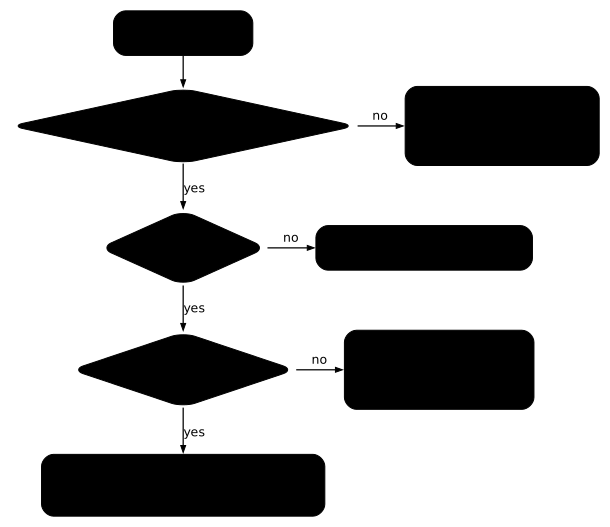
The following diagram gives the order of questions to ask about a route that no longer serves: first check that its status is up to date, then Accepted, then ResolvedRefs, and only then read the HTTP response. Each case below triggers one of these branches.
What happens when the parent does not exist?
Replace the route's Gateway with a Gateway that does not exist.
kubectl -n ws-gateway patch httproute demo --type merge -p '{"spec":{"parentRefs":[{"name":"nexiste-pas"}]}}'kubectl -n ws-gateway get httproute demo -o jsonpath='{range .status.parents[*].conditions[*]}{.type}={.status} ({.reason}){"\n"}{end}'httproute.gateway.networking.k8s.io/demo patchedAccepted=True (Accepted)ResolvedRefs=True (ResolvedRefs)The conditions still say Accepted=True, even though the route can no longer be attached. This status is stale: the controller has not updated it. To see it, compare metadata.generation with the observedGeneration of each condition, then query the route.
kubectl -n ws-gateway get httproute demo -o jsonpath='generation={.metadata.generation}{"\n"}{.status}{"\n"}'curl -sS -m 5 -o /dev/null -w '%{http_code}\n' -H 'Host: demo.test' http://localhost:8080/a/generation=2{"parents":[{"conditions":[{"lastTransitionTime":"2026-11-12T09:03:15Z","message":"","observedGeneration":1,"reason":"Accepted","status":"True","type":"Accepted"},{"lastTransitionTime":"2026-11-12T09:03:15Z","message":"","observedGeneration":1,"reason":"ResolvedRefs","status":"True","type":"ResolvedRefs"}],"controllerName":"traefik.io/gateway-controller","parentRef":{"group":"gateway.networking.k8s.io","kind":"Gateway","name":"web"}}]}404The route's generation is 2 but the conditions carry observedGeneration: 1, and the displayed parentRef is still web, the old parent. The request returns 404: the route no longer serves. Keep the rule in mind: a status whose observedGeneration is lower than metadata.generation describes the old version of the route, and says nothing about the new one. Put the right parent back.
kubectl -n ws-gateway patch httproute demo --type merge -p '{"spec":{"parentRefs":[{"name":"web"}]}}'What happens when the route is in another namespace?
A route from another namespace is only accepted if the listener allows it. The web Gateway only accepts routes from its own namespace (from: Same). Create an application and a route in ws-gateway-b that target the Gateway in ws-gateway. The first manifest, which creates the application, is saved in the file app-b-ns-b.yaml, and the route in the file httproute-autre-ns.yaml.
apiVersion: v1kind: ConfigMapmetadata: name: page-b namespace: ws-gateway-bdata: index.html: application B (ws-gateway-b)---apiVersion: apps/v1kind: Deploymentmetadata: name: app-b namespace: ws-gateway-bspec: replicas: 1 selector: matchLabels: app: app-b template: metadata: labels: app: app-b spec: containers: - name: nginx image: nginx:1.30.5@sha256:9bf97bd7714f5e24c1ccd545ecb9eb5435cb6d109c97cebb15e7e455e0239edb ports: - containerPort: 80 volumeMounts: - name: page mountPath: /usr/share/nginx/html/a volumes: - name: page configMap: name: page-b---apiVersion: v1kind: Servicemetadata: name: app-b namespace: ws-gateway-bspec: selector: app: app-b ports: - port: 80 targetPort: 80apiVersion: gateway.networking.k8s.io/v1kind: HTTPRoutemetadata: name: autre namespace: ws-gateway-bspec: parentRefs: - name: web namespace: ws-gateway hostnames: - autre.test rules: - backendRefs: - name: app-b port: 80kubectl apply -f app-b-ns-b.yamlkubectl -n ws-gateway-b apply -f httproute-autre-ns.yamlkubectl -n ws-gateway-b get httproute autre -o jsonpath='{range .status.parents[*].conditions[*]}{.type}={.status} ({.reason}) {.message}{"\n"}{end}'configmap/page-b createddeployment.apps/app-b createdservice/app-b createdhttproute.gateway.networking.k8s.io/autre createdAccepted=False (NotAllowedByListeners)ResolvedRefs=True (ResolvedRefs)Accepted=False with the reason NotAllowedByListeners: the listener refuses this route. The message is empty with Traefik, only the reason tells you. To accept it, you would have to change allowedRoutes.namespaces.from on the Gateway, a decision that belongs to the cluster operator.
What happens when the backend does not exist?
Point the first rule of demo at a Service that does not exist.
kubectl -n ws-gateway patch httproute demo --type json -p '[{"op":"replace","path":"/spec/rules/0/backendRefs/0/name","value":"fantome"}]'kubectl -n ws-gateway get httproute demo -o jsonpath='{range .status.parents[*].conditions[*]}{.type}={.status} ({.reason}) {.message}{"\n"}{end}'curl -sS -m 5 -i -H 'Host: demo.test' http://localhost:8080/a/httproute.gateway.networking.k8s.io/demo patchedAccepted=True (Accepted)ResolvedRefs=False (BackendNotFound) Cannot load HTTPBackendRef ws-gateway/fantome: getting service: service "fantome" not foundHTTP/1.1 500 Internal Server ErrorDate: Thu, 12 Nov 2026 09:03:35 GMTContent-Length: 0The route stays Accepted=True but ResolvedRefs=False (BackendNotFound), and the message names the missing Service. The request returns 500 Internal Server Error, with an empty body: this is neither the 404 of a missing rule nor the 503 of a Service without a Pod, which the Ingress lesson showed. Remember the three codes: 404 when no rule matches, 503 when the Service has no Pod, 500 when the backend cannot be found or is not allowed.
ReferenceGrant
A backend in another namespace is refused until that namespace allows it. Point the rule at app-b in ws-gateway-b.
kubectl -n ws-gateway patch httproute demo --type json -p '[{"op":"replace","path":"/spec/rules/0/backendRefs/0","value":{"name":"app-b","namespace":"ws-gateway-b","port":80}}]'kubectl -n ws-gateway get httproute demo -o jsonpath='{range .status.parents[*].conditions[*]}{.type}={.status} ({.reason}) {.message}{"\n"}{end}'httproute.gateway.networking.k8s.io/demo patchedAccepted=True (Accepted)ResolvedRefs=False (RefNotPermitted) Cannot load HTTPBackendRef core/Service/ws-gateway-b/app-b: missing ReferenceGrantThe condition ResolvedRefs=False (RefNotPermitted) and the message missing ReferenceGrant say that no authorization exists in ws-gateway-b, and the request also returns 500. The authorization is a ReferenceGrant object, created in the target namespace, which names who is allowed to target it. Save it in the file referencegrant.yaml.
apiVersion: gateway.networking.k8s.io/v1kind: ReferenceGrantmetadata: name: autorise-ws-gateway namespace: ws-gateway-bspec: from: - group: gateway.networking.k8s.io kind: HTTPRoute namespace: ws-gateway to: - group: "" kind: Servicekubectl apply -f referencegrant.yamlkubectl -n ws-gateway get httproute demo -o jsonpath='{range .status.parents[*].conditions[*]}{.type}={.status} ({.reason}) {.message}{"\n"}{end}'curl -sS -m 5 -H 'Host: demo.test' http://localhost:8080/a/referencegrant.gateway.networking.k8s.io/autorise-ws-gateway createdAccepted=True (Accepted)ResolvedRefs=True (ResolvedRefs)application B (ws-gateway-b)Without touching the route, ResolvedRefs goes back to True and the request reaches the application in the other namespace. In v1.6.2, the ReferenceGrant is written in v1, and v1beta1 is still accepted; on an older cluster, check with kubectl api-resources --api-group=gateway.networking.k8s.io which version is served.
Migrating from Ingress
Migrating does not mean rewriting everything: an Ingress and an HTTPRoute can coexist on the same controller, application by application.
Concept equivalence
The following table maps each Ingress need to its Gateway API equivalent, with the names used in this lesson. Read it line by line when you convert an Ingress: the right-hand column gives the field to fill in the Gateway or in the route.
| Need | Ingress | Gateway API |
|---|---|---|
| Choose the controller | spec.ingressClassName: traefik to the traefik IngressClass | spec.gatewayClassName: traefik to the traefik GatewayClass |
| Entry point and port | implicit, the controller's entrypoints | Gateway object, spec.listeners[].port and protocol; the port must be that of a Traefik entrypoint |
| Who can attach | no control | allowedRoutes.namespaces.from: Same, All, Selector |
| Host | spec.rules[].host | spec.hostnames[] of the HTTPRoute |
| Path | paths[].path and pathType: Prefix | matches[].path.value and type: PathPrefix |
| Backend | backend.service.name and port.number | backendRefs[].name and port |
| Header, weight | controller annotations or CRDs | matches[].headers[], backendRefs[].weight |
| Redirect | controller annotation or Middleware | filters[].type: RequestRedirect |
| Backend in another namespace | impossible | backendRefs[].namespace and a ReferenceGrant in the target namespace |
| Diagnosis | describe ingress, no event | status.conditions of the Gateway and status.parents[].conditions of the route |
Maturity and evolution
The resources of this lesson are in v1 in the Standard channel of v1.6.2: GatewayClass, Gateway, HTTPRoute, ReferenceGrant, as well as GRPCRoute, TCPRoute, TLSRoute, UDPRoute, BackendTLSPolicy and ListenerSet. No field of the Experimental channel is used here. Before reusing an example found online, check the installed version and channel with the CRD annotations, as shown above: an example written for another version can use a field that your cluster does not have.
How do you clean up the lesson's cluster?
Delete the namespaces, the Helm release, the GatewayClasses, then the cluster.
kubectl delete namespace ws-gateway ws-gateway-bhelm uninstall traefik --namespace traefikkubectl delete gatewayclass --allkind delete cluster --name demo-expoUninstalling the release removes the traefik GatewayClass, so kubectl delete gatewayclass --all answers No resources found.
Hands-on practice
The guided lab repeats the gesture of the demonstration, then adds a fault. Two applications, svc-api and svc-web, already serve in the lab namespace under the host name app.local. You first publish an HTTP entry point, the entree Gateway, that the cluster must declare programmed, then routes that send /api and /web to the right application, without any undeclared path reaching either one.
The setup also created a route named catalogue, which the cluster refuses. You read the conditions of that route to find out why it is refused, then you repair it. The validation reads the state of the cluster: the programmed Gateway, the routes by path, the catalogue route with Accepted and ResolvedRefs set to True and an up-to-date observedGeneration, then a real response.
The lab runs on a kubeadm virtual machine, with the same Traefik and the traefik GatewayClass already in place. One thing differs from the demonstration: requests go through port 30080 of the node, not through localhost:8080. As in the demonstration, the listener port must match a Traefik entrypoint.
Key takeaways
- Gateway API separates the choice of controller (GatewayClass), the entry point (Gateway) and the rules (HTTPRoute), each owned by a different role.
- Install the Standard channel CRDs before the controller; installing the Experimental channel on top is refused by the
safe-upgradespolicy. - A listener port must be that of a controller entrypoint, and an empty
ADDRESSdoes not signal a failure with Traefik. - The Gateway is read in
AcceptedandProgrammed; the route is read instatus.parents[].conditions, with thereason. - A status whose
observedGenerationis lower thanmetadata.generationis stale: it describes the old version of the route. NotAllowedByListenerscomes from the listener,BackendNotFoundfrom a missing Service,RefNotPermittedfrom a missingReferenceGrantin the target namespace.- Header routing,
weightsplitting and redirects are fields of the API, not annotations. - TCP and UDP routes are Standard in v1.6.2, but are not used in this lesson.
Test your knowledge
This quiz covers the points of the lesson: the roles of the resources, the channels, the conditions of a route and the diagnosis of a detached route. The pass mark is set at 70%.
Knowledge check
Check what you have learned with this interactive quiz
How it works
- The timer starts when you click Start
- Multiple choice, true/false and short answer questions
- You can move between questions
- Detailed results are shown at the end
Starts the quiz and the timer
Review
(0/0)Score by domain
A domain groups several guides and gets several questions, so its score is more reliable than a per-topic score, which often rests on a single question.
Summary
Strengths
No topic passed at 80% on at least two questions yet.
Weak areas
No topic below the pass mark.
Recommended next
Hints before you try again?
Continue the course: Kubernetes NetworkPolicies: isolating traffic between Pods
A new full quiz with random questions
Work again only on the questions you missed