The 4Cs of cloud native security (Cloud, Cluster, Container, Code) sort the security controls of a Kubernetes application into four nested layers. Each layer relies on the one around it: a perfectly hardened container protects nothing if the node that hosts it is compromised. This lesson is for anyone who runs or audits a cluster and is preparing for the KCSA certification. You learn to name the layers, to explain why the outside comes first, to place a measure in the right layer and to find, for each one, the lesson of the course that teaches the control.
What you will learn
- Name the four layers (cloud, cluster, container, code) and say which one contains which
- Explain why a flaw in an outer layer weakens all the layers it contains
- Place a security measure in the right layer, based on what enforces it
- Match each layer with a control taught in the course
- Say what falls to the provider and what falls to your team, layer by layer
Prerequisites
This lesson assumes you know what a Pod and a namespace are. It also cites controls you have already met in the course: RBAC, NetworkPolicies and the securityContext. No command is to be run here: the lesson is a line of reasoning.
What are the four layers of cloud native security?
The 4Cs model sorts security into four nested layers. From the outside in, you find the cloud (or the data center that hosts the machines), the Kubernetes cluster, the container and the application code. Each layer contains the next one.
The model is part of the KCSA curriculum, in the "Overview of Cloud Native Security" domain of the official curriculum. The current kubernetes.io documentation no longer presents the 4Cs: the security/overview page was removed and redirects to the general page on Kubernetes security. Its last text can still be read in the security overview page of the documentation repository.
The diagram below nests the layers like Russian dolls. Look at the large outer frame, the cloud one: it contains all the other layers. A defect there affects everything inside.
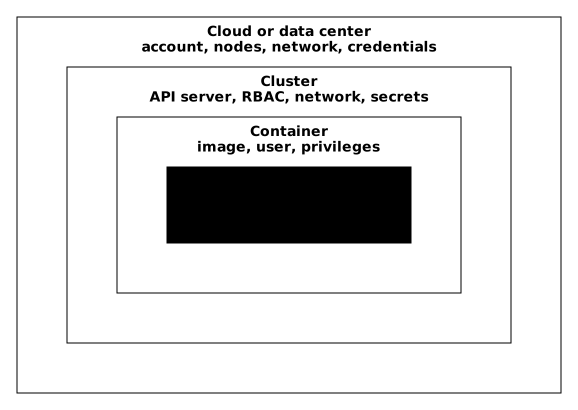
The word "cloud" means here everything below Kubernetes: the account with a provider, the virtual machines, the network and their credentials. On servers you host yourself, this layer exists too: it is your data center.
Why does a flaw in an outer layer weaken all the others?
A control in an inner layer assumes that the outer layer holds. If the outer layer gives way, that control no longer protects.
Take an example. You have pinned your image, removed the container's privileges and restricted RBAC. An attacker nevertheless gets administrator SSH access to the node that runs this Pod. From the node's system, they read the container's files and its environment variables. RBAC controls requests sent to the API and the securityContext controls processes started by the kubelet: neither applies to an administrator of the machine.
The original text of the model said it bluntly: you cannot make up for weak defenses in the base layers by acting only at the code level. An inner layer therefore never replaces an open outer layer.
Outer layers, on the other hand, limit the damage of an inner flaw. That is the meaning of defense in depth (see Defense in depth: securing in layers): stacking several barriers so that a single flaw is not enough. If the application code has a flaw and an attacker gets a shell in the container, the container layer (non-root user, read-only filesystem) and then the cluster layer (NetworkPolicy, RBAC) limit what they can reach. Each layer reduces the damage of the flaw in the layer inside it.
A rule completes this idea: least privilege, which means giving each actor only the rights it needs. It applies layer by layer: a minimal cloud role for the nodes, a minimal RBAC role for a service account, a container without superfluous privileges, an application that uses only the dependencies it needs.
What does each layer protect, and which control does the course teach?
Each layer has its own controls, and the course teaches at least one per layer. The four subsections below name them and point to the relevant lesson, without repeating it.
Which controls belong to the cloud layer?
The cloud layer protects network access to the API server and to the nodes, the credentials the cluster uses to call the provider's API, and access to etcd, the database where the cluster keeps its state. Typical controls are network access control lists, minimal identity rights for the nodes and protection of the instance metadata service. Rights and identities are covered in IAM: managing identities and permissions in the cloud and in Least privilege applied (in French). The lesson Securing the infrastructure under the cluster details what this infrastructure exposes.
Which controls belong to the cluster layer?
The cluster layer protects the Kubernetes components and the rules that apply to applications. It includes authorization through RBAC, network isolation through NetworkPolicy, the Pod Security Standards enforced at admission (see also the admission controllers (in French)), the Secrets (in French) with their encryption at rest, and the audit log that records the requests made to the API server.
Which controls belong to the container layer?
The container layer protects what runs in a Pod. The securityContext removes unnecessary privileges, image scanning looks for known vulnerabilities, and the image is pinned by its digest so that it does not change without your knowing, as the Supply Chain Security lesson explains. For stronger isolation between a container and the node's kernel, runtime sandboxes add a barrier.
Which controls belong to the code layer?
The code layer is the one your team writes: the application and its dependencies. Controls cover third-party libraries (software composition analysis, see SCA), the search for defects in source code (SAST) and tests of the running application (DAST). This layer is the only one Kubernetes knows nothing about: the cluster runs the code without reading it.
Who handles each layer: the provider or your team?
A cloud provider does not secure the same thing in each layer, and the split depends on the offer. The shared responsibility model, detailed in Cloud shared responsibility, says that the provider secures the infrastructure it operates and that you secure what you put on it. For Kubernetes, the page Shared responsibilities: who does what in security details the split by layer for a managed cluster and for a self-managed cluster.
The table below gives the reading principle for the four Cs. The "depends on the offer" cells are the ones where the provider's contract decides: read it again before concluding.
| Layer | What falls to the provider | What falls to your team |
|---|---|---|
| Cloud | Hardware, hypervisor, physical network | Account, IAM rights, network rules, access to the nodes, depending on the offer |
| Cluster | Depending on the offer: operating the control plane on a managed cluster | RBAC, NetworkPolicy, Pod Security, Secrets. Everything, on a self-managed cluster |
| Container | Nothing about your image or its privileges | Image, user, privileges, scan |
| Code | Nothing | Application and dependencies |
The table reads like this: the further inside you go, the larger your team's share grows. On a self-managed cluster, there is no provider for the cluster, and your team also carries the operation of the components.
How do you place a measure in the right layer?
To place a measure, ask two questions. The first: who enforces it (the provider, the API server, the runtime, the application)? The second: what object does it act on (a cloud account, a request to the API, a container, a dependency)? The layer is that of the element that enforces the measure, not that of the risk it reduces.
One case shows why. Forbidding privileged: true in a namespace reduces a container risk, but it is the Pod Security Standards that refuse the Pod, and they are enforced by the API server's admission. The measure is therefore in the cluster layer. The privileged field written in the manifest, for its part, belongs to the container layer.
| Described measure | Who enforces it, on what | Layer |
|---|---|---|
| Limit network access to the API server to the administrators' addresses | The provider's network, on traffic to the cluster | Cloud |
| Give the nodes a cloud role that allows only what is strictly necessary | The provider's IAM, on the machines' identity | Cloud |
Write a Role that allows only get on Pods | The API server, on users' requests | Cluster |
| Refuse a privileged Pod in a namespace | The API server's admission, on Pod creation | Cluster |
| Scan the image before deploying it | The scan tool, on the image content | Container |
| Pin the versions of the application's libraries | The dependency manager, on the delivered code | Code |
Practice with a measure that is not in the table, for example "encrypt Secrets in etcd". The question "who enforces it?" gives the API server, which encrypts before writing. The answer is therefore the cluster layer, even though the targeted risk, reading the disk of a control plane node, comes from the outside.
What is left when a layer fails?
Take a Pod of the shop that you deployed in the course, with its protections, and make the layers fail one by one, from code to cloud. This thought exercise shows what still holds at each step.
| Layer that fails | What happens to the Pod | What still protects |
|---|---|---|
| None | The attacker has only the exposed port | All four layers |
| Code | A vulnerable dependency gives a shell in the container | Container, cluster and cloud limit what it reaches |
| Container | The Pod manifest asks for root and superfluous privileges | The cluster can still refuse this Pod at admission; if it accepts it, it limits its exchanges, and the cloud stays closed |
| Cluster | No NetworkPolicy or strict RBAC: the shell reaches the other Pods and the API | The cloud still limits what the nodes can do at the provider |
| Cloud | The attacker administers the node or the provider account | No cluster control: they bypass RBAC, admission and NetworkPolicies |
Read the table line by line. The Code, Container and Cluster lines show protections that take over from one another: each lost layer leaves the others to limit the damage. The Cloud line is different. When the outer layer gives way, nothing is left inside to make up for it, because the controls of the inner layers run on a machine or an account that the attacker now controls.
Key takeaways
- The 4Cs are cloud, cluster, container and code, from the outside in.
- A control in an inner layer assumes the outer layer holds: you do not make up for an open cloud layer with flawless code.
- Defense in depth stacks the layers so that the flaw in one is limited by the others.
- You place a measure in the layer of what enforces it, not in that of the risk it reduces.
- The cluster contains RBAC, NetworkPolicy, Pod Security Standards, Secrets and audit; the container contains the
securityContext, scanning and the pinned image. - The further inside you go, the larger your team's share grows; the exact split depends on the provider's offer.
Test your knowledge
Eight reasoning questions about placing measures in layers.
Knowledge check
Check what you have learned with this interactive quiz
How it works
- The timer starts when you click Start
- Multiple choice, true/false and short answer questions
- You can move between questions
- Detailed results are shown at the end
Starts the quiz and the timer
Review
(0/0)Score by domain
A domain groups several guides and gets several questions, so its score is more reliable than a per-topic score, which often rests on a single question.
Summary
Strengths
No topic passed at 80% on at least two questions yet.
Weak areas
No topic below the pass mark.
Recommended next
Hints before you try again?
Continue the course: Securing the infrastructure under the cluster: cloud and nodes
A new full quiz with random questions
Work again only on the questions you missed