CoreDNS is the internal DNS server of Kubernetes: it turns the name of a Service, such as web.ws-dns.svc.cluster.local, into an IP address, so that Pods reach each other by a stable name rather than by an address that changes. This lesson follows a name resolution from a Pod to CoreDNS, reads and changes its configuration, then breaks DNS on purpose to teach you how to diagnose it. It is for readers who can already reach a Service by its name (see Services) and want to know what to look at when resolution fails.
What you will learn
- Describe the path of a name resolution from a Pod to CoreDNS
- Write the full DNS name of a Service, of a Pod and of a Pod behind a headless Service
- Check that CoreDNS works: Deployment, Pods and the
kube-dnsService - Read the Corefile and state the role of its main plugins
- Add static entries or an external DNS, and restore the original configuration
- Diagnose a resolution failure from a debug Pod
- Read the Prometheus metrics of CoreDNS
- Choose a
dnsPolicyand write adnsConfigfor a Pod
Prerequisites
You have read Pod Networking and you have the four-node demo-reseau cluster created in Pod Networking (kind 0.33.0, nodes in v1.37.0, CoreDNS 1.14.6). Save the following file as dns-base.yaml: it describes a web Deployment and its Service in the ws-dns namespace, plus a client Pod named client in each of the ws-dns and ws-dns-b namespaces. The commands that follow create the namespaces, then apply the file.
apiVersion: apps/v1kind: Deploymentmetadata: name: web namespace: ws-dnsspec: replicas: 2 selector: matchLabels: app: web template: metadata: labels: app: web spec: containers: - name: nginx image: nginx:1.30.5@sha256:9bf97bd7714f5e24c1ccd545ecb9eb5435cb6d109c97cebb15e7e455e0239edb ports: - containerPort: 80---apiVersion: v1kind: Servicemetadata: name: web namespace: ws-dnsspec: selector: app: web ports: - port: 80 targetPort: 80---apiVersion: v1kind: Podmetadata: name: client namespace: ws-dnsspec: containers: - name: busybox image: busybox:1.38.0@sha256:a46257e06c82ad85242d0d38077d0a52d9896389ca60a1a59d3463db586e5fa4 command: ["sleep", "3600"]---apiVersion: v1kind: Podmetadata: name: client namespace: ws-dns-bspec: containers: - name: busybox image: busybox:1.38.0@sha256:a46257e06c82ad85242d0d38077d0a52d9896389ca60a1a59d3463db586e5fa4 command: ["sleep", "3600"]kubectl create namespace ws-dnskubectl create namespace ws-dns-bkubectl apply -f dns-base.yamlkubectl -n ws-dns rollout status deployment/web --timeout=90sSome names in this lesson are in French on purpose, so that the commands and outputs stay those of the tested cluster: demo-reseau means "network-demo", nexiste-pas "does-not-exist", vieux.corp.test "old.corp.test", coredns.sauve.yaml "coredns.saved.yaml", Corefile.faute "Corefile.mistake", Corefile.cas1 "Corefile.case1", heritage "legacy", web-ancien "web-old" and exemple.org "example.org".
How does a Pod resolve a name in Kubernetes?
Kubernetes hands out addresses that change: a recreated Pod gets a new address, and so does a Service that is deleted and created again. The internal DNS maps a stable name to the address of the moment. CoreDNS stores nothing: it reads the Services and the EndpointSlices from the Kubernetes API and turns them into DNS answers.
DNS architecture
Three elements take part, and mixing them up makes troubleshooting harder: the /etc/resolv.conf file that the kubelet writes in every Pod, the kube-dns Service that holds a fixed address, and the CoreDNS Pods that actually answer. The kube-dns name of the Service is a legacy: it does designate CoreDNS. Notice on the diagram that Pods only know the address of the Service.
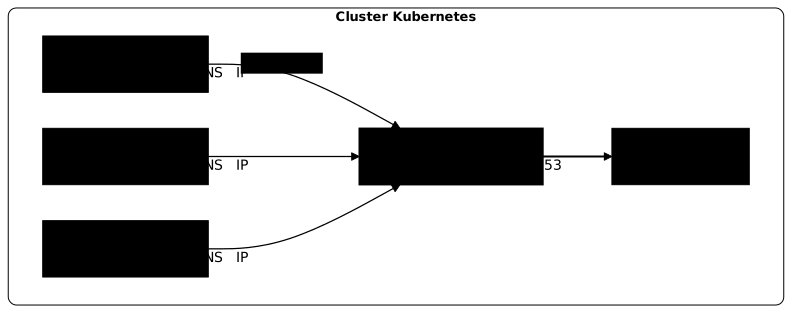
Resolution flow
Following a query from end to end gives you the map of the failure points, because each step can fail on its own. When a Pod wants to reach web.ws-dns.svc.cluster.local:
- The Pod reads
/etc/resolv.conf, which points to the address of thekube-dnsService. - The query goes to that Service, which forwards it to one of the CoreDNS Pods.
- The
kubernetesplugin of CoreDNS answers from the objects of the cluster. - The Pod receives the ClusterIP of the Service and contacts it.
Check that CoreDNS works
Before suspecting a configuration, check that the chain exists: the Deployment, its Pods, the Service and its endpoints. A few commands that take a few seconds rule out the most obvious causes.
Deployment status
The coredns Deployment declares two replicas on a kubeadm or kind cluster. The AVAILABLE column must equal READY.
kubectl -n kube-system get deployment corednskubectl -n kube-system get deployment coredns -o jsonpath='{.spec.template.spec.containers[0].image}{"\n"}'NAME READY UP-TO-DATE AVAILABLE AGEcoredns 2/2 2 2 8m57sregistry.k8s.io/coredns/coredns:v1.14.62/2 means both replicas answer, and the second command gives the CoreDNS version, here v1.14.6.
Pod status
The selector label is k8s-app=kube-dns while the Pods are named coredns: the log and diagnostic commands expect the label, not the name.
kubectl -n kube-system get pods -l k8s-app=kube-dns -o wideNAME READY STATUS RESTARTS AGE IP NODE NOMINATED NODE READINESS GATEScoredns-559f6c778d-gckk9 1/1 Running 0 8m51s 10.244.0.2 demo-reseau-control-plane <none> <none>coredns-559f6c778d-gcx8k 1/1 Running 0 8m51s 10.244.0.3 demo-reseau-control-plane <none> <none>Look at READY, STATUS and RESTARTS. Two Pods that are 1/1 Running with no restart mean healthy DNS. Here, both run on the control plane.
The kube-dns Service
The kubelet writes the address of this Service in the /etc/resolv.conf of every Pod. Port 9153 serves the metrics, and the two port 53 entries expose DNS over UDP and over TCP.
kubectl -n kube-system get svc kube-dnskubectl -n kube-system get endpointslices -l kubernetes.io/service-name=kube-dnsNAME TYPE CLUSTER-IP EXTERNAL-IP PORT(S) AGEkube-dns ClusterIP 10.96.0.10 <none> 53/UDP,53/TCP,9153/TCP 8m57sNAME ADDRESSTYPE PORTS ENDPOINTS AGEkube-dns-bhzgf IPv4 53,53,9153 10.244.0.3,10.244.0.2 8m51sThe address 10.96.0.10 is the one of this cluster: it depends on the Service range, so check it with the first command. The ENDPOINTS column of the EndpointSlice lists the addresses of the two CoreDNS Pods. A Service without endpoints answers nobody, and you will see below what that looks like.
Which DNS name for a Service, a Pod or a headless Pod?
Kubernetes follows a naming convention that is the same on every cluster. The cluster domain is cluster.local by default. Three families of objects each have their own form: Services, Pods and Pods behind a headless Service.
Services
The full name of a Service is <service>.<namespace>.svc.cluster.local. The short forms work thanks to the search line of the Pod's /etc/resolv.conf, which completes incomplete names: they therefore resolve only from a Pod, never from a node.
| Form | Spelling | Example |
|---|---|---|
| Full name | <service>.<namespace>.svc.cluster.local | web.ws-dns.svc.cluster.local |
| Same namespace | <service> | web |
| Other namespace | <service>.<namespace> | web.ws-dns |
From the client Pod of the ws-dns namespace, first read the resolver file, then resolve the full name:
kubectl -n ws-dns exec client -- cat /etc/resolv.confkubectl -n ws-dns exec client -- nslookup web.ws-dns.svc.cluster.local; echo "rc=$?"search ws-dns.svc.cluster.local svc.cluster.local cluster.localnameserver 10.96.0.10options ndots:5Server: 10.96.0.10Address: 10.96.0.10:53
Name: web.ws-dns.svc.cluster.localAddress: 10.96.54.40
rc=0Look at the nameserver: it is the ClusterIP of the kube-dns Service. The search line puts the namespace of the Pod first, which explains why web is enough in ws-dns and not elsewhere. With the full name, the answer comes back cleanly and rc=0.
With the short name web, the result depends on the tool. wget http://web reaches nginx, but the busybox nslookup finds the address while surrounding it with NXDOMAIN lines for the suffixes that fail, then exits with rc=1: draw no conclusion about DNS from it, the reason is detailed in Pod Networking. From the other namespace, the short name no longer resolves, while the full name gives the same address:
kubectl -n ws-dns-b exec client -- wget -qO- -T 3 http://web; echo "rc=$?"kubectl -n ws-dns-b exec client -- nslookup web.ws-dns.svc.cluster.local; echo "rc=$?"wget: bad address 'web'command terminated with exit code 1rc=1Server: 10.96.0.10Address: 10.96.0.10:53
Name: web.ws-dns.svc.cluster.localAddress: 10.96.54.40
rc=0bad address 'web' means that web does not exist in any namespace of the Pod's search list, here ws-dns-b. The full name depends on no list: when diagnosing, always write it in full.
Pods
Kubernetes can publish a name for each Pod, provided the kubernetes plugin of CoreDNS has the pods insecure option, which is the case here (see the Corefile below). The form is <address-with-dashes>.<namespace>.pod.cluster.local. Resolve the name of an address that no Pod holds, then the same name with a namespace that does not exist:
kubectl -n ws-dns exec client -- nslookup 10-244-99-99.ws-dns.pod.cluster.local; echo "rc=$?"kubectl -n ws-dns exec client -- nslookup 10-244-99-99.nexiste-pas.pod.cluster.local; echo "rc=$?"Server: 10.96.0.10Address: 10.96.0.10:53
Name: 10-244-99-99.ws-dns.pod.cluster.localAddress: 10.244.99.99
rc=0Server: 10.96.0.10Address: 10.96.0.10:53
** server can't find 10-244-99-99.nexiste-pas.pod.cluster.local: NXDOMAIN
** server can't find 10-244-99-99.nexiste-pas.pod.cluster.local: NXDOMAIN
command terminated with exit code 1rc=1No Pod holds 10.244.99.99, and yet CoreDNS answers 10.244.99.99. With pods insecure, CoreDNS does not ask Kubernetes about a Pod name: it copies the address contained in the name. A positive answer therefore does not prove that the Pod exists: it is a poor presence test. The namespace, on the other hand, is checked: a namespace that does not exist gives NXDOMAIN.
Headless Services
A headless Service, declared with clusterIP: None, gets no virtual address. CoreDNS then returns the addresses of the Pods directly, and also gives each of them a stable name, which lets a client target a specific instance, as with a replicated database. Save this file as headless.yaml: a StatefulSet of two db Pods and the headless db Service (see StatefulSets).
apiVersion: v1kind: Servicemetadata: name: db namespace: ws-dnsspec: clusterIP: None selector: app: db ports: - port: 80 name: http---apiVersion: apps/v1kind: StatefulSetmetadata: name: db namespace: ws-dnsspec: serviceName: db replicas: 2 selector: matchLabels: app: db template: metadata: labels: app: db spec: containers: - name: nginx image: nginx:1.30.5@sha256:9bf97bd7714f5e24c1ccd545ecb9eb5435cb6d109c97cebb15e7e455e0239edb ports: - containerPort: 80kubectl apply -f headless.yamlkubectl -n ws-dns rollout status statefulset/db --timeout=120skubectl -n ws-dns exec client -- nslookup db.ws-dns.svc.cluster.localkubectl -n ws-dns exec client -- nslookup db-0.db.ws-dns.svc.cluster.localName: db.ws-dns.svc.cluster.localAddress: 10.244.2.3Name: db.ws-dns.svc.cluster.localAddress: 10.244.1.6
Name: db-0.db.ws-dns.svc.cluster.localAddress: 10.244.1.6The Server lines are omitted. The Service name returns two addresses, those of the Pods, and no ClusterIP. The <pod>.<service>.<namespace>.svc.cluster.local name returns a single address, that of db-0, the same as kubectl -n ws-dns get pod db-0 -o jsonpath='{.status.podIP}'.
What does the Corefile contain?
CoreDNS is configured by a ConfigMap named coredns in the kube-system namespace, which holds a single file, the Corefile. It describes a chain of plugins. Changing this ConfigMap changes the behavior of the DNS of the whole cluster, without redeploying anything.
Show the current configuration
Always read the real configuration rather than assuming the one from your distribution: each one may ship a variant.
kubectl -n kube-system get configmap coredns -o jsonpath='{.data.Corefile}'The output is the Corefile below.
A common Corefile example (kubeadm)
Here is the Corefile set up by kind, which installs CoreDNS with kubeadm, here with CoreDNS 1.14.6:
.:53 { errors health { lameduck 5s } ready kubernetes cluster.local in-addr.arpa ip6.arpa { pods insecure fallthrough in-addr.arpa ip6.arpa ttl 30 } prometheus :9153 forward . /etc/resolv.conf { max_concurrent 1000 } cache 30 { disable success cluster.local disable denial cluster.local } loop reload loadbalance}Look at two blocks. In kubernetes, the pods insecure option makes Pod names resolvable, as seen above. In cache 30, the two disable lines exclude cluster.local from the cache: according to the documentation of the cache plugin, CoreDNS then does not keep internal answers in memory.
If a Pod still reaches the old address of a Service whose ClusterIP has changed, the CoreDNS cache is therefore not the cause: look for a cache on the application side or in the system. The 30-second cache only applies to external names.
What the plugins do
Two plugins do most of the work: kubernetes answers for internal names, and forward sends everything else to the configured resolvers, here the node's /etc/resolv.conf file. The others bring observability, caching and robustness. The roles below are those of the CoreDNS plugin documentation.
| Plugin | Role |
|---|---|
errors | writes errors to the log |
health and ready | expose the health and readiness of the Pod |
kubernetes | answers for the names of the cluster |
prometheus | exposes the metrics on port 9153 |
forward | forwards the other queries to the upstream resolvers |
cache | caches the external answers, 30 seconds |
loop | detects forwarding loops |
reload | reloads the Corefile when the ConfigMap changes |
loadbalance | rotates the order of the addresses in an answer |
The reload plugin does not act right away: on a kind cluster, a valid change is picked up after 75 to 89 seconds (next section).
How do you change CoreDNS without breaking the cluster's DNS?
A syntax error in the Corefile can cut resolution for the whole cluster. So keep a copy of the ConfigMap before every change, with the command that follows.
kubectl -n kube-system get configmap coredns -o yaml > coredns.sauve.yamlAdd a custom external DNS
To resolve a company-internal domain with its own DNS, the Kubernetes documentation on customizing DNS adds a server block before the main block. The corp.test domain and the 10.0.0.53 address are examples to replace:
corp.test:53 { errors cache 30 forward . 10.0.0.53}Add static entries
For a host name that exists in no DNS, the hosts plugin provides static entries. Insert a hosts block before the kubernetes block, then replace the ConfigMap:
kubectl -n kube-system get configmap coredns -o jsonpath='{.data.Corefile}' | awk '/^ kubernetes cluster.local/ {print " hosts {"; print " 192.0.2.10 vieux.corp.test"; print " fallthrough"; print " }"} {print}' > Corefile.hostskubectl -n kube-system create configmap coredns --from-file=Corefile=Corefile.hosts --dry-run=client -o yaml | kubectl replace -f -configmap/coredns replacedThe inserted block is:
hosts { 192.0.2.10 vieux.corp.test fallthrough }According to the documentation of the hosts plugin, the fallthrough word lets the names absent from this block go on to the next plugins, including kubernetes. The change is not immediate: retry the resolution until it answers.
kubectl -n ws-dns exec client -- nslookup vieux.corp.testServer: 10.96.0.10Address: 10.96.0.10:53
Name: vieux.corp.testAddress: 192.0.2.10On a kind cluster, the first answer arrives between 75 and 89 seconds after the replace: allow one to two minutes before concluding that it does not work. The log shows [INFO] Reloading then [INFO] Reloading complete.
What happens with a mistake in the Corefile?
Now replace forward with forwrd in the static entries file and apply it:
sed 's#forward \. /etc/resolv.conf#forwrd . /etc/resolv.conf#' Corefile.hosts > Corefile.fautekubectl -n kube-system create configmap coredns --from-file=Corefile=Corefile.faute --dry-run=client -o yaml | kubectl replace -f -kubectl -n kube-system logs -l k8s-app=kube-dns --prefix --tail=3After about a minute, the log of one of the Pods contains:
[pod/coredns-64858cd7ff-chvx4/coredns] [INFO] Reloading[pod/coredns-64858cd7ff-chvx4/coredns] [ERROR] Restart failed: /etc/coredns/Corefile:17 - Error during parsing: Unknown directive 'forwrd'[pod/coredns-64858cd7ff-chvx4/coredns] [ERROR] plugin/reload: Corefile changed but reload failed: starting with listener file descriptors: /etc/coredns/Corefile:17 - Error during parsing: Unknown directive 'forwrd'The reload is refused, but the Pod keeps running with the old configuration: the Pods stay Running and vieux.corp.test still resolves. A mistake therefore stays silent until the day a Pod restarts.
A Pod that starts with the mistake has no old configuration to fall back on: it loops in CrashLoopBackOff. To see it, scale CoreDNS to zero replicas with the faulty ConfigMap in place, then start two again:
kubectl -n kube-system scale deployment coredns --replicas=0The error message quotes the line of forward in your file: 17 with the file of this page. The output below comes from a shorter Corefile, where forward is on line 13.
kubectl -n kube-system scale deployment coredns --replicas=2sleep 30kubectl -n kube-system get pods -l k8s-app=kube-dnskubectl -n kube-system logs -l k8s-app=kube-dns --tail=20The output below is an excerpt: the maxprocs lines of the log are omitted.
deployment.apps/coredns scaledNAME READY STATUS RESTARTS AGEcoredns-559f6c778d-8t7gr 0/1 CrashLoopBackOff 2 (18s ago) 30scoredns-559f6c778d-cwdh8 0/1 CrashLoopBackOff 2 (17s ago) 30s/etc/coredns/Corefile:13 - Error during parsing: Unknown directive 'forwrd'This output shows what happens to new CoreDNS Pods when the ConfigMap contains a mistake: they go into CrashLoopBackOff and are never ready.
The Error during parsing: Unknown directive 'forwrd' log gives the faulty line. The kubectl -n kube-system logs -l k8s-app=kube-dns command is therefore your first reflex when the CoreDNS Pods do not start.
How do you restore the original configuration?
The obvious move, replaying the backup with replace, is refused:
kubectl -n kube-system replace -f coredns.sauve.yamlError from server (Conflict): error when replacing "coredns.sauve.yaml": Operation cannot be fulfilled on configmaps "coredns": the object has been modified; please apply your changes to the latest version and try againThe saved file contains the metadata.resourceVersion field, which dates from the backup: the object has changed since, and Kubernetes refuses to overwrite a newer version. kubectl apply -f coredns.sauve.yaml fails too, with the same Conflict. The move that works removes this line from the file before the replace:
sed '/resourceVersion/d' coredns.sauve.yaml | kubectl -n kube-system replace -f -configmap/coredns replacedIf CoreDNS Pods are in CrashLoopBackOff, restart them after restoring the ConfigMap, never before: a rollout restart done with the faulty ConfigMap fixes nothing, the new Pods fail the same way.
kubectl -n kube-system rollout restart deployment corednskubectl -n kube-system rollout status deployment/coredns --timeout=120sdeployment.apps/coredns restartedWaiting for deployment spec update to be observed...[...]deployment "coredns" successfully rolled outTwo new 1/1 Running Pods are ready in about 11 seconds.
Without a restart, the Pods that are already running pick up the right configuration on their own, 33 seconds after the replace on kind. This delay varies, from 33 to 89 seconds in this lesson.
How do you diagnose a DNS failure?
A DNS problem rarely shows up as such: the application reports an unknown host, a refused connection or slowness. The method is to test the resolution from a Pod, compare it with the expected behavior, then work back up the chain to CoreDNS.
Quick test with a debug Pod
The test starts from a Pod, never from a node, because only a Pod has an /etc/resolv.conf that points to CoreDNS. The client Pod of the lesson does the job.
The kubernetes.default name is a good target, since this Service exists on every cluster. With busybox, query it with a tool that goes through the C library, such as nc, because the busybox nslookup does not complete a name with a single dot:
kubectl -n ws-dns exec client -- nc -zv -w 3 kubernetes.default 443; echo "rc=$?"kubernetes.default (10.96.0.1:443) openrc=0The open answer proves that the short name resolved to 10.96.0.1 and that the port answers. For nslookup, use the full name kubernetes.default.svc.cluster.local.
Check /etc/resolv.conf in a Pod
This file is fixed when the Pod is created: a change to the DNS configuration only reaches an existing Pod after it is recreated. Check that the nameserver matches the ClusterIP of the kube-dns Service, as seen above in the client Pod: nameserver 10.96.0.10, options ndots:5 and three cluster search suffixes, with no node suffix.
Common problems and solutions
Four situations cover most failures. Three are told apart by a single question, what resolves, and what fails? The fourth, slowness, shows no error. Follow the tree from top to bottom, with a Service name written in full: each "no" points to the section that deals with the failure.
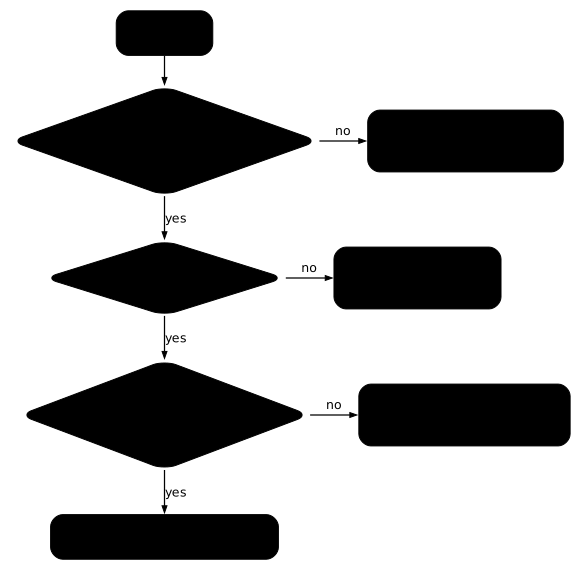
The Pod resolves no name
When no resolution works, neither internal nor external, the Pod does not reach CoreDNS or CoreDNS does not answer. Scale CoreDNS down to zero replicas to see the symptom. The sleep 5 gives the Pods time to stop.
kubectl -n kube-system scale deployment coredns --replicas=0sleep 5time kubectl -n ws-dns exec client -- nslookup web; echo "rc=$?"kubectl -n kube-system get endpointslices -l kubernetes.io/service-name=kube-dnsdeployment.apps/coredns scalednslookup: write to '10.96.0.10': Connection refused;; connection timed out; no servers could be reached
command terminated with exit code 1
real 0m0.077src=1NAME ADDRESSTYPE PORTS ENDPOINTS AGEkube-dns-bhzgf IPv4 <unset> <unset> 21mThe failure is immediate: Connection refused in 0.08 seconds, not a delay to wait for. This shape keeps you from believing in a network block. The kube-dns Service now has no Pod behind it, and its EndpointSlice is empty (<unset>).
The EndpointSlice does not empty right away. On kind, it is empty five seconds after the scale, which matches the lameduck 5s of the Corefile; just after the scale, it still contains the addresses of the Pods that are stopping.
To work back from a failure, run kubectl -n kube-system get pods -l k8s-app=kube-dns, then look at the Service, then kubectl -n kube-system logs -l k8s-app=kube-dns. A NetworkPolicy that closes the egress of the Pod also blocks DNS.
Bring back two replicas with kubectl -n kube-system scale deployment coredns --replicas=2: two replicas are ready in about 5 seconds and resolution comes back.
Internal resolution works, external fails
When the names of the cluster resolve but external names do not, CoreDNS works and the failure is downstream: the forward plugin does not reach its resolvers, by default those of the node's /etc/resolv.conf file. Point forward at an address that does not answer, then compare:
kubectl -n kube-system get configmap coredns -o jsonpath='{.data.Corefile}' | sed 's#forward \. /etc/resolv.conf#forward . 192.0.2.1#' > Corefile.cas1kubectl -n kube-system create configmap coredns --from-file=Corefile=Corefile.cas1 --dry-run=client -o yaml | kubectl replace -f -After the reload (up to 89 seconds), the internal name resolves and the external name fails:
kubectl -n ws-dns exec client -- nslookup web.ws-dns.svc.cluster.local; echo "rc=$?"time kubectl -n ws-dns exec client -- nslookup -timeout=3 exemple.org; echo "rc=$?"[...]Name: web.ws-dns.svc.cluster.localAddress: 10.96.54.40
rc=0;; connection timed out; no servers could be reached
command terminated with exit code 1
real 0m3.189src=1The failure lasts 3.19 seconds, which is the requested timeout: it is silence, not a refusal.
The "internal OK, external KO" pair points to the forward line: check it with kubectl -n kube-system get configmap coredns -o yaml | grep forward, then the resolvers of the node, or give explicit resolvers. Then restore the backup as in the previous section.
The name resolves, but the connection fails
A name that resolves to an address does not guarantee that a Pod answers behind it. Save this heritage Service in heritage.yaml: its app: web-ancien selector matches no Pod.
apiVersion: v1kind: Servicemetadata: name: heritage namespace: ws-dnsspec: selector: app: web-ancien ports: - port: 80 targetPort: 80kubectl apply -f heritage.yamlkubectl -n ws-dns exec client -- nslookup heritage.ws-dns.svc.cluster.localtime kubectl -n ws-dns exec client -- wget -qO- -T 3 http://heritage; echo "rc=$?"kubectl -n ws-dns get endpointslices -l kubernetes.io/service-name=heritage[...]Name: heritage.ws-dns.svc.cluster.localAddress: 10.96.90.1
wget: can't connect to remote host (10.96.90.1): Connection refusedcommand terminated with exit code 1
real 0m1.082src=1NAME ADDRESSTYPE PORTS ENDPOINTS AGEheritage-ggngl IPv4 <unset> <unset> 1sThe name resolves to 10.96.90.1, but the connection is refused (Connection refused): the EndpointSlice has no port and no address, because no Pod carries the requested label. DNS is not the cause: compare the labels of the Pods (kubectl -n ws-dns get pods --show-labels) with the selector of the Service.
Endpoints that are present are not enough either. After kubectl -n ws-dns patch service web --type merge -p '{"spec":{"ports":[{"port":80,"targetPort":8080}]}}' and five seconds of waiting, the EndpointSlice does carry port 8080 and the two addresses, but wget answers Connection refused, since nginx listens on port 80.
Right after the patch, the page still loaded: the kube-proxy rules are not updated within the second. The topic is covered in Services.
Slow external resolution: four queries instead of one
With options ndots:5, the manual page resolv.conf(5) states that a name with fewer than five dots is first tried with each suffix of the search line, and that the requested name is queried as is only last. With the three suffixes of the client Pod, an external name such as exemple.org can therefore cost four queries instead of one for each record type requested (A, AAAA), including three useless NXDOMAIN answers.
Writing the name with a trailing dot, exemple.org., declares it absolute and skips the search list. For a Pod that makes many external queries, lower ndots with a dnsConfig, as in the next section.
How do you choose dnsPolicy and dnsConfig?
Everything above concerns the server. Two fields of a Pod manifest act on the client side: dnsPolicy chooses the resolver that the Pod queries, and dnsConfig adjusts or replaces the content of its /etc/resolv.conf. They are set when the Pod is created.
dnsPolicy
The possible values are described in the Kubernetes documentation.
| Value | Behavior |
|---|---|
ClusterFirst (default) | queries CoreDNS for everything |
Default | takes over the node's resolv.conf |
ClusterFirstWithHostNet | for Pods with hostNetwork: true |
None | no configuration, to be written in dnsConfig |
The hostNetwork case is recognized by a precise symptom. Save this Pod as hostnet.yaml:
apiVersion: v1kind: Podmetadata: name: hostnet namespace: ws-dnsspec: hostNetwork: true containers: - name: busybox image: busybox:1.38.0@sha256:a46257e06c82ad85242d0d38077d0a52d9896389ca60a1a59d3463db586e5fa4 command: ["sleep", "3600"]kubectl apply -f hostnet.yamlkubectl -n ws-dns wait --for=condition=Ready pod/hostnet --timeout=60skubectl -n ws-dns exec hostnet -- cat /etc/resolv.confkubectl -n ws-dns exec hostnet -- nslookup -timeout=2 web.ws-dns.svc.cluster.local; echo "rc=$?"nameserver 172.18.0.1options edns0 trust-ad ndots:0Server: 172.18.0.1Address: 172.18.0.1:53
** server can't find web.ws-dns.svc.cluster.local: SERVFAIL
** server can't find web.ws-dns.svc.cluster.local: SERVFAIL
command terminated with exit code 1rc=1Look at the nameserver: 172.18.0.1 is not the ClusterIP of kube-dns, but the resolver of the kind node. The Pod inherited the node's resolver file, and the answer is SERVFAIL, not NXDOMAIN: this server does not know the cluster zone.
The code guides the diagnosis. NXDOMAIN means that a competent server answered that the name does not exist; SERVFAIL, that you are querying a server that cannot answer.
With dnsPolicy: ClusterFirstWithHostNet added under hostNetwork: true (Pod hostnet-cf), the file becomes the cluster's again (nameserver 10.96.0.10, ndots:5) and nslookup web.ws-dns.svc.cluster.local returns 10.96.54.40 with rc=0.
dnsConfig
The dnsConfig block adds to the default behavior, or replaces it entirely with dnsPolicy: "None". Save these two Pods in dnsconfig.yaml: ndots2 lowers ndots to 2, and dns-none declares a resolver and a suffix of its own.
apiVersion: v1kind: Podmetadata: name: ndots2 namespace: ws-dnsspec: dnsConfig: options: - name: ndots value: "2" containers: - name: busybox image: busybox:1.38.0@sha256:a46257e06c82ad85242d0d38077d0a52d9896389ca60a1a59d3463db586e5fa4 command: ["sleep", "3600"]---apiVersion: v1kind: Podmetadata: name: dns-none namespace: ws-dnsspec: dnsPolicy: "None" dnsConfig: nameservers: - 192.0.2.53 searches: - corp.test containers: - name: busybox image: busybox:1.38.0@sha256:a46257e06c82ad85242d0d38077d0a52d9896389ca60a1a59d3463db586e5fa4 command: ["sleep", "3600"]kubectl apply -f dnsconfig.yamlkubectl -n ws-dns wait --for=condition=Ready pod/ndots2 pod/dns-none --timeout=60skubectl -n ws-dns exec ndots2 -- cat /etc/resolv.confkubectl -n ws-dns exec dns-none -- cat /etc/resolv.conftime kubectl -n ws-dns exec dns-none -- nslookup -timeout=2 web.ws-dns.svc.cluster.local; echo "rc=$?"search ws-dns.svc.cluster.local svc.cluster.local cluster.localnameserver 10.96.0.10options ndots:2search corp.testnameserver 192.0.2.53;; connection timed out; no servers could be reached
command terminated with exit code 1
real 0m2.067src=1For ndots2, dnsConfig only added options ndots:2 to the cluster file. For dns-none, the file contains only what you wrote: no kube-dns, no ndots. This Pod therefore no longer resolves any Service name, and the query times out after 2 seconds. Add the ClusterIP of kube-dns to nameservers if this Pod must keep access to the names of the cluster.
How do you monitor and size CoreDNS?
CoreDNS exposes Prometheus metrics on port 9153 of the kube-dns Service. The port-forward makes them readable without a collector; the sleep 3 gives the tunnel time to open before curl.
Metrics and monitoring
kubectl -n kube-system port-forward svc/kube-dns 9153:9153 &sleep 3curl -s http://localhost:9153/metrics | grep -m5 coredns_dns_requests_totalkill %1Forwarding from 127.0.0.1:9153 -> 9153Forwarding from [::1]:9153 -> 9153Handling connection for 9153# HELP coredns_dns_requests_total Counter of DNS requests made per zone, protocol and family.# TYPE coredns_dns_requests_total countercoredns_dns_requests_total{family="1",proto="udp",server="dns://:53",type="A",view="",zone="."} 10coredns_dns_requests_total{family="1",proto="udp",server="dns://:53",type="AAAA",view="",zone="."} 10coredns_dns_requests_total{family="1",proto="udp",server="dns://:53",type="other",view="",zone="."} 1The last three lines count the queries by record type: A, AAAA and others. Three other metrics complete the monitoring, according to the documentation of the metrics plugin and that of the cache plugin: coredns_dns_responses_total (answers by code, including NXDOMAIN and SERVFAIL), coredns_dns_request_duration_seconds (latency) and coredns_cache_hits_total (cache efficiency).
Scaling CoreDNS
The coredns Deployment has two replicas, and the section "The Pod resolves no name" showed that at zero, DNS is cut. To change the number of replicas (replace 2 with the value you want, and go back to 2 at the end of the lesson), or to restart the Pods:
kubectl -n kube-system scale deployment coredns --replicas=2kubectl -n kube-system rollout restart deployment corednsTo adapt the number of replicas to the size of the cluster, the Kubernetes documentation describes a horizontal DNS autoscaler.
NodeLocal DNSCache: a DNS cache per node
For large clusters or applications that are sensitive to DNS latency, Kubernetes offers NodeLocal DNSCache, a DNS cache placed on every node by a DaemonSet. The setup is described in the official documentation.
Essential CKA commands
The CKA exam is timed: these commands cover the diagnostic path without writing anything. Pod names change, the k8s-app=kube-dns label does not.
kubectl get deployment,pods,svc -n kube-system -l k8s-app=kube-dnskubectl get configmap coredns -n kube-system -o yamlkubectl logs -n kube-system -l k8s-app=kube-dns --tail=50kubectl exec <pod> -- cat /etc/resolv.confkubectl exec <pod> -- nslookup <service>.<namespace>.svc.cluster.localkubectl rollout restart deployment coredns -n kube-systemHow do you clean up the lesson's cluster?
Delete the working namespaces, then check that CoreDNS is back to 2/2. The coredns ConfigMap lives in kube-system and survives this deletion: the last command checks that the Corefile no longer carries the hosts block or the 192.0.2.1 address of forward, and prints nothing if that is the case.
kubectl delete namespace ws-dns ws-dns-bkubectl -n kube-system get deployment corednskubectl -n kube-system get configmap coredns -o jsonpath='{.data.Corefile}' | grep -E 'hosts|192\.0\.2\.1'Put it into practice
A cluster DNS failure shows up everywhere at once and does not tell you its cause. In the guided lab, no Pod resolves a Service name any more: a team reports that its application in the app namespace no longer answers, although its web Pod, its web-svc Service and its client Pod have not changed. You find out why the cluster DNS no longer answers, you bring it back, then you prove that a client Pod resolves web-svc.app.svc.cluster.local and reaches the Service over HTTP.
The lab hides two faults. The first shows in the state of the Pods. The second is trickier: the CoreDNS Pods are Running and Ready, they look healthy, and yet the cluster names do not resolve. When the state of the Pods says nothing, you have to read the configuration that is loaded.
The validation reads the state of the cluster, not your commands: CoreDNS must run again as kubeadm sets it up, with two ready replicas and a configuration put back in order, then a real resolution and a real HTTP request start from the client Pod. A workaround inside the client Pod does not count. This lab runs on a kubeadm virtual machine, not on kind: the nodes are machines, and the CoreDNS configuration is the one that kubeadm installs.
Key takeaways
- CoreDNS reads the Services and the EndpointSlices of the API and answers the Pods; it stores nothing. The
/etc/resolv.confof a Pod points to thekube-dnsService, and the CoreDNS Pods are selected byk8s-app=kube-dns. - The full name of a Service is
<service>.<namespace>.svc.cluster.local; when diagnosing, always write it in full. - With
pods insecure, a Pod name resolves even if no Pod holds the address: it is not a presence test. - The Corefile lives in the
corednsConfigMap ofkube-system; keep a backup before changing it. - A change is not immediate (33 to 89 seconds on kind, allow two minutes), and a syntax mistake keeps the old configuration on the Pods that are running.
- To restore a saved ConfigMap, remove
resourceVersionfrom the file beforereplace, then restart CoreDNS. - An immediate
Connection refusedis not a network block: the Service has no Pod behind it, or the Pod does not listen on the targeted port. A timeout points to a path that does not answer. - A Pod with
hostNetworkneedsClusterFirstWithHostNetto resolve the names of the cluster;dnsConfigadjusts or replaces its/etc/resolv.conf.
Test your knowledge
This quiz reuses the CoreDNS questions of the CKA program, where DNS troubleshooting belongs to the Troubleshooting domain. A score below 80% points to the sections to go back over.
Knowledge check
Check what you have learned with this interactive quiz
How it works
- The timer starts when you click Start
- Multiple choice, true/false and short answer questions
- You can move between questions
- Detailed results are shown at the end
Starts the quiz and the timer
Review
(0/0)Score by domain
A domain groups several guides and gets several questions, so its score is more reliable than a per-topic score, which often rests on a single question.
Summary
Strengths
No topic passed at 80% on at least two questions yet.
Weak areas
No topic below the pass mark.
Recommended next
Hints before you try again?
Continue the course: Kubernetes Ingress: expose HTTP applications with Traefik
A new full quiz with random questions
Work again only on the questions you missed