Kubernetes does not manage networking, storage or container execution itself. It delegates these responsibilities to external plugins through three standardized interfaces: CNI (network), CSI (storage) and CRI (runtime). Understanding these interfaces is essential for the CKA certification (Cluster Architecture domain, 25%).
This guide explains the role of each interface and how to diagnose it on a node.
What you will learn
- Explain the role of the CNI (Pod network), the CSI (external storage) and the CRI (container runtime)
- Find the runtime socket, the CNI configuration in force and the CSI drivers of a cluster
- Read a symptom (a
NotReadynode, a Pod inContainerCreating, a PVC inPending) to name the interface at fault - Use the diagnostic commands of each interface
Overview of the three interfaces
The three interfaces follow the same logic: Kubernetes defines a contract, and any vendor can write a plugin that honors it. The diagram shows who calls what. Look at where the arrows go: the kubelet calls the runtime and the storage directly, while the network is configured by the runtime itself, at the moment it creates the Pod.

| Interface | Acronym | Role | Example plugins |
|---|---|---|---|
| CRI | Container Runtime Interface | Create and manage containers | containerd, CRI-O |
| CNI | Container Network Interface | Configure the Pod network | Calico, Cilium, Flannel |
| CSI | Container Storage Interface | Provision storage | AWS EBS, Ceph, NFS |
CRI, Container Runtime Interface
The CRI is the interface closest to the system: without it, no container
starts on the node. It defines a contract between the kubelet, which knows
what to launch, and the runtime, which knows how to launch it. A problem at this
level always shows up the same way: the node goes NotReady, and no Pod starts
anymore.
What is it?
The CRI is the interface between the kubelet and the container runtime. The two programs talk over gRPC, a protocol for calling functions on a remote program. Thanks to it, the kubelet can create, start, stop and delete containers without knowing anything about how the runtime is implemented.
Why does it matter?
Before the CRI (Kubernetes before 1.5), the kubelet was coupled to Docker. The CRI made it possible to support other runtimes such as containerd or CRI-O.
Compatible CRI runtimes
Two implementations dominate today, and they are equally good in production. The choice is most often dictated by the Kubernetes distribution you install, not by a technical preference.
| Runtime | Description | Use case |
|---|---|---|
| containerd | Lightweight runtime, the de facto standard | kubeadm clusters, cloud providers |
| CRI-O | Optimized for Kubernetes | OpenShift, minimal clusters |
Checking the configured runtime
The CONTAINER-RUNTIME column gives the runtime and its version, node by node.
A column that differs from one node to another deserves a look: it is often the
sign of a node added with a different installation procedure.
# See the runtime used by the kubeletkubectl get nodes -o wideNAME STATUS ROLES VERSION CONTAINER-RUNTIMEmaster1 Ready control-plane v1.37.0 containerd://2.3.4worker1 Ready <none> v1.37.0 containerd://2.3.4# Runtime version, as reported by the kubeletkubectl get node <node-name> -o jsonpath='{.status.nodeInfo.containerRuntimeVersion}'Kubelet configuration
The kubelet reaches the runtime through a Unix socket, a special file that acts as a meeting point between two programs on the same machine. It is the key setting of the CRI configuration. It is declared in the kubelet configuration file, the form the official documentation recommends:
# /var/lib/kubelet/config.yaml, containerd: the default on most distributionscontainerRuntimeEndpoint: unix:///run/containerd/containerd.sock
# The same thing for CRI-OcontainerRuntimeEndpoint: unix:///var/run/crio/crio.sock
The equivalent flag, --container-runtime-endpoint, still exists but the
kubelet reference marks it as deprecated in favor of this field.
The place to read this setting has changed. Up to Kubernetes 1.33, kubeadm wrote
the socket as a flag in kubeadm-flags.env. Since 1.34, it puts it in a
configuration file, and 1.37 removed the code that emitted the flag. On a recent
node, the historical grep therefore returns nothing, which looks like a
failure when everything is fine.
# The endpoint as the kubelet reads it, across the whole 1.35 to 1.37 rangegrep containerRuntimeEndpoint /var/lib/kubelet/config.yaml
# What kubeadm set for this specific nodecat /var/lib/kubelet/instance-config.yaml
CRI diagnostics
These commands run on the node, over SSH, and work even when the API server is
unreachable: crictl talks directly to the runtime socket, without going
through the control plane.
# Check that the socket existsls -la /run/containerd/containerd.sock
# Test the connection with crictlcrictl info
# List containers through the CRIcrictl ps
# List imagescrictl images
The standard diagnostic tool for this interface is crictl. It is present on most Kubernetes nodes, and it is the only recourse when the API server stops answering. On the cluster of this course, crictl version returns RuntimeName: containerd, RuntimeVersion: v2.3.4 and RuntimeApiVersion: v1. That last field confirms at a glance the constraint stated above: the runtime does speak the CRI v1 API.
CNI, Container Network Interface
Kubernetes imposes a network model, where each Pod has its own IP address,
reachable from every other Pod without NAT, but it provides no implementation of
it. That is the job of the CNI plugin, chosen when the cluster is installed. Two
failures stand apart. As long as no plugin is installed, the nodes stay
NotReady and ordinary Pods stay Pending. When a plugin is installed but in
error, the nodes are Ready and new Pods stay in ContainerCreating, with no
IP.
What is it?
The CNI is the specification that defines how to configure container networking. When a Pod is created, the runtime calls the CNI plugins to:
- Create a network interface in the Pod
- Assign an IP address
- Configure the routes
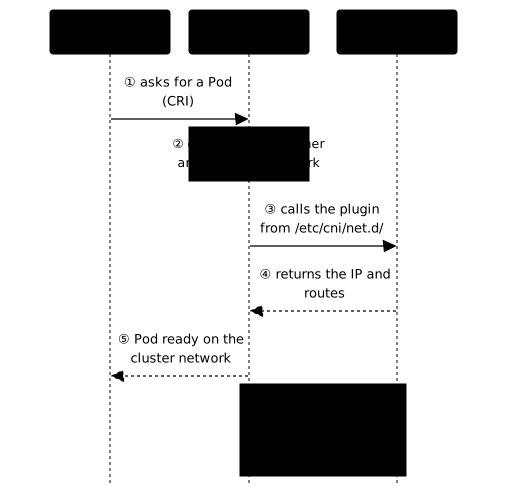
The Pod network flow
The order of the steps explains a puzzling behavior: the container exists before
it has an address. The diagram follows the creation of a Pod, from the kubelet
to the plugin. Look at steps ③ and ④: if the plugin fails at either of them, the
container is created but stays without a network, hence a ContainerCreating
status that never resolves.
Popular CNI plugins
The network mode determines how a packet travels from one node to another: VXLAN encapsulates the traffic in a tunnel, which works everywhere but adds latency; BGP advertises the Pod routes to the underlying network, which is faster but assumes a cooperative network; eBPF processes packets directly in the kernel. This choice is structural: changing the CNI plugin of a production cluster is a heavy operation.
| Plugin | Network mode | Strengths |
|---|---|---|
| Calico | BGP / VXLAN / IP-in-IP | Network Policies, performance |
| Cilium | eBPF | Observability, advanced security |
| Flannel | VXLAN / host-gw | Simplicity, ideal for getting started |
| Canal | Calico + Flannel | Combines both |
Kubernetes recommends plugins that are compatible with the CNI spec v1.0.0, and that is what you will read in the cniVersion field of a modern configuration file. Do not infer a floor from it: measured on the kind cluster of this course, 10-kindnet.conflist declares "cniVersion": "0.3.1" and the network works perfectly. This field describes the format of the configuration file, not the feature level of the plugin: an old value is not in itself a sign of a problem.
CNI configuration
CNI plugins are configured in /etc/cni/net.d/:
# List the CNI configurationsls /etc/cni/net.d/10-calico.conflistThe numeric prefix gives the reading order: the first file in alphabetical
order is the one retained. The selection is made by the container runtime,
containerd or CRI-O, and not by the kubelet: the runtime is the one that calls
the plugin, as the diagram above shows. The file name therefore tells you which
plugin is actually active, which is the fastest way to find out. On a lab
cluster built with kind, you will read 10-kindnet.conflist.
To find the main plugin, open the retained file:
# Read the file in forcecat /etc/cni/net.d/10-calico.conflistIn the plugins list, the type field of the first element names the main
plugin. In the Calico example below, it is calico; portmap, which follows
it, is a complementary plugin, called after the first one.
{ "name": "k8s-pod-network", "cniVersion": "1.0.0", "plugins": [ { "type": "calico", "datastore_type": "kubernetes", "ipam": { "type": "calico-ipam" }, "policy": { "type": "k8s" } }, { "type": "portmap", "capabilities": {"portMappings": true} } ]}CNI binaries
The plugin binaries are in /opt/cni/bin/:
ls /opt/cni/bin/bandwidth bridge calico calico-ipam flannel host-local loopback portmap ...Do not be surprised by how short the list is on a lab cluster. Measured on the kind cluster of this course, the directory holds only four binaries:
host-local loopback portmap ptpNone of them is called kindnet: that network plugin runs as a DaemonSet in
the cluster (a Pod present on every node) and relies on these basic building
blocks, whereas Calico also drops its own binary. Counting the files of this
directory therefore says nothing about the plugin actually in use; it is
/etc/cni/net.d/ that names it.
CNI diagnostics
Diagnosis always starts from the same observation: a Pod has no address, or cannot reach another one. These commands check in turn that the plugin is running, that the address was assigned, and that the node's range matches the cluster CIDR.
# Which plugin is running, without presuming its namekubectl get daemonset -n kube-system
# See the IP assigned to a Podkubectl get pod <pod-name> -o wide
# Check the cluster CIDRkubectl cluster-info dump | grep -m 1 cluster-cidr
# See the CIDR allocated to each nodekubectl get nodes -o jsonpath='{range .items[*]}{.metadata.name}{"\t"}{.spec.podCIDR}{"\n"}{end}'
Common CNI problems
The table sorts four symptoms by the moment the failure appears: when the Pod is created, when the address is assigned, or only during exchanges between Pods. IPAM is the part of the plugin that hands out IP addresses.
| Symptom | Likely cause | Solution |
|---|---|---|
Pod in ContainerCreating with no IP, node Ready | CNI plugin in error (binary or configuration) | Read kubectl describe pod (FailedCreatePodSandBox) and the plugin logs |
Node NotReady, Pods in Pending | No CNI plugin installed | Install a CNI (Calico, Flannel...) |
| Pod with no IP, events that mention address allocation | IPAM error (node address range exhausted or missing) | Check the CNI plugin logs and the node CIDR |
| Pods cannot communicate | Network Policy or plugin error | Check the Network Policies |
CSI, Container Storage Interface
Storage is the domain with the most vendors: NAS arrays, cloud disks, distributed systems. Rather than building their code into Kubernetes, the CSI gives them a common interface, implemented by a driver deployed like any other application of the cluster. It is also the only one of the three interfaces that involves persistent data, and so the only one where a mistake can be irreversible.
What is it?
The CSI is the standard interface to provision storage and attach it to containers. It replaces the in-tree storage plugins, the ones built into the Kubernetes code.
Why CSI?
Before CSI, each storage type (AWS EBS, GCE PD, Ceph...) required code in the Kubernetes core. With CSI:
- Drivers are developed independently of Kubernetes
- Driver updates do not affect the Kubernetes release cycle
- Any vendor can create a CSI driver
Two different fates for the old in-tree plugins
All the old in-tree storage types are deprecated, but they do not share the same fate. The nuance changes what you have to do, and how soon.
Most of them are redirected. A manifest that still declares
awsElasticBlockStore, gcePersistentDisk, azureDisk, cinder or
vsphereVolume keeps working: Kubernetes calls the matching CSI driver on your
behalf, provided that driver is installed. You therefore have time, but not
forever.
cephfs is the exception. It is no longer redirected, it is no longer supported
at all, and the API says so plainly: "the in-tree cephfs type is no longer
supported". Here, moving to the CSI driver is not a best practice to plan, it is
an obligation on which the startup of your Pods depends.
CSI migration
The table gives, for each redirected in-tree plugin, the CSI driver to install. Without that driver, the redirection has nowhere to go.
| In-tree plugin (deprecated) | CSI driver |
|---|---|
| awsElasticBlockStore | ebs.csi.aws.com |
| gcePersistentDisk | pd.csi.storage.gke.io |
| azureDisk | disk.csi.azure.com |
| cinder (OpenStack) | cinder.csi.openstack.org |
| vsphereVolume | csi.vsphere.vmware.com |
CSI architecture
The chain reads from left to right: the user creates a PVC (a volume request), which names a StorageClass, which says which driver to contact. The driver then talks to the storage system to create the volume, and makes it available on the node where the Pod is scheduled.

CSI components
A CSI driver is made of several Pods. Sidecars are helper containers, supplied by the Kubernetes project, that translate the cluster's requests into CSI calls to the driver.
| Component | Role | Typical deployment |
|---|---|---|
| Controller | Provisions and deletes volumes | Deployment in kube-system |
| Node | Mounts and unmounts volumes | DaemonSet on every node |
| CSI Sidecars | external-provisioner, external-attacher... | With the controller |
The Controller of a CSI driver is deployed as an ordinary Deployment, usually in kube-system. Do not conclude that it runs "on the control plane": Kubernetes schedules it like any other workload, and it can perfectly well land on a worker.
Checking CSI drivers
A driver missing from this list will never be used, whatever StorageClass is
declared. The ATTACHREQUIRED column tells whether the volume must be attached
to the node before mounting: that is the case for block disks, not for network
shares.
# List the installed CSI driverskubectl get csidriversNAME ATTACHREQUIRED PODINFOONMOUNT ...ebs.csi.aws.com true falseefs.csi.aws.com false falseOn a lab cluster, expect an empty list. Kind answers No resources found, and
that is not a failure: its rancher.io/local-path provisioner does provide
storage, but it is not a CSI driver. You will see it in
kubectl get storageclass, not here. A StorageClass names a provisioner, which
is not necessarily CSI.
# Details of a driverkubectl describe csidriver ebs.csi.aws.comCSI StorageClass
The provisioner field links to the CSI driver, while the parameters are
specific to each vendor. Two options are worth knowing.
volumeBindingMode: WaitForFirstConsumer delays volume creation until a Pod is
scheduled, which avoids provisioning a disk in the wrong zone.
allowVolumeExpansion allows an existing volume to be enlarged.
apiVersion: storage.k8s.io/v1kind: StorageClassmetadata: name: gp3provisioner: ebs.csi.aws.comparameters: type: gp3 fsType: ext4volumeBindingMode: WaitForFirstConsumerallowVolumeExpansion: trueCSI diagnostics
A PVC stuck in Pending does not say why: the reason is found in its events, or
in the logs of the csi-provisioner sidecar, the component in charge of
translating the request into a call to the storage vendor.
# Check the CSI podskubectl get pods -n kube-system | grep csi
# CSI controller logskubectl logs -n kube-system -l app=ebs-csi-controller -c csi-provisioner
# Check the PVs created through CSIkubectl get pv -o custom-columns=NAME:.metadata.name,DRIVER:.spec.csi.driver
# PVC eventskubectl describe pvc <pvc-name>
Comparison table
Read the "Called by" row first: it explains why a CRI failure blocks the whole node, whereas a CSI failure only affects the Pods that ask for a volume. Also note where the configuration lives, which is the first thing to check when troubleshooting.
| Aspect | CRI | CNI | CSI |
|---|---|---|---|
| Role | Run containers | Configure the network | Provision storage |
| Called by | kubelet | Container runtime | kubelet + sidecars + controller |
| Config | Runtime socket | /etc/cni/net.d/ | StorageClass |
| Examples | containerd, CRI-O | Calico, Cilium | AWS EBS, Ceph |
| Diagnostics | crictl | kubectl get pods -n kube-system | kubectl get csidrivers |
Where to look when something breaks
The three interfaces fail at different moments of a Pod's life cycle, and that
is what lets you tell them apart without guessing. A CRI problem hits earliest:
the container is never started. A CNI problem leaves the Pod in
ContainerCreating, with no address, on a Ready node; a missing plugin keeps
the node NotReady instead. A CSI problem comes last: the Pod is scheduled, its
volume does not mount. The moment of the failure therefore points to the
interface, before you even read a single message.
CRI problems (runtime)
The kubelet launches no Pod and its log repeats "container runtime is down". The
socket and crictl commands seen above apply; add the state of the runtime
service and its journal.
# Check the service statesystemctl status containerdjournalctl -u containerd -n 50CNI problems (network)
Pods stay stuck in ContainerCreating, with no IP, on a Ready node: the
plugin is in error. A NotReady node with Pending Pods points instead to no
plugin being installed. Start by checking that the plugin is present, then read
its logs once you know its name.
# Check that a CNI plugin is installedls /etc/cni/net.d/ls /opt/cni/bin/
# Which plugin is running, without presuming its namekubectl get daemonset -n kube-system
# Plugin logs, once its name is knownkubectl logs -n kube-system -l k8s-app=<plugin-name>
CSI problems (storage)
A PVC stays in Pending or a volume does not mount. First check that the driver
is registered, then read the PVC events and the controller logs.
# Check the CSI driverkubectl get csidrivers
# Check the PVC eventskubectl describe pvc <name>
# CSI controller logskubectl logs -n kube-system -l app=ebs-csi-controller -c csi-provisioner
Essential CKA commands
This block gathers the commands to know for the exam, grouped by interface. The first two of each group are usually enough to identify the faulty component; the following ones serve to confirm the hypothesis.
# === CRI ===# Check the runtimekubectl get nodes -o widecrictl infocrictl ps
# === CNI ===# See the CNI plugin, without presuming its namels /etc/cni/net.d/kubectl get daemonset -n kube-system
# See the CIDRs per nodekubectl get nodes -o jsonpath='{range .items[*]}{.metadata.name}{"\t"}{.spec.podCIDR}{"\n"}{end}'
# === CSI ===# List the CSI driverskubectl get csidrivers
# Check the StorageClasseskubectl get storageclasses
# Debug a stuck PVCkubectl describe pvc <name>
Putting it into practice
The guided lab repeats these readings on a real kubeadm node, on virtual machines, not on kind. You find the runtime socket the kubelet uses, the runtime and its version as the node reports them, the CNI configuration file in force with its main plugin, then the CSI drivers registered in the cluster. You record your answers on the node, and the validation checks them against the actual state of the cluster: a value copied from this lesson does not pass, only the one from your node counts. These are the places to look when one of the three interfaces breaks.
Key takeaways
- The CRI connects the kubelet to the container runtime, containerd or CRI-O, and the runtime socket is read in
/var/lib/kubelet/config.yaml. - The CNI configures the Pod network: the runtime calls it when the Pod is created, and its configuration lives in
/etc/cni/net.d/. - The CSI provisions external storage, and the StorageClass names the CSI driver to use.
- In-tree storage plugins are deprecated: go through a CSI driver.
- The runtime and its version are read with
kubectl get nodes -o wide, andcrictldiagnoses the runtime even when the API server no longer answers. - The first file of
/etc/cni/net.d/, in alphabetical order, names the active network plugin; the binaries are in/opt/cni/bin/. kubectl get csidriverslists the registered CSI drivers; an empty list on a lab cluster is not a failure.
Test your knowledge
Seven questions to check that you can attribute each symptom to the right interface, a reflex that the Cluster Architecture domain of the CKA assesses directly.
Knowledge check
Check what you have learned with this interactive quiz
How it works
- The timer starts when you click Start
- Multiple choice, true/false and short answer questions
- You can move between questions
- Detailed results are shown at the end
Starts the quiz and the timer
Review
(0/0)Score by domain
A domain groups several guides and gets several questions, so its score is more reliable than a per-topic score, which often rests on a single question.
Summary
Strengths
No topic passed at 80% on at least two questions yet.
Weak areas
No topic below the pass mark.
Recommended next
Hints before you try again?
Continue the course: Install a Kubernetes cluster with kubeadm
A new full quiz with random questions
Work again only on the questions you missed