The PKI (public key infrastructure) of a Kubernetes cluster is the set of certificate authorities and certificates with which the components authenticate each other over TLS. On a kubeadm cluster, these files live in /etc/kubernetes/pki, and the component certificates expire after one year. This lesson is for administrators of a kubeadm cluster. You learn which certificate signed what, how to read an expiry date and how to renew before the outage. It then shows how to give a human access: Kubernetes has no "user" object, and a person presents a certificate that the cluster has signed.
What you will learn
- Say what the PKI of a cluster is for and name its three authorities:
ca,etcd-caandfront-proxy-ca. - Find the certificates in
/etc/kubernetes/pkiand read one withopenssl x509. - Read the expiry date of each certificate with
kubeadm certs check-expiration. - Renew the control plane certificates with
kubeadm certs renew, then make the components reload them. - Tell what the kubelet renews on its own from what you must monitor.
- Recognize the symptoms of an expired certificate and regain access.
- Give a human access through the CertificateSigningRequest API, down to their kubeconfig, and check their rights.
Prerequisites
A kubeadm cluster whose control plane you administer, with sudo access to the node: the lesson Install a Kubernetes cluster with kubeadm builds one. You also need to know what a static Pod is (a component that the kubelet starts from a file, without going through the API) and to be familiar with the RBAC objects, Role and RoleBinding. This lesson covers the certificates of the cluster itself, not the TLS certificates of your applications.
What is the PKI of a Kubernetes cluster for?
It proves the identity of each component and encrypts their exchanges. A certificate binds an identity (a name) to a public key, and a certificate authority (CA) signs it to vouch for that binding. When two components talk, each one checks that the other's certificate was signed by an authority it knows, and that it has not expired.
In a cluster, this mechanism plays three roles. The API server presents a serving certificate, so that its clients know they are talking to the real API server. The components (kubelet, controller-manager, scheduler) present a client certificate, so that the API server knows who is talking to it: it reads their identity in the CN (Common Name) field of the certificate. And etcd requires certificates from its clients and from its peers, because its database holds all the objects of the cluster, Secrets included.
Which certificate authorities does a kubeadm cluster have?
A kubeadm cluster has three authorities, ca, etcd-ca and front-proxy-ca, and each one signs a family of certificates. The diagram below sorts them by authority: notice that each certificate descends from a single authority, and that the sa.key and sa.pub pair has no arrow because it does not sign certificates.

The first one, ca, is the cluster authority. It signs the serving certificate of the API server, the one it presents to the kubelet (apiserver-kubelet-client) and the client certificates of the components: administrator, controller-manager, scheduler and kubelet. The second, etcd-ca, signs only what concerns etcd, including the certificate the API server presents to etcd (apiserver-etcd-client). The third, front-proxy-ca, signs the certificate the API server uses to reach the aggregated APIs, for example the metrics-server one.
Separating the authorities limits the damage: a certificate signed by etcd-ca is not accepted by the API server as a cluster client certificate. The sa.key and sa.pub pair signs the ServiceAccount tokens: these are keys, not a certificate, and kubeadm certs check-expiration does not list them. The files are laid out as follows in /etc/kubernetes/pki: the three authorities (ca.crt and ca.key, front-proxy-ca.crt…), the control plane certificates at the root, and those of etcd in the etcd/ subdirectory. The key of an authority (ca.key) is the most sensitive secret on the node: whoever reads it can sign a certificate for any identity in the cluster.
How do you read a cluster certificate?
To read a certificate, you use openssl x509, which decodes the .crt file. The following command displays the subject, the issuer, the dates, the serial number and the alternative names of the API server serving certificate.
sudo openssl x509 -in /etc/kubernetes/pki/apiserver.crt -noout \ -subject -issuer -serial -dates -ext subjectAltNameFive lines are worth looking at. The subject is the identity of the certificate, and the issuer is the authority that signed it: here, the cluster authority, since ca signs apiserver. notBefore and notAfter bound the validity, and notAfter is the expiry date. The serial number (serial) changes with every renewal: it is the surest way to check that a certificate has really been replaced. Finally subjectAltName lists the DNS names and IP addresses for which the certificate is valid: a client that reaches the API through a name missing from this list refuses the connection.
For the expiry date of an authority, the same command is enough, reduced to the date.
sudo openssl x509 -in /etc/kubernetes/pki/ca.crt -noout -enddateThe component client certificates are not separate files: kubeadm stores them, base64-encoded, in the admin.conf, controller-manager.conf and scheduler.conf kubeconfigs of /etc/kubernetes. To read the administrator's, you extract the client-certificate-data field, decode it, then pass it to openssl.
sudo grep client-certificate-data /etc/kubernetes/admin.conf \ | awk '{print $2}' | base64 -d | openssl x509 -noout -subject -enddateHow do you find the expiry dates of all the certificates?
kubeadm certs check-expiration reads all the certificates at once, with their expiry date, the remaining time and the authority that signed them. It is the command to run for an audit.
sudo kubeadm certs check-expirationThe output has two tables. The kubeadm guide shows an excerpt; here is the table of the authorities.
CERTIFICATE AUTHORITY EXPIRES RESIDUAL TIME EXTERNALLY MANAGEDca Nov 07, 2036 21:44 UTC 9y noetcd-ca Nov 07, 2036 21:44 UTC 9y nofront-proxy-ca Nov 07, 2036 21:44 UTC 9y noThere are two tables to read, and they do not have the same expiry. The first lists the component certificates, valid for one year by default: this is the one you monitor, in the RESIDUAL TIME column. The second lists the three authorities, valid for ten years by default, that is nine years left on this cluster. The EXTERNALLY MANAGED column says whether kubeadm manages the certificate (no) or whether another authority provides it: kubeadm does not renew what it does not manage. As a rule, renew when less than thirty days remain.
This audit belongs in the monthly routine described by the lesson Daily tasks of a Kubernetes administrator. An upgrade with kubeadm upgrade also renews the certificates, unless you pass --certificate-renewal=false: a cluster that is upgraded at least once a year does not see its certificates expire.
How do you renew the certificates and make components reload them?
You renew with kubeadm certs renew, which replaces the certificates on the node's disk, then you check that the components use the new ones. The kubeadm guide details the procedure step by step, with its outputs; this section gives the order and what to watch.
sudo kubeadm certs renew allThe command renews eleven certificates: those of the API server (serving, client to etcd, client to kubelet), those of etcd (server, peers, health check), the front-proxy one, and the kubeconfigs admin.conf, controller-manager.conf, scheduler.conf and super-admin.conf. It does not touch the authorities. Its last line says: "You must restart the kube-apiserver, kube-controller-manager, kube-scheduler and etcd, so that they can use the new certificates." On a cluster with several control planes, run it on each of them.
This instruction needs some nuance. A measurement of November 13, 2026 (kubeadm 1.37.2) shows that the API server and etcd reload their serving certificate on their own: without restarting anything, they served the new one in less than 25 seconds. The controller-manager and the scheduler, on the other hand, read the client certificate of their kubeconfig only at startup: without a restart, they keep the old one and stop working the day it expires. Since renew all also renews the client certificates, follow the kubeadm instruction and restart the four static Pods, one at a time.
A static Pod is not restarted with kubectl delete pod, since the kubelet recreates the Pod from its file. The procedure is to move the manifest out of /etc/kubernetes/manifests, wait with crictl ps until the container has gone, then put the manifest back. The kubeadm guide details it, with the order to follow. Plan for an API outage: on the measurement of November 13, 2026, kubectl failed for about 41 seconds in total, the time to restart etcd and the API server.
One last step remains, which is often forgotten. The renewal rewrites /etc/kubernetes/admin.conf, but not the copy you made in ~/.kube/config: that one keeps the old client certificate. Copy the file again, then check that kubectl answers.
sudo cp /etc/kubernetes/admin.conf ~/.kube/configsudo chown "$(id -u):$(id -g)" ~/.kube/configkubectl get nodesIf kubectl get nodes answers, the API server accepts the renewed certificate. Then run sudo kubeadm certs check-expiration again: each renewed certificate must show about one year of validity again.
What does the kubelet renew by itself?
The kubelet renews its client certificate by itself: kubeadm enables automatic rotation of the kubelet client certificates, and those are replaced before their expiry without you doing anything. You therefore do not have to monitor them in the monthly audit.
Conversely, the control plane certificates require an intervention: API server, etcd, controller-manager, scheduler and the kubeconfigs that go with them. This is the exact list returned by kubeadm certs check-expiration. This split simplifies the audit: you monitor what the command displays, plus the certificates you have signed yourself, such as camille's below.
What happens when a certificate expires?
When a certificate expires, the components refuse to talk to each other: kubectl no longer answers, or the nodes lose contact with the API server. The error message contains certificate has expired. It appears in the kubectl output if the certificate in ~/.kube/config has expired, or in the logs of a component (crictl logs, journalctl -u kubelet) if it is a certificate between components. The lesson Diagnose a control plane failure gives the method to find the faulty component.
Recovery is done from the control plane node, logged in as root or with sudo, because it does not depend on kubectl. You run sudo kubeadm certs renew all, restart the four static Pods as in the previous section, then copy admin.conf to ~/.kube/config again. Until the copy is up to date, kubectl can run with the node's file: sudo kubectl --kubeconfig /etc/kubernetes/admin.conf get nodes. For etcd, the etcd page gives the runbook for expired certificates.
kubeadm certs renew does not replace the three authorities, valid for ten years: replacing them is a separate operation, which this lesson does not cover. The one-year expiry is known long in advance: with the monthly audit, an expiration remains an avoidable outage.
How do you give a human access with a CertificateSigningRequest?
You give a human access by having the cluster sign a certificate for them, through the CertificateSigningRequest (CSR) API, then granting them rights with RBAC. Kubernetes has no User object: the API server recognizes a person by the CN of their client certificate, signed by ca. The other way, signing by hand with ca.key, forces you to take the authority key off the node. With a CSR, the authority key stays on the node, and it is the cluster that signs, after an explicit approval.
The next diagram shows the three actors and the path of the request. Notice that camille's private key goes neither through the administrator nor through the API server: only the request travels.
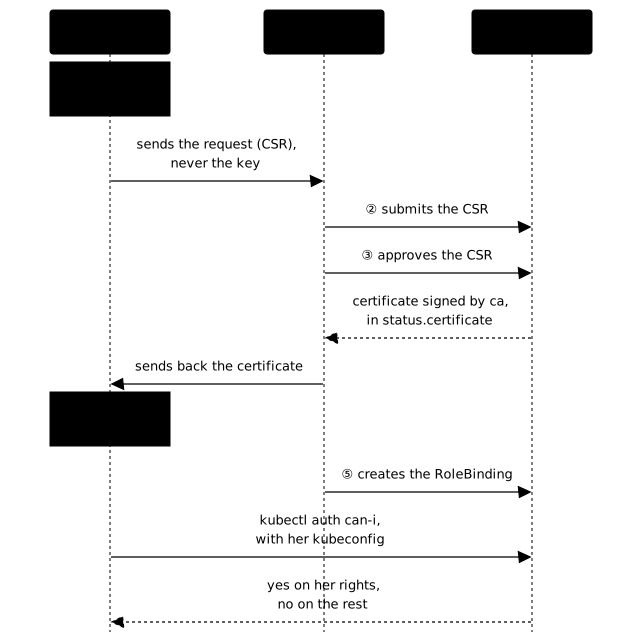
The procedure has five steps, here for a user named camille who must read the Pods of the equipe-web namespace. First step: she creates her private key and a certificate request, with her name in the CN. The key stays with her and never travels.
openssl genrsa -out camille.key 2048openssl req -new -key camille.key -subj "/CN=camille" -out camille.csrAn O field in the subject (/CN=camille/O=equipe-web) would also declare a group: the API server reads CN as the user name and O as the group, which lets you grant rights to a group rather than to each person.
Second step: the administrator submits the request to the API. The object carries the request base64-encoded on a single line (base64 -w0), the signer kubernetes.io/kube-apiserver-client, which issues client certificates for the API server, and the usage client auth.
cat <<EOF | kubectl apply -f -apiVersion: certificates.k8s.io/v1kind: CertificateSigningRequestmetadata: name: camillespec: request: $(base64 -w0 < camille.csr) signerName: kubernetes.io/kube-apiserver-client usages: - client authEOFThird step: the administrator approves the request, then reads the certificate that the API issued in status.certificate, base64-encoded. kubectl get csr shows the state of the request: Pending before approval, Approved,Issued after.
kubectl certificate approve camillekubectl get csr camille -o jsonpath='{.status.certificate}' | base64 -d > camille.crtopenssl x509 -in camille.crt -noout -subject -enddateThe last command confirms two things: the subject does carry CN=camille, and notAfter gives the expiry date of this certificate, to be noted like the others.
Fourth step: you build camille's kubeconfig, a separate file, with the address of the API server, the public certificate of the authority (ca.crt), then her certificate and her key. In practice, the administrator sends her camille.crt and she assembles her own file; the commands below run in the same place to stay short.
SERVEUR=$(kubectl config view --minify -o jsonpath='{.clusters[0].cluster.server}')kubectl config set-cluster kubernetes --server="$SERVEUR" \ --certificate-authority=/etc/kubernetes/pki/ca.crt --embed-certs=true \ --kubeconfig=camille.kubeconfigkubectl config set-credentials camille --client-certificate=camille.crt \ --client-key=camille.key --embed-certs=true --kubeconfig=camille.kubeconfigkubectl config set-context camille --cluster=kubernetes --user=camille \ --kubeconfig=camille.kubeconfigkubectl config use-context camille --kubeconfig=camille.kubeconfigFifth step: you give her her rights. A certificate proves who she is, but it grants her no rights. A RoleBinding in equipe-web links her to the view ClusterRole, which allows reading without modifying and gives no access to Secrets. The same template works with a narrower Role: the RBAC lesson explains how to build it.
kubectl create rolebinding camille-lecture --clusterrole=view \ --user=camille --namespace=equipe-webYou check under her identity, with her kubeconfig. kubectl auth whoami must answer camille, which proves that the API recognizes the certificate. Then kubectl auth can-i asks about the rights: list pods in equipe-web must answer yes, and delete pods, get secrets or list pods in another namespace must answer no.
kubectl --kubeconfig camille.kubeconfig auth whoamikubectl --kubeconfig camille.kubeconfig auth can-i list pods --namespace equipe-webkubectl --kubeconfig camille.kubeconfig auth can-i get secrets --namespace equipe-webOne limit to know: Kubernetes does not revoke a client certificate. Until it expires, a stolen certificate remains accepted. To remove camille's access, delete her RoleBinding: she still authenticates, but can no longer do anything.
Put it into practice
The three labs run on a kubeadm cluster on virtual machines, as in the exam. The first has you read the expiry dates of a cluster, renew the control plane certificates, restart the controller-manager and the scheduler, then copy admin.conf again. The validation reads the CA expiry date you write in ~/pki/reponses.yaml and compares it with the certificate. It then compares the serial number of the seven control plane certificates with the one recorded at launch. For the controller-manager and the scheduler, it requires a new client certificate in their kubeconfig and a restart after that rewrite. Finally, it checks that ~/.kube/config holds the new admin.conf certificate and that kubectl answers. Renewing a single certificate, forgetting the restarts or touching a file without renewing it does not pass.
The second lab asks you to give camille read access to equipe-web with a CertificateSigningRequest: her key and her request, the approval, the issued certificate, her kubeconfig, then her rights. The validation reads the request, compares the certificate in the kubeconfig with the one the API issued, then queries the API under camille's identity: reading Pods passes, everything else (modifying, reading a Secret, looking at another namespace or at the nodes) must be denied. A certificate signed by hand with the ca key does not pass.
The third is the level 4 challenge, with no procedure. It combines these steps with those of Back up and restore Kubernetes and of Manage API deprecations (in French): backup, etcd restore, manifests to migrate off the removed APIs, and control plane certificates to bring up to date. It is graded on the final state of the cluster, one criterion per state to reach, with a pass mark of 70%.
Key takeaways
- The PKI of a kubeadm cluster lives in
/etc/kubernetes/pkiand relies on three authorities:cafor the cluster,etcd-cafor etcd andfront-proxy-cafor the aggregated APIs. openssl x509 -noout -subject -issuer -serial -dates -ext subjectAltNamereads a certificate; the serial number proves a renewal.kubeadm certs check-expirationlists the expiry dates: one year for the component certificates, ten years for the authorities.kubeadm certs renew allrenews eleven certificates, not the authorities; restart the four static Pods, because the controller-manager and the scheduler read their client certificate only at startup.- The renewal rewrites
/etc/kubernetes/admin.confbut not~/.kube/config: copy it again. - The kubelet renews its client certificate by itself; the control plane certificates are monitored every month.
- An expired certificate shows up as
certificate has expired; recovery is done on the node withkubeadm certs renew all. - A human gets their certificate through a CertificateSigningRequest: the
cakey never leaves the node, and the rights come from a RoleBinding.
Knowledge check
Eight questions cover what each authority signs, how to read an expiry date, what must be reloaded after a renewal and the path of a CSR down to the kubeconfig. If an answer surprises you, go back to the matching section.
Knowledge check
Check what you have learned with this interactive quiz
How it works
- The timer starts when you click Start
- Multiple choice, true/false and short answer questions
- You can move between questions
- Detailed results are shown at the end
Starts the quiz and the timer
Review
(0/0)Score by domain
A domain groups several guides and gets several questions, so its score is more reliable than a per-topic score, which often rests on a single question.
Summary
Strengths
No topic passed at 80% on at least two questions yet.
Weak areas
No topic below the pass mark.
Recommended next
Hints before you try again?
Continue the course: Operate Kubernetes: diagnose a running cluster
A new full quiz with random questions
Work again only on the questions you missed