The CKAD (Certified Kubernetes Application Developer) is a two-hour hands-on exam: you deploy, configure and troubleshoot applications on real Kubernetes clusters, with no multiple-choice questions. This page tells you what the exam asks, how it runs, which lessons of the course prepare each of its five domains, and how to split six weeks of study.
It is written for someone who deploys applications on Kubernetes and wants that skill recognized. It assumes you already know the basic resources (Pods, Deployments, Services), which the course teaches before this module: the CKAD does not re-explain them, and neither does this page. It does not replace the command cheat sheet or the exercises: it tells you where to go, and in what order.
What you will learn
- Read the exam format, with the date and the source of each figure.
- Describe how a task works: ssh connection, return to the
basehost. - Map the five domains and their weights to the lessons that teach them.
- Spot what the CKAD leaves to other courses or does not ask.
- Build a six-week study plan.
What is the CKAD exam format?
The exam lasts 2 hours, has 15 to 20 tasks, and you need 66% of the points to pass. These values come from the Linux Foundation. They were collected on November 13, 2026: if the product page says something different when you read it, the product page prevails.
| Item | Value as of November 13, 2026 | Source |
|---|---|---|
| Duration | 2 hours | CKAD product page |
| Number of tasks | 15 to 20 | CKA and CKAD tips |
| Passing score | 66% | CKA, CKAD and CKS FAQ |
| Certification validity | 2 years | CKAD product page |
| Price of the exam alone | 445 USD | CKAD product page |
| Kubernetes version | 1.37 | CKAD product page, CKAD v1.37 curriculum and CKA and CKAD tips |
| Time allowed to sit the exam after purchase | 12 months | CKAD product page |
| Retake | one retake included | CKAD product page |
Read this table with two ideas in mind. The 66% passing score lets you lose about a third of the points: it is better to finish cleanly the tasks you master than to start more of them without completing any. And version 1.37 is the one this course teaches, so the commands and fields you learn here are the ones from the exam.
The Killer.sh exam simulator is a special case. It offers two sessions of 36 hours each, but the FAQ, read on November 13, 2026, states that it is not included in the "exam only" CKAD-SINGLE offer. Check what your offer contains before you count on it.
There are no multiple-choice questions: you work on real clusters. Studying with flashcards therefore pays off little, and what matters is knowing how to type and how to check your results.
How does a task work during the exam?
Each task opens with a box asking you to connect over ssh to a specific host, and you go back to the base host with exit when the task is done. This mechanism is described in the Linux Foundation's tips for the CKA and CKAD, read on November 13, 2026.
The diagram shows the intended path on the left and, on the right, the detour that the exam does not support. Follow the intended path: you start from base, connect over ssh to the task host, where kubectl, k and completion are ready, then exit brings you back to base for the next task.
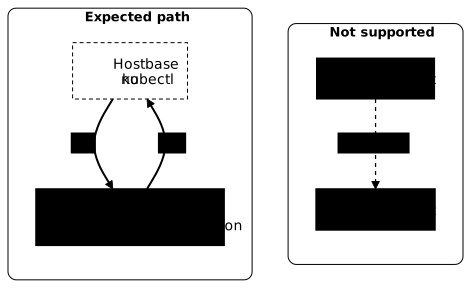
Read this flow as a loop: one task, one host, one exit. Two rules follow, given by the same page. Nested ssh is not supported: always go back to base before you connect to another host. And you must not reboot base, which would not restart the exam environment anyway.
On the hosts where you work, kubectl is installed, the k alias is defined and Bash completion is active. You therefore have no setup to do at the start of the exam. base, however, has none of these tools preinstalled, kubectl included: always work from the designated host.
The routine is simple, but it is easy to lose under the clock. To get used to it before the big day, work the same way, one connection per task. This cannot be practiced on kind, whose nodes are containers with no ssh host: play instead the labs of the Kubernetes labs catalog, which run on virtual machines, or the simulator if your offer includes it.
What are the five domains of the blueprint?
The official CNCF curriculum splits the CKAD into five domains, whose weights add up to 100% of the points. The "Application Environment, Configuration and Security" domain is the heaviest, at 25%.
| Domain | Weight |
|---|---|
| Application Design and Build | 20% |
| Application Deployment | 20% |
| Application Observability and Maintenance | 15% |
| Application Environment, Configuration and Security | 25% |
| Services and Networking | 20% |
Source: CKAD v1.37 curriculum, read on November 13, 2026. The weights describe a share of the points, not a number of tasks. For each domain, here are the lessons of the course that teach it.
Application Design and Build (20%)
This domain asks you to choose the right resource for a workload and to compose a Pod. You learn to choose between a Deployment, a DaemonSet, a StatefulSet or a Job and CronJob. Init containers and sidecars cover multi-container Pods, and application volumes and the introduction to storage cover ephemeral and persistent volumes. Building the image is covered elsewhere, see below.
Application Deployment (20%)
This domain covers Deployment updates and deployment strategies. The lesson on rolling updates and rollbacks practices the progressive update, the rollback and a blue-green switch (two versions of the application side by side, with traffic moving from one to the other), in addition to the Deployment itself. Kustomize and Helm complete this domain: Helm is taught by its own course, see below.
Application Observability and Maintenance (15%)
This domain asks you to know whether an application is healthy, and to find out why it is not. Probes check the health of the container, the lesson on reading the cluster state shows kubectl get, describe, logs and top, and Debug an application gives the method. Three common diagnoses have their own lesson: CrashLoopBackOff, ImagePullBackOff (in French) and Pending Pods. The curriculum also asks you to understand API deprecations: see Manage API deprecations (in French).
Application Environment, Configuration and Security (25%)
This is the heaviest domain, and it is wider than most people think: it is not limited to ConfigMaps and Secrets. It also includes securityContexts (the rights and restrictions of a container) and capabilities, authentication, authorization (RBAC), admission (the checks the API applies before accepting an object), the resources that extend Kubernetes (CRDs, operators), requests, limits and quotas. The curriculum does not cite the RBAC acronym, but in Kubernetes an account's authorization goes through that mechanism: prepare it for the CKAD.
Here are the lessons, in the order the curriculum cites them:
- extension resources: Operators and CRDs for developers then operators;
- authentication and authorization with RBAC, then admission (in French), which the course covers in its cluster security module;
- resources: requests and limits then ResourceQuota and LimitRange;
- configuration: ConfigMaps and Secrets;
- Pod identity: ServiceAccounts;
- application security: the Security Context and the Pod Security Standards.
Because this domain is worth a quarter of the points, it takes two weeks in the plan below.
Services and Networking (20%)
This domain asks you to give access to an application and to troubleshoot that access. Services are the foundation, Ingress routes HTTP traffic, and Network Policies limit who can talk to whom. For access that does not work, the approach in Debug an application applies to Services too.
Which topics are covered by other courses?
Two objectives of the curriculum are taught outside the Kubernetes course, because they concern tools that have their own path.
Building a container image (Dockerfile, multi-stage build) belongs to the containers course: start by writing a Dockerfile, then shrink an image. The Kubernetes course assumes the image already exists.
Helm, the Kubernetes package manager, is taught by the Helm course (in French). For the CKAD, keep three steps in mind: search for and install a chart (a Helm package) with the Helm commands (in French) and the installation of releases (in French), then change some of its values with the values (in French).
What does the CKAD not ask?
The CKAD looks at the cluster from the application's point of view. Installing a cluster with kubeadm, backing up etcd or upgrading nodes are administration tasks: they belong to the CKA. Cluster hardening, auditing and runtime detection belong to the CKS.
So do not lose weeks on control plane administration to prepare for this exam. The guide to choosing your certification compares the three exams if you are still hesitating.
What six-week study plan should you follow?
End each week with a hands-on exercise, never with reading: an entirely practical exam is prepared at the keyboard. The split below is not mandatory. If you have less time, keep the order and shorten each step rather than skipping a domain, since none weighs less than 15%.
| Week | Domain | Where to read | To finish the week |
|---|---|---|---|
| 1 | Application Design and Build | the lessons of the first domain above | create a two-container Pod and a CronJob without writing the YAML from scratch |
| 2 | Application Deployment | rolling updates, Kustomize, Helm | update a Deployment, then roll back |
| 3 | Services and Networking | Services, Ingress, Network Policies | expose an application and make it reachable from another Pod |
| 4 | Environment and resources | ConfigMaps, Secrets, requests, limits, quotas | inject configuration in three different ways |
| 5 | Application security | ServiceAccounts, RBAC, Security Context, admission, CRDs | give a Pod an identity and minimal rights |
| 6 | Observability and Maintenance | probes, kubectl logs, describe, diagnostic lessons | repair three failing Pods, then take the mock exam |
Weeks 4 and 5 share the 25% domain. Week 6 ends with the mock exam because diagnosis is easier once the other domains are known: an object already exists, and you have to find out why it does not work.
For the details of the commands to know and how to type them fast, use the CKAD essential commands cheat sheet. To practice task by task, then on the mock exam, play the timed CKAD exercises. These two pages cover the exam session, the most rewarding commands and the practice.
For manifests and kubectl commands, practice on the course's kind cluster, created in one command and disposable: you can break it and recreate it without losing anything. The per-task ssh connection, for its part, is practiced in the catalog labs, on virtual machines, or in the simulator.
Key takeaways
- The exam lasts 2 hours, has 15 to 20 tasks and requires 66% of the points: the figures above are those of November 13, 2026, to be reconfirmed on the product page before you buy.
- Each task starts with an ssh connection to the host indicated, and ends with
exitback tobase; nested ssh is not supported. - On the working hosts,
kubectl, thekalias and Bash completion are already configured, but not onbase. - The "Application Environment, Configuration and Security" domain weighs 25% and includes authorization (prepared with RBAC), admission, securityContexts, capabilities, CRDs and quotas.
- The domain weights are 20, 20, 15, 25 and 20%, and no domain can be sacrificed.
- Image building and Helm are taught in their own courses, linked above.
- The Killer.sh simulator is not included in the "exam only" offers: check your offer.
- A six-week plan ends each week with a hands-on exercise, then with the mock exam.
Test your knowledge
Seven questions on the exam format, the scope of the CKAD, its five domains and how to prepare for it.
Knowledge check
Check what you have learned with this interactive quiz
How it works
- The timer starts when you click Start
- Multiple choice, true/false and short answer questions
- You can move between questions
- Detailed results are shown at the end
Starts the quiz and the timer
Review
(0/0)Score by domain
A domain groups several guides and gets several questions, so its score is more reliable than a per-topic score, which often rests on a single question.
Summary
Strengths
No topic passed at 80% on at least two questions yet.
Weak areas
No topic below the pass mark.
Recommended next
Hints before you try again?
Continue the course: CKAD cheat sheet: essential kubectl commands
A new full quiz with random questions
Work again only on the questions you missed