A Pod starts with requests and limits (the amount of CPU and memory reserved for it, and the ceiling it cannot exceed), and these values are almost always guessed. The Requests and limits lesson teaches you to change them without recreating the Pod, with the resize subresource. This lesson adds what is missing: why the plain patch is refused, how to tell the container whether to restart, then how to ask the Vertical Pod Autoscaler (VPA) which values to set. You read its recommendation in Off mode, and you apply it by hand, without copying it blindly, on Kubernetes 1.37 with VPA 1.8.1.
What you will learn
- Say why a plain patch on a Pod's
resourcesis refused and what--subresource resizechanges - Choose
resizePolicydepending on whether the container must restart or not - Install the VPA and read its recommendation in
Offmode (target,lowerBound,upperBound) - Apply a recommendation to a Deployment's
requestsafter checking that it makes sense - Name the VPA modes and say why letting a VPA and an HPA adjust the same metric is discouraged
- Place, cap and size without step-by-step instructions, in the graded challenge of the "Scheduling and capacity" module
Prerequisites
This lesson assumes three things:
- You can read a Pod's requests and limits, and you have done a first in-place resize: the Requests and limits lesson teaches it with its outputs, and this lesson does not repeat it.
- You have seen the Horizontal Pod Autoscaler: its lesson also installs metrics-server, which the VPA needs.
- Your machine has
gitandopenssl: the VPA install script clones the project repository and generates the admission webhook certificate.
The outputs below come from a kind cluster running Kubernetes 1.37.0.
Why adjust the resources of a running Pod?
A badly sized Pod costs you in two ways. Requests that are too high reserve resources nobody uses, and the scheduler refuses to place other Pods. Limits that are too low slow the container down (CPU) or get it killed with OOMKilled (memory).
Without in-place resize, fixing these values meant deleting the Pod and creating another one, which is an interruption for an application that keeps state in memory. In-place resize changes the values in the same Pod, but it assumes you know which values to set.
The HPA does not solve this problem: it changes the number of Pods, never their size. The VPA acts on the size. The table below sums up the difference.
| HPA | VPA | |
|---|---|---|
| What it changes | the number of replicas | the requests (and the limits) of each Pod |
| It suits | a load that varies fast | a stable consumption, badly estimated at the start |
| Source of measurements | metrics-server, or an external metric | metrics-server and its own history |
How do you resize a Pod in place?
In-place resize is native and stable since Kubernetes 1.35. An existing Pod nonetheless refuses to have its resources modified by a plain patch: you have to go through the dedicated subresource, with kubectl patch pod <name> --subresource resize (kubectl 1.32 or newer). The Requests and limits lesson shows this gesture in full, including how to read cpu.max. This section only takes up two elements: the refusal of the plain patch, then a working Pod that will serve for resizePolicy.
Create this Pod. The resizePolicy field is explained in the next section; for now, remember that it says whether the container must restart when a resource changes.
apiVersion: v1kind: Podmetadata: name: redim namespace: redimspec: containers: - name: app image: nginx:1.30.5@sha256:9bf97bd7714f5e24c1ccd545ecb9eb5435cb6d109c97cebb15e7e455e0239edb resizePolicy: - resourceName: cpu restartPolicy: NotRequired - resourceName: memory restartPolicy: RestartContainer resources: requests: cpu: 100m memory: 64Mi limits: cpu: 200m memory: 128Mikubectl create namespace redimkubectl apply -f redim.yaml && kubectl wait --for=condition=Ready pod/redim -n redim --timeout=120snamespace/redim createdpod/redim createdpod/redim condition metNote the starting point: the Pod identifier (uid), its restart count, and the resources read from the container status.
kubectl get pod redim -n redim -o jsonpath='uid={.metadata.uid}{"\n"}restartCount={.status.containerStatuses[0].restartCount}{"\n"}status.resources={.status.containerStatuses[0].resources}{"\n"}'uid=7b0076ea-ca37-49bd-a1de-7262e0dd9f67restartCount=0status.resources={"limits":{"cpu":"200m","memory":"128Mi"},"requests":{"cpu":"100m","memory":"64Mi"}}Keep the uid in mind: if it changes after a resize, the Pod was recreated. Now try to double the CPU without the subresource:
kubectl patch pod redim -n redim -p '{"spec":{"containers":[{"name":"app","resources":{"requests":{"cpu":"200m"},"limits":{"cpu":"400m"}}}]}}'The Pod "redim" is invalid: spec: Forbidden: pod updates may not change fields other than `spec.containers[*].image`,`spec.initContainers[*].image`,`spec.activeDeadlineSeconds`,`spec.tolerations` (only additions to existing tolerations),`spec.terminationGracePeriodSeconds` (allow it to be set to 1 if it was previously negative)The message is followed by a diff showing the two CPU values. Read the first part: pod updates may not change fields other than ... means that a Pod's resources cannot be modified through the ordinary route. Make the same request again with --subresource resize, then read the state back.
kubectl patch pod redim -n redim --subresource resize -p '{"spec":{"containers":[{"name":"app","resources":{"requests":{"cpu":"200m"},"limits":{"cpu":"400m"}}}]}}'kubectl get pod redim -n redim -o jsonpath='uid={.metadata.uid}{"\n"}restartCount={.status.containerStatuses[0].restartCount}{"\n"}status.resources={.status.containerStatuses[0].resources}{"\n"}'pod/redim patcheduid=7b0076ea-ca37-49bd-a1de-7262e0dd9f67restartCount=0status.resources={"limits":{"cpu":"400m","memory":"128Mi"},"requests":{"cpu":"200m","memory":"64Mi"}}The patch is accepted, and you can read three things: the uid is the same (the Pod was not recreated), restartCount is still 0 (CPU is NotRequired), and status.resources carries 200m and 400m. Keep this reference point: with memory, the result will be different.
When does the container restart: resizePolicy
The resizePolicy field is optional. Without it, the container does not restart: each resource is NotRequired, the container keeps running and the kernel applies the new value. You only write it to ask for RestartContainer, when the application reads its memory at startup and does not adapt to a limit that changes. The two values are chosen per resource.
In the redim Pod, memory is set to RestartContainer. Raise the request to 96Mi and the limit to 192Mi:
kubectl patch pod redim -n redim --subresource resize -p '{"spec":{"containers":[{"name":"app","resources":{"requests":{"memory":"96Mi"},"limits":{"memory":"192Mi"}}}]}}'sleep 10; kubectl get pod redim -n redim -o jsonpath='uid={.metadata.uid}{"\n"}restartCount={.status.containerStatuses[0].restartCount}{"\n"}'; kubectl get pod redim -n redimpod/redim patcheduid=7b0076ea-ca37-49bd-a1de-7262e0dd9f67restartCount=1NAME READY STATUS RESTARTS AGEredim 1/1 Running 1 (10s ago) 16sThis time the container restarted (restartCount=1), but the Pod stayed the same (same uid): the IP address, the node and the volumes are kept. The Pod events tell you what happened.
kubectl get events -n redim --sort-by=.lastTimestampLAST SEEN TYPE REASON OBJECT MESSAGE...10s Normal ResizeStarted pod/redim Pod resize started: {"containers":[{"name":"app","resources":{"limits":{"cpu":"400m","memory":"192Mi"},"requests":{"cpu":"200m","memory":"96Mi"}}}],"generation":3}10s Normal Killing pod/redim Container app resize requires restart10s Normal ResizeCompleted pod/redim Pod resize completed: {"containers":[{"name":"app","resources":{"limits":{"cpu":"400m","memory":"192Mi"},"requests":{"cpu":"200m","memory":"96Mi"}}}],"generation":3}The ellipsis replaces the creation events and those of the first resize. The three lines kept show the cycle: ResizeStarted, a Killing whose resize requires restart message comes from the RestartContainer policy, then ResizeCompleted. A CPU resize in NotRequired only produces ResizeStarted and ResizeCompleted.
A resize accepted by the API is not necessarily applied: if it stays pending (PodResizePending condition, reason Deferred or Infeasible), or if you lower a memory limit below the real usage, the Resize a Pod in place section of the Requests and limits lesson shows these states with their outputs.
What does the VPA add to this gesture?
Resizing by hand assumes you know which values to set. The Vertical Pod Autoscaler answers that question. It is a component you install on top of Kubernetes, from the kubernetes/autoscaler repository. It is made of three programs.
| Component | Role |
|---|---|
| Recommender | reads the consumption (through metrics-server) and its history, and writes a recommendation in the VPA status |
| Updater | applies the recommendation to the running Pods, depending on the chosen mode |
| Admission Controller | sets the recommended values on new Pods when they are created |
The diagram follows the recommendation from end to end. Note that the Recommender is the only one of the three that produces the recommendation: it reads the metrics-server measurements and writes it to the VPA status. The Updater and the Admission Controller only read that status, and each then acts depending on the mode: the Updater on running Pods, the Admission Controller on Pods being created. In Off mode, the flow stops at the status.
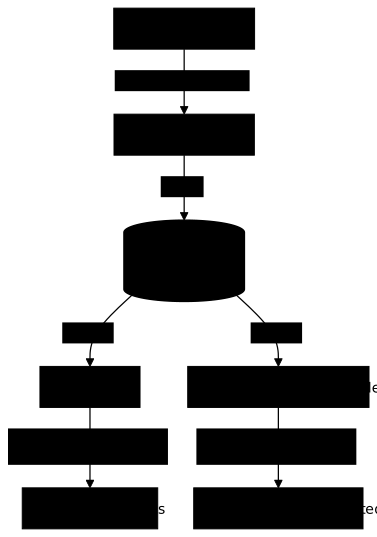
In Recreate mode, the Updater evicts a Pod: it deletes it so that its controller creates another one. It therefore does not modify the Pod itself, and the recreated Pod goes through the Admission Controller again, which sets the recommended values on it.
The Recommender keeps the consumption history, and it is this history that makes its recommendation more reliable over the days. In this lesson, only the Recommender works: you use it to read a recommendation without letting anything act.
Install VPA 1.8.1
VPA 1.8.1 covers Kubernetes 1.36 to 1.38. It is installed with the project script, without Helm, from a clone of the repository at the version tag. First make sure kubectl top nodes answers: without metrics-server, the Recommender has no measurements.
git clone --depth 1 --branch vertical-pod-autoscaler-1.8.1 https://github.com/kubernetes/autoscaler.gitcd autoscaler/vertical-pod-autoscaler && ./hack/vpa-up.shThe script creates two CRDs, RBAC roles, three Deployments in kube-system and a certificate for the admission webhook. It takes about two seconds, and the three Pods are ready a few seconds later.
kubectl get pods -n kube-system -l 'app in (vpa-recommender,vpa-updater,vpa-admission-controller)'NAME READY STATUS RESTARTS AGEvpa-admission-controller-54bf55d747-nzrqr 1/1 Running 0 6svpa-recommender-785f59768d-snj8m 1/1 Running 0 7svpa-updater-7d644d7885-5fknp 1/1 Running 0 7sIf openssl is missing, the script does not stop: it prints openssl: command not found, then vpa-admission-controller stays in ContainerCreating, for lack of the vpa-tls-certs secret. Install openssl and run ./hack/vpa-up.sh again.
The three components are running. The script writes the images by tag (registry.k8s.io/autoscaling/vpa-recommender:1.8.1 and its two siblings): to pin a digest, read it in status.containerStatuses[].imageID of the Pods.
Read a recommendation in Off mode
To see a recommendation, you need a Pod that consumes CPU. The Deployment below runs a compute loop capped at 100m by its limit, with a request deliberately too low at 20m. The VPA that targets it is in Off mode: it computes, it changes nothing.
apiVersion: apps/v1kind: Deploymentmetadata: name: charge namespace: dimensionspec: replicas: 1 selector: matchLabels: app: charge template: metadata: labels: app: charge spec: containers: - name: calcul image: busybox:1.38.0@sha256:a46257e06c82ad85242d0d38077d0a52d9896389ca60a1a59d3463db586e5fa4 command: ["sh", "-c", "while true; do :; done"] resources: requests: cpu: 20m memory: 16Mi limits: cpu: 100m memory: 64Mi---apiVersion: autoscaling.k8s.io/v1kind: VerticalPodAutoscalermetadata: name: charge-vpa namespace: dimensionspec: targetRef: apiVersion: apps/v1 kind: Deployment name: charge updatePolicy: updateMode: "Off"Apply it, then wait a minute: the first recommendation appeared 55 seconds after the VPA was created during the measurement.
kubectl create namespace dimensionkubectl apply -f charge.yamlAfter a minute of waiting, read the VPA summary.
kubectl get vpa -n dimensionNAME MODE CPU MEM PROVIDED AGEcharge-vpa Off 126m 250Mi True 60sRight after creation, the CPU, MEM and PROVIDED columns are empty: they fill in when the Recommender has a first value. The MODE column confirms Off. For the full detail, read the VPA status.
kubectl get vpa charge-vpa -n dimension -o yamlstatus: conditions: - lastTransitionTime: "2026-11-12T19:30:41Z" status: "True" type: RecommendationProvided observedGeneration: 1 recommendation: containerRecommendations: - containerName: calcul lowerBound: cpu: 25m memory: 250Mi target: cpu: 126m memory: 250Mi uncappedTarget: cpu: 126m memory: 250Mi upperBound: cpu: 100G memory: 97656250000KiOnly the status block is reproduced. target is the value the VPA recommends setting in the requests. lowerBound is the recommended minimum, below which the Pod risks running short of resources. upperBound is the reasonable maximum, and here it is absurdly wide (100G of CPU) because the Recommender has no history yet: it narrows over the days. uncappedTarget is the target before any VPA bounds (resourcePolicy) limit it.
Two of these values are surprising, and they tell you how to read the rest. The CPU target (126m) exceeds the 20m request because the Pod consumes its whole limit: kubectl top pod reads 101m, and the Recommender adds a margin. The memory target (250Mi) measures nothing: the Pod uses less than 1Mi, and 250Mi is the Recommender's default floor, below which it never recommends. That is why target is not to be copied as is.
Off mode touches nothing. The Pod keeps its starting requests:
kubectl get pods -n dimension -o custom-columns=NOM:.metadata.name,RESTARTS:.status.containerStatuses[0].restartCount,REQUESTS:.spec.containers[0].resources.requestsNOM RESTARTS REQUESTScharge-fb59dc75c-bb7rh 0 map[cpu:20m memory:16Mi]Should you copy target as is?
No: target is a starting point to check against what you know about the Pod. The two values in the example show two ways to get it wrong.
Memory first. Copying memory: 250Mi into the requests would reserve on the node more than fifteen times the current request (16Mi) for a Pod that uses less than 1Mi, only because 250Mi is a floor. Compare target with kubectl top pod and with the consumption you expect from the application, and keep the value that reflects the need.
CPU next. The 126m target comes from a loop throttled by its 100m limit: the Pod cannot consume more, so the measurement stops at the ceiling you set, not at the real need. Carry 126m over as a first step, raise the limit, then read the recommendation again after a few minutes: if the Pod consumes more once freed, it will say so.
The three values lowerBound, target and upperBound are read together. An oversized upperBound, like the 100G of CPU in the example, signals a history that is too short: the recommendation is still fragile. To read the recommendations of several Deployments at once, the Goldilocks tool (in French) creates the VPAs in Off mode and displays them in a dashboard.
Apply the recommendation by hand
Applying the recommendation by hand means copying the values you retained into the Deployment's requests, then running kubectl apply again. The Deployment then creates new Pods with the right values, through a rolling update.
In this example, you apply the recommended CPU and keep the starting memory request, since 250Mi is only a floor. You also raise the CPU limit to 250m so that the loop is no longer throttled at 100m. The VPA mainly recommends the request: for the limits, keep the ratio you had between the limit and the request, or set a value of your choice. A request must never exceed the limit, because the API refuses such a Pod.
resources: requests: cpu: 126m memory: 16Mi limits: cpu: 250m memory: 64MiRun kubectl apply -f charge.yaml again, wait for the rollout to finish with kubectl rollout status deployment/charge -n dimension, then read the requests back with the custom-columns command used above. Right after the rollout, the old Pod may still appear for a few dozen seconds, being stopped (Terminating), with its old values: read the line of the new Pod.
NOM RESTARTS REQUESTScharge-5b6bbfcf5f-znn8t 0 map[cpu:126m memory:16Mi]charge-fb59dc75c-5k44p 0 map[cpu:20m memory:16Mi]The new Pod carries cpu:126m and memory:16Mi. The old one, at cpu:20m, disappears as soon as it has finished stopping.
This method has one advantage: you keep control over what changes and when. For a standalone Pod, without a Deployment, it is the in-place resize from the Requests and limits lesson that sets these values.
What are the VPA modes?
The spec.updatePolicy.updateMode field decides what the VPA does with its recommendation. A VPA without an explicit mode is not read-only. Created without updatePolicy, it takes the Recreate mode, not Off: the CRD says so ("The default is 'Recreate'") and an object read back after creation carries updateMode: Recreate. So check the mode before letting a VPA act.
| Mode | What it does |
|---|---|
Off | computes the recommendation, changes nothing |
Initial | sets the values when Pods are created, never afterwards |
Recreate (default) | evicts the Pods whose values differ from the recommendation, so that the controller recreates them |
InPlaceOrRecreate | tries the in-place resize, evicts on failure (stable, requires in-place resize on the cluster) |
InPlace | resizes in place, never evicts (alpha, needs the InPlace=true feature gate, which the three VPA components expose) |
Auto | deprecated, behaves like Recreate: prefer an explicit mode |
To learn, stay in Off. For an application that cannot tolerate interruption, InPlaceOrRecreate is the mode to aim for: it avoids eviction when the cluster knows how to resize in place.
Can you combine the VPA and the HPA?
Yes, but it is discouraged when they adjust the same metric. The HPA computes a CPU percentage relative to the requests. If the VPA changes those requests, the percentage moves without the load having changed, and the two loops work against each other. Leave the VPA in Off when an HPA tracks CPU, or have the HPA track a different metric from the one the VPA adjusts.
By default, the VPA adjusts the requests and makes the limit follow by keeping the ratio (controlledValues field, value RequestsAndLimits). The RequestsOnly value only changes the requests. The Recommender also raises its recommendation after an OOMKilled.
Clean up the cluster
The charge Deployment runs a loop that consumes CPU continuously, and the VPA runs in kube-system: none of this should stay on a shared cluster. First delete the lesson namespaces, which stops the loop, then remove the VPA with the script provided by the same clone as vpa-up.sh.
kubectl delete namespace dimension redim --ignore-not-found# from autoscaler/vertical-pod-autoscaler, the directory where vpa-up.sh was run./hack/vpa-down.shThe --ignore-not-found option avoids an error if you did not create the redim namespace. At tag 1.8.1, vpa-down.sh returns exit code 1 even when everything went well: do not rely on this code, check the result. Then check with kubectl get pods -n kube-system -l 'app in (vpa-recommender,vpa-updater,vpa-admission-controller)': the command must list nothing anymore.
Troubleshooting
The first three symptoms concern in-place resize, the next three the VPA.
| Symptom | Likely cause | What to do |
|---|---|---|
pod updates may not change fields other than ... | patch sent without the subresource | add --subresource resize |
| the container restarted | the resizePolicy of this resource is RestartContainer | intended for the memory of some applications; declare NotRequired for a resource that does not need it |
PodResizePending stays present | node too full, or request too large for the node | see Requests and limits |
vpa-admission-controller stays in ContainerCreating | the vpa-tls-certs secret is missing, because openssl was absent when the script ran | install openssl, then run ./hack/vpa-up.sh again |
kubectl get vpa empty in the CPU and MEM columns | first recommendation not computed yet, or metrics-server missing | wait a minute, then check kubectl top pods |
| Pods are evicted without being asked | VPA created without updatePolicy, so in Recreate | switch the VPA back to Off or pick an explicit mode |
Put it into practice
The lab picks up the end of this lesson on a catalogue Deployment of two replicas, whose requests are deliberately low (5m of CPU, 16Mi of memory) under a CPU limit of 50m. You create the catalogue VPA in Off mode yourself, wait for its recommendation, then apply requests to the Deployment without copying target blindly. In-place resize of a standalone Pod has its own lab, in the Requests and limits lesson.
The validation has five tests and reads the cluster state at the time of the check. The VPA must target the Deployment in Off mode and have produced a recommendation. The CPU must lie between the lower bound and the upper bound. The memory must be at least the consumption that metrics-server measures and at most the upper bound. The running Pods must carry these requests, applied through the Deployment: what counts is the Pods it recreates, not Pods edited by hand. Finally, the VPA must not have evicted any Pod.
In this lab, the container consumes about sixty MB: keeping the starting memory request (16Mi) is not enough, unlike the lesson's example.
Challenge: place Pods, cap a namespace and size
The challenge is the unaided proof of the module "Scheduling and capacity", and it is graded on the cluster state you leave behind, not on the commands you type. With no procedure, you reserve a node for one application and keep the others away from it, you place an application with node affinity and spread its replicas, you cap a namespace while giving its containers default values, then you scale an application on its CPU load.
The validation reads eight states, with no solution and no value to copy. The reserved node carries the requested taint and label, the reserved application runs on that node and the ordinary application runs elsewhere. The required affinity and the preferred affinity are declared, and the replicas spread across different nodes. The namespace refuses, in a server-side dry run, a Pod that exceeds the quota, and it fills in the LimitRange values for a Pod without requests. Finally the HPA carries the requested bounds and reads a metric, then the number of replicas rises above the minimum under load.
Passing requires 70 points out of 100. Two requirements are blocking and must pass whatever the total: the reserved application on its node, with the ordinary application elsewhere, and the refusal, in a server-side dry run, of a Pod that exceeds the quota. While you work, dsoxlab check lists what still fails, without saying how to fix it. The lesson to go back to is the one that teaches the missing state: reread it, redo the gesture, then rerun dsoxlab check. The challenge relies on Advanced scheduling: Affinity, Taints, Tolerations and Topology Spread, which also teaches replica spreading, on ResourceQuota and LimitRange, on Choose your autoscaler and on Horizontal Pod Autoscaler.
Key takeaways
- A running Pod's
resourcescan only be changed through theresizesubresource, for example withkubectl patch pod <name> --subresource resize: the same patch without it is refused. resizePolicyis optional:NotRequiredis the default value. You only writeRestartContainerfor a resource whose change requires a container restart.- After a resize, compare the
uid, therestartCountandstatus.resources: withRestartContainer, theuidstays the same andrestartCountgoes up. - The VPA is a component you install, and its script needs
gitandopenssl. InOffmode, it writes a recommendation (target,lowerBound,upperBound) instatus.recommendationwithout changing anything. targetis not to be copied blindly: 250Mi of memory is only a Recommender floor, and a CPU measured under a tight limit reflects the limit, not the need.- A VPA created without
updatePolicyis inRecreatemode and evicts Pods.Autois deprecated.InPlaceOrRecreatetries the in-place resize before evicting. - Do not let the VPA and the HPA adjust the same metric: it is discouraged, because their loops work against each other.
Test your knowledge
This quiz covers the refusal of the plain patch, the effect of resizePolicy, the role of the three VPA components, its modes and how to read a recommendation.
Knowledge check
Check what you have learned with this interactive quiz
How it works
- The timer starts when you click Start
- Multiple choice, true/false and short answer questions
- You can move between questions
- Detailed results are shown at the end
Starts the quiz and the timer
Review
(0/0)Score by domain
A domain groups several guides and gets several questions, so its score is more reliable than a per-topic score, which often rests on a single question.
Summary
Strengths
No topic passed at 80% on at least two questions yet.
Weak areas
No topic below the pass mark.
Recommended next
Hints before you try again?
Continue the course: Kubernetes Security Context: control your Pods' permissions
A new full quiz with random questions
Work again only on the questions you missed