When a Pod disappears, everything it wrote disappears with it, unless the file is in a persistent volume. In this lesson, you declare that volume by hand, you request it with a claim, you mount it in a Pod, then you check where the data lives and what happens to it when the claim is deleted. Next you observe a volume created automatically, you fix a write refusal with fsGroup, and you learn to read a claim stuck in Pending.
What you will learn
- Link Pod, PVC, PV and StorageClass, and say which one creates which
- Write a static PersistentVolume, a claim that binds to it and a Pod that mounts it
- Check that data written by the Pod is found on the node's disk
- Choose an access mode, knowing that
ReadWriteOncelimits access to one node, not one Pod - Decide on a reclaim policy, fix it on an existing volume and say what remains of the data
- Tell static and dynamic provisioning apart, understand
WaitForFirstConsumerand diagnose a claim inPending - Set the permissions of a volume for a Pod that does not run as root
Prerequisites
You know how to create a Pod and read its events, as in Pods and Kubernetes resources. You have Docker, kubectl and kind 0.33 or later, installed as in First cluster. This lesson uses a four-node cluster, because storage depends on the node where the Pod runs. The commands were run with kind 0.33.0, kubectl 1.37.0 and nodes in v1.37.0.
Why is storage special in Kubernetes?
A Pod can be deleted, recreated and rescheduled on another node at any time. A file written inside the container does not follow that movement. Three questions follow: how to keep the data when the Pod disappears, how to make it available when the Pod changes node, and who decides what becomes of it when it is no longer needed.
Kubernetes answers with two families of volumes. Ephemeral volumes, such as emptyDir, live and die with the Pod. Persistent volumes, described by a PersistentVolume, exist independently of it.
The mental model: Pod → PVC → PV → StorageClass
Four objects each play a role. The Pod mounts a claim. The claim (PersistentVolumeClaim, PVC) expresses a need: a size and an access mode. The volume (PersistentVolume, PV) is the actual piece of storage. The StorageClass is the recipe that creates a PV on demand. The diagram shows the two paths: a PV prepared by hand by an administrator, or a PV created by a StorageClass.
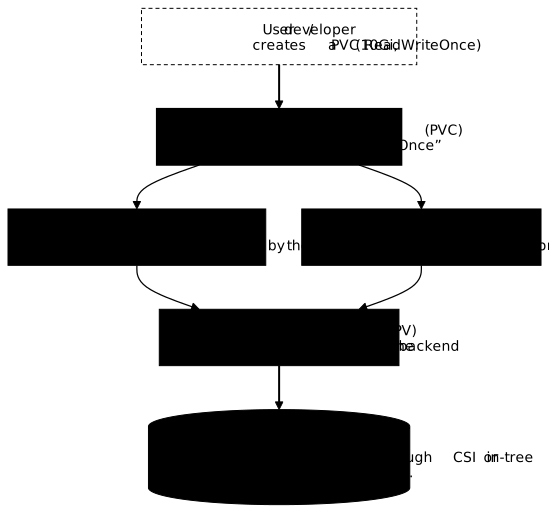
This lesson prepares the first path by hand, then observes the second. The lesson on StorageClass details the recipe itself.
Prepare the cluster and the namespace
The demo-multi cluster has one control plane node and three worker nodes. The kind-multi.yaml file is the one from the lesson on kind: a control plane and three workers, labelled by zone.
mkdir -p ~/atelier-k8s/stockage && cd ~/atelier-k8s/stockagecat > kind-multi.yaml <<'EOF'kind: ClusterapiVersion: kind.x-k8s.io/v1alpha4nodes: - role: control-plane - role: worker labels: topology.kubernetes.io/zone: zone-a - role: worker labels: topology.kubernetes.io/zone: zone-b - role: worker labels: topology.kubernetes.io/zone: zone-cEOFkind create cluster --name demo-multi --image kindest/node:v1.37.0@sha256:a1ed56cfb0e7b93589bdf97c8cd566405a265939e3620fc4f5de89adff580ae5 --config kind-multi.yamlCreation took 29 seconds. The command prints progress lines, which we cut. The last useful line confirms the context:
Set kubectl context to "kind-demo-multi"Wait until the four nodes are ready, then look at them:
kubectl wait --for=condition=Ready nodes --all --timeout=120skubectl get nodes -o widenode/demo-multi-control-plane condition metnode/demo-multi-worker condition metnode/demo-multi-worker2 condition metnode/demo-multi-worker3 condition metNAME STATUS ROLES AGE VERSION INTERNAL-IP EXTERNAL-IP OS-IMAGE KERNEL-VERSION CONTAINER-RUNTIMEdemo-multi-control-plane Ready control-plane 30s v1.37.0 172.18.0.3 <none> Debian GNU/Linux 13 (trixie) 6.12.115+deb13.1-amd64 (amd64) containerd://2.3.4demo-multi-worker Ready <none> 14s v1.37.0 172.18.0.2 <none> Debian GNU/Linux 13 (trixie) 6.12.115+deb13.1-amd64 (amd64) containerd://2.3.4demo-multi-worker2 Ready <none> 14s v1.37.0 172.18.0.4 <none> Debian GNU/Linux 13 (trixie) 6.12.115+deb13.1-amd64 (amd64) containerd://2.3.4demo-multi-worker3 Ready <none> 14s v1.37.0 172.18.0.5 <none> Debian GNU/Linux 13 (trixie) 6.12.115+deb13.1-amd64 (amd64) containerd://2.3.4Look at the STATUS column: the four nodes are Ready. With kind, each node is a Docker container. You can therefore read a node's disk with docker exec, which you will do to prove where the data is. Create the working namespace:
kubectl create namespace stockage-modelenamespace/stockage-modele createdThe names and messages of this lesson are in French on purpose, so that the outputs stay those of the tested cluster: stockage-modele means "storage model", ephemere "ephemeral", temoin.txt "marker.txt", ecrivain "writer", lecteur "reader", ailleurs "elsewhere", donnees "data", statique "static", dynamique "dynamic", demo-manuel "demo-manual", donnee-du-pod "pod-data", demo-droits "demo-permissions", classe-inconnue "unknown-class", n-existe-pas "does-not-exist", sans-classe "no-class" and absent "missing". In the custom-columns output, the headers NOM and CLASSE mean "name" and "class". The echo message "bonjour" means "hello", and the retrait du PV : … s apres la commande de suppression de la PVC line means "PV removal: … s after the PVC deletion command".
emptyDir and hostPath: two volumes without a PersistentVolume
Before making data persistent, let us see what happens without a persistent volume. Application volumes, including emptyDir, are detailed in Application volumes. Here, we use them to see what persistence fixes.
emptyDir: temporary storage inside the Pod
An emptyDir is an empty directory, created when the Pod starts and deleted with it. The ephemere Pod writes a file into it, then we delete the Pod.
cat > pod-emptydir.yaml <<'EOF'apiVersion: v1kind: Podmetadata: name: ephemere namespace: stockage-modelespec: containers: - name: app image: busybox:1.38.0@sha256:a46257e06c82ad85242d0d38077d0a52d9896389ca60a1a59d3463db586e5fa4 command: ["sleep", "3600"] volumeMounts: - name: temp mountPath: /data volumes: - name: temp emptyDir: {}EOFkubectl apply -f pod-emptydir.yamlkubectl -n stockage-modele wait --for=condition=Ready pod/ephemere --timeout=60skubectl -n stockage-modele exec ephemere -- sh -c 'echo bonjour > /data/temoin.txt && cat /data/temoin.txt'pod/ephemere createdpod/ephemere condition metbonjourThe file exists. Delete the Pod, recreate it under the same name and list /data:
kubectl -n stockage-modele delete pod ephemerekubectl apply -f pod-emptydir.yaml && kubectl -n stockage-modele wait --for=condition=Ready pod/ephemere --timeout=60s && kubectl -n stockage-modele exec ephemere -- ls -la /datapod "ephemere" deleted from stockage-modele namespacepod/ephemere createdpod/ephemere condition mettotal 8drwxrwxrwx 2 root root 4096 Nov 11 22:36 .drwxr-xr-x 1 root root 4096 Nov 11 22:36 ..Look for temoin.txt in the list: it is not there. The recreated Pod starts again with an empty directory. Deletion takes about thirty seconds: sleep ignores the stop signal, and Kubernetes waits for the grace period to end. Remove the Pod before continuing:
kubectl -n stockage-modele delete pod ephemere --wait=truepod "ephemere" deleted from stockage-modele namespacehostPath: access to the node's filesystem
The Application volumes lesson already introduced hostPath and its danger: the Pod reads the disk of the node that hosts it. On the persistence side, keep the other limit in mind. The data survives the Pod, but it stays tied to one node: a Pod rescheduled elsewhere does not find it. For persistent data, use a PersistentVolume, as in the sections that follow.
Static provisioning
With static provisioning, an administrator creates the PV by hand. You do it here with a local volume, which designates a directory on a specific node. This directory must exist beforehand: Kubernetes does not create it (see the troubleshooting section below). Create it on demo-multi-worker:
docker exec demo-multi-worker sh -c 'mkdir -p /mnt/demo-pv-statique && ls -ld /mnt/demo-pv-statique'drwxr-xr-x 2 root root 4096 Nov 11 22:36 /mnt/demo-pv-statiqueThe PersistentVolume carries four useful pieces of information: its size, its access mode, its reclaim policy (see below) and the node where it lives, in nodeAffinity. Its storageClassName is only a label used to match it with a claim. No demo-manuel StorageClass object exists.
cat > pv-statique.yaml <<'EOF'apiVersion: v1kind: PersistentVolumemetadata: name: demo-pv-statiquespec: capacity: storage: 1Gi accessModes: - ReadWriteOnce persistentVolumeReclaimPolicy: Retain storageClassName: demo-manuel local: path: /mnt/demo-pv-statique nodeAffinity: required: nodeSelectorTerms: - matchExpressions: - key: kubernetes.io/hostname operator: In values: - demo-multi-workerEOFkubectl apply -f pv-statique.yamlkubectl get pv demo-pv-statiquepersistentvolume/demo-pv-statique createdNAME CAPACITY ACCESS MODES RECLAIM POLICY STATUS CLAIM STORAGECLASS VOLUMEATTRIBUTESCLASS REASON AGEdemo-pv-statique 1Gi RWO Retain Available demo-manuel <unset> 0sLook at STATUS and CLAIM: the volume is Available, nobody has claimed it yet. Now create the claim, which asks for 1Gi in ReadWriteOnce with the same class label:
cat > pvc-statique.yaml <<'EOF'apiVersion: v1kind: PersistentVolumeClaimmetadata: name: donnees-statique namespace: stockage-modelespec: accessModes: - ReadWriteOnce storageClassName: demo-manuel resources: requests: storage: 1GiEOFkubectl apply -f pvc-statique.yamlkubectl -n stockage-modele get pvc donnees-statiquekubectl get pv demo-pv-statiquepersistentvolumeclaim/donnees-statique createdNAME STATUS VOLUME CAPACITY ACCESS MODES STORAGECLASS VOLUMEATTRIBUTESCLASS AGEdonnees-statique Bound demo-pv-statique 1Gi RWO demo-manuel <unset> 0sNAME CAPACITY ACCESS MODES RECLAIM POLICY STATUS CLAIM STORAGECLASS VOLUMEATTRIBUTESCLASS REASON AGEdemo-pv-statique 1Gi RWO Retain Bound stockage-modele/donnees-statique demo-manuel <unset> 1sThe claim is Bound as soon as it is created, and the PV shows its owner in CLAIM. Binding is immediate because a compatible PV already existed: same class, enough size, compatible access mode. Mount the claim in a Pod named ecrivain:
cat > pod-statique.yaml <<'EOF'apiVersion: v1kind: Podmetadata: name: ecrivain namespace: stockage-modelespec: containers: - name: app image: busybox:1.38.0@sha256:a46257e06c82ad85242d0d38077d0a52d9896389ca60a1a59d3463db586e5fa4 command: ["sleep", "3600"] volumeMounts: - name: donnees mountPath: /data volumes: - name: donnees persistentVolumeClaim: claimName: donnees-statiqueEOFkubectl apply -f pod-statique.yaml && kubectl -n stockage-modele wait --for=condition=Ready pod/ecrivain --timeout=60skubectl -n stockage-modele get pod ecrivain -o widepod/ecrivain createdpod/ecrivain condition metNAME READY STATUS RESTARTS AGE IP NODE NOMINATED NODE READINESS GATESecrivain 1/1 Running 0 0s 10.244.1.4 demo-multi-worker <none> <none>Look at the NODE column: the Pod runs on demo-multi-worker, although the manifest contains no nodeSelector. It is the PV's affinity that guided the scheduler. Write a file, then read it on the node's disk:
kubectl -n stockage-modele exec ecrivain -- sh -c 'echo donnee-du-pod > /data/temoin.txt'docker exec demo-multi-worker cat /mnt/demo-pv-statique/temoin.txtdonnee-du-podThe file written in the Pod is indeed in the node's directory. This is where persistence is proven: the data lives on the disk, not in the Pod. Delete the Pod, recreate it and read again:
kubectl -n stockage-modele delete pod ecrivain && kubectl apply -f pod-statique.yaml && kubectl -n stockage-modele wait --for=condition=Ready pod/ecrivain --timeout=60s && kubectl -n stockage-modele exec ecrivain -- cat /data/temoin.txtpod "ecrivain" deleted from stockage-modele namespacepod/ecrivain createdpod/ecrivain condition metdonnee-du-podThe recreated Pod reads donnee-du-pod back. Compare with the emptyDir: same gesture, opposite result.
Access modes: who can access the volume?
A claim's access mode says how the volume can be mounted. There are four, and a PV only accepts some of them depending on its storage type:
| Mode | Abbreviation | What it allows |
|---|---|---|
ReadWriteOnce | RWO | read and write from a single node |
ReadOnlyMany | ROX | read-only from several nodes |
ReadWriteMany | RWX | read and write from several nodes |
ReadWriteOncePod | RWOP | read and write from a single Pod |
The right-hand column matters: RWO is about the node, RWOP about the Pod. The RWX mode requires shared storage, such as a network file system. The local storage of kind does not offer it.
ReadWriteOnce means one node, not one Pod
An RWO volume is mounted on a single node at a time, but all the Pods of that node can use it. Start a second Pod that mounts the same claim, while ecrivain is running:
cat > pod-lecteur.yaml <<'EOF'apiVersion: v1kind: Podmetadata: name: lecteur namespace: stockage-modelespec: containers: - name: app image: busybox:1.38.0@sha256:a46257e06c82ad85242d0d38077d0a52d9896389ca60a1a59d3463db586e5fa4 command: ["sleep", "3600"] volumeMounts: - name: donnees mountPath: /data volumes: - name: donnees persistentVolumeClaim: claimName: donnees-statiqueEOFkubectl apply -f pod-lecteur.yaml && kubectl -n stockage-modele wait --for=condition=Ready pod/lecteur --timeout=60s && kubectl -n stockage-modele exec lecteur -- cat /data/temoin.txtkubectl -n stockage-modele get pod -o widepod/lecteur createdpod/lecteur condition metdonnee-du-podNAME READY STATUS RESTARTS AGE IP NODE NOMINATED NODE READINESS GATESecrivain 1/1 Running 0 2s 10.244.1.5 demo-multi-worker <none> <none>lecteur 1/1 Running 0 1s 10.244.1.6 demo-multi-worker <none> <none>The second Pod starts and reads the first one's data. Both are on demo-multi-worker: RWO did not stop them. Now force a third Pod onto another node with nodeSelector:
cat > pod-ailleurs.yaml <<'EOF'apiVersion: v1kind: Podmetadata: name: ailleurs namespace: stockage-modelespec: nodeSelector: kubernetes.io/hostname: demo-multi-worker2 containers: - name: app image: busybox:1.38.0@sha256:a46257e06c82ad85242d0d38077d0a52d9896389ca60a1a59d3463db586e5fa4 command: ["sleep", "3600"] volumeMounts: - name: donnees mountPath: /data volumes: - name: donnees persistentVolumeClaim: claimName: donnees-statiqueEOFkubectl apply -f pod-ailleurs.yamlsleep 10; kubectl -n stockage-modele get pod ailleurspod/ailleurs createdNAME READY STATUS RESTARTS AGEailleurs 0/1 Pending 0 10sThe Pod stays Pending. Read the cause in the Pod's events (only the end of kubectl -n stockage-modele describe pod ailleurs is shown):
Events: Type Reason Age From Message ---- ------ ---- ---- ------- Warning FailedScheduling 10s default-scheduler 0/4 nodes are available: 1 node(s) didn't match PersistentVolume's node affinity, 1 node(s) had untolerated taint(s), 2 node(s) didn't match Pod's node affinity/selector. preemption: 0/4 nodes are available: 4 Preemption is not helpful for scheduling.The event comes from the scheduler, not from the volume. It counts the refused nodes: one does not match the PV's affinity, another carries a taint (the control plane node), and two do not match the nodeSelector. The volume is tied to one node, and the Pod cannot go elsewhere. Delete the three Pods; the claim stays bound:
kubectl -n stockage-modele delete pod ailleurs lecteur ecrivainkubectl -n stockage-modele get pvc donnees-statiquepod "ailleurs" deleted from stockage-modele namespacepod "lecteur" deleted from stockage-modele namespacepod "ecrivain" deleted from stockage-modele namespaceNAME STATUS VOLUME CAPACITY ACCESS MODES STORAGECLASS VOLUMEATTRIBUTESCLASS AGEdonnees-statique Bound demo-pv-statique 1Gi RWO demo-manuel <unset> 76sTo limit usage to a single Pod, even on the same node, the mode is ReadWriteOncePod. The Kubernetes documentation presents it as reserved for CSI volumes, those of storage drivers that follow the standard Container Storage Interface (see CNI, CSI and CRI). The local provisioner of kind accepts it anyway. A second Pod that mounts the same claim then stays Pending, with the event 3 node(s) unavailable due to PersistentVolumeClaim with ReadWriteOncePod access mode already in-use by another pod. On the security side, of the four modes, it is the only one that prevents a second consumer from reading or writing the volume.
Reclaim policies: what happens when the PVC is deleted?
A PV's reclaim policy says what becomes of the volume when its claim is deleted. Delete removes the PV and its content. Retain keeps the PV and the data, so that the administrator decides. The demo-pv-statique PV is in Retain. Delete its claim:
kubectl -n stockage-modele delete pvc donnees-statiquekubectl get pv demo-pv-statiquedocker exec demo-multi-worker cat /mnt/demo-pv-statique/temoin.txtpersistentvolumeclaim "donnees-statique" deleted from stockage-modele namespaceNAME CAPACITY ACCESS MODES RECLAIM POLICY STATUS CLAIM STORAGECLASS VOLUMEATTRIBUTESCLASS REASON AGEdemo-pv-statique 1Gi RWO Retain Released stockage-modele/donnees-statique demo-manuel <unset> 77sdonnee-du-podThe PV is Released and CLAIM still names the old claim. The data is still there. Recreate the claim:
kubectl apply -f pvc-statique.yaml && sleep 5 && kubectl -n stockage-modele get pvc donnees-statiquepersistentvolumeclaim/donnees-statique createdNAME STATUS VOLUME CAPACITY ACCESS MODES STORAGECLASS VOLUMEATTRIBUTESCLASS AGEdonnees-statique Pending demo-manuel <unset> 5sThe new claim stays Pending: a Released PV is not reassigned on its own. It keeps the name and the identifier (uid) of the old claim in its spec.claimRef field, and it reserves them. The choice is deliberate: an administrator must confirm that a new consumer may read the previous one's data. To confirm, remove the claimRef:
kubectl patch pv demo-pv-statique --type json -p '[{"op":"remove","path":"/spec/claimRef"}]'kubectl -n stockage-modele get pvc donnees-statique && kubectl get pv demo-pv-statique && docker exec demo-multi-worker cat /mnt/demo-pv-statique/temoin.txtpersistentvolume/demo-pv-statique patchedNAME STATUS VOLUME CAPACITY ACCESS MODES STORAGECLASS VOLUMEATTRIBUTESCLASS AGEdonnees-statique Pending demo-manuel <unset> 5sNAME CAPACITY ACCESS MODES RECLAIM POLICY STATUS CLAIM STORAGECLASS VOLUMEATTRIBUTESCLASS REASON AGEdemo-pv-statique 1Gi RWO Retain Available demo-manuel <unset> 82sdonnee-du-podRight after the patch, the PV is Available, but the claim is still Pending. Binding is not instantaneous. Read again after 20 seconds:
sleep 20; kubectl -n stockage-modele get pvc donnees-statique && kubectl get pv demo-pv-statiqueNAME STATUS VOLUME CAPACITY ACCESS MODES STORAGECLASS VOLUMEATTRIBUTESCLASS AGEdonnees-statique Bound demo-pv-statique 1Gi RWO demo-manuel <unset> 25sNAME CAPACITY ACCESS MODES RECLAIM POLICY STATUS CLAIM STORAGECLASS VOLUMEATTRIBUTESCLASS REASON AGEdemo-pv-statique 1Gi RWO Retain Bound stockage-modele/donnees-statique demo-manuel <unset> 102sThe claim is Bound and the new consumer can read donnee-du-pod. With Retain, a reassigned volume gives the old data to the new consumer. Empty the directory before reusing a volume that has held sensitive data.
volumeBindingMode: when should the PVC bind to the PV?
Dynamic provisioning creates the PV on demand, thanks to a StorageClass. The class's volumeBindingMode field decides the timing: Immediate binds the claim as soon as it is created, WaitForFirstConsumer waits until a Pod mounts it, so that the volume is created on the node chosen by the scheduler. The kind cluster already has a default class:
kubectl get storageclassNAME PROVISIONER RECLAIMPOLICY VOLUMEBINDINGMODE ALLOWVOLUMEEXPANSION AGEstandard (default) rancher.io/local-path Delete WaitForFirstConsumer false 25sLook at VOLUMEBINDINGMODE and RECLAIMPOLICY: standard waits for a first consumer and deletes its volumes along with their claim. Create a claim without a class: it takes the default class.
cat > pvc-dynamique.yaml <<'EOF'apiVersion: v1kind: PersistentVolumeClaimmetadata: name: donnees-dynamique namespace: stockage-modelespec: accessModes: - ReadWriteOnce resources: requests: storage: 1GiEOFkubectl apply -f pvc-dynamique.yaml && sleep 5 && kubectl -n stockage-modele get pvc donnees-dynamiquekubectl -n stockage-modele describe pvc donnees-dynamiquepersistentvolumeclaim/donnees-dynamique createdNAME STATUS VOLUME CAPACITY ACCESS MODES STORAGECLASS VOLUMEATTRIBUTESCLASS AGEdonnees-dynamique Pending standard <unset> 5sName: donnees-dynamiqueNamespace: stockage-modeleStorageClass: standardStatus: PendingVolume:Labels: <none>Annotations: <none>Finalizers: [kubernetes.io/pvc-protection]Capacity:Access Modes:VolumeMode: FilesystemUsed By: <none>Events: Type Reason Age From Message ---- ------ ---- ---- ------- Normal WaitForFirstConsumer 0s (x2 over 5s) persistentvolume-controller waiting for first consumer to be created before bindingPending is not a failure here. The event is of type Normal and it says what we are waiting for: waiting for first consumer to be created before binding. Create a Pod that mounts the claim:
cat > pod-dynamique.yaml <<'EOF'apiVersion: v1kind: Podmetadata: name: dynamique namespace: stockage-modelespec: containers: - name: app image: busybox:1.38.0@sha256:a46257e06c82ad85242d0d38077d0a52d9896389ca60a1a59d3463db586e5fa4 command: ["sleep", "3600"] volumeMounts: - name: donnees mountPath: /data volumes: - name: donnees persistentVolumeClaim: claimName: donnees-dynamiqueEOFkubectl apply -f pod-dynamique.yaml && date +%T && kubectl -n stockage-modele wait --for=condition=Ready pod/dynamique --timeout=90s && date +%Tkubectl -n stockage-modele get pvc donnees-dynamiquepod/dynamique created22:38:23pod/dynamique condition met22:38:31NAME STATUS VOLUME CAPACITY ACCESS MODES STORAGECLASS VOLUMEATTRIBUTESCLASS AGEdonnees-dynamique Bound pvc-7e1017da-0381-4fc5-926b-2e0a402606d5 1Gi RWO standard <unset> 13sThe volume appeared with the Pod, in 8 seconds. Nobody wrote a PV. Look at what the provisioner created: the reclaim policy, the class and the volume's node.
kubectl get pv -o custom-columns=NOM:.metadata.name,RECLAIM:.spec.persistentVolumeReclaimPolicy,CLASSE:.spec.storageClassName,CLAIM:.spec.claimRef.namekubectl get pv -o jsonpath='{range .items[*]}{.metadata.name}{"\t"}{.spec.nodeAffinity.required.nodeSelectorTerms[0].matchExpressions[0].values[0]}{"\n"}{end}'NOM RECLAIM CLASSE CLAIMdemo-pv-statique Retain demo-manuel donnees-statiquepvc-7e1017da-0381-4fc5-926b-2e0a402606d5 Delete standard donnees-dynamiquedemo-pv-statique demo-multi-workerpvc-7e1017da-0381-4fc5-926b-2e0a402606d5 demo-multi-worker2The dynamic PV is in Delete, a policy inherited from the standard class. It is tied to a node as well, demo-multi-worker2, the one of the first Pod. The kind provisioner created a directory on that node:
PV=$(kubectl -n stockage-modele get pvc donnees-dynamique -o jsonpath='{.spec.volumeName}'); kubectl get pv "$PV" -o jsonpath='hostPath={.spec.hostPath.path}{"\n"}local={.spec.local.path}{"\n"}'hostPath=/var/local-path-provisioner/pvc-7e1017da-0381-4fc5-926b-2e0a402606d5_stockage-modele_donnees-dynamiquelocal=The directory is under /var/local-path-provisioner, named after the PV, the namespace and the claim.
Change the reclaim policy of an existing PV
A dynamic volume is created in Delete: deleting its claim deletes the data. To keep it, change the PV's policy before deleting the claim. The reclaim policy of an existing PV is changed with kubectl patch, without stopping the Pod. First write a file, then switch the volume to Retain:
kubectl -n stockage-modele exec dynamique -- sh -c 'echo dyn > /data/temoin.txt'PV=$(kubectl -n stockage-modele get pvc donnees-dynamique -o jsonpath='{.spec.volumeName}'); kubectl patch pv "$PV" -p '{"spec":{"persistentVolumeReclaimPolicy":"Retain"}}' && kubectl get pv "$PV"persistentvolume/pvc-7e1017da-0381-4fc5-926b-2e0a402606d5 patchedNAME CAPACITY ACCESS MODES RECLAIM POLICY STATUS CLAIM STORAGECLASS VOLUMEATTRIBUTESCLASS REASON AGEpvc-7e1017da-0381-4fc5-926b-2e0a402606d5 1Gi RWO Retain Bound stockage-modele/donnees-dynamique standard <unset> 4sThe RECLAIM POLICY column changes to Retain, and the Pod keeps running. Now delete the Pod, then the claim:
kubectl -n stockage-modele delete pod dynamique && kubectl -n stockage-modele delete pvc donnees-dynamique && sleep 5 && kubectl get pvpod "dynamique" deleted from stockage-modele namespacepersistentvolumeclaim "donnees-dynamique" deleted from stockage-modele namespaceNAME CAPACITY ACCESS MODES RECLAIM POLICY STATUS CLAIM STORAGECLASS VOLUMEATTRIBUTESCLASS REASON AGEdemo-pv-statique 1Gi RWO Retain Bound stockage-modele/donnees-statique demo-manuel <unset> 2m33spvc-7e1017da-0381-4fc5-926b-2e0a402606d5 1Gi RWO Retain Released stockage-modele/donnees-dynamique standard <unset> 41sThe dynamic PV is Released, not deleted. Look on each node to see where the data is:
for n in demo-multi-worker demo-multi-worker2 demo-multi-worker3; do echo "## $n"; docker exec "$n" sh -c 'ls -l /var/local-path-provisioner/ 2>&1; cat /var/local-path-provisioner/*/temoin.txt 2>&1'; done## demo-multi-workerls: cannot access '/var/local-path-provisioner/': No such file or directorycat: '/var/local-path-provisioner/*/temoin.txt': No such file or directory## demo-multi-worker2total 4drwxrwxrwx 2 root root 4096 Nov 11 22:38 pvc-7e1017da-0381-4fc5-926b-2e0a402606d5_stockage-modele_donnees-dynamiquedyn## demo-multi-worker3ls: cannot access '/var/local-path-provisioner/': No such file or directorycat: '/var/local-path-provisioner/*/temoin.txt': No such file or directoryThe directory and its dyn file are on demo-multi-worker2. The other two nodes have no directory: the error messages are normal. Now see the contrast with Delete: the same sequence, without the patch, with a stopwatch on the PV's disappearance.
kubectl apply -f pvc-dynamique.yaml && kubectl apply -f pod-dynamique.yaml && kubectl -n stockage-modele wait --for=condition=Ready pod/dynamique --timeout=90s >/dev/null && PV=$(kubectl -n stockage-modele get pvc donnees-dynamique -o jsonpath='{.spec.volumeName}') && echo "$PV" && kubectl -n stockage-modele delete pod dynamique && T0=$(date +%s.%N) && kubectl -n stockage-modele delete pvc donnees-dynamique && kubectl wait --for=delete pv/"$PV" --timeout=60s && T1=$(date +%s.%N) && echo "retrait du PV : $(awk -v a="$T0" -v b="$T1" 'BEGIN{printf "%.1f", b-a}') s apres la commande de suppression de la PVC"persistentvolumeclaim/donnees-dynamique createdpod/dynamique createdpvc-6075098c-e86f-48be-b8f8-c0d2165f0d66pod "dynamique" deleted from stockage-modele namespacepersistentvolumeclaim "donnees-dynamique" deleted from stockage-modele namespacepersistentvolume/pvc-6075098c-e86f-48be-b8f8-c0d2165f0d66 condition metretrait du PV : 2.1 s apres la commande de suppression de la PVCThe PV disappeared 2.1 seconds after the claim. Its directory disappeared too:
for n in demo-multi-worker demo-multi-worker2 demo-multi-worker3; do echo "## $n"; docker exec "$n" sh -c 'ls -l /var/local-path-provisioner/ 2>&1'; done## demo-multi-workertotal 0## demo-multi-worker2total 4drwxrwxrwx 2 root root 4096 Nov 11 22:38 pvc-7e1017da-0381-4fc5-926b-2e0a402606d5_stockage-modele_donnees-dynamique## demo-multi-worker3ls: cannot access '/var/local-path-provisioner/': No such file or directoryOn demo-multi-worker, which held the volume in Delete, /var/local-path-provisioner/ is empty (total 0). Only the directory of the volume kept in Retain remains, on demo-multi-worker2. Choose the reclaim policy before deleting the claim: with Delete, there is no way back.
Volume permissions: the security angle
A Pod that does not run as root can have a volume it cannot write to. Prepare a second static volume, whose directory belongs to root, with its claim:
cat > pv-droits.yaml <<'EOF'apiVersion: v1kind: PersistentVolumemetadata: name: demo-pv-droitsspec: capacity: storage: 1Gi accessModes: - ReadWriteOnce persistentVolumeReclaimPolicy: Retain storageClassName: demo-droits local: path: /mnt/demo-pv-droits nodeAffinity: required: nodeSelectorTerms: - matchExpressions: - key: kubernetes.io/hostname operator: In values: - demo-multi-workerEOFcat > pvc-droits.yaml <<'EOF'apiVersion: v1kind: PersistentVolumeClaimmetadata: name: donnees-droits namespace: stockage-modelespec: accessModes: - ReadWriteOnce storageClassName: demo-droits resources: requests: storage: 1GiEOFdocker exec demo-multi-worker sh -c 'mkdir -p /mnt/demo-pv-droits && ls -ld /mnt/demo-pv-droits' && kubectl apply -f pv-droits.yaml -f pvc-droits.yaml && sleep 3 && kubectl -n stockage-modele get pvc donnees-droitsdrwxr-xr-x 2 root root 4096 Nov 11 22:40 /mnt/demo-pv-droitspersistentvolume/demo-pv-droits createdpersistentvolumeclaim/donnees-droits createdNAME STATUS VOLUME CAPACITY ACCESS MODES STORAGECLASS VOLUMEATTRIBUTESCLASS AGEdonnees-droits Bound demo-pv-droits 1Gi RWO demo-droits <unset> 3sThe directory belongs to root and only root can modify it (drwxr-xr-x). Start a Pod that runs with user ID 1000 and try to write:
cat > pod-non-root.yaml <<'EOF'apiVersion: v1kind: Podmetadata: name: non-root namespace: stockage-modelespec: securityContext: runAsUser: 1000 runAsNonRoot: true containers: - name: app image: busybox:1.38.0@sha256:a46257e06c82ad85242d0d38077d0a52d9896389ca60a1a59d3463db586e5fa4 command: ["sleep", "3600"] volumeMounts: - name: donnees mountPath: /data volumes: - name: donnees persistentVolumeClaim: claimName: donnees-droitsEOFkubectl apply -f pod-non-root.yaml && kubectl -n stockage-modele wait --for=condition=Ready pod/non-root --timeout=60s && kubectl -n stockage-modele exec non-root -- sh -c 'echo test > /data/test.txt'pod/non-root createdpod/non-root condition metsh: line 0: can't create /data/test.txt: Permission deniedcommand terminated with exit code 1The Pod starts, but the write is refused: Permission denied. The process is user 1000, in group 0, and the directory belongs to root with no write access for others. You already fixed a read refusal with fsGroup in Application volumes, on a ConfigMap file. The field plays the same role here on a persistent volume: it adds a group to the Pod and changes the directory's group. Add fsGroup: 1000 and recreate the Pod:
cat > pod-non-root-fsgroup.yaml <<'EOF'apiVersion: v1kind: Podmetadata: name: non-root namespace: stockage-modelespec: securityContext: runAsUser: 1000 runAsNonRoot: true fsGroup: 1000 containers: - name: app image: busybox:1.38.0@sha256:a46257e06c82ad85242d0d38077d0a52d9896389ca60a1a59d3463db586e5fa4 command: ["sleep", "3600"] volumeMounts: - name: donnees mountPath: /data volumes: - name: donnees persistentVolumeClaim: claimName: donnees-droitsEOFkubectl -n stockage-modele delete pod non-root && kubectl apply -f pod-non-root-fsgroup.yaml && kubectl -n stockage-modele wait --for=condition=Ready pod/non-root --timeout=60s && kubectl -n stockage-modele exec non-root -- sh -c 'echo test > /data/test.txt && ls -ld /data'pod "non-root" deleted from stockage-modele namespacepod/non-root createdpod/non-root condition metdrwxrwsr-x 2 root 1000 4096 Nov 11 22:41 /dataThe write succeeds. Look at the directory's group and permissions: /data now belongs to group 1000, with write access for that group (rws). See the result from the node:
kubectl -n stockage-modele exec non-root -- sh -c 'id; ls -ln /data'; docker exec demo-multi-worker ls -lnd /mnt/demo-pv-droits /mnt/demo-pv-droits/test.txtuid=1000 gid=0(root) groups=0(root),1000total 4-rw-r--r-- 1 1000 1000 5 Nov 11 22:41 test.txtdrwxrwsr-x 2 0 1000 4096 Nov 11 22:41 /mnt/demo-pv-droits-rw-r--r-- 1 1000 1000 5 Nov 11 22:41 /mnt/demo-pv-droits/test.txtThe change is visible on the node's disk. fsGroup modifies the directory's permissions on the node, and the change remains after the Pod is deleted. This is convenient for a non-root Pod, but a Pod of the same group can then read and modify the content. This setting only applies to volume types that support permission changes. The other security context fields are covered in Security Context.
Troubleshooting: why does my PVC stay Pending?
A PVC in Pending is not always a failure: with WaitForFirstConsumer, it is the normal state before the first Pod. When it lasts while a Pod mounts it, kubectl describe pvc gives the cause in its events.
Diagnostic checklist
| What you see | Likely cause | What to do |
|---|---|---|
waiting for first consumer to be created before binding | class in WaitForFirstConsumer, no Pod mounts the claim | create the Pod |
storageclass.storage.k8s.io "<name>" not found | the claim names a class that does not exist | fix the class name or create the class |
Pod in ContainerCreating, FailedMount event and path ... does not exist | local volume whose directory does not exist on the node | create the directory on the node |
Pod in Pending, didn't match PersistentVolume's node affinity | the Pod cannot go to the PV's node | remove the nodeSelector or lift the constraint |
For a local volume without a directory, the measured event is MountVolume.NewMounter initialization failed for volume "demo-pv-absent" : path "/mnt/demo-pv-absent" does not exist. The Pod is scheduled on the right node, then stays in ContainerCreating. A local volume does not create its directory: it is up to you to prepare it on the node.
Diagnostic commands
The second row of the table can be reproduced with a claim that names an unknown class:
cat > pvc-classe-inconnue.yaml <<'EOF'apiVersion: v1kind: PersistentVolumeClaimmetadata: name: classe-inconnue namespace: stockage-modelespec: accessModes: - ReadWriteOnce storageClassName: n-existe-pas resources: requests: storage: 1GiEOFkubectl apply -f pvc-classe-inconnue.yaml && sleep 5 && kubectl -n stockage-modele get pvc classe-inconnue && kubectl -n stockage-modele describe pvc classe-inconnuepersistentvolumeclaim/classe-inconnue createdNAME STATUS VOLUME CAPACITY ACCESS MODES STORAGECLASS VOLUMEATTRIBUTESCLASS AGEclasse-inconnue Pending n-existe-pas <unset> 5sName: classe-inconnueNamespace: stockage-modeleStorageClass: n-existe-pasStatus: PendingVolume:Labels: <none>Annotations: <none>Finalizers: [kubernetes.io/pvc-protection]Capacity:Access Modes:VolumeMode: FilesystemUsed By: <none>Events: Type Reason Age From Message ---- ------ ---- ---- ------- Warning ProvisioningFailed 1s (x2 over 5s) persistentvolume-controller storageclass.storage.k8s.io "n-existe-pas" not foundRead the last line: the event names the missing class. Fix the class, or create it. A claim without storageClassName does not have this problem: the server writes the default class into the claim.
cat > pvc-sans-classe.yaml <<'EOF'apiVersion: v1kind: PersistentVolumeClaimmetadata: name: sans-classe namespace: stockage-modelespec: accessModes: - ReadWriteOnce resources: requests: storage: 1GiEOFkubectl apply -f pvc-sans-classe.yaml && kubectl -n stockage-modele get pvc sans-classe -o jsonpath='{.spec.storageClassName}{"\n"}'persistentvolumeclaim/sans-classe createdstandardThe claim received standard. It therefore no longer looks for a static PV of another class: it waits for a Pod to create a dynamic volume.
Clean up the cluster
Delete the namespace, then the PVs, which do not belong to a namespace.
kubectl delete namespace stockage-modele --wait=true --timeout=120skubectl delete pv demo-pv-statique demo-pv-droits --ignore-not-foundkubectl get pvnamespace "stockage-modele" deletedpersistentvolume "demo-pv-statique" deletedpersistentvolume "demo-pv-droits" deletedNAME CAPACITY ACCESS MODES RECLAIM POLICY STATUS CLAIM STORAGECLASS VOLUMEATTRIBUTESCLASS REASON AGEpvc-7e1017da-0381-4fc5-926b-2e0a402606d5 1Gi RWO Retain Released stockage-modele/donnees-dynamique standard <unset> 4m3sThe dynamic PV kept in Retain remains: deleting the namespace does not delete it. Delete it, then the node directories, which Retain leaves in place:
kubectl get pv -o name | xargs -r kubectl deletedocker exec demo-multi-worker sh -c 'rm -rf /mnt/demo-pv-statique /mnt/demo-pv-droits'docker exec demo-multi-worker2 sh -c 'rm -r /var/local-path-provisioner/pvc-*'Keep the demo-multi cluster: the lesson on StorageClass uses it.
Put it into practice
The lab A persistent volume: PersistentVolume, PersistentVolumeClaim and a Pod that writes covers static provisioning. On a cluster without dynamic provisioning, you create a 1Gi lab-pv volume in ReadWriteOnce, backed by the /mnt/lab-data directory of a node, with the manual StorageClass. You claim it with lab-pvc for 500Mi, then mount it on /data in the data-pod Pod, which writes hello into test.txt. The validation checks the volume's capacity, access mode and class, the Bound binding, the mount and the file in the Pod. It also reads the same file back on the node's disk, because that is where persistence is proven. This lab runs on a kubeadm cluster made of virtual machines, not on kind: the node's disk is read there over ssh, and not with docker exec as in this lesson's demonstration.
Key takeaways
- The Pod mounts a claim (PVC), which is bound to a volume (PV) created by hand or by a StorageClass.
- Persistence is proven on the node's disk: the file stays, the Pod can disappear.
ReadWriteOncelimits access to one node, not one Pod;ReadWriteOncePodlimits it to a single Pod.- A
localvolume is tied to a node, and its directory must exist before the Pod. Deleteremoves the volume and its data along with the claim;Retainkeeps them, and the PV becomesReleaseduntil itsclaimRefis removed.- The reclaim policy of an existing PV is fixed with
kubectl patch pv, before deleting the claim. - A PVC in
Pendingis read withkubectl describe pvc:WaitForFirstConsumeris normal,storageclass ... not foundis a class mistake. fsGroupsets write access for a non-root Pod and changes the directory's group on the node.
Test your knowledge
The questions cover the scope of ReadWriteOnce, what becomes of data depending on the reclaim policy, and how to read a PVC in Pending.
Knowledge check
Check what you have learned with this interactive quiz
How it works
- The timer starts when you click Start
- Multiple choice, true/false and short answer questions
- You can move between questions
- Detailed results are shown at the end
Starts the quiz and the timer
Review
(0/0)Score by domain
A domain groups several guides and gets several questions, so its score is more reliable than a per-topic score, which often rests on a single question.
Summary
Strengths
No topic passed at 80% on at least two questions yet.
Weak areas
No topic below the pass mark.
Recommended next
Hints before you try again?
Continue the course: Dynamic storage provisioning with Kubernetes StorageClass
A new full quiz with random questions
Work again only on the questions you missed