A trust boundary is the line where a data flow passes from one trust zone to another: from the Internet to an exposed service, from a user to the API server, from a container to its node. That is where threats concentrate, and that is where you put controls. This lesson is for anyone who runs or audits a cluster and is preparing for the KCSA. You draw the boundaries of a cluster, you follow data flows across them, you sketch the data flow diagram of an application, then you apply STRIDE to an exposed flow. This method asks six threat questions, and each one leads to a Kubernetes control.
What you will learn
- Define a trust boundary and draw the main ones of a cluster
- Follow a data flow and spot every boundary it crosses
- Draw the data flow diagram of an application hosted on the cluster
- Apply STRIDE to a flow that crosses a boundary and name the control that answers
- Tell STRIDE apart from MITRE ATT&CK and choose one or the other depending on the moment
Prerequisites
This lesson extends The 4Cs of cloud native security and Securing the infrastructure under the cluster, whose layers and entry points it takes up. It also assumes you know RBAC, NetworkPolicies and Secrets. You do not need to know STRIDE: the lesson defines its six categories before using it.
What is a trust boundary?
A trust boundary separates two zones that do not have the same level of trust. What comes from the other side must not be taken on faith: you must check it (who is it?), limit it (what can it do?) and trace it (what did it do?). As long as a flow stays within a zone whose components trust one another, it needs less attention than one that crosses a boundary.
The level of trust is judged by the harm the other side can do. A Pod in the same namespace, written by the same team, is more trustworthy than a client on the Internet. Another namespace, or another Pod exposed to the public, is less so.
What are the boundaries of a Kubernetes cluster?
A cluster has six main boundaries. The diagram numbers them from ① to ⑥: each numbered line is a flow that crosses a boundary. Look at the dotted lines (⑤ and ⑥): they go from the container to the node's system, then from the node to the cloud. They are easy to forget, because they do not go through the API server: RBAC and admission do not see these calls. Admission filters only the write requests sent to the API (creating, modifying or deleting an object): it can refuse a dangerous configuration before the Pod starts, but it sees neither reads nor what the container does afterwards.
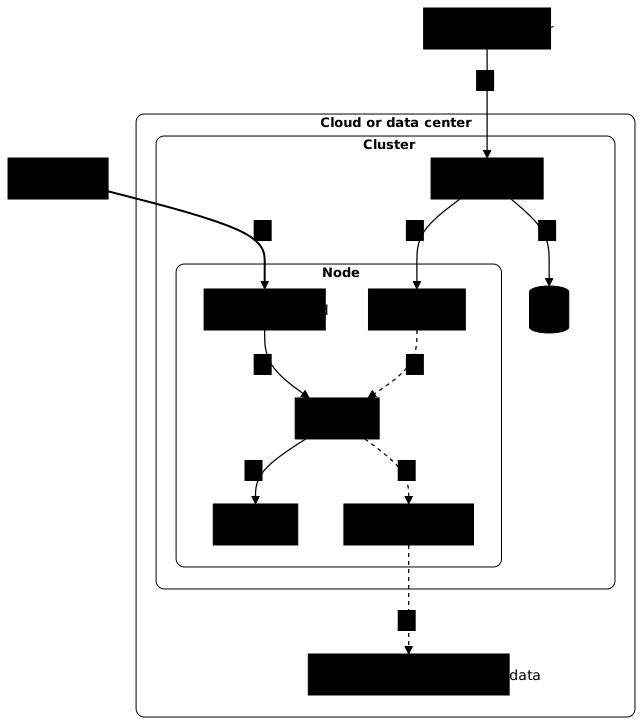
The frames of this diagram (cloud, cluster, node) show where the components are located, they do not delimit trust zones. It is the numbers that mark the boundaries: two lines carry the same number when they cross the same boundary, like ⑤ between the node and the container, whether the kubelet starts Pod A there or Pod A reaches the node's system.
The table recalls, for each boundary, what guards it. The controls are those of the course: they are not repeated here.
| Boundary | What crosses it | Control that guards it |
|---|---|---|
| ① Internet to exposed service | Requests from unidentified clients | Ingress with TLS, NetworkPolicy |
| ② User to API server | kubectl commands | Authentication, RBAC, audit |
| ③ API server to etcd and kubelet | The cluster state, the Pods to start | Certificates (PKI), limited access to etcd |
| ④ Pod to Pod | Network calls between applications | NetworkPolicy, mTLS |
| ⑤ Container to node | System calls, volumes, privileges | securityContext, Pod Security Standards |
| ⑥ Node to cloud | Provider credentials and metadata | Minimal IAM, blocking metadata (see the previous lesson) |
Boundary ⑤ is the one a container escape aims at: an attacker who gets out of the container arrives on the node, therefore in the zone that all the Pods it hosts depend on.
How do you follow a data flow across the boundaries?
To follow a flow, start from the sender and name each component the data goes through until its destination. At each change of zone, note the boundary. Three flows from the life of the cluster show the approach.
The first is a kubectl apply command. It leaves your workstation, crosses boundary ② to reach the API server, then the API server writes the object into etcd (boundary ③). The kubelet of the node concerned queries the API server to fetch the Pods meant for it (boundary ③ again), and the container starts on the node (boundary ⑤).
The second is reading a Secret with kubectl get secret. The request crosses ②, the API server reads the Secret in etcd (③) and returns it. A Secret mounted in a Pod takes a similar path: the kubelet fetches it from the API server (③) then makes it available to the container on the node (⑤).
At each crossing the same question arises: who can read here? RBAC answers for ②, encryption at rest for etcd's disk, as described in Protecting a Kubernetes cluster's Secrets (in French).
The third is a Pod calling another Pod. It crosses boundary ④ as soon as the two Pods are in different namespaces or do not have the same exposure. Without a NetworkPolicy, nothing filters this flow, and without mutual TLS (mTLS) nothing authenticates the caller.
How do you draw the data flow diagram of an application?
A data flow diagram (DFD) shows the actors, the components, the flows between them and the trust boundaries. A DFD is made of four elements: actors (a client), components (a Pod, a database), flows (an arrow with its protocol) and boundaries (a frame around a zone).
For a shop application, the diagram comes down to four flows. Look at the frames: each arrow that leaves a frame or enters another one crosses a boundary.
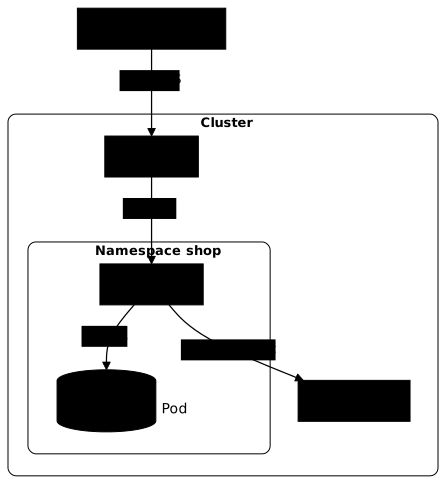
The client is outside the cluster: F1 crosses boundary ①. The Ingress is outside the application's namespace: F2 goes from one namespace to another, which is boundary ④. F3 stays inside the namespace, therefore in a more homogeneous zone. F4 goes to the API server: it is an API client, here a Pod instead of a user, as for boundary ②.
How do you build the DFD of your own application?
Four steps are enough, always in this order.
- List the actors and the components: who sends a request, who receives it, who stores the data.
- Draw one frame per trust zone: the Internet, the cluster, each namespace.
- Draw one arrow per exchange, with its protocol. In this lesson, the arrow starts from the party that opens the connection, even if data flows in both directions: it is the initiator that a NetworkPolicy filters, so the arrow immediately tells you which rule to write.
- Mark the arrows that leave a frame: these are the ones you will analyze with STRIDE.
Apply these steps to a variant of the shop. The web Pod no longer talks to the database: it drops each order into a message queue, a broker Pod in the messaging namespace, shared with other teams. A billing Pod in the shop namespace reads this queue, then writes into the database. The actors and components are the client, the Ingress, the web Pod, the queue, the billing Pod and the database. The frames are the Internet, the cluster, the shop namespace (web, billing and database) and the messaging namespace (the queue).
The table numbers the flows V1 to V5 (V for variant) so they are not confused with those of the previous diagram. It says which ones leave a frame.
| Flow | From to, protocol | Boundary crossed |
|---|---|---|
| V1 | Client to Ingress, HTTPS | Yes, ①: from the Internet to the cluster |
| V2 | Ingress to web Pod, HTTP | Yes, ④: to the shop namespace |
| V3 | Web Pod to the queue, AMQP (a common messaging protocol) | Yes, ④: from shop to messaging |
| V4 | Billing Pod to the queue, AMQP | Yes, ④: from shop to messaging |
| V5 | Billing Pod to the database, SQL | No: same namespace |
Arrow V4 starts from the billing Pod, because it is the one that connects to the queue to read from it. Only V5 stays inside a frame. The queue is a shared component: it adds two ④ boundaries to guard, V3 and V4. Without a NetworkPolicy, nothing limits who can reach the queue, and without authentication on the queue itself, another Pod of the cluster can drop fake orders into it. STRIDE exists precisely to ask these questions, flow by flow.
To go deeper into the method, the guide Threat modeling with STRIDE gives a minimal DFD template and shows how to turn it into a working session.
How do you apply STRIDE to a flow that crosses a boundary?
STRIDE is a threat modeling method that asks six questions of each flow or component. Its name is the acronym of Spoofing, Tampering, Repudiation, Information disclosure, Denial of service and Elevation of privilege. Apply it to the most exposed flow of the shop's DFD, the one that crosses the outermost boundary: F1, from the client to the Ingress.
The table asks one question per category and names the Kubernetes or neighboring control that answers it. Read it line by line: a threat with no control in the last column is a threat to handle.
| Category | Question asked of flow F1 | Control that answers |
|---|---|---|
| Spoofing | Can someone pass themselves off as the server or as a client? | A valid TLS certificate on the Ingress, managed by cert-manager, and the application's authentication |
| Tampering | Can the request be modified along the way? | TLS encryption also protects the integrity of the flow |
| Repudiation | Will we be able to prove who did what? | The Ingress controller's access logs, kept outside the Pod |
| Information disclosure | Can data leak to a third party? | TLS, and Ingress rules limited to public paths |
| Denial of service | Can the flow saturate the Pod? | requests and limits and scaling of the exposed Pods |
| Elevation of privilege | Can a compromised Pod gain more rights? | securityContext and a NetworkPolicy that limits what the Ingress reaches |
A given flow does not always produce six real threats. STRIDE gives the questions, not the answers: for each cell, the decision is to accept the risk, reduce it or transfer it.
The answers change with the flow. On flow F4, the application calling the API server, the same questions give other answers: spoofing targets the service account token, elevation of privilege targets an overly broad Role, and repudiation belongs to the audit log.
How do you go from the analysis result to the control to put in place?
A STRIDE analysis produces a list of threats. For each one, three steps lead to a control. First, attach it to a boundary of the previous table, which already says which control of the course guards it. Then, check whether this control is in place on your cluster. Finally, if it is missing, write a testable requirement (for example "every request to the web Pod goes through TLS") rather than a vague wish.
To choose where to start, take first the flows that cross a boundary with the outside of the cluster: they are the most exposed. The generic guide details prioritization by likelihood and impact, as well as writing requirements, in Threat modeling with STRIDE.
STRIDE or MITRE ATT&CK: which one to use, and when?
STRIDE and MITRE ATT&CK answer two different questions, at two different moments. STRIDE starts from design: for each component and each flow, which threats can weigh here? You use it before or during the construction of a system, to decide which controls to put in place. MITRE ATT&CK starts from observed behaviors of adversaries, arranged by tactics (initial access, persistence, credential access, and so on): you use it to check that you detect these behaviors or to build an attack scenario. The page MITRE ATT&CK (in French) details the matrix.
The two complement each other: STRIDE says where to look in a design, ATT&CK says how an attacker proceeds in practice. The guide Threat, risk, vulnerability, attack places STRIDE, ATT&CK and other methods such as PASTA relative to one another.
Key takeaways
- A trust boundary separates two different trust zones; it is where you concentrate verification, limitation and traceability.
- A cluster has six main boundaries: Internet to exposed service, user to API server, API server to etcd and kubelet, Pod to Pod, container to node, node to cloud.
- To follow a flow, start from the sender, name each component crossed and note each change of zone.
- A data flow diagram comes down to actors, components, flows and boundaries; you draw one frame per trust zone and mark the flows that leave one.
- STRIDE asks six questions of each flow that crosses a boundary; each threat found attaches to a control of the course.
- STRIDE serves design and ATT&CK describes an adversary's behaviors: you use one to decide on controls, the other to check detection.
Test your knowledge
Nine reasoning questions about boundaries, flows and STRIDE.
Knowledge check
Check what you have learned with this interactive quiz
How it works
- The timer starts when you click Start
- Multiple choice, true/false and short answer questions
- You can move between questions
- Detailed results are shown at the end
Starts the quiz and the timer
Review
(0/0)Score by domain
A domain groups several guides and gets several questions, so its score is more reliable than a per-topic score, which often rests on a single question.
Summary
Strengths
No topic passed at 80% on at least two questions yet.
Weak areas
No topic below the pass mark.
Recommended next
Hints before you try again?
Continue the course: Attack scenarios in a Kubernetes cluster
A new full quiz with random questions
Work again only on the questions you missed