An application takes 40 seconds to start, a badly tuned probe declares it dead after 10 seconds, and Kubernetes restarts it in a loop even though it never crashes. Probes are checks that the kubelet, the Kubernetes agent on each node, runs against a container: the startup probe protects the startup, the liveness probe restarts a stuck container, the readiness probe decides whether the Pod receives traffic. In this lesson, you reproduce a liveness probe that is too short, you read its events, then you fix it with the three probes until the Pod is ready without any restart.
You need to know Deployments and Services (the Service of the demonstration is provided without explanation), and have the demo cluster created in First cluster.
What you will learn
- Tell startup, liveness and readiness apart by what they trigger
- Read the
UnhealthyandKillingevents of a failing probe - Fix a liveness probe that is too short with a startup probe and compute
failureThreshold × periodSeconds - Read whether a Pod is ready in the
Readycondition and in the EndpointSlice - Tell
connection refusedfrom an HTTP code in a probe message - Choose between HTTP, TCP, command and gRPC, and tune the parameters
What are Kubernetes probes?
A probe answers a question that Kubernetes cannot guess: the container is running, but is it doing its job? A running process is not necessarily ready: it may be initializing, stuck, or cut off from its database. The three probes answer three different questions.
The three types of probes
Each probe triggers its own action: it is this action, more than the check itself, that tells them apart.
| Probe | Question | If it fails |
|---|---|---|
startupProbe | Has the application finished starting? | The container is restarted |
livenessProbe | Is the container still alive, not stuck? | The container is restarted |
readinessProbe | Can the Pod receive traffic? | The Pod stays alive but no longer receives traffic |
The order is as follows: as long as the startup probe has not succeeded, the other two do not run. Afterwards, liveness and readiness run in parallel for the whole life of the container.
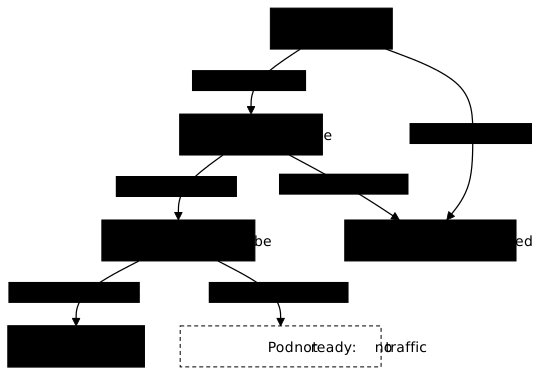
Look at the three exit arrows on failure: startup and liveness lead to a restart, readiness only leads to the removal from traffic. The Pod removed from traffic is not deleted: you can read this in the EndpointSlice, the object that lists the addresses of the Pods of a Service and says for each one whether it is ready.
Reproduce a liveness probe that is too short
The demonstration uses a simulated slow application: the nginx image whose command prints "initialisation en cours" ("initialization in progress"), waits 40 seconds, then starts nginx. During these 40 seconds, port 80 refuses connections. The lent Deployment ("slow") carries a liveness probe that checks / every 5 seconds and gives up after 2 failures, about 10 seconds of tolerance: that is too short.
You work in a dedicated namespace, deleted at the end:
kubectl config use-context kind-demo && kubectl create namespace sondesSwitched to context "kind-demo".namespace/sondes createdThe names and messages of this lesson are in French on purpose, so that the outputs stay those of the tested cluster: sondes means "probes", lent "slow", sans-route "no route", refus "refusal", sante-absente "health absent", "initialisation en cours" "initialization in progress", "prêt" "ready", and the RAISON column "REASON". The -corrige suffix of a file means "fixed".
Write and apply the manifest. The command waits 50 seconds before displaying the Pod:
mkdir -p ~/atelier-k8s/sondes && cd ~/atelier-k8s/sondescat > lent.yaml <<'EOF'apiVersion: apps/v1kind: Deploymentmetadata: name: lentspec: replicas: 1 selector: matchLabels: app: lent template: metadata: labels: app: lent spec: containers: - name: app image: nginx:1.30.5@sha256:9bf97bd7714f5e24c1ccd545ecb9eb5435cb6d109c97cebb15e7e455e0239edb command: - /bin/sh - -c - | echo "initialisation en cours" sleep 40 echo "prêt" exec nginx -g 'daemon off;' ports: - containerPort: 80 livenessProbe: # ❌ trop courte : l'application met 40 s à démarrer httpGet: path: / port: 80 periodSeconds: 5 failureThreshold: 2---apiVersion: v1kind: Servicemetadata: name: lentspec: selector: app: lent ports: - port: 80 targetPort: 80EOFkubectl apply -f lent.yaml -n sondes && sleep 50 && kubectl get pods -n sondes -l app=lentdeployment.apps/lent createdservice/lent createdNAME READY STATUS RESTARTS AGElent-85bdd4d975-9jtvj 1/1 Running 1 (9s ago) 50sRESTARTS 1: the container has already restarted once in 50 seconds. Another detail: READY 1/1, even though nginx is not listening yet. Without a readinessProbe, a Pod is considered ready as soon as its container is running: this is the trap that the readiness probe fixes further on. Now look for why the container restarted, in the probe events:
kubectl get events -n sondes --field-selector reason=Unhealthy -o custom-columns=RAISON:.reason,MESSAGE:.messageRAISON MESSAGEUnhealthy Liveness probe failed: Get "http://10.244.0.32:80/": dial tcp 10.244.0.32:80: connect: connection refusedThe message names the probe (Liveness probe failed), the address queried and the cause: connection refused. The kubelet queries the IP address of the Pod from the node, and nothing is listening on port 80 yet. This is not an HTTP code: the application did not answer badly, it did not answer at all. The next event says what Kubernetes did about it:
kubectl get events -n sondes --field-selector reason=Killing -o custom-columns=RAISON:.reason,MESSAGE:.messageRAISON MESSAGEKilling Container app failed liveness probe, will be restartedIt is indeed the probe that killed the container, not a crash. One last proof is in the logs of the previous instance:
kubectl logs deployment/lent -n sondes --previousinitialisation en coursThe container never wrote "prêt": it was killed in the middle of its initialization. The application is not broken, it is slow, and the liveness probe takes it for dead.
Fix it with startup, liveness and readiness
The fix has three parts. The startupProbe gives the application 150 seconds to start: the tolerance is computed by multiplying failureThreshold (the number of failures accepted) by periodSeconds (the delay between two attempts), here 30 × 5 s. The livenessProbe only takes over once the startup probe has succeeded, with a normal tolerance. The readinessProbe keeps the Pod out of traffic as long as the application does not answer.
The lent-corrige.yaml file takes the lent Deployment and its Service again, with these three probes in place of the liveness probe alone:
cat > lent-corrige.yaml <<'EOF'apiVersion: apps/v1kind: Deploymentmetadata: name: lentspec: replicas: 1 selector: matchLabels: app: lent template: metadata: labels: app: lent spec: containers: - name: app image: nginx:1.30.5@sha256:9bf97bd7714f5e24c1ccd545ecb9eb5435cb6d109c97cebb15e7e455e0239edb command: - /bin/sh - -c - | echo "initialisation en cours" sleep 40 echo "prêt" exec nginx -g 'daemon off;' ports: - containerPort: 80 startupProbe: httpGet: path: / port: 80 periodSeconds: 5 failureThreshold: 30 livenessProbe: httpGet: path: / port: 80 periodSeconds: 10 failureThreshold: 3 readinessProbe: httpGet: path: / port: 80 periodSeconds: 5 failureThreshold: 3---apiVersion: v1kind: Servicemetadata: name: lentspec: selector: app: lent ports: - port: 80 targetPort: 80EOFkubectl apply -f lent-corrige.yaml -n sondes && sleep 15 && kubectl get pods -n sondes -l app=lent && kubectl get endpointslice -n sondes -l kubernetes.io/service-name=lent -o jsonpath='{.items[0].endpoints[*].conditions}{"\n"}'deployment.apps/lent configuredservice/lent unchangedNAME READY STATUS RESTARTS AGElent-558f887648-tpjw4 0/1 Running 0 15slent-85bdd4d975-9jtvj 1/1 Running 1 (25s ago) 66s{"ready":true,"serving":true,"terminating":false} {"ready":false,"serving":false,"terminating":false}The Deployment replaces the Pod progressively, so two Pods coexist. The new one is Running but 0/1: the container is running, the readiness probe has not succeeded yet. The old one is still listed, 1/1.
The EndpointSlice contains both addresses: the old Pod with ready: true, the new one with ready: false. A Pod that is not ready therefore stays listed in the EndpointSlice, with ready: false: this flag is enough to remove its traffic. Wait for the end of the rollout:
kubectl rollout status deployment/lent -n sondes --timeout=120s && kubectl get pods -n sondes -l app=lentWaiting for deployment "lent" rollout to finish: 1 old replicas are pending termination...Waiting for deployment "lent" rollout to finish: 1 old replicas are pending termination...deployment "lent" successfully rolled outNAME READY STATUS RESTARTS AGElent-558f887648-tpjw4 1/1 Running 0 45slent-85bdd4d975-9jtvj 1/1 Terminating 2 (15s ago) 96sThe new Pod is 1/1 Running with 0 restarts: the startup probe waited for the end of the 40 seconds and the liveness probe killed nothing. The old one is Terminating. Read the EndpointSlice again:
kubectl get endpointslice -n sondes -l kubernetes.io/service-name=lent -o jsonpath='{.items[0].endpoints[*].conditions}{"\n"}'{"ready":false,"serving":true,"terminating":true} {"ready":true,"serving":true,"terminating":false}Two entries: the old Pod at the end of its life (terminating: true) and the new one with ready: true, which receives the traffic. Wait for the old Pod to disappear to be left with a single entry. The Ready condition of the Pod, the one the Service reads, can be read directly:
kubectl get pod -n sondes -l app=lent -o jsonpath='{.items[0].status.conditions[?(@.type=="Ready")].status}{"\n"}'TrueA readiness probe that fails without restarting anything
The readiness probe never restarts a container: it only removes the Pod from traffic. The sans-route Pod queries a path that does not exist:
cat > sans-route.yaml <<'EOF'apiVersion: v1kind: Podmetadata: name: sans-routespec: containers: - name: nginx image: nginx:1.30.5@sha256:9bf97bd7714f5e24c1ccd545ecb9eb5435cb6d109c97cebb15e7e455e0239edb ports: - containerPort: 80 readinessProbe: httpGet: path: /sante-absente port: 80 periodSeconds: 5EOFkubectl apply -f sans-route.yaml -n sondes && sleep 20 && kubectl get pod sans-route -n sondes && kubectl get events -n sondes --field-selector involvedObject.name=sans-route,reason=Unhealthy -o custom-columns=MESSAGE:.messagepod/sans-route createdNAME READY STATUS RESTARTS AGEsans-route 0/1 Running 0 20sMESSAGEReadiness probe failed: Get "http://10.244.0.35:80/sante-absente": dial tcp 10.244.0.35:80: connect: connection refusedReadiness probe failed: HTTP probe failed with statuscode: 404The Pod stays 0/1 with 0 restarts: a failing readiness probe kills nothing. The two messages read differently. The first, connection refused, dates from before nginx was listening: nothing was answering. The second, statuscode: 404, is an HTTP code: the application answers, but the path does not exist. With connection refused, look at the startup; with an HTTP code, look at the path and at the application code.
One setting remains forbidden: successThreshold, the number of consecutive successes that make the probe succeed, must be 1 for a liveness or startup probe. The liveness-refusee.yaml file describes an nginx Pod named refus, whose livenessProbe declares successThreshold: 2. Write it, then ask the server to validate it without creating anything, thanks to --dry-run=server:
cat > liveness-refusee.yaml <<'EOF'apiVersion: v1kind: Podmetadata: name: refusspec: containers: - name: nginx image: nginx:1.30.5@sha256:9bf97bd7714f5e24c1ccd545ecb9eb5435cb6d109c97cebb15e7e455e0239edb livenessProbe: # ❌ successThreshold vaut forcément 1 pour une liveness httpGet: path: / port: 80 successThreshold: 2EOFkubectl apply -f liveness-refusee.yaml -n sondes --dry-run=serverThe Pod "refus" is invalid: spec.containers[0].livenessProbe.successThreshold: Invalid value: 2: must be 1The server refuses the value 2 on the liveness probe: this is a counter-example. Only the readiness probe accepts several consecutive successes. The comments of the manifests in French mean "too short: the application takes 40 s to start" and "successThreshold is necessarily 1 for a liveness probe".
Check methods
A probe chooses a method, and each method has its own success criterion:
httpGetcalls an HTTP path: a code from 200 to 399 is a success;tcpSocketopens a connection on a port: the opening is enough;execruns a command in the container: exit code 0 is a success;grpcqueries the standard gRPC health service of the application.
Except for exec, the kubelet sends the request from the node, to the IP address of the Pod: it does not run curl in the container. The table compares the four methods.
| Method | Suits | Limit |
|---|---|---|
httpGet | A web application with a health path | Only checks what the path tests |
tcpSocket | A service without HTTP (database, cache) | An open port does not prove that the service is ready |
exec | Testing a file or an internal command | Each probe starts a process in the container |
grpc | An application that exposes the gRPC health protocol | Requires the application to implement it |
Configuration parameters
Five parameters set the pace of a probe:
initialDelaySeconds(default 0): the wait before the first attempt;periodSeconds(default 10): the delay between two attempts;timeoutSeconds(default 1): the time allowed for an answer before counting a failure;successThreshold(default 1): the number of consecutive successes that make the probe succeed;failureThreshold(default 3): the number of consecutive failures that make it fail.
The tolerance before a restart is failureThreshold multiplied by periodSeconds: with the default values, 30 seconds. This computation was missing from the liveness probe of the demonstration: 2 × 5 = 10 seconds for an application that needs 40.
When should you avoid a liveness probe?
A liveness probe restarts: it must only check what a restart repairs, that is a stuck container. It must not test an external dependency such as the database: if the database goes down, restarting the application does not bring it back, and all the Pods restart at the same time. This dependency check belongs to the readiness probe, which removes from traffic without restarting.
The mistakes that cause outages
Three settings are enough to cause an outage. A liveness probe whose tolerance is shorter than the startup restarts the container in a loop, as in the demonstration. A liveness probe that tests an external dependency causes cascading restarts. A startup probe whose failureThreshold is too low restarts the container before the end of the startup. For an application that always starts quickly, the startup probe is useless: a liveness and a readiness probe are enough.
Clean up the cluster
Deleting the namespace removes the Deployments, the Service and the Pods of the lesson:
kubectl delete namespace sondesnamespace "sondes" deletedPut it into practice
In the lab, you set the three probes on a web server Pod: a startup probe that tolerates a slow startup of about one minute, then a liveness probe and a readiness probe that both query port 80 over HTTP. Compute the tolerance of the startup probe with the formula of the lesson. The validation reads the Pod: requested port and image, setting of each of the three probes, then Pod Ready with zero restarts.
Key takeaways
- The startup probe protects the startup, the liveness probe restarts a stuck container, the readiness probe decides about traffic.
- As long as the startup probe has not succeeded, liveness and readiness do not run.
- The tolerance of a probe is
failureThreshold × periodSeconds: a liveness probe shorter than the startup causes restart loops. - Without a
readinessProbe, a Pod is ready as soon as its container runs, even if the application is not listening yet. - A Pod that is not ready stays listed in the EndpointSlice with
ready: false: the flag removes its traffic. - The
UnhealthyandKillingevents name the faulty probe;connection refusedsays that nothing is listening, an HTTP code says that the application answers badly. - The kubelet probes the IP address of the Pod from the node: it does not run
curlin the container, except for anexecprobe. successThresholdis 1 for a liveness or startup probe: the server refuses 2.
Test your knowledge
This quiz covers the action that distinguishes each probe, the reading of events and the EndpointSlice. Allow five minutes and aim for 80%; below that, reread "Reproduce a liveness probe that is too short".
Knowledge check
Check what you have learned with this interactive quiz
How it works
- The timer starts when you click Start
- Multiple choice, true/false and short answer questions
- You can move between questions
- Detailed results are shown at the end
Starts the quiz and the timer
Review
(0/0)Score by domain
A domain groups several guides and gets several questions, so its score is more reliable than a per-topic score, which often rests on a single question.
Summary
Strengths
No topic passed at 80% on at least two questions yet.
Weak areas
No topic below the pass mark.
Recommended next
Hints before you try again?
Continue the course: Kubernetes requests and limits: avoid the pitfalls
A new full quiz with random questions
Work again only on the questions you missed