A StorageClass lets Kubernetes create a volume at the moment an application asks for one. Without it, an administrator prepares every PersistentVolume by hand before a claim (a PersistentVolumeClaim, or PVC) can bind. In this lesson, you read the classes of a cluster, you create some, you get a volume by submitting a claim, you mount it in a Pod, then you diagnose the claims that stay in Pending. You finish with a challenge graded on the state of the cluster.
What you will learn
- Read the parameters of a StorageClass (
provisioner,reclaimPolicy,volumeBindingMode) and recognize the default class - Create a StorageClass that names an existing provisioner, knowing which fields can no longer be changed
- Get a volume created for a claim, mount it in a Deployment and write a marker file in it
- Explain why a local volume keeps the Pod on its node
- Avoid the pitfalls of the default class: two classes marked as default, a claim without a class
- Diagnose a
Pendingclaim withdescribeand the events - Pass the module challenge without guidance: keep data beyond the life of a Pod
Prerequisites
You have read Kubernetes storage: PV, PVC, StorageClass and permissions: you know what a claim, a volume, a reclaim policy and an access mode are. You have the four-node demo-multi cluster created in the previous lesson, or an equivalent cluster with kind 0.33 or later. The commands were run with kind 0.33.0, kubectl 1.37.0 and nodes in v1.37.0.
Why use a StorageClass?
With static provisioning, every storage need requires a hand-written PersistentVolume that exists before the claim. A StorageClass reverses the order: the claim names a class, and the class's provisioner creates the volume. The provisioner is a cluster component that knows how to make storage, for example by creating a directory on a node or a disk at a cloud provider.
In kind, the provisioner is called rancher.io/local-path. It runs as a Deployment in the local-path-storage namespace:
kubectl -n local-path-storage get deploy -o wideNAME READY UP-TO-DATE AVAILABLE AGE CONTAINERS IMAGES SELECTORlocal-path-provisioner 1/1 1 1 26s local-path-provisioner docker.io/kindest/local-path-provisioner:v20260820-69b56db7 app=local-path-provisionerThe image is built by kind 0.33.0, and its volumes are hostPath directories under /var/local-path-provisioner on the node. On a production cluster, you install the provisioner of your own storage; Longhorn (in French) is one example. This lesson uses the one from kind, already installed, and creates new classes that name it.
Create the lesson's namespace:
kubectl create namespace stockage-classesnamespace/stockage-classes createdThe names and messages of this lesson are in French on purpose, so that the outputs stay those of the tested cluster: stockage-classes means "storage classes", demo-conserver "demo-keep", donnees "data", donnees-immediates "immediate-data", ecrivain "writer", temoin "marker", sans-classe "no-class", demo-defaut2 "demo-default2", demo-sans-provisionneur "demo-no-provisioner", classe-inexistante "missing-class" and demo-fantome "demo-ghost". The word retire, printed by the cleanup command, means "removed". The provisioner name exemple.formation.k8s/absent means "example.training.k8s/absent".
Read a cluster's classes
Start by looking at what the cluster offers:
kubectl get storageclassNAME PROVISIONER RECLAIMPOLICY VOLUMEBINDINGMODE ALLOWVOLUMEEXPANSION AGEstandard (default) rancher.io/local-path Delete WaitForFirstConsumer false 9m14sLook at four columns. PROVISIONER names the component that creates the volumes. RECLAIMPOLICY says what becomes of the volumes when their claim disappears. VOLUMEBINDINGMODE says when the volume is created. The (default) mention marks the class that a claim naming no class receives. Now see the complete object:
kubectl get storageclass standard -o yamlapiVersion: storage.k8s.io/v1kind: StorageClassmetadata: annotations: kubectl.kubernetes.io/last-applied-configuration: | {"apiVersion":"storage.k8s.io/v1","kind":"StorageClass","metadata":{"annotations":{"storageclass.kubernetes.io/is-default-class":"true"},"name":"standard"},"provisioner":"rancher.io/local-path","reclaimPolicy":"Delete","volumeBindingMode":"WaitForFirstConsumer"} storageclass.kubernetes.io/is-default-class: "true" creationTimestamp: "2026-11-11T22:33:33Z" name: standard resourceVersion: "296" uid: a047bf82-0836-4964-a35f-325167122684provisioner: rancher.io/local-pathreclaimPolicy: DeletevolumeBindingMode: WaitForFirstConsumerThe default class is recognized by the storageclass.kubernetes.io/is-default-class: "true" annotation. A StorageClass has no spec: its fields are at the top level. The allowVolumeExpansion, parameters, mountOptions and allowedTopologies fields are absent from this class.
Understand the parameters of a StorageClass
To learn a class's fields and their possible values, kubectl explain gives them from the cluster's API:
kubectl explain storageclass.reclaimPolicyGROUP: storage.k8s.ioKIND: StorageClassVERSION: v1
FIELD: reclaimPolicy <string>ENUM: Delete Recycle Retain
DESCRIPTION: reclaimPolicy controls the reclaimPolicy for dynamically provisioned PersistentVolumes of this storage class. Defaults to Delete.
Possible enum values: - `"Delete"` means the volume will be deleted from Kubernetes on release from its claim. The volume plugin must support Deletion. - `"Recycle"` means the volume will be recycled back into the pool of unbound persistent volumes on release from its claim. The volume plugin must support Recycling. - `"Retain"` means the volume will be left in its current phase (Released) for manual reclamation by the administrator. The default policy is Retain.Read the sentence Defaults to Delete: for a class, the default value is Delete. The sentence The default policy is Retain that follows describes the Retain value, the one of a volume created by hand. The other useful fields of a class are the following.
| Field | Role |
|---|---|
provisioner | the component that creates the volumes, the only required field |
parameters | the settings specific to the provisioner |
reclaimPolicy | Delete (default) or Retain, copied into each volume created |
volumeBindingMode | Immediate (default when the field is absent) or WaitForFirstConsumer |
allowVolumeExpansion | allows or forbids growing a volume |
mountOptions | mount options, not validated by the API: it is the volume mount that fails if an option is invalid |
allowedTopologies | restricts the node topologies (for example the zones) where a volume can be created |
This table comes from kubectl explain storageclass. For the other fields, the same command gives the reference of the cluster you use. Its output also lists the Recycle value for reclaimPolicy: it is deprecated, do not use it.
Create a StorageClass
Create two classes that name the kind provisioner. demo-conserver keeps the data (Retain) and waits for a Pod to create the volume. demo-immediate asks for immediate binding: it is used to observe what the kind provisioner does with it.
mkdir -p ~/atelier-k8s/stockage && cd ~/atelier-k8s/stockagecat > sc-conserver.yaml <<'EOF'apiVersion: storage.k8s.io/v1kind: StorageClassmetadata: name: demo-conserverprovisioner: rancher.io/local-pathreclaimPolicy: RetainvolumeBindingMode: WaitForFirstConsumerEOFcat > sc-immediate.yaml <<'EOF'apiVersion: storage.k8s.io/v1kind: StorageClassmetadata: name: demo-immediateprovisioner: rancher.io/local-pathreclaimPolicy: DeletevolumeBindingMode: ImmediateEOFkubectl apply -f sc-conserver.yaml -f sc-immediate.yamlkubectl get storageclassstorageclass.storage.k8s.io/demo-conserver createdstorageclass.storage.k8s.io/demo-immediate createdNAME PROVISIONER RECLAIMPOLICY VOLUMEBINDINGMODE ALLOWVOLUMEEXPANSION AGEdemo-conserver rancher.io/local-path Retain WaitForFirstConsumer false 0sdemo-immediate rancher.io/local-path Delete Immediate false 0sstandard (default) rancher.io/local-path Delete WaitForFirstConsumer false 9m14sThe three classes are there, and only standard carries (default). A class is created with a simple kubectl apply, without installing anything, since its provisioner already exists.
Four StorageClass fields are immutable
The provisioner, parameters, reclaimPolicy and volumeBindingMode fields can no longer be modified after the class is created. The allowVolumeExpansion, mountOptions and allowedTopologies fields remain modifiable. Try to change parameters, reclaimPolicy and volumeBindingMode:
kubectl patch storageclass demo-conserver --type merge -p '{"parameters":{"x":"y"}}'kubectl patch storageclass demo-conserver --type merge -p '{"reclaimPolicy":"Delete"}'kubectl patch storageclass demo-conserver --type merge -p '{"volumeBindingMode":"Immediate"}'kubectl get storageclass demo-conserverThe StorageClass "demo-conserver" is invalid: parameters: Invalid value: null: field is immutableThe StorageClass "demo-conserver" is invalid: reclaimPolicy: Invalid value: null: field is immutableThe StorageClass "demo-conserver" is invalid: volumeBindingMode: Invalid value: null: field is immutableNAME PROVISIONER RECLAIMPOLICY VOLUMEBINDINGMODE ALLOWVOLUMEEXPANSION AGEdemo-conserver rancher.io/local-path Retain WaitForFirstConsumer false 0sAll three changes are refused with field is immutable, and the class stays unchanged. To change one of the four fields, you create a new class. Volumes that already exist are fixed one by one, as the previous lesson shows with kubectl patch pv.
Get a volume with a claim
Submit one claim per class. Each names its class with storageClassName, and no PersistentVolume has been written.
cat > pvc-conserver.yaml <<'EOF'apiVersion: v1kind: PersistentVolumeClaimmetadata: name: donnees namespace: stockage-classesspec: accessModes: - ReadWriteOnce storageClassName: demo-conserver resources: requests: storage: 1GiEOFcat > pvc-immediate.yaml <<'EOF'apiVersion: v1kind: PersistentVolumeClaimmetadata: name: donnees-immediates namespace: stockage-classesspec: accessModes: - ReadWriteOnce storageClassName: demo-immediate resources: requests: storage: 1GiEOFkubectl apply -f pvc-conserver.yaml -f pvc-immediate.yaml && sleep 5 && kubectl -n stockage-classes get pvc && kubectl get pvpersistentvolumeclaim/donnees createdpersistentvolumeclaim/donnees-immediates createdNAME STATUS VOLUME CAPACITY ACCESS MODES STORAGECLASS VOLUMEATTRIBUTESCLASS AGEdonnees Pending demo-conserver <unset> 5sdonnees-immediates Pending demo-immediate <unset> 5sNo resources foundBoth claims are Pending, and kubectl get pv finds no volume. For donnees, this is the expected behavior of WaitForFirstConsumer:
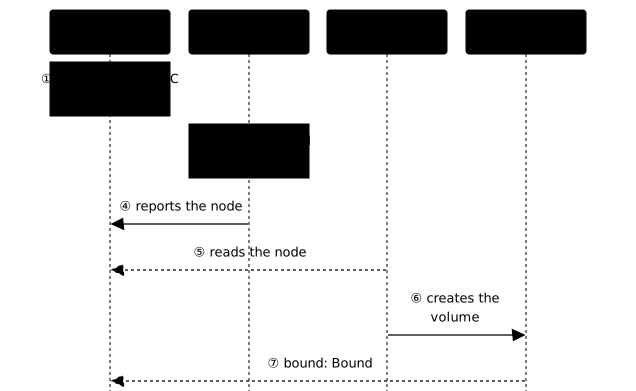
kubectl -n stockage-classes describe pvc donneesName: donneesNamespace: stockage-classesStorageClass: demo-conserverStatus: PendingVolume:Labels: <none>Annotations: <none>Finalizers: [kubernetes.io/pvc-protection]Capacity:Access Modes:VolumeMode: FilesystemUsed By: <none>Events: Type Reason Age From Message ---- ------ ---- ---- ------- Normal WaitForFirstConsumer 5s persistentvolume-controller waiting for first consumer to be created before bindingThe event is of type Normal: the controller waits for the first Pod that mounts the claim, to create the volume on the node where that Pod will be placed. There is nothing to repair.
The following diagram shows the order of the exchanges with WaitForFirstConsumer. Notice at step ① that the claim stays Pending with no volume, then that the provisioner only acts after the scheduler has chosen the node (steps ③ to ⑥):
Now look at donnees-immediates:
kubectl -n stockage-classes describe pvc donnees-immediatesName: donnees-immediatesNamespace: stockage-classesStorageClass: demo-immediateStatus: PendingVolume:Labels: <none>Annotations: volume.beta.kubernetes.io/storage-provisioner: rancher.io/local-path volume.kubernetes.io/storage-provisioner: rancher.io/local-pathFinalizers: [kubernetes.io/pvc-protection]Capacity:Access Modes:VolumeMode: FilesystemUsed By: <none>Events: Type Reason Age From Message ---- ------ ---- ---- ------- Normal ExternalProvisioning 5s persistentvolume-controller Waiting for a volume to be created either by the external provisioner 'rancher.io/local-path' or manually by the system administrator. If volume creation is delayed, please verify that the provisioner is running and correctly registered. Normal Provisioning 5s rancher.io/local-path_local-path-provisioner-75f7fc7dc5-m28gf_727c5252-760f-4fc1-a658-e1298ff637ba External provisioner is provisioning volume for claim "stockage-classes/donnees-immediates" Warning ProvisioningFailed 5s rancher.io/local-path_local-path-provisioner-75f7fc7dc5-m28gf_727c5252-760f-4fc1-a658-e1298ff637ba failed to provision volume with StorageClass "demo-immediate": configuration error, no node was specifiedThis time, the error comes from the provisioner itself (From column): configuration error, no node was specified. The kind provisioner creates a directory on a node, and without a Pod, nobody has chosen that node. With this provisioner, only the WaitForFirstConsumer mode works. This is not a general rule: the behavior of Immediate depends on the provisioner, and you must read its documentation before choosing it.
Mount the claim in a Deployment
A single-replica Deployment mounts donnees. The Deployment also serves as a template for the challenge.
cat > deploy-donnees.yaml <<'EOF'apiVersion: apps/v1kind: Deploymentmetadata: name: ecrivain namespace: stockage-classesspec: replicas: 1 selector: matchLabels: app: ecrivain template: metadata: labels: app: ecrivain spec: containers: - name: app image: busybox:1.38.0@sha256:a46257e06c82ad85242d0d38077d0a52d9896389ca60a1a59d3463db586e5fa4 command: ["sleep", "3600"] volumeMounts: - name: donnees mountPath: /data volumes: - name: donnees persistentVolumeClaim: claimName: donneesEOFkubectl apply -f deploy-donnees.yaml && date +%T && kubectl -n stockage-classes rollout status deployment/ecrivain --timeout=90s && date +%Tkubectl -n stockage-classes get pvc donnees && kubectl get pvdeployment.apps/ecrivain created22:42:52Waiting for deployment "ecrivain" rollout to finish: 0 out of 1 new replicas have been updated...Waiting for deployment "ecrivain" rollout to finish: 0 of 1 updated replicas are available...deployment "ecrivain" successfully rolled out22:42:57NAME STATUS VOLUME CAPACITY ACCESS MODES STORAGECLASS VOLUMEATTRIBUTESCLASS AGEdonnees Bound pvc-ba8b08f1-f452-4e94-816b-54c2231a593e 1Gi RWO demo-conserver <unset> 10sNAME CAPACITY ACCESS MODES RECLAIM POLICY STATUS CLAIM STORAGECLASS VOLUMEATTRIBUTESCLASS REASON AGEpvc-ba8b08f1-f452-4e94-816b-54c2231a593e 1Gi RWO Retain Bound stockage-classes/donnees demo-conserver <unset> 1sThe Pod is ready in 5 seconds. Look at the claim's STATUS column: it has become Bound, and a volume appeared for it, with the Retain reclaim policy of its class. Write a marker file, then look at where the Pod runs and where the volume lives:
kubectl -n stockage-classes exec deploy/ecrivain -- sh -c 'echo temoin > /data/temoin.txt && cat /data/temoin.txt'kubectl -n stockage-classes get pod -o widekubectl get pv -o jsonpath='{range .items[?(@.spec.storageClassName=="demo-conserver")]}{.metadata.name}{"\t"}{.spec.nodeAffinity.required.nodeSelectorTerms[0].matchExpressions[0].values[0]}{"\t"}{.spec.hostPath.path}{"\n"}{end}'temoinNAME READY STATUS RESTARTS AGE IP NODE NOMINATED NODE READINESS GATESecrivain-86c7df85b8-r6cpb 1/1 Running 0 5s 10.244.1.16 demo-multi-worker <none> <none>pvc-ba8b08f1-f452-4e94-816b-54c2231a593e demo-multi-worker /var/local-path-provisioner/pvc-ba8b08f1-f452-4e94-816b-54c2231a593e_stockage-classes_donneesThe Pod is on demo-multi-worker, and so is the volume: the provisioner created the directory on the Pod's node, and the PV's affinity names that node. Delete the Pod, let the Deployment recreate it, and read the file again:
kubectl delete pod -n stockage-classes -l app=ecrivain && kubectl -n stockage-classes rollout status deployment/ecrivain --timeout=90s && kubectl -n stockage-classes exec deploy/ecrivain -- cat /data/temoin.txtkubectl -n stockage-classes get pod -o widepod "ecrivain-86c7df85b8-r6cpb" deleted from stockage-classes namespacedeployment "ecrivain" successfully rolled outtemoinNAME READY STATUS RESTARTS AGE IP NODE NOMINATED NODE READINESS GATESecrivain-86c7df85b8-mgr7l 1/1 Running 0 32s 10.244.1.17 demo-multi-worker <none> <none>The new Pod reads temoin back and returns to the same node, imposed by the volume's affinity.
What happens if the volume's node is unavailable?
The volume does not follow the Pod: it stays on its node. Mark that node as unschedulable with kubectl cordon, which forbids placing new Pods on it, then delete the Pod:
NODE=$(kubectl -n stockage-classes get pod -l app=ecrivain -o jsonpath='{.items[0].spec.nodeName}'); echo "$NODE"; kubectl cordon "$NODE" && kubectl delete pod -n stockage-classes -l app=ecrivain && sleep 15 && kubectl -n stockage-classes get pod -o wide && kubectl -n stockage-classes describe pod -l app=ecrivain | tail -15demo-multi-workernode/demo-multi-worker cordonedpod "ecrivain-86c7df85b8-mgr7l" deleted from stockage-classes namespaceNAME READY STATUS RESTARTS AGE IP NODE NOMINATED NODE READINESS GATESecrivain-86c7df85b8-sfntp 0/1 Pending 0 46s <none> <none> <none> <none> ReadOnly: false kube-api-access-9fv5x: Type: Projected (a volume that contains injected data from multiple sources) TokenExpirationSeconds: 3607 ConfigMapName: kube-root-ca.crt Optional: false DownwardAPI: trueQoS Class: BestEffortNode-Selectors: <none>Tolerations: node.kubernetes.io/not-ready:NoExecute op=Exists for 300s node.kubernetes.io/unreachable:NoExecute op=Exists for 300sEvents: Type Reason Age From Message ---- ------ ---- ---- ------- Warning FailedScheduling 46s default-scheduler 0/4 nodes are available: 1 node(s) had untolerated taint(s), 1 node(s) were unschedulable, 2 node(s) didn't match PersistentVolume's node affinity. preemption: 0/4 nodes are available: 4 Preemption is not helpful for scheduling.The new Pod stays Pending. Read the event: one node is unschedulable (the one you blocked), two nodes do not match the volume's affinity, and the control plane node carries a taint. A local volume keeps the Pod on its node, even when that node no longer accepts Pods. Make the node schedulable again:
NODE=$(kubectl get pv -o jsonpath='{.items[?(@.spec.storageClassName=="demo-conserver")].spec.nodeAffinity.required.nodeSelectorTerms[0].matchExpressions[0].values[0]}'); kubectl uncordon "$NODE" && kubectl -n stockage-classes rollout status deployment/ecrivain --timeout=90skubectl -n stockage-classes exec deploy/ecrivain -- cat /data/temoin.txt && kubectl -n stockage-classes get pod -o widenode/demo-multi-worker uncordonedWaiting for deployment "ecrivain" rollout to finish: 0 of 1 updated replicas are available...deployment "ecrivain" successfully rolled outtemoinNAME READY STATUS RESTARTS AGE IP NODE NOMINATED NODE READINESS GATESecrivain-86c7df85b8-sfntp 1/1 Running 0 47s 10.244.1.18 demo-multi-worker <none> <none>The Pod starts as soon as the node comes back, and the file is intact.
The default StorageClass
A claim that does not specify storageClassName receives the class marked as default, thanks to the annotation seen above. Writing storageClassName: "" is different: the empty string disables dynamic provisioning for that claim, which does not receive the default class, whereas an absent field lets the default class apply.
Two default classes: Kubernetes does not complain
Mark a second class as the default class:
cat > pvc-sans-classe.yaml <<'EOF'apiVersion: v1kind: PersistentVolumeClaimmetadata: name: sans-classe namespace: stockage-classesspec: accessModes: - ReadWriteOnce resources: requests: storage: 1GiEOFkubectl patch storageclass demo-conserver -p '{"metadata":{"annotations":{"storageclass.kubernetes.io/is-default-class":"true"}}}'kubectl get storageclasskubectl apply -f pvc-sans-classe.yaml && kubectl -n stockage-classes get pvc sans-classe -o jsonpath='{.spec.storageClassName}{"\n"}'storageclass.storage.k8s.io/demo-conserver patchedNAME PROVISIONER RECLAIMPOLICY VOLUMEBINDINGMODE ALLOWVOLUMEEXPANSION AGEdemo-conserver (default) rancher.io/local-path Retain WaitForFirstConsumer false 89sdemo-immediate rancher.io/local-path Delete Immediate false 89sstandard rancher.io/local-path Delete WaitForFirstConsumer false 10mpersistentvolumeclaim/sans-classe createddemo-conserverThe API accepts the change without an error. Look at the NAME column: (default) appears only on demo-conserver, although standard still carries the annotation. The claim received demo-conserver, the more recent of the two. Two classes marked as default produce no message, and the more recent one is used. Go back to the starting state: the first command removes the marking from demo-conserver, the second deletes the sans-classe claim, and kubectl get storageclass checks that only standard is still marked.
kubectl patch storageclass demo-conserver -p '{"metadata":{"annotations":{"storageclass.kubernetes.io/is-default-class":"false"}}}' && kubectl delete pvc -n stockage-classes sans-classe && kubectl get storageclassstorageclass.storage.k8s.io/demo-conserver patchedpersistentvolumeclaim "sans-classe" deleted from stockage-classes namespaceNAME PROVISIONER RECLAIMPOLICY VOLUMEBINDINGMODE ALLOWVOLUMEEXPANSION AGEdemo-conserver rancher.io/local-path Retain WaitForFirstConsumer false 89sdemo-immediate rancher.io/local-path Delete Immediate false 89sstandard (default) rancher.io/local-path Delete WaitForFirstConsumer false 10mTo see that the annotation is really set on both classes, create a class that carries it from its creation:
cat > sc-defaut2.yaml <<'EOF'apiVersion: storage.k8s.io/v1kind: StorageClassmetadata: name: demo-defaut2 annotations: storageclass.kubernetes.io/is-default-class: "true"provisioner: rancher.io/local-pathreclaimPolicy: DeletevolumeBindingMode: WaitForFirstConsumerEOFkubectl apply -f sc-defaut2.yaml && kubectl get storageclass && kubectl get storageclass -o jsonpath='{range .items[*]}{.metadata.name}{"\t"}{.metadata.annotations.storageclass\.kubernetes\.io/is-default-class}{"\n"}{end}'storageclass.storage.k8s.io/demo-defaut2 createdNAME PROVISIONER RECLAIMPOLICY VOLUMEBINDINGMODE ALLOWVOLUMEEXPANSION AGEdemo-defaut2 (default) rancher.io/local-path Delete WaitForFirstConsumer false 0sstandard rancher.io/local-path Delete WaitForFirstConsumer false 13mdemo-defaut2 truestandard trueYour list also contains demo-conserver and demo-immediate, which this output does not show. The demo-defaut2 and standard classes both carry true, and kubectl get storageclass marks only one. The display is not enough to check: read the annotation. Remove this class before continuing:
kubectl delete storageclass demo-defaut2A PVC without a class catches the default class created after it
When no class is marked as default, a claim without storageClassName stays pending. Remove the marking from standard and submit the claim:
kubectl patch storageclass standard -p '{"metadata":{"annotations":{"storageclass.kubernetes.io/is-default-class":"false"}}}' && kubectl apply -f pvc-sans-classe.yaml && sleep 5 && kubectl -n stockage-classes get pvc sans-classe && kubectl -n stockage-classes describe pvc sans-classestorageclass.storage.k8s.io/standard patchedpersistentvolumeclaim/sans-classe createdNAME STATUS VOLUME CAPACITY ACCESS MODES STORAGECLASS VOLUMEATTRIBUTESCLASS AGEsans-classe Pending <unset> 6sName: sans-classeNamespace: stockage-classesStorageClass:Status: PendingVolume:Labels: <none>Annotations: <none>Finalizers: [kubernetes.io/pvc-protection]Capacity:Access Modes:VolumeMode: FilesystemUsed By: <none>Events: Type Reason Age From Message ---- ------ ---- ---- ------- Normal FailedBinding 6s persistentvolume-controller no persistent volumes available for this claim and no storage class is setThe STORAGECLASS column is empty, and the event says no storage class is set: the claim found neither a free PV nor a class. Put the annotation back on standard and read the claim again:
kubectl patch storageclass standard -p '{"metadata":{"annotations":{"storageclass.kubernetes.io/is-default-class":"true"}}}' && sleep 10 && kubectl -n stockage-classes get pvc sans-classe -o jsonpath='{.spec.storageClassName}{"\t"}{.status.phase}{"\n"}'storageclass.storage.k8s.io/standard patchedstandard PendingLess than 10 seconds after the default class came back, the claim received standard. It stays Pending because no Pod mounts it, which is normal with WaitForFirstConsumer. The claim is therefore not lost: it catches the default class created after it. Delete it:
kubectl delete pvc -n stockage-classes sans-classepersistentvolumeclaim "sans-classe" deleted from stockage-classes namespaceCommon causes of a Pending PVC
A claim in Pending is explained by its events. Two causes are easy to provoke: a class that does not exist, and a class whose provisioner is not installed. Create them side by side:
cat > sc-sans-provisionneur.yaml <<'EOF'apiVersion: storage.k8s.io/v1kind: StorageClassmetadata: name: demo-sans-provisionneurprovisioner: exemple.formation.k8s/absentvolumeBindingMode: ImmediateEOFcat > pvc-sans-provisionneur.yaml <<'EOF'apiVersion: v1kind: PersistentVolumeClaimmetadata: name: sans-provisionneur namespace: stockage-classesspec: accessModes: - ReadWriteOnce storageClassName: demo-sans-provisionneur resources: requests: storage: 1GiEOFcat > pvc-classe-inexistante.yaml <<'EOF'apiVersion: v1kind: PersistentVolumeClaimmetadata: name: classe-inexistante namespace: stockage-classesspec: accessModes: - ReadWriteOnce storageClassName: demo-fantome resources: requests: storage: 1GiEOFkubectl apply -f sc-sans-provisionneur.yaml -f pvc-sans-provisionneur.yaml -f pvc-classe-inexistante.yaml && sleep 8 && kubectl -n stockage-classes get pvcstorageclass.storage.k8s.io/demo-sans-provisionneur createdpersistentvolumeclaim/sans-provisionneur createdpersistentvolumeclaim/classe-inexistante createdNAME STATUS VOLUME CAPACITY ACCESS MODES STORAGECLASS VOLUMEATTRIBUTESCLASS AGEclasse-inexistante Pending demo-fantome <unset> 8sdonnees Bound pvc-ba8b08f1-f452-4e94-816b-54c2231a593e 1Gi RWO demo-conserver <unset> 2m43sdonnees-immediates Pending demo-immediate <unset> 2m43ssans-provisionneur Pending demo-sans-provisionneur <unset> 8sBoth new claims are Pending. To tell them apart, read the claims' events, one type and one reason per line:
kubectl -n stockage-classes get events --field-selector involvedObject.kind=PersistentVolumeClaimLAST SEEN TYPE REASON OBJECT MESSAGE7s Warning ProvisioningFailed persistentvolumeclaim/classe-inexistante storageclass.storage.k8s.io "demo-fantome" not found7s Normal ExternalProvisioning persistentvolumeclaim/donnees-immediates Waiting for a volume to be created either by the external provisioner 'rancher.io/local-path' or manually by the system administrator. If volume creation is delayed, please verify that the provisioner is running and correctly registered.58s Normal Provisioning persistentvolumeclaim/donnees-immediates External provisioner is provisioning volume for claim "stockage-classes/donnees-immediates"58s Warning ProvisioningFailed persistentvolumeclaim/donnees-immediates failed to provision volume with StorageClass "demo-immediate": configuration error, no node was specified2m43s Normal WaitForFirstConsumer persistentvolumeclaim/donnees waiting for first consumer to be created before binding2m37s Normal ExternalProvisioning persistentvolumeclaim/donnees Waiting for a volume to be created either by the external provisioner 'rancher.io/local-path' or manually by the system administrator. If volume creation is delayed, please verify that the provisioner is running and correctly registered.2m37s Normal Provisioning persistentvolumeclaim/donnees External provisioner is provisioning volume for claim "stockage-classes/donnees"2m34s Normal ProvisioningSucceeded persistentvolumeclaim/donnees Successfully provisioned volume pvc-ba8b08f1-f452-4e94-816b-54c2231a593e74s Normal WaitForFirstConsumer persistentvolumeclaim/sans-classe waiting for first consumer to be created before binding74s Normal FailedBinding persistentvolumeclaim/sans-classe no persistent volumes available for this claim and no storage class is set8s Normal WaitForFirstConsumer persistentvolumeclaim/sans-classe waiting for first consumer to be created before binding7s Normal ExternalProvisioning persistentvolumeclaim/sans-provisionneur Waiting for a volume to be created either by the external provisioner 'exemple.formation.k8s/absent' or manually by the system administrator. If volume creation is delayed, please verify that the provisioner is running and correctly registered.Look for the lines of classe-inexistante and sans-provisionneur. The missing class gives a Warning ProvisioningFailed that names the class: storageclass.storage.k8s.io "demo-fantome" not found. The missing provisioner gives no Warning: only a Normal ExternalProvisioning says that a volume is awaited from the exemple.formation.k8s/absent provisioner. A claim that waits for a long time without an error should therefore make you check that the provisioner is installed. The other lines in the list come from the previous claims; they serve as landmarks.
| Event | Cause | What to do |
|---|---|---|
Warning ProvisioningFailed: storageclass ... "<name>" not found | the claim names a class that does not exist | fix the name or create the class |
Normal ExternalProvisioning that lasts | the named provisioner is not installed or does not answer | check that it runs: in kind, kubectl -n local-path-storage get deploy |
Normal WaitForFirstConsumer | the class waits for a Pod | create the Pod |
Normal FailedBinding: no storage class is set | no default class and no named class | mark a default class or name the class |
Warning ProvisioningFailed: configuration error, no node was specified | Immediate with a provisioner that needs a node | switch to WaitForFirstConsumer |
In this table, the last row only applies to the kind provisioner. Another provisioner gives its own message, which you read the same way, in the From column of the events. A network error such as failed to provision volume ... connection refused is read the same way: the message comes from the provisioner, which cannot reach its storage. The class therefore exists, and it is the reachability of the storage that you must check, not the class name.
Clean up the cluster
Delete the namespace and the three classes. The donnees volume is in Retain: it survives its namespace and stays Released.
kubectl delete namespace stockage-classes --wait=true --timeout=120skubectl delete storageclass demo-conserver demo-immediate demo-sans-provisionneur --ignore-not-foundkubectl get pvnamespace "stockage-classes" deletedstorageclass.storage.k8s.io "demo-conserver" deletedstorageclass.storage.k8s.io "demo-immediate" deletedstorageclass.storage.k8s.io "demo-sans-provisionneur" deletedNAME CAPACITY ACCESS MODES RECLAIM POLICY STATUS CLAIM STORAGECLASS VOLUMEATTRIBUTESCLASS REASON AGEpvc-ba8b08f1-f452-4e94-816b-54c2231a593e 1Gi RWO Retain Released stockage-classes/donnees demo-conserver <unset> 3m52sDelete the volume, then its directory on the node, because deleting the PV does not delete the directory:
for pv in $(kubectl get pv -o jsonpath='{range .items[*]}{.metadata.name}{" "}{end}'); do N=$(kubectl get pv "$pv" -o jsonpath='{.spec.nodeAffinity.required.nodeSelectorTerms[0].matchExpressions[0].values[0]}'); P=$(kubectl get pv "$pv" -o jsonpath='{.spec.hostPath.path}'); echo "$pv $N $P"; kubectl delete pv "$pv"; docker exec "$N" sh -c "ls -ld $P && rm -r $P && echo retire"; done; kubectl get pvpvc-ba8b08f1-f452-4e94-816b-54c2231a593e demo-multi-worker /var/local-path-provisioner/pvc-ba8b08f1-f452-4e94-816b-54c2231a593e_stockage-classes_donneespersistentvolume "pvc-ba8b08f1-f452-4e94-816b-54c2231a593e" deleteddrwxrwxrwx 2 root root 4096 Nov 11 22:42 /var/local-path-provisioner/pvc-ba8b08f1-f452-4e94-816b-54c2231a593e_stockage-classes_donneesretireNo resources foundThe demo-multi cluster has done its job. Delete it:
kind delete cluster --name demo-multiDeleting cluster "demo-multi" ...Deleted nodes: ["demo-multi-control-plane" "demo-multi-worker2" "demo-multi-worker3" "demo-multi-worker"]Put it into practice
The guided lab repeats the two gestures of the demonstration, in about 30 minutes. In Create your StorageClass and get a volume no administrator created, you first create your own class, garde, which names the provisioner of the local-path class with a reclaim policy and a binding mode set by the lab instructions. The donnees claim in the archives namespace then goes through this class, and you mount it in a registre Pod on /data to write a marker file in it. The validation checks that your class exists next to local-path, that the volume was created for the claim by the provisioner and not by hand, that it carries your class's reclaim policy, and that the Pod wrote the marker in the volume. This lab runs on a kubeadm virtual machine, not on kind. The provisioner there is local-path-provisioner and its volumes are directories under /opt/local-path-provisioner on the node that carries the Pod, and not under /var/local-path-provisioner as in this lesson's demonstration.
Challenge: keep data beyond the life of a Pod
The challenge is the module's unaided proof: a specification with no command and no solution, graded on the state of the cluster you leave behind and not on the commands you typed. The archives team wants its registre application to keep its data when its Pod disappears. You get a volume from a class that you create, you prove that a marker file survives the recreation of the Pod, you keep the data beyond the claim, and you fix a claim left in Pending after recording its cause. The challenge builds on this lesson and on Kubernetes storage: PV, PVC, StorageClass and permissions.
The specification has six requirements of equal weight, each checked by one test, and passing requires 70 points out of 100. Three requirements are blocking: they must pass whatever the total. They are the volume created by the class for the registre claim, the marker file read back intact after the Pod is recreated, and the cause of the Pending recorded before the fix. No hint is offered: you have only the specification and what the module taught you. Each requirement is worth about 17 points, so you must meet at least five requirements out of six, the three blocking ones included, to reach the threshold.
Key takeaways
- A StorageClass names a provisioner, which creates the volume at the moment a claim asks for it.
provisioner,reclaimPolicyandvolumeBindingModeare read withkubectl get storageclass; these three fields andparameterscan no longer be changed after the class is created.- With
WaitForFirstConsumer, a claim staysPendingwith no error until the first Pod, because the volume is created on the chosen node. - A local volume keeps the Pod on its node: if that node is no longer schedulable, the Pod stays
Pending. - Two classes marked as default produce no error: the more recent one is used, and
kubectl get storageclassshows(default)only on it. - A claim without a class, created when no class is the default, stays
Pending, then receives the default class as soon as it returns. - A missing class gives a
Warning ProvisioningFailed; a missing provisioner gives only a lastingNormal ExternalProvisioning. - The volume of a class in
Retainsurvives the claim and its namespace, with its directory on the node.
Test your knowledge
The questions cover the default class and its pitfalls, the fields that can no longer be changed, and how to read a claim that does not bind.
Knowledge check
Check what you have learned with this interactive quiz
How it works
- The timer starts when you click Start
- Multiple choice, true/false and short answer questions
- You can move between questions
- Detailed results are shown at the end
Starts the quiz and the timer
Review
(0/0)Score by domain
A domain groups several guides and gets several questions, so its score is more reliable than a per-topic score, which often rests on a single question.
Summary
Strengths
No topic passed at 80% on at least two questions yet.
Weak areas
No topic below the pass mark.
Recommended next
Hints before you try again?
Continue the course: Kubernetes StatefulSets: stable identity and persistent storage
A new full quiz with random questions
Work again only on the questions you missed