This page closes the module "Basic resources": it puts the objects you have just used back into perspective (Pod, ReplicaSet, Deployment, Service, ConfigMap, Secret, Namespace), has you find which ones work together, then asks you to wire them yourself in a challenge graded on the state of the cluster. It replaces no lesson: each point points back to the one that teaches it.
Prerequisites: the first eleven lessons of the module, in their order, listed in the section "In which order does the module teach the resources?" below. The twelfth, the kubectl cheat sheet, is optional.
What you will learn
- Say, for each basic resource, the need it answers
- Recognize the relationships between resources that are the most confusing
- Spot the lesson to revisit from the quiz questions you missed
- Wire a Deployment, a ConfigMap, a Secret and a Service, then update it, without step-by-step instructions
Which object answers which need?
Each resource has a single role, and the question "which problem am I solving?" decides which one to use. The table lists the seven resources of the module with the need that calls for them and the lesson that teaches them.
| Resource | Main role | Lesson |
|---|---|---|
| Namespace | Partition names and attach rights and quotas | Namespaces |
| Pod | Run one or more containers | Pods |
| ReplicaSet | Maintain a given number of Pods | ReplicaSets |
| Deployment | Manage Pods over time: update, rollback, number of replicas | Deployments |
| Service | Give Pods a stable network entry point | Services |
| ConfigMap | Provide non-sensitive configuration | ConfigMaps |
| Secret | Provide sensitive data, kept out of manifests | Secrets |
How do these resources work together?
Taken alone, each resource has a simple role. An application combines them, from the Namespace down to the running container:
- A Namespace isolates the environment.
- A Deployment creates and maintains the Pods, through a ReplicaSet.
- A Service gives a stable address to the Pods, which are ephemeral.
- A ConfigMap injects the non-sensitive configuration.
- A Secret injects the credentials.
- An update replaces the Pods gradually, and a rollback restores the previous revision the day an update goes wrong.
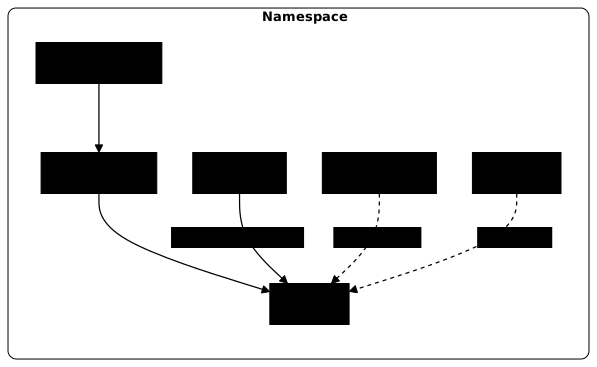
The diagram shows who depends on whom: the Deployment goes down to the Pods, whereas the Service, the ConfigMap and the Secret plug into the Pods without creating them. Confusion often concerns the boundary between two close objects. If one of the following four relationships feels unclear, reopen the indicated lesson.
| Relationship | What you need to know | Lesson to revisit |
|---|---|---|
| Pod and Deployment | A lone Pod is not replaced if it disappears; a Deployment replaces it | Deployments |
| Deployment and ReplicaSet | The Deployment drives ReplicaSets, one per version, and never creates the Pods directly | ReplicaSets |
| Service and Pod | The Service finds its Pods through their labels and only routes to those that are ready | Services |
| ConfigMap and Secret | Both are injected the same way; only the Secret is meant for sensitive data, and neither refreshes in an environment variable | ConfigMaps and Secrets |
Which classic mistakes should you avoid early on?
Here are five classic mistakes, several of which produce no error message:
- creating Pods by hand for a long-lived application, whereas a Deployment replaces them after a failure;
- confusing Service and Ingress: the Service gives a stable entry point to Pods, the Ingress adds HTTP routing on top of Services;
- writing a password in a ConfigMap or in a Deployment manifest, instead of a Secret created on the command line;
- thinking that a ReplicaSet replaces a Deployment: it maintains a number of Pods, but does not manage updates;
- forgetting that modifying a ConfigMap or a Secret does not change the environment variables of a running Pod: only replacing the Pod updates them.
In which order does the module teach the resources?
Each lesson builds on the previous one: if a notion escaped you, go back to it at its place in this chain rather than in isolation.
- Kubernetes resources, to place the objects of the cluster
- Pods, the basic unit of execution
- Deployments, to deploy an application in a way you can operate
- ReplicaSets, the mechanism a Deployment relies on
- Rolling updates and rollbacks, to update without cutting the service and to go back
- Labels and annotations, to find and select objects
- Services, to connect and expose Pods in a stable way
- Reach an application, with
expose,port-forwardandproxy - ConfigMaps, to take configuration out of the code
- Secrets, for sensitive data
- Namespaces, to partition
- kubectl cheat sheet, optional, to look up a syntax
Put it into practice
The quiz below checks that you recognize the right answer. The challenge checks that you know how to do it: it gives an objective, not the commands. In a magasin namespace that you create, you run a vitrine Deployment with three replicas, to which you give a configuration value from a vitrine-config ConfigMap and a password from a vitrine-secret Secret, without ever writing this password in the Deployment. A vitrine Service then exposes the application and must answer over HTTP. Finally, you update the image while keeping the old ReplicaSet at zero replicas.
The challenge is graded on the final state of the cluster, not on the commands typed, with a threshold of 70 out of 100. While you work, dsoxlab check lists what still fails, and dsoxlab submit returns the verdict. A state that fails tells you what is missing, without saying how to fix it: the lesson to go back to is the one in the module that teaches that state. Reread it, redo the gesture, then run dsoxlab check again.
Key takeaways
- Each basic resource answers a single need: the Pod runs, the ReplicaSet maintains a number of Pods, the Deployment drives updates, the Service gives stable access.
- The ConfigMap provides non-sensitive configuration; the Secret provides sensitive data, which stays out of manifests.
- The Namespace partitions names and serves as the scope for rights and quotas, without isolating the network.
- A Deployment does not create the Pods itself: it goes through a ReplicaSet, and keeps the old ReplicaSet at zero to allow the rollback.
- An environment variable is never refreshed after a ConfigMap or Secret change; only replacing the Pod updates it.
- The module challenge is graded on the final state of the cluster, with a threshold of 70.
Test your knowledge
The quiz draws only from the lessons of the module, two or three questions per lesson. If a family of questions gives you trouble, reread the matching lesson rather than the whole module.
Knowledge check
Check what you have learned with this interactive quiz
How it works
- The timer starts when you click Start
- Multiple choice, true/false and short answer questions
- You can move between questions
- Detailed results are shown at the end
Starts the quiz and the timer
Review
(0/0)Score by domain
A domain groups several guides and gets several questions, so its score is more reliable than a per-topic score, which often rests on a single question.
Summary
Strengths
No topic passed at 80% on at least two questions yet.
Weak areas
No topic below the pass mark.
Recommended next
Hints before you try again?
Continue the course: Level 1 exam: ship and update an application
A new full quiz with random questions
Work again only on the questions you missed