Kubernetes does not manage your containers directly: it manages objects, also called resources, that describe the desired state of your application. This lesson sorts the basic resources into three groups: workloads, which run the application, configuration, and networking. You will know which one to use to run, configure or expose an application, how Deployment, ReplicaSet, Pod, Service, ConfigMap and Secret fit together, and in which order to learn them in this module.
Prerequisites: the architecture of a cluster and the demo cluster from First cluster, with kubectl pointed at the right context.
What you will learn
- Sort the basic resources into three groups: workloads, configuration, networking
- Say which resource to use to run, configure or expose an application
- Explain how Deployment, ReplicaSet, Pod, Service, ConfigMap and Secret fit together
- Choose the order in which to learn the resources of this module
How do you classify Kubernetes resources?
Three questions are enough to classify a resource: does it run the application (workloads), configure it (configuration), or make it reachable (networking)? The table gives the answer for the resources of the module; the Namespace, filed separately under "Organization", answers none of the three questions: it runs nothing, it separates groups of resources.
| Group | Resource | What it does |
|---|---|---|
| Workloads | Pod | Runs one or more containers; ephemeral, you almost never create one on its own |
| Workloads | ReplicaSet | Maintains a number of identical Pods; created by the Deployment |
| Workloads | Deployment | Creates the ReplicaSets, updates and rolls back; for stateless applications |
| Networking | Service | Gives a stable address in front of Pods that change |
| Configuration | ConfigMap | Stores non-sensitive configuration (settings, files) |
| Configuration | Secret | Stores sensitive data; base64-encoded, not encrypted by default |
| Organization | Namespace | Separates groups of resources (environments, teams) |
A Secret is not encrypted by default, only base64-encoded: anyone who can read it can decode it.
How do these resources fit together?
A single resource is almost useless on its own: a complete application assembles several of them. The following diagram shows the most common assembly, that of a stateless application.
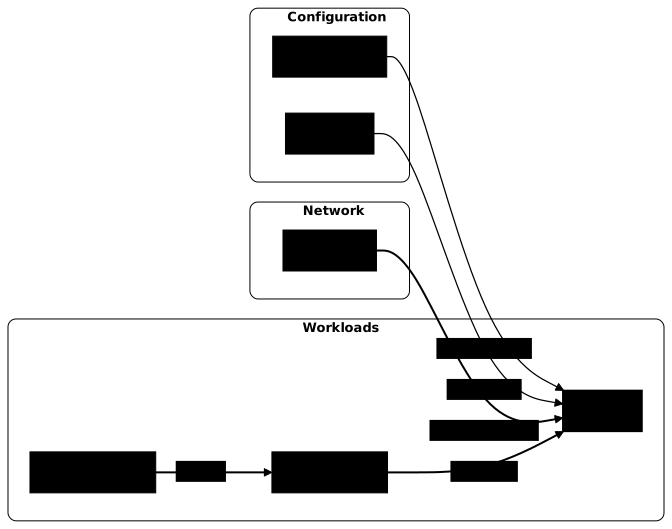
Read the diagram from left to right. In the workloads group, the Deployment creates a ReplicaSet, which maintains the Pods. The Service, in the networking group, does not know the Pods by name: it finds them by their labels, key-value tags attached to every object (the lesson Labels and annotations covers them in detail). A selector that matches no Pod therefore gives a Service that routes to nothing, with no error. The ConfigMap and the Secret, in the configuration group, inject their values into the Pods as environment variables or files.
The Service stays valid when the Pods are replaced, for example during an update: the Service provides a permanent access point in front of ephemeral Pods.
Do you have to create resources in a specific order?
The numbering of the module is a reading order, not a mandatory creation order. Kubernetes does not run through a recipe: each controller (the component that watches one type of object) constantly compares the observed state with the desired state, and corrects the gap as soon as it can. Most references to an object that does not exist yet therefore resolve themselves once the object appears. Create a Service before the Pods it must reach: at first it has no destination address, then it fills up as soon as the Pods exist.
kubectl config use-context kind-demokubectl create service clusterip hello --tcp=80:80kubectl get endpointslices -l kubernetes.io/service-name=hellokubectl create deployment hello --replicas=2 \ --image=nginx:1.30.5@sha256:9bf97bd7714f5e24c1ccd545ecb9eb5435cb6d109c97cebb15e7e455e0239edbkubectl rollout status deployment/hello --timeout=90skubectl get endpointslices -l kubernetes.io/service-name=hello -o jsonpath='{.items[0].endpoints[*].conditions.ready}{"\n"}'Switched to context "kind-demo".service/hello createdNAME ADDRESSTYPE PORTS ENDPOINTS AGEhello-2r7nn IPv4 <unset> <unset> 0sdeployment.apps/hello createdWaiting for deployment "hello" rollout to finish: 0 out of 2 new replicas have been updated...Waiting for deployment "hello" rollout to finish: 0 of 2 updated replicas are available...Waiting for deployment "hello" rollout to finish: 1 of 2 updated replicas are available...deployment "hello" successfully rolled outtrue trueThe Service is created first, with no Pods: its EndpointSlice (the list of addresses behind the Service) is empty. The Deployment then creates its Pods, which carry the app=hello label that the Service selects by default, and the EndpointSlice fills itself with two ready addresses. This behavior is detailed in the lesson Services.
Two practical rules follow for a folder of manifests applied with kubectl apply -f folder/. Kubectl reads the files in alphabetical order. A Pod that references a ConfigMap or a Secret that is still missing waits for it to appear, so these dependencies impose no order. However, a Namespace must exist before the objects it contains: declare it in a file whose name sorts first (00-namespace.yaml), or create it before applying the folder.
Then delete the two objects to leave the cluster clean. Deleting the Deployment also deletes its ReplicaSet and its Pods.
kubectl delete service hellokubectl delete deployment helloservice "hello" deleted from default namespacedeployment.apps "hello" deleted from default namespaceWhich advanced resources exist?
Four resources (StatefulSet, DaemonSet, Job and CronJob) address needs that the Deployment does not cover. The table groups them into three rows, because Job and CronJob go together. They are learned at level 2 of the training, once the lifecycle of a Deployment is well understood; here is enough to recognize them.
| Resource | When to use it | Guide |
|---|---|---|
| StatefulSet | Stateful application (database): stable identities (mysql-0, mysql-1), volumes tied to each Pod | StatefulSets |
| DaemonSet | One Pod on each node (monitoring agent, log collector) | DaemonSets |
| Job, CronJob | Task that finishes (migration, backup), one-off or scheduled | Jobs and CronJobs |
In what order should you learn the resources of this module?
The module follows a chain of dependencies: each lesson builds on the previous one. It starts with the Pod, the unit of execution, then the Deployment that manages it, the ReplicaSet that works behind the scenes, and the rolling updates that deliver a version without downtime. A lesson on labels and annotations then prepares exposure: it is through its labels that a Service chooses its Pods. After the Services, a lesson shows how to reach an application from your workstation with kubectl port-forward.
The last part takes configuration out of the image: ConfigMaps, then Secrets right after, because their syntax is almost identical while their security stakes differ, and finally Namespaces. An optional kubectl cheat sheet summarizes the everyday commands; the knowledge check closes the module. Validate each step on your local cluster before moving on to the next.
Key takeaways
- Kubernetes reconciles objects: you describe a desired state, a controller reaches it.
- Three groups: workloads (Pod, ReplicaSet, Deployment), configuration (ConfigMap, Secret), networking (Service).
- The Deployment creates a ReplicaSet, which maintains Pods; you almost never create a Pod on its own.
- The Service finds its Pods by their labels, and gives a stable access point in front of ephemeral Pods.
- ConfigMap and Secret have the same syntax, but a Secret is base64-encoded, not encrypted.
- The creation order of resources matters little, except for the Namespace, which must exist before what it contains.
- StatefulSet, DaemonSet, Job and CronJob address advanced needs, covered at level 2.
Test your knowledge
This quiz draws its questions from the Kubernetes question bank and covers the resources described above. Take it without going back: the points you miss tell you which guide to open first.
Knowledge check
Check what you have learned with this interactive quiz
How it works
- The timer starts when you click Start
- Multiple choice, true/false and short answer questions
- You can move between questions
- Detailed results are shown at the end
Starts the quiz and the timer
Review
(0/0)Score by domain
A domain groups several guides and gets several questions, so its score is more reliable than a per-topic score, which often rests on a single question.
Summary
Strengths
No topic passed at 80% on at least two questions yet.
Weak areas
No topic below the pass mark.
Recommended next
Hints before you try again?
Continue the course: Kubernetes Pods: create, observe and diagnose
A new full quiz with random questions
Work again only on the questions you missed