A manifest is a YAML file that describes a Kubernetes object. To write one
without starting from a blank page, you follow four steps: generate a skeleton
with kubectl, complete it, validate it, then apply it. This lesson has you go
through them on a concrete case: a Deployment, its Service and its ConfigMap in
a single file. You read a rejection that only the server detects, you look at
what kubectl diff announces before applying, then you fix an existing
Deployment without recreating it.
What you will learn
- Generate a skeleton with
kubectl create ... --dry-run=client -o yaml, complete it, validate it and apply it - Write the four fields of a manifest (
apiVersion,kind,metadata,specordata) for a Pod, a Deployment, a Service, a ConfigMap and a Secret - Name the target namespace of a manifest before applying
- Validate with
--dry-run=clientthen--dry-run=server, and say what each validation detects - Group several objects in a multi-document file
- Fix a Deployment with
kubectl apply,set,patchoredit, and explain why its selector cannot be changed
Prerequisites
You have the demo cluster from
First cluster
and a kubectl that reaches it. You know how to find a type and its fields with
kubectl api-resources and kubectl explain, covered in the lesson
kubectl api-resources and explain.
You have already created a Deployment, as in the lesson
Deployments.
Which fields are found in every manifest?
Every manifest starts with the same four fields. apiVersion and kind
say which type of object you are describing (you read them in the output of
kubectl api-resources). metadata names it and carries its labels. spec
describes the desired state. Configuration objects, such as ConfigMap and
Secret, replace spec with a data field.
| Object | apiVersion | kind | What the content describes |
|---|---|---|---|
| Pod | v1 | Pod | spec: the containers to run |
| Deployment | apps/v1 | Deployment | spec: replicas, selector and Pod template |
| Service | v1 | Service | spec: the Pod selector and the ports |
| ConfigMap | v1 | ConfigMap | data: key and value pairs |
| Secret | v1 | Secret | data (base64 values) or stringData (plain-text values, encoded by the API) |
The smallest useful manifest is that of a Pod, which serves as a reference for reading the others:
apiVersion: v1kind: Podmetadata: name: web labels: app: webspec: containers: - name: nginx image: nginx:1.30.5@sha256:9bf97bd7714f5e24c1ccd545ecb9eb5435cb6d109c97cebb15e7e455e0239edb ports: - containerPort: 80containers is a list (each container starts with a dash) and containerPort
publishes nothing: it documents the port the application listens on. Pods are
rarely created on their own, that is the job of the Deployment.
A Secret follows the same model, with data in place of spec. With
stringData, you write the values in plain text and the API encodes them in
base64 when it stores them:
apiVersion: v1kind: Secretmetadata: name: web-secrettype: OpaquestringData: MOT_DE_PASSE: motdepasse-de-demoThe values of a Secret are encoded, not encrypted: never commit a real value. ConfigMaps and Secrets are covered in the lessons ConfigMaps and Secrets.
Generate or write by hand?
There are two ways to get a valid manifest. Assisted generation lets kubectl
write the skeleton, which avoids indentation mistakes and wrong apiVersion
values; writing by hand teaches where the fields really go. You combine the
two: you generate the skeleton, you complete it by hand, and you check the
result before applying it.
The demonstration in this lesson follows that thread: generate three skeletons, put them together in one file, validate, apply, then fix.
Which namespace does the manifest apply to?
A namespaced object lives in a namespace, and three sources can designate it:
the metadata.namespace field of the file, the -n option of the command, or
the namespace of the current context. Writing namespace: in the file is the
safest choice, because the manifest then names its target whatever the
context of the person applying it. If the file and the -n option
contradict each other, kubectl refuses to apply rather than choose.
To change the namespace of the current context, use
kubectl config set-context --current --namespace=<name>.
Some names in this demonstration are French on purpose, so that the outputs
stay those of the tested cluster: manifestes means "manifests", faux
"wrong", inconnu "unknown", autre "other", atelier-k8s "k8s workshop", and
the message code de sortie printed by echo means "exit code".
The demonstration file names its namespace, so create that namespace first, then the working directory:
kubectl create namespace manifestesnamespace/manifestes createdmkdir -p ~/atelier-k8s/manifestes && cd ~/atelier-k8s/manifestesGenerate a skeleton with --dry-run=client
The --dry-run=client option tells kubectl to build the object without
sending it to the cluster, and -o yaml displays it. Nothing is created: you
get a valid YAML to complete. Start with the Deployment:
kubectl create deployment web --image=nginx:1.30.5@sha256:9bf97bd7714f5e24c1ccd545ecb9eb5435cb6d109c97cebb15e7e455e0239edb --replicas=2 --dry-run=client -o yamlapiVersion: apps/v1kind: Deploymentmetadata: labels: app: web name: webspec: replicas: 2 selector: matchLabels: app: web strategy: {} template: metadata: labels: app: web spec: containers: - image: nginx:1.30.5@sha256:9bf97bd7714f5e24c1ccd545ecb9eb5435cb6d109c97cebb15e7e455e0239edb name: nginx resources: {}status: {}Look at how the label app: web appears in three places: on the Deployment, in
the selector and in the labels of the Pod template. The selector and the
labels of the Pod template must match, otherwise the API rejects the
object; the label of the Deployment itself only serves to find it. The empty
braces (strategy: {}, resources: {}, status: {}) are fields you can leave
or delete. Next generate the Service, then the ConfigMap:
kubectl create service clusterip web --tcp=80:80 --dry-run=client -o yamlapiVersion: v1kind: Servicemetadata: labels: app: web name: webspec: ports: - name: 80-80 port: 80 protocol: TCP targetPort: 80 selector: app: web type: ClusterIPstatus: loadBalancer: {}The Service reuses the label app: web in its selector, which is how it finds
the Pods of the Deployment. It also adds a port name, 80-80, and a ClusterIP
type that you can omit from your file, since they are the default values.
kubectl create configmap web-config --from-literal=MODE=demo --dry-run=client -o yamlapiVersion: v1data: MODE: demokind: ConfigMapmetadata: name: web-configWrite the multi-document file
A YAML file can hold several objects, separated by a --- line.
kubectl apply -f processes them in the order of the file. You put the
ConfigMap first, because the Deployment references it, and each object names
its namespace.
The Deployment in the file adds two blocks that the lesson provides without
teaching them: envFrom injects all the keys of the ConfigMap as environment
variables (lesson ConfigMaps),
and resources sets what the container requests and what it may consume
(lesson Requests and limits).
cat > web.yaml <<'EOF'apiVersion: v1kind: ConfigMapmetadata: name: web-config namespace: manifestesdata: MODE: demo---apiVersion: apps/v1kind: Deploymentmetadata: name: web namespace: manifestes labels: app: webspec: replicas: 2 selector: matchLabels: app: web template: metadata: labels: app: web spec: containers: - name: nginx image: nginx:1.30.5@sha256:9bf97bd7714f5e24c1ccd545ecb9eb5435cb6d109c97cebb15e7e455e0239edb ports: - containerPort: 80 envFrom: - configMapRef: name: web-config resources: requests: cpu: "0.1" memory: 64Mi limits: cpu: "0.2" memory: 128Mi---apiVersion: v1kind: Servicemetadata: name: web namespace: manifestesspec: selector: app: web ports: - port: 80 targetPort: 80EOFThe "0.1" and "0.2" values of cpu are written that way on purpose: they are
used further down to show what the API does with them.
Validate before applying
A manifest can be wrong in two ways. A YAML syntax error shows up on the client
side, and so does an unknown kind: kubectl queries the API to resolve it.
Schema fields, inconsistent values and admission rejections only show up
server-side, because only the API server validates them with the rules of
the cluster. The diagram follows a manifest from kubectl to etcd: look at
where each command stops.
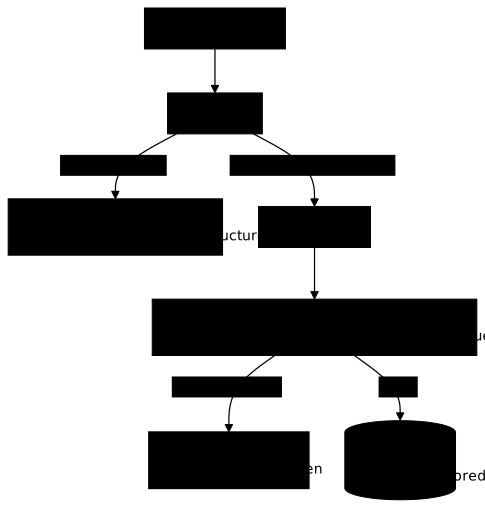
--dry-run=client gives its verdict before any admission. --dry-run=server
goes as far as the validation of the API server without writing anything. Only
apply stores the object in etcd. To see the difference, write an inconsistent
Deployment whose memory request exceeds the limit:
cat > faux.yaml <<'EOF'apiVersion: apps/v1kind: Deploymentmetadata: name: faux namespace: manifestesspec: replicas: 1 selector: matchLabels: app: faux template: metadata: labels: app: faux spec: containers: - name: nginx image: nginx:1.30.5@sha256:9bf97bd7714f5e24c1ccd545ecb9eb5435cb6d109c97cebb15e7e455e0239edb resources: requests: memory: 256Mi limits: memory: 128MiEOFkubectl apply --dry-run=client -f faux.yamldeployment.apps/faux created (dry run)The client sees no fault, because the file is valid YAML. Ask the server the same question:
kubectl apply --dry-run=server -f faux.yamlThe Deployment "faux" is invalid: spec.template.spec.containers[0].resources.requests: Invalid value: "256Mi": must be less than or equal to memory limit of 128MiRead the message from left to right: the rejected object, the path of the
faulty field (spec.template.spec.containers[0].resources.requests), the value
at fault (256Mi) and the rule that is broken (a request cannot exceed the
limit of 128Mi). The path starts with spec.template.spec because the
containers of a Deployment are in its Pod template.
The same gap appears with a typo. A Deployment whose spec carries
replicass: 3 instead of replicas is valid YAML, but the field does not exist
in the schema:
cat > inconnu.yaml <<'EOF'apiVersion: apps/v1kind: Deploymentmetadata: name: inconnuspec: replicass: 3 selector: matchLabels: app: inconnu template: metadata: labels: app: inconnu spec: containers: - name: nginx image: nginx:1.30.5@sha256:9bf97bd7714f5e24c1ccd545ecb9eb5435cb6d109c97cebb15e7e455e0239edbEOFkubectl apply --dry-run=client -f inconnu.yaml; echo "code de sortie : $?"kubectl apply --dry-run=server -f inconnu.yaml; echo "code de sortie : $?"deployment.apps/inconnu created (dry run)code de sortie : 0Error from server (BadRequest): error when creating "inconnu.yaml": Deployment in version "v1" cannot be handled as a Deployment: strict decoding error: unknown field "spec.replicass"code de sortie : 1The client says nothing: created (dry run) and an exit code of 0. The server
rejects with strict decoding error: unknown field "spec.replicass" and an exit
code of 1, naming the path of the unknown field. Client-side validation alone
therefore lets a typo through. Now validate the real file:
kubectl apply --dry-run=server -f web.yamlconfigmap/web-config created (server dry run)deployment.apps/web created (server dry run)service/web created (server dry run)The three objects pass the server validation and nothing is stored.
What does kubectl diff show before the first apply?
The kubectl diff -f command compares the file with the state of the cluster
and displays what would change. Its return code tells whether there is a
difference: 0 without a difference, 1 with a difference. Before the first
apply, nothing exists yet:
kubectl diff -f web.yaml; echo "code de sortie : $?"diff -u -N /tmp/LIVE-3149195294/apps.v1.Deployment.manifestes.web /tmp/MERGED-2196928699/apps.v1.Deployment.manifestes.web--- /tmp/LIVE-3149195294/apps.v1.Deployment.manifestes.web 2026-11-11 14:49:47.405760941 +0000+++ /tmp/MERGED-2196928699/apps.v1.Deployment.manifestes.web 2026-11-11 14:49:47.405760941 +0000@@ -0,0 +1,52 @@+apiVersion: apps/v1+kind: Deployment+metadata:+ creationTimestamp: "2026-11-11T14:49:47Z"+ generation: 1+ labels:+ app: web+ name: web+ namespace: manifestes+ uid: 837fed18-a8b1-4311-8be6-537c09fea300+spec:+ progressDeadlineSeconds: 600+ replicas: 2+ revisionHistoryLimit: 10+ selector:+ matchLabels:+ app: web+ strategy:+ rollingUpdate:+ maxSurge: 25%+ maxUnavailable: 25%+ type: RollingUpdate[...]code de sortie : 1The full diff shows the three objects as + lines, since everything is to be
created, and the output cut here only shows the start of the Deployment. Look at
the fields your file does not write: progressDeadlineSeconds,
revisionHistoryLimit, strategy. The API fills them with default values, and
kubectl diff shows them before the apply. The exit code 1 means "there are
differences", not "the command failed".
Apply, then read back what the server filled in
Apply the file and wait for the rollout to finish with kubectl rollout status:
kubectl apply -f web.yaml && kubectl rollout status deployment/web -n manifestes --timeout=90sconfigmap/web-config createddeployment.apps/web createdservice/web createdWaiting for deployment "web" rollout to finish: 0 of 2 updated replicas are available...Waiting for deployment "web" rollout to finish: 1 of 2 updated replicas are available...deployment "web" successfully rolled outThe three objects are created and the Deployment is ready. Run the same command
again to check that apply can be replayed:
kubectl apply -f web.yamlconfigmap/web-config unchangeddeployment.apps/web configuredservice/web unchangedLook at the Deployment line: configured, although nothing changed in the file.
This is the trap of the value rewritten by the server. The file writes
cpu: "0.1", and the API stores another form of the same value:
kubectl get deployment web -n manifestes -o jsonpath='{.spec.template.spec.containers[0].resources.requests.cpu}{"\n"}'100mThe API normalizes 0.1 into 100m (one hundred thousandths of a core). On
each apply, kubectl compares what you wrote with what it stored, sees a
difference in form and sends a patch, hence configured without any real
change, and without generation moving. Writing 100m in the file removes this
noise, and the next run then answers unchanged. The server also fills in the
fields you did not write:
kubectl get deployment web -n manifestes -o jsonpath='{.spec.template.spec.containers[0].imagePullPolicy}{" "}{.spec.strategy.type}{" "}{.spec.revisionHistoryLimit}{"\n"}'IfNotPresent RollingUpdate 10These three values, imagePullPolicy, the strategy type and the number of old
revisions kept, are not in your file. The manifest read back from the cluster
is therefore never identical to the one you wrote: this is normal, and it is
why kubectl diff compares the two before applying. Finally check that the
Service finds the Pods:
kubectl get endpointslices -n manifestes -l kubernetes.io/service-name=webNAME ADDRESSTYPE PORTS ENDPOINTS AGEweb-ttq6l IPv4 80 10.244.0.9,10.244.0.10 1sThe EndpointSlice of the web Service lists two addresses: the selector of
the Service does find the two Pods of the Deployment.
Why can't a Deployment's selector be changed?
The selector says which Pods belong to the Deployment. Changing it along the way would leave orphaned Pods, so the API declares it immutable. Try to change it with a patch:
kubectl patch deployment web -n manifestes --type merge -p '{"spec":{"selector":{"matchLabels":{"app":"autre"}}}}'The Deployment "web" is invalid:* spec.template.metadata.labels: Invalid value: {"app":"web"}: `selector` does not match template `labels`* spec.selector: Invalid value: {"matchLabels":{"app":"autre"}}: field is immutableTwo messages add up. The first says that the new selector no longer matches the
labels of the Pod template. The second, field is immutable, says that
spec.selector cannot change after creation. To change the selector, you have
to delete the Deployment and recreate it.
Fix a Deployment without recreating it
Four gestures modify an existing object. The first is the safest: you fix the
file and apply it again. Go to three replicas in web.yaml (change
replicas: 2 to replicas: 3), then look at the diff:
sed -i 's/replicas: 2/replicas: 3/' web.yaml && kubectl diff -f web.yaml; echo "code de sortie : $?"diff -u -N /tmp/LIVE-567096176/apps.v1.Deployment.manifestes.web /tmp/MERGED-1248848545/apps.v1.Deployment.manifestes.web--- /tmp/LIVE-567096176/apps.v1.Deployment.manifestes.web 2026-11-11 14:49:48.805864753 +0000+++ /tmp/MERGED-1248848545/apps.v1.Deployment.manifestes.web 2026-11-11 14:49:48.805864753 +0000@@ -6,7 +6,7 @@ kubectl.kubernetes.io/last-applied-configuration: | {"apiVersion":"apps/v1","kind":"Deployment","metadata":{"annotations":{},"labels":{"app":"web"},"name":"web","namespace":"manifestes"},"spec":{"replicas":2,"selector":{"matchLabels":{"app":"web"}},"template":{"metadata":{"labels":{"app":"web"}},"spec":{"containers":[{"envFrom":[{"configMapRef":{"name":"web-config"}}],"image":"nginx:1.30.5@sha256:9bf97bd7714f5e24c1ccd545ecb9eb5435cb6d109c97cebb15e7e455e0239edb","name":"nginx","ports":[{"containerPort":80}],"resources":{"limits":{"cpu":"0.2","memory":"128Mi"},"requests":{"cpu":"0.1","memory":"64Mi"}}}]}}}} creationTimestamp: "2026-11-11T14:49:47Z"- generation: 1+ generation: 2 labels: app: web name: web@@ -15,7 +15,7 @@ uid: 92d10c21-ed6a-4b74-8a59-d2e41da2e699 spec: progressDeadlineSeconds: 600- replicas: 2+ replicas: 3 revisionHistoryLimit: 10 selector: matchLabels:code de sortie : 1Look for the lines that start with - and +: replicas goes from 2 to 3,
and the generation counter goes from 1 to 2 each time the spec changes. The
long JSON line, above, is the last-applied-configuration annotation that
kubectl apply uses to compute its diffs (the lesson
kubectl create and apply
explains it).
The diff is short, it only contains what changes. Apply:
kubectl apply -f web.yaml && kubectl rollout status deployment/web -n manifestes --timeout=90sconfigmap/web-config unchangeddeployment.apps/web configuredservice/web unchangedWaiting for deployment "web" rollout to finish: 2 of 3 updated replicas are available...deployment "web" successfully rolled outOnly the Deployment is configured, the two other objects stay unchanged.
Change only the image with kubectl set
The kubectl set image command only modifies the image of a container. It is
handy for a quick fix:
kubectl set image deployment/web nginx=nginx:1.29@sha256:1881968aff6f7cdcc4b888c00a11f4ce241ad7ec957e0cb4a9e19e93a3ff87ea -n manifestesdeployment.apps/web image updatedThe rest of the container is intact, which you check by reading the ports and the limits back:
kubectl get deployment web -n manifestes -o jsonpath='{.spec.template.spec.containers[0].ports}{" "}{.spec.template.spec.containers[0].resources.limits}{"\n"}'[{"containerPort":80,"protocol":"TCP"}] {"cpu":"200m","memory":"128Mi"}The port and the limits are still there. Note that the cluster now runs a different image from the one in the file: the file is no longer the source of truth until you apply it again.
The merge patch trap on a list
The kubectl patch --type merge command merges a JSON fragment into the object.
Simple fields are merged, but a list is replaced as a whole. Now
containers is a list: a patch that only cites the image rewrites the whole
container.
kubectl patch deployment web -n manifestes --type merge -p '{"spec":{"template":{"spec":{"containers":[{"name":"nginx","image":"nginx:1.30.5@sha256:9bf97bd7714f5e24c1ccd545ecb9eb5435cb6d109c97cebb15e7e455e0239edb"}]}}}}'deployment.apps/web patchedThe API accepts the patch without any warning. Read the ports and the resources back:
kubectl get deployment web -n manifestes -o jsonpath='{.spec.template.spec.containers[0].ports}{" "}{.spec.template.spec.containers[0].resources}{"\n"}' {}The ports field is empty and resources is {}: the patch replaced the
containers list with a container that only has its name and its image. To
change a single value in a container, prefer kubectl set image or fix the
file. To restore the lost fields, apply the file again, since it is the
reference:
kubectl apply -f web.yaml && kubectl rollout status deployment/web -n manifestes --timeout=90sconfigmap/web-config unchangeddeployment.apps/web configuredservice/web unchangeddeployment "web" successfully rolled outapply restores the ports and the resources, because the file describes them.
The guide kubectl edit, patch and replace (in French)
covers these three commands in detail.
Edit by hand with kubectl edit
The kubectl edit command opens the object from the cluster in your editor, the
one designated by the KUBE_EDITOR variable or, failing that, EDITOR. Change
replicas: 3 to replicas: 4, save and quit:
kubectl edit deployment web -n manifestesdeployment.apps/web editedThe change only exists in the cluster: the file still says 3. The diff shows this drift:
kubectl diff -f web.yaml; echo "code de sortie : $?"@@ -15,7 +15,7 @@ uid: 92d10c21-ed6a-4b74-8a59-d2e41da2e699 spec: progressDeadlineSeconds: 600- replicas: 4+ replicas: 3 revisionHistoryLimit: 10 selector: matchLabels:code de sortie : 1The cluster says 4 (- line), the file says 3 (+ line). Applying the file
again erases the manual change:
kubectl apply -f web.yamlconfigmap/web-config unchangeddeployment.apps/web configuredservice/web unchangedThe Deployment goes back to three replicas: the file is the reference. This is
why you fix the file rather than the object: a fix made only in the cluster
disappears at the next apply.
Clean up the cluster
Delete the namespace, which takes the Deployment, the Service and the ConfigMap with it, then the working directory:
kubectl delete namespace manifestes && rm -rf ~/atelier-k8s/manifestesnamespace "manifestes" deletedThe deletion waits for the Pods to stop: it can take several tens of seconds.
Troubleshooting
When a manifest is rejected, read the field path first in the message: it points to the exact place to fix. The table lists the most frequent rejections.
| Symptom | Likely cause | Solution |
|---|---|---|
kubectl cannot read the file | Wrong indentation or a tab in the file | Indent with spaces, two per level |
no matches for kind ... in version ... | Wrong kind or apiVersion | Read the columns again with kubectl api-resources | grep -i <name> |
| A field is reported as unknown | Field misspelled or misplaced | Check with kubectl explain <type>.<path> |
Invalid value ... must be less than or equal to memory limit | Request higher than the limit | Fix requests or limits; only --dry-run=server detects it |
field is immutable on spec.selector | Selector changed on an existing Deployment | Delete and recreate the Deployment |
apply answers configured without a change | Value normalized by the API (0.1 becomes 100m) | Write the normalized form in the file |
After a patch, fields have disappeared | The merge patch replaced a whole list | Apply the file again, or use set image |
Put it into practice
The lab has you write a multi-document file that holds a Deployment, its Service and a ConfigMap, and that names its namespace. You validate it server-side before applying it, then you fix a faulty Deployment in place, without recreating it. The validation covers the state of the cluster: the server accepts the file, no object is created in default, both replicas are available on the requested image, the Service finds its Pods, the container reads its configuration from the ConfigMap, and the fixed object was not recreated.
Key takeaways
- Every manifest starts with
apiVersion,kind,metadataandspec(ordatafor a ConfigMap and a Secret). - The workflow is: generate with
--dry-run=client -o yaml, complete, validate, apply. - Name the namespace in the file: the manifest then names its target whatever the context.
--dry-run=clientflags invalid YAML and an unknownkind, but not schema fields or validation rules;--dry-run=serversees them, such as a request higher than the limit.kubectl diff -freturns code 1 when there is a difference, 0 otherwise.- The API normalizes or fills in values: the manifest read back is not the one you wrote.
spec.selectorof a Deployment is immutable; a merge patch oncontainersreplaces the whole list.- Fix the file and apply it again: a change made only in the cluster is overwritten at the next
apply.
Test your knowledge
Prediction and diagnosis questions to check that you can read a server
rejection, predict the effect of a diff, a patch or an apply, and choose
the right validation.
Knowledge check
Check what you have learned with this interactive quiz
How it works
- The timer starts when you click Start
- Multiple choice, true/false and short answer questions
- You can move between questions
- Detailed results are shown at the end
Starts the quiz and the timer
Review
(0/0)Score by domain
A domain groups several guides and gets several questions, so its score is more reliable than a per-topic score, which often rests on a single question.
Summary
Strengths
No topic passed at 80% on at least two questions yet.
Weak areas
No topic below the pass mark.
Recommended next
Hints before you try again?
Continue the course: kubectl create and apply: create and update your resources
A new full quiz with random questions
Work again only on the questions you missed