Containers share the Linux kernel of the host. A kernel flaw or a poorly filtered system call can let a malicious container escape to the host. Sandboxed runtimes (gVisor, Kata Containers) add an extra layer of isolation between the container and the host kernel, which reduces the attack surface. The Kubernetes RuntimeClass resource lets you send chosen Pods to these alternative runtimes. This guide covers the configuration, the usage and the selection criteria for the CKS exam.
Sandboxed runtimes belong to the Minimize Microservice Vulnerabilities domain of the official CKS curriculum published by the CNCF, which gives it a weight of 20% in the exam. This domain lists "sandboxed containers" among its isolation techniques. This guide has you practice the two gestures that belong to it: creating a RuntimeClass, and assigning a Pod to the runtime you want.
What you will learn
- Explain why standard containers are not enough for some workloads
- Compare how gVisor and Kata Containers isolate containers
- Declare an alternative runtime in containerd
- Create a RuntimeClass resource and assign it to a Pod
- Choose the runtime that fits your constraints
- Confine a Pod and detect abnormal activity without help, with the module challenge
Prerequisites
- A Kubernetes cluster with administrator access
- Familiarity with Pods and Security Contexts
- SSH access to the cluster nodes (to configure containerd)
Why isolate containers further?
A standard Linux container (runc) runs as an isolated process thanks to namespaces and cgroups, but it shares the host kernel. Every system call of the container is handled directly by the host kernel.
This shared kernel raises two security problems:
- Wide attack surface: the Linux kernel exposes several hundred system calls. A vulnerability in any of them can allow a container escape.
- Incomplete isolation: some kernel resources (such as
/procand/sys) are not fully partitioned by namespaces.
Sandboxed runtimes solve this problem by placing an extra layer between the container and the host kernel.
| Approach | Isolation | Performance | Compatibility |
|---|---|---|---|
| runc (standard) | Namespaces + cgroups | Native | Full |
| gVisor (runsc) | Application kernel in userspace | Syscall overhead | High for common workloads |
| Kata Containers | Lightweight VM per Pod | Startup overhead | Near-complete |
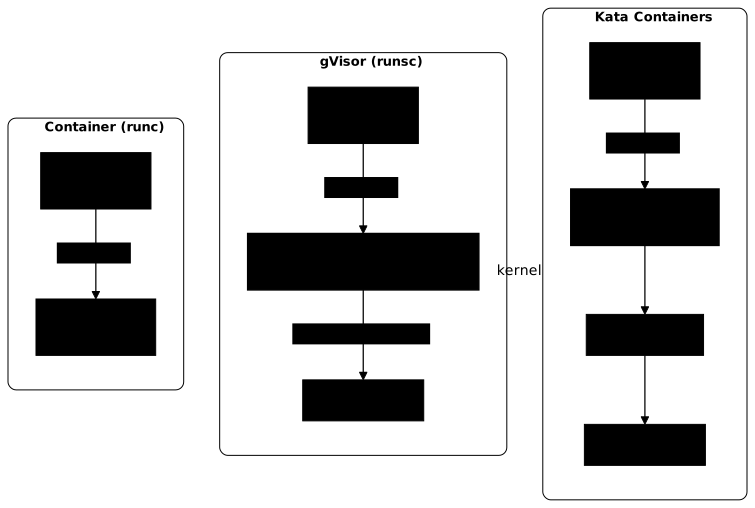
The diagram follows the same system call in the three cases. On the left, with runc, the process reaches the host kernel directly, shared with every container. In the middle, with gVisor, the call stops first in the Sentry (outlined in red), which only calls the host kernel for a restricted set of operations. On the right, with Kata Containers, the call is served by the micro-VM's guest kernel (outlined in red): the host is reached only through the hypervisor.
gVisor: an application kernel in userspace
gVisor is an open source Google project that intercepts the system calls of containers and handles them in an application kernel written in Go, called the Sentry. This kernel runs in userspace, that is, as an ordinary program and not inside the host kernel. The container's processes do not call the host kernel directly: their system calls are intercepted and served by the Sentry, which relies on the host kernel only in a controlled way.
How is gVisor built?
gVisor is made of two main processes:
- Sentry: the application kernel. It implements the Linux system calls (memory management, threading, signals, networking) and relies on the host kernel only for a restricted set of operations. It runs in userspace with a very restrictive seccomp profile.
- Gofer: a mediator process that manages file system access through the 9P protocol. The Sentry has no direct access to the host's files.
gVisor's OCI executable is called runsc (run sandboxed container). It integrates with containerd and CRI-O like any OCI runtime.
What are the strengths and limits of gVisor?
The trade-off of gVisor fits in one sentence: it intercepts system calls in user space instead of letting them reach the host kernel. Everything below follows from it, the benefits and the costs alike, and that is what makes the choice predictable rather than a matter of taste.
The practical consequence for deciding: gVisor suits an application better the more it talks little to the kernel. A service that computes barely pays; a service that multiplies I/O operations pays on every operation.
What you gain:
- Small footprint: no VM, no full guest kernel. A gVisor sandbox uses little extra memory.
- Fast startup: comparable to runc, because there is no VM to launch.
- Written in Go: the fact that gVisor is mostly written in Go reduces some classic classes of memory vulnerabilities (use-after-free, buffer overflow) compared with kernel code in C/C++.
What you lose:
- Per-syscall overhead: every system call goes through the Sentry, which adds latency. I/O-heavy and syscall-heavy workloads are the most affected.
- Compatibility: gVisor does not implement every Linux system call. Some very specific applications may not work.
- No kernel modules: applications that need specific kernel modules (advanced iptables, eBPF) are not compatible.
Kata Containers: a lightweight VM per Pod
Kata Containers takes the opposite approach to gVisor: each Pod runs in its own dedicated lightweight virtual machine. The container has its own guest Linux kernel, isolated from the host kernel by a hypervisor (QEMU/KVM, Cloud Hypervisor or Firecracker).
What are the strengths and limits of Kata Containers?
Rather than reimplementing system calls, Kata gives a real Linux kernel to each Pod, inside a lightweight virtual machine. Compatibility gains everything gVisor concedes, and the cost moves from run time to memory and startup.
The criterion for choosing between the two is therefore less the threat covered, which is the same on both sides, than the nature of the workload: Kata for a demanding or exotic application that gVisor refuses to run, gVisor for many lightweight containers on a node with limited resources.
What you gain:
- Hardware isolation: the separation is provided by the hypervisor and the CPU virtualization mechanisms (VT-x/AMD-V). The isolation is comparable to that of a classic VM.
- Near-complete compatibility: the container runs on a real Linux kernel, with no system call restriction.
What you lose:
- Startup overhead: launching a micro-VM takes a few seconds, against a few milliseconds for runc.
- Memory consumption: each Pod needs its own guest kernel in memory.
- Nested virtualization: if your Kubernetes nodes themselves run in VMs, Kata may require nested virtualization, which depends on the cloud provider and the instance type.
gVisor vs Kata Containers
Two rows of this table settle the choice in practice; the others only add nuance. Nested virtualization first: if your Kubernetes nodes are themselves virtual machines at a cloud provider that does not expose it, Kata is ruled out outright, and the question no longer arises. Compatibility next: gVisor reimplements system calls, so an application that touches eBPF, kernel modules or rare system calls may fail, where Kata runs a real Linux kernel and accepts everything. Keep in mind that these two runtimes are not ranked from weaker to stronger: they protect against the same threat, escape to the host kernel, through two different mechanisms.
| Criterion | gVisor | Kata Containers |
|---|---|---|
| Mechanism | Userspace kernel (Go) | Lightweight VM (hypervisor) |
| Isolation | Strong (system call interception) | Strong (kernel separated by a hypervisor) |
| Performance | Per-syscall overhead | Startup + memory overhead |
| Compatibility | High for common workloads | Near-complete |
| Nested virt. | Not required | Required if nodes are virtualized |
| Use cases | Multi-tenant, CI/CD, serverless | Regulated workloads, defense in depth |
RuntimeClass: sending Pods to a runtime
The Kubernetes RuntimeClass resource lets you assign a Pod to a specific CRI runtime. It is a non-namespaced (cluster-scope) resource, stable since Kubernetes v1.20, which maps a readable name to a CRI handler configured on the nodes.
How do you create a RuntimeClass?
apiVersion: node.k8s.io/v1kind: RuntimeClassmetadata: name: gvisor# The handler must match the configuration name exposed by the CRIhandler: runscThe handler field must exactly match the configuration name exposed by the node's CRI implementation, for example containerd or CRI-O.
How do you use a RuntimeClass in a Pod?
To run a Pod with a sandboxed runtime, add the runtimeClassName field to the Pod spec:
apiVersion: v1kind: Podmetadata: name: sandbox-testspec: runtimeClassName: gvisor containers: - name: app image: nginx:1.27@sha256:6784fb0834aa7dbbe12e3d7471e69c290df3e6ba810dc38b34ae33d3c1c05f7dIf the referenced RuntimeClass does not exist, the Pod creation is rejected at admission (Forbidden: RuntimeClass not found). If the RuntimeClass exists but the handler is not configured on the node, the Pod stays stuck in ContainerCreating with a FailedCreatePodSandBox event.
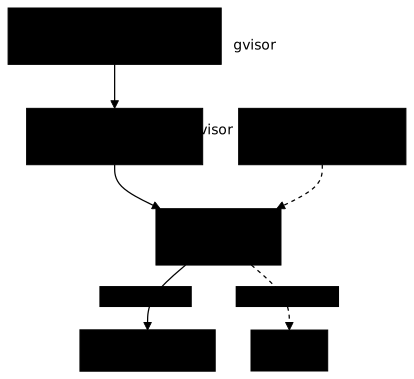
The next diagram shows the whole chain. Follow the solid arrows: the Pod names a RuntimeClass, whose handler designates the runtime declared in containerd, here runsc. The dashed arrows show a Pod without runtimeClassName, which containerd hands to its default runtime.
Scheduling and nodeSelector
By default, RuntimeClass assumes a homogeneous cluster where every node supports the runtime. In practice, only some nodes have gVisor or Kata installed.
RuntimeClass supports a scheduling field that injects a nodeSelector and tolerations into Pods at admission. These constraints combine with those already present in the Pod; they do not replace them:
apiVersion: node.k8s.io/v1kind: RuntimeClassmetadata: name: gvisorhandler: runscscheduling: nodeSelector: runtime: gvisor tolerations: - key: runtime value: gvisor effect: NoScheduleWith this configuration, Pods that use runtimeClassName: gvisor are automatically directed to the nodes labeled runtime=gvisor.
Pod Overhead
Sandboxed runtimes consume extra resources (memory for the gVisor Sentry, or for the Kata guest kernel). The overhead field lets you declare that consumption so the scheduler accounts for it:
apiVersion: node.k8s.io/v1kind: RuntimeClassmetadata: name: katahandler: kataoverhead: podFixed: memory: "120Mi" cpu: "250m"This cost is injected into the Pod at admission, from the RuntimeClass, then taken into account everywhere afterwards: in scheduling, in resource quotas, in the Pod's cgroup and in eviction decisions.
The Pod Overhead mechanism is stable since Kubernetes 1.24, so there
is no feature gate to enable. What you do need to check, however, is that
it took effect: the values declared in the RuntimeClass's overhead.podFixed
appear in the Pod's .spec.overhead field after
admission. If that field is empty, the Pod was not attached to the
RuntimeClass you thought it was.
How do you configure containerd for an alternative runtime?
The two runtimes are not installed the same way. gVisor is installed
on each node, outside Kubernetes: a binary, then a declaration in
containerd. Kata Containers is installed, according to its documentation, with its
kata-deploy Helm chart, which drops binaries and artifacts on the nodes
from the cluster itself.
-
Install runsc on each target node
gVisor publishes one archive per dated release, which contains
runscand the containerd shim. Pin the release rather than followinglatest, and check the SHA-512 digest before installing (extraction needsbzip2):Terminal window ARCH=$(uname -m) # x86_64 or aarch64GVISOR=20260928.0URL=https://storage.googleapis.com/gvisor/releases/release/${GVISOR}/${ARCH}curl -sSfLO "${URL}/gvisor.tar.bz2"curl -sSfLO "${URL}/gvisor.tar.bz2.sha512"sha512sum -c gvisor.tar.bz2.sha512tar xjf gvisor.tar.bz2 runsc containerd-shim-runsc-v1sudo install -m 0755 runsc containerd-shim-runsc-v1 /usr/local/bin/runsc --versionThe check must answer
gvisor.tar.bz2: OK, and the last command must report the pinned release:runsc version release-20260928.0spec: 1.2.1 -
Configure containerd to declare the
runschandlerAdd to
/etc/containerd/config.toml(containerd 2.x syntax / config v3):[plugins."io.containerd.cri.v1.runtime".containerd.runtimes.runsc]runtime_type = "io.containerd.runsc.v1" -
Restart containerd
Terminal window sudo systemctl restart containerd -
Check that the runtime is available
Terminal window sudo crictl info | grep -A 5 runsc
-
Check hardware virtualization on each target node
Kata launches one virtual machine per Pod: without KVM on the node, nothing starts. The device must exist:
Terminal window ls -l /dev/kvm -
Install kata-deploy, at a pinned version
Terminal window CHART=oci://ghcr.io/kata-containers/kata-deploy-charts/kata-deployVERSION=4.2.0helm install kata-deploy "${CHART}" --version "${VERSION}" -
List the RuntimeClasses created
Terminal window kubectl get runtimeclassesSince Kata 4.0, the default runtime is
runtime-rs: its classes carry the-runtime-rssuffix, for examplekata-qemu-runtime-rs. The old Go runtime is still shipped under the namekata-qemu, but it is deprecated.
Complete workflow: from the node to the Pod
Here is the complete procedure to deploy a sandboxed Pod with gVisor. With Kata, kata-deploy takes care of the first two steps and creates its own RuntimeClasses:
-
Install the runtime on the target nodes (gVisor or Kata)
-
Configure containerd with the matching handler
-
Label the nodes that support the runtime
Terminal window kubectl label nodes <node-name> runtime=gvisor -
Create the RuntimeClass in the cluster
Terminal window kubectl apply -f - <<EOFapiVersion: node.k8s.io/v1kind: RuntimeClassmetadata:name: gvisorhandler: runscscheduling:nodeSelector:runtime: gvisorEOF -
Deploy a Pod with the RuntimeClass
Terminal window kubectl apply -f - <<EOFapiVersion: v1kind: Podmetadata:name: sandbox-testspec:runtimeClassName: gvisorcontainers:- name: testimage: nginx:1.27@sha256:6784fb0834aa7dbbe12e3d7471e69c290df3e6ba810dc38b34ae33d3c1c05f7dcommand: ["sh", "-c", "uname -a && sleep 3600"]EOF -
Check that the Pod uses the right runtime
Terminal window # Confirm the runtimeClassName in the speckubectl get pod sandbox-test -o jsonpath='{.spec.runtimeClassName}'# gvisor# Compare the kernel seen by the container with the node'skubectl exec sandbox-test -- cat /proc/version# Linux version 4.19.0-gvisor ... (the node itself runs 6.8.x)# dmesg shows the messages of the gVisor Sentrykubectl exec sandbox-test -- dmesg | head -3# [0.000000] Starting gVisor...# For a Kata Pod, the kernel shown is the one of the guest VM,# and dmesg shows a complete Linux boot
Best practices
Two questions arise once the sandboxed runtime is in place, and they do not call for the same answers. The first is to guarantee that it is really used, because nothing in Kubernetes forces a manifest to ask for a RuntimeClass. The second is to measure its cost on your workload, which varies too much from one application to another to be deduced from an advertised figure.
Security
The blind spot of the setup is that a RuntimeClass is not enforced: the author of the manifest chooses their own runtimeClassName, and forgetting it silently falls back to runc. The security of the sandbox therefore rests entirely on two external safeguards: RBAC that prevents creating a RuntimeClass pointing to a lax handler, and an admission policy that rejects Pods without a sandboxed runtime in sensitive namespaces.
- Restrict the creation of RuntimeClasses to cluster administrators (RBAC). A user should not be able to create or modify RuntimeClasses.
- Enforce the RuntimeClass on sensitive namespaces with an admission controller (Kyverno, Gatekeeper) to guarantee that multi-tenant workloads always use a sandboxed runtime.
- Combine with other mechanisms: RuntimeClass does not replace the Pod Security Standards, AppArmor/Seccomp or Network Policies. It is an additional layer of defense in depth.
Performance
The overhead of a sandboxed runtime cannot be summed up as a global percentage: it depends on your application's system call profile. A service that computes a lot and talks little to the kernel loses little; a service that multiplies disk accesses or network connections pays on every operation. So measure on your real workload, not on a generic benchmark, and keep an eye on the node's memory: it is what saturates first when several sandboxes coexist, each carrying its own Sentry or its own guest kernel.
- Test before deploying: measure the impact on your real workloads. gVisor adds an overhead that varies with the number of system calls.
- Separate the nodes: dedicate some nodes to sandboxed workloads so the overhead does not affect standard applications.
- Declare the Pod Overhead: set the
overheadfield in the RuntimeClass so the scheduler plans Pods correctly.
Troubleshooting
The moment the Pod fails already tells you where to look, before you even read the message. An immediate refusal at creation comes from the API server: the RuntimeClass does not exist in the cluster. A Pod that stays Pending found no node matching the scheduling constraints. A Pod that reaches ContainerCreating and then hangs was scheduled: the problem is then on the node itself, in the containerd configuration or in the runtime binary. So start with kubectl describe pod, whose Events section tells these three cases apart unambiguously.
| Symptom | Likely cause | Solution |
|---|---|---|
Rejected at creation: Forbidden: RuntimeClass "xxx" not found | RuntimeClass missing from the cluster | Check kubectl get runtimeclass |
Pod stuck in ContainerCreating with a FailedCreatePodSandBox event | Handler not configured in containerd / CRI-O | Check /etc/containerd/config.toml (path depends on the version), restart containerd |
Pod Pending indefinitely | No node with the required label | Check the labels (kubectl get nodes --show-labels) and the RuntimeClass's scheduling.nodeSelector |
not supported error with Kata | Hardware virtualization not available | Check that /dev/kvm exists on the node; enable nested virtualization if the nodes are virtualized |
| Application crashes under gVisor | System call not implemented | Check the gVisor logs (runsc debug); check compatibility on gvisor.dev |
Resources
Three sources, depending on what you are looking for. The Kubernetes
documentation describes RuntimeClass itself, that is, the exposure mechanism, and
it is the reference if your question is about the handler or about scheduling.
The other two each document an implementation, and that is where the
compatibility lists and the tuning options live, which change at the pace of
those projects and not of Kubernetes.
- RuntimeClass: Official Kubernetes documentation
- gVisor: gvisor.dev
- Kata Containers: katacontainers.io
Hands-on practice
A sandbox is proven by looking at the kernel the container sees. This lab places a Pod on a second runtime installed on the node, which runs its own application kernel, and the validation reads from the inside a kernel version that is no longer the node's.
Challenge: confine a Pod and detect abnormal activity
The challenge is the module's unaided proof: it is graded on the cluster state you leave behind, not on the commands you typed. On the k8s-cp.lab node, no procedure is given. You confine Pods against the kernel with AppArmor and seccomp, you require mutual TLS in a meshed namespace, you close another namespace by default while keeping its application flow and its DNS, and you isolate a Pod in a sandbox. Finally, you get Falco to raise an alert when a shell is opened in the protected namespace, and only there. The lab preparation installs Falco 0.45.2, gVisor and Istio, but it defines no profile and no rule: writing the Falco rule is your job, like the profiles.
The validation reads sixteen states, with no solution and no value to copy. The tests really write and run chmod in the Pods, make real connections between Pods and compare the sandbox's kernel with the machine's. They open a shell themselves in the protected Pod, then in a Pod of another namespace, before reading the alerts written by Falco, and they check that the rules shipped with Falco have not changed. Passing requires 70 points out of 100, and there are no hints.
Three states are blocking and must pass whatever the total: the write to /tmp refused by the AppArmor profile, the client without a sidecar blocked while the meshed client gets through, and the Falco alert for a shell opened in the protected namespace. While you work, dsoxlab check shows what is missing, without saying how to fix it, and the lesson to go back to is the one that teaches that state. Another state grades the default network lockdown of a namespace, which the lesson on NetworkPolicies teaches. The challenge builds on AppArmor (in French), on seccomp (in French), on pod-to-pod mutual TLS, on Falco and on Falco or Tetragon (in French), as well as on the sections of this lesson devoted to the sandbox.
Key takeaways
- Standard containers share the host kernel, which exposes a wide attack surface through system calls
- gVisor intercepts system calls in an application kernel written in Go, suited to multi-tenant and CI/CD workloads
- Kata Containers runs each Pod in a lightweight VM with its own kernel: near-complete compatibility, but costlier startup and memory
- RuntimeClass is the Kubernetes resource that maps a name to a CRI handler configured on the nodes
- The
runtimeClassNamefield in the Pod spec activates the alternative runtime - The RuntimeClass
schedulingfield automatically targets the compatible nodes - The
overheadfield declares the runtime's extra resources for the scheduler - Sandboxed runtimes do not replace the other Kubernetes security mechanisms, they complete them
Knowledge check
Five questions on kernel isolation: what gVisor and Kata Containers do differently, and how RuntimeClass exposes them to Pods.
Knowledge check
Check what you have learned with this interactive quiz
How it works
- The timer starts when you click Start
- Multiple choice, true/false and short answer questions
- You can move between questions
- Detailed results are shown at the end
Starts the quiz and the timer
Review
(0/0)Score by domain
A domain groups several guides and gets several questions, so its score is more reliable than a per-topic score, which often rests on a single question.
Summary
Strengths
No topic passed at 80% on at least two questions yet.
Weak areas
No topic below the pass mark.
Recommended next
Hints before you try again?
Continue the course: Level 5 exam: secure a cluster
A new full quiz with random questions
Work again only on the questions you missed