A container orchestrator drives a fleet of machines as if it were a single one: you describe what must run, it decides where, checks continuously and fixes things on its own. Docker can start and restart a container on one machine, but it cannot pick another machine when the first one goes down. This lesson is for readers coming out of the Docker course who are approaching Kubernetes. It shows the six needs that an engine alone does not cover, then the notion of desired state on which everything rests, and places Kubernetes against its competitors before you learn its vocabulary.
What you will learn
- Tell apart what Docker already does on one machine from what it does not do on several.
- Name the six needs an orchestrator covers: placement, restart, scaling, networking between hosts, rolling updates, desired state.
- Explain the loop that compares the desired state to the actual state, and predict what the orchestrator does when a gap appears.
- Place Kubernetes against Docker Swarm and Nomad, and decide whether an orchestrator is needed for a given case.
Prerequisites
You know how to run a container with docker run, publish a port and read
docker ps, as in the Docker course. Restart policies
(--restart) are presented in
Read a startup failure. No
knowledge of Kubernetes is required: the lesson does not ask you to type any
Kubernetes command.
What is a container orchestrator?
An orchestrator is software that manages containers across several machines from a description of what must run. It does not run any container itself: on each machine, called a node, it hands execution over to the local engine (containerd, CRI-O). Its job is to decide which container runs on which node and in how many copies, then to watch the result and react when a copy disappears. The set of nodes driven together is called a cluster.
The exact place of each layer (runtime, engine, orchestrator) is demonstrated in Runtime, engine, orchestrator: who does what? (in French). This lesson starts from there and asks a single question: what is missing when you only have an engine and several servers?
What can Docker already do on a single machine?
On one machine, Docker already restarts a container that stops, thanks to its
restart policy. This is often what makes people believe an orchestrator is
unnecessary. The following test starts nginx with --restart unless-stopped,
stops the main process from inside the container, waits three seconds for
Docker to restart the container, then reads the restart counter again.
docker run -d --name orch-web --restart unless-stopped \ nginx:1.31.3-alpine3.24@sha256:4a73073bd557c65b759505da037898b61f1be6cbcc3c2c3aeac22d2a470c1752docker exec orch-web nginx -s stopsleep 3docker inspect -f '{{.RestartCount}} {{.State.Status}}' orch-web1 runningLook at the first number: the Docker daemon saw the container stop and
restarted it, so RestartCount goes from 0 to 1. Remember the limit: this
daemon only sees its own machine. If the server itself shuts down, nobody
restarts anything, and no other server takes over. Clean up with
docker rm -f orch-web.
What is missing as soon as you have several machines?
With three servers and one engine on each, six tasks fall back on you: placing, restarting elsewhere, multiplying, connecting, updating and monitoring. The table below sets them against what an orchestrator does. Read the middle column as your day without an orchestrator: every row is a script or a manual intervention.
| Need | With an engine alone, on each server | With an orchestrator |
|---|---|---|
| Placement | You pick the server by hand | It picks a node that has room |
| Restart | Local restart, nothing if the server goes down | It recreates the container on another node |
| Scaling | One docker run per copy, on each server | You change a number, it adjusts |
| Networking between hosts | Addresses to track, load balancer to configure | A stable name that reaches all copies |
| Rolling update | Stop, update, restart, server by server | Replacement copy by copy, with rollback |
| Desired state | The truth is in your head or your scripts | It is written down, and checked continuously |
Placement: who chooses the machine?
Placement means choosing which node each container starts on. Without an orchestrator, you look at the free memory and processor of each server yourself. An orchestrator hands this choice to a component called the scheduler, which takes into account the resources requested and the constraints you set.
Restart: what happens when a server goes down?
Docker's local restart covers a process that crashes, not a lost machine. An orchestrator detects that a node no longer answers and recreates its containers on the remaining nodes. This is called self-healing, and it is what an engine alone cannot do.
Scaling: how many copies?
Scaling takes an application from 2 to 10 copies (called replicas) to absorb load, then back down. With an orchestrator, you change a number in the description and it starts or stops the copies needed, spread across the nodes. Some can even adjust this number according to the measured load.
Networking between hosts: how do you reach a copy that moves?
Networking between hosts is easy to underestimate. A copy recreated on another node gets a different IP address. An orchestrator provides a stable name and an address that does not move, behind which it spreads the traffic across all the copies, wherever they run.
Rolling update: how do you change version without downtime?
A rolling update replaces the copies one by one: a new version starts, proves that it answers, then an old one stops. If the new version fails, the orchestrator interrupts the replacement and allows a rollback. By hand, the same operation takes a fragile script and a maintenance window.
What is the desired state, and why does everything rest on it?
The desired state is the description of what must run, which the orchestrator constantly compares to what actually runs. You no longer write "start three containers", you write "there must be three copies of this image". The difference looks small, but it changes everything: a command runs once and is forgotten, whereas a declaration stays true and is checked permanently.
The diagram shows this reconciliation loop. You declare once, then the orchestrator observes the actual state, compares it to the desired state and acts if there is a gap, indefinitely. The five previous needs follow from it: a lost node, a surplus copy or a version to change are just gaps between the actual state and the desired state.
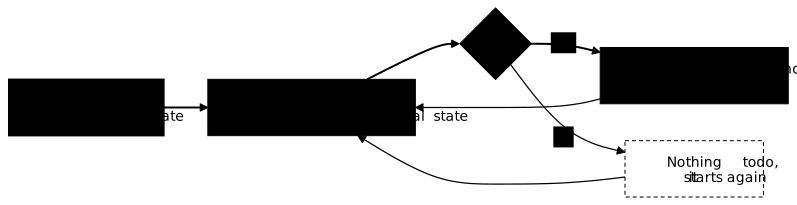
This approach also makes the orchestrator predictable: the description lives in a file, can be reread, versioned in Git and replayed identically on another cluster. It has a name, declarative management, which the Kubernetes lessons use all the time.
What does orchestration look like on a real cluster?
On a three-node Kubernetes cluster, deleting a copy or shutting down a node
requires no intervention: the orchestrator recreates what is missing. The
outputs below come from a local cluster created with kind, a tool that runs
each node in a Docker container. This cluster runs Kubernetes 1.37 and has
three nodes: one node that hosts the control plane (the components that
drive the cluster) and two worker nodes. You have nothing to type here: you
will create a cluster of this kind in the lesson
First cluster with kind.
Just look at the NODE column and the names of the copies.
Three copies of nginx were declared. The scheduler spread them across the two
worker nodes. The outputs of this section are those of
kubectl get pods -o wide, reduced to the columns NAME, READY, STATUS and
NODE:
NAME READY STATUS NODEweb-6d8c9555f7-6fpgv 1/1 Running orchestration-worker2web-6d8c9555f7-ct57l 1/1 Running orchestration-worker2web-6d8c9555f7-nx4p8 1/1 Running orchestration-workerBefore reading the next output, make a prediction: the copy 6fpgv is deleted
by hand, what will happen? The desired state says three copies, the actual state
counts two, so the orchestrator creates a new one. This is what the next
output shows, taken three seconds after the deletion: xrb5n replaced 6fpgv,
and the scheduler placed it on the other node, orchestration-worker.
NAME READY STATUS NODEweb-6d8c9555f7-ct57l 1/1 Running orchestration-worker2web-6d8c9555f7-nx4p8 1/1 Running orchestration-workerweb-6d8c9555f7-xrb5n 1/1 Running orchestration-workerLast test, the one an engine alone cannot do: the node orchestration-worker,
which carried two copies, is shut down with docker stop (kind nodes are
containers). Its status changes to NotReady after about fifty seconds. The
orchestrator then waits for a grace period of five minutes by default
(adjustable), in case the node comes back, then recreates the copies of the lost
node on the surviving node. The scheduler spreads copies as it sees fit, so the
number of copies carried by the stopped node varies from one cluster to
another: here, it carried two.
NAME READY STATUS NODEweb-6d8c9555f7-7mn7z 1/1 Running orchestration-worker2web-6d8c9555f7-clb5h 1/1 Running orchestration-worker2web-6d8c9555f7-ct57l 1/1 Running orchestration-worker2web-6d8c9555f7-nx4p8 1/1 Terminating orchestration-workerweb-6d8c9555f7-xrb5n 1/1 Terminating orchestration-workerIn the STATUS column, the two copies of the lost node, nx4p8 and xrb5n,
are marked Terminating, and two new copies, 7mn7z and clb5h, run on
orchestration-worker2. The READY column still shows 1/1 for the copies of
the stopped node: the node no longer answers, nobody updates this value, and
these lines stay there as long as it does not come back. Three copies run again
(7mn7z, clb5h and ct57l): the count of three is restored without a
single command being typed.
Why did Kubernetes win?
Kubernetes won out by combining Google's experience, neutral governance and an API that the whole ecosystem can extend. Google released it as open source in 2014, inspired by Borg, its internal orchestrator. Version 1.0 came out in 2015, and the project was handed to the CNCF (Cloud Native Computing Foundation, part of the Linux Foundation), of which it became the first graduated project on 6 March 2018.
Three factors largely explain its adoption against the other tools:
- Neutral governance: no vendor owns Kubernetes, which allowed every cloud provider to offer a managed service (EKS at AWS, GKE at Google, AKS at Microsoft, and at European providers).
- An extensible API: you can add your own object types. Networking, storage or security tools plug into it instead of reinventing an orchestrator.
- A single model: the same description works on a workstation, in a datacenter or at a cloud provider, which makes it the common base of teams and certifications.
The other orchestrators have not disappeared. Swarm mode is built into Docker and remains simple to pick up on a few machines; it is described in Docker Swarm (in French). Nomad, from HashiCorp, also orchestrates workloads that are not containers, see Nomad (in French). Finally OpenShift, from Red Hat, is not a competitor but an enriched distribution of Kubernetes, presented in OpenShift (in French).
Do you always need an orchestrator?
No: on a single machine, an orchestrator costs more than it brings. Kubernetes requires a control plane, the components that drive the cluster, to run, update and secure. For an application on a single server, Docker Compose describes several containers in one file and is enough, see Describe an application with Compose. Compose is not an orchestrator: it does not pick a machine and does not replace anything if the host goes down.
The need to orchestrate is born with the second machine and with the requirement for availability: as soon as a server failure must no longer cut the service, someone has to restart things elsewhere. The decision table by fleet size is in Runtime, engine, orchestrator (in French). For a small fleet or a homelab, K3s (in French) is a lightweight distribution of Kubernetes.
Key takeaways
- An orchestrator drives containers across several machines; on each node, it hands execution over to the local engine.
- Docker's
--restartpolicy restarts a container on its own machine, never on another one when the server goes down. - Six needs justify an orchestrator: placement, restart elsewhere, scaling, networking between hosts, rolling updates and desired state.
- The desired state is a description that the orchestrator continuously compares to the actual state: every gap triggers an action.
- Kubernetes won out thanks to its neutral governance (CNCF), its extensible API and its single model from workstation to cloud.
- Swarm and Nomad remain usable; Compose is not an orchestrator and is enough on a single machine.
Test your knowledge
Six questions check that you know what an engine alone does not do, what the desired state covers, and when an orchestrator becomes necessary.
Knowledge check
Check what you have learned with this interactive quiz
How it works
- The timer starts when you click Start
- Multiple choice, true/false and short answer questions
- You can move between questions
- Detailed results are shown at the end
Starts the quiz and the timer
Review
(0/0)Score by domain
A domain groups several guides and gets several questions, so its score is more reliable than a per-topic score, which often rests on a single question.
Summary
Strengths
No topic passed at 80% on at least two questions yet.
Weak areas
No topic below the pass mark.
Recommended next
Hints before you try again?
Continue the course: The key concepts of Kubernetes to get started
A new full quiz with random questions
Work again only on the questions you missed