You start a container and it does not run. Sometimes docker run stops straight away on an error. Sometimes the container shows up in docker ps, stops, then starts again without end. In both cases Docker tells you what happened, but not always where you look first. The container logs are sometimes empty.
This lesson shows where to read the information. The exit code, a number the program returns when it ends, tells you who failed: Docker itself or the program started inside the container. The container status tells you whether Docker is still trying to restart it. You then learn to stop a restart loop by fixing the problem, rather than by turning restarts off.
All the commands on this page target Docker Engine 29.9.2.
What you will learn
- Read the codes 125, 126 and 127 returned by
docker run, and say who produces them - Find the error of a container for which
docker logsreturns nothing, in.State.Error - Recognize the
Restartingstatus and read the.RestartCountcounter - Compare the four
--restartpolicies:no,on-failure[:n],always,unless-stopped - Stop a loop by fixing the problem, and know when to stop restarts in order to examine the container
Prerequisites
You need Docker installed and running (installing Docker), the basic commands from running a container, and docker logs and docker container inspect --format, both introduced in the lesson inspect a running container. Container states and the codes 137 and 143 are explained in lifecycle, PID 1 and clean stop. This lesson does not go back over them.
What do exit codes 125, 126 and 127 mean?
When docker run fails, it returns an exit code, a number your shell keeps in the $? variable. Docker reserves three of them, and each one tells you where to look. The lesson running a container introduced the codes 125 and 127. This one adds 126.
| Code | What happened | Where to look |
|---|---|---|
| 125 | Docker could not start the container | The message printed by docker run |
| 126 | The command exists in the image but cannot be executed | The permissions of the file being run |
| 127 | The command does not exist in the image | The name of the command and the content of the image |
With the codes 126 and 127, Docker did create the container, but the program never started. It therefore wrote nothing, and docker logs stays empty. The three tests below trigger the codes 125, 127 and 126, in that order.
First test, with an option docker run does not know. Docker refuses the command without creating a container. The echo then prints the code returned to your shell.
docker run --option-inventee alpine:3.24@sha256:be2656061b536c1883c4034790e21d0a09c5aaaf51968b89368a3c0371ea2c9a trueecho "code = $?"unknown flag: --option-inventee
Usage: docker run [OPTIONS] IMAGE [COMMAND] [ARG...]
Run 'docker run --help' for more informationcode = 125The message starts with unknown flag, Docker reminds you how to use docker run, and the code is 125.
Second test, with a tool that is missing from the image. The debian:13-slim image is deliberately minimal and does not contain curl. Docker creates the container, then cannot find the command to run.
docker run --name sans-curl debian:13-slim@sha256:f6b08b09a05725f9431502d3b5714f5c4576e82c1a84fa1debe0c24a7e0c3ec4 curl --versionecho "code = $?"docker: Error response from daemon: failed to create task for container: failed to create shim task: OCI runtime create failed: runc create failed: unable to start container process: error during container init: exec: "curl": executable file not found in $PATH
Run 'docker run --help' for more informationcode = 127The message ends with executable file not found in $PATH. The system looked for curl in the directories listed in the $PATH variable and found it nowhere. The code is 127.
Third test, with a file that exists but is not a program. /etc/passwd is in the image, without execute permission.
docker run --name sans-droit alpine:3.24@sha256:be2656061b536c1883c4034790e21d0a09c5aaaf51968b89368a3c0371ea2c9a /etc/passwdecho "code = $?"docker: Error response from daemon: failed to create task for container: failed to create shim task: OCI runtime create failed: runc create failed: unable to start container process: error during container init: exec: "/etc/passwd": permission denied
Run 'docker run --help' for more informationcode = 126This time the message says permission denied and the code is 126. The file exists, but the system refuses to execute it.
The code 125 has a special case. If the port you publish is already taken by another container, Docker creates the container but cannot start it. docker ps -a then shows it in the created state, like the containers in the next section. The lesson publish a port explains this conflict.
For the codes 127 and 126, the docker run message already names the cause. The code is nevertheless enough to know what to do, without reading the whole message. With 127, install the tool or fix its name. With 126, make the file executable.
Where is the error when the logs are empty?
When the program never started, the error is not in the logs. It is in the container's .State.Error field. The logs only contain what the program wrote, and a program that did not start wrote nothing. Docker, for its part, noted the reason for the failure in the information it keeps about the container, and docker container inspect displays it.
The two commands below query the sans-curl container created above. The first reads the logs. The second reads the status, the code and the error.
docker logs sans-curldocker container inspect sans-curl --format 'statut={{.State.Status}} code={{.State.ExitCode}} erreur={{.State.Error}}'The first command prints nothing. The second prints Docker's message:
statut=created code=127 erreur=failed to create task for container: failed to create shim task: OCI runtime create failed: runc create failed: unable to start container process: error during container init: exec: "curl": executable file not found in $PATHLook at the status first. It is created, not exited: the container was created, but it never started. A container that ran and then stopped would be exited. The sans-droit container gives the same result, with the code 126 and the message permission denied.
The code 125 reads differently in two cases. With an unknown option, Docker creates no container. docker ps -a has nothing to list, and only the docker run message explains the failure. With a port conflict, Docker creates a container in the created state, whose .State.ExitCode is 128. The 125 was the code of the docker run command, not the container's.
The code 127 can also come from elsewhere. If you start a shell and that shell calls the missing tool, the shell returns 127, after it has started. It writes its message to the logs.
docker run --name via-shell alpine:3.24@sha256:be2656061b536c1883c4034790e21d0a09c5aaaf51968b89368a3c0371ea2c9a sh -c 'outil-absent'echo "code = $?"docker logs via-shellsh: outil-absent: not foundcode = 127sh: outil-absent: not foundA code 127 therefore has two possible origins. If the logs are empty, Docker did not find the command, and the message is in .State.Error. If the logs hold the message, an already running program did not find another command.
What does the Restarting status mean?
The Restarting status describes a container that Docker restarts again and again, because its program fails on every attempt and its restart policy asks for it. The policy is a setting you apply at creation, with the --restart option. It repairs nothing, it repeats. The container is therefore never really running: its program stops, Docker restarts it, and it starts over.
Start a container whose program prints one line and then always exits with the code 1. The always policy asks Docker to restart it.
docker run -d --name tourne-en-rond --restart always alpine:3.24@sha256:be2656061b536c1883c4034790e21d0a09c5aaaf51968b89368a3c0371ea2c9a sh -c 'echo un essai de plus; exit 1'sleep 2docker ps -a --filter name=tourne-en-rond --format '{{.Names}} {{.Status}}'4623f3a7b80f8c6dc7f7eca65476d41da0beacd3862ddfeb1076346206db1e95tourne-en-rond Restarting (1) Less than a second agoThe status is Restarting, and the code of the last exit, 1, is in parentheses. The sleep 2 gives the program time to fail a first time. Without it, you would still see Up Less than a second. The identifier on the first line changes at every run.
Now query the container. You read its status, the code of its last exit, its policy and the number of restarts already made (labelled relances in the command), then its logs.
docker container inspect tourne-en-rond --format 'statut={{.State.Status}} code={{.State.ExitCode}} politique={{.HostConfig.RestartPolicy.Name}} relances={{.RestartCount}}'docker logs tourne-en-rondstatut=running code=0 politique=always relances=4un essai de plusun essai de plusun essai de plusun essai de plusun essai de plusThe .RestartCount field, displayed here under the name relances, counts the restarts made by Docker. Read it twice, a few seconds apart. If it goes up, the container is in a loop. docker logs repeats the same line on every attempt. Here there are five, the first start and four restarts, so every attempt fails the same way.
The status shown here is running with the code 0, which can be surprising. The inspection landed just after a restart: the program had just started again and its code had been reset to zero. Run the command again and you will most often read restarting and code=1. The restart counter, for its part, is reliable at any moment.
Docker pauses between two restarts. This pause doubles at every failure, from a fraction of a second at first up to one minute at most. On this container, the gap between two restarts went from 26 s to 51 s, then to 60 s. The loop therefore slows down on its own, but it does not stop.
What does each restart policy decide?
A policy decides in which cases Docker restarts the container. It says nothing about the health of the program. The --restart option accepts four values. The table shows, for each one, when it restarts, and what it does when Docker itself restarts.
| Policy | Restarts when the program exits | After a Docker restart |
|---|---|---|
no (default) | never | the container stays stopped |
on-failure[:n] | only if the code is not 0, at most n times | restarted if its last exit was an error and the cap is not reached; stays stopped after an exit with the code 0 |
always | always, even with the code 0 | restarted, even if it had been stopped by hand |
unless-stopped | always, even with the code 0 | restarted, unless it had been stopped by hand |
In this table, on-failure:n is the only policy that gives up. After n attempts, Docker stops restarting the container. It stays stopped (exited) with its last code. Written without n, the policy never gives up.
always and unless-stopped both restart the container endlessly. They differ only when Docker restarts, for example when the machine reboots. A container you had stopped with docker stop comes back under always and stays stopped under unless-stopped. These behaviors were verified on Docker Engine 29.9.2, by restarting the service with systemctl restart docker.
Under on-failure, when Docker restarts, everything depends on the code the program stopped with. When you stop the container with docker stop or docker kill, the policy never restarts it on the spot, even with an error code. But when Docker restarts, it reads the last recorded code. A program that had stopped cleanly returned the code 0, and Docker leaves it stopped. A program that ignored the stop request was killed after the grace period with the code 137: when Docker restarts, it comes back. The lesson lifecycle, PID 1 and clean stop explains this code.
To see Docker give up, start a container whose program exits with the code 4, under the on-failure:3 policy.
docker run -d --name limite-trois --restart on-failure:3 alpine:3.24@sha256:be2656061b536c1883c4034790e21d0a09c5aaaf51968b89368a3c0371ea2c9a sh -c 'exit 4'sleep 5docker container inspect limite-trois --format 'statut={{.State.Status}} code={{.State.ExitCode}} relances={{.RestartCount}} plafond={{.HostConfig.RestartPolicy.MaximumRetryCount}}'5f191dc84d5697602ad06a68f7f47eb4fd66f095e0b87ec1cc100165507b5e55statut=exited code=4 relances=3 plafond=3relances is 3, like plafond (the cap): Docker made its three attempts, then it gave up. The status is exited, whereas tourne-en-rond stayed in Restarting. The abandoned container keeps its exit code and its counter, and you can still read them. If you start it again or recreate it, they start from zero.
How do you stop a restart loop?
To stop a loop, fix the problem that makes the program fail. Turning restarts off, or deleting the container, stops the loop but repairs nothing. The program was already failing on the first attempt, the fault remains entire, and you risk losing the information that would have let you find it. Three actions are possible, and they do not have the same scope. The first repairs, the second stops restarts, the third recreates the container.
To repair, read the error in docker logs or in .State.Error, then fix the problem outside the container. It may be a file to create, a missing piece of data, or a service that is not listening yet. Docker keeps restarting the container, and the next attempt succeeds.
The following example uses a named volume, a storage space that Docker manages separately from the container. It is empty at first. The program requires a file pret in this volume and fails as long as the file is missing. When the file is there, exec replaces the shell with sleep infinity, which waits forever and becomes the container's main process.
docker run -d --name patient --restart unless-stopped -v attente:/donnees alpine:3.24@sha256:be2656061b536c1883c4034790e21d0a09c5aaaf51968b89368a3c0371ea2c9a sh -c 'test -f /donnees/pret && exec sleep infinity; echo fichier pret absent; exit 1'docker logs patientdbd7673f5a1921ee61fbfc93c782c09457bd3236c2d2eb5fa8c40d286bf57e52fichier pret absentThe logs point at the missing file. You create it in the volume with a throwaway container, which the --rm option deletes as soon as it has finished, without touching patient.
docker run --rm -v attente:/donnees alpine:3.24@sha256:be2656061b536c1883c4034790e21d0a09c5aaaf51968b89368a3c0371ea2c9a touch /donnees/pretdocker ps --filter name=patient --format '{{.Names}} {{.Status}}'patient Restarting (1) 6 seconds agoThe container is still in Restarting, because Docker has not yet made its next attempt. Do not restart patient by hand, let Docker do it. The delay between two attempts grows, so the wait can reach about a minute. Run docker ps again from time to time, until you see the Up status. In our test, the file was created about twenty seconds after the start, and the container went to Up six seconds after the file was created:
patient Up Less than a secondDocker restarted the container automatically once the problem was fixed. If you had restarted it yourself, you would only have skipped the wait, proving nothing more.
To stop the loop without repairing anything, docker update --restart=no removes the restart policy from a container that already exists, then docker stop stops it. You do this to examine the container while it is stopped. This is not a repair, the problem is still to be fixed.
docker update --restart=no tourne-en-ronddocker stop tourne-en-ronddocker ps -a --filter name=tourne-en-rond --format '{{.Names}} {{.Status}}'tourne-en-rondtourne-en-rondtourne-en-rond Exited (1) Less than a second agoThe first two lines are the names returned by docker update then docker stop. The third line confirms that the container is stopped and that Docker no longer restarts it.
When the problem comes from the command or from a setting applied when the container was created, the third resort is to recreate it. You cannot change on an existing container its command, its -e variables, its -v mounts, its -p ports or its image, and docker update does not change them. Delete the container with docker rm, then recreate it with a corrected docker run. Recreating is the right answer in these cases, and only after reading why the container was failing.
How do you diagnose a container that will not start or restarts in a loop?
To find the origin of the problem, look at three things in this order: the container status, its exit code, then the place where the error is written. The diagram below follows these three steps.
First type docker ps -a. If the container does not appear, docker run did not create it, and only its message explains the failure. If it is in Restarting, Docker restarts it again and again. Read its policy and its restart counter, then fix the problem. If it is in Created, the program never started: read .State.Error, whatever code is displayed. If it is in Exited, look at its last exit code, which tells you where to look for the error. This is also the case when Docker gave up at the on-failure cap.
Docker never gives the code 125 to a container: it is the code of the docker run command when it fails itself. An Exited (125) container can nevertheless exist, if its program chose to exit with that code. In that case, .State.Error is empty and the 125 reads like any "other code": the explanation is in docker logs.
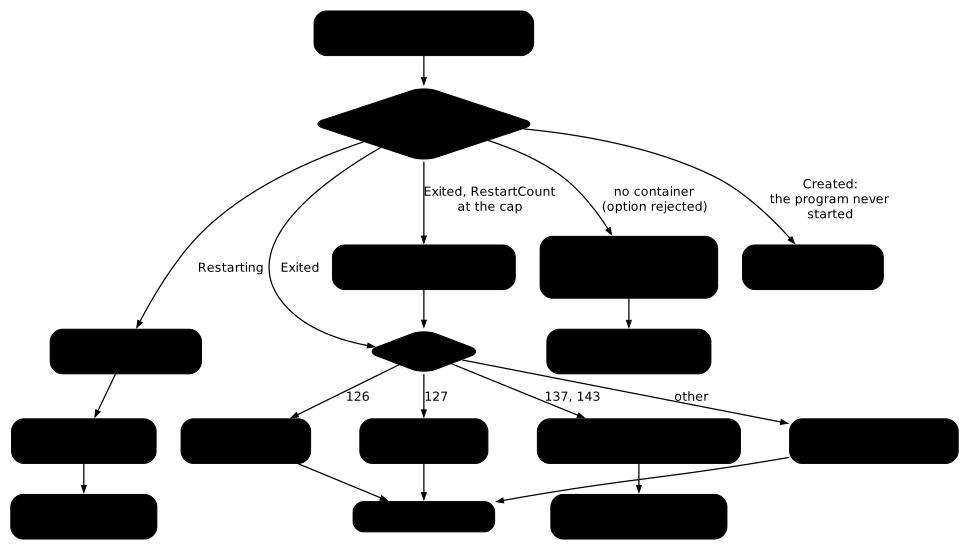
For the codes 137 and 143, the diagram sends you to the lesson lifecycle, PID 1 and clean stop. These codes signal a process killed by a signal, and that lesson explains how to read them.
Troubleshooting: the common errors
The table links a symptom you observe to its probable cause, then to the solution.
| Symptom | Cause | Solution |
|---|---|---|
docker logs returns nothing and the container is in the created state | The program never started (code 126, 127, or 128 on a port conflict) | Read .State.Error with docker container inspect |
| Code 127 although the tool exists on the host | The tool is missing from the image, often a minimal image | Install the tool in the image, or run a command that is present |
| The container restarts although it exits with the code 0 | always or unless-stopped policy: it restarts even after a clean exit | Use on-failure for a task that must finish |
.RestartCount no longer goes up and the container is Exited | The on-failure:n cap is reached | Read the code and the logs, fix the problem, then start the container again with docker start; recreate it only if its command or a setting applied at creation (variable, mount, port, image) is the cause |
| The loop resumes after a Docker restart | always policy, which also restarts a container stopped by hand, or on-failure, when the last exit was an error (for example a program that ignores the stop request and exits with the code 137) | Switch to unless-stopped, or to no |
How do you clean up after the tests?
The tests left six containers and a volume. docker rm -f deletes the containers and docker volume rm deletes the volume. The -f option first stops a container that is still running, including a container in Restarting. Delete the volume last, once the containers that use it are deleted.
docker rm -f sans-curl sans-droit via-shell tourne-en-rond limite-trois patientdocker volume rm attentedocker rm prints the deleted names and docker volume rm prints attente. After that, docker ps -a no longer lists any of these six names.
Practice
Two labs have you apply this method to containers that are already broken. You read the code, the status and the error, then you fix things.
In the first, three containers are stopped, each for a different reason. You note their exit codes and the status of one of them. Then you start a working container, with the same image and without rebuilding it.
In the second, three containers have the same fault. Docker restarts the first one endlessly, it gave up on the second, and the third works. You note the number of attempts, the exit code and the restart policy. Then you fix the problem so that the looping container stays up, without changing its policy or touching the working container.
In both labs, the grade does not depend on the commands you type. At the end, the lab queries Docker and checks the real state of the containers. Some values change at every run, so read them on your own containers: no answer key gives them.
Key points
- The code 125 is the code of the
docker runcommand when it fails itself, and Docker never gives it to a container: sometimes no container exists, sometimes it stays in thecreatedstate with its own code. AnExited (125)comes from the program and reads like any other code, indocker logs. The 126 means a file is not executable, the 127 that a command cannot be found. - A program that did not start wrote nothing.
docker logsis empty, and the error is read in.State.Errorwithdocker container inspect --format. - A code 127 can also come from a shell that is already running. In that case, its message is in the logs.
- The
Restartingstatus and a.RestartCountthat goes up indicate a loop: Docker restarts a program that fails on every attempt. on-failure:nis the only policy that gives up afternattempts.alwaysandunless-stoppedrestart endlessly and differ only after a Docker restart.- Turning restarts off stops the loop without repairing anything. To repair, read the error and fix the problem outside the container: Docker then restarts the container on its own. Turning restarts off is only for examining the container while it is stopped.
- You cannot change on an existing container its command, variables, mounts, ports or image. Recreating the container is the right answer when one of them is the cause, after reading why it was failing.
Knowledge check
Check that the essentials of this guide stuck. The questions cover only what has just been explained here.
Knowledge check
Check what you have learned with this interactive quiz
How it works
- The timer starts when you click Start
- Multiple choice, true/false and short answer questions
- You can move between questions
- Detailed results are shown at the end
Starts the quiz and the timer
Review
(0/0)Score by domain
A domain groups several guides and gets several questions, so its score is more reliable than a per-topic score, which often rests on a single question.
Summary
Strengths
No topic passed at 80% on at least two questions yet.
Weak areas
No topic below the pass mark.
Recommended next
Hints before you try again?
Continue the course: Exam: bring three failing containers back into service
A new full quiz with random questions
Work again only on the questions you missed