A backup that nobody has ever restored is a hypothesis, not a guarantee. You already know how to start a Compose stack with a database and files. Here, you back up the three parts of an application (the database, the files of the volumes, the configuration of the project), you restore them on a blank environment and you prove that the result is identical.
You will also run into two traps. Copying the volume of a running database gives a copy that may refuse to start. And the -T option of docker compose exec does not protect what you think it protects: an output redirected to a file stays intact without it.
What you will learn
- Say what must be backed up in a Compose application, and what is sensitive in the backup.
- Back up a PostgreSQL database with
pg_dump -Fcand read the contents of the archive withpg_restore --list. - Explain what
-Tchanges fordocker compose exec. - Explain why a hot copy of a database volume is not a backup.
- Back up the files of a volume with
tarand restore the configuration of a project. - Keep the database and the files consistent with each other when the application writes to both.
- Restore on a blank target, compare a control checksum and replay a restoration on a database that is already filled.
Prerequisites
You need a Linux host with Docker Engine 29.9.2 and its Compose 5.6.1 plugin, installed from the official repository as the lesson on installing Docker shows. The measurements in this lesson were made on Debian 13 with PostgreSQL 18.6.
You know how to write a Compose stack with a named volume, as Persist the data of a recreated stack shows, and you know the difference between a volume and a file mount, presented in Keep data and mount files. The stack reads its settings from a .env file (Interpolation and environment files) and the database password from a secret (Inject secrets and know their limits). The --wait option of docker compose up is explained in Startup, readiness and health. Finally, the lesson Read logs and attribute saturation has already presented -T as the form to use for a docker compose exec launched from a script.
This lesson covers the logical backup of a database, that is, an export of its contents. Physical backups (a copy of the database files, as pg_basebackup does), archiving of the transaction logs and point-in-time restoration are described in Sauvegarder et restaurer PostgreSQL (in French) and are not repeated here.
Which stack serves as the demonstration?
A small library in a ~/bibliotheque folder: a base service (PostgreSQL) and a site service (nginx) that serves cover images. The name of the folder becomes the project name, so the containers are called bibliotheque-... and the volumes bibliotheque_donnees and bibliotheque_couvertures.
The names are French (bibliotheque is a library, livres books, couvertures covers, sauv short for sauvegarde, a backup), because the commands and outputs shown are the ones that were run. They are identifiers and program output, so they stay as they are.
Create the folders, then the compose.yaml file. The ~/sauv folder will receive the backups, which contain all the data of the database: mkdir -m 700 reserves it for your account from the moment it is created, instead of restricting each file afterwards.
mkdir -p ~/bibliotheque/nginx ~/bibliotheque/secretsmkdir -m 700 -p ~/sauvcd ~/bibliothequeservices: base: image: postgres:18.6-alpine3.24@sha256:10a5c69a83035ab5239f5620d708520e8b28f5aa1f2b20143e6024532edadfb5 environment: POSTGRES_USER: ${BASE_UTILISATEUR} POSTGRES_DB: ${BASE_NOM} POSTGRES_PASSWORD_FILE: /run/secrets/base_mdp secrets: - base_mdp volumes: - donnees:/var/lib/postgresql healthcheck: test: ["CMD-SHELL", "pg_isready -U ${BASE_UTILISATEUR} -d ${BASE_NOM}"] interval: 2s timeout: 3s retries: 30 site: image: nginx:1.30.6-alpine@sha256:0e52bd054126cdc040b1276c0af347aeb02a41b9cfe305d6094767ac30e97949 ports: - "${SITE_PORT}:80" volumes: - couvertures:/usr/share/nginx/html/couvertures:ro - ./nginx/default.conf:/etc/nginx/conf.d/default.conf:rosecrets: base_mdp: file: ./secrets/base_mdp.txtvolumes: donnees: couvertures:The donnees volume is mounted on /var/lib/postgresql: with PostgreSQL 18, the image puts the data in a subfolder of this path, which will matter in the section on the hot copy. The couvertures volume is mounted read-only in nginx.
Next, write the nginx configuration, the .env file and the secret, keeping strict permissions on the last two. The password is a fake one, specific to the demonstration.
cat > nginx/default.conf <<'EOF'server { listen 80; location /couvertures/ { root /usr/share/nginx/html; } location = /sante { default_type text/plain; return 200 "ok\n"; }}EOFcat > .env <<'EOF'BASE_UTILISATEUR=biblioBASE_NOM=bibliothequeSITE_PORT=8080EOFprintf 'mdp-de-demo-bibliotheque' > secrets/base_mdp.txtchmod 600 .env secrets/base_mdp.txtdocker compose up -d --waitFill the database with five sample books. psql reads the text that follows on its standard input (the "heredoc"). The -T option tells Compose not to allocate a pseudo-terminal, a fake screen-and-keyboard that the section on -T explains.
docker compose exec -T base psql -U biblio -d bibliotheque -v ON_ERROR_STOP=1 <<'EOF'CREATE TABLE livres (id serial PRIMARY KEY, titre text NOT NULL, auteur text NOT NULL, annee int NOT NULL);INSERT INTO livres (titre, auteur, annee) VALUES ('Les Misérables','Victor Hugo',1862), ('Germinal','Émile Zola',1885), ('Le Petit Prince','Antoine de Saint-Exupéry',1943), ('L''Étranger','Albert Camus',1942), ('Bonjour tristesse','Françoise Sagan',1954);EOFThen create three cover files of 20,000 random bytes in the couvertures volume. The Alpine image is pinned by its digest, like the other two: without a tag or a digest, docker run alpine would pull alpine:latest, a reference that changes with each release. The ALPINE variable avoids repeating the reference.
ALPINE=alpine:3.24@sha256:be2656061b536c1883c4034790e21d0a09c5aaaf51968b89368a3c0371ea2c9adocker run --rm -v bibliotheque_couvertures:/dst "$ALPINE" \ sh -c 'for i in 1 2 3; do head -c 20000 /dev/urandom > /dst/couverture-$i.jpg; done'What remains is to fix what the restoration will have to find again. A control checksum is a short result computed on the data: if it is identical before and after, the data is too. Write the query in a file, then record the checksum of the database and those of the files as nginx serves them. In curl -fsS, the -f option makes the command fail on an HTTP error (404, 500) instead of returning the error page: without it, sha256sum would hash that page and the checksum would look valid. -sS stays silent except on error.
cat > ~/sauv/empreinte.sql <<'EOF'select count(*)||' lignes, md5 '||md5(string_agg(id||titre||auteur||annee,'|' order by id)) from livresEOFdocker compose exec -T base psql -U biblio -d bibliotheque -Atf - < ~/sauv/empreinte.sqlfor i in 1 2 3; do curl -fsS http://localhost:8080/couvertures/couverture-$i.jpg | sha256sum; done > ~/sauv/sha-source.txtcat ~/sauv/sha-source.txt5 lignes, md5 b52719a3d3e67d9d6e6b36e8a31f2877The number of rows and the md5 form the value that the target will have to reproduce. The -Atf - options of psql ask for a raw output, without a header, with the query read from standard input.
The sha-source.txt file keeps the checksum of the three covers. cat must display three lines, each a SHA-256 checksum of 64 hexadecimal characters, and the three are different, since the files are random. The same checksum three times would mean that curl failed and that sha256sum hashed an empty input.
What must be backed up in a Compose application?
Three things, which are not backed up in the same way: the data of the database, the files of the volumes and the configuration of the project. Images are not on the list, since they can be found again by their digest as long as the registry serves them.
| What matters | Where it lives | How to back it up | Sensitivity |
|---|---|---|---|
| The database data | The donnees volume, managed by PostgreSQL | pg_dump run in the container | Contains all the business data |
| The application files | The couvertures volume | tar run in a container that mounts the volume | Depends on the nature of the files |
| The project configuration | compose.yaml, .env, nginx/, secrets/ in the project folder | tar of the folder, on the host side | Contains the database password |
The last row of the table is the trickiest. The configuration archive contains the secret file and the .env: it is as sensitive as the secret itself. Keep it out of any Git repository. The database dump is just as sensitive: it carries all the business data. That is why the backup folder is created with mode 700.
A backup is only judged by its restoration. Each part will therefore be restored below on a blank target, with the same control checksum to conclude.
How do you back up the database with pg_dump?
By running pg_dump in the database container with docker compose exec, and redirecting its output to a file on the host. pg_dump queries the server like any other client and reads the data in a transaction: according to the pg_dump documentation, it gets a consistent view of the database even while other clients are writing. The -Fc format, called the custom format, produces a compressed archive specific to PostgreSQL that pg_restore can read back, table by table if you wish.
cd ~/sauvdocker compose -f ~/bibliotheque/compose.yaml exec -T base pg_dump -Fc -U biblio bibliotheque > biblio.dumpls -l biblio.dumpOn the measurement machine, the command took 0.1 s and the archive is 2,887 bytes: the database is tiny. Remember the principle rather than the size: the biblio.dump file is created by the shell of the host (that is the > redirection), while pg_dump runs in the container and writes to its standard output.
The -f option of Compose designates the project file, which lets you run the command from ~/sauv. You can also move into ~/bibliotheque.
What does the -T option of docker compose exec change?
-T prevents Docker from allocating a pseudo-terminal, that is, a fake screen-and-keyboard, for the command. Without the option, docker compose exec may allocate one, and what matters for the result is where the standard output goes: a file or a terminal.
You might think that without -T, a pseudo-terminal damages an output redirected to a file. The measurement says otherwise. On the measurement machine, pg_dump -Fc run without -T and redirected to a file returned code 0 and a file of the same size as the first (2,887 bytes), with or without a pseudo-terminal on the input. pg_restore --list read that file. The > redirection therefore does not corrupt the archive.
The defect appears when the standard output is a terminal: a text pg_dump, without redirection, run under a pseudo-terminal produced CRLF line endings (a carriage return before each line feed, 47 counted in the output). Never send pg_dump -Fc to a terminal: a binary archive has no business on a screen, always redirect it to a file.
The real trap is elsewhere, and -T does not fix it.
In a script read on standard input (a command launched by ssh ... bash -s, or a while read loop), a docker compose exec that has no input redirection consumes the rest of the script: the following commands never run. The remedy is to give it an input of its own, with < /dev/null when the command has nothing to read. The rule comes down to two gestures: -T for any redirected or scripted command, which removes the pseudo-terminal, and < /dev/null so that exec does not touch the input of the script.
How do you check the contents of a backup without restoring it?
With pg_restore --list, which reads the archive and displays its table of contents without writing anything to a database. You run it in the container, the archive arrives on standard input, and -T avoids the pseudo-terminal.
docker compose -f ~/bibliotheque/compose.yaml exec -T base pg_restore --list < biblio.dump;; Archive created at 2026-11-03 05:47:10 UTC; dbname: bibliotheque; TOC Entries: 11; Compression: gzip; Dump Version: 1.16-0; Format: CUSTOM; Integer: 4 bytes; Offset: 8 bytes; Dumped from database version: 18.6; Dumped by pg_dump version: 18.6;;; Selected TOC Entries:;220; 1259 16386 TABLE public livres biblio219; 1259 16385 SEQUENCE public livres_id_seq biblio3481; 0 0 SEQUENCE OWNED BY public livres_id_seq biblio3323; 2604 16389 DEFAULT public livres id biblio3474; 0 16386 TABLE DATA public livres biblio3482; 0 0 SEQUENCE SET public livres_id_seq biblio3325; 2606 16397 CONSTRAINT public livres livres_pkey biblioRead the header first: Format: CUSTOM confirms the format, and Dumped from database version: 18.6 says which version the archive comes from. Then look for the TABLE DATA public livres line: it is the one that carries the rows of the table. Without it, the archive would contain the structure but no data. The SEQUENCE SET line carries the position of the sequence, that is, the last number handed out, which the restoration must also recover.
A limit to know about: pg_dump only backs up the targeted database, not the roles (the users and their permissions), which belong to the whole server. The pg_dumpall --globals-only section of Sauvegarder et restaurer PostgreSQL (in French) explains how to export them.
How do you keep the database and the files consistent with each other?
When the application writes to both the database and the files, the two backups, taken at two different moments, can contradict each other: the database references a file that is missing from the archive, or the other way round. The remedy is to stop the service that writes during both backups, then restart it: docker compose stop site before, docker compose start site after (replace site with the service that writes in your case). In this demonstration, the site only reads, so the precaution is unnecessary; the guide Sauvegarder et restaurer Forgejo (in French) covers the case of a real application.
Why is copying the volume of a running database not a backup?
Because the files of a running database change during the copy: PostgreSQL continuously creates, fills and deletes segments of its transaction log (the WAL, its pg_wal files). A file copy taken at that moment mixes states from different times, and the copied database may not start on it. For an ordinary file copy (tar, cp), you must therefore stop the server before copying. A filesystem snapshot, a frozen image of the disk taken in a single step, would also do, but only some filesystems or volumes can produce one.
The measurement bench replayed this case five times on a 539 MB database, fed continuously by a writer (batches of 5,000 rows, with a CHECKPOINT every 0.3 s). It is a deliberately heavy load. Meanwhile, the volume was copied by a tar run in a container, then a PostgreSQL of the same image was started on the copy.
Here is the copy that was made. On your small database at rest, replaying it would not reproduce these failures: read the command and what it gave.
docker run --rm -v bibliotheque_donnees:/src:ro "$ALPINE" tar cf - -C /src . \ | docker run --rm -i -v copie1:/dst "$ALPINE" tar xf - -C /dstFive attempts out of five failed, in the same way. The reading tar returned code 1, with messages of this kind for WAL segments that disappeared during the copy.
tar: ./18/docker/pg_wal/000000010000000000000048: No such file or directorytar: ./18/docker/pg_wal/00000001000000000000004A: No such file or directoryThe PostgreSQL started on the copy then stopped within a second.
2026-11-03 05:48:59.621 UTC [31] LOG: invalid checkpoint record2026-11-03 05:48:59.621 UTC [31] PANIC: could not locate a valid checkpoint record at 0/47AD55F8The word PANIC says that the database refuses to start: it does not degrade silently. One attempt out of five gave a similar message, PANIC: could not find redo location ... referenced by checkpoint record. A tricky detail: the part that writes the copy (tar xf) returned code 0 in all five attempts. With a pipe (the | between the two docker run), the shell only returns the code of the last command: the failure of the read is lost, and the faulty copy looks successful.
A control showed the other side. On a database at rest, with a CHECKPOINT just before the copy (the command that forces PostgreSQL to write to disk what it holds in memory) and no writes, the copy started and displayed database system was not properly shut down; automatic recovery in progress, then redo done, with the same number of rows. PostgreSQL treated the copy as a database that had been stopped abruptly and recovered it. That is luck, not a guarantee: a database at rest only differs from the other one at the moment you need to restore it.
One reservation is in order: the load of this bench is deliberately heavy, and under a normal load the failure may be less frequent. The conclusion still holds, because a tar run on a running volume is an ordinary file copy: it requires the server to be stopped.
For a cold copy (database stopped cleanly) or a physical backup with pg_basebackup, read Sauvegarder et restaurer PostgreSQL (in French) and check by a restoration on your version. This lesson keeps pg_dump, whose restoration is proven below.
How do you back up the files and the configuration?
The files of a volume are backed up with tar, run in a container that mounts the volume read-only, together with the backup folder of the host. The files of a site are not a database: they only change when the application writes them, and here the site serves them read-only.
cd ~/sauvdocker run --rm -v bibliotheque_couvertures:/src:ro -v "$PWD":/sauvegarde "$ALPINE" \ tar czf /sauvegarde/couvertures.tar.gz -C /src .ls -l couvertures.tar.gzOn the measurement machine, the archive weighs about 60,000 bytes (60,319 on the last attempt): three random files of 20,000 bytes do not compress, and the exact value varies from one attempt to the next. The file belongs to root, because tar runs as root in the container. You can read it, and delete it with rm, since the folder is yours; in a terminal, rm first asks for confirmation for this write-protected file.
For the configuration, it is a simple tar of the folder, on the host side. The archive includes the .env and the secret.
cd ~/bibliothequetar czf ~/sauv/config.tar.gz compose.yaml .env nginx secretstar tzvf ~/sauv/config.tar.gz-rw-rw-r-- ansible/ansible 866 2026-11-03 05:47 compose.yaml-rw------- ansible/ansible 61 2026-11-03 05:47 .envdrwxrwxr-x ansible/ansible 0 2026-11-03 05:46 nginx/-rw-rw-r-- ansible/ansible 187 2026-11-03 05:47 nginx/default.confdrwxrwxr-x ansible/ansible 0 2026-11-03 05:46 secrets/-rw------- ansible/ansible 24 2026-11-03 05:47 secrets/base_mdp.txtIn the listing, tar kept the 600 mode of the .env and of the secret inside the archive. But the archive file itself gets the permissions that your umask (the mask that removes permissions from any created file) leaves: on the measurement machine (umask 0002), it is created as rw-rw-r--. Here, the ~/sauv folder in 700 stops other accounts from entering it, and therefore from reading the archive. If you move it elsewhere, check its permissions with ls -l and restrict it with chmod 600.
How do you restore on a blank target?
By recreating the project in another folder, in this order: configuration, volumes, files, startup, then database. A blank target is an environment that does not yet contain anything of the stack: no volume, no container, no data. Here, it is a second project, bibliotheque-restauree, started on the same machine for the demonstration. In a real recovery, it would be another machine: first copy the backup folder, then follow the same steps. That is also the reason to keep a copy off the machine: a backup left on the host disappears with it. The guide Sauvegarder et restaurer Forgejo (in French) shows an encrypted remote copy.
The diagram shows the path of each part. At the top, each source becomes a backup file. At the bottom, the red lines show at which step each file is used: the configuration first, the files once the volumes are created, the database last, when the service is running.
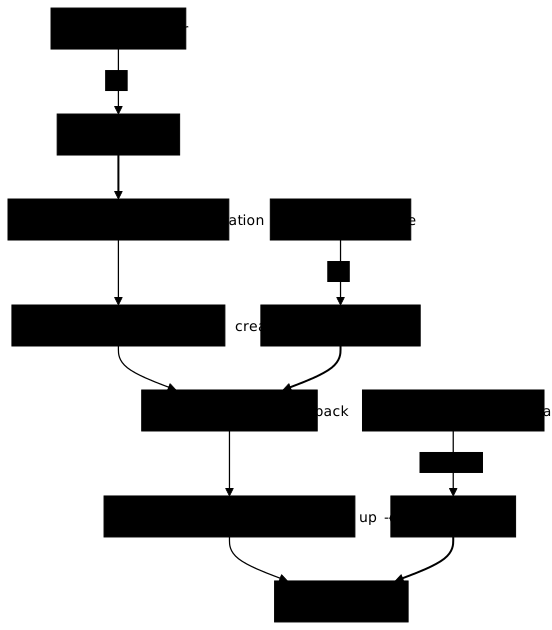
Restore the configuration first. Since the target runs next to the source, a single setting changes: the published port, 8081 instead of 8080.
mkdir -p ~/bibliotheque-restauree && cd ~/bibliotheque-restaureetar xzf ~/sauv/config.tar.gzsed -i 's/^SITE_PORT=8080/SITE_PORT=8081/' .envcat .envBASE_UTILISATEUR=biblioBASE_NOM=bibliothequeSITE_PORT=8081The volumes of the target must then exist, and belong to the project, before you put files in them. docker compose create creates the volumes with the labels that attach them to the project, then the network and the containers, without starting anything.
docker compose createdocker volume ls Volume bibliotheque-restauree_donnees Creating Network bibliotheque-restauree_default Creating Volume bibliotheque-restauree_couvertures Creating Volume bibliotheque-restauree_couvertures Created Volume bibliotheque-restauree_donnees Created Network bibliotheque-restauree_default Created Container bibliotheque-restauree-site-1 Creating Container bibliotheque-restauree-base-1 Creating Container bibliotheque-restauree-site-1 Created Container bibliotheque-restauree-base-1 CreatedDRIVER VOLUME NAMElocal bibliotheque-restauree_couvertureslocal bibliotheque-restauree_donneeslocal bibliotheque_couvertureslocal bibliotheque_donneesThe project prefix separates the volumes of the target from those of the source. Next, restore the files into the volume of the target, with the same tar, in the opposite direction and with the backup folder mounted read-only.
docker run --rm -v bibliotheque-restauree_couvertures:/dst -v "$HOME/sauv":/sauvegarde:ro "$ALPINE" \ tar xzf /sauvegarde/couvertures.tar.gz -C /dstStart the target and wait for the database to be ready. Then look at what it contains.
docker compose up -d --waitdocker compose exec -T base psql -U biblio -d bibliotheque -c '\dt' Container bibliotheque-restauree-site-1 Starting Container bibliotheque-restauree-base-1 Starting Container bibliotheque-restauree-site-1 Started Container bibliotheque-restauree-base-1 Started Container bibliotheque-restauree-base-1 Waiting Container bibliotheque-restauree-site-1 Waiting Container bibliotheque-restauree-site-1 Healthy Container bibliotheque-restauree-base-1 HealthyDid not find any tables.The last line says that the bibliotheque database exists but has no tables. The postgres image created it on the first start, from POSTGRES_DB, so there is no CREATE DATABASE to run. What remains is to pour the backup into it.
docker compose exec -T base pg_restore -U biblio -d bibliotheque --exit-on-error --no-owner < ~/sauv/biblio.dumpecho "rc=$?"docker compose exec -T base psql -U biblio -d bibliotheque -Atf - < ~/sauv/empreinte.sqlrc=05 lignes, md5 b52719a3d3e67d9d6e6b36e8a31f2877The restoration took 0.12 s on the measurement machine. --exit-on-error stops pg_restore at the first error instead of carrying on, and --no-owner avoids reassigning each object to its original owner: they belong to the user of the connection. Above all, compare the checksum: the number of rows and the md5 are those of the source, recorded earlier.
What should you do about the "already exists" error?
Nothing is broken: pg_restore refuses to recreate tables that already exist. You can see it by rerunning the same restoration, now that the database is filled. The --no-owner option is left out here and below: these two commands are played with the same biblio user that created the objects, so there is no owner to reassign.
docker compose exec -T base pg_restore -U biblio -d bibliotheque --exit-on-error < ~/sauv/biblio.dumpecho "rc=$?"pg_restore: error: could not execute query: ERROR: relation "livres" already existsCommand was: CREATE TABLE public.livres ( id integer NOT NULL, titre text NOT NULL, auteur text NOT NULL, annee integer NOT NULL);
rc=1The return code is 1 and the quoted query is the one that fails: pg_restore wanted to recreate the table and it exists. There are two ways out. The cleanest is to restore on a blank database, as above. To overwrite a database that exists, add --clean --if-exists: pg_restore drops each object before recreating it, without error if the object is absent.
docker compose exec -T base pg_restore -U biblio -d bibliotheque --clean --if-exists --exit-on-error < ~/sauv/biblio.dumpecho "rc=$?"This time the return code is 0. Record the checksum of the target with the psql -Atf - command already used: it must give the value of the source again. But --clean destroys what exists in the targeted database: use it only on the one you want to replace.
How do you prove that the restoration is complete?
By comparing the target to the source on each of the three parts, and by checking that the application behaves as before. The checksum of the database has already been compared. Record the one from the source again, then read the rows of the target.
docker compose -f ~/bibliotheque/compose.yaml exec -T base psql -U biblio -d bibliotheque -Atf - < ~/sauv/empreinte.sqldocker compose exec -T base psql -U biblio -d bibliotheque -c 'select id, titre, annee from livres order by id'5 lignes, md5 b52719a3d3e67d9d6e6b36e8a31f2877 id | titre | annee----+-------------------+------- 1 | Les Misérables | 1862 2 | Germinal | 1885 3 | Le Petit Prince | 1943 4 | L'Étranger | 1942 5 | Bonjour tristesse | 1954(5 rows)The accents are preserved. Then check the sequence, the counter that gives the number of new rows. A restoration that forgot it would replay numbers already taken. Add a row, then delete it.
docker compose exec -T base psql -U biblio -d bibliotheque -Atc "insert into livres (titre,auteur,annee) values ('Candide','Voltaire',1759) returning id"docker compose exec -T base psql -U biblio -d bibliotheque -Atc "delete from livres where titre='Candide'"6INSERT 0 1DELETE 1The new book received the identifier 6: the sequence resumed after the last number of the source. For the files, compare what nginx serves on the target with what you recorded on the source, then test the health route.
for i in 1 2 3; do curl -fsS http://localhost:8081/couvertures/couverture-$i.jpg | sha256sum; done > ~/sauv/sha-cible.txtdiff ~/sauv/sha-source.txt ~/sauv/sha-cible.txtcurl -s http://localhost:8081/santecurl -s -o /dev/null -w '%{http_code}\n' http://localhost:8081/santeok200The diff command displays nothing: the three checksums are identical. The /sante route answers ok with code 200. The configuration remains. docker compose config displays the file as Compose interprets it, variables replaced: compare the source and the target. For the source, -f designates its file from the folder of the target, and -p bibliotheque explicitly sets its project name, the one under which it runs.
docker compose -f ~/bibliotheque/compose.yaml -p bibliotheque config > ~/sauv/cfg-source.txtdocker compose config > ~/sauv/cfg-cible.txtdiff ~/sauv/cfg-source.txt ~/sauv/cfg-cible.txt1c1< name: bibliotheque---> name: bibliotheque-restauree37c37< source: /home/ansible/bibliotheque/nginx/default.conf---> source: /home/ansible/bibliotheque-restauree/nginx/default.conf44c44< published: "8080"---> published: "8081"48c48< name: bibliotheque_default---> name: bibliotheque-restauree_default51c51< name: bibliotheque_couvertures---> name: bibliotheque-restauree_couvertures53c53< name: bibliotheque_donnees---> name: bibliotheque-restauree_donnees56,57c56,57< name: bibliotheque_base_mdp< file: /home/ansible/bibliotheque/secrets/base_mdp.txt---> name: bibliotheque-restauree_base_mdp> file: /home/ansible/bibliotheque-restauree/secrets/base_mdp.txtEach difference has an explanation: the project name, the absolute paths of the folder (the nginx mount and the secret file), the published port, chosen for the demonstration, and the names prefixed by the project (network, volumes, secret). Nothing else differs: the structure is the same. A difference that you cannot explain, on the other hand, signals an incomplete restored configuration.
The test is complete when the three readings agree: the checksum of the database, the checksums of the served files, and a configuration that differs only by what you changed.
What should you do when the backup or the restoration fails?
The table starts from what you observe, then gives the probable cause and the gesture that fixes the problem.
| What you observe | Probable cause | What you do |
|---|---|---|
pg_restore: error: ... relation "..." already exists, code 1 | The targeted database already contains the tables | Restore on a blank database, or add --clean --if-exists if you want to overwrite this database |
Did not find any tables. right after up -d --wait on the target | The database was created empty by the image | This is normal: run pg_restore |
tar returns No such file or directory on pg_wal files, then the copy refuses to start with PANIC | Hot copy of the volume of a running database | Give up this copy; back up with pg_dump |
| The copy looks successful but the database does not start | In a pipe, the shell returns the code of the last command, not that of the reading tar | Test the return code of the read, and above all restore before trusting the backup |
| The following commands of a script never run | docker compose exec reads the standard input of the script | Add < /dev/null if the command reads nothing (and keep -T to remove the pseudo-terminal) |
CRLF line endings in a text output of pg_dump | The standard output is a terminal with a pseudo-terminal | Redirect the output to a file with -T |
How do you clean everything up after the demonstration?
The demonstration leaves two projects, four volumes (five if you replayed the hot copy), three images and three folders. docker compose down -v removes the containers, the network and the volumes of each project. Images are removed by their digest, which avoids touching another version.
cd ~/bibliotheque-restauree && docker compose down -vcd ~/bibliotheque && docker compose down -vdocker rmi postgres:18.6-alpine3.24@sha256:10a5c69a83035ab5239f5620d708520e8b28f5aa1f2b20143e6024532edadfb5 \ nginx:1.30.6-alpine@sha256:0e52bd054126cdc040b1276c0af347aeb02a41b9cfe305d6094767ac30e97949cd ~ && rm -r ~/sauv ~/bibliotheque ~/bibliotheque-restaureeThe ~/sauv folder is deleted by the last rm, including couvertures.tar.gz (owned by root, but in a folder that is yours; rm -r may ask for confirmation, answer y). If you replayed the hot copy, also remove its volume, copie1, with docker volume rm copie1. Keep the Alpine image if you use it elsewhere, otherwise remove it by its digest: docker rmi alpine:3.24@sha256:be2656061b536c1883c4034790e21d0a09c5aaaf51968b89368a3c0371ea2c9a. After that, docker ps -a and docker volume ls no longer show anything from the demonstration.
Practice
The lab gives you a Compose stack that is already running, with a PostgreSQL database and a service that publishes files. You back it up, bring it back in a new project that runs next to it, then prove that the data served is the same, without costing the source anything.
The validation does not look at the commands you typed. It rereads the database backup to check that it is logical, checks that the files and the configuration are archived separately and that the target is a distinct project, up on its own port, then compares the checksums of the target with those of the source, which stayed intact. The files are read as the web service serves them, not only in the volume.
Key points
- A backup is only worth what its restoration proves: prove it with a control checksum compared between the source and the target.
- A Compose application has three parts to back up: the database (
pg_dump), the files of the volumes (tarin a container) and the configuration of the project. - The configuration archive and the database dump are sensitive: create the backup folder with mode
700from the start. docker compose exec -T base pg_dump -Fc ... > fileproduces an archive thatpg_restore --listlets you read without restoring anything.-Tdisables the pseudo-terminal: redirecting the output to a file does not corrupt the archive, but an output to a terminal can addCRLF. The trap of scripts is another one: in a script read on standard input, anexecwithout input redirection consumes the rest of the script, and the remedy is< /dev/null.- Copying a database volume with
tarwhile it runs is not a backup: on the measurement bench, under heavy load, five copies out of five failed withPANIC. Under a normal load the failure may be less frequent, and a copy that starts remains luck. - Restore on a blank target in this order: configuration,
docker compose create, files,up -d --wait, thenpg_restore. Thealready existserror is fixed by a blank database or by--clean --if-exists, which destroys what exists. - Pin by digest the images of your backup commands, Alpine included: without a tag,
docker run alpinepullslatest. - If the application writes to both the database and the files, stop the service that writes during both backups, then restart it.
Knowledge check
Check that the essentials of this lesson have stuck. The questions cover only what has just been explained here.
Knowledge check
Check what you have learned with this interactive quiz
How it works
- The timer starts when you click Start
- Multiple choice, true/false and short answer questions
- You can move between questions
- Detailed results are shown at the end
Starts the quiz and the timer
Review
(0/0)Score by domain
A domain groups several guides and gets several questions, so its score is more reliable than a per-topic score, which often rests on a single question.
Summary
Strengths
No topic passed at 80% on at least two questions yet.
Weak areas
No topic below the pass mark.
Recommended next
Hints before you try again?
Continue the course: Update, and roll back without losing data
A new full quiz with random questions
Work again only on the questions you missed