Upgrading Docker Engine must not cost your services an outage. This lesson takes you from version 29.8.2 to version 29.9.2 on a Debian 13 machine that runs a service and holds a piece of data to check, then back again. The engine packages are held with apt-mark hold, as the installation lesson leaves them. Before each step, you record the state and you back up. Afterwards, you check. The outputs come from a complete run of the lesson on November 4, 2026, on a throwaway VM (Docker installed from the official repository, cgroup v2, containerd image store).
Two notions are needed from the start. The daemon (dockerd) is the process that manages containers, and a package update restarts it. live-restore is the daemon.json setting that lets containers keep running while the daemon is stopped, then has the daemon take them over again when it comes back.
The diagram shows the sequence of the lesson. Look at the diamond: it decides whether you keep the new version or go back to the previous one, and the rollback box recalls the most likely obstacle, the systemd start limit.
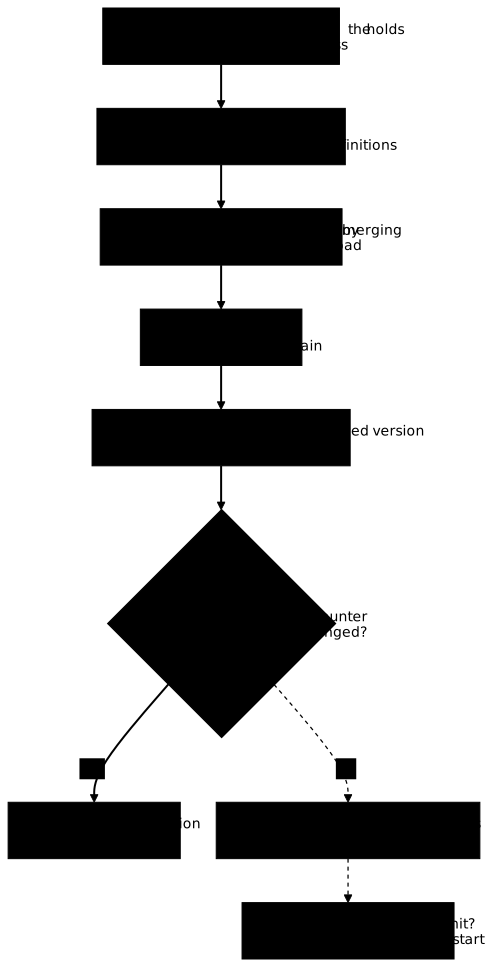
The sections follow these steps, with two detours: what a daemon restart does without live-restore, and what a faulty daemon.json gives.
What you will learn
- Record the state of the engine and its apt holds, and set up a witness service and a witness data file before intervening
- Back up
/etc/dockerand the container definitions, and know what an archive does not restore - Explain why a daemon restart restarts the containers, and what
live-restorechanges - Add
live-restoreto an existingdaemon.jsonwithout overwriting it, and validate it before reloading - Upgrade to a named version from the official repository by lifting then setting the hold again, and check the recovery with evidence
- Go back to the previous version, and recover when systemd refuses to restart the daemon
Prerequisites
- Rotate Docker logs and reclaim disk space: the operating gesture on the engine, and the
/etc/docker/daemon.jsonfile that carries its options. - Container lifecycle, PID 1 and clean shutdown in Docker: how a container stops (SIGTERM, 10-second delay, SIGKILL), on which a measurement below depends.
- Install Docker Engine 29 and prove it works: the pinned installation and the package holds, which this lesson picks up.
- A throwaway Debian 13 machine, a user who belongs to the
dockergroup andsudo. The commands are written for bash.
The configuration of the daemon itself (storage, logs, mirrors) is described in Configurer le daemon Docker (in French): this lesson keeps only one setting, live-restore. The mechanism by which a container survives the daemon (the intermediate containerd-shim processes) is explained in Who launches a container: Docker's execution chain.
How do you get the starting machine?
Start from a new Debian 13 VM, where the official Docker repository is configured as in the installation lesson. There you reproduce the state that lesson leaves, but in 29.8.2: the six Docker packages installed in a named version, docker-ce-rootless-extras included, then held. The block also adds a daemon.json that sets log rotation: the installation lesson does not create one, and here it stands for the configuration that a real host already carries. Do not run this block on your training machine, whose packages are held in 29.9.2: apt-get would refuse to change them there.
Naming the version of docker-ce-rootless-extras matters: this package is recommended by docker-ce, and without a named version, apt installs its most recent version (29.9.3 on a machine measured here), which then differs from the engine's.
V=5:29.8.2-1~debian.13~trixiesudo apt-get install -y --allow-downgrades \ docker-ce="$V" docker-ce-cli="$V" docker-ce-rootless-extras="$V" \ containerd.io=2.4.2-3~debian.13~trixie \ docker-buildx-plugin=0.38.1-1~debian.13~trixie \ docker-compose-plugin=5.6.1-1~debian.13~trixiesudo apt-mark hold docker-ce docker-ce-cli docker-ce-rootless-extras containerd.io docker-buildx-plugin docker-compose-pluginecho '{ "log-driver": "json-file", "log-opts": { "max-size": "10m", "max-file": "3" } }' | sudo tee /etc/docker/daemon.jsonsudo systemctl restart dockerThe --allow-downgrades option is only needed if the machine already carries a more recent version that is not held. On a new VM, it has no effect.
How do you take stock of the engine and set up a witness?
Before touching the engine, record what is installed, what is configured and what is already held, then create something that can prove the intervention broke nothing. An inventory written before the intervention serves as a point of comparison: without it, you cannot say what changed.
docker version --format 'client={{.Client.Version}} serveur={{.Server.Version}}'dpkg-query -W -f='${Package} ${Version}\n' docker-ce docker-ce-cli docker-ce-rootless-extras containerd.io docker-buildx-plugin docker-compose-pluginapt-mark showholddocker info --format 'liverestore={{.LiveRestoreEnabled}} logging={{.LoggingDriver}}'sudo cat /etc/docker/daemon.jsonapt-cache policy docker-ce | head -4client=29.8.2 serveur=29.8.2containerd.io 2.4.2-3~debian.13~trixiedocker-buildx-plugin 0.38.1-1~debian.13~trixiedocker-ce 5:29.8.2-1~debian.13~trixiedocker-ce-cli 5:29.8.2-1~debian.13~trixiedocker-ce-rootless-extras 5:29.8.2-1~debian.13~trixiedocker-compose-plugin 5.6.1-1~debian.13~trixiecontainerd.iodocker-buildx-plugindocker-cedocker-ce-clidocker-ce-rootless-extrasdocker-compose-pluginliverestore=false logging=json-file{ "log-driver": "json-file", "log-opts": { "max-size": "10m", "max-file": "3" } }docker-ce: Installed: 5:29.8.2-1~debian.13~trixie Candidate: 5:29.9.3-1~debian.13~trixie Version table:Five things can be read in this output. The three engine packages (docker-ce, docker-ce-cli and docker-ce-rootless-extras) are in 29.8.2, and the other three carry their own versions. apt-mark showhold lists these same six packages: they are held. liverestore=false says the setting is not active. The daemon.json file already exists and carries log options, which will have to be kept. Finally, the repository's candidate is 29.9.3, not the target version.
The last line matters: if you do not name the version, apt installs the candidate, not the one you decided on. The upgrade below therefore names the version.
The witness is made of a piece of data in a volume and a service that writes one heartbeat per second, that is, one timestamp counter line in a file of the volume. The data lets you check that nothing is lost. The heartbeat counter proves whether the service was restarted: a restarted service starts again at 1. The image is pinned by its digest.
IMG='alpine:3.24.3@sha256:be2656061b536c1883c4034790e21d0a09c5aaaf51968b89368a3c0371ea2c9a'docker volume create vt-donneesdocker run --rm -v vt-donnees:/data "$IMG" sh -c 'echo "commande 4471 validee" > /data/commandes.txt'docker run -d --name vt-service --restart unless-stopped -v vt-donnees:/data "$IMG" \ sh -c 'i=0; while true; do i=$((i+1)); echo "$(date +%s) $i" >> /data/battements; sleep 1; done'docker run --rm -v vt-donnees:/data "$IMG" sha256sum /data/commandes.txtdocker inspect -f 'StartedAt={{.State.StartedAt}} Pid={{.State.Pid}} Restart={{.RestartCount}}' vt-serviceNote two values: the sha256 checksum of the commandes.txt file (here 6dd06996…) and the StartedAt and Pid line of the service. The PID is the number of the container's process as seen from the host, and StartedAt is the time it started. If either one changes, the container was restarted. The counter of the last heartbeat says the same thing: if it starts again at 1, the service was restarted.
Three small functions, to paste into your shell, save you from retyping these measurements. etat prints the PID and StartedAt, dernier prints the last heartbeat written (timestamp and counter), and empreinte recomputes the checksum of the data. The checksum checks the data: it shows that a file has not changed, it does not protect it.
etat() { docker inspect -f 'StartedAt={{.State.StartedAt}} Pid={{.State.Pid}} Restart={{.RestartCount}} Status={{.State.Status}}' vt-service}dernier() { echo "dernier battement : $(sudo tail -1 "$(docker volume inspect -f '{{.Mountpoint}}' vt-donnees)/battements")"}empreinte() { sudo sha256sum "$(docker volume inspect -f '{{.Mountpoint}}' vt-donnees)/commandes.txt"}These functions exist only in the terminal where you paste them. The same goes for the variables that the following blocks set (T0, V, D). Keep the same terminal for the whole lesson, or paste the functions again in a new terminal.
What should you back up before touching the engine?
Back up the daemon's configuration files, the definition of the systemd services, the installed package versions, the definition of each container and the list of images by digest. None of these pieces is in the volumes: they disappear with a reinstallation, and they are what lets you say exactly what was running.
D=/root/sauvegarde-docker-$(date +%Y%m%d)sudo mkdir -p "$D"sudo tar -C / -czf "$D/etc-docker.tgz" etc/dockersudo sh -c "systemctl cat docker.service > $D/docker.service.txt"sudo sh -c "ls /etc/systemd/system/docker.service.d 2>&1 > $D/drop-ins.txt"docker version --format '{{.Server.Version}}' | sudo tee "$D/version.txt" >/dev/nulldpkg-query -W -f='${Package}=${Version}\n' docker-ce docker-ce-cli docker-ce-rootless-extras containerd.io docker-buildx-plugin docker-compose-plugin | sudo tee "$D/paquets.txt" >/dev/nulldocker inspect vt-service | sudo tee "$D/vt-service.json" >/dev/nulldocker image ls --digests --format '{{.Repository}}:{{.Tag}}@{{.Digest}}' | sudo tee "$D/images.txt" >/dev/nullsudo ls -la "$D"sudo tar -tzf "$D/etc-docker.tgz"Read the archive listing: it must contain etc/docker/daemon.json, with the log options. If ls answers No such file or directory for docker.service.d, no systemd override exists and drop-ins.txt stays empty. The 2>&1 > file order is intentional: it sends the listing to the file and lets the error show on screen. To capture everything in the file, the usual form is > file 2>&1.
This backup has a limit: a backup only restores what it contains. An archive taken before a configuration change brings back the earlier configuration. You will therefore redo it after each change, and the section on the faulty configuration shows why.
The volumes are not part of this backup, and on a real host backing them up is a precondition for any version upgrade: a rollback only brings back the packages and /etc/docker, not the state of the data on disk. The method is described in Back up and restore an application.
Why does restarting the daemon restart the containers?
Without live-restore, a daemon that stops stops its containers. Restarting the daemon, which is what a package update does, therefore restarts every container with a new process. The files of the volume stay, but the service is interrupted and its process changes.
Measure it on the witness, before enabling anything. The block records the state and the last heartbeat, restarts the daemon, waits 4 seconds for the service to resume, records the state again, then prints the heartbeats written around the restart, starting two seconds before T0.
etat; dernierT0=$(date +%s)sudo systemctl restart dockersleep 4etatsudo awk -v t0="$T0" '$1>=t0-2' "$(docker volume inspect -f '{{.Mountpoint}}' vt-donnees)/battements" | head -16sudo journalctl -u docker --since "@$T0" --no-pager -o cat | grep -E 'Restoring containers|running containers|Loading containers: done' | head -5StartedAt=2026-11-04T17:30:48.788526544Z Pid=32234 Restart=0 Status=runningdernier battement : 1793813514 66StartedAt=2026-11-04T17:32:05.399836146Z Pid=32870 Restart=0 Status=running1793813512 641793813513 651793813514 661793813515 671793813516 681793813517 691793813518 701793813519 711793813520 721793813521 731793813522 741793813523 751793813524 761793813525 11793813526 21793813527 3time="2026-11-04T17:32:04.553208870Z" level=info msg="Restoring containers: start."time="2026-11-04T17:32:05.489246380Z" level=info msg="Loading containers: done."Look at three things. The Pid went from 32234 to 32870 and StartedAt from 17:30:48 to 17:32:05: the container was indeed restarted, because its unless-stopped policy tells Docker to restart it. The heartbeat counter climbs to 76 then starts again at 1: this is the most readable proof of a restart.
Between heartbeat 66 (timestamp …514) and heartbeat 1 (…525), 11 seconds go by. They are explained by the 10-second stop delay: the shell that serves as PID 1 of vt-service ignores SIGTERM, as the lesson Container lifecycle, PID 1 and clean shutdown in Docker explains. Docker therefore waits 10 seconds, during which the container keeps writing (heartbeats 67 to 76), then sends SIGKILL and restarts it. A service that handles SIGTERM would stop faster, but it would still be restarted with a new PID. The RestartCount counter stays at 0: it does not say whether the daemon restarted the container, only the PID, StartedAt and the heartbeat counter do.
The log shows Restoring containers: start., a line that appears even without live-restore: it therefore proves nothing. Only the there are running containers line signals that containers stayed alive, and it does not appear here.
How do you enable live-restore without restarting?
Add "live-restore": true to the existing daemon.json by merging it, without overwriting the file, validate the resulting file with dockerd --validate, then reload the daemon with systemctl reload docker. A reload rereads the configuration without stopping the daemon: the setting becomes active without touching the containers. A restart would stop them first, since the setting is not active yet.
Writing { "live-restore": true } with tee would erase the log options already there, with nothing to tell you. The merge is done with jq, a JSON manipulation tool absent from a minimal Debian 13: sudo apt-get install -y jq installs it, along with two libraries. The block copies the file, writes the result of the merge into daemon.json.nouveau, validates that file, and only then puts it in place.
sudo apt-get install -y jqsudo cp /etc/docker/daemon.json /etc/docker/daemon.json.avant-live-restoresudo jq '. + {"live-restore": true}' /etc/docker/daemon.json.avant-live-restore | sudo tee /etc/docker/daemon.json.nouveausudo dockerd --validate --config-file /etc/docker/daemon.json.nouveau && \ sudo mv /etc/docker/daemon.json.nouveau /etc/docker/daemon.jsonecho "validate and put in place rc=$?"etatsudo systemctl reload docker; echo "reload rc=$?"docker info --format 'liverestore={{.LiveRestoreEnabled}} logging={{.LoggingDriver}}'etat{ "log-driver": "json-file", "log-opts": { "max-size": "10m", "max-file": "3" }, "live-restore": true}configuration OKvalidate and put in place rc=0StartedAt=2026-11-04T17:32:05.399836146Z Pid=32870 Restart=0 Status=runningreload rc=0liverestore=true logging=json-fileStartedAt=2026-11-04T17:32:05.399836146Z Pid=32870 Restart=0 Status=runningFirst read the merged file: the log options are kept and live-restore is added. Then read configuration OK, then the 0 on the next line: it holds for the whole chain, validation and placement by mv, since && only runs mv if the validation succeeds. Finally read liverestore=true with logging=json-file, which shows that the log configuration survived. The two StartedAt lines are identical: the service did not move.
dockerd --validate does not see everything. It checks the syntax of the file and its values, but not a conflict with the command-line options of the systemd unit. The unit measured here runs /usr/bin/dockerd -H fd:// …, and a file containing "hosts": ["unix:///var/run/docker.sock"] conflicts with that -H. Yet the validation answers configuration OK with code 0, while the dockerd reference says that an option set both in the file and on the command line prevents the daemon from starting. --validate therefore detects some of the errors before the restart, not all of them.
Now repeat the same restart as in the previous section, this time with live-restore active.
T0=$(date +%s)time sudo systemctl restart dockersleep 4etatThe result is very different. The restart takes 0.77 second instead of about 11 seconds, the Pid stays the same and StartedAt does not change. The daemon restarted, the container kept writing.
real 0m0.773s[...]StartedAt=2026-11-04T17:32:05.399836146Z Pid=32870 Restart=0 Status=runningNow back up the updated configuration. This archive will serve as the return point in the section on the faulty configuration, in a directory separate from the first backup.
D=/root/sauvegarde-docker-avant-majsudo mkdir -p "$D"sudo tar -C / -czf "$D/etc-docker.tgz" etc/dockersudo tar -tzvf "$D/etc-docker.tgz"This time, the listing must show etc/docker/daemon.json, with live-restore and the log options, as well as the daemon.json.avant-live-restore copy that the merge left in the directory.
How do you upgrade to the target version and check the recovery?
Since the six packages are held, apt first refuses the upgrade: you must lift the hold on the three engine packages (docker-ce, docker-ce-cli, docker-ce-rootless-extras), install them by naming the version, then set the hold again. The full version name is read with apt-cache policy docker-ce; for this upgrade, it is 5:29.9.2-1~debian.13~trixie.
Start by attempting the upgrade without lifting the hold, to see the refusal.
V=5:29.9.2-1~debian.13~trixiesudo DEBIAN_FRONTEND=noninteractive apt-get install -y -q "docker-ce=$V" "docker-ce-cli=$V" "docker-ce-rootless-extras=$V"docker version --format 'serveur={{.Server.Version}}'The following held packages will be changed: docker-ce docker-ce-cli docker-ce-rootless-extrasThe following packages will be upgraded: docker-ce docker-ce-cli docker-ce-rootless-extras3 upgraded, 0 newly installed, 0 to remove and 4 not upgraded.E: Held packages were changed and -y was used without --allow-change-held-packages.serveur=29.8.2apt-get announces the upgrade of the three packages, then refuses: Held packages were changed. The server stays in 29.8.2, nothing was installed. This refusal is intended: the hold turns an upgrade into a deliberate gesture, rather than a side effect of a system update.
Before upgrading, let a minute go by since your last daemon restart: the Docker systemd unit refuses a fourth start within the same minute, and the upgrade restarts the daemon (see the section on the start limit). Then do the upgrade in order: record the state before, lift the hold, install, set the hold again, then check the evidence (PID, StartedAt, heartbeat counter, checksum).
etat; dernier; empreinteT0=$(date +%s)sudo apt-mark unhold docker-ce docker-ce-cli docker-ce-rootless-extrastime sudo DEBIAN_FRONTEND=noninteractive apt-get install -y -q "docker-ce=$V" "docker-ce-cli=$V" "docker-ce-rootless-extras=$V"sudo apt-mark hold docker-ce docker-ce-cli docker-ce-rootless-extrassleep 4apt-mark showholddpkg-query -W -f='${Package} ${Version}\n' docker-ce docker-ce-cli docker-ce-rootless-extrasdocker version --format 'client={{.Client.Version}} serveur={{.Server.Version}}'etat; dernier; empreintesudo cat /etc/docker/daemon.jsonStartedAt=2026-11-04T17:32:05.399836146Z Pid=32870 Restart=0 Status=runningdernier battement : 1793813665 1416dd06996a50ab6d3a5d0b0e3ffad7f34ac43e426c8ba40c0df15f2adafdbc060 /var/lib/docker/volumes/vt-donnees/_data/commandes.txtCanceled hold on docker-ce.Canceled hold on docker-ce-cli.Canceled hold on docker-ce-rootless-extras.The following packages will be upgraded:3 upgraded, 0 newly installed, 0 to remove and 4 not upgraded.
real 0m5.061s[...]docker-ce set on hold.docker-ce-cli set on hold.docker-ce-rootless-extras set on hold.containerd.iodocker-buildx-plugindocker-cedocker-ce-clidocker-ce-rootless-extrasdocker-compose-plugindocker-ce 5:29.9.2-1~debian.13~trixiedocker-ce-cli 5:29.9.2-1~debian.13~trixiedocker-ce-rootless-extras 5:29.9.2-1~debian.13~trixieclient=29.9.2 serveur=29.9.2StartedAt=2026-11-04T17:32:05.399836146Z Pid=32870 Restart=0 Status=runningdernier battement : 1793813674 1506dd06996a50ab6d3a5d0b0e3ffad7f34ac43e426c8ba40c0df15f2adafdbc060 /var/lib/docker/volumes/vt-donnees/_data/commandes.txt{ "log-driver": "json-file", "log-opts": { "max-size": "10m", "max-file": "3" }, "live-restore": true}Read this output in order. The three holds are lifted then set again, and apt-mark showhold lists the six packages once more. The three engine packages are in 29.9.2, for 5.1 seconds of installation. The Pid and the StartedAt are unchanged, and so is the checksum, and the heartbeat counter keeps going: it goes from 141 to 150 without starting over at 1. The upgrade therefore happened without interrupting the service. The daemon.json kept its options, since it was merged.
In this upgrade, containerd.io stays in 2.4.2-3: upgrading containerd.io as well was not measured, so the lesson says nothing about its effect on running containers. If you upgrade it, add it to apt-mark unhold, then to apt-mark hold.
The daemon log lets you confirm that the containers were taken over again. The following command reads it from T0, the instant just before the installation, which you set at the start of the block with T0=$(date +%s).
sudo journalctl -u docker --since "@$T0" --no-pager | grep -iE 'live|restor|container|error|warn'Look for there are running containers, updated network configuration will not take affect: this line says the daemon found live containers and therefore did not apply a network configuration change. That is normal here, since no network setting changed. Restoring containers: start. is not enough, as seen above, since it also appears without live-restore. The log may also contain Deleting nftables ... error lines, which signal a missing rule table: they appear in this measurement, and the witness did not suffer from them.
How far is live-restore guaranteed?
The Docker documentation on live-restore only promises that containers are kept for patch releases, not for a version upgrade. It adds that if you skip versions, the daemon may fail to find its containers again.
Docker's documentation still writes versions in the YY.MM.x form, inherited from the calendar versioning that Docker Engine left with version 23.0.0 for semantic versioning. A patch release only changes the third number (29.9.2 to 29.9.3). Going from 29.8.2 to 29.9.2 changes the second: it is a minor release, and the upgrade in this lesson therefore goes beyond what Docker's documentation promises.
On this combination, the container nonetheless survived. Take it as a measured fact, not a guarantee: the measurement holds for versions 29.8.2 and 29.9.2, with this witness, on this machine. Another upgrade may behave differently.
The same documentation describes two risks, which justify not upgrading a production host lightly.
- If the daemon does not find its containers again when it comes back, it can no longer manage them, and you must stop them by hand.
- If the daemon stays stopped for a long time, the 64 KB FIFO buffer that receives the containers' logs fills up, and the containers that write to standard output (stdout) block. The witness of this lesson writes to a file in the volume, not to stdout: this measurement therefore does not show this risk.
For a minor upgrade, plan a maintenance window, as if the containers were to be interrupted (see the section on the restart without live-restore). Live-restore reduces the outage when everything goes well, it does not remove it as a matter of principle.
The same page specifies that live-restore only takes containers over again if the daemon options (address of the network bridge, storage driver) have not changed. This is why this lesson changes only one setting at a time.
What happens with a faulty daemon.json?
An invalid daemon.json prevents the daemon from restarting, while the containers keep running thanks to live-restore. You lose control (docker ps no longer answers) without having lost the service. Always validate the file before restarting: dockerd --validate --config-file /etc/docker/daemon.json returns code 1 on an invalid file, except for a conflict with the unit's command line, which it does not see.
Cause the failure with an extra comma, a classic JSON mistake. The block deliberately overwrites the file with invalid content, which you must never do on a real host: it is the gesture that the merge and the validation of the previous section avoid. Back up the updated configuration first, which was done above. The block starts with systemctl reset-failed docker, which resets the unit's start counter: the section on the start limit, further down, explains why.
sudo systemctl reset-failed dockerecho '{ "live-restore": true, "log-driver": "json-file", }' | sudo tee /etc/docker/daemon.jsonT0=$(date +%s)sudo systemctl restart docker; echo "restart rc=$?"sleep 2systemctl is-active dockersudo journalctl -u docker --since "@$T0" --no-pager -o cat | head -12pgrep -af 'while true' | head -2Read the output in order. The restart returns code 1 and the service state is activating, because systemd retries the start. The log gives the exact cause: invalid JSON: invalid character '}' looking for beginning of object key string. The last command still finds the container's process: the container is still running, and it keeps writing its heartbeats while the daemon is stopped.
Job for docker.service failed because the control process exited with error code.See "systemctl status docker.service" and "journalctl -xeu docker.service" for details.restart rc=1activatingStopping docker.service - Docker Application Container Engine...[...]unable to configure the Docker daemon with file /etc/docker/daemon.json: invalid JSON: invalid character '}' looking for beginning of object key stringdocker.service: Main process exited, code=exited, status=1/FAILUREdocker.service: Failed with result 'exit-code'.Failed to start docker.service - Docker Application Container Engine.docker.service: Scheduled restart job, restart counter is at 1.Starting docker.service - Docker Application Container Engine...32870 sh -c i=0; while true; do i=$((i+1)); echo "$(date +%s) $i" >> /data/battements; sleep 1; doneTo restore, extract over /etc/docker the archive taken after live-restore was enabled, reset systemd's failure counter, then start the daemon.
sudo tar -C / -xzf /root/sauvegarde-docker-avant-maj/etc-docker.tgzsudo cat /etc/docker/daemon.jsonsudo systemctl reset-failed dockersudo systemctl start docker; echo "start rc=$?"sleep 3etat; dernier; empreintedocker info --format 'liverestore={{.LiveRestoreEnabled}} serveur={{.ServerVersion}}'The daemon starts again (start rc=0) with live-restore active. In this measurement, the PID stays 32870, the one from before the failure, the checksum is the same and the heartbeat counter keeps going (220 at the time of the reading, without starting over at 1): the configuration failure did not touch the service. Read these same lines on your machine, in this order: StartedAt and Pid unchanged, counter that keeps going, identical checksum.
The order of the backups matters. The archive taken at the very beginning, before the merge, contains the daemon.json from before live-restore: extracting it over a faulty file replaces it with that valid file, but without live-restore: you would have to redo the merge before restarting the daemon, otherwise nothing guarantees any longer that the containers that stayed alive will be taken over. The rule follows: redo the backup of /etc/docker after every configuration change, before the next one.
How do you go back to the previous version?
Install the previous version with the same command as for upgrading: lift the hold on the three packages, name the version, add --allow-downgrades, set the hold again. With -y, apt-get refuses to go down a version without this option. Keep the package backup (paquets.txt) at hand: it gives the exact version names.
V=5:29.8.2-1~debian.13~trixieetat; derniersudo apt-mark unhold docker-ce docker-ce-cli docker-ce-rootless-extrastime sudo DEBIAN_FRONTEND=noninteractive apt-get install -y -q --allow-downgrades "docker-ce=$V" "docker-ce-cli=$V" "docker-ce-rootless-extras=$V"sudo apt-mark hold docker-ce docker-ce-cli docker-ce-rootless-extrassleep 4docker version --format 'client={{.Client.Version}} serveur={{.Server.Version}}'dpkg-query -W -f='${Package} ${Version}\n' docker-ce-rootless-extrasStartedAt=2026-11-04T17:32:05.399836146Z Pid=32870 Restart=0 Status=runningdernier battement : 1793813810 285Canceled hold on docker-ce.Canceled hold on docker-ce-cli.Canceled hold on docker-ce-rootless-extras.The following packages will be DOWNGRADED:0 upgraded, 0 newly installed, 3 downgraded, 0 to remove and 4 not upgraded.
real 0m4.829s[...]docker-ce set on hold.docker-ce-cli set on hold.docker-ce-rootless-extras set on hold.client=29.8.2 serveur=29.8.2docker-ce-rootless-extras 5:29.8.2-1~debian.13~trixieRead this output carefully. apt-get announces The following packages will be DOWNGRADED for the three packages, and docker version returns 29.8.2 for both the client and the server: the packages went back and the daemon restarted. If you chained several restarts in less than a minute, the end of the output is different: serveur= is empty and docker version answers Cannot connect to the Docker daemon. The daemon did not restart, and the next section explains it.
This rollback only brings back the packages, and the configuration of /etc/docker if you restore it from your archive. It does not bring back the state of the data on disk: if version 29.9 modified metadata, or if an application wrote data in the meantime, the rollback does not undo them. This is why, on a real host, the volumes are backed up before the upgrade.
What if the daemon refuses to start right after the rollback?
When systemd has already started the daemon three times in the last minute, it refuses a fourth start: the service state changes to failed with the result start-limit-hit. The log says so: Start request repeated too quickly. Four starts in less than a minute are enough: the restarts of the lesson, plus the one caused by an upgrade or a version rollback, add up if you chain them without a pause.
To see it, provoke it: with live-restore active, the fourth restart in a row is refused, and the container keeps running.
for i in 1 2 3 4; do sudo systemctl restart docker; echo "restart $i rc=$?"; donerestart 1 rc=0restart 2 rc=0restart 3 rc=0Job for docker.service failed because start of the service was attempted too often.See "systemctl status docker.service" and "journalctl -xeu docker.service" for details.To force a start use "systemctl reset-failed docker.service"followed by "systemctl start docker.service" again.restart 4 rc=1This limit is the setting of the docker.service unit measured here, StartLimitBurst=3 over a 1-minute window, and not a general systemd rule: another unit, or another version of the package, may carry a different one. The container, for its part, survives. Read the next three commands.
systemctl is-active dockersystemctl show docker -p Resultpgrep -af 'while true' | head -2sudo tail -1 /var/lib/docker/volumes/vt-donnees/_data/battementsfailedResult=start-limit-hit32870 sh -c i=0; while true; do i=$((i+1)); echo "$(date +%s) $i" >> /data/battements; sleep 1; done1793813887 362The service is failed with start-limit-hit, but the witness's process (the same PID 32870) is still running and its counter climbs: the container was not touched, it is only the daemon that is not restarted. To start again, reset systemd's failure counter, then start the daemon.
sudo systemctl reset-failed dockersudo systemctl start docker; echo "start rc=$?"sleep 3docker version --format 'client={{.Client.Version}} serveur={{.Server.Version}}'etatsudo tail -1 /var/lib/docker/volumes/vt-donnees/_data/battementsempreintestart rc=0client=29.8.2 serveur=29.8.2StartedAt=2026-11-04T17:32:05.399836146Z Pid=32870 Restart=0 Status=running1793813891 3666dd06996a50ab6d3a5d0b0e3ffad7f34ac43e426c8ba40c0df15f2adafdbc060 /var/lib/docker/volumes/vt-donnees/_data/commandes.txtThe daemon starts again with the client and the server in 29.8.2. The PID and StartedAt are those from before, the counter kept going (362 then 366) and the checksum is intact: the rollback happened without interrupting the service. The remedy is therefore systemctl reset-failed docker then systemctl start docker, or waiting a minute between two operations.
What does apt-mark hold cover, and what does it leave out?
apt-mark hold blocks the named packages at their installed version: apt-get upgrade no longer touches them, and apt-get install on these packages refuses as long as the hold is not lifted, as you saw for the upgrade. The installation lesson holds the six Docker packages, and that is what you want: the hold only covers the packages you named, and nothing else.
Check it by simulating a general update with the -s option, which installs nothing.
sudo apt-get -s upgrade 2>&1 | grep -iE 'kept back|held|docker|^Inst'The following packages have been kept back: docker-ce docker-ce-cli docker-ce-rootless-extras docker-compose-pluginInst libapt-pkg7.0 [3.0.3] (3.0.4 Debian-Security:13/stable-security [amd64])Inst apt [3.0.3] (3.0.4 Debian-Security:13/stable-security [amd64]) [apt-utils:amd64 ]Inst apt-utils [3.0.3] (3.0.4 Debian-Security:13/stable-security [amd64])The Docker packages for which a more recent version exists are all held back (kept back), docker-compose-plugin included; only system packages would be updated. On the same host, with only docker-ce, docker-ce-cli and containerd.io held, the same simulation announced instead Inst docker-compose-plugin [5.6.1-1~debian.13~trixie] (5.7.0-1~debian.13~trixie …): a package you did not name is not protected. The inventory at the start of the lesson gives the complete list to hold.
Once the measurements are done, remove the witness. The merged daemon.json (with live-restore), the package holds and the backups in /root stay on the machine: delete them too if you do not keep this VM.
docker rm -f vt-servicedocker volume rm vt-donneesKey points
- Before intervening, record the package versions (all six),
docker info(includingLiveRestoreEnabled),apt-mark showholdanddaemon.json: this inventory is the point of comparison for everything that follows. - A witness is made of a piece of data with its
sha256checksum and a service that writes one numbered heartbeat per second. The checksum checks the data. To know whether the service was restarted, read the PID,StartedAtand the heartbeat counter, which starts again at 1. - Without
live-restore, a daemon restart restarts the containers: new PID, counter at 1, including the 10-second stop delay of a PID 1 that ignores SIGTERM. - Add
live-restoreby merging (jq, backup copy,daemon.json.nouveau,dockerd --validate,mv), thensystemctl reload docker.--validatedoes not see a conflict with the command-line options of the unit. - Since the packages are held, the upgrade needs
apt-mark unholdon the three engine packages, installation in a named version (docker-ce=5:29.9.2-1~debian.13~trixie), thenapt-mark hold. Without a named version,apttakes the repository's candidate. - The Docker documentation only guarantees
live-restorebetween patch releases. Going from 29.8.2 to 29.9.2 is a measured fact, not a promise, and a daemon stopped for a long time can block the containers that write to stdout: plan a maintenance window. - A backup only restores what it contains: redo the one for
/etc/dockerafter every configuration change. The rollback only brings back the packages and/etc/docker, not the state of the data: back up the volumes beforehand. - The rollback needs
--allow-downgrades. Chained right after an upgrade, it can hitstart-limit-hit: the container survives, andsystemctl reset-failed dockerthensystemctl start dockerrestart the daemon.
Knowledge check
Check that the essentials of this lesson have sunk in. The questions only cover what was just explained here.
Knowledge check
Check what you have learned with this interactive quiz
How it works
- The timer starts when you click Start
- Multiple choice, true/false and short answer questions
- You can move between questions
- Detailed results are shown at the end
Starts the quiz and the timer
Review
(0/0)Score by domain
A domain groups several guides and gets several questions, so its score is more reliable than a per-topic score, which often rests on a single question.
Summary
Strengths
No topic passed at 80% on at least two questions yet.
Weak areas
No topic below the pass mark.
Recommended next
Hints before you try again?
Continue the course: Remove direct access to the Docker daemon
A new full quiz with random questions
Work again only on the questions you missed