A container launched with no option receives two filters nobody asked for. The first, seccomp, sorts system calls: these are the requests a program sends to the kernel to open a file, create a process or mount a disk. The second, AppArmor, mostly sorts access to files, to the network and to mounts. Each follows a profile, a file of rules that says what is allowed. When a command fails with "Operation not permitted", you do not know which of the two profiles refused, nor whether a missing capability is the cause instead. This lesson teaches you to read the active profiles, to pin a denial on its layer, then to write your own profiles without removing the other protections. The measurements come from a Debian 13 VM with Docker Engine 29.9.2 and Compose 5.6.1. An AppArmor profile is loaded into the kernel of the host: replay the steps on a throwaway machine, never on a shared host.
What you will learn
Each step is checked in the kernel, not only in a configuration option.
- You read the active profiles of a container in
docker info,/proc/1/statusand/proc/1/attr/current. - You pin a denial on its layer (capability, seccomp or AppArmor) by removing one layer at a time.
- You recognize the settings that disable these protections, in order to refuse them.
- You write a seccomp profile derived from the default profile of your engine
version, and you attach it with
docker runor Compose. - You load a dedicated AppArmor profile, you attach it in enforce mode (the kernel applies the denials) and you make its denial show up in the kernel log.
- You give that profile what a service still requires (receiving the stop signal, surviving the reboot of the host).
Prerequisites
You must know how to run a container and understand the role of Linux
capabilities. The lesson
Securing Docker in production
applies them to the engine, and the page
Understanding Linux capabilities
explains the kernel mechanism. You need sudo access on a Linux host that runs
AppArmor, here Debian 13, with curl and python3 to download and modify the
seccomp profile.
All the measurements of the lesson use a pinned Alpine image and cut the
network (--network none). Every object created carries the c38b-m- prefix
and lives in a dedicated working folder:
ALP="alpine:3.24.3@sha256:be2656061b536c1883c4034790e21d0a09c5aaaf51968b89368a3c0371ea2c9a"W=/tmp/c38b-m-workmkdir -p "$W" && cd "$W"Run the blocks in order and in a single terminal: they reuse ALP, W and the
current folder. The two labs work on other calls, other paths and other values:
redo the reasoning there instead of copying the blocks.
What does each mechanism filter, and how does it differ from capabilities?
The three mechanisms each rule on the same call of the process, each with its own question. Capabilities decide whether the process has the right to perform a privileged operation, for example changing the owner of a file. seccomp decides whether the system call itself is allowed, whatever the process that issues it. AppArmor decides whether the profile attached to the process allows the targeted access: a path, a network operation, a mount, but also a capability or a signal.
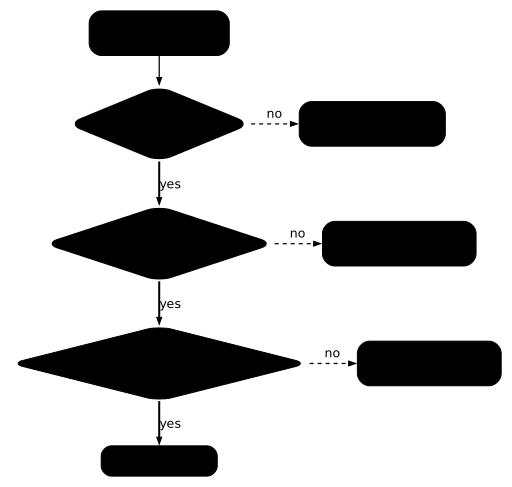
Follow the diagram from top to bottom: a denial at any step stops the call. Above all, remember that an access must be allowed by the three layers at once.
The error message gives a hint, not a proof. By default, seccomp and the
capabilities answer EPERM ("Operation not permitted"), and AppArmor answers
EACCES ("Permission denied") when it refuses a file or a mount. But a seccomp
profile can return EACCES, and an AppArmor profile that refuses a capability
returns EPERM, as the measurements below show. Only removing one layer at a
time settles it.
The order of the checks is fixed for seccomp: it rules before the kernel runs
the system call, so before the checks made during that execution. Between
AppArmor and the capabilities, the order depends on the call. The diagram shows
the one for mount, which the table in the section "Which layer refused my
call?" brings out. The table below sums up what each layer examines and where
it is set.
| Layer | What it examines | Docker option that sets it |
|---|---|---|
| Capabilities | The privileged operation requested | --cap-add, --cap-drop |
| seccomp | The name of the system call and its numeric arguments | --security-opt seccomp= |
| AppArmor | Paths, network, mounts, capabilities and signals according to the profile | --security-opt apparmor= |
The difference with capabilities lies in granularity. A capability is a right granted to the process, whereas a seccomp profile lists system calls and an AppArmor profile lists access rules. Both profiles can therefore refuse an action that the process is nevertheless entitled to perform.
Which profiles does the engine apply without being asked?
Docker attaches to every unprivileged container a built-in seccomp profile and,
on a host that runs AppArmor, a profile named docker-default, without you
asking (see
the default seccomp profile
and the default AppArmor profile).
The docker info command announces the active mechanisms, and the kernel says
what a given container really applies.
docker info --format '{{.SecurityOptions}}'[name=apparmor,profile=default name=seccomp,profile=builtin name=cgroupns]This output says that Docker knows how to apply AppArmor (profile default)
and seccomp (profile builtin, built into Docker). It says nothing about a
given container. To examine one, read two files of its main process, PID 1:
docker run --rm --network none "$ALP" sh -c 'grep -E "^(Seccomp|Seccomp_filters|NoNewPrivs):" /proc/1/status; cat /proc/1/attr/current'NoNewPrivs: 0Seccomp: 2Seccomp_filters: 1docker-default (enforce)Look at the Seccomp: 2 line. It is 0 when no filter is loaded and 2 when a
filter is active, and Seccomp_filters: 1 counts the loaded filters. The
NoNewPrivs line is not used in this lesson. The last line, read from
/proc/1/attr/current, gives the AppArmor profile and its mode. The enforce
mode means that the kernel applies the denials; the other mode, complain,
only logs the accesses that the profile would refuse. These two files come from
the kernel: they are authoritative, unlike an option displayed by Docker.
Finally, docker inspect is not the right source for seccomp:
docker run -d --network none --name c38b-m-ins "$ALP" sleep 120docker inspect c38b-m-ins --format 'SecurityOpt={{json .HostConfig.SecurityOpt}} AppArmorProfile={{json .AppArmorProfile}} Privileged={{.HostConfig.Privileged}}'docker rm -f c38b-m-insSecurityOpt=null AppArmorProfile="docker-default" Privileged=falseSecurityOpt is null: this field only lists the options you asked for.
AppArmorProfile does name the profile applied, but no field names the seccomp
profile. An empty option list therefore does not prove the absence of a
filter: the proof remains /proc/1/status.
Which layer refused my call?
A missing capability and a seccomp filter return the same error, EPERM
("Operation not permitted"). The message therefore does not point to the guilty
layer. The method is to remove one layer at a time on a throwaway
container: if the call goes through when a layer is removed, that layer was
refusing. This removal is for measuring, never for fixing: the fix only
touches the layer at fault.
The first case is unshare -U, which asks the kernel for a separate user
namespace. Under the default profile, it fails. The seccomp=unconfined option
disables the seccomp profile for a container: if the call goes through again
with it, seccomp alone was at fault:
docker run --rm --network none "$ALP" sh -c 'unshare -U true; echo unshare_rc=$?'docker run --rm --network none --security-opt seccomp=unconfined "$ALP" sh -c 'unshare -U true; echo unshare_rc=$?'unshare_rc=1unshare: unshare(0x10000000): Operation not permittedunshare_rc=0The first container fails with EPERM and the second succeeds. No capability
changed between the two: the seccomp filter is responsible. Note also that
--cap-add SYS_ADMIN lets unshare through, because the default profile
allows that call when the capability is present. Here, seccomp and the
capability are linked.
The second case goes the other way. chown works by default, and fails when
you remove the CHOWN capability. The error persists even when seccomp and
AppArmor are disabled, which clears those two layers.
docker run --rm --network none --cap-drop CHOWN "$ALP" sh -c 'touch /tmp/f; chown 1000 /tmp/f; echo chown_rc=$?'docker run --rm --network none --cap-drop CHOWN --security-opt seccomp=unconfined --security-opt apparmor=unconfined "$ALP" sh -c 'touch /tmp/f; chown 1000 /tmp/f; echo chown_rc=$?'chown: /tmp/f: Operation not permittedchown_rc=1chown: /tmp/f: Operation not permittedchown_rc=1The third case, mount -t tmpfs none /mnt, crosses the three layers. The table
gives what each combination produced: the message changes according to the
layer that refuses, and only one combination succeeds.
| Options added to the container | Result of mount | Layer that refuses |
|---|---|---|
| none | permission denied (are you root?), code 1 | seccomp, which only allows mount with SYS_ADMIN |
seccomp=unconfined | mounting none on /mnt failed: Permission denied, code 255 | AppArmor (docker-default) |
--cap-add SYS_ADMIN | mounting none on /mnt failed: Permission denied, code 255 | AppArmor (docker-default) |
--cap-add SYS_ADMIN and apparmor=unconfined | succeeded, code 0 | none |
seccomp=unconfined and apparmor=unconfined | permission denied (are you root?), code 1 | the missing SYS_ADMIN capability |
Read the table from top to bottom. Granting the capability is not enough (row
3), because docker-default forbids mount. Conversely, removing both
profiles is not enough without the capability (row 5). Rows 1 and 5 show the
same message, because seccomp and a missing capability both return EPERM: the
message alone separates nothing.
What separates them is the result when a layer is removed. As soon as seccomp
is removed (row 2), the message and the code change: the default seccomp
profile was therefore refusing first, since it only allows mount for a
process that holds SYS_ADMIN. Then AppArmor refuses while the capability is
still missing, which sets the order of the diagram for this call.
To pin down a denial, repeat the approach: note the error, remove one layer, run again, and start over until the call goes through. The fix targets only the layer found, and the other protections stay active.
What do unconfined and privileged remove?
Three settings disable these protections: seccomp=unconfined,
apparmor=unconfined and --privileged. Recognize them in a docker run, a
Compose file or a script in order to refuse them: none of them is justified
as a way to fix a denial.
docker run --rm --network none --privileged "$ALP" sh -c 'grep -E "^(Seccomp|Seccomp_filters|NoNewPrivs):" /proc/1/status; cat /proc/1/attr/current'NoNewPrivs: 0Seccomp: 0Seccomp_filters: 0unconfinedWith --privileged, the seccomp filter drops to Seccomp: 0 and AppArmor
becomes unconfined: both layers disappear at once. The two unconfined
options each act on a single layer, as the table sums up.
| Option | Seccomp field of /proc/1/status | /proc/1/attr/current |
|---|---|---|
| none (default) | 2 | docker-default (enforce) |
--security-opt seccomp=unconfined | 0 | docker-default (enforce) |
--security-opt apparmor=unconfined | 2 | unconfined |
--privileged | 0 | unconfined |
When you set both unconfined, docker inspect shows
SecurityOpt=["seccomp=unconfined","apparmor=unconfined"] and
AppArmorProfile="unconfined", which is easy to spot in a review. A service
whose /proc/1/status check gives Seccomp: 0, or whose
/proc/1/attr/current gives unconfined, runs without one of these
protections.
How do you write a custom seccomp profile?
A seccomp profile is a JSON file built on three elements:
defaultActionsays what happens to a call that is not in the list;syscallsis the list of rules;- each rule carries
names(the calls targeted),actionand, if needed,args(conditions on the arguments of the call).
You give it to Docker with --security-opt seccomp=<file>. The client reads
the file, not the daemon: the path is therefore resolved on the machine where
you type the command.
Where should you start?
Start from the default profile of the exact version of your engine, not
from a profile that allows everything. For Docker 29.9.2, the file is in the
moby/moby repository, at the version tag. The path
profiles/seccomp/default.json does not exist at that tag: use the vendor/
path of the block below. On the measurement VM, the file had the checksum on
the first line of the output.
curl -fsSL "https://raw.githubusercontent.com/moby/moby/docker-v29.9.2/vendor/github.com/moby/profiles/seccomp/default.json" -o defaut.jsonsha256sum defaut.jsonpython3 -c "import json;d=json.load(open('defaut.json'));print('defaultAction=',d['defaultAction'],' defaultErrnoRet=',d.get('defaultErrnoRet'),' groupes=',len(d['syscalls']))"785b2429264afba4d594320337cb17f144f3c7d51585f9805eef72e28f4f9334 defaut.jsondefaultAction= SCMP_ACT_ERRNO defaultErrnoRet= 1 groupes= 37The profile refuses by default (SCMP_ACT_ERRNO, with error 1, EPERM) and
lists its allowances in 37 rules. Attached unchanged, the downloaded file
behaves like the built-in profile: chmod works and unshare stays refused.
To block chmod, two moves are possible: add a denial, or remove the
allowance. The two trials give different results.
What happens if you add a deny at the end of the list?
The first reflex is to add, at the end of the list, a rule that refuses
chmod and its variants. The derive-ajout.py script runs this trial with the
Alpine image:
cat > derive-ajout.py <<'EOF'import jsond = json.load(open('defaut.json'))d['syscalls'].append({"names": ["chmod", "fchmod", "fchmodat", "fchmodat2"], "action": "SCMP_ACT_ERRNO", "errnoRet": 1})json.dump(d, open('derive.json', 'w'), indent=1)print('règles :', len(d['syscalls']))EOFpython3 derive-ajout.pydocker run --rm --network none --security-opt seccomp="$W/derive.json" "$ALP" sh -c 'touch /tmp/f; chmod 600 /tmp/f; echo "chmod rc=$?"; unshare -U true && echo unshare=ok || echo unshare=refuse'règles : 38chmod rc=0unshare: unshare(0x10000000): Operation not permittedunshare=refuseLook at chmod rc=0: the profile has 38 rules and it refuses nothing new. It
was nevertheless loaded, since unshare stays refused as before. A denial
added at the end of the list blocked nothing here. The default profile
already allows the chmod family in its first rule, a SCMP_ACT_ALLOW rule,
and that is the one that won. This trial covers an unconditional denial aimed
at a call that is already allowed: it does not tell you how two contradictory
rules are settled in general. Do not count on an added denial, and harden by
removal.
How do you deny a call that was allowed?
Since defaultAction refuses, it is enough to remove the names of the call
from the rule that allows it: the call then falls under the default denial.
You harden the profile by taking allowances away from it, not by adding
denials. The derive-retrait.py script first looks for the rules that cite the
chmod family (the first line of the output finds only one, rule 0), then
removes those names from every SCMP_ACT_ALLOW rule.
cat > derive-retrait.py <<'EOF'import jsonVISES = {"chmod", "fchmod", "fchmodat", "fchmodat2"}d = json.load(open('defaut.json'))ou = [(i, sorted(VISES & set(r.get('names', [])))) for i, r in enumerate(d['syscalls']) if VISES & set(r.get('names', []))]print('règles qui autorisent la famille chmod :', [(i, d['syscalls'][i]['action'], n) for i, n in ou])for r in d['syscalls']: if r.get('action') == 'SCMP_ACT_ALLOW' and 'names' in r: r['names'] = [n for n in r['names'] if n not in VISES]json.dump(d, open('derive.json', 'w'), indent=1)EOFpython3 derive-retrait.pydocker run --rm --network none --security-opt seccomp="$W/derive.json" "$ALP" sh -c 'touch /tmp/f; chmod 600 /tmp/f; echo "chmod rc=$?"; unshare -U true && echo unshare=ok || echo unshare=refuse; ls /tmp >/dev/null && echo ls=ok'docker run -d --name c38b-m-d2 --network none --security-opt seccomp="$W/derive.json" "$ALP" sleep 30docker exec c38b-m-d2 grep -E '^Seccomp' /proc/1/statusdocker rm -f c38b-m-d2règles qui autorisent la famille chmod : [(0, 'SCMP_ACT_ALLOW', ['chmod', 'fchmod', 'fchmodat', 'fchmodat2'])]chmod rc=1chmod: /tmp/f: Operation not permittedunshare=refuseunshare: unshare(0x10000000): Operation not permittedls=okSeccomp: 2Seccomp_filters: 1Three lines of the output establish that the profile is correct. chmod rc=1
proves that the targeted call is refused. unshare=refuse and ls=ok show
that the rest of the default profile stays in place and that ordinary calls
go through. Seccomp: 2 confirms that the kernel applies a filter. You have
therefore removed one allowance without touching the rest.
What else can you set in a rule?
The variants that follow isolate each field of a rule. They were measured on a
minimal profile whose defaultAction is SCMP_ACT_ALLOW, in place of the
default profile. Such a profile loses the protections of the default:
unshare -U true goes through, whereas the default profile refuses it. Keep it
only to understand the fields, never for a service.
cat > c38b-m-chmod-eperm.json <<'EOF'{ "defaultAction": "SCMP_ACT_ALLOW", "syscalls": [ { "names": ["chmod", "fchmod", "fchmodat", "fchmodat2"], "action": "SCMP_ACT_ERRNO" } ]}EOFdocker run --rm --network none --security-opt seccomp="$W/c38b-m-chmod-eperm.json" "$ALP" sh -c 'touch /tmp/f; chmod 600 /tmp/f; echo chmod600_rc=$?; mkdir /tmp/d; echo mkdir_rc=$?; ls -l /tmp/f; unshare -U true; echo unshare_rc=$?; grep -E "^Seccomp" /proc/1/status'chmod: /tmp/f: Operation not permittedchmod600_rc=1mkdir_rc=0-rw-r--r-- 1 root root 0 Nov 4 18:39 /tmp/funshare_rc=0Seccomp: 2Seccomp_filters: 1Without errnoRet, the error returned is EPERM. The file keeps its original
permissions (-rw-r--r--), mkdir works, and unshare_rc=0 confirms the
announced loss of protection. Three other fields are set by changing the rule:
"errnoRet": 13returnsEACCES, andchmodprintschmod: /tmp/f: Permission denied."action": "SCMP_ACT_KILL_PROCESS"kills the offending process instead of returning an error to it. The parent shell survived, becausechmodis a separate process, and the output showedBad system call (core dumped).- An
argskey makes the rule conditional on the value of an argument, as the example below shows.
The args rule refuses chmod only for the mode 0777, written 511 in
decimal. For chmod and fchmod, the mode is the second argument (index 1).
For fchmodat and fchmodat2, it is the third (index 2).
cat > c38b-m-chmod-args.json <<'EOF'{ "defaultAction": "SCMP_ACT_ALLOW", "syscalls": [ { "names": ["chmod", "fchmod"], "action": "SCMP_ACT_ERRNO", "args": [{"index": 1, "value": 511, "op": "SCMP_CMP_EQ"}] }, { "names": ["fchmodat", "fchmodat2"], "action": "SCMP_ACT_ERRNO", "args": [{"index": 2, "value": 511, "op": "SCMP_CMP_EQ"}] } ]}EOFdocker run --rm --network none --security-opt seccomp="$W/c38b-m-chmod-args.json" "$ALP" sh -c 'touch /tmp/f; chmod 600 /tmp/f; echo chmod600_rc=$?; chmod 777 /tmp/f; echo chmod777_rc=$?; ls -l /tmp/f'chmod600_rc=0chmod: /tmp/f: Operation not permittedchmod777_rc=1-rw------- 1 root root 0 Nov 4 18:39 /tmp/fchmod 600 goes through and chmod 777 is refused: the rule only targets the
chosen value.
A badly written profile does not always announce itself. On Docker 29.9.2, two
errors stop docker run before the container starts, with return code 125: a
truncated JSON file, then a missing file. Here are the two messages, in that
order:
docker: compacting json for seccomp profile (/tmp/c38b-m-work/c38b-m-broken.json) failed: unexpected end of JSON inputdocker: opening seccomp profile (/tmp/c38b-m-work/c38b-m-absent.json) failed: open /tmp/c38b-m-work/c38b-m-absent.json: no such file or directoryOn the other hand, a nonexistent system call name is silently accepted: the
container started normally with a profile targeting c38b_m_inexistant. A typo
in names therefore produces no error, and the rule applies to nothing. Always
check the effect with a trial that must fail.
How do you attach it in a Compose file?
Compose takes the option over under security_opt. A relative path is read
from the folder of the Compose file, not from the folder where you run the
command. Both the seccomp= and seccomp: forms worked with Compose 5.6.1.
To measure it, docker compose -f "$W/compose/compose.yaml" up -d was run from
another folder, which contained no profile: the profile was applied
(Seccomp: 2, chmod refused). With a fake permissive profile of the same
name in that launch folder, chmod was still refused, so the file next to
compose.yaml is indeed the one that is read. The block below runs Compose
from the folder of the file, which comes to the same thing.
mkdir -p "$W/compose" && cd "$W/compose"cp "$W/c38b-m-chmod-eperm.json" .cat > compose.yaml <<EOFname: c38b-m-projservices: app: image: $ALP command: ["sleep", "120"] network_mode: none security_opt: - seccomp=./c38b-m-chmod-eperm.jsonEOFdocker compose up -ddocker compose exec -T app sh -c 'touch /tmp/f; chmod 600 /tmp/f; echo rc=$?; grep -E "^Seccomp" /proc/1/status'docker compose downcd "$W" Container c38b-m-proj-app-1 Creating Container c38b-m-proj-app-1 Created Container c38b-m-proj-app-1 Starting Container c38b-m-proj-app-1 Startedchmod: /tmp/f: Operation not permittedrc=1Seccomp: 2Seccomp_filters: 1The Seccomp: 2 line and the refusal of chmod prove that the profile is
applied to the service. With seccomp=unconfined in its place, the same
container showed Seccomp: 0: an automated check of this field therefore
detects that setting.
How do you write and load an AppArmor profile?
An AppArmor profile is a file of rules that apparmor_parser loads into the
kernel of the host. It has a name, and that name is what you give to
--security-opt apparmor=. An access that the profile allows nowhere is
refused without any particular rule: that is an implicit denial. The deny
rule creates an explicit denial, which holds even when a broader rule
allows the access. The profile below broadly allows the network (network),
the capabilities that the container already holds (capability), files
(file) and unmounting (umount), then only refuses writing under
/srv/vault/. It does not take over the other rules of docker-default: the
section "What does a dedicated profile lose compared to docker-default?" shows
what that gap costs a service. The two flags are not part of the exercise:
copy them as they are.
mkdir -p "$W/vault"echo "contenu-vault" > "$W/vault/secret.txt"chmod 666 "$W/vault/secret.txt"ls -l "$W/vault/secret.txt"cat > c38b-m-nowrite <<'EOF'#include <tunables/global>
profile c38b-m-nowrite flags=(attach_disconnected,mediate_deleted) {  #include <abstractions/base>
  network,  capability,  file,  umount,
  deny /srv/vault/** w,}EOFsudo aa-status | grep -E 'c38b|docker-default|profiles are loaded'sudo apparmor_parser -a c38b-m-nowrite; echo "parser_rc=$?"sed -e 's/profile c38b-m-nowrite flags=(/profile c38b-m-nowrite-cplx flags=(complain,/' c38b-m-nowrite > c38b-m-nowrite-cplxsudo apparmor_parser -a c38b-m-nowrite-cplxsudo aa-status | grep -E 'c38b|docker-default|profiles are loaded'
-rw-rw-rw- 1 ansible ansible 14 Nov 4 18:40 /tmp/c38b-m-work/vault/secret.txt107 profiles are loaded. docker-defaultparser_rc=0109 profiles are loaded. c38b-m-nowrite docker-default c38b-m-nowrite-cplxThe test file has Unix mode 666: the permissions therefore allow writing, and
only the AppArmor policy can refuse it. Loading with -a adds the profile
without touching docker-default or the other profiles. The sed command also
builds a copy of the profile in complain mode, to compare the two modes
afterwards. In the output, aa-status goes from 107 to 109 profiles: the
profile of the lesson and that copy, listed next to docker-default.
If you replay the lesson while the profile is still loaded, -a refuses to add
it a second time. The -r option replaces the loaded profile with the content
of the file:
sudo apparmor_parser -a c38b-m-nowrite; echo "parser_a_rc=$?"sudo apparmor_parser -r c38b-m-nowrite; echo "parser_r_rc=$?"apparmor_parser: Unable to add "c38b-m-nowrite". Profile already existsparser_a_rc=239parser_r_rc=0A syntax error is reported at load time, with the line number and a return code of 1:
printf 'profile c38b-m-bad {\n file,\n deny /x/** wz,\n}\n' > c38b-m-badsudo apparmor_parser -a c38b-m-bad; echo "bad_rc=$?"AppArmor parser error for c38b-m-bad in profile c38b-m-bad at line 3: syntax error, unexpected TOK_ID, expecting TOK_MODEbad_rc=1Next, attach the profile to a container, with the test folder mounted on
/srv/vault and a tmpfs on /srv/open for comparison.
S='cat /proc/1/attr/current; echo --- ; cat /srv/vault/secret.txt; echo "cat_rc=$?"; echo nouveau > /srv/vault/secret.txt; echo "write_rc=$?"; touch /srv/vault/new; echo "touch_rc=$?"; mkdir /srv/vault/d; echo "mkdir_rc=$?"; echo ok > /srv/open/f; echo "open_rc=$?"; ls -l /srv/vault/secret.txt; id'docker run --rm --network none --security-opt apparmor=c38b-m-nowrite -v "$W/vault:/srv/vault" --tmpfs /srv/open "$ALP" sh -c "$S"c38b-m-nowrite (enforce)---contenu-vaultcat_rc=0sh: can't create /srv/vault/secret.txt: Permission deniedwrite_rc=1touch: /srv/vault/new: Permission deniedtouch_rc=1mkdir: can't create directory '/srv/vault/d': Permission deniedmkdir_rc=1open_rc=0-rw-rw-rw- 1 1001 1001 14 Nov 4 18:40 /srv/vault/secret.txtuid=0(root) gid=0(root) groups=0(root),0(root),1(bin),2(daemon),3(sys),4(adm),6(disk),10(wheel),11(floppy),20(dialout),26(tape),27(video)Read the output in this order. The first line confirms the enforce mode.
Reading succeeds; writing, touch and mkdir in the protected folder are
refused; writing in /srv/open goes through. The profile therefore only stops
the targeted access. The file keeps mode 666 and the user of the container is
root: only the policy refuses, not the Unix permissions. With
docker-default or with apparmor=unconfined, the same writes all succeeded.
AppArmor also filters capabilities. The capability rule of the profile leaves
the container the ones it holds; a deny capability chown rule takes one away,
even though Docker granted it. The denial then looks like that of a missing
capability:
sed -e 's/c38b-m-nowrite/c38b-m-nochown/' -e 's# deny /srv/vault/\*\* w,# deny capability chown,#' c38b-m-nowrite > c38b-m-nochownsudo apparmor_parser -a c38b-m-nochowndocker run --rm --network none --security-opt apparmor=c38b-m-nochown "$ALP" sh -c 'cat /proc/1/attr/current; touch /tmp/f; chown 1000 /tmp/f 2>&1; echo chown_rc=$?'docker run --rm --network none --security-opt apparmor=c38b-m-nochown --security-opt seccomp=unconfined "$ALP" sh -c 'touch /tmp/f; chown 1000 /tmp/f 2>&1; echo chown_sans_seccomp_rc=$?'c38b-m-nochown (enforce)chown: /tmp/f: Operation not permittedchown_rc=1chown: /tmp/f: Operation not permittedchown_sans_seccomp_rc=1The message is Operation not permitted, so EPERM, exactly the one from
--cap-drop CHOWN: an AppArmor denial does not always return EACCES. The
denial persists without seccomp, even though Docker grants the CHOWN
capability by default and the same chown works under docker-default: it is
therefore indeed the AppArmor profile that refuses.
The complain mode logs the accesses that the profile would implicitly refuse,
without blocking them, but it still applies a deny rule. Run again the
docker run that mounts vault, with the copy loaded above under
flags=(complain,...), that is, with
--security-opt apparmor=c38b-m-nowrite-cplx. The container prints
c38b-m-nowrite-cplx (complain), and writing to the file is still
refused:
c38b-m-nowrite-cplx (complain)[...]sh: can't create /srv/vault/secret.txt: Permission deniedwrite_rc=1A deny rule therefore applies even in complain, which the manual page
aa-complain(8)
confirms. Do not count on this mode to safely test a deny rule, and do
not infer the mode from an observed denial: a deny denial shows up in both
modes. Only /proc/1/attr/current says whether the profile is in enforce.
If you name a profile that is not loaded, the container does not start, and
docker run returns code 127 with an error from the runc runtime:
docker: Error response from daemon: failed to create task for container: failed to create shim task: OCI runtime create failed: runc create failed: unable to start container process: error during container init: unable to apply apparmor profile: apparmor failed to apply profile: write fsmount:fscontext:proc/thread-self/attr/apparmor/exec: no such file or directoryThe message does not say "profile missing" in so many words, but
unable to apply apparmor profile followed by no such file or directory
hints at it. Load the profile before starting the container. This is also
the error a service meets after a host reboot, when its profile was only loaded
with -a: the section "How does an AppArmor profile survive a reboot?" shows
how to install it.
Why does an AppArmor denial not show up in the kernel log?
The denial of the write is indeed applied, and yet the journalctl -k command
shows no apparmor="DENIED" line for /srv/vault. On the measurement VM, the
/sys/module/apparmor/parameters/audit parameter was normal (readable with
sudo cat) and auditd was inactive. A simple deny rule refuses without
logging: the manual page
apparmor.d(5)
says that you have to combine it with audit to get a trace.
The audit deny rule does both. Load a copy of the profile where only that
rule changes, then run the write again:
sed -e 's/c38b-m-nowrite/c38b-m-nowrite-aud/' -e 's#deny /srv/vault#audit deny /srv/vault#' c38b-m-nowrite > c38b-m-nowrite-audsudo apparmor_parser -a c38b-m-nowrite-auddocker run --rm --network none --security-opt apparmor=c38b-m-nowrite-aud -v "$W/vault:/srv/vault" --tmpfs /srv/open "$ALP" sh -c 'cat /proc/1/attr/current; cat /srv/vault/secret.txt; echo x > /srv/vault/secret.txt; echo write_rc=$?'sudo journalctl -k --no-pager -o short-iso --since "-5min" | grep 'apparmor='c38b-m-nowrite-aud (enforce)contenu-vaultsh: can't create /srv/vault/secret.txt: Permission deniedwrite_rc=1[...]2026-11-04T18:40:19+00:00 c45-debian.lab kernel: audit: type=1400 audit(1793817619.758:118): apparmor="STATUS" operation="profile_load" profile="unconfined" name="c38b-m-nowrite-aud" pid=29909 comm="apparmor_parser"2026-11-04T18:40:19+00:00 c45-debian.lab kernel: audit: type=1400 audit(1793817619.966:119): apparmor="DENIED" operation="open" class="file" profile="c38b-m-nowrite-aud" name="/srv/vault/secret.txt" pid=29951 comm="sh" requested_mask="wc" denied_mask="wc" fsuid=0 ouid=1001The DENIED line is enough to pin the denial on AppArmor: profile= names the
profile, name= the path, operation="open" the operation, and
requested_mask="wc" the write and creation requested. An implicit denial, on
the other hand, logs itself: a profile that does not allow writing on this
path, with no deny or audit rule, produced the same line.
The grep 'apparmor=' filter also brings back noise unrelated to your denial:
operation="profile_load" lines when you load a profile, and, if you name a
profile that is not loaded, an operation="change_onexec" line emitted by
runc with info="label not found". Look for the profile= and the name=
of your case. On this VM, the refusal of mount by docker-default did not
leave a trace either without an audit rule.
What does a dedicated profile lose compared to docker-default?
A profile passed through --security-opt apparmor= replaces docker-default
entirely: it inherits none of its rules. Yet docker-default does not just
allow. The
profile template
embedded in Docker 29.9.2 also refuses mount, writing to most files of
/proc and /sys, reading /proc/kcore, and the alg and vsock network
sockets. Finally, it allows specific signals: those that runc and the
daemon send to the container, and those that the container's processes
exchange. The c38b-m-nowrite profile has none of these rules.
The most visible gap concerns signals. The service below waits for SIGTERM
to stop cleanly: that is the signal that docker stop has runc send to it.
Run it under the profile of the lesson, then stop it:
APP='trap "echo arret-propre; exit 0" TERM; sleep 300 & wait'docker run -d --name c38b-m-svc --network none --security-opt apparmor=c38b-m-nowrite "$ALP" sh -c "$APP" >/dev/nullsleep 1docker exec c38b-m-svc cat /proc/1/attr/currentt0=$(date +%s); docker stop c38b-m-svc >/dev/null; t1=$(date +%s)echo "duree_stop=$((t1-t0))s code=$(docker inspect -f '{{.State.ExitCode}}' c38b-m-svc) journal=[$(docker logs c38b-m-svc 2>&1)]"docker rm c38b-m-svc >/dev/nullsudo journalctl -k --no-pager -o short-iso --since "-1min" | grep 'apparmor="DENIED"' | grep 'c38b-m-nowrite'c38b-m-nowrite (enforce)duree_stop=12s code=137 journal=[]2026-11-04T19:09:44+00:00 c45-debian.lab kernel: audit: type=1400 audit(1793819384.532:124): apparmor="DENIED" operation="signal" class="signal" profile="c38b-m-nowrite" pid=2327 comm="runc" requested_mask="receive" denied_mask="receive" signal=term peer="runc"2026-11-04T19:09:46+00:00 c45-debian.lab kernel: audit: type=1400 audit(1793819386.560:125): apparmor="DENIED" operation="signal" class="signal" profile="c38b-m-nowrite" pid=2334 comm="runc" requested_mask="receive" denied_mask="receive" signal=kill peer="runc"The stop took 12 seconds and ended with code 137, without the arret-propre
line. The log says why: AppArmor refused the container the right to
receive (requested_mask="receive") the SIGTERM then the SIGKILL sent
by runc (peer="runc"). The container was nevertheless killed, as code 137
shows, by a path that these two lines do not show: the profile does not
prevent the stop, it takes away the service's only chance to stop itself. The
service never knew it was being asked to stop: this is the abrupt stop that
a service with data being written must avoid. The lesson
Container lifecycle, PID 1 and clean shutdown in Docker
explains the delay of docker stop and code 137.
The profile of a service therefore allows at least the reception of the signals
from runc. The c38b-m-service copy differs from c38b-m-nowrite only by
that rule:
sed -e 's/c38b-m-nowrite/c38b-m-service/' -e 's# deny /srv/vault/\*\* w,# signal (receive) peer=runc,\n deny /srv/vault/** w,#' c38b-m-nowrite > c38b-m-servicecat c38b-m-servicesudo apparmor_parser -a c38b-m-service; echo "parser_service_rc=$?"docker run -d --name c38b-m-svc --network none --security-opt apparmor=c38b-m-service "$ALP" sh -c "$APP" >/dev/nullsleep 1docker exec c38b-m-svc cat /proc/1/attr/currentt0=$(date +%s); docker stop c38b-m-svc >/dev/null; t1=$(date +%s)echo "duree_stop=$((t1-t0))s code=$(docker inspect -f '{{.State.ExitCode}}' c38b-m-svc) journal=[$(docker logs c38b-m-svc 2>&1)]"docker rm c38b-m-svc >/dev/null#include <tunables/global>
profile c38b-m-service flags=(attach_disconnected,mediate_deleted) { #include <abstractions/base>
network, capability, file, umount,
signal (receive) peer=runc, deny /srv/vault/** w,}parser_service_rc=0c38b-m-service (enforce)duree_stop=0s code=0 journal=[arret-propre]With this rule, the service receives SIGTERM, writes arret-propre and exits
with code 0 without waiting. That single rule only covers the signals from
runc: a service whose processes send signals to each other, or receive some
from a process of the host, needs the other signal rules of the template. For
a real service, do not start from an empty profile:
start from the template of your engine version, keep its denials and its
signal rules, then add your restriction. Then check the three operating
gestures: the targeted access is refused, docker stop ends with code 0, and
the log shows no unexpected denial.
How does an AppArmor profile survive a reboot?
apparmor_parser -a loads the profile into the kernel and writes nothing to
disk: when the host reboots, the profile disappears, and the container that
names it no longer starts. For a profile to be reloaded at boot, install its
file under /etc/apparmor.d/, which the apparmor service reads at every
start, then load it from that location with -r:
sudo install -m 0644 -o root -g root c38b-m-service /etc/apparmor.d/c38b-m-servicesudo apparmor_parser -r /etc/apparmor.d/c38b-m-service; echo "parser_install_rc=$?"ls -l /etc/apparmor.d/c38b-m-servicesudo aa-status | grep -E 'c38b|profiles are loaded'parser_install_rc=0-rw-r--r-- 1 root root 229 Nov 4 19:09 /etc/apparmor.d/c38b-m-service110 profiles are loaded. c38b-m-nochown c38b-m-nowrite c38b-m-serviceThis output comes from a run limited to the three profiles it lists. If you ran
all the blocks of the lesson, aa-status also lists the -cplx and -aud
copies (112 profiles on the measurement VM). The measurement VM was then
rebooted. A reboot opens a new terminal and empties /tmp: the checks below
therefore redefine ALP, and the working folder is gone. This block describes
the state after the reboot: run without rebooting, it gives nowrite_rc=0,
since c38b-m-nowrite is still loaded.
ALP="alpine:3.24.3@sha256:be2656061b536c1883c4034790e21d0a09c5aaaf51968b89368a3c0371ea2c9a"sudo aa-status | grep -E 'c38b|profiles are loaded'docker run --rm --network none --security-opt apparmor=c38b-m-service "$ALP" cat /proc/1/attr/current; echo "service_rc=$?"docker run --rm --network none --security-opt apparmor=c38b-m-nowrite "$ALP" cat /proc/1/attr/current; echo "nowrite_rc=$?"108 profiles are loaded. c38b-m-servicec38b-m-service (enforce)service_rc=0docker: Error response from daemon: failed to create task for container: failed to create shim task: OCI runtime create failed: runc create failed: unable to start container process: error during container init: unable to apply apparmor profile: apparmor failed to apply profile: write fsmount:fscontext:proc/thread-self/attr/apparmor/exec: no such file or directory
Run 'docker run --help' for more informationnowrite_rc=127Only the installed profile came back: the container that names it starts,
whereas the one that names c38b-m-nowrite, loaded with -a, fails with code
127. You do not need to reboot to anticipate it: the presence of the file under
/etc/apparmor.d/ and an enabled apparmor service (systemctl is-enabled apparmor) indicate that the profile will be reloaded. If you reboot a
throwaway machine anyway, only c38b-m-service is left to clean up, by its
path, as the first two lines of the cleanup block do. The page
Understand and use AppArmor details profile
management on the host side.
What are the limits of these profiles?
Each mechanism leaves some cases out of its reach, and it is better to know them than to discover them in production.
- seccomp does not read the content of paths passed by pointer: it compares the name of the call and its numeric arguments, so it cannot refuse "open this file". The kernel documentation on seccomp explains it: BPF filters do not dereference pointers. Refusing a path is AppArmor's job.
- AppArmor depends on the host. Distributions based on SELinux, instead of AppArmor, do not have this mechanism: their containers are confined by SELinux labels, which follow other rules.
- A custom profile is tied to the machine. A seccomp profile is a file that
the client reads, an AppArmor profile is a state of the host's kernel: every
host that runs the service must carry the profile installed under
/etc/apparmor.d/. - A badly written seccomp rule stays silent: an unknown call name is accepted without error. Only a trial that must fail proves that a rule applies.
Never disable a protection to fix a denial: an unconfined granted "to test
quickly" risks staying in place. Write the minimal probe that reproduces the
denial, find the layer by removing one layer at a time, then modify only the
profile of that layer. For Kubernetes, the same profiles are attached through
the securityContext:
seccomp in Kubernetes
(in French) and
AppArmor in Kubernetes
(in French).
How do you clean up what the lesson created?
A loaded AppArmor profile stays in the kernel until you unload it: deleting
the file is not enough. First unload the installed profile by its path under
/etc/apparmor.d/, then remove that file so that it does not come back at the
next boot. Then unload the other profiles of the lesson with -R, which reads
their file in the working folder, check that only the original profiles remain,
then delete the folder.
sudo apparmor_parser -R /etc/apparmor.d/c38b-m-service; echo "unload c38b-m-service rc=$?"sudo rm /etc/apparmor.d/c38b-m-servicefor f in c38b-m-nowrite c38b-m-nowrite-cplx c38b-m-nowrite-aud c38b-m-nochown; do sudo apparmor_parser -R "$f"; echo "unload $f rc=$?"; donesudo aa-status | grep -c c38bsudo aa-status | grep -E 'profiles are loaded|docker-default'cd / && find /tmp/c38b-m-work -deletedocker ps -a --filter name=c38b-m- --format '{{.Names}}'unload c38b-m-service rc=0unload c38b-m-nowrite rc=0unload c38b-m-nowrite-cplx rc=0unload c38b-m-nowrite-aud rc=0unload c38b-m-nochown rc=00107 profiles are loaded. docker-defaultThe count 0 after grep -c c38b proves that no profile of the lesson
remains, and the total falls back to the number from before the lesson (107 on
the measurement VM), docker-default included. The last command must print
nothing. Never unload docker-default or any profile other than those of the
lesson.
Put it into practice
The first lab starts from a service whose seccomp filtering is disabled. You
derive the default profile, supplied as a pinned copy, so that it refuses one
specific call with one specific argument value while still letting the same
call through with other values. It combines the two moves of this lesson:
remove the call from the rule that allows it, then allow it again with a
condition on its argument. Its four tests check that the explicit profile is
declared with no unconfined, that the kernel announces an active filter in
/proc/1/status, that a provided probe sees the targeted call refused and the
others allowed, and that the profile still refuses what the default refused,
which rules out a permissive profile.
The second lab has you write, load and attach a dedicated AppArmor profile
yourself, in enforce mode. It expects the opposite of this lesson's
demonstration profile: instead of allowing broadly and then refusing a write
with deny, the profile names what the service needs and refuses the rest by
omission. That is the implicit denial seen earlier, the only one that
complain mode lets through, and so the only one that proves which mode
applies. Its tests read the profile declared on the container, check enforce
in /proc/1/attr/current, try two reads, one of which must be refused by the
policy and not by Unix permissions, then try to read a system file the service
has no need for, to rule out a profile with a bare file, rule. Keep in mind
that the method "load in complain, collect the denials, add rules" only shows
what the service attempted: it does not reveal the signal (receive) peer=runc
rule for a service that ignores SIGTERM.
Key points
A denial is judged by its layer before it is fixed, and a fix never removes the other protections.
- You read the active profiles in
/proc/1/status(Seccomp: 2) and/proc/1/attr/current(docker-default (enforce)), becauseSecurityOptis empty by default. - You pin a denial by removing one layer at a time, because the message does
not separate them: seccomp, capabilities and a capability refused by AppArmor
all return
EPERM. - You spot
seccomp=unconfined,apparmor=unconfinedand--privilegedas settings to refuse. - You harden a seccomp profile by removing the call from the
SCMP_ACT_ALLOWrule: a denial added at the end of the list blocked nothing in the measurement. - You attach an AppArmor profile loaded with
apparmor_parser, you checkenforce, and to log adenydenial you addaudit. - You know that a dedicated profile replaces
docker-defaultentirely: withoutsignal (receive) peer=runc,docker stopno longer stops the service cleanly. - You install the profile of a service under
/etc/apparmor.d/, because a profile loaded with-adisappears at reboot and the container no longer starts. - You keep in mind that
complaindoes not stop adenyrule, and that a truncated or missing seccomp profile stopsdocker run(code 125) whereas an unknown call name goes through without error. - You unload your profiles with
apparmor_parser -Rat the end.
Knowledge check
Check that the essentials of this lesson are mastered. The questions cover reading the active profiles, pinning a denial on its layer, writing the two profiles and how they hold up in operation (stopping the service, rebooting).
Knowledge check
Check what you have learned with this interactive quiz
How it works
- The timer starts when you click Start
- Multiple choice, true/false and short answer questions
- You can move between questions
- Detailed results are shown at the end
Starts the quiz and the timer
Review
(0/0)Score by domain
A domain groups several guides and gets several questions, so its score is more reliable than a per-topic score, which often rests on a single question.
Summary
Strengths
No topic passed at 80% on at least two questions yet.
Weak areas
No topic below the pass mark.
Recommended next
Hints before you try again?
Continue the course: Read-only root filesystem, and a shutdown without data loss
A new full quiz with random questions
Work again only on the questions you missed