A registry that leaves your workstation must speak TLS, otherwise Docker refuses to send it an image. This lesson, for readers who already know how to push and pull an image, sets up a registry:3 (the CNCF Distribution project, version 3.1.2) behind a certificate signed by your own authority, makes Docker recognize that authority without ever disabling a check, then requires a password. You then query the registry API, delete an image and reclaim the disk space. Each error met along the way is shown with its exact message, so that you can recognize it on your own machine.
Several names in this lesson are French because the commands and outputs are the ones that were run: registre.atelier.test ("workshop registry"), the container registre-confiance ("trusted registry"), the volume donnees-registre ("registry data"), the folders ac/ (the authority), certs-registre/ (the registry certificates), auth/ and ids/ (identifiers), and the realm Registre atelier. They are identifiers and outputs, so they stay as they are.
What you will learn
- Explain why a registry outside the loopback interface requires TLS, and check that your demonstration does not run on a name that resolves back to loopback
- Create a local authority and a server certificate with the right SANs
- Serve
registry:3over TLS and trust the authority with/etc/docker/certs.d/<host:port>/ca.crt - Protect the registry with
htpasswd(bcrypt), log in withdocker login --password-stdinand find where Docker stores the credentials - Query the
/v2/API, delete an image and reclaim the disk space withregistry garbage-collect - Diagnose a connection refusal from its message
Prerequisites
- Having followed Publish and pull an image in a controlled way: naming an image for a registry,
docker push,docker pull, tag versus digest, and the local registry over HTTP on127.0.0.1. This lesson starts from there and does not repeat it. - A working Docker Engine, with the containerd image store of a fresh Docker 29 installation (the section on the loopback interface says how to check it). The outputs come from Docker 29.9.2 on Debian 13 with OpenSSL 3.5.7. The lesson assumes a Docker Engine installed in root mode on Linux: rootless Docker and Docker Desktop put the certificate configuration elsewhere, and the lesson does not cover those cases.
- An account able to run
sudo: copying a certificate into/etc/docker/certs.d/writes into a directory owned byroot. - Knowing what a TLS certificate and a certificate authority are. Generate TLS certificates with openssl (in French) details the key, the signing request and the internal authority; the lesson only reuses the steps needed here.
The lesson never uses insecure-registries or the daemon.json file: the goal is to make the registry trustworthy, not to silence the client. It therefore requires no restart of Docker.
Why does a registry outside the loopback interface require TLS?
Docker requires HTTPS and a certificate it can verify to push and pull images, because a plain-text registry lets images, and soon passwords, travel over the network with nobody able to check who they are talking to. It makes one exception for a registry designated by a loopback address (127.0.0.0/8, for example 127.0.0.1) or by localhost: it accepts HTTP there and does not verify the certificate, since these addresses never leave your machine. That is why the registry of the previous lesson worked over HTTP. The exception depends on how the registry is designated: another name, such as registre.atelier.test, even resolved to the loopback interface, does not get it for pushing and pulling.
This rule was measured with the containerd image store, the one of a fresh Docker 29 installation: docker info displays driver-type io.containerd.snapshotter.v1 there. A Docker upgraded from an old version may keep the old store, which was not measured here.
A plain HTTP registry, designated by a name, fails like this, with no other configuration (here a test on port 6080, which the lesson no longer uses afterwards):
failed to do request: Head "https://registre.atelier.test:6080/v2/demo/alpine/blobs/sha256:b92841763c5c...": http: server gave HTTP response to HTTPS clientThis message says that Docker tried HTTPS and that the server answered in plain text. In the URL, blobs/sha256:… designates a blob, a file that the registry stores under its digest; here, the configuration of the image. The remedy is to put the registry behind TLS, not to lower the requirements of the client.
The trap comes from the words "loopback interface". For the login (docker login), the daemon treats as an insecure registry any name whose resolved addresses are all in 127.0.0.0/8 (or equal to ::1), not only the string 127.0.0.1. On Debian, the name of the machine points to 127.0.1.1 in /etc/hosts. On that name, a docker login succeeds even without ca.crt, and a wrong password returns a 400 Bad Request error instead of 401, on an http:// URL.
Image transfer does not have this leniency, with the containerd store. On that same name, docker push and docker pull try HTTPS and verify the certificate: without the trusted authority, they fail on that verification, whereas the literal address 127.0.1.1 or localhost would let them through. The login and the image transfer therefore return two different verdicts on the same name. A successful docker login proves nothing about trust: it can succeed while the first docker push will fail. A demonstration that takes this success as proof says nothing about what will happen in production.
To avoid this false signal on your machine, use a name that you point to the non-loopback address of your machine, and check the resolution before starting.
IP=$(hostname -I | cut -d' ' -f1)echo "$IP registre.atelier.test" | sudo tee -a /etc/hostsgetent hosts registre.atelier.test10.10.114.11 registre.atelier.test10.10.114.11 registre.atelier.testThe first line is the echo of tee, the second the answer of getent. The latter must display the address of your network card, not an address that starts with 127.. If it displays 127.…, fix the /etc/hosts file before continuing. The name registre.atelier.test and the port 6443 are those of the lesson; everything else in the lesson relies on this pair, and the same name must appear identically in the certificate, in the trust folder and in the image names.
How do you create a local authority and a server certificate?
You first create a certificate authority (CA), which is only a key and certificate pair used for signing, then a server certificate signed by it. The point that matters is the list of SANs (Subject Alternative Name) of the server certificate: the client compares the name or the address it asked for to this list, and rejects the certificate if that name or address is not in it. The CN field is no longer enough.
The two folders have distinct roles: ac/ keeps the key of the authority, which never leaves the host, and certs-registre/ receives only the key and the certificate of the server, the only files the container will see. The command starts by recomputing $IP, the variable of the previous section, which is lost if you open a new terminal.
The certificate of the CA carries CA:TRUE and the right to sign; the server one receives its SANs through a small extension file. The validity is short (30 days): this is a workshop, and a certificate that expires is precisely one of the cases to know how to diagnose further down.
IP=$(hostname -I | cut -d' ' -f1)mkdir -p ~/atelier-registre/ac ~/atelier-registre/certs-registre \  ~/atelier-registre/auth ~/atelier-registre/idscd ~/atelier-registre/ac
openssl req -x509 -newkey rsa:2048 -nodes -days 30 \  -keyout ca.key -out ca.crt -subj '/CN=AC locale atelier' \  -addext 'basicConstraints=critical,CA:TRUE' \  -addext 'keyUsage=critical,keyCertSign,cRLSign'
openssl req -newkey rsa:2048 -nodes -keyout ../certs-registre/serveur.key \  -out serveur.csr -subj '/CN=serveur'printf 'subjectAltName=DNS:registre.atelier.test,IP:%s\n' "$IP" > serveur.extopenssl x509 -req -in serveur.csr -CA ca.crt -CAkey ca.key -CAcreateserial \  -out ../certs-registre/serveur.crt -extfile serveur.ext -days 30chmod 644 ca.crt ../certs-registre/serveur.crt
The first command creates ca.key and ca.crt in ac/: the key of the authority stays in this folder, which the container will not mount, and keeps its original permissions. The following ones produce the server key, the signing request, then serveur.crt signed by the authority, the last two files being written in certs-registre/.
The server key keeps its 0600 permissions: the file belongs to your account, and no other account of the host can read it. The registry:3 image declares no user (docker image inspect --format '{{.Config.User}}' registry:3.1.2@sha256:d4032d4cc323c1731c707931ecada07a53076eac38e3b61ae57533f170f2c6c3 returns an empty value) and its process runs as root in the container. This root reads the key despite its owner and its permissions, which avoids a chmod 644 on a secret file.
This behavior holds for a Docker in root mode, the case of this lesson: with a user namespace or a rootless Docker, the process is no longer the root of the host and can no longer read the key. A more hardened alternative exists: give the key to a dedicated owner and start the container with --user set to that identifier, so that the registry no longer runs as root. The lesson does not set it up and has not exercised it.
Check what the certificate announces:
openssl x509 -in ../certs-registre/serveur.crt -noout -subject -issuer -ext subjectAltName -datessubject=CN=serveurissuer=CN=AC locale atelierX509v3 Subject Alternative Name: DNS:registre.atelier.test, IP Address:10.10.114.11notBefore=Nov 3 18:12:16 2026 GMTnotAfter=Dec 3 18:12:16 2026 GMTLook first at issuer, which must name your authority, then at the SAN line, which must contain the name registre.atelier.test and the address of your machine (here that of the measurement machine; yours differs), and finally at notAfter, which must be in the future.
How do you serve the registry over TLS?
You pass the registry:3 container the path of the certificate and of the key through two environment variables, REGISTRY_HTTP_TLS_CERTIFICATE and REGISTRY_HTTP_TLS_KEY, after mounting read-only the single certs-registre folder, which does not contain the key of the authority. Port 5000 of the container is published on 6443 of the host. The image is pinned by its digest, like all the images of the course.
docker run -d --name registre-confiance -p 6443:5000 \ -v ~/atelier-registre/certs-registre:/certs:ro \ -e REGISTRY_HTTP_TLS_CERTIFICATE=/certs/serveur.crt \ -e REGISTRY_HTTP_TLS_KEY=/certs/serveur.key \ registry:3.1.2@sha256:d4032d4cc323c1731c707931ecada07a53076eac38e3b61ae57533f170f2c6c3sleep 2docker logs registre-confiance 2>&1 | grep -a 'tls'The two-second pause gives the registry time to write its log; if nothing is displayed, run the docker logs command again. The log must contain the line restricting TLS version to tls1.2 or higher, then listening on [::]:5000, tls. Without the word tls at the end of this second line, the registry listens in plain text: re-read the names of the two variables.
Now prepare an image to send. You first pull alpine:3.24 by its digest (the same as in the previous lesson, but nothing guarantees that it is still present on your machine), then give it the name of the registry:
docker pull alpine:3.24@sha256:be2656061b536c1883c4034790e21d0a09c5aaaf51968b89368a3c0371ea2c9adocker tag alpine:3.24@sha256:be2656061b536c1883c4034790e21d0a09c5aaaf51968b89368a3c0371ea2c9a registre.atelier.test:6443/demo/alpine:1.0A pull by digest does not keep the tag: docker image ls displays the image as alpine@sha256:be26…, without 3.24. The docker tag finds it anyway through the full reference.
How do you make Docker trust the authority?
As long as Docker does not know your authority, it rejects the certificate of the registry, even if it is perfectly valid. The docker push shows it:
docker push registre.atelier.test:6443/demo/alpine:1.0The push refers to repository [registre.atelier.test:6443/demo/alpine]7b229517ed22: Unavailablefailed to do request: Head "https://registre.atelier.test:6443/v2/demo/alpine/blobs/sha256:b92841763c5c...": tls: failed to verify certificate: x509: certificate signed by unknown authorityThe unknown authority message is the expected signal: the certificate is not at fault, it is the chain of trust that is missing on the client side. The diagram shows the two halves to bring together: the authority signs the certificate that the registry presents, and the same authority must be deposited on the client.
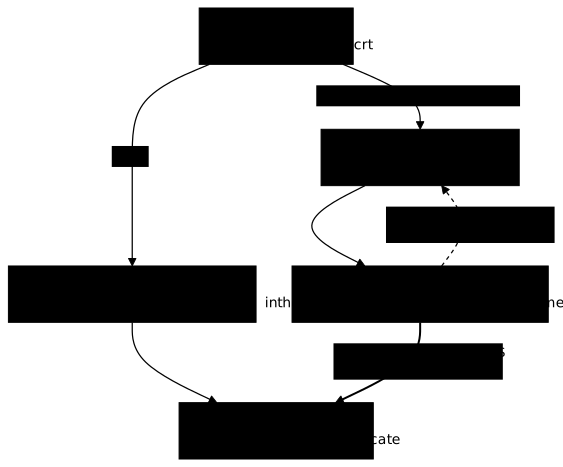
Docker reads the trusted authorities of a registry in /etc/docker/certs.d/<host:port>/ca.crt. This directory is created with sudo, since it belongs to root:
sudo mkdir -p /etc/docker/certs.d/registre.atelier.test:6443sudo cp ~/atelier-registre/ac/ca.crt /etc/docker/certs.d/registre.atelier.test:6443/ca.crtdocker push registre.atelier.test:6443/demo/alpine:1.0The push refers to repository [registre.atelier.test:6443/demo/alpine]7b229517ed22: Pushed1.0: digest: sha256:c26612752c78b18faacd63c7d50f4592c2e7b0f25e0e20e82bd74e465c57ab0d size: 1022
Info -> Not all multiplatform-content is present and only the available single-platform image was pushed sha256:be2656061b536c1883c4034790e21d0a09c5aaaf51968b89368a3c0371ea2c9a -> sha256:c26612752c78b18faacd63c7d50f4592c2e7b0f25e0e20e82bd74e465c57ab0dThe push goes through without restarting Docker. The Info line does not come from the registry: it signals that the local image embeds only one of the platforms of its index, and that only this one was sent. The c266… digest is that of the manifest the registry received.
Four rules avoid hours lost on this folder:
- the file is read on every connection, without a restart: renamed
ca.crt.off, the pull fails again withunknown authority, and it works again as soon as you put it back; - only the
.crtsuffix designates an authority: a file namedca.pemis ignored, and the.certand.keysuffixes are reserved for the client certificate and key; - the folder name is the exact
host:portpair: without a folder for10.10.114.11:6443, a push to the IP address givesunknown authorityeven when the folder of the name exists; - the certificate deposited is that of the authority, not that of the server.
To test the registry with curl rather than with Docker, give it the same authority through --cacert: curl --cacert ~/atelier-registre/ac/ca.crt https://registre.atelier.test:6443/v2/ returns {}. Without the option, curl answers curl: (60) SSL certificate problem: unable to get local issuer certificate: same cause, other tool.
How do you require a password with htpasswd?
The registry can verify accounts described in a file in the htpasswd format, provided that the passwords are hashed with bcrypt. You produce this file with the htpasswd tool of the httpd image, without installing anything on the host, giving it the password on standard input so that it appears neither in the shell history nor in the process list.
cd ~/atelier-registrechmod 700 idsfor u in maya theo; do openssl rand -hex 8 | tr -d '\n' > ids/$u; doneH=httpd:2.4-alpine@sha256:070da7661f0be8a05430b2c125c0cde9e53176b4048c813024021969a0e3893cdocker run --rm -i $H htpasswd -niB maya < ids/maya > auth/htpasswddocker run --rm -i $H htpasswd -niB theo < ids/theo >> auth/htpasswdchmod 600 auth/htpasswdsed -E 's/(:.{12}).*/\1.../' auth/htpasswdmaya:$2y$05$jqiXm...
theo:$2y$05$EubRa...The file goes to 0600 for the same reason as the server key: it contains the password hashes, which the other accounts of the host have no need to read, and the root of the container reads it anyway through the read-only mount.
The $2y$ prefix is the signature of bcrypt, which is what the registry can read. The 05 that follows indicates a bcrypt cost of 5, the value that htpasswd -B applies by default: it suits a workshop. Outside a workshop, the -C option sets a higher cost, at the price of a longer computation on each verification (time not measured here). The htpasswd tool ends each line with an empty line, which the registry ignores.
The passwords are drawn at random in ids/: maya and theo are two accounts, which the lesson will use to show a limit further down.
You restart the registry with three more variables: REGISTRY_AUTH=htpasswd, REGISTRY_AUTH_HTPASSWD_REALM (the text that the registry announces to the client in its 401 answer) and REGISTRY_AUTH_HTPASSWD_PATH. This time, you add a named volume so that the images survive the recreation of the container (docker rm then docker run) and so that an ephemeral container can mount it by its name. The -v option of docker rm deletes at the same time the anonymous volume that the registry image creates for /var/lib/registry: without it, the first container leaves this volume on the disk.
docker rm -fv registre-confiancedocker volume create donnees-registredocker run -d --name registre-confiance -p 6443:5000 \ -v donnees-registre:/var/lib/registry \ -v ~/atelier-registre/certs-registre:/certs:ro \ -v ~/atelier-registre/auth:/auth:ro \ -e REGISTRY_HTTP_TLS_CERTIFICATE=/certs/serveur.crt \ -e REGISTRY_HTTP_TLS_KEY=/certs/serveur.key \ -e REGISTRY_AUTH=htpasswd \ -e REGISTRY_AUTH_HTPASSWD_REALM="Registre atelier" \ -e REGISTRY_AUTH_HTPASSWD_PATH=/auth/htpasswd \ registry:3.1.2@sha256:d4032d4cc323c1731c707931ecada07a53076eac38e3b61ae57533f170f2c6c3sleep 2docker logs registre-confiance 2>&1 | grep -a htpasswdAs with the first start, the two-second pause gives the registry time to write its log. It must display configured "htpasswd" access controller. This line is emitted at the debug level, the one of the configuration shipped in the image; with the config.yml presented further down, which does not set logging, it does not appear, and it is the 401 answer to an anonymous request that proves the authentication.
These variables are only another way of writing the configuration file of the registry. The matching rule is simple: you prefix the path of the key in capitals with REGISTRY_, the levels being separated by _. REGISTRY_HTTP_TLS_CERTIFICATE corresponds to http.tls.certificate, and REGISTRY_AUTH_HTPASSWD_REALM to auth.htpasswd.realm.
A config.yml file can carry these same settings, which is useful when you prefer to describe the registry in a file rather than in variables. Mounted on /etc/distribution/config.yml, it entirely replaces the configuration shipped in the image: the registry refuses to start with unsupported version: "" if the file contains only http.tls and auth.htpasswd. The version: 0.1 line is therefore mandatory, and the storage block must be given again. Here is a file that reuses what this lesson needs, with the paths as seen by the container.
It is not a copy of the shipped configuration, which carries other sections: debug logging, metrics, a storage health check. Its storage block reuses that of the shipped configuration, including delete.enabled: true, which the section on deletion assumes:
version: 0.1storage: delete: enabled: true cache: blobdescriptor: inmemory filesystem: rootdirectory: /var/lib/registryhttp: addr: :5000 tls: certificate: /certs/serveur.crt key: /certs/serveur.keyauth: htpasswd: realm: Registre atelier path: /auth/htpasswdSaved as ~/atelier-registre/config.yml, this file is mounted with -v ~/atelier-registre/config.yml:/etc/distribution/config.yml:ro in place of the REGISTRY_* variables. The registry then starts over TLS (listening on [::]:5000, tls) and answers 401 to a request without credentials.
Now query the API without, then with credentials. So as not to write the password in the arguments of curl, visible for a moment in the process list and kept by the shell history, you first store it in a netrc file with 600 permissions (umask 077), which --netrc-file reads:
(umask 077; printf 'machine registre.atelier.test login maya password %s\n' \ "$(cat ~/atelier-registre/ids/maya)" > ~/atelier-registre/ids/netrc)curl -sS -i --cacert ~/atelier-registre/ac/ca.crt https://registre.atelier.test:6443/v2/curl -sS -i --cacert ~/atelier-registre/ac/ca.crt \ --netrc-file ~/atelier-registre/ids/netrc https://registre.atelier.test:6443/v2/HTTP/2 401content-type: application/jsondocker-distribution-api-version: registry/2.0www-authenticate: Basic realm="Registre atelier"content-length: 87date: Tue, 03 Nov 2026 18:13:26 GMT
{"errors":[{"code":"UNAUTHORIZED","message":"authentication required","detail":null}]}HTTP/2 200content-type: application/jsondocker-distribution-api-version: registry/2.0content-length: 2date: Tue, 03 Nov 2026 18:13:26 GMT
{}The first answer is a 401 whose www-authenticate header announces the chosen realm; the second, with a valid account, is a 200 with the body {}. A wrong password returns the same 401 as the absence of credentials, and an anonymous upload on POST /v2/demo/alpine/blobs/uploads/ also receives 401: the registry does not distinguish "unknown account" from "wrong password".
Three traps lie in wait at startup, and the last one is the most treacherous:
- without
REGISTRY_AUTH_HTPASSWD_REALM, the registry stops withpanic: unable to configure authorization (htpasswd): "realm" must be set for htpasswd access controller: the realm is mandatory; - with a nonexistent path on a read-only mount, the error is
failed to open htpasswd path open /auth/nexiste.pas: read-only file system, misleading, because the file is simply absent; - a file generated in MD5 (
htpasswd -m, prefix$apr1$) is accepted at startup, without error, then every request receives a401, with this only clue in the log:error authenticating user ... crypto/bcrypt: hashedSecret too short to be a bcrypted password. A registry that starts therefore does not prove that its accounts work: test an authenticated request.
How do you log in with docker login, and where do the credentials go?
docker login sends the credentials to the registry, checks the answer and, if it is positive, stores them on the disk of the user. You give it the password through --password-stdin: the --password option works, but Docker then also displays WARNING! Using --password via the CLI is insecure. Use --password-stdin., because the value stays in the history and in the process list.
docker login registre.atelier.test:6443 -u maya --password-stdin < ~/atelier-registre/ids/mayaWARNING! Your credentials are stored unencrypted in '/home/ansible/.docker/config.json'.Configure a credential helper to remove this warning. Seehttps://docs.docker.com/go/credential-store/
Login SucceededThe line to read is Login Succeeded. The warning that precedes it is accurate: Docker created ~/.docker/config.json, where the auth field encodes the credentials in base64, an encoding that can be undone without a key and therefore encrypts nothing. The section How do you log in to Docker Hub without exposing your password? of the previous lesson details this file, its permissions and the credential helper that stores the credentials in the keychain of the system. The lesson sets none up.
To store the credentials somewhere other than ~/.docker, the global option docker --config <folder> exists. You must then repeat it on every command that has to use it: without it, Docker looks in ~/.docker and answers no basic auth credentials.
Once logged in, the push goes through:
docker push registre.atelier.test:6443/demo/alpine:1.0The push refers to repository [registre.atelier.test:6443/demo/alpine]7b229517ed22: Pushed1.0: digest: sha256:c26612752c78b18faacd63c7d50f4592c2e7b0f25e0e20e82bd74e465c57ab0d size: 1022
Info -> Not all multiplatform-content is present and only the available single-platform image was pushed sha256:be2656061b536c1883c4034790e21d0a09c5aaaf51968b89368a3c0371ea2c9a -> sha256:c26612752c78b18faacd63c7d50f4592c2e7b0f25e0e20e82bd74e465c57ab0dBefore the docker login, or after a docker logout, the same push fails with a message that does not mention a password. The status line of the layer varies from one attempt to another (Waiting or Unavailable), only the last line is stable:
The push refers to repository [registre.atelier.test:6443/demo/alpine]7b229517ed22: Waitingpush access denied, repository does not exist or may require authorization: authorization failed: no basic auth credentialsno basic auth credentials means that Docker found no credentials for this registry. A wrong password, on the other hand, makes the docker login itself fail, and no file is created:
Error response from daemon: login attempt to https://registre.atelier.test:6443/v2/ failed with status: 401 Unauthorizeddocker logout registre.atelier.test:6443 displays Removing login credentials for registre.atelier.test:6443 and leaves config.json in place, with an empty auths list. A following pull fails again with no basic auth credentials.
What can you read in the registry API?
The registry answers the /v2/ HTTP API of the OCI distribution specification, which curl queries as well as Docker does. The _catalog catalog is a Distribution extension, absent from this specification. The three useful requests to inspect its content are the catalog, the list of the tags of a repository and the manifest of a tag. The commands reuse the netrc file created above, through the variable N. The variables C (the authority) and N are lost, like $IP, if you open a new terminal: redefine them with the first two lines of the following block before continuing.
C=~/atelier-registre/ac/ca.crtN=~/atelier-registre/ids/netrccurl -sS --cacert $C --netrc-file $N https://registre.atelier.test:6443/v2/_catalogcurl -sS --cacert $C --netrc-file $N https://registre.atelier.test:6443/v2/demo/alpine/tags/listcurl -sS --cacert $C --netrc-file $N https://registre.atelier.test:6443/v2/inconnu/tags/list{"repositories":["demo/alpine"]}{"name":"demo/alpine","tags":["1.0"]}{"errors":[{"code":"NAME_UNKNOWN","message":"repository name not known to registry","detail":{"name":"inconnu"}}]}The first two answers list the repository then its tag; the third shows the error format, with a stable code (NAME_UNKNOWN) that a script can rely on.
The manifest, the sheet that describes the image and lists its layers, needs more care: the registry serves it only if the Accept header announces the type that the image uses. The image pushed here is described by an OCI manifest, of type application/vnd.oci.image.manifest.v1+json.
curl -sS --cacert $C --netrc-file $N https://registre.atelier.test:6443/v2/demo/alpine/manifests/1.0curl -sS --cacert $C --netrc-file $N -H 'Accept: application/vnd.oci.image.manifest.v1+json' -I https://registre.atelier.test:6443/v2/demo/alpine/manifests/1.0{"errors":[{"code":"MANIFEST_UNKNOWN","message":"OCI manifest found, but accept header does not support OCI manifests"}]}HTTP/2 200content-type: application/vnd.oci.image.manifest.v1+jsondocker-content-digest: sha256:c26612752c78b18faacd63c7d50f4592c2e7b0f25e0e20e82bd74e465c57ab0ddocker-distribution-api-version: registry/2.0etag: "sha256:c26612752c78b18faacd63c7d50f4592c2e7b0f25e0e20e82bd74e465c57ab0d"content-length: 1022date: Tue, 03 Nov 2026 18:14:00 GMTThe first command, without Accept, returns the MANIFEST_UNKNOWN error and its message OCI manifest found, but accept header does not support OCI manifests: the manifest exists, but the client did not say that it knew how to read it. With only Accept: application/vnd.oci.image.index.v1+json, the answer is a 404 with the same error: an index is not a manifest. With the right type, the answer carries content-type: application/vnd.oci.image.manifest.v1+json, docker-content-digest (the digest of the push) and content-length: 1022.
These answers are those of registry:3: another registry may answer differently, notably on _catalog and on the accepted types.
How do you delete an image and reclaim the disk space?
Deleting an image takes four steps, in this order: the API removes the manifest, you stop the registry, a garbage-collect (the Distribution garbage collector) run in an ephemeral container frees the layers that nothing references anymore, then you restart the registry. The Distribution documentation requires the registry to be stopped (or in read-only mode) during the run: a push in progress could lose a layer being uploaded. The diagram shows what the DELETE leaves behind, and what happens if you run the garbage collector on the running registry.
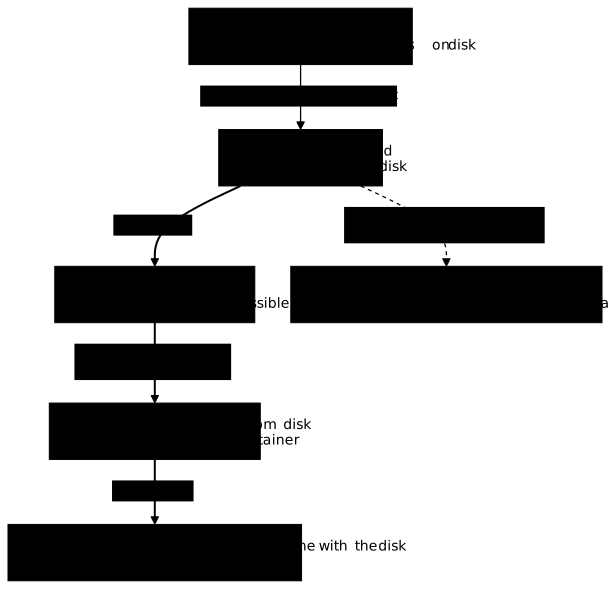
In the registry:3 image (Distribution 3.1.2), the shipped configuration /etc/distribution/config.yml enables deletion (storage.delete.enabled: true), whereas the documented default of the parameter is false: a DELETE on a manifest returns 202. With REGISTRY_STORAGE_DELETE_ENABLED=false, it returns 405 and {"errors":[{"code":"UNSUPPORTED","message":"The operation is unsupported."}]}.
Deletion goes through the digest of the manifest, not through the tag. It therefore removes all the tags that designate it. The commands reuse the variables C and N of the previous section: if you changed terminal, redefine them first.
D=sha256:c26612752c78b18faacd63c7d50f4592c2e7b0f25e0e20e82bd74e465c57ab0dcurl -sS -i --cacert $C --netrc-file $N -X DELETE https://registre.atelier.test:6443/v2/demo/alpine/manifests/$Dcurl -sS --cacert $C --netrc-file $N https://registre.atelier.test:6443/v2/demo/alpine/tags/listcurl -sS --cacert $C --netrc-file $N https://registre.atelier.test:6443/v2/_catalogHTTP/2 202docker-distribution-api-version: registry/2.0content-length: 0date: Tue, 03 Nov 2026 18:14:00 GMT
{"name":"demo/alpine","tags":[]}{"repositories":["demo/alpine"]}The 202 confirms the deletion, the tag list is empty, and a GET of the tag returns MANIFEST_UNKNOWN with unknown tag=1.0. The repository, for its part, stays in _catalog: it does not disappear with its last tag. As for the disk space, it has not moved: the layers are still there.
The garbage-collect runs on the disk of the registry, not in the running registry. You therefore stop the registre-confiance container, then run the registry tool of the same image, pinned by the same digest, in an ephemeral container (--rm) that mounts the same donnees-registre volume. This container needs neither the certificates nor the credentials: it reads the configuration shipped in the image, /etc/distribution/config.yml, whose storage block already points to /var/lib/registry. The --entrypoint registry option chooses the program to run, and the arguments that follow the image are those of registry. The following block chains six commands: stopping the registry, a first measurement of the volume, the --dry-run simulation that announces what would be deleted, the actual run, a second measurement, then restarting the registry.
R=registry:3.1.2@sha256:d4032d4cc323c1731c707931ecada07a53076eac38e3b61ae57533f170f2c6c3docker stop registre-confiancedocker run --rm --entrypoint du -v donnees-registre:/var/lib/registry $R -sh /var/lib/registrydocker run --rm --entrypoint registry -v donnees-registre:/var/lib/registry $R garbage-collect --dry-run /etc/distribution/config.ymldocker run --rm --entrypoint registry -v donnees-registre:/var/lib/registry $R garbage-collect /etc/distribution/config.ymldocker run --rm --entrypoint du -v donnees-registre:/var/lib/registry $R -sh /var/lib/registrydocker start registre-confianceThe variable R is lost in a new terminal, like $IP, $C and $N: redefine it if needed.
After the deletion of the manifest of demo/alpine, the first measurement gives 3.8M. The simulation announces 0 blobs marked, 3 blobs and 0 manifests eligible for deletion: the three blobs (files of the storage, like the one in the error URL above) are here the manifest, the configuration and the layer of the image. After the actual run, the second measurement gives 88.0K. The garbage-collect has nothing to delete as long as the DELETE has not taken place.
This form avoids a trap. Run with docker exec on the running registry, the garbage collector deletes the files without the registry knowing: the latter keeps in memory the list of the layers it knows, and a new docker push of the same image answers Layer already exists although the layer file has disappeared from the volume. The registry then contains a manifest whose layers are missing on the disk, and only a restart brings it back in line. With the prior stop, the registry restarts at docker start with an empty list, which fills up as requests come in.
Read-only mode (storage.maintenance.readonly) is the other condition cited by the Distribution documentation; the lesson did not exercise it. The demonstration runs on a workshop registry with no other client, which does not transpose as is to a registry that serves users: the stop interrupts the service. It does not exercise the --delete-untagged option either, which also deletes the manifests without a tag.
What can't htpasswd authentication do?
With htpasswd, all the accounts have the same rights: each one can pull, push and delete. The second account, theo, shows it. You must first log in with this account, which replaces the credentials of maya for this registry, then give the local image a demo/theo name:
docker login registre.atelier.test:6443 -u theo --password-stdin < ~/atelier-registre/ids/theodocker tag registre.atelier.test:6443/demo/alpine:1.0 registre.atelier.test:6443/demo/theo:1.0docker push registre.atelier.test:6443/demo/theo:1.0The docker login must display Login Succeeded, and the docker push ends with exit code 0:
The push refers to repository [registre.atelier.test:6443/demo/theo]7b229517ed22: Pushed1.0: digest: sha256:c26612752c78b18faacd63c7d50f4592c2e7b0f25e0e20e82bd74e465c57ab0d size: 1022
 Info -> Not all multiplatform-content is present and only the available single-platform image was pushed         sha256:be2656061b536c1883c4034790e21d0a09c5aaaf51968b89368a3c0371ea2c9a -> sha256:c26612752c78b18faacd63c7d50f4592c2e7b0f25e0e20e82bd74e465c57ab0d
theo did create a repository, although no rule gave him the right to. Since the layer was deleted from the volume by the garbage-collect, the registry receives it again: it is Pushed, not Mounted from demo/alpine. There is no read-only account.
If you need accounts that pull without being able to push, you have to change mechanism: token authentication (auth.token, which assumes a third-party service issuing tokens) or a reverse proxy placed in front of the registry, which filters the HTTP methods. The lesson sets up neither. For rights management per project, with an interface, a more complete registry such as Harbor meets the need.
What to do when the registry refuses the connection?
A refusal is diagnosed by its exact message, which almost always designates the cause: read the end of the Docker error line before touching anything.
| Message | Cause | Fix |
|---|---|---|
x509: certificate signed by unknown authority | Docker does not know the authority, or the certs.d folder does not have the exact host:port name, or the file is not a .crt | Copy ca.crt into /etc/docker/certs.d/<host:port>/ |
x509: certificate is valid for autre.exemple.test, not registre.atelier.test | The requested name is not in the SANs | Redo the certificate with the right name in subjectAltName |
x509: cannot validate certificate for 10.10.114.11 because it doesn't contain any IP SANs | Connection by IP address while the certificate carries only names | Add IP:<address> to the SANs, or use the name |
x509: certificate has expired or is not yet valid | Date outside the validity of the certificate | Issue a new server certificate with the same authority, restart the registry |
http: server gave HTTP response to HTTPS client | The registry listens in plain HTTP while it is designated otherwise than by a loopback address or localhost (a name, or a network address) | Serve the registry over TLS |
dial tcp …:6443: connect: connection refused | No registry listens on this port (container stopped, for example after the garbage-collect if the docker start was forgotten) | docker ps -a, then docker start registre-confiance |
Layer already exists when pushing a deleted image | The garbage-collect was run on the running registry, which still believes it owns the layer | docker restart registre-confiance, then push again; next time, stop the registry first |
no basic auth credentials | No docker login for this registry | docker login <host:port> |
login attempt to https://…/v2/ failed with status: 401 Unauthorized | Wrong password or unknown account | Check the htpasswd file (bcrypt) and the password |
The same causes are recognized with curl: (60) SSL: no alternative certificate subject name matches target hostname for a wrong SAN, (60) SSL certificate problem: certificate has expired for an expired certificate, (7) Failed to connect for a stopped registry, and Client sent an HTTP request to an HTTPS server. when you speak HTTP to a TLS registry.
To practice on the expired certificate, issue a server certificate whose validity is already past: openssl x509 -req accepts -not_before and -not_after from OpenSSL 3.4, two options absent from earlier versions. The dates are given in the YYYYMMDDhhmmssZ format: choose a start and an end both in the past, the end coming after the start. This exercise is offered without a measured output in the lesson: the expected message is that of the certificate has expired or is not yet valid line of the table. Write it to a file other than serveur.crt, for example expire.crt in certs-registre/.
The registry reads its certificate only at startup: you must therefore recreate it. Take the whole block of the htpasswd section, docker rm -fv included, changing only serveur.crt to expire.crt in REGISTRY_HTTP_TLS_CERTIFICATE. The named volume donnees-registre keeps the images. To get back to a working registry, recreate it again with serveur.crt. If you overwrote serveur.crt, issue it again first with the last two openssl commands of the section on the local authority (the signing request, then openssl x509 -req), run from ~/atelier-registre/ac: do not run the first one again, which would recreate the authority and make Docker reject the registry, since its certs.d keeps the old ca.crt.
If your demonstration behaves differently from the one in the lesson, go back to the loopback trap: a docker login that succeeds without an installed authority, or a 400 Bad Request instead of 401, most often betrays a name resolved to 127.x. An insecure-registries entry already declared for this registry in daemon.json produces the same effect: check the "Insecure Registries" list of docker info.
How do you clean up what the lesson installed?
The lesson created a container, a volume, three image references (tags and digest), a trust folder in /etc/docker, a line in /etc/hosts and a working folder. Remove them in this order, so as to leave neither credentials nor a useless trusted authority on the machine:
docker logout registre.atelier.test:6443docker rm -fv registre-confiancedocker volume rm donnees-registredocker rmi registre.atelier.test:6443/demo/alpine:1.0 registre.atelier.test:6443/demo/theo:1.0docker rmi alpine:3.24@sha256:be2656061b536c1883c4034790e21d0a09c5aaaf51968b89368a3c0371ea2c9asudo rm -r /etc/docker/certs.d/registre.atelier.test:6443sudo rmdir --ignore-fail-on-non-empty /etc/docker/certs.dsudo sed -i '/registre.atelier.test/d' /etc/hostsrm -r ~/atelier-registreThe command that removes alpine:3.24 also deletes the image if you used it before the lesson: skip it in that case. Two traces may remain. The registry:3 and httpd images that the lesson downloaded are not deleted, you can reuse them. And docker logout leaves ~/.docker/config.json with an empty auths list: if this file did not exist before the lesson, remove it with rm ~/.docker/config.json.
Practice
The first lab asks you to enable TLS on a registry, to install its private authority for Docker and to prove a real pull with certificate verification, without any insecure-registries exception. The second asks you to require credentials on a private registry: it is validated on an authenticated Docker push and pull, under verified TLS.
Key points
By default, Docker accepts a registry over HTTP, or without a verified certificate, only if it is designated by a loopback address or by localhost. With the containerd store of a fresh installation, a name resolved to the loopback interface does not benefit from it for pushing and pulling, but docker login succeeds there without verifying the certificate: demonstrate trust on a non-loopback address, after checking the resolution with getent hosts. The server certificate carries its name and its address in the SANs, and a name missing from this list is rejected. The server key stays at 0600: the registry, which runs as root in the container of a Docker in root mode, reads it anyway.
Docker trusts an authority through /etc/docker/certs.d/<host:port>/ca.crt: the file is read without a restart, carries the .crt suffix, and its folder follows the exact host:port pair. The lesson uses neither insecure-registries nor daemon.json.
htpasswd authentication requires bcrypt and a REGISTRY_AUTH_HTPASSWD_REALM: an MD5 file starts without error and returns a 401 on every request. docker login --password-stdin stores the credentials in ~/.docker/config.json, in plain base64; docker logout removes them.
The /v2/ API gives _catalog (a Distribution extension) and tags/list, but the manifest requires the right Accept. htpasswd does not distinguish rights: all the accounts push and delete. A mounted config.yml replaces the whole shipped configuration: it requires version: 0.1 and gives the storage block again.
In the registry:3 image, deletion is enabled by the shipped configuration, whereas the documented default is false. Deleting an image goes through the digest of the manifest, only the garbage-collect gives back the space, and it runs with the registry stopped, in a docker run --rm container of the same image on the same volume, before a docker start. Run hot, it leaves the registry answering Layer already exists. When cleaning up, docker rm -fv also removes the anonymous volume of the container.
Knowledge check
Check that the essentials of this lesson have stuck. The questions cover only what has just been explained here.
Knowledge check
Check what you have learned with this interactive quiz
How it works
- The timer starts when you click Start
- Multiple choice, true/false and short answer questions
- You can move between questions
- Detailed results are shown at the end
Starts the quiz and the timer
Review
(0/0)Score by domain
A domain groups several guides and gets several questions, so its score is more reliable than a per-topic score, which often rests on a single question.
Summary
Strengths
No topic passed at 80% on at least two questions yet.
Weak areas
No topic below the pass mark.
Recommended next
Hints before you try again?
Continue the course: Pin a base image, and deliver it offline
A new full quiz with random questions
Work again only on the questions you missed