A container is not a small machine. It is a process of the host from which the Linux kernel hides part of the system (that is the job of namespaces) and on which it imposes ceilings (that is the job of cgroups). This lesson has you measure both mechanisms on a running container, instead of taking them on faith.
You first compare a container's namespaces with the host's. You then read, in the cgroup, the files where Docker writes --memory and --pids-limit. Two measurements on files and on the user complete the picture.
The measurements do not use sudo, but they need an account that can run docker. Such an account indirectly has rights equivalent to root: "without sudo" does not mean "without privileges" (see Securing Docker in production). Only reading a container's namespaces from the host requires administrator rights.
In the examples, the containers are named uid-defaut ("default uid"), uid-1000, plafonne ("capped") and sans-plafond ("uncapped").
What you will learn
- Compare a container's namespaces with the host's with
readlink /proc/self/ns/<type> - Read in the result which namespaces belong to the container and which are shared
- Say what sharing a namespace with the host changes (
--pid host,--network host,--uts host) - Find a container's cgroup v2, read
memory.maxandpids.max, and spotcpu.max - Link each limit option to the cgroup file it writes
- Show that the container has its own file root and that its uid 0 matches the host's
- Say what isolation does not guarantee, and where hardening lives
Prerequisites
- Know how to start and remove a container, which Run a Docker container and choose what it runs teaches, and how to inspect it, which Inspect a running container with Docker covers
- Have read Containers or virtual machines: which one to choose?: a container is a process, seen with two numbers
- A Linux host with Docker Engine 29.9.2 and an account that can run
docker(the measurements on this page do not usesudo)
The outputs on this page come from Docker Engine 29.9.2, installed from Docker's official repository on Debian 13. With an older version of Docker or another distribution, the cgroup may be organized differently. Read your own path before relying on it.
What isolates a container, and what limits it?
Two kernel mechanisms share the work. A namespace changes what a process sees, a cgroup (control group) changes what it can consume. The first covers visible processes, the network, mount points or the hostname. The second covers memory, the number of processes or processor time. The two are independent: a container without limits is isolated without being capped, and a capped container can share namespaces with the host.
The diagram ties both mechanisms to the same process. On the left, the cgroup: each ceiling file carries, just below its name, the docker run option that writes it. On the right, the seven namespace types that the kernel attaches to the process. The dotted arrow says that with --pid host, --network host or --uts host, the targeted type is no longer the container's own: it is the host's.
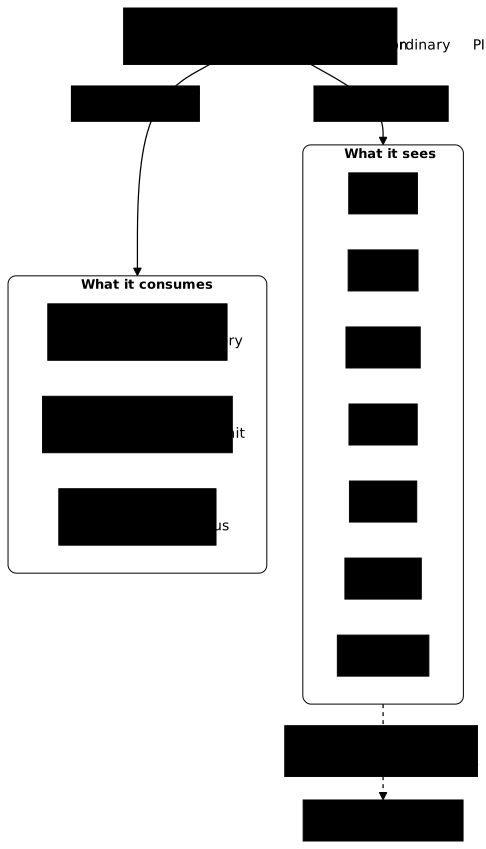
Everything rests on a single kernel, the host's. That is why a container starts fast, and why its isolation is not absolute. The rest of the page checks, command by command, how far each view goes.
How do you read a container's namespaces?
To know whether a container shares a namespace with the host, read /proc/self/ns/. This directory holds one link per namespace type, for example net:[4026531840], and the number in brackets identifies the namespace. If the numbers differ, the two processes do not use the same namespace. If they are equal, they share it.
A process can always read its own links. You therefore only need to run the same command twice, on the host and then in a container, without sudo.
The following loop prints, for the seven namespace types, the number that readlink sees when run on the host with your account, then the number the same readlink sees when run in a throwaway container (--rm).
for ns in cgroup ipc mnt net pid user uts; do printf '%-7s host=%s container=%s\n' "$ns" \ "$(readlink /proc/self/ns/$ns)" \ "$(docker run --rm alpine:3.24@sha256:be2656061b536c1883c4034790e21d0a09c5aaaf51968b89368a3c0371ea2c9a readlink /proc/self/ns/$ns)"donecgroup host=cgroup:[4026531835] container=cgroup:[4026532357]ipc host=ipc:[4026531839] container=ipc:[4026532355]mnt host=mnt:[4026531841] container=mnt:[4026532353]net host=net:[4026531840] container=net:[4026532358]pid host=pid:[4026531836] container=pid:[4026532356]user host=user:[4026531837] container=user:[4026531837]uts host=uts:[4026531838] container=uts:[4026532354]Compare the two numbers on each line. Six lines have different numbers: the container has its own space for those six types. The user line carries two identical numbers: without options, Docker does not give the container a namespace of its own for users, so it shares the host's. No docker run option creates one: that goes through userns-remap on the daemon side or through rootless mode, both presented in Securing Docker in production. The section on uid 0 draws the consequence.
Only equality on a given line matters: compare the numbers with each other, on the same machine and at the same moment, never with those of another machine. The host's numbers are mostly fixed kernel values, and a new container may reuse numbers freed by a container that has disappeared. The diagram summarizes this measurement, with a single box that differs from the others, the user type.
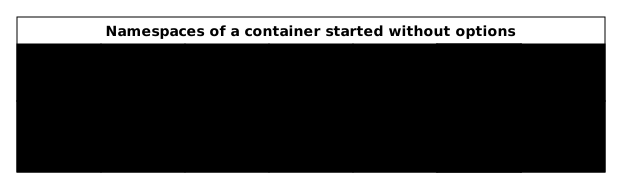
The /proc/self/ns/ directory also contains a time link (the clock namespace) and two links, pid_for_children and time_for_children. They are not used for this measurement, which sticks to the seven types of the diagram.
You can also make this observation from the host, on a running container: with administrator rights, /proc/<pid>/ns/ of the container's main process gives the same numbers as readlink run inside that container. That is the reading the first lab asks for.
What does a shared namespace change?
Docker lets you refuse the isolation of a namespace type, container by container, with an option that takes the value host. The observation is always made the same way: a throwaway container prints what it sees, and you compare it with what the host sees.
With --pid host, the container no longer has its own process tree: it sees the host's. Run ps in that container and look at the first line, the one for process number 1.
docker run --rm --pid host alpine:3.24@sha256:be2656061b536c1883c4034790e21d0a09c5aaaf51968b89368a3c0371ea2c9a sh -c 'ps -o pid,comm | head -n 5'PID COMMAND 1 systemd 2 kthreadd 3 pool_workqueue_ 4 kworker/R-kvfreNumber 1 is systemd, the host's init process, and not the container's sh. The container therefore sees the host's process tree. The head limits the output to the first lines: the full list has hundreds.
The other two options are observed the same way.
With --network host, the container no longer has its own network stack. List its interfaces with ip link.
docker run --rm --network host alpine:3.24@sha256:be2656061b536c1883c4034790e21d0a09c5aaaf51968b89368a3c0371ea2c9a ip linkOn the test VM, the container lists the same interfaces as the host (lo, enp1s0 and docker0), instead of its two usual interfaces, lo and eth0. The ports it opens are opened directly on the host.
With --uts host, hostname prints the host machine's name instead of a name derived from the container's identifier.
docker run --rm --uts host alpine:3.24@sha256:be2656061b536c1883c4034790e21d0a09c5aaaf51968b89368a3c0371ea2c9a hostnameOn the test VM, the command prints d29-debian.lab, the host's name. Without the option, it prints the container's short identifier.
Networking has its own lesson: Default Docker network or your own: which to choose?.
Each of these three shares has a legitimate use: monitoring the host's processes, serving on its ports without going through the Docker network's address translation, presenting an agent with the machine's real name. Each one nonetheless removes the view that separated the container from the host.
Does the container see the host's files?
No, not by default: Docker prepares a filesystem of the container's own, but you can give it access to host files. The three files /etc/hosts, /etc/hostname and /etc/resolv.conf that the container sees are not the host's: Docker generates them for it.
This filesystem is the container's root /. It lives in its own mnt namespace, the one on the mnt line measured above. Docker assembles it from the image layers, read-only, to which it adds a write layer specific to the container. The page Docker volumes: keep your data and mount files explains this write layer and what survives the removal of the container.
Two measurements show that this root is not the host's. The first compares the file that identifies the distribution: the container prints the one from its image.
docker run --rm alpine:3.24@sha256:be2656061b536c1883c4034790e21d0a09c5aaaf51968b89368a3c0371ea2c9a cat /etc/os-releaseNAME="Alpine Linux"ID=alpineVERSION_ID=3.24.3PRETTY_NAME="Alpine Linux v3.24"HOME_URL="https://alpinelinux.org/"BUG_REPORT_URL="https://gitlab.alpinelinux.org/alpine/aports/-/issues"The host prints its own with the same command, run directly.
cat /etc/os-releasePRETTY_NAME="Debian GNU/Linux 13 (trixie)"NAME="Debian GNU/Linux"VERSION_ID="13"VERSION="13 (trixie)"VERSION_CODENAME=trixieDEBIAN_VERSION_FULL=13.7ID=debianHOME_URL="https://www.debian.org/"SUPPORT_URL="https://www.debian.org/support"BUG_REPORT_URL="https://bugs.debian.org/"Look at the PRETTY_NAME line: Alpine for the image, Debian 13 for the test host. Two distributions, and yet a single kernel.
The second measurement reads the mount table that the kernel keeps for the container's process.
docker run --rm alpine:3.24@sha256:be2656061b536c1883c4034790e21d0a09c5aaaf51968b89368a3c0371ea2c9a sh -c 'cat /proc/self/mountinfo | head -n 3'343 231 0:57 / / rw,relatime - overlay overlay rw,lowerdir=/var/lib/containerd/io.containerd.snapshotter.v1.overlayfs/snapshots/178/fs:/var/lib/containerd/io.containerd.snapshotter.v1.overlayfs/snapshots/133/fs,upperdir=/var/lib/containerd/io.containerd.snapshotter.v1.overlayfs/snapshots/179/fs,workdir=/var/lib/containerd/io.containerd.snapshotter.v1.overlayfs/snapshots/179/work345 343 0:67 / /proc rw,nosuid,nodev,noexec,relatime - proc proc rw346 343 0:68 / /dev rw,nosuid - tmpfs tmpfs rw,size=65536k,mode=755,inode64The first line describes the mount of the root /. Note its filesystem type: overlay, a kernel technique that stacks several directories. The container's root is therefore assembled from the image layers and the write layer, and is not a host disk mounted as is. The next two lines show /proc and /dev, which Docker also mounts in this root.
This root is not locked shut, though. A container reaches host files through mounts (bind mounts), which you request with -v or --mount. Docker also adds a few of its own: /etc/hosts, /etc/hostname and /etc/resolv.conf are three files that Docker generates for each container on the host, then mounts in the container. They are not the host's files: the hostname holds the container's short identifier, that is, the first twelve characters of its identifier. As for resolv.conf, on the default network of a host that goes through systemd-resolved, like the test VM, it carries the real DNS server instead of the host's local relay 127.0.0.53, which is unreachable from the container. On a network you create, the container instead gets Docker's embedded DNS, presented in Default Docker network or your own: which to choose?. The more you mount from the host, the more the container sees. The page Securing Docker in production details the mounts to avoid.
What is a container's uid 0 worth on the host?
A uid is the number that identifies a user for the kernel, and uid 0 is root's. Without a namespace of its own for users, the container's uid 0 matches the host's uid 0: for the kernel, it is the same number. The user line measured above announced it, with its shared number.
That does not give it all of root's powers on the host: Docker removes capabilities from the process (a capability is a fragment of root's powers that the kernel grants separately) and applies other protections, which the security page details.
You confirm it by following the process on both sides. The container first answers the question "which uid am I?".
docker run --rm alpine:3.24@sha256:be2656061b536c1883c4034790e21d0a09c5aaaf51968b89368a3c0371ea2c9a id -u0The result is 0 for any container started without a --user option whose image declares no user. That is the case for the Alpine image.
To see which user the host associates with this 0, start a process that waits, get its host-side number with docker inspect, then read its owner with ps (this reading does not need sudo).
docker run -d --name uid-defaut alpine:3.24@sha256:be2656061b536c1883c4034790e21d0a09c5aaaf51968b89368a3c0371ea2c9a sleep 900PID_DEFAUT=$(docker inspect --format '{{.State.Pid}}' uid-defaut)ps -o user,pid,comm -p "$PID_DEFAUT"USER PID COMMANDroot 24631 sleepLook at the USER column: it prints root. The process that runs as root in the container is also root for the host. Along the way, docker inspect --format '{{.State.Pid}}' gave you the number the host assigns to the sleep, which the container sees as PID 1.
The --user option changes the process's uid, on the container side and the host side alike, since the kernel knows only one number.
docker run -d --name uid-1000 --user 1000:1000 alpine:3.24@sha256:be2656061b536c1883c4034790e21d0a09c5aaaf51968b89368a3c0371ea2c9a sleep 900PID_1000=$(docker inspect --format '{{.State.Pid}}' uid-1000)ps -o user,pid,comm -p "$PID_1000"USER PID COMMANDstudent 24692 sleepThe USER column prints the name of the host account that holds uid 1000 (student on the test VM), or the number 1000 if no account holds it. Either way, it is no longer root. A process that is no longer root in the container is no longer root for the host either: this is a first way to reduce what the shared uid allows.
Where is a container's cgroup?
A cgroup is a directory of the virtual filesystem /sys/fs/cgroup/, each file of which is a setting or a counter. On the test VM, a container's directory is called docker-<identifier>.scope and sits under system.slice. This path assumes version 2 of cgroups and Docker's systemd cgroup driver. The cgroup driver is the component that creates and manages these directories. With a driver other than systemd, the directory does not have the same name and is not in the same place: the path rebuilt below then does not apply as is. Two commands check these conditions on your host.
The first reads the filesystem type of /sys/fs/cgroup.
stat -fc %T /sys/fs/cgroupcgroup2fsThe expected type is cgroup2fs, as here. The second asks Docker for its cgroup driver and the version it uses:
docker info --format '{{.CgroupDriver}} {{.CgroupVersion}}'systemd 2The first field is the driver (systemd), the second the cgroup version (2).
Now start a container with two ceilings, whose files you will read below, and rebuild the path of its directory from its full identifier. The grep filter keeps only four files among all those in the directory.
docker run -d --name plafonne --memory 96m --pids-limit 40 alpine:3.24@sha256:be2656061b536c1883c4034790e21d0a09c5aaaf51968b89368a3c0371ea2c9a sleep 900ID_CG=$(docker inspect --format '{{.Id}}' plafonne)CG="/sys/fs/cgroup/system.slice/docker-${ID_CG}.scope"ls "$CG" | grep -E '^(cgroup\.procs|cpu\.max|memory\.max|pids\.max)$'cgroup.procscpu.maxmemory.maxpids.maxThree of these files carry the ceilings: memory.max, pids.max and cpu.max. The fourth, cgroup.procs, lists the processes of the group, with their host-side numbers.
Check the link between the container and its directory. The host number of the sleep, which docker inspect gives, must appear in cgroup.procs, and /proc/<pid>/cgroup must point to the same directory.
PID_PLAF=$(docker inspect --format '{{.State.Pid}}' plafonne)cat "$CG/cgroup.procs"cat "/proc/$PID_PLAF/cgroup"225850::/system.slice/docker-7114f9b6e84a3f3b5008d3c2a6181821ea6ac9d3d49d35209b581b4989601403.scopeThe first line is the host number of the sleep, the same as PID_PLAF. The second is the cgroup path, relative to /sys/fs/cgroup. You read this directory without sudo.
If the directory computed above does not exist on your host, do not try to guess its name: read the real path in /proc/<pid>/cgroup, from the host, with the number that docker inspect gives. With the systemd driver, it is 0::/system.slice/docker-<full-id>.scope. Run inside the container, cat /proc/self/cgroup returns 0::/, because the cgroup namespace hides the path.
What do --memory and --pids-limit write into the cgroup?
Docker does not apply a limit itself: it writes it into a cgroup file, and the kernel applies it. --memory feeds memory.max, in bytes. --pids-limit feeds pids.max, a number of processes. A file that contains max means "no ceiling".
The following commands read the three files of the capped container, on the host side, then the settings of a container started with no option at all.
cat "$CG/memory.max" "$CG/pids.max" "$CG/cpu.max"docker run -d --name sans-plafond alpine:3.24@sha256:be2656061b536c1883c4034790e21d0a09c5aaaf51968b89368a3c0371ea2c9a sleep 900ID_SANS=$(docker inspect --format '{{.Id}}' sans-plafond)cat "/sys/fs/cgroup/system.slice/docker-${ID_SANS}.scope/memory.max" "/sys/fs/cgroup/system.slice/docker-${ID_SANS}.scope/pids.max"10066329640max 100000b409889e569ab013b00dd5557610c17941391f0eac082f292b9c246f46d0ee06max3400Read the first three lines, those of the capped container. 100663296 is the 96 MiB memory limit converted to bytes (96 x 1024 x 1024). 40 is the value of --pids-limit. max 100000 means that no processor time ceiling is set (--cpus, explained in Cap a container: CPU, ulimits and shared memory). The fourth line is the identifier of the second container, printed by docker run -d. The last two lines are its settings.
For the container started with no option, memory.max is max: Docker writes no memory ceiling. On the other hand, pids.max is 3400 and not max. This ceiling does not come from Docker: on this VM, it matches systemd's default setting for .scope units, DefaultTasksMax, which systemctl show -p DefaultTasksMax prints. It is the result of this configuration, not a universal rule: on a host set up differently, you will read another value. Read yours before concluding that a container without --pids-limit is not capped on the number of processes.
The container itself reads the same settings under its own /sys/fs/cgroup/, which presents it with the root of its group. You can thus check that an application really sees the ceiling you set for it.
docker exec plafonne cat /sys/fs/cgroup/memory.max /sys/fs/cgroup/pids.max10066329640You find the values read on the host side. They explain two classic symptoms: a container killed without a message from the application has often hit memory.max, and a service that can no longer start processes has hit pids.max.
Why is isolation not an absolute barrier?
A namespace hides part of the system, a cgroup caps consumption, and neither completely locks the container in. Four limits are worth knowing.
- The kernel is shared: all containers and the host call the same kernel, and a flaw in it concerns them all.
- The uid 0 is shared as long as the container has no namespace of its own for users, as the previous measurements showed. Removed capabilities and the other protections limit what this
rootcan do, but they do not replace an unprivileged user. - A namespace shared with
--pid hostor--network host, or a host directory mounted in the container, removes a separation that isolation provided. - A resource ceiling prevents no action: a container capped on memory remains free to do anything its uid allows.
Reducing these risks is a matter of hardening: dropping capabilities, security profiles, a read-only filesystem, an unprivileged uid. The page Securing Docker in production covers them, and this lesson does not repeat them. To rebuild these mechanisms by hand, without Docker, see Understanding Linux namespaces and Limit a container: cgroups v2 and capabilities.
How do you clean up after the measurements?
Four containers from this page stay alive until you remove them, because they run a sleep. The -f option stops them before removing them. The containers started with --rm removed themselves.
docker rm -f uid-defaut uid-1000 plafonne sans-plafondThe command prints the four names. The variables defined in your terminal (PID_DEFAUT, PID_1000, CG, ID_CG…) disappear with the session.
Practice
Two labs, in order. In the first, you find a container's process on the host, you read the namespaces the kernel gave it and you compare them with the host's. The lab then checks your answers.
The second lab starts from the cgroup. You find a container's, you read the memory limit it carries, then you set ceilings when creating a container. Here again, the lab checks your answers.
Key points
A namespace changes what a container's process sees, a cgroup changes what it can consume. The two are independent, and a container can have one without the other.
You compare namespaces with readlink /proc/self/ns/<type>, run on the host and then in a container. Two identical numbers mean a shared space, two different numbers a space of its own. By default, only user is shared. The --pid host, --network host and --uts host options also share the corresponding type: reserve them for a specific need.
The container has its own file root (mnt namespace). It does not see the host's files by default, but mounts can give it access to some. Its three files /etc/hosts, /etc/hostname and /etc/resolv.conf are generated by Docker for it, they are not the host's. Its uid 0 matches the host's as long as it has no namespace of its own for users, without giving it all of root's powers.
With cgroup v2 and the systemd driver, a container's cgroup is a docker-<identifier>.scope directory under /sys/fs/cgroup/system.slice/, readable from the host. --memory writes memory.max in bytes, --pids-limit writes pids.max and --cpus writes cpu.max. Docker writes the limits, the kernel applies them, and the value max means there is no ceiling. Without --pids-limit, the test VM prints pids.max at 3400, a value inherited from systemd's DefaultTasksMax: it depends on your configuration.
A shared kernel and a shared uid 0 mean that isolation by namespaces and cgroups is not an absolute barrier. Hardening belongs to the security page.
Knowledge check
Check that you have the essentials of this guide. The questions cover only what has just been explained here.
Knowledge check
Check what you have learned with this interactive quiz
How it works
- The timer starts when you click Start
- Multiple choice, true/false and short answer questions
- You can move between questions
- Detailed results are shown at the end
Starts the quiz and the timer
Review
(0/0)Score by domain
A domain groups several guides and gets several questions, so its score is more reliable than a per-topic score, which often rests on a single question.
Summary
Strengths
No topic passed at 80% on at least two questions yet.
Weak areas
No topic below the pass mark.
Recommended next
Hints before you try again?
Continue the course: Who launches a container: Docker's execution chain
A new full quiz with random questions
Work again only on the questions you missed