You are on call at night, and a container has stopped. The runbook says "relaunch the container". You relaunch it and the service comes back. The next day, the working files are gone.
The problem is the word "relaunch", which can mean two operations. You can restart the container that already exists, or create a new one under the same name. Either way, a container is running at the end. Nothing warns you about the difference.
Another problem shows up during deployments. The old container stops with code 137, reported as a failure, and the stop takes exactly ten seconds. If the team gets used to ignoring this alert, it will miss a real one. Docker had to kill the container, because it did not react to the stop request sent just before.
This lesson explains both problems, which have the same origin. A container is a process that goes through several states. Its first process, the one with number 1 (PID 1), decides how the container stops.
What you will learn
- Read the state of a container
- Tell a restarted container from a recreated one, using its ID and its files
- Pause a container, a state that is different from a stop
- Read the exit code of a finished container
- Understand why PID 1 ignores the stop request, and check it
- Make the application PID 1 without removing its preparation script
- Know the other fixes, the form of
CMDand the--initoption, and their limits
Prerequisites
You need Docker installed, which the Docker installation covers, and the basic commands (run, ps, exec, stop) from the lesson on the Docker command line. All the outputs on this page were taken on Docker 29.9.2, with the alpine:3.24 image. This image is pinned by its digest, the SHA-256 fingerprint that identifies it without ambiguity. Its shell is the busybox one, a small set of Unix tools.
How do you read the state of a container?
A container goes through several states. The main ones are created, running, paused and exited. More rarely, you will see restarting, removing and dead. Each command (docker create, start, pause, stop) moves the container from one state to another. To read the current state, use docker container inspect and the .State.Status field.
The diagram shows the four main states and the commands that move a container between them. Remember two arrows in particular. docker stop leads to exited. The container is stopped, but it still exists. Only docker rm deletes it.
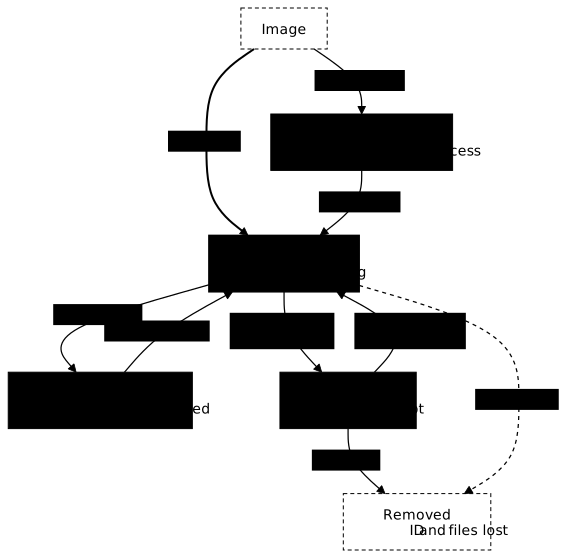
The restarting state appears when a container started with --restart always sees its command fail right away. docker ps --filter status=restarting then lists it with the status Restarting (1) Less than a second ago.
The created state often comes as a surprise. docker create prepares the container without starting it. It prints the container ID, which the redirection to /dev/null hides here to keep only the state.
docker create --name cree alpine:3.24@sha256:be2656061b536c1883c4034790e21d0a09c5aaaf51968b89368a3c0371ea2c9a sh -c 'sleep infinity' > /dev/nulldocker container inspect cree --format 'etat={{.State.Status}} pid={{.State.Pid}}'etat=created pid=0The state is created and the process number is 0, so no program is running yet. This is expected: docker run does two things in a row, docker create and then docker start, and only the first one happened here.
Restart or recreate a container: what is the difference?
You start a container, write a file in it and note its ID. Then you stop it and restart it.
docker run -d --name veilleur alpine:3.24@sha256:be2656061b536c1883c4034790e21d0a09c5aaaf51968b89368a3c0371ea2c9a sh -c 'sleep infinity'docker exec veilleur sh -c 'echo marque-du-premier-conteneur > /marque.txt'docker container inspect veilleur --format '{{.Id}}'docker stop veilleurdocker container inspect veilleur --format 'etat={{.State.Status}} code={{.State.ExitCode}}'docker start veilleurdocker container inspect veilleur --format '{{.Id}}'docker exec veilleur cat /marque.txtcb8ab854ed07dc582d62e966f693b8a5865849d0af2b5a95dfd1dcaae326da10cb8ab854ed07dc582d62e966f693b8a5865849d0af2b5a95dfd1dcaae326da10veilleuretat=exited code=137veilleurcb8ab854ed07dc582d62e966f693b8a5865849d0af2b5a95dfd1dcaae326da10marque-du-premier-conteneurThe three IDs are identical. The first is the one docker run printed at launch, the second was read before the stop and the third after the restart. So the same container came back, and the file written before the stop is still there.
A stopped container is not deleted. Docker keeps its ID, its logs and its writable layer. The writable layer is the space that belongs to the container, where the files it creates or modifies are stored. docker restart on a stopped container gives the same result, with the same ID.
The stop also printed code=137. This code has no effect on whether the container is kept. The section on the ten-second stop explains it.
Now for the other way to "relaunch the container", the one the on-call runbook did not tell apart from the first. You delete the container, then start a new one under the same name.
docker rm -f veilleurdocker run -d --name veilleur alpine:3.24@sha256:be2656061b536c1883c4034790e21d0a09c5aaaf51968b89368a3c0371ea2c9a sh -c 'sleep infinity'docker container inspect veilleur --format '{{.Id}}'docker exec veilleur cat /marque.txtveilleur8011f6ef159e6a8c2276532a8d4d2ae4d0361a629dc54cba0f6c74cdc0c258b38011f6ef159e6a8c2276532a8d4d2ae4d0361a629dc54cba0f6c74cdc0c258b3cat: can't open '/marque.txt': No such file or directoryThe name is still veilleur, but the ID is different. This is another container. Docker hands a name out again as soon as the container that held it is deleted. Only the ID identifies a container reliably.
This new container starts from the image, with nothing of what was written in the old one. The cat on the last line fails because the file no longer exists. Docker shows no error and its logs report nothing unusual. This loss is hard to notice.
Data you want to keep after a container is deleted must not stay in its writable layer. Put it in a volume, a storage space that Docker manages separately from the container. The lesson on volumes covers it. For the on-call case, remember this: a stopped container gets restarted, not deleted.
What does docker pause do?
docker pause suspends the processes of a container without ending them. It is the only command that leads to the paused state. Neither a stop nor a deletion gets you there.
docker run -d --name suspendu alpine:3.24@sha256:be2656061b536c1883c4034790e21d0a09c5aaaf51968b89368a3c0371ea2c9a sh -c 'sleep infinity'docker pause suspendudocker container inspect suspendu --format 'etat={{.State.Status}} running={{.State.Running}} paused={{.State.Paused}} pid={{.State.Pid}}'docker ps --filter name=suspendu --format '{{.Names}} {{.Status}}'docker unpause suspendudocker container inspect suspendu --format 'etat={{.State.Status}}'1c891ac0b01f02d4eba9874b3afb8292320f4b302bd2f24b39e3a17caf87ffabsuspenduetat=paused running=true paused=true pid=4167suspendu Up Less than a second (Paused)suspenduetat=runningThe two fields running=true and paused=true are true at the same time. The processes still exist. They keep their number, their memory and their connections, but they no longer run. docker unpause resumes them where they were. docker stop would have ended the main process and docker rm would have deleted the container. After those two commands, you cannot go back.
Where do you read the exit code of a finished container?
When the main process ends, the container goes to the exited state and keeps the code that process returned. Here, sh -c 'exit 3' returns code 3.
docker run --name traitement alpine:3.24@sha256:be2656061b536c1883c4034790e21d0a09c5aaaf51968b89368a3c0371ea2c9a sh -c 'exit 3'echo "code rendu par docker run = $?"docker container inspect traitement --format 'etat={{.State.Status}} code={{.State.ExitCode}}'docker ps -a --filter name=traitement --format '{{.Names}} {{.Status}}'code rendu par docker run = 3etat=exited code=3traitement Exited (3) Less than a second agoThe 3 appears in three places. docker run returns it to your shell, the inspection keeps it and docker ps -a displays it as long as the container exists. Monitoring tools read this code to decide whether to restart a container or raise an alert. If the code does not match what happened, they make the wrong decision.
A signal is a short message sent to a process, by the kernel or by another process. SIGTERM asks the process to stop. The program can catch it to close its files before exiting. SIGKILL stops the process immediately, without giving it a chance to react.
By convention, an exit code above 128 means the process was killed by a signal. The signal number is the code minus 128. Code 137 corresponds to SIGKILL (128 + 9) and code 143 to SIGTERM (128 + 15). A program can also return such a code itself.
Why can a stop take ten seconds?
The veilleur container, which only waited, stopped with code 137. So Docker killed it with SIGKILL. The cause is a rule of the Linux kernel. The first process of a container, PID 1, ignores SIGTERM if it has not set anything up to handle it. A few commands show it.
docker stop works in two steps. It first sends PID 1 the stop signal of the image, SIGTERM by default. It then waits for a grace period, ten seconds by default. If the container is still running at the end of the period, it sends SIGKILL.
The image can change this stop signal with the STOPSIGNAL instruction of the Dockerfile, the file that describes how an image is built. You can also change it at launch with the --stop-signal option of docker run. The test below sends the same signal to two processes of the same container, an ordinary process and PID 1.
docker run -d --name temoin alpine:3.24@sha256:be2656061b536c1883c4034790e21d0a09c5aaaf51968b89368a3c0371ea2c9a \ sh -c 'sleep 600 & echo $! > /tmp/pid ; while : ; do sleep 1 ; done'docker exec temoin sh -c 'P=$(cat /tmp/pid); echo "pid ordinaire = $P, etat = $(awk "{print \$3}" /proc/$P/stat)"; kill -TERM $P; sleep 1; echo "apres SIGTERM, etat = $(awk "{print \$3}" /proc/$P/stat 2>/dev/null || echo disparu)"; kill -TERM 1; sleep 1; echo "le PID 1 apres SIGTERM, etat = $(awk "{print \$3}" /proc/1/stat)"'docker container inspect temoin --format 'conteneur={{.State.Status}}'The first docker run prints the container ID. The output below leaves it out to keep only the measurements.
pid ordinaire = 7, etat = Sapres SIGTERM, etat = disparule PID 1 apres SIGTERM, etat = Sconteneur=runningThe ordinary process has disappeared, so it stopped. PID 1 is still asleep (state S) and the container is still running. The container and the signal are the same, only the process number changes.
The Linux kernel delivers to PID 1 only the signals it has set up a handler for. A handler is the code that deals with a signal. Without a handler, PID 1 ignores SIGTERM. Any other process would stop.
SIGKILL and SIGSTOP are the exception when they come from the host, more precisely from a parent PID namespace. This is why the final SIGKILL of docker stop does stop the container.
You can draw a diagnostic reflex from this. A stop that lasts exactly the grace period means the container did not stop on its own. To see it, start a container whose PID 1 is sleep, which has no handler. Set the grace period to two seconds with --timeout 2 and time the stop.
docker run -d --name sourd alpine:3.24@sha256:be2656061b536c1883c4034790e21d0a09c5aaaf51968b89368a3c0371ea2c9a sleep 600debut=$(date +%s)docker stop --timeout 2 sourdecho "duree de l'arret = $(( $(date +%s) - debut )) s"docker container inspect sourd --format 'code={{.State.ExitCode}}'64847118aaf62017bbbc2caa302aa3254c9d9d3de8a8f3c9ba075f1c2e88da24sourdduree de l'arret = 2 scode=137You asked for a two-second delay, the stop took two seconds and the code is still 137. The duration follows the setting. Docker waited until the end of the delay, then killed the process.
What if the application receives the signal but stops too slowly?
PID 1 is not the only cause of a stop that lasts the whole period. An application can receive SIGTERM and take longer than the delay to finish its work. It may have to drain a queue, close connections or save a last state. Docker then sends SIGKILL and the code is also 137.
The logs tell the two cases apart. An application that received the signal can write it down before being killed. In the next example, the container catches SIGTERM, then simulates a five-second shutdown.
docker run -d --name demo-lent alpine:3.24@sha256:be2656061b536c1883c4034790e21d0a09c5aaaf51968b89368a3c0371ea2c9a \ sh -c 'trap "echo arret-commence; sleep 5; echo arret-termine; exit 0" TERM; while :; do sleep 1; done'docker stop --timeout 2 demo-lentdocker container inspect demo-lent --format 'code={{.State.ExitCode}}'docker logs demo-lenta06620694cc219437024d0ad7524d52346f802408bb9ba9cf2889c01464e0b56demo-lentcode=137arret-commenceThe code is 137 and the stop took two to three seconds, as with sourd (the measurement is read to the nearest second). Yet the arret-commence line shows that the application did receive the signal. The arret-termine line is missing, because Docker killed the application before its shutdown was over.
In this case, changing PID 1 is no use. The application needs more time. Use docker stop --timeout 10 (or -t 10) for a one-off stop, or --stop-timeout 10 when creating the container to keep the setting. With a delay longer than its shutdown, the same container exits with code 0 after five to six seconds.
When a stop lasts the whole period, ask yourself two questions, in this order. Do the logs show that the signal was received? If so, does the application's shutdown fit within the delay?
How do you tell which program is PID 1 in a container?
Two files in the container tell you which program is PID 1. /proc/1/comm gives its short name, truncated to 15 characters by the kernel. /proc/1/cmdline gives its full command line. Its arguments are separated by null bytes, which tr replaces with spaces here.
docker exec <conteneur> cat /proc/1/commdocker exec <conteneur> sh -c 'tr "\0" " " < /proc/1/cmdline'An in-house image sometimes starts the application from an entry script. This script begins with some preparation, for example writing a configuration, setting permissions or applying a database migration.
The shell that runs this script starts the application as a child process and stays PID 1 itself. So it is the shell that receives SIGTERM. It has no handler, it ignores the signal, and the application never receives it.
The shell's exec command fixes this. Instead of starting the application as a child, the shell replaces itself with it. The application takes number 1 and receives the signal directly.
The diagram follows SIGTERM in both cases, with the scripts of the demonstration that comes next: a launcher (the entry script) that starts service.sh, without exec on one side and with exec on the other. Look at who holds number 1 and whether service.sh receives the signal.
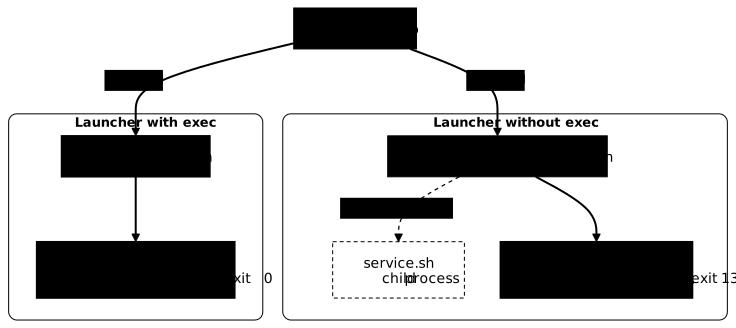
You create a small demo service and two launch scripts that differ only by the word exec. They are written in a local directory, mounted read-only in the container.
mkdir demo-pid1 && cd demo-pid1cat > service.sh <<'EOF'#!/bin/shecho service-demarretrap 'echo arret-propre-du-service; exit 0' TERMwhile :; do sleep 1; doneEOFcat > lanceur-sans-exec.sh <<'EOF'#!/bin/shecho reglage-applique/demo/service.shEOFcat > lanceur-avec-exec.sh <<'EOF'#!/bin/shecho reglage-appliqueexec /demo/service.shEOFchmod +x service.sh lanceur-sans-exec.sh lanceur-avec-exec.shEach script starts in its own container. You then read the PID 1 of each one. You stop both containers while timing them, then read the exit code and the logs.
docker run -d --name demo-sans-exec -v "$PWD:/demo:ro" alpine:3.24@sha256:be2656061b536c1883c4034790e21d0a09c5aaaf51968b89368a3c0371ea2c9a /demo/lanceur-sans-exec.shdocker run -d --name demo-avec-exec -v "$PWD:/demo:ro" alpine:3.24@sha256:be2656061b536c1883c4034790e21d0a09c5aaaf51968b89368a3c0371ea2c9a /demo/lanceur-avec-exec.shfor n in demo-sans-exec demo-avec-exec; do echo "$n : PID 1 = $(docker exec $n cat /proc/1/comm)"donefor n in demo-sans-exec demo-avec-exec; do debut=$(date +%s) docker stop "$n" > /dev/null echo "$n : arret en $(( $(date +%s) - debut )) s, code $(docker container inspect "$n" --format '{{.State.ExitCode}}')" docker logs "$n"done650db54f5f2b4c5b50a53aa6e3733cbdb1df5dd659b9f7eebf6b3251019a09f7bf12f9c1cad775531367e225939391830823560a10644479aad2d78029b2361ddemo-sans-exec : PID 1 = lanceur-sans-exdemo-avec-exec : PID 1 = service.shdemo-sans-exec : arret en 11 s, code 137reglage-appliqueservice-demarredemo-avec-exec : arret en 1 s, code 0reglage-appliqueservice-demarrearret-propre-du-serviceIn the first container, PID 1 is the launch script. Its name, lanceur-sans-ex, is truncated to 15 characters. The stop takes 11 seconds for a grace period of 10 seconds, because date +%s measures to the nearest second, and it ends with code 137. In the second container, PID 1 is the service itself. It stops in one second with code 0.
Only the second container prints the arret-propre-du-service line, which the service writes when it receives the signal. The two scripts differ only by the word exec, so it is exec that makes the difference. The second lab has you apply this fix to an image and check that it works.
Does the shell form of CMD always stop the application from receiving the signal?
In a Dockerfile (see the lesson Write a Dockerfile), the CMD instruction sets the command run when the container starts. It can be written in two ways. The exec form is a list in square brackets, such as ["/service.sh"], and Docker launches the program directly. The shell form is plain text, such as /service.sh, and Docker hands it to /bin/sh -c.
The Dockerfile reference states that with the shell form, /bin/sh -c runs the command and does not pass signals on, so the program is not PID 1. This is true as long as the shell stays in place. To see what really happens, stay in the demo-pid1 directory. You reuse service.sh, which already catches SIGTERM, and you add three Dockerfiles that differ only by their CMD line.
for v in exec shell chaine; do printf 'FROM alpine:3.24@sha256:be2656061b536c1883c4034790e21d0a09c5aaaf51968b89368a3c0371ea2c9a\nCOPY service.sh /service.sh\n' > Dockerfile.$vdoneecho 'CMD ["/service.sh"]' >> Dockerfile.exececho 'CMD /service.sh' >> Dockerfile.shellecho 'CMD /service.sh && echo jamais' >> Dockerfile.chainefor v in exec shell chaine; do docker build -q -f Dockerfile.$v -t signaux-demo:1.0-$v . > /dev/nulldoneThen start each image with docker run -d --name signaux-<variant> signaux-demo:1.0-<variant>. Read its PID 1 with docker exec signaux-<variant> cat /proc/1/comm. Stop it with docker stop while timing it, then read the exit code, as for the two launch scripts.
| Declaration in the Dockerfile | PID 1 | Duration | Code |
|---|---|---|---|
CMD ["/service.sh"], exec form | service.sh | 1.1 s | 0 |
CMD /service.sh, shell form | service.sh | 1.1 s | 0 |
CMD /service.sh && echo jamais, shell form | sh | 10.2 s | 137 |
The durations are rounded to the tenth, over two runs. The application handles the signal only at the end of its current sleep 1. If it receives SIGTERM, the stop therefore lasts about one second. If it does not, the stop lasts the ten-second grace period plus a fraction.
With the shell form and a single command, PID 1 is still service.sh. The shell of the Alpine image (busybox) treats this case separately. Instead of starting the command as a child, it replaces itself with it, as exec would.
As soon as the line contains anything other than a simple command, here a &&, the shell has to stay in place to chain the commands. It stays PID 1 and the application no longer receives the signal.
Prefer the exec form, because it does not depend on this shell behavior. Still, the real cause of the problem is not the form of CMD. It is an intermediate process that stays in place after starting the application.
What other fixes exist, and what are their limits?
Making the application PID 1 is not the only fix. Docker can also start a small init program as PID 1. This init passes signals on to the application and cleans up orphan processes, the ones whose parent has disappeared.
Take the same case as sourd. Its program, sleep, does not catch SIGTERM, so it waited the whole period before exiting with 137. This time, add the --init option.
docker run -d --init --name demo-init alpine:3.24@sha256:be2656061b536c1883c4034790e21d0a09c5aaaf51968b89368a3c0371ea2c9a sleep 600docker exec demo-init cat /proc/1/commdebut=$(date +%s)docker stop demo-initecho "duree de l'arret = $(( $(date +%s) - debut )) s"docker container inspect demo-init --format 'code={{.State.ExitCode}}'4df393abf312565eae3d00057f97af203a1e8f2dd5d26aa4d5f11a14f25d307ddocker-initdemo-initduree de l'arret = 0 scode=143PID 1 is now docker-init. The stop is immediate and the code is 143. The init passed SIGTERM on to sleep, which does not catch it and stopped on that signal instead of being killed by SIGKILL. For Docker, the stop is clean. Be careful though: the application closed nothing itself. --init saves you from waiting for the delay, but it does not replace a signal handler in the application.
The last fix is to start the application directly from the ENTRYPOINT and do the preparation elsewhere. The ENTRYPOINT is the instruction that names the program started at launch, often an entry script. You then remove the script instead of fixing it, and the preparation still has to be done somewhere else.
How do you clean up after the experiments?
When you are done, delete what the page created: the containers, the three images you built, then the demo directory. Leave that directory first. An rm -r demo-pid1 run from inside it fails with No such file or directory.
docker rm -f cree veilleur suspendu traitement temoin sourd demo-lent demo-sans-exec demo-avec-exec demo-init signaux-exec signaux-shell signaux-chainedocker rmi signaux-demo:1.0-exec signaux-demo:1.0-shell signaux-demo:1.0-chainecd .. && rm -r demo-pid1docker rm -f stops then deletes the containers, docker rmi deletes the images, and rm -r erases the directory and its scripts.
Practice
Two labs extend the page. Do them in order.
The first starts from containers that already exist. You take them through several states without ever recreating them. The grade does not depend on your commands. The lab checks that the restarted container kept the ID noted before you intervened, and that the file written in it is still readable. It also checks that the second container is paused and not stopped, and that a third one finished with the expected exit code.
In the second, you diagnose and then fix the ten-second stop. The lab first checks that you stopped the faulty container and kept it with its non-zero code, so that the defect was actually observed. It then starts a container from your fixed image to read its PID 1. It checks that this container exits with code 0, and it looks in its logs for the line the application writes when it receives the signal, as well as the preparation line. Emptying the entry script would make the symptom disappear, and the lab rejects that fix.
Key points
-
A stopped container still exists. It keeps its ID, its logs and its writable layer.
docker startanddocker restartbring it back as it was. -
Recreating a container under the same name gives a different container. Its ID is different, its writable layer is empty and no message warns you. Only the ID identifies a container, not the name.
-
docker pausesuspends a container without stopping it.running=trueandpaused=trueare true at the same time, anddocker unpauseresumes it where it was. Afterstoporrm, there is no going back. -
The exit code stays readable after the container ends, in
.State.ExitCode. Above 128, a signal killed the process. Its number is the code minus 128, so 137 for SIGKILL and 143 for SIGTERM. -
PID 1 ignores the signals it does not handle. This is a Linux kernel rule. In a single container, an ordinary process stops on SIGTERM and PID 1 does not react.
-
A stop that lasts exactly the grace period has two possible causes. Either the signal did not arrive (PID 1 without a handler), or the application takes longer than the delay to stop. The code is 137 in both cases. The logs settle it, and you fix the second case with
docker stop -tor--stop-timeout. -
In an entry script,
execreplaces the shell with the application. It becomes PID 1 and receives the signal. Withoutexec, the script stays PID 1 and does not pass the signal on. -
The shell form of a
CMDis not always the cause. The shell of the Alpine image (busybox) replaces itself directly with a single command. The real problem is an intermediate process that stays in place after starting the application. The exec form avoids this case without depending on the shell. -
--initpasses SIGTERM on to the application and the stop exits with code 143. The application closed nothing itself, because the option does not replace a signal handler.
Knowledge check
Check that the essentials of this guide stuck. The questions cover only what has just been explained here.
Knowledge check
Check what you have learned with this interactive quiz
How it works
- The timer starts when you click Start
- Multiple choice, true/false and short answer questions
- You can move between questions
- Detailed results are shown at the end
Starts the quiz and the timer
Review
(0/0)Score by domain
A domain groups several guides and gets several questions, so its score is more reliable than a per-topic score, which often rests on a single question.
Summary
Strengths
No topic passed at 80% on at least two questions yet.
Weak areas
No topic below the pass mark.
Recommended next
Hints before you try again?
Continue the course: Inspect a running container with Docker
A new full quiz with random questions
Work again only on the questions you missed