In the first stack of the course, site and base share a single network, created by Compose for the project. Every service on that network can reach every other one. This is convenient to get started, but a database that everyone can reach is also a database that a compromised service can reach.
This lesson is for a beginner who can write a two-service compose.yaml. You declare three networks, you attach each service only to the networks it needs, you make internal the ones that have no reason to get out, then you prove with real connections which service reaches which. The database publishes no port on the machine, and the front end cannot reach it directly.
What you will learn
- Declare several networks in a
compose.yamland attach each service only to the networks it needs. - Make a network with no way out using
internal: true. - Find the real name of the networks Compose creates, and check that a network is indeed internal.
- Prove with
ncthat a path exists or does not exist, including by aiming at an IP address rather than a name. - Check that no database port is published on the host, and understand why a published port reopens a path that the networks close.
Prerequisites
You need a Linux host with Docker Engine 29.9.2 and its Compose 5.6.1 plugin, installed from the official repository as shown in the lesson on installing Docker. The images in the lesson are pinned by their digest, the same ones as in the first stack.
You wrote a first stack with the lesson Describe an application with Compose. It explains the project name and how one service reaches another by its name. Thanks to the lesson on Docker networks, you also know that a name only resolves between containers on the same user-defined network.
The lesson on isolating a container explains what an internal network is. This page applies it in Compose without explaining it again.
You work in a ~/atelier folder, which the lesson has you create empty. To probe connections, the lesson uses nc. The nginx alpine images already include it, but the probe launched from the host also requires nc on the host: on Debian 13, it comes from the netcat-openbsd package.
Why is a single network for the whole stack a problem?
Because the network that Compose creates by default connects all the services to each other, without distinction. Picture a stack of three services: an nginx front end that visitors reach, an application, and a postgres database. Only the application needs the database. On a single network, the front end can nevertheless open a connection to it. A single flaw in the front end is then enough for an attacker to try connecting to it.
Compose warns you of nothing. The file works, the page is displayed, and nobody notices that this path exists: you only see it by testing it.
The remedy fits in one rule: a service only joins the networks it needs to talk to its direct neighbors. The front end talks to the application, the application talks to the database, and the front end never talks to the database. Write this rule in the file, and Docker enforces it.
How do you spread services across several networks?
Start by listing who talks to whom, then create one network per relationship. The stack in the lesson has three services, named portail (the front end), appli (the application) and base (the database). These names are used in the file and in the commands.
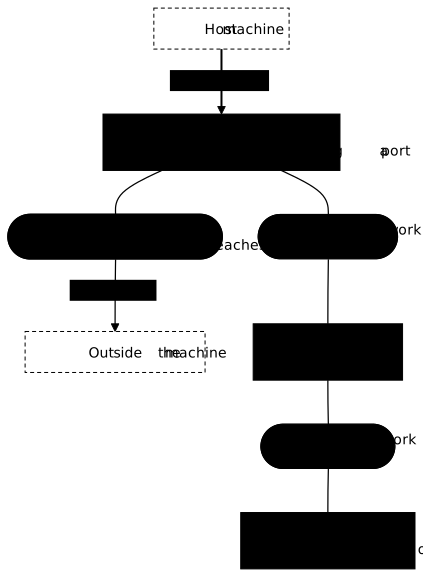
Three networks are enough. The public network is the only ordinary network, and portail is its only member. It is there because portail needs an ordinary network for its port to be published: Docker ignores a port on a service whose networks are all internal, which the subsection Does publishing a database port reopen the forbidden path? measures. portail is also the only service that publishes a port. The applicatif network connects portail to appli. The donnees network connects appli to base. These last two are internal, because appli and base have no reason to reach the outside.
appli belongs to two networks, applicatif and donnees, and it is the one that builds the bridge. The front end gets the data from the database through the application, without ever reaching the database directly.
In the diagram, each line connects a service to a network it is a member of. The two networks marked "internal" are the ones that lead nowhere. The public network, in red, is the only one that gets out: its arrow leads outside the machine. portail is attached to it so that its port is published, as the "published port" arrow arriving on it shows. Then follow the chain from top to bottom: portail and base are at the two ends, and no network brings them together. This absence of a path between portail and base is what you will prove below.
How do you declare the networks in the compose.yaml?
Create the folder and the file. The file has two top-level blocks: services:, which you know, and networks:, which declares the networks the way volumes: declares volumes.
mkdir ~/atelier && cd ~/atelierservices: portail: image: nginx:1.30.6-alpine@sha256:0e52bd054126cdc040b1276c0af347aeb02a41b9cfe305d6094767ac30e97949 ports: - "127.0.0.1:18420:80" networks: - public - applicatif
appli: image: nginx:1.30.6-alpine@sha256:0e52bd054126cdc040b1276c0af347aeb02a41b9cfe305d6094767ac30e97949 networks: - applicatif - donnees
base: image: postgres:18.6-alpine3.24@sha256:10a5c69a83035ab5239f5620d708520e8b28f5aa1f2b20143e6024532edadfb5 environment: POSTGRES_PASSWORD: demo-seulement networks: - donnees
networks: public: applicatif: internal: true donnees: internal: trueThe appli service uses the same nginx image as the front end. It plays the role of an application here: for the demonstration, it is enough that a port listens on this service. In a real project, it would be the image of your application.
In each service, networks: is a list of the networks the service joins. Each entry repeats the key of the network declared at the bottom of the file: public, applicatif or donnees, and not the full name Compose will give them. A service that does not declare networks: joins the project's default network, the one from the first lesson. As soon as it declares its list, it joins only that one.
At the bottom, each network is a key. public has no option: Compose creates it with its default settings, that is, on a single Docker host, a bridge network, like those of docker network create. You can write driver: bridge to say it explicitly. applicatif and donnees carry internal: true: their members reach each other, but these networks offer no route to the outside.
Finally, look at ports:. Only portail declares one, published on 127.0.0.1 as in the first stack. appli and base have none: the database is reachable by the members of the donnees network and by the host, which reaches the IP address of each container, as you will measure below. A network decides who can connect between containers; ports: decides what the host publishes. The two are checked separately, and a port published by the database could reopen a path that the networks have closed: the subsection "Does publishing a database port reopen the forbidden path?" measures it.
How do you check the file, then create the stack?
First run docker compose config, which validates the file and prints the configuration Compose will apply, without creating anything.
docker compose configRead three things in the output. Each service lists only its own networks: portail has two, appli has two, base has only one. The networks: block at the bottom contains the three networks. And applicatif and donnees both carry internal: true. If a network is missing from a service's list, the file is what needs fixing before you start.
Then start the stack.
docker compose up -d[+] up 6/6 ✔ Network atelier_applicatif Created 0.1s ✔ Network atelier_donnees Created 0.0s ✔ Network atelier_public Created 0.0s ✔ Container atelier-base-1 Started 0.2s ✔ Container atelier-appli-1 Started 0.5s ✔ Container atelier-portail-1 Started 0.4sCompose created three networks and three containers. Notice that there is no atelier_default network: no service uses it, so Compose does not create it.
The names follow the rule from the first lesson: <project>_<network>, where the project is the name of the folder. The network declared under the donnees key is therefore called atelier_donnees for Docker. This full name is the one to use with docker network; in the file, you keep the short key.
List the project's networks, then check which ones are internal.
docker network ls --filter label=com.docker.compose.project=atelier --format 'table {{.Name}}\t{{.Driver}}'docker network inspect atelier_public atelier_applicatif atelier_donnees --format '{{.Name}} interne={{.Internal}}'NAME DRIVERatelier_applicatif bridgeatelier_donnees bridgeatelier_public bridgeatelier_public interne=falseatelier_applicatif interne=trueatelier_donnees interne=trueThe first command shows that the three networks are bridges and that they belong to the project. The filter on the com.docker.compose.project label avoids showing the networks of the other projects on the machine. The second confirms that only atelier_public is not internal.
How do you prove what reaches what?
By attempting real connections, service by service. Resolving a name does not prove that a connection succeeds, and conversely a name that does not resolve only shows that the two services share no network. What matters is whether a connection is established or fails.
Before running any command, predict the result. The table gives the path to test and the reason for the expected answer. Hide the last column and guess it.
| From | To | Common network | Expected |
|---|---|---|---|
portail | appli, port 80 | applicatif | the connection succeeds |
appli | base, port 5432 | donnees | the connection succeeds |
portail | base, port 5432 | none | the connection fails |
Each probe uses nc -z, which opens the connection without sending data, and -w 3, which gives up after three seconds. The sh -c prints ouvert ("open") if nc succeeds and injoignable ("unreachable") otherwise.
The database needs a few seconds to initialize. If you probe it right after up -d, it answers injoignable even though the path exists. As in the first lesson, wait a few seconds, or run the probe again.
First probe the path from the front end to the application.
docker compose exec portail sh -c 'nc -z -w 3 appli 80 && echo ouvert || echo injoignable'ouvertThe word ouvert proves that portail reaches port 80 of appli, through the applicatif network. Now probe from the application to the database.
docker compose exec appli sh -c 'nc -z -w 3 base 5432 && echo ouvert || echo injoignable'ouvertThe application reaches the database through the donnees network. What remains is the forbidden path: the front end to the database.
docker compose exec portail sh -c 'nc -z -w 3 base 5432 && echo ouvert || echo injoignable'nc: bad address 'base'injoignableThe bad address message comes from nc: the name base does not resolve from portail, because the two services share no network. You can check this with docker compose exec portail getent hosts base, which prints nothing and returns code 2.
A name that does not resolve is only a hint, however. The proof is a second probe, aimed at the database's IP address. To read it, the template {{range .NetworkSettings.Networks}} walks through the container's networks and returns the address on each one. base has only one network, so it returns only one address. On Docker 29, this is the form to use: the flat field .NetworkSettings.IPAddress no longer exists.
IP_BASE=$(docker inspect -f '{{range .NetworkSettings.Networks}}{{.IPAddress}}{{end}}' atelier-base-1)echo "$IP_BASE"docker compose exec portail sh -c "nc -z -w 3 $IP_BASE 5432 && echo ouvert || echo injoignable"172.20.0.3injoignableThe first line is the address of the database on its network. All the addresses in this lesson are those of the test machine: Docker chooses the subnets, so read your own. The second line shows that portail does not reach the database by its address either: the name was not the only barrier, and without a common network the connection to the address fails too, as long as no published port serves as a detour.
A failure proves nothing as long as you do not know whether the probe works. So replay the same command from appli, which shares the database's network. The double quotes let your shell replace $IP_BASE before the command enters the container.
docker compose exec appli sh -c "nc -z -w 3 $IP_BASE 5432 && echo ouvert || echo injoignable"ouvertThe same address answers from appli, and not from portail. The previous failure is therefore indeed due to the absence of a common network, and not to a typo.
To finish, check that the database publishes nothing on the host.
docker compose ps --format 'table {{.Service}}\t{{.Ports}}'SERVICE PORTSappli 80/tcpbase 5432/tcpportail 127.0.0.1:18420->80/tcpLook at the PORTS column. Only portail shows an -> arrow, so only its port is published on the machine. The 80/tcp and 5432/tcp of the other two services indicate a port that exists in the container, with nothing published on the host side.
Do not confuse "not published" with "unreachable from the host". The host sees each container by its IP address, and an internal network changes nothing about that. From the machine, the same probe reaches the database.
nc -z -w 3 "$IP_BASE" 5432 && echo ouvert || echo injoignableConnection to 172.20.0.3 5432 port [tcp/postgresql] succeeded!ouvertThe database is therefore reachable by the members of donnees and by the host. The networks limit the paths between containers, not the host's access.
Why does an internal network not get out, and what trap remains?
An internal network has no route to the outside: this is the definition of internal: true, and the mechanism is detailed in the lesson on isolating a container. Here, you read it in each service's routing table. Compare base and appli, both on internal networks, and portail, a member of the only network that gets out.
docker compose exec base ip routedocker compose exec appli ip routedocker compose exec portail ip route172.20.0.0/16 dev eth0 scope link src 172.20.0.3172.18.0.0/16 dev eth1 scope link src 172.18.0.2172.20.0.0/16 dev eth0 scope link src 172.20.0.2default via 172.19.0.1 dev eth1172.18.0.0/16 dev eth0 scope link src 172.18.0.3172.19.0.0/16 dev eth1 scope link src 172.19.0.2The output combines the three commands. The first line comes from base: a single route, the one for the donnees subnet. The next two come from appli: two subnets, applicatif and donnees, and no default line. The last three come from portail, and only the default via line leads to the outside, through the public network.
appli has no default route because both its networks are internal. If one of them were an ordinary network, appli would keep its default route and would get out.
A probe toward the outside confirms what the table says. It aims at the gateway of the machine's network, which the first command reads from the host's default route.
PASSERELLE=$(ip route | awk '/^default/ {print $3}')docker compose exec portail sh -c "ping -c1 -W2 $PASSERELLE >/dev/null 2>&1 && echo sort || echo ne-sort-pas"docker compose exec appli sh -c "ping -c1 -W2 $PASSERELLE >/dev/null 2>&1 && echo sort || echo ne-sort-pas"sortne-sort-pasOnly portail gets out (sort, "gets out"; ne-sort-pas, "does not get out"), because public is the only ordinary network. Getting out is not the purpose of public, though: portail is attached to it so that its port is published, and the next subsection measures this.
internal: true does not separate the services from each other either: appli and base reach each other freely on donnees. Two settings complement each other. The networks: list of each service decides who talks to whom, and internal: true decides whether a network leads to the outside.
Does publishing a database port reopen the forbidden path?
It depends on the database's networks. If it is a member of internal networks only, Docker ignores the published port, without any error message.
Run the test on a test machine only. During the test, PostgreSQL is published on all the machine's addresses: it is open to the local network, protected by a single demo password. Undo the test right after the measurement.
To see it, add these lines to the base service of the compose.yaml, without touching its networks: list, then recreate the service with docker compose up -d.
ports: - "0.0.0.0:15432:5432"The PORTS column of docker compose ps still shows 5432/tcp, and docker port atelier-base-1 prints nothing: the port is not published.
Now attach the database to an ordinary network, keeping the port. You need to add exposition to the networks: list of base, and declare this network in the top-level networks: block, without options. Here are the full base service and networks: block for this test.
  base:    image: postgres:18.6-alpine3.24@sha256:10a5c69a83035ab5239f5620d708520e8b28f5aa1f2b20143e6024532edadfb5    environment:      POSTGRES_PASSWORD: demo-seulement    ports:      - "0.0.0.0:15432:5432"    networks:      - donnees      - exposition
networks:  public:  applicatif:    internal: true  donnees:    internal: true  exposition:
Recreate the database with docker compose up -d: Compose creates the atelier_exposition network and recreates the atelier-base-1 container. The PORTS column now shows 0.0.0.0:15432->5432/tcp: the port is published, and the forbidden path reopens.
To see it, the following loop runs the same nc probe from portail, then from appli, toward three targets:
- port 15432 on the gateway of
atelier_public, that is, the address the host occupies in that network; - the same port on the address of the host itself;
- port 15433, which nobody publishes: it serves as a control, to know that the probe works.
The first two variables of the loop read as follows. HOTE asks the kernel, with ip -4 route get 1.1.1.1, which address the machine would use to reach the Internet, then awk extracts the address from it: nothing is sent to 1.1.1.1. PASSERELLE_PUBLIC reads the gateway address from docker network inspect. In the loop, ${cible%%:*} keeps what precedes the colon, so the address, and ${cible##*:} what follows it, so the port. The -T option avoids allocating a terminal, which is useless here. The addresses in the output come from a separate test: read your own.
HOTE=$(ip -4 route get 1.1.1.1 | awk '{for(i=1;i<NF;i++) if($i=="src") print $(i+1)}')PASSERELLE_PUBLIC=$(docker network inspect atelier_public --format '{{(index .IPAM.Config 0).Gateway}}')for service in portail appli; do for cible in "$PASSERELLE_PUBLIC:15432" "$HOTE:15432" "$PASSERELLE_PUBLIC:15433"; do printf '%s -> %s ' "$service" "$cible" docker compose exec -T "$service" sh -c "nc -z -w 3 ${cible%%:*} ${cible##*:} && echo ouvert || echo injoignable" donedoneportail -> 172.20.0.1:15432 ouvertportail -> 10.10.114.11:15432 ouvertportail -> 172.20.0.1:15433 injoignableappli -> 172.20.0.1:15432 injoignableappli -> 10.10.114.11:15432 injoignableappli -> 172.20.0.1:15433 injoignableThe first two lines succeed: portail reaches the database port, because the port is published on all the host's addresses and portail reaches the host through the gateway of public. Port 15433 stays closed, so the probe works. The last three lines fail, because appli has no ordinary network, so no route to the gateway or to the host.
A published port therefore bypasses the segmentation. Do not publish the database's, and undo the test. Remove the ports: of base from the file, exposition from its networks: list and the exposition: key from the networks: block, then recreate the database.
docker compose up -ddocker network rm atelier_expositionThe network must be removed by hand: Compose does not remove a network that the file no longer declares, and docker compose down -v leaves it in place too. docker network ls must no longer show atelier_exposition.
What do you do when one service does not reach another?
Start from the symptom you observe, then bring it back to the same question: do the two services have a network in common? The table links the most frequent cases to their cause.
| What you observe | Probable cause | What you do |
|---|---|---|
bad address or getent hosts returns nothing | The two services have no common network | Read the networks: list of both services with docker compose config and add the missing network to one of them |
The name resolves, but the connection is refused right after up -d | The destination service is still starting, like the database | Wait a few seconds and run the probe again |
| A service reaches a neighbor you wanted to cut off | It shares a network with it, often a network added "to make it work" | Remove that network from its networks: list and recreate the stack with docker compose up -d |
| A service on an internal network still gets out | It is also attached to a network that is not internal | List its networks with docker inspect and remove the open network |
The ports: added to the database does not appear in docker compose ps | The database is a member of internal networks only, so Docker does not publish its port | Remove the ports:: it is not needed, the database is reached through the donnees network |
portail reaches the database although the two services share no network | A database port is published on all the host's addresses, and the database has an ordinary network | Remove the ports: of the database and the added network, run docker compose up -d, then docker network rm on that network: only the front end publishes a port |
docker network inspect donnees answers that the network does not exist | The network name is the key from the file without the project prefix | Use <project>_<key>, or read the real names with docker network ls |
When in doubt, go back to proof by connection. Run the nc probe from the source service toward the target service's port, then the same probe from a service that must succeed. If both fail, look at the target service: it is not listening yet, or the port is wrong. If only the first fails, a common network is missing.
How do you clean everything up after the demo?
The demonstration leaves three networks, three containers, the ~/atelier folder and two images. The docker compose down -v command removes the containers and the project's three networks. It also removes the anonymous volume that the postgres image creates for its data, that is, a volume whose name Docker chooses on its own, a string of 64 hexadecimal characters.
There is a trap: after the port test, this volume stays in place, because the database was recreated. You must therefore read its name before the down, while the container still exists. In the first command, VOLUME_BASE=$(...) stores in a shell variable the result of docker inspect: .Mounts lists the volumes mounted in atelier-base-1, and .Name gives their name. Keep the same terminal for everything that follows, because the variable disappears with it.
cd ~/atelierVOLUME_BASE=$(docker inspect -f '{{range .Mounts}}{{.Name}}{{end}}' atelier-base-1)docker compose down -vdocker volume ls -qLook in the list for the name that VOLUME_BASE contains (print it with echo "$VOLUME_BASE"). If it is still there, remove it. If it is gone, move on to the next command.
docker volume rm "$VOLUME_BASE"Then remove the two images and the folder.
docker rmi nginx:1.30.6-alpine@sha256:0e52bd054126cdc040b1276c0af347aeb02a41b9cfe305d6094767ac30e97949 \ postgres:18.6-alpine3.24@sha256:10a5c69a83035ab5239f5620d708520e8b28f5aa1f2b20143e6024532edadfb5cd ~ && rm atelier/compose.yaml && rmdir atelierDocker prints each removed object. After that, docker network ls no longer shows any atelier_... network, and docker ps -a shows nothing left from the lesson. If docker network ls still shows atelier_exposition, remove it with docker network rm atelier_exposition. Finally, docker volume ls -q no longer lists the database's anonymous volume. Querying a removed network gives the error Error response from daemon: network atelier_donnees not found.
Practice
The lab gives you three images that are already prepared and no running service. You write the compose.yaml that connects them, and you publish a single service on the host.
The lab asks for a variant of this lesson's stack, with two networks instead of three. Its instructions take precedence, not the lesson's file: read them before writing yours.
The check looks at what runs on the machine, not at the commands you typed. It verifies that the end-to-end connection succeeds through the authorized path. It also verifies that the front end reaches the data service neither by its name nor by its IP address, and that only the intended service publishes a port. It repeats the test after recreating a service from your file: only the file counts.
Key points
-
With no instruction, Compose puts all services on a single network, and each one can reach all the others. To limit the paths, declare your networks.
-
The top-level
networks:block declares the networks, and thenetworks:list of each service says which ones it joins. A service that declares its list no longer joins thedefaultnetwork. -
Attach each service only to the networks it needs. Two services that share no network reach each other neither by name nor by IP address, as long as no port published on the host serves as a detour.
-
internal: trueremoves a network's default route, so its way out to the outside. It does not separate the members from each other, and a service also attached to an ordinary network still gets out through that one. In the lesson's stack, onlyportailgets out. -
Compose names the networks
<project>_<key>. In the file you use the key, withdocker networkyou use the full name. -
A resolved name does not prove a connection. Prove it with
nc -z -w 3 <host> <port>from the source service, and replay the same probe from a service that must succeed to know that the failure is real. -
A network decides who can connect between containers,
ports:decides what the host publishes. The host reaches the IP address of every container anyway, and a database port published on all the host's addresses, possible if it also has an ordinary network, reopens the path fromportail. Check thePORTScolumn ofdocker compose ps. -
docker compose down -vdoes not remove everything: the anonymous volume of a recreated database stays in place, and so does a network that the file no longer declares. Read the volume name before thedown, then check withdocker volume ls -qanddocker network ls.
Knowledge check
Check that the essentials of this lesson have stuck. The questions cover only what has just been explained here.
Knowledge check
Check what you have learned with this interactive quiz
How it works
- The timer starts when you click Start
- Multiple choice, true/false and short answer questions
- You can move between questions
- Detailed results are shown at the end
Starts the quiz and the timer
Review
(0/0)Score by domain
A domain groups several guides and gets several questions, so its score is more reliable than a per-topic score, which often rests on a single question.
Summary
Strengths
No topic passed at 80% on at least two questions yet.
Weak areas
No topic below the pass mark.
Recommended next
Hints before you try again?
Continue the course: Persist the data of a recreated stack
A new full quiz with random questions
Work again only on the questions you missed