You change one line of your code, you rebuild the image, and Docker reinstalls every dependency even though none of them moved. This lesson explains why, and how to write the Dockerfile so that the build cache pays off: Docker reuses the result of the instructions where nothing changed, and replays only the rest. You will see what invalidates this cache, in which order to write the instructions, how a .dockerignore protects a broad COPY, and how to keep the packages already downloaded when the list of dependencies changes.
The outputs on this page come from Docker Engine 29.9.2 and Buildx 0.38.1, on Debian 13.
What you will learn
- Read in the
docker buildoutput the layers that are reused (CACHED) and the ones that are rebuilt - Predict what a change invalidates: an instruction, a copied file, and everything after it
- Copy the dependency file alone before the code, to keep the install cached
- Write a
.dockerignorethat keeps a broadCOPYcached without excluding a needed file - Keep pip's download cache between two builds with
RUN --mount=type=cache
Prerequisites
You need a working Docker (Install Docker Engine 29 and prove it works) and the lesson Write a Dockerfile and control its build context: you wrote a Dockerfile there, built an image, and saw what the build context is. Choosing the base image is covered in Choose and maintain a Docker base image; here, the base is given.
You also need to know why an image runs as non-root, which Docker USER: run an image as non-root without breaking it covers. The Dockerfiles in this lesson deliberately leave out the USER instruction, so that only the order of the layers explains the cache. In a real image, it comes after the dependencies are installed.
Why does a build redo everything after a small change?
Because the order of your instructions forces Docker to replay the dependency install as soon as the code changes. To see it, you need a small application with a list of dependencies. Create a throwaway working directory, a Python script that prints a table, and the file that lists its two dependencies.
The names in this example are French, and they stay as they are: atelier-cache is the "cache workshop", releve.py is the "reading" script, mesures are "measurements", salle is "room" and lieu is "place".
mkdir ~/atelier-cache && cd ~/atelier-cache
printf 'tabulate==0.9.0\nwcwidth==0.2.13\n' > requirements.txt
cat > releve.py <<'EOF'from tabulate import tabulate
mesures = [["salle A", 21.5], ["salle B", 19.0]]print(tabulate(mesures, headers=["lieu", "°C"]))EOF
The requirements.txt file names each dependency with its exact version. This lesson calls it the lock file: it freezes what the install will fetch. The script only uses tabulate, which relies on wcwidth to align the columns when that package is present.
Here is a Dockerfile that looks natural: it copies the whole context, then installs. It works, and it is the counter-example of this lesson.
# ❌ Counter-example: the code is copied before the installFROM python:3.15.2-slim@sha256:8c13a3f37a6a5b71498228e902c4b9f51c1f7900d49fabf71f9a650c6120e0d0WORKDIR /appCOPY . .RUN pip install --no-cache-dir -r requirements.txtCMD ["python", "releve.py"]Build the image once, then change a value in the script and rebuild. The --progress=plain option prints each step on separate lines, and the grep keeps only the step titles and the CACHED mentions. The tag releve:essai reads "reading:trial".
docker build -q -t releve:essai .sed -i 's/21.5/22.0/' releve.pydocker build --progress=plain -t releve:essai . 2>&1 | grep -E '\[[0-9]/[0-9]\]|CACHED'#4 [1/4] FROM docker.io/library/python:3.15.2-slim@sha256:8c13a3f37a6a5b71498228e902c4b9f51c1f7900d49fabf71f9a650c6120e0d0#6 [2/4] WORKDIR /app#6 CACHED#7 [3/4] COPY . .#8 [4/4] RUN pip install --no-cache-dir -r requirements.txtLook at which steps carry CACHED. WORKDIR is reused: nothing changed for it. COPY . . is rebuilt, which is normal since the script changed. But the install is rebuilt too, although requirements.txt did not change by a single byte. Docker downloads and installs the two dependencies again for one value changed in a script.
Two details about reading this output. The FROM line designates the base image, which is never rebuilt: it is never marked CACHED, even when everything else is. And the #n numbers identify internal BuildKit steps: they change from one build to the next, only the CACHED mention after a step's title matters.
With two small packages, the loss is counted in seconds. On a real project, it grows with the number of dependencies, and it comes back at every change of the code.
How does Docker decide to reuse a layer?
Docker reuses a layer when it finds, for the same instruction, a result built on the same previous layer. Each instruction that modifies files produces a layer, and the builder compares it with the ones it has already made. For a RUN, it compares the text of the command. For a COPY, it compares the content of the copied files. If it finds an identical layer, it prints it with CACHED and does not rebuild it.
What you saw is explained by the chaining: a layer is built on the previous one. As soon as an instruction is rebuilt, all those after it are rebuilt too, because their starting layer is no longer the same. The cache does not stop at one place and resume further down.
The diagram puts the two Dockerfiles of this lesson side by side, after a change to the code. A dotted grey box is unchanged or taken from the cache. A box outlined in red is the layer whose input changed. A white box is rebuilt although its own input did not change: it simply follows a rebuilt layer. On the left, COPY . . changes and drags along the install placed right below it. On the right, only the last COPY changes: the lock file and the install, above it, stay intact.
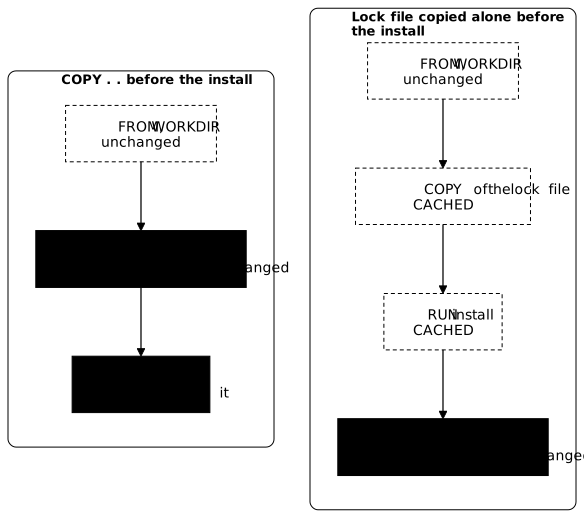
The table sums up what each change makes Docker rebuild.
| What changes | What Docker rebuilds |
|---|---|
| The text of an instruction | That instruction, then all the following ones |
The content of a file that a COPY names (a COPY . . names the whole context) | That COPY, then all the following instructions |
A context file that no COPY names | Nothing |
What you saw matches the second row: COPY . . depends on the whole context, therefore on a modified script, and the install placed after it is dragged into the rebuild. The third row is checked further down with the reordered Dockerfile: a COPY that names its files depends only on them, and a log file dropped next to them rebuilds none of its layers.
One pitfall remains, and it comes from the comparison by text. A RUN whose command did not change is served from the cache, even if the result it would produce today would be different: a package updated since then is not downloaded again. The lock file therefore pins the exact versions.
To force a complete rebuild, run docker build --no-cache. It ignores the cache, including the mounted cache introduced below: pip then downloads all the packages again.
In what order should you write the instructions?
Put at the top what rarely changes, and at the bottom what changes with every modification. The dependency install depends only on the lock file. It is therefore enough to copy the lock file alone before the install, and the code only after it. When the code changes, the install layer has the same instruction and the same lock file: it is served from the cache.
Rewrite the Dockerfile in this order.
FROM python:3.15.2-slim@sha256:8c13a3f37a6a5b71498228e902c4b9f51c1f7900d49fabf71f9a650c6120e0d0WORKDIR /appCOPY requirements.txt .RUN pip install --no-cache-dir -r requirements.txtCOPY releve.py .CMD ["python", "releve.py"]The first COPY names requirements.txt and nothing else: this file is the only input of the install. The second COPY brings the script, after it. Build once, change the script, rebuild.
docker build -q -t releve:essai .sed -i 's/22.0/23.5/' releve.pydocker build --progress=plain -t releve:essai . 2>&1 | grep -E '\[[0-9]/[0-9]\]|CACHED'#5 [1/5] FROM docker.io/library/python:3.15.2-slim@sha256:8c13a3f37a6a5b71498228e902c4b9f51c1f7900d49fabf71f9a650c6120e0d0#6 [2/5] WORKDIR /app#6 CACHED#7 [3/5] COPY requirements.txt .#7 CACHED#8 [4/5] RUN pip install --no-cache-dir -r requirements.txt#8 CACHED#9 [5/5] COPY releve.py .This time, three steps carry CACHED: WORKDIR, the COPY of the lock file and above all the install. Only the COPY of the script is rebuilt, and it is the only work that was needed. Changing the script touches only the last layer, and the ones above stay intact.
The other half matters just as much. A cache that kept serving the old install after a dependency change would be a serious defect, because the image would keep old versions without anyone noticing. So change the lock file, and check that the install is indeed replayed.
sed -i 's/tabulate==0.9.0/tabulate==0.8.10/' requirements.txtdocker build --progress=plain -t releve:essai . 2>&1 | grep -E '\[[0-9]/[0-9]\]|CACHED'docker run --rm releve:essai sh -c "pip freeze | grep tabulate"#5 [1/5] FROM docker.io/library/python:3.15.2-slim@sha256:8c13a3f37a6a5b71498228e902c4b9f51c1f7900d49fabf71f9a650c6120e0d0#6 [2/5] WORKDIR /app#6 CACHED#7 [3/5] COPY requirements.txt .#8 [4/5] RUN pip install --no-cache-dir -r requirements.txt#9 [5/5] COPY releve.py .tabulate==0.8.10Only WORKDIR is reused. The COPY of the lock file is rebuilt because the content of the file changed, so the install is too, then the script. The last line confirms that the image does contain the requested version. The cache does more than serve: it updates itself as soon as what the step depends on changes.
This reasoning holds for every language. The lock file is called package.json and package-lock.json for Node.js (npm ci then installs the dependencies they describe), or go.mod and go.sum for Go. In each case, you copy that file first, you install, then you copy the code.
Does a file that changes without being used invalidate the cache?
Yes, as soon as a broad COPY takes it into account. In the Dockerfile above, each COPY names its files, so a log file dropped next to the script changes nothing. Check it: write into a debug.log file, which the script does not use, then rebuild.
echo "essai" >> debug.logdocker build --progress=plain -t releve:essai . 2>&1 | grep -E '\[[0-9]/[0-9]\]|CACHED'#5 [1/5] FROM docker.io/library/python:3.15.2-slim@sha256:8c13a3f37a6a5b71498228e902c4b9f51c1f7900d49fabf71f9a650c6120e0d0#6 [4/5] RUN pip install --no-cache-dir -r requirements.txt#6 CACHED#7 [2/5] WORKDIR /app#7 CACHED#8 [3/5] COPY requirements.txt .#8 CACHED#9 [5/5] COPY releve.py .#9 CACHEDAll the steps are reused, including the last COPY. When steps are served from the cache, BuildKit may print them in an order that is not the Dockerfile's: here, the install [4/5] appears before WORKDIR [2/5], and only the number between brackets gives the real place of the step. But a real project contains dozens of code files, and people often write COPY . . to copy them in one go. That COPY then depends on the whole context, including what the application does not use: a log file, a tool's cache directory, an editor file.
To see it, replace the last COPY with the broad form, build, then write into the log file again.
sed -i 's/^COPY releve.py \./COPY . ./' Dockerfiledocker build -q -t releve:essai .echo "essai" >> debug.logdocker build --progress=plain -t releve:essai . 2>&1 | grep -E '\[[0-9]/[0-9]\]|CACHED'#5 [1/5] FROM docker.io/library/python:3.15.2-slim@sha256:8c13a3f37a6a5b71498228e902c4b9f51c1f7900d49fabf71f9a650c6120e0d0#6 [2/5] WORKDIR /app#6 CACHED#7 [3/5] COPY requirements.txt .#7 CACHED#8 [4/5] RUN pip install --no-cache-dir -r requirements.txt#8 CACHED#9 [5/5] COPY . .The install stays cached, thanks to the order. But COPY . . is rebuilt although the code is identical: debug.log entered the layer. Here, the last instruction is cheap. If an expensive step followed it, a compilation for instance, it would be replayed for a mere log file.
The remedy is a .dockerignore file at the root of the context, which lists what docker build must not send to the builder. A file that is excluded is not in the context, so it can no longer invalidate a COPY.
printf '*.log\n__pycache__/\n' > .dockerignoredocker build -q -t releve:essai .echo "autre essai" >> debug.logdocker build --progress=plain -t releve:essai . 2>&1 | grep -E '\[[0-9]/[0-9]\]|CACHED'#5 [1/5] FROM docker.io/library/python:3.15.2-slim@sha256:8c13a3f37a6a5b71498228e902c4b9f51c1f7900d49fabf71f9a650c6120e0d0#6 [4/5] RUN pip install --no-cache-dir -r requirements.txt#6 CACHED#7 [2/5] WORKDIR /app#7 CACHED#8 [3/5] COPY requirements.txt .#8 CACHED#9 [5/5] COPY . .#9 CACHEDIn the second build, COPY . . carries CACHED although debug.log changed: the excluded file no longer counts. The display order of the steps served from the cache varies from one build to the next, as in the previous output: rely on the number between brackets.
The first build of this block does rebuild COPY . ., though. The .dockerignore has just been created, and COPY . . copies it like any other file of the context: the content of the layer changes. This command uses -q, which hides the steps. Without that option, you would see COPY . . without CACHED.
What the .dockerignore brings you depends on the builder. On a builder you reuse, BuildKit sends back only the modified files anyway: the .dockerignore does not speed up the transfer of a second build, it keeps the layers stable. On a new builder, with COPY . ., it also reduces the first transfer. With a 20 MB log file in the context, the first build sends 20.01 MB without a .dockerignore, and 260 bytes once *.log is excluded.
A pattern that is too broad, on the other hand, breaks the build. If you add *.txt to leave out some notes, you also hide requirements.txt.
printf '*.log\n__pycache__/\n*.txt\n' > .dockerignoredocker build -q -t releve:essai .Dockerfile:3-------------------- 1 | FROM python:3.15.2-slim@sha256:8c13a3f37a6a5b71498228e902c4b9f51c1f7900d49fabf71f9a650c6120e0d0 2 | WORKDIR /app 3 | >>> COPY requirements.txt . 4 | RUN pip install --no-cache-dir -r requirements.txt 5 | COPY . .--------------------ERROR: failed to build: failed to solve: failed to compute cache key: failed to calculate checksum of ref be5l1msq8sj5xnr7yn2c457zv::4wwxkvcfp4ugycgkgmno90s5o: "/requirements.txt": not foundThe two identifiers after ref change with every build. The message is the one of a file not found by COPY, as in the lesson on the context. But here the file exists on your disk: it is the .dockerignore that removed it from the context. When a build fails right after a change to the .dockerignore, the first lead is a pattern that excludes a file the Dockerfile names. Put back the previous file, which lists only *.log and __pycache__/.
printf '*.log\n__pycache__/\n' > .dockerignoreA pattern also has a scope worth knowing: *.log targets only the root of the context. Create a log file in a subdirectory, rebuild, then look for .log files in the image.
mkdir logs && echo "essai" > logs/sub.logdocker build -q -t releve:essai .docker run --rm releve:essai sh -c 'find /app -name "*.log"'/app/logs/sub.logThe log file of the subdirectory entered the image, whereas debug.log, at the root, stayed out. To target .log files at every level, write **/*.log.
printf '**/*.log\n__pycache__/\n' > .dockerignoredocker build -q -t releve:essai .docker run --rm releve:essai sh -c 'find /app -name "*.log"'This time, the last command prints nothing: no .log file is in the image.
One last file deserves attention: the Dockerfile itself. COPY . . copies it into the image, along with the .dockerignore, so modifying the Dockerfile, even with a simple comment, rebuilds that layer.
You can therefore list Dockerfile in the .dockerignore. Docker reads it anyway to build the image: the build succeeds, the file is no longer in the image, and a new comment no longer rebuilds COPY . ..
printf '**/*.log\n__pycache__/\nDockerfile\n' > .dockerignoredocker build -q -t releve:essai .docker run --rm releve:essai ls -a /appecho "# autre note" >> Dockerfiledocker build --progress=plain -t releve:essai . 2>&1 | grep -E '\[[0-9]/[0-9]\]|CACHED'....dockerignorelogsreleve.pyrequirements.txt#5 [1/5] FROM docker.io/library/python:3.15.2-slim@sha256:8c13a3f37a6a5b71498228e902c4b9f51c1f7900d49fabf71f9a650c6120e0d0#6 [2/5] WORKDIR /app#6 CACHED#7 [3/5] COPY requirements.txt .#7 CACHED#8 [4/5] RUN pip install --no-cache-dir -r requirements.txt#8 CACHED#9 [5/5] COPY . .#9 CACHEDThe first six lines come from ls -a: the Dockerfile is no longer in /app. The rest comes from the last build, where all the steps are reused, COPY . . included.
How do you keep downloaded packages when the lock file changes?
With the right order, a change of code no longer reinstalls anything, but a change of the lock file reinstalls all the dependencies, including those that did not move. In the example, moving tabulate from one version to another also makes wcwidth download again. On a project that depends on hundreds of packages, this build is long, and it is long at every update of a single dependency.
BuildKit offers a cache mount for this case. A RUN --mount=type=cache,target=<directory> instruction gives the command a directory that survives from one build to the next, is managed by the builder, and is not written into a layer of the image. For pip, this directory is the one where it stores the files it downloads, /root/.cache/pip for the root user. Write the Dockerfile like this, without the --no-cache-dir option: it told pip to keep nothing, which would defeat the point of the mount.
FROM python:3.15.2-slim@sha256:8c13a3f37a6a5b71498228e902c4b9f51c1f7900d49fabf71f9a650c6120e0d0WORKDIR /appCOPY requirements.txt .RUN --mount=type=cache,target=/root/.cache/pip \ pip install -r requirements.txtCOPY . .CMD ["python", "releve.py"]Build a first time, which fills the cache mount. Then change the version of tabulate in the lock file, and rebuild while looking for what pip says about each package.
docker build -q -t releve:essai .sed -i 's/tabulate==0.8.10/tabulate==0.9.0/' requirements.txtdocker build --progress=plain -t releve:essai . 2>&1 | grep -E 'Using cached|Downloading'#8 1.423 Downloading tabulate-0.9.0-py3-none-any.whl.metadata (34 kB)#8 1.495 Using cached wcwidth-0.2.13-py2.py3-none-any.whl.metadata (14 kB)#8 1.513 Downloading tabulate-0.9.0-py3-none-any.whl (35 kB)#8 1.537 Using cached wcwidth-0.2.13-py2.py3-none-any.whl (34 kB)Read the lines that end with .whl: the two others concern the metadata files that pip consults first. tabulate is downloaded again, since that version had never been downloaded into the cache mount. wcwidth, on the other hand, carries Using cached: pip finds it in the mounted directory and does not download it. The RUN instruction was indeed replayed, because the lock file changed, but it did less work. The durations printed on these lines vary from one machine to another.
Since the directory is not in a layer, it does not make the image heavier. You can check it: this command counts the files of pip's cache in the built image.
docker run --rm releve:essai sh -c "find /root/.cache -type f 2>/dev/null | wc -l"0The count is 0: the image contains none of the downloaded files. Without the mount, and without --no-cache-dir, pip would have left them in the layer, and they would ship with the application.
The cache mount has three limits, which keep you from asking more of it than it gives.
- It only speeds up the instructions that are replayed: if the lock file did not change, the whole layer is served, and the cache mount does not come into play.
- It lives in the builder where you build. A new workstation or a CI runner that starts empty finds it empty, so the Dockerfile must work without it.
- A cleanup of the build cache removes it too: after
docker builder prune, the same lock file change downloadswcwidthagain liketabulate. Adocker build --no-cachedoes not use it either.
Sharing layers between several machines takes a remote build cache (--cache-to and --cache-from). It carries the layers, so the install is served as is when the lock file did not change, but it does not carry the mounted directory: on a new builder, the cache mount starts empty again, as the Dockerfile reference specifies. The remote cache, its min and max modes and what it exports are measured in BuildKit cache in CI and image promotion between registries.
What to do when the cache is not used?
In the output of docker build --progress=plain, look for the first step that is not followed by CACHED, not counting FROM, which is never marked. Ask yourself what changed in its command or in the files it copies. Since a rebuilt step drags all the following ones with it, it is the cause, and the others are only the consequence. The table covers the situations of the lesson.
| What you observe | Probable cause | Fix |
|---|---|---|
| The dependency install replays at every code change | A COPY . . placed before the install | Copy only the dependency file first, install, then copy the code |
A COPY is rebuilt although your code did not change | A useless context file changed (log file, tool cache) | Add it to the .dockerignore |
The build fails on a file not found right after a change to the .dockerignore | A pattern excludes a file the Dockerfile names | Narrow the pattern |
| The image keeps old package versions | The RUN command is identical, the layer is served | Pin the versions in the lock file, or run docker build --no-cache once (the cache mount is ignored too) |
| CI rebuilds everything at every run | The builder is new and its cache is empty | Keep the builder's cache from one run to the next, through a remote cache, as BuildKit cache in CI and image promotion between registries describes |
One last check is better than questioning everything: run the same docker build twice in a row, without changing anything. If a step other than FROM is not CACHED in the second build, an input changes by itself, and that is what you must look for.
How do you clean up after the experiments?
The experiments left a releve:essai image and a working directory. Remove them, then check that no releve image remains. The echo prints "plus de releve", which reads "no more releve".
docker rmi releve:essaicd ~ && rm -r ~/atelier-cachedocker images --format '{{.Repository}}:{{.Tag}}' | grep '^releve' || echo "plus de releve"plus de relevePractice
The two labs take up the two halves of the lesson.
The first gives you a Dockerfile that produces a correct image, but whose cache is not used. The validation covers three things:
- the content of the image, which must contain neither the Dockerfile nor the useless context files, and must carry the declared dependencies;
- the reuse of the cache: the validation rebuilds the image after a code change, then after a dependency change, and checks whether the install is replayed;
- the output of the application when the image is started.
The second lab is about reusing dependencies when the build step is replayed. The validation rebuilds from two versions of the source and examines what the final image contains. It never measures elapsed time.
Key points
Docker reuses a layer when the instruction and what it depends on are identical to a previous build, and it prints it with CACHED, except for FROM, which is never marked. A RUN is compared by the text of its command, a COPY by the content of the copied files.
A rebuilt layer drags all the following ones with it. The order of the instructions therefore decides what each change makes Docker rebuild: what rarely changes goes at the top, what changes with every modification goes at the bottom.
To keep the dependency install cached, copy the dependency file alone, install, then copy the code. The cache still updates itself: if the lock file changes, the COPY of the lock file is rebuilt and the install follows.
With a COPY . ., a context file that the application does not use, a log file for instance, invalidates the layer. A .dockerignore keeps it out. On the same builder, its contribution is to keep the cache stable, not to speed up the transfer of a second build; on a new builder, it also reduces the first transfer.
Two pitfalls come with it. A pattern that is too broad and excludes a needed file makes the build fail. And *.log targets only the root of the context: **/*.log targets every level. The Dockerfile is copied too by COPY . .; listing it in the .dockerignore keeps a comment from rebuilding the layer.
RUN --mount=type=cache keeps a download directory between two builds without writing it into the image. It reduces the work of a replayed RUN, it does not replace the right order, and a new builder finds it empty.
When the cache is not used, look for the first step without CACHED, FROM aside: it is the cause.
Knowledge check
Check that you have the essentials of this lesson. The questions cover only what has just been explained here.
Knowledge check
Check what you have learned with this interactive quiz
How it works
- The timer starts when you click Start
- Multiple choice, true/false and short answer questions
- You can move between questions
- Detailed results are shown at the end
Starts the quiz and the timer
Review
(0/0)Score by domain
A domain groups several guides and gets several questions, so its score is more reliable than a per-topic score, which often rests on a single question.
Summary
Strengths
No topic passed at 80% on at least two questions yet.
Weak areas
No topic below the pass mark.
Recommended next
Hints before you try again?
Continue the course: Publish and pull an image in a controlled way
A new full quiz with random questions
Work again only on the questions you missed