Docker is the reference containerization platform: it lets you package an application and its dependencies into an image, an immutable artifact, then run it anywhere in the same way as a container, a lightweight isolated process that starts in a few seconds. This settles the famous "it works on my machine": the container carries everything it needs to run, from the code to the system libraries.
This page opens the Docker course: it explains how the course is organized, module by module, then gives you a quick reference to come back to a command or a choice.
What do you need to know before starting?
The Docker course assumes that you already know what a container is and that you are comfortable in a Linux terminal. The first prerequisite comes from the Introduction to containerization course (in French), the second from the Linux course.
The Introduction to containerization course makes you understand that a container is an ordinary process of the machine, to which the kernel gives a restricted view of the system. Namespaces isolate what it sees, and cgroups cap what it consumes: you create them by hand in A container by hand with unshare and nsenter (in French), then in Limit a container: cgroups v2 and capabilities. You also learn the difference with a virtual machine there: a virtual machine emulates a complete computer with its own kernel, whereas a container shares the host kernel, which explains why it starts in a few seconds.
An OCI image is a standardized archive that provides a container's filesystem and its starting configuration. It is studied with Understanding OCI: tag, digest, manifest, multi-arch and artifacts and Read an OCI image and verify its digest (in French).
A runtime such as runc then executes this image by reproducing the kernel operations seen earlier, in Run an OCI bundle with runc (in French). The lesson Runtime, engine, orchestrator: who does what (in French) then places Docker relative to it.
On the Linux side, the Docker course only uses a small foundation, detailed on the home page of the Linux course: navigating and editing files in a terminal, reading and changing the permissions of a file and a user, listing and stopping processes, and understanding basic networking (IP address, port, name resolution). These notions come back in the modules on volumes, clean container shutdown and port publishing.
If you lack these foundations, first follow the Introduction to containerization course, then go back over the Linux modules that match what blocks you, before returning here.
How is the Docker course organized?
The course has fourteen teaching modules, split into three levels: "Use Docker" (run, build, publish, observe, connect and persist), "Compose and operate an application" (Compose), then "Build, harden and industrialize" (advanced images, engine, hardening, image pipeline). The modules follow a recommended reading order, and your progress lesson by lesson is tracked on the My path page.
All the commands in the course are measured on Docker Engine 29.9.2, Compose 5.6.1 and Buildx 0.38.1, installed on Debian 13.
The durations quoted below are those of the programme: each lesson carries its own, and a module announces the sum of its published lessons. Every lesson and exam of the programme has a published page, and three guides of the third level are being rewritten. This page only links published lessons, and points out in each module the guides that are being rewritten.
Discover Docker and run a container
This first module (about 2 h 45) lays out what a container is before running one. The lesson Containers or virtual machines: which one to choose? compares the two models, then Images, containers and registries: the anatomy traces the path from a docker command to the process. You then install Docker Engine 29 and prove it works, and learn to run a container and choose what it runs. The exam "get a service running" closes the module.
Build and publish an image
A container starts from an image, and this module (about 3 h 25) teaches you to build it and then publish it. It starts with Write a Dockerfile, then choose and maintain a base image. It continues with Docker USER, which explains how to run an image as non-root without breaking it, and with the organization of layers and the build cache. The lesson Publish and pull an image has you name the image, log in with a limited-rights token, then push it and pull it back by tag or by digest. The exam "ship a first image" checks it all.
Observe and troubleshoot a container
This module (about 2 h 20) is about understanding why a container stops, restarts or refuses to start. The lifecycle, PID 1 and clean shutdown explain the states and the exit codes 137 and 143. Inspect a running container gives four commands for four questions, and Read a startup failure teaches how to interpret the codes 125, 126 and 127 and restart loops. The exam "bring three containers back into service" puts you in a real situation.
Expose and connect containers
This module (about 2 h 10) deals with what is open, and to whom. Publish a port without exposing the whole host distinguishes the three forms of -p. Next, the default network or a network of your own shows that only a network you create resolves container names, and isolating a container from the network compares none and the internal network. The exam "expose an application without exposing its database" proves it.
Keep your data
A recreated container loses its files: this module (about 1 h 35) teaches you to keep them. The lesson Docker volumes compares named volume, bind mount and tmpfs. The one on volume permissions sorts out the three causes of an access denied. You finish with the exam "bring a container back into service".
Describe an application with Compose
This module (about 3 h 15) opens the second level: you move from several docker run commands to a single file. The lesson Describe an application with Compose sets up two services, a network and a volume. It is followed by interpolation and environment files, the organization of a stack's networks and the persistence of the data of a recreated stack. The exam "bring a stack back into service" concludes it.
Make a stack reliable
A stack that starts is not yet a reliable stack, and this module (about 3 h 45) takes care of that. You inject secrets while knowing their limits, you set up startup, readiness and health, you bound resources and restarts, then you write explicit variants for development and deployment. The exam "make a stack reliable" checks these settings.
Operate and restore a stack
This module (about 2 h 45) ends the second level. It teaches you to read logs and attribute saturation, to back up and restore an application, then to update a stack and roll back without losing data. The exam "operate and restore a stack" closes the module and the level.
Build advanced images
The third level opens with this module (about 6 h 15), which takes up image building where the first level stopped. You start by reading an OCI image and its identity: tag, index, manifest, digest and platform. You then learn to change base without breaking the application, then to separate build from runtime with a multi-stage build. The lesson BuildKit: build secrets and private access covers build secrets, and the one on multi-architecture covers buildx and emulation. The exam "rebuild an image for two architectures" checks the result.
Test, shrink and ship an image
This module teaches you to decide that an image is ready, then to ship it. Its five lessons and its exam add up to about 5 h 35. You test the contract of an image with a script that rejects it if it is unusable, then you shrink its size. You then serve a trusted registry and log in to it, you pin a base and ship offline with docker save, then you export an image without a daemon with Skopeo. The exam "deliver an image usable elsewhere" checks that a bare client runs your delivery.
Understand what the engine does
This module explains what really happens when a container starts. Its four lessons and its exam add up to about 2 h 50. You start by measuring a container's isolation with namespaces and cgroups, then you follow the execution chain from the docker client down to runc. The lesson Cap a container then tunes the processor, the ulimits and the shared memory, and Cap memory and the number of tasks of a container teaches you to set these two ceilings, read their effect in the cgroup and recognize an OOM or a task saturation. The exam "contain a runaway container" closes the module.
Administer the daemon
The Docker daemon is the element that all your applications share, and this module teaches you to look after it. Its five published lessons and its exam add up to about 4 h 25. The guide Configure the Docker daemon (in French), which covers daemon.json, logs, storage and registry mirrors, is being rewritten. The lesson Put a proxy in front of the Docker API (about 40 min) shows why mounting docker.sock as :ro does not protect.
The lesson Rotate Docker logs and reclaim disk space (about 30 min) bounds a container's logs, proves that rotation happens, measures space by category and frees a full filesystem without recreating the container. The lesson Upgrade Docker Engine and back up its configuration (about 35 min) upgrades Docker Engine from one version to the next on a host whose packages are held, with live-restore and a witness piece of data, then rolls back. The lesson Remove direct access to the Docker daemon (about 45 min) lists who can talk to the Docker socket, through the docker group, an ACL or a mount inside a container, then removes each access and checks that it is really closed. The lesson Run Docker in rootless mode (about 55 min) installs an engine under an unprivileged account next to the system engine, reads the UID mapping, measures what changes for networking, resources and AppArmor, then keeps the daemon running without an open session. The exam "take over a Docker host" (about 60 min) closes the module: a host left unmaintained, to take over without losing its named volumes.
Harden the execution
This module aims to reduce what a compromised container can do. Its four published lessons and its exam add up to about 4 h 25. Two published guides are being rewritten: Securing Docker in production, which covers the Docker socket, --privileged, capabilities, seccomp profiles, AppArmor and SELinux, read-only mode, resource limits and rootless mode, and Manage secrets (in French), which avoids exposing tokens and passwords in images. The lesson Read-only root filesystem, and a shutdown without data loss (about 50 min) freezes the root of a PostgreSQL container with --read-only, bounds its tmpfs mounts, prepares its volume, then compares docker stop and docker kill on a transaction in progress. The lesson Find orphan Docker volumes without deleting everything (about 60 min) finds a volume that is no longer attached, reads it safely and backs it up, reattaches it to Compose after a project rename, then removes only what is disposable. The lesson Seccomp and AppArmor profiles for Docker containers (about 60 min) reads a container's active profiles, attributes a denial to its layer, derives a seccomp profile from the default one and writes an AppArmor profile that still lets the service stop cleanly and survives a reboot. The lesson Diagnose Docker network and firewall issues (about 35 min) follows a packet to the container, locates the hop and the rule that refuse it, fixes one rule and proves it with positive and negative probes, without ever disabling the firewall. The exam "harden a service without breaking it" (about 60 min) closes the module.
Industrialize the image pipeline
The last module puts image building into production. The lesson Automate the build, tests and publication of an image (about 40 min) writes a CI script that builds the image of a commit, tests it with Compose, then publishes an archive with its provenance. The build cache shared between runs and the promotion of the same image from one registry to another are measured in the reference page BuildKit cache in CI and image promotion between registries, which does not cover promotion between environments: the lesson Promote the same artifact between two environments (about 55 min) covers it, by transferring an archive to a second host and deploying with --no-build --pull never so that no environment rebuilds the image.
The lesson Check what an image contains, and who signed it (about 50 min) scans an image with Trivy, writes a gate that refuses a named CVE, then signs an archive with a local authority and verifies the chain, the identity and the signature; Cosign and DOCKER_CONTENT_TRUST are only placed there.
The lesson Prepare operations, and recognize the limits of a single host (about 40 min) measures an SLO, ties alerts to the signals Docker exposes, times a restore, then checks that the service comes back after the host restarts, and what a single host cannot guarantee. The final exam "take over an unknown service" (about 3 h) closes the course: an application to deliver, harden, break and restore end to end, scored on its final state. The module adds up to about 6 h 05.
Quick reference
Do you want an "immediate answer" page? This section is made for that.
Concepts (image/container/layers): what to remember
- Image: immutable artifact (like a built binary or a package).
- Container: isolated process (like a systemd service) + ephemeral FS.
- Layer: diff (like a Git commit), stacked and cacheable.
- Volume: persistent storage (like a local PVC, but on the Docker side).
- Bridge network: isolated NAT network (like a Docker "default" VRF).
CLI: the commands that really matter
- "I run":
docker run … - "I look":
docker ps,docker images - "I understand":
docker logs,docker inspect - "I get in":
docker exec -it … sh - "I clean up":
docker rm,docker rmi,docker system prune
Volumes: quick choice
- Bind mount: dev / local code / quick debugging.
- Named volume: prod / application data / DB.
- tmpfs: temporary secret / performance / nothing on disk.
Networks: quick choice
- bridge: standard case (multi-container app on 1 host).
- host: maximum performance, minimal network isolation.
- overlay: multi-host (Swarm) / distributed network.
Troubleshooting: "what do I do when it doesn't work"
- If it crashes: exit code + logs +
inspect(fixed order). - If it does not answer: published ports + IP/route + DNS + healthcheck.
- If it does not pull: registry auth + DNS + proxy + certs.
Security: simple rules
- Avoid
root(rootless if possible). - Drop unneeded capabilities, read-only FS if possible.
- Scan images, update regularly.
- Secrets outside the image and outside exposed variables.
→ Security guide → Secrets guide (in French)
Landmarks: standards and ecosystem
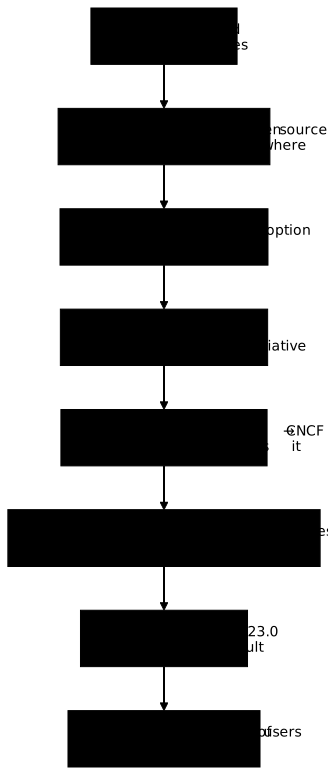
The timeline reads from top to bottom, from 2010 to 2024: it places the dates that explain why the ecosystem no longer depends on a single tool, with the deprecation of dockershim by Kubernetes in 2020 (Kubernetes 1.20) highlighted, followed by its removal in 2022 (Kubernetes 1.24).
FAQ: frequently asked questions
Definition
- Container: lightweight, portable unit that bundles the application and all its dependencies
- Image: immutable template used as the basis for containers
- Registry: central repository of images (Docker Hub, private registries)
Key benefits
- Portability: "works everywhere" (dev, test, prod)
- Isolation: each container has its own filesystem
- Lightness: shares the host kernel (vs virtual machines)
- Reproducibility: same environment on every system
Architecture
┌─────────────────────────────────┐
│     Docker applications         │
├─────────────────────────────────┤
│    Containers (isolated)        │
├─────────────────────────────────┤
│    Docker Engine (daemon)       │
├─────────────────────────────────┤
│    Operating system             │
└─────────────────────────────────┘
Use cases
- Development: identical environments for the whole team
- CI/CD: automated tests in disposable containers
- Microservices: independent deployment and scaling
Main roles
| Function | Description |
|---|---|
| Build | Create images from a Dockerfile |
| Run | Start and stop containers |
| Isolation | Namespaces, cgroups, capabilities |
| Network | Create virtual networks between containers |
| Storage | Manage volumes and bind mounts |
| Security | Apply security policies |
Docker Engine components
# Check the engine
docker version
docker info

# Architecture
systemctl status docker  # dockerd daemon
docker ps                # CLI client
Alternatives to Docker
- Podman: Docker-compatible, daemonless (more secure)
- containerd: low-level runtime (used by Kubernetes)
- CRI-O: optimized for Kubernetes
| Engine | Type | Particularities | Use case |
|---|---|---|---|
| Docker | Full container engine | Mature ecosystem, Docker Hub, Compose | Development, general production |
| Podman | Docker-compatible, daemonless | No root daemon, pods, Docker-compatible CLI | Security, non-root environments |
| containerd | Low-level runtime | Lightweight, built into Kubernetes and Docker | Kubernetes production |
| CRI-O | Kubernetes runtime | Optimized for CRI, OCI images only | Dedicated Kubernetes clusters |
| LXC/Incus | System containers | Lightweight virtual machines, full init | VM to container migration |
Command examples
# Docker (with a daemon)
sudo docker run -d nginx:1.31.8@sha256:5ab5b0b01097420873a3f3330f44248e34a3c2a3e8d5ee30658aeae8cb7435da

# Podman (daemonless)
podman run -d docker.io/library/nginx:1.31.8@sha256:5ab5b0b01097420873a3f3330f44248e34a3c2a3e8d5ee30658aeae8cb7435da
podman pod create my-pod  # Native pod support

# containerd (via ctr)
sudo ctr images pull docker.io/library/nginx:1.31.8@sha256:5ab5b0b01097420873a3f3330f44248e34a3c2a3e8d5ee30658aeae8cb7435da
sudo ctr run docker.io/library/nginx:1.31.8@sha256:5ab5b0b01097420873a3f3330f44248e34a3c2a3e8d5ee30658aeae8cb7435da nginx-ctr
How to choose?
- Docker: development, learning, rich ecosystem
- Podman: security, CI/CD without root privileges
- containerd/CRI-O: Kubernetes clusters in production
System configuration
| Aspect | Configuration | Rationale |
|---|---|---|
| Storage | Dedicated /var/lib/docker partition |
Avoid saturating the system if images/volumes eat up the space |
| Logs | json-file driver with rotation |
max-size: 10m, max-file: 3 to limit growth |
| Daemon | /etc/docker/daemon.json file |
Centralize the configuration (log-driver, log-opts, live-restore, etc.) |
Network security
"icc": false disables communication between containers on the default network.{
"icc": false,
"userland-proxy": false,
"no-new-privileges": true
}
Resource limits
# Limit CPU and memory
docker run -d \
  --memory="512m" \
  --memory-swap="1g" \
  --cpus="1.5" \
  --restart=unless-stopped \
  my-app:1.0.0
Container security
# In the Dockerfile
USER node  # Do not run as root

# Trusted images
FROM node:24.22.2-alpine@sha256:8a32c8cf649a49915a66e81e7a609223c708d0adabf288ee3f4077d765542f85  # Minimal official image, pinned by digest

# Health checks
HEALTHCHECK --interval=30s --timeout=3s \
  CMD node healthcheck.js
Monitoring and observability
# Docker metrics
docker stats

# Centralized logs
# Configure a log driver (syslog, fluentd, splunk)
Secrets management
# Use Docker secrets (Swarm) or secured environment variables
docker secret create db_password ./password.txt
Production checklist
- Dedicated partition for
/var/lib/docker - Log rotation configured
- Non-root users in containers
- Limited resources (CPU/RAM)
- Official images, regularly updated
- Health checks on all services
- Active monitoring (Prometheus, Grafana)
- Automated backups of volumes
Principle of least privilege
# Limit Linux capabilities
docker run --cap-drop=ALL --cap-add=NET_BIND_SERVICE my-app:1.0.0

# Run as a non-root user
docker run --user 1000:1000 my-app:1.0.0

# Read-only container
docker run --read-only --tmpfs /tmp my-app:1.0.0

# Disable new privileges
docker run --security-opt=no-new-privileges my-app:1.0.0
Security modules (LSM)
# AppArmor (Ubuntu/Debian)
docker run --security-opt apparmor=docker-default nginx:1.31.8@sha256:5ab5b0b01097420873a3f3330f44248e34a3c2a3e8d5ee30658aeae8cb7435da

# SELinux (RHEL/CentOS)
docker run --security-opt label=type:svirt_apache_t nginx:1.31.8@sha256:5ab5b0b01097420873a3f3330f44248e34a3c2a3e8d5ee30658aeae8cb7435da
Image trust
Docker Content Trust no longer exists. Thedocker trust command was removedfrom Docker Engine 29, and the
DOCKER_CONTENT_TRUST variable has becomeinert there: a
docker pull finds it, ignores it and succeeds without anywarning. Setting it today gives a false sense of verification.
# Verify a signature: Cosign, outside the Docker engine
cosign verify --certificate-identity-regexp '.*' \
  --certificate-oidc-issuer-regexp '.*' nginx:stable-alpine

# Pin the image by its digest, which depends on no tool
docker pull nginx@sha256:...

# Scan for vulnerabilities
docker run --rm ghcr.io/aquasecurity/trivy:0.76.1@sha256:790fd66d1697395d8693d1acaa1ea702406a20f109b6fc7bac8db623eca6c06c image nginx:1.31.8-alpine@sha256:785835ea65db4bba6f021acc0f3be91b0fef76a53fe41f8588c6698d2aed0606
Network security
# Network filtering (custom network)
docker network create --internal backend

# No needless port exposure
# ❌ docker run -p 0.0.0.0:3306:3306 mysql:8.4.13@sha256:a81d043930e51745522bd5c430961cf8286f0a23f0a9a2a6e0108f7ea71b0902
# ✅ docker run -p 127.0.0.1:3306:3306 mysql:8.4.13@sha256:a81d043930e51745522bd5c430961cf8286f0a23f0a9a2a6e0108f7ea71b0902
Secrets management
# Docker Swarm secrets
echo "my_password" | docker secret create db_password -
docker service create --secret db_password my-api

# Environment variables (separate file)
docker run --env-file .env.production my-app:1.0.0
Audit and monitoring
# Audit of Docker events
auditctl -w /var/lib/docker -k docker
auditctl -w /usr/bin/docker -k docker

# Centralized logs
# Configure syslog/fluentd in /etc/docker/daemon.json
Minimal images
# Prefer Alpine or scratch
FROM alpine:3.24.3@sha256:be2656061b536c1883c4034790e21d0a09c5aaaf51968b89368a3c0371ea2c9a  # minimal image, pinned by digest

# Multi-stage for static executables
FROM scratch
COPY --from=builder /app/binary /
ENTRYPOINT ["/binary"]
Security checklist
- Non-root user in all containers
- Minimal capabilities (--cap-drop=ALL)
- AppArmor/SELinux enabled
- Signatures verified with Cosign or Notation, and images pinned by digest
- Regular scanning of images (Trivy, Clair)
- Internal network for backend services
- Secrets managed via Docker secrets or a vault
- Active audit on /var/lib/docker
- Minimal images (Alpine/scratch)
- Regular updates of base images
Comparison of the types
| Type | Location | Management | Use case |
|---|---|---|---|
| Volumes | /var/lib/docker/volumes/ |
Docker (recommended) | Databases, application data |
| Bind mounts | Absolute path on the host | User | Development, configuration files |
| tmpfs | RAM only | Ephemeral | Secrets, sensitive temporary data |
Volume commands
# Create a volume
docker volume create my-volume

# List volumes
docker volume ls

# Inspect a volume
docker volume inspect my-volume

# Use a volume
docker run -v my-volume:/data postgres:18.6@sha256:3a4264520e121176619f54ff867d12774bc81e95e7b84db58d63bccdb6144b81

# Remove a volume
docker volume rm my-volume
Docker Compose examples
services:
  db:
    image: postgres:18.6@sha256:3a4264520e121176619f54ff867d12774bc81e95e7b84db58d63bccdb6144b81
    volumes:
      - db-data:/var/lib/postgresql/data  # Named volume
      - ./init.sql:/docker-entrypoint-initdb.d/init.sql:ro  # Bind mount

volumes:
  db-data:  # Volume declaration
Backup and restore
# Back up a volume
docker run --rm -v my-volume:/data -v $(pwd):/backup alpine:3.24.3@sha256:be2656061b536c1883c4034790e21d0a09c5aaaf51968b89368a3c0371ea2c9a tar czf /backup/data.tar.gz /data

# Restore a volume
docker run --rm -v my-volume:/data -v $(pwd):/backup alpine:3.24.3@sha256:be2656061b536c1883c4034790e21d0a09c5aaaf51968b89368a3c0371ea2c9a tar xzf /backup/data.tar.gz -C /
Storage plugins
- Local: default storage on the host
- NFS: network share between several hosts
- SSHFS: remote mount over SSH
- Cloud: Azure Files, AWS EFS, Google Filestore
Comparison
| Aspect | Image | Container |
|---|---|---|
| Nature | Static, immutable template | Dynamic, ephemeral instance |
| Storage | Layered filesystem (layers) | Read/write layer on top of the image |
| State | No state (stateless) | Has a state (stateful) |
| Sharing | Can be the base of several containers | Isolated, cannot be shared |
| Lifecycle | Created once, used many times | Created, started, stopped, removed |
Commands
# List images
docker images

# List running containers
docker ps

# List all containers (running and stopped)
docker ps -a

# Create a container from an image
docker run nginx:1.31.8@sha256:5ab5b0b01097420873a3f3330f44248e34a3c2a3e8d5ee30658aeae8cb7435da  # nginx image → nginx container
Layered structure
Each image is made of read-only layers. The container adds a read/write layer on top.Network modes
| Mode | Description | Use case |
|---|---|---|
| bridge | Isolated virtual network (default) | Communication between containers on the same host |
| host | Shares the host network stack | Maximum performance (no NAT) |
| overlay | Multi-host network (Swarm/Kubernetes) | Container clusters spanning several machines |
| macvlan | Assigns virtual MAC addresses | Integration into the existing physical network |
| none | No network | Complete network isolation |
Example: custom bridge network
# Create a bridge network
docker network create my-network

# Start containers in this network
docker run -d --name db --network my-network postgres:18.6@sha256:3a4264520e121176619f54ff867d12774bc81e95e7b84db58d63bccdb6144b81
docker run -d --name api --network my-network -p 3000:3000 my-api:1.0.0

# Containers can talk to each other by name
# From 'api': psql -h db -U postgres
Port exposure
# Map a host port → container port
docker run -p 8080:80 nginx:1.31.8@sha256:5ab5b0b01097420873a3f3330f44248e34a3c2a3e8d5ee30658aeae8cb7435da  # localhost:8080 → nginx:80

# Publish all the ports declared by EXPOSE in the Dockerfile
docker run -P nginx:1.31.8@sha256:5ab5b0b01097420873a3f3330f44248e34a3c2a3e8d5ee30658aeae8cb7435da
Internal DNS
Docker provides a built-in DNS: containers resolve each other by name on custom networks (bridge/overlay).Benefits
- Simplicity: one
compose.yamlfile replaces severaldocker runcommands - Reproducibility: the whole team uses the same stack
- Lifecycle management: start/stop/rebuild all the services with one command
- Multiple environments: dev/test/prod profiles in the same file
Full example
services:
  db:
    image: postgres:18.6-alpine3.24@sha256:10a5c69a83035ab5239f5620d708520e8b28f5aa1f2b20143e6024532edadfb5
    environment:
      POSTGRES_PASSWORD_FILE: /run/secrets/db_password
    volumes:
      - db-data:/var/lib/postgresql/data
    networks:
      - backend
    secrets:
      - db_password
    healthcheck:
      test: ["CMD", "pg_isready", "-U", "postgres"]
      interval: 10s

  api:
    build: ./api
    env_file: .env
    depends_on:
      db:
        condition: service_healthy
    networks:
      - backend
      - frontend

  web:
    image: nginx:1.31.8-alpine@sha256:785835ea65db4bba6f021acc0f3be91b0fef76a53fe41f8588c6698d2aed0606
    ports:
      - "80:80"
    volumes:
      - ./nginx.conf:/etc/nginx/nginx.conf:ro
    networks:
      - frontend
    profiles:
      - prod

networks:
  backend:
  frontend:

volumes:
  db-data:

secrets:
  db_password:
    file: ./db_password.txt
Essential commands
# Start all the services
docker compose up -d

# Follow the logs in real time
docker compose logs -f api

# List the containers
docker compose ps

# Run a command in a service
docker compose exec api sh

# Stop and remove
docker compose down

# Enable a specific profile
docker compose --profile prod up -d
Environment variables
# .env file
API_PORT=3000
DB_VERSION=15

# Referenced in compose.yaml
ports:
  - "${API_PORT}:3000"
Comparison
| Aspect | Docker | Kubernetes |
|---|---|---|
| Level | Individual container | Cluster of containers |
| Scope | Single machine | Multi-machine (cluster) |
| Goal | Package and run | Orchestrate and automate |
| Scaling | Manual (docker run x N) |
Automatic (HorizontalPodAutoscaler) |
| High availability | No (single container) | Yes (replication, self-healing) |
| Configuration | CLI/compose.yaml | YAML manifests (Deployment, Service, etc.) |
| Complexity | Simple, easy to learn | Steep learning curve |
Examples
Docker: simple execution# Start 3 replicas manually
docker run -d --name web1 -p 8001:80 nginx:1.31.8@sha256:5ab5b0b01097420873a3f3330f44248e34a3c2a3e8d5ee30658aeae8cb7435da
docker run -d --name web2 -p 8002:80 nginx:1.31.8@sha256:5ab5b0b01097420873a3f3330f44248e34a3c2a3e8d5ee30658aeae8cb7435da
docker run -d --name web3 -p 8003:80 nginx:1.31.8@sha256:5ab5b0b01097420873a3f3330f44248e34a3c2a3e8d5ee30658aeae8cb7435da
# No automatic load balancing
# No automatic restart on crash
apiVersion: apps/v1
kind: Deployment
metadata:
  name: nginx-deployment
spec:
  replicas: 3  # 3 automatic replicas
  selector:
    matchLabels:
      app: nginx
  template:
    metadata:
      labels:
        app: nginx
    spec:
      containers:
      - name: nginx
        image: nginx:1.31.8@sha256:5ab5b0b01097420873a3f3330f44248e34a3c2a3e8d5ee30658aeae8cb7435da
        ports:
        - containerPort: 80
---
apiVersion: v1
kind: Service
metadata:
  name: nginx-service
spec:
  type: LoadBalancer
  selector:
    app: nginx
  ports:
  - port: 80
    targetPort: 80
# Kubernetes automatically handles:
kubectl apply -f deployment.yaml
# → 3 pods spread across the cluster
# → Automatic load balancing
# → Automatic restart on crash (self-healing)
# → Rolling updates without downtime
Kubernetes features
- Auto-scaling: automatic adjustment of the number of pods according to load (CPU/RAM)
- Self-healing: automatic restart of failed pods
- Rolling updates: progressive replacement of Pods, without interruption; a canary or an A/B test also needs several Deployments or a dedicated tool
- Service discovery: internal DNS for communication between services
- ConfigMaps & Secrets: centralized configuration management
- Persistent Volumes: persistent storage independent of the pod lifecycle
Architecture
Docker:┌─────────────────┐
│ Machine │
│ ┌───┬───┬───┐ │
│ │C1 │C2 │C3 │ │ (Isolated containers)
│ └───┴───┴───┘ │
│ Docker Engine │
└─────────────────┘
┌────────────────────────────────────┐
│          Cluster K8s               │
│  ┌─────────┐  ┌─────────┐         │
│  │ Node 1  │  │ Node 2  │  ...    │
│  │ ┌─┬─┬─┐ │  │ ┌─┬─┐   │         │
│  │ │P│P│P│ │  │ │P│P│   │         │  (Pods spread out)
│  │ └─┴─┴─┘ │  │ └─┴─┘   │         │
│  └─────────┘  └─────────┘         │
│  Control Plane (API, Scheduler)   │
└────────────────────────────────────┘
When to use which?
| Context | Recommended tool |
|---|---|
| Local development | Docker + Docker Compose |
| Simple application (1-5 containers) | Docker |
| Large-scale production (>10 containers) | Kubernetes |
| Need for high availability | Kubernetes |
| Multi-cloud or hybrid cloud | Kubernetes |
| Team without DevOps expertise | Docker (simpler) |
Main instructions
| Instruction | Role | Example |
|---|---|---|
| FROM | Base image | FROM node:24.22.2-alpine@sha256:8a32c8cf649a49915a66e81e7a609223c708d0adabf288ee3f4077d765542f85 |
| WORKDIR | Working directory | WORKDIR /app |
| COPY | Copy files | COPY package*.json ./ |
| RUN | Run commands | RUN npm install |
| EXPOSE | Document ports | EXPOSE 3000 |
| ENV | Environment variables | ENV NODE_ENV=production |
| CMD | Default command | CMD ["npm", "start"] |
| ENTRYPOINT | Fixed entry point | ENTRYPOINT ["docker-entrypoint.sh"] |
Multi-stage example (optimization)
# Stage 1: Build
FROM node:24.22.2-alpine@sha256:8a32c8cf649a49915a66e81e7a609223c708d0adabf288ee3f4077d765542f85 AS builder
WORKDIR /app
COPY package*.json ./
RUN npm ci
COPY . .
RUN npm run build

# Stage 2: Production
FROM node:24.22.2-alpine@sha256:8a32c8cf649a49915a66e81e7a609223c708d0adabf288ee3f4077d765542f85
WORKDIR /app
COPY --from=builder /app/dist ./dist
COPY package*.json ./
RUN npm ci --only=production
EXPOSE 3000
CMD ["node", "dist/index.js"]
Usage
# Build an image
docker build -t my-app:1.0 .

# Run a container
docker run -p 3000:3000 my-app:1.0
Best practices
- Use lightweight official base images (Alpine)
- Create a .dockerignore file (node_modules, .git)
- Minimize layers: group the RUN instructions
- Multi-stage builds: smaller final images
- Do not run as root:
USER node
docker run command, which downloads the image if needed and then starts the container. For a first test:docker run hello-world:linux@sha256:5e22040d441e5fb3aed38368acbe8486b575d7018df38dbdfbc7311fbb2ef3a9
docker run -d -p 8080:80 nginx:1.31.8@sha256:5ab5b0b01097420873a3f3330f44248e34a3c2a3e8d5ee30658aeae8cb7435da
-d option detaches the container (background mode) and -p 8080:80 maps the port. Check with docker ps that the container is running. The options are detailed in the Docker CLI guide.The core is free, Docker Desktop has conditions
You need to tell the open source components apart from the Docker Desktop desktop application.| Component | License | Free? |
|---|---|---|
| Docker Engine (dockerd, CLI) | Apache 2.0 | Yes, unconditionally |
| Docker Compose (plugin) | Apache 2.0 | Yes, unconditionally |
| Docker Desktop | Proprietary | Under conditions |