Two requests land on the same morning. Security wants a container that processes customer files to reach nothing: not the outside, not the host, not its neighbors. The application team wants its database to be reachable only by its application, but reachable, and by name. Both say "isolate it", and these are not the same request at all.
The answer to one is an outage for the other. A container with no network at all makes the database unusable, and a confined network still lets the neighbors through. This page teaches you to set up each of the two isolations with docker run --network none and docker network create --internal, then to check from the inside that they hold, which proves more than reading the configuration.
The containers and the network in the examples carry French names, which are plain identifiers: balise is the control service (a "beacon"), analyseur the container to isolate, cloison the internal network (a "partition"), and $HOTE the variable that holds the host's address.
What you will learn
- Tell the two isolations apart: no network at all, or a network that does not lead out
- Create an internal network with the subnet of your choice (the range of addresses the network hands out to its members)
- Observe the missing route that makes the isolation, instead of believing it
- Spot the two-network trap: a container can belong to both
- Measure isolation by what the container actually receives
Prerequisites
An installed engine (installing Docker), the basic verbs (the Docker command line), and the notion of a dedicated network with name resolution, covered in Docker networks. The commands on this page are written for Docker Engine 29.9.2 and the alpine:3.24 image, whose busybox shell provides ip and nc. The measurements also query the control service from the host, so you need nc on the host itself (the netcat-openbsd package on Debian 13).
What are the two ways to isolate a container?
You can remove the network from the container, or place it on a network that leads nowhere. The first case is set with --network none: the container keeps only its loopback interface (lo), which only lets it talk to itself. The second case is set with a network created by docker network create --internal: its members have an interface, resolve each other by name, and have no route to the outside.
The diagram puts the three situations in front of the same control service, a service published on the machine's address, which stands in for everything outside the containers' network. Look at who reaches the control service, and who reaches its neighbor.
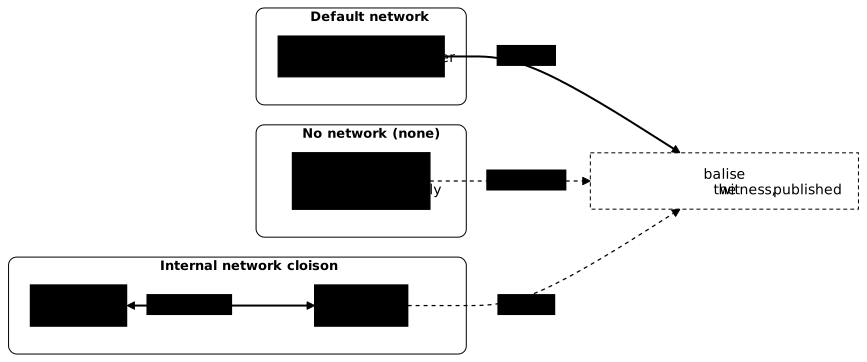
| Posture | Non-loopback interfaces | Reaches the outside | Reaches a neighbor by name |
|---|---|---|---|
| default network | one | yes | no |
--network none | none | no | not applicable |
| internal network | one | no | yes |
The last row explains the choice. If the container must talk to others, none is too strong. If it must talk to nobody, an internal network is too weak, since its neighbors can reach it.
How do you cut a container off from the network completely?
Create it with --network none. For the measurement to mean anything, you first set up a control service: a container that answers one fixed line, published on port 18310 of the machine. Without a control service, "the container reaches nothing" would be just as true if the control service had disappeared.
docker run -d --name balise -p 18310:8080 alpine:3.24@sha256:be2656061b536c1883c4034790e21d0a09c5aaaf51968b89368a3c0371ea2c9a \ sh -c 'while true; do echo signal=balise | nc -l -p 8080; done'HOTE=$(ip -o -4 route get 1.1.1.1 | awk '{for (i = 1; i <= NF; i++) if ($i == "src") print $(i + 1)}')nc -w 3 "$HOTE" 18310The second command derives the machine's routable address from its default route, instead of hard-coding it. The control service must answer from the host before anything else.
signal=baliseNow create the container with no network, and look at it from the inside.
docker run -d --name analyseur --network none alpine:3.24@sha256:be2656061b536c1883c4034790e21d0a09c5aaaf51968b89368a3c0371ea2c9a sleep infinitydocker exec analyseur ip -o linkdocker exec analyseur nc -w 3 "$HOTE" 18310echo "nc exit code = $?"1: lo: <LOOPBACK,UP,LOWER_UP> mtu 65536 qdisc noqueue state UNKNOWN qlen 1000\ link/loopback 00:00:00:00:00:00 brd 00:00:00:00:00:00nc exit code = 1The output shows two independent observations, and you need to make both. The first reads the configuration: only lo is left. The second tests the behavior: the container does not receive the control service's line, and nc returns code 1. They agree here, but one can mislead where the other does not: the section on the two networks below gives a case. You also have to read the answer, not just note that the connection is established: a published port sometimes accepts the connection before anything is listening behind it.
How do you confine a group of containers without cutting them off from each other?
Create a network declared internal, with an explicit subnet: a network created without a plan gets a subnet that the engine picks on its own, which you avoid in production.
docker network create --internal --subnet 172.30.14.0/24 cloisondocker network inspect cloison --format 'internal={{.Internal}} subnet={{(index .IPAM.Config 0).Subnet}}'internal=true subnet=172.30.14.0/24Then start two containers directly on it, without going through the default network.
docker run -d --name registre --network cloison alpine:3.24@sha256:be2656061b536c1883c4034790e21d0a09c5aaaf51968b89368a3c0371ea2c9a \ sh -c 'while true; do echo signal=registre | nc -l -p 7000; done'docker run -d --name lecteur --network cloison alpine:3.24@sha256:be2656061b536c1883c4034790e21d0a09c5aaaf51968b89368a3c0371ea2c9a sleep infinitydocker exec lecteur nc -w 3 registre 7000docker exec lecteur nc -w 3 "$HOTE" 18310echo "nc exit code to the control service = $?"signal=registrenc exit code to the control service = 1The first exchange succeeds because a user-created network, internal or not, resolves the names of its members; the lesson on Docker networks details this built-in DNS. The second fails, and the reason can be read in the container's routing table.
Why does an internal network never let traffic out?
An internal network is not just a filter placed in front of the containers: it rests first on the absence of a path. No default route is configured in a member. The default route is the line of the routing table that says where to send any packet with no more specific route; without it, the kernel has nowhere to send a packet bound for the outside. The docker network create documentation adds that the engine also installs firewall rules that reject traffic between this network and the others. Compare with the default network.
docker exec lecteur ip routedocker run --rm alpine:3.24@sha256:be2656061b536c1883c4034790e21d0a09c5aaaf51968b89368a3c0371ea2c9a ip route172.30.14.0/24 dev eth0 scope link src 172.30.14.3default via 172.17.0.1 dev eth0172.17.0.0/16 dev eth0 scope link src 172.17.0.3The first command shows only the route of the 172.30.14.0/24 subnet; the second shows the next two lines, including a default line toward the default network's gateway. The absence of a default line is enough to explain the failure observed. This is the first of the two protections, the one about routes, and the easiest to observe: you read it inside the container. The other is the engine's firewall, which you do not read from the container.
Two limits follow. This mechanism says nothing about what happens between members of the same internal network, which can all reach each other. And the network is not cut off from the host: according to the documentation, the host can directly reach the IP address of each member, and the network's gateway address stays reachable from the members. Confinement stops the members from getting out toward other networks; it protects them neither from each other nor from the host.
Why does my confined container still get out?
Because a container can belong to two networks at once. The internal network adds a membership; it does not remove the default network's. A container attached to both keeps the second one's route and gets out as before.
The action is therefore twofold: be on the internal network, and have left the other one. The measurement reuses the objects of the page. A new member of cloison, passerelle (a "gateway"), is attached in addition to the default network (bridge): the control service balise and the network cloison already exist, and $HOTE still holds the machine's address.
docker run -d --name passerelle --network cloison alpine:3.24@sha256:be2656061b536c1883c4034790e21d0a09c5aaaf51968b89368a3c0371ea2c9a sleep infinitydocker network connect bridge passerelledocker container inspect passerelle --format '{{range $reseau, $v := .NetworkSettings.Networks}}{{println $reseau}}{{end}}'docker exec passerelle nc -w 3 "$HOTE" 18310echo "nc exit code to the control service = $?"bridgecloison
signal=balisenc exit code to the control service = 0The list of networks does contain cloison, and yet passerelle receives the control service's line: the configuration announces a confined container, the behavior shows the opposite. Now detach it from the default network, then repeat both observations.
docker network disconnect bridge passerelledocker container inspect passerelle --format '{{range $reseau, $v := .NetworkSettings.Networks}}{{println $reseau}}{{end}}'docker exec passerelle ip routedocker exec passerelle nc -w 3 "$HOTE" 18310echo "nc exit code to the control service = $?"docker exec passerelle nc -w 3 registre 7000cloison
172.30.14.0/24 dev eth0 scope link src 172.30.14.4nc exit code to the control service = 1signal=registreOnly cloison remains in the list (the empty line comes from the println placed before the final line break), the default route has disappeared, the probe toward the control service fails with code 1 without printing any message (busybox's nc is silent in this case), and passerelle still reaches registre by name, since the isolation does not affect internal exchanges. The simplest and most readable approach is still to recreate the container under the same name with --network cloison from the start, which avoids the window during which it belongs to both.
How do you diagnose isolation that does not hold?
Four symptoms come up. The first is a "network-less" container that still reaches the control service. It was often recreated without the option, or it uses another container's network (--network container:<name>): read docker container inspect analyseur --format '{{.HostConfig.NetworkMode}}' and compare with none.
The second is two members of the internal network that do not talk to each other. The cause is a misspelled name or a container left on another network: a name only resolves between members of the same user-defined network.
The third is a member of the internal network that still gets out. It is almost always attached to a second network as well: list its networks with the docker container inspect command from the previous section, then detach it from the other one with docker network disconnect.
The fourth is a silent control service, which makes every measurement worthless: check it from the host before concluding anything.
Putting it into practice
The lab provides containers that all get out, including a control service you must not touch, and asks you to obtain both isolations on the same machine. One container must end up with no network interface other than loopback. A group of two containers must be confined on an internal network whose subnet is imposed, reach each other by name, and never reach the control service. The validation reads the state of the system, never your commands: it looks at the interfaces inside the container, tests what it receives from the control service, checks that the network is internal with the right subnet, and verifies that no member reaches the control service.
How do you clean up after the measurements?
The control service publishes port 18310 of the machine as long as it runs: delete it with the other containers of the page, then the network, which can only disappear once it has no members left.
docker rm -f balise analyseur registre lecteur passerelledocker network rm cloisonThe names of the containers are printed, then that of the network. If you did the lab, its containers and its network carry the names that the lab imposes: delete them the same way, reading their names in docker ps -a and docker network ls.
Key takeaways
-
There are two isolations: no network (
--network none) for a container with no one to talk to, an internal network for a group whose members talk to each other without getting out. -
A container with no network keeps only
lo: no useful interface, no neighbor, no way out. -
An internal network is created with
--internaland is best given an explicit--subnetrather than a subnet chosen by the engine. -
The isolation rests first on a missing route, which the engine backs up with firewall rules:
ip routein a member shows nodefaultline, and the host can still reach the members. -
The members of an internal network resolve each other by name, like on any user-defined network.
-
A container can belong to two networks: being on the internal network is not enough, it must also have left the other one.
-
You measure the answer, not the connection, against a control service you have checked is answering, otherwise the isolation "succeeds" because there is nothing left to reach.
Knowledge check
Check that you have grasped the essentials of this guide. The questions cover only what has just been explained here.
Knowledge check
Check what you have learned with this interactive quiz
How it works
- The timer starts when you click Start
- Multiple choice, true/false and short answer questions
- You can move between questions
- Detailed results are shown at the end
Starts the quiz and the timer
Review
(0/0)Score by domain
A domain groups several guides and gets several questions, so its score is more reliable than a per-topic score, which often rests on a single question.
Summary
Strengths
No topic passed at 80% on at least two questions yet.
Weak areas
No topic below the pass mark.
Recommended next
Hints before you try again?
Continue the course: Exam: expose an application without exposing its database
A new full quiz with random questions
Work again only on the questions you missed