To deliver an image to a machine without a network, docker save needs a Docker daemon that already holds the image. Skopeo copies an image from a registry to an archive without a daemon and without going through the local store. This lesson, for readers who already know how to deliver an image with docker save and docker load, shows how to write that copy, which archive format to choose, and above all what the Skopeo route changes about the identity of the image: a FROM pinned on the index digest no longer resolves there. The outputs come from Skopeo 1.22.3, Docker Engine 29.9.2 and Debian 13, with the containerd store.
Two names stay in French because the commands and outputs are the ones that were run: the container machine-isolee ("isolated machine") and the folder xfer ("transfer"). They are identifiers and outputs, so they stay as they are.
What you will learn
- Export an image by digest to an
oci-archive:archive withskopeo copy - Write the source without a tag and the destination with a full name
- Choose
oci-archive:overdocker-archive:by comparing sizes - Say what loading a Skopeo archive changes about the identity of the image, and about a
FROMpinned on the index digest - Choose the exported platform with
--override-arch - Diagnose a failing export from its message
Prerequisites
- Pin a base image, and deliver it offline: you know how to pin a
FROMby digest, export withdocker save, check asha256sumreceipt and load on an isolated machine. This lesson does not explain them again. - The isolated machine of the previous lesson, a container
machine-isoleewithout a network, withalpine:3.24.3loaded from analpine.tarproduced bydocker savewithout--platform, and thexferfolder mounted inside it. If you cleaned it up, recreate it with the section "How do you simulate a machine with no network?" of the previous lesson, then export and loadalpine:3.24.3as in its section ondocker save. - The guide on Skopeo presents the tool as a whole (inspection, copy between registries, synchronization). This lesson only takes up the export to an archive for
docker load. - A Docker Engine 29.9.2 on the connected machine.
How do you run Skopeo without a Docker daemon?
Skopeo is a command-line tool that copies an image between two locations (a registry, an archive, a folder) without a daemon. To export an image, it is useful on a workstation where you want neither to involve a daemon nor to add an image to the local store. The route has a cost: one more tool to bring along, a reference syntax different from Docker's, and an image identity that changes on loading. docker save therefore remains the default route.
In the demonstration, Skopeo 1.22.3 is started from the publisher's image, pinned by its digest to freeze its version. This uses the Docker daemon: the demonstration itself is not daemonless. On an export workstation without Docker, you install the binary. Debian 13 ships skopeo 1.18.0+ds1-1+b5, older than 1.22.3: the measurements of this lesson were not redone with it.
Pull the publisher's image by its digest, create an output folder reserved for your account, then run the copy in a throwaway container.
docker pull quay.io/skopeo/stable:v1.22.3@sha256:2681eccb8b02c495b013c2669cbf7f41d5c0b0b0e644e7c69bd3ea9bcb20641fmkdir sk && chmod 700 skdocker run --rm --user "$(id -u):$(id -g)" -e HOME=/tmp -v "$PWD/sk:/out" \ quay.io/skopeo/stable:v1.22.3@sha256:2681eccb8b02c495b013c2669cbf7f41d5c0b0b0e644e7c69bd3ea9bcb20641f \ copy docker://docker.io/library/alpine@sha256:be2656061b536c1883c4034790e21d0a09c5aaaf51968b89368a3c0371ea2c9a \ oci-archive:/out/alpine-oci.tar:docker.io/library/alpine:3.24.3ls -l skGetting image source signaturesCopying blob sha256:7b229517ed222597277036d94892173207d01a731ab3a88eeb1de2e963a2c788Copying config sha256:b92841763c5c2140a20eeb2a44e94ebb0e80fd51d9d6b5895ea72fa999525d68Writing manifest to image destinationtotal 3772-rw-r--r-- 1 ansible ansible 3860992 Nov 3 20:14 alpine-oci.tarThe container runs with your identity (--user), so that the archive belongs to you, and -e HOME=/tmp gives it a home folder. Without --user, the same copy succeeds, but the archive belongs to root: measured in a second attempt, it shows root root in ls -l. The sk folder of the host is mounted as /out. The container does not receive the daemon socket: Skopeo has no way to talk to Docker. The line Getting image source signatures is the step where Skopeo reads the signatures the source may carry: the manual of skopeo copy describes the command as the copy of an image with its manifests, its layers and its signatures.
The publisher's image carries the tag v1.22.3 and the digest of its index, the one that the quay.io/skopeo/stable repository associated with that tag on 2026-11-04. The publisher republishes this tag, so only the digest freezes the image you pull.
How do you write the source and destination of a skopeo copy?
The command takes two arguments, the source then the destination, and each starts with a transport: a prefix that says where the image is. docker:// designates a registry. oci-archive: designates an archive file.
The destination oci-archive:/out/alpine-oci.tar:docker.io/library/alpine:3.24.3 reads in three parts: the transport, the path of the file, then the name the image will carry inside the archive. Skopeo writes it in the org.opencontainers.image.ref.name annotation of the archive index, and this is the name docker load will announce on loading.
Look at the source: the name:tag@sha256:… form of the FROM does not hold for Skopeo. With the tag and the digest together, it refuses: the containers/image library cannot request an image by a tag and a digest at the same time, and its code rejects this form.
time="2026-11-03T20:14:50Z" level=fatal msg="Invalid source name docker://docker.io/library/alpine:3.24.3@sha256:be2656061b536c1883c4034790e21d0a09c5aaaf51968b89368a3c0371ea2c9a: Docker references with both a tag and digest are currently not supported"Write the source with the digest alone, docker://docker.io/library/alpine@sha256:…, as above. This is the opposite of docker pull and of the FROM, which accept tag@digest. The name alpine:3.24.3 goes in the destination, where it will serve docker load.
Which archive format should you choose with Skopeo?
Skopeo can write two archive formats, and they are not equal. oci-archive: follows the OCI layout and keeps the layers compressed. docker-archive: writes an archive in the Docker format, whose layer is decompressed, and which carries one image per copy, without a multi-architecture index. The table gives the sizes measured for alpine:3.24.3 in amd64, with that of docker save.
| Command | Size (bytes) | Permissions | Content |
|---|---|---|---|
docker save | 3,961,856 | -rw------- | OCI layout, with the index |
skopeo copy … oci-archive: | 3,860,992 | -rw-r--r-- | OCI layout, compressed layer, amd64 manifest only |
skopeo copy … docker-archive: | 8,717,312 | -rw-r--r-- | Docker archive, decompressed layer |
Keep oci-archive:: its size is close to that of docker save. The docker-archive: archive weighs about 2.3 times more (8,717,312 bytes against 3,860,992), and the loaded image carries an ID specific to the conversion (594f9501… in the measurement), which exists nowhere upstream. The destination is written the same way, docker-archive:/out/alpine-docker.tar:docker.io/library/alpine:3.24.3, but the lesson only uses it as a counter-example.
Run in a container, as here, Skopeo writes the archive as -rw-r--r-- (0644), readable by the other accounts, whereas docker save writes it as -rw-------. The umask of your shell changes nothing about it, even after umask 077. Only the sk folder in 0700, created by mkdir sk && chmod 700 sk above, protects the archive. As soon as it leaves that folder, it becomes readable again: run chmod 600 sk/alpine-oci.tar after writing so that it protects itself. The sha256sum checksum is computed and checked as for an archive from docker save: it must be identical on both sides of the transfer.
What does Skopeo change about the identity of the loaded image?
A Skopeo archive loads with docker load, but the loaded image no longer has the same identity as the one from docker save. The diagram puts the two routes side by side: on the left the Skopeo route, on the right the docker save route. Look at what the archive carries, then at the last box of each column, the one for the Id: only the Skopeo route does not keep the index digest.
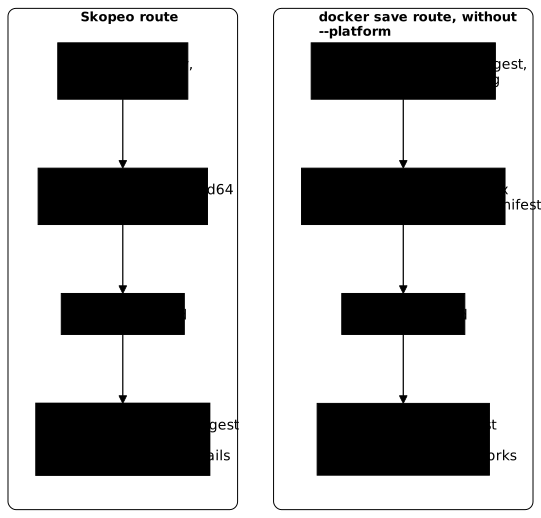
First protect the archive with chmod 600, then write its receipt and copy both files into xfer, as for a docker save archive. The chmod 600 matters here: xfer was created by a plain mkdir -p in the previous lesson, so without restricted permissions, and the copy keeps the permissions of its source, minus those your umask removes.
On the isolated machine, sha256sum -c must print alpine-oci.tar: OK: any other line means that the archive is not the one that left. The output shown below starts at the loading, right after this check. As in the previous lesson, the receipt must travel through a channel separate from the archive to protect against deliberate tampering. Then load the archive on the isolated machine, which already holds alpine:3.24.3 from docker save, and read the identity of the image.
chmod 600 sk/alpine-oci.tar(cd sk && sha256sum alpine-oci.tar > alpine-oci.tar.sha256)cp sk/alpine-oci.tar sk/alpine-oci.tar.sha256 xfer/docker exec machine-isolee sh -c 'cd /xfer && sha256sum -c alpine-oci.tar.sha256'docker exec machine-isolee docker load -i /xfer/alpine-oci.tardocker exec machine-isolee docker image inspect alpine:3.24.3 --format 'Id={{.Id}} RepoDigests={{.RepoDigests}} Arch={{.Architecture}}'docker exec machine-isolee docker run --rm --pull never alpine:3.24.3@sha256:c26612752c78b18faacd63c7d50f4592c2e7b0f25e0e20e82bd74e465c57ab0d cat /etc/alpine-releasedocker exec machine-isolee docker run --rm --pull never alpine@sha256:be2656061b536c1883c4034790e21d0a09c5aaaf51968b89368a3c0371ea2c9a cat /etc/alpine-releasedocker exec machine-isolee docker images --digests alpineLoaded image: alpine:3.24.3Id=sha256:c26612752c78b18faacd63c7d50f4592c2e7b0f25e0e20e82bd74e465c57ab0d RepoDigests=[alpine@sha256:c26612752c78b18faacd63c7d50f4592c2e7b0f25e0e20e82bd74e465c57ab0d] Arch=amd643.24.3docker: Error response from daemon: No such image: alpine@sha256:be2656061b536c1883c4034790e21d0a09c5aaaf51968b89368a3c0371ea2c9a
Run 'docker run --help' for more informationREPOSITORY TAG DIGEST IMAGE ID CREATED SIZEalpine 3.24.3 sha256:c26612752c78b18faacd63c7d50f4592c2e7b0f25e0e20e82bd74e465c57ab0d c26612752c78 12 days ago 12.9MBLook at three lines. The image runs by the digest of its manifest (c26612…). The Id is the digest of the amd64 manifest (c26612…), as after a docker push, and not the index digest (be2656…) that docker load kept after docker save. Finally, the reference by the index digest answers No such image. The CREATED column ("12 days ago") depends on the day you run the command: yours will show a different duration.
The loading also replaced the image: the isolated machine held alpine:3.24.3 loaded by docker save, and a Skopeo archive loaded under the same name takes its place. The listing, filtered on alpine, now shows a single line, the c266… one, and the index digest be26… has disappeared from the isolated machine. A pinned FROM that used to work therefore stops working. To show it, write two Dockerfiles in b1/ and b2/, copy them into xfer, and build them on the isolated machine.
# b1/Dockerfile: pinned on the index digestFROM alpine:3.24.3@sha256:be2656061b536c1883c4034790e21d0a09c5aaaf51968b89368a3c0371ea2c9aRUN true# b2/Dockerfile: pinned on the amd64 manifest digestFROM alpine:3.24.3@sha256:c26612752c78b18faacd63c7d50f4592c2e7b0f25e0e20e82bd74e465c57ab0dRUN truecp -r b1 b2 xfer/docker exec machine-isolee docker build --progress=plain --network none --no-cache -t t:idx /xfer/b1docker exec machine-isolee docker build --progress=plain --network none --no-cache -t t:man /xfer/b2The first build fails, and its error looks like a network outage, not like missing content:
#2 ERROR: failed to do request: Head "https://registry-1.docker.io/v2/library/alpine/manifests/sha256:be2656061b536c1883c4034790e21d0a09c5aaaf51968b89368a3c0371ea2c9a": dial tcp: lookup registry-1.docker.io on 10.10.114.1:53: dial udp 10.10.114.1:53: connect: network is unreachableThe build looks for this index (be26…) on the registry, because it cannot find it in the store, and runs into the absence of a network. The second build, pinned on the manifest digest c26612…, succeeds: it ends with #5 [2/2] RUN true then #5 DONE 0.1s. A build with FROM alpine:3.24.3 without a digest also succeeds.
To get the index digest back, reload the docker save archive: after a docker rmi -f alpine:3.24.3 and a docker load -i /xfer/alpine.tar, the isolated machine runs the image by its tag and by the index digest, printing 3.24.3 twice. If you must build there on a base pinned on the index, deliver it with docker save without --platform. With --platform, docker save leads to the same result as Skopeo: the archive is reduced to the manifest, and the loaded image carries its digest, as the previous lesson shows.
A trap comes from the destination name. Recreate the archive with the short name alpine:3.24.3 in place of docker.io/library/alpine:3.24.3. Then remove alpine:3.24.3 from the isolated machine with docker rmi -f, and load the new archive.
docker run --rm --user "$(id -u):$(id -g)" -e HOME=/tmp -v "$PWD/sk:/out" \ quay.io/skopeo/stable:v1.22.3@sha256:2681eccb8b02c495b013c2669cbf7f41d5c0b0b0e644e7c69bd3ea9bcb20641f \ copy docker://docker.io/library/alpine@sha256:be2656061b536c1883c4034790e21d0a09c5aaaf51968b89368a3c0371ea2c9a \ oci-archive:/out/court.tar:alpine:3.24.3cp sk/court.tar xfer/docker exec machine-isolee docker rmi -f alpine:3.24.3docker exec machine-isolee docker load -i /xfer/court.tardocker exec machine-isolee docker images --digests alpinedocker exec machine-isolee docker image inspect alpine:3.24.3docker load announces Loaded image: alpine:3.24.3, but the image is unusable. The image list, then docker image inspect alpine:3.24.3, give:
Loaded image: alpine:3.24.3REPOSITORY   TAG       DIGEST    IMAGE ID       CREATED       SIZEalpine       3.24.3    <none>    c26612752c78   12 days ago   12.9MBalpine       3.24.3    <none>    c26612752c78   12 days ago   12.9MB
Error response from daemon: No such image: alpine:3.24.3
The two lines without a digest, and the No such image of docker image inspect, betray this short name: recreate the archive with the full name. The court.tar archive ("short") is no longer useful, and the cleanup removes it along with the sk folder.
How do you choose the platform with Skopeo?
Skopeo copies the variant of the platform of the machine that runs it, here amd64. Add --override-arch arm64 before the source to choose the arm64 variant in the remote index: it does not need to be pulled first, unlike docker save --platform.
docker run --rm --user "$(id -u):$(id -g)" -e HOME=/tmp -v "$PWD/sk:/out" \ quay.io/skopeo/stable:v1.22.3@sha256:2681eccb8b02c495b013c2669cbf7f41d5c0b0b0e644e7c69bd3ea9bcb20641f \ copy --override-arch arm64 docker://docker.io/library/alpine@sha256:be2656061b536c1883c4034790e21d0a09c5aaaf51968b89368a3c0371ea2c9a \ oci-archive:/out/arm.tar:docker.io/library/alpine:3.24.3Loaded on an amd64 host, this archive loads without error, and the failure comes at launch: Docker warns that the platform of the image does not match that of the host, then the first program launched fails on exec format error. This loading would replace the alpine:3.24.3 image of the isolated machine, like the one in the previous section. The lesson on pinning a base and delivering it offline shows the exact warning and error, with a docker save archive of another architecture. Export the platform of the isolated machine, then.
One last point about the copy itself: the local store does not receive the copied image. Measured with busybox:1.37, a copy from Docker Hub left no busybox line in docker image ls -a. This is what you expect from a route without a store, and it is also why docker image ls will not tell you what was exported.
What to do when the Skopeo export fails?
Each failure in the lesson has a message or a symptom that points to it. Look for yours in the first column.
| Message or symptom | Cause | Action |
|---|---|---|
Docker references with both a tag and digest are currently not supported | The source of skopeo copy carries a tag and a digest | Write the source with the digest alone: docker://docker.io/library/alpine@sha256:… |
docker load announces Loaded image: alpine:3.24.3, but the image is listed twice without a digest and inspect answers No such image | oci-archive: destination written with a short name | Recreate the archive with the full name, docker.io/library/alpine:3.24.3 |
No such image: alpine@sha256:… with the index digest after loading | The archive carries the manifest digest, not the index one | Run by the tag or by the manifest digest, or deliver with docker save without --platform |
failed to do request: Head "https://registry-1.docker.io/v2/library/alpine/manifests/sha256:…" … network is unreachable when building a FROM pinned on the index | Same cause: the index is no longer in the store of the isolated machine | Pin the manifest digest, or reload the docker save archive made without --platform |
The archive belongs to root | Container started without --user | Add --user "$(id -u):$(id -g)" and -e HOME=/tmp |
Archive about 2.3 times heavier than the docker save one, loaded image with an ID unknown upstream | docker-archive: destination | Recreate the archive as oci-archive: |
exec format error when launching a delivered image | Archive of a different architecture than the machine | Export the right platform with --override-arch |
The platform failure and the short-name one look alike: the loading succeeds in both cases, and the defect only appears in use.
How do you clean up after the experiments?
The lesson leaves on your workstation the Skopeo image, the sk folder and the Dockerfile folders b1 and b2. Remove them first: these commands touch neither the isolated machine nor the xfer folder. Reread each path before running an rm -rf: it asks for no confirmation.
docker image rm quay.io/skopeo/stable@sha256:2681eccb8b02c495b013c2669cbf7f41d5c0b0b0e644e7c69bd3ea9bcb20641frm -rf sk b1 b2If the Skopeo image has already disappeared, docker image rm says so and exits with code 1: the other commands run all the same.
Then play the cleanup of the previous lesson, the section "How do you clean up after the experiments?" of pinning a base and delivering it offline. It removes the isolated machine with docker rm -fv machine-isolee: the -v option takes away the anonymous volume that holds its whole inner daemon, so also the t:man image built here and the unusable image loaded from court.tar. It also removes the xfer folder, after the machine that mounts it as /xfer, and the alpine:3.24.3 and docker:dind images of the host.
If you keep the isolated machine for other experiments, remove only the image built here with docker exec machine-isolee docker rmi t:man, and know that it keeps the image loaded from court.tar, unusable by its name: removing it with the machine remains the simplest action. The xfer folder also keeps alpine-oci.tar, its receipt and court.tar, the latter in 0644: remove them with rm -f xfer/alpine-oci.tar xfer/alpine-oci.tar.sha256 xfer/court.tar.
Finally check with docker image ls that no <none> image from this lesson or the previous one remains (an image pulled by digest without a tag, or an orphan base after a rebuild under the same tag): delete it by its identifier.
Key points
Skopeo exports an image from a registry to an archive without a daemon: skopeo copy docker://…@sha256:… oci-archive:/out/archive.tar:docker.io/library/…:tag. The demonstration starts it from the publisher's image, which uses the daemon; on a workstation without Docker, you install the binary.
The source is written with the digest alone, never tag@sha256:. The destination carries a full name: with a short name, the loaded image is unusable.
Choose oci-archive:: its layers stay compressed, and its size is close to that of docker save. docker-archive: weighs about 2.3 times more and produces an ID unknown upstream. Run in a container, Skopeo writes the archive as -rw-r--r-- whatever your umask: keep it in a 0700 folder and run chmod 600 if it leaves it.
Loading a Skopeo archive changes the identity: the Id is the manifest digest, and the reference by the index digest fails. Loaded under the same name as an image from docker save, it replaces it, and a FROM pinned on the index stops resolving. To keep the index digest, deliver with docker save without --platform: with --platform, it leads to the same result as Skopeo, a manifest digest.
--override-arch chooses the platform in the remote index without pulling it first, and the local store does not receive the copied image.
Knowledge check
Check that the essentials of this lesson have stuck. The questions cover only what has just been explained here.
Knowledge check
Check what you have learned with this interactive quiz
How it works
- The timer starts when you click Start
- Multiple choice, true/false and short answer questions
- You can move between questions
- Detailed results are shown at the end
Starts the quiz and the timer
Review
(0/0)Score by domain
A domain groups several guides and gets several questions, so its score is more reliable than a per-topic score, which often rests on a single question.
Summary
Strengths
No topic passed at 80% on at least two questions yet.
Weak areas
No topic below the pass mark.
Recommended next
Hints before you try again?
Continue the course: Exam: deliver an image usable elsewhere
A new full quiz with random questions
Work again only on the questions you missed