When a container stops with code 137, or can no longer run a single command, two ceilings must be ruled out first: memory and the number of tasks. This lesson teaches you to set both ceilings, to check that the kernel really enforces them, then to recognize which of the two causes you are facing, thanks to counters rather than an impression. The outputs come from Docker Engine 29.9.2 on Debian 13.7 (kernel 6.12.113, cgroup v2, systemd driver), on a VM with 2 processors and 2.84 GiB of memory, without swap.
Three words come up everywhere. A cgroup is the control group of the Linux kernel to which Docker attaches each container: it counts the resources of the container and caps them. The OOM (out of memory) is the kernel's decision to kill a process of the group when the memory ceiling is crossed. A task is a process or a thread: the task ceiling bounds their total number in the cgroup.
Two other notions come up often. PID 1 is the first process of the container, the one Docker starts with the command given to docker run: when it ends, the container stops. Swap is a space on disk that the kernel uses as an extension of memory.
What you will learn
- Set a memory ceiling with or without swap, and check both what the daemon was asked and what the kernel enforces
- Prove an OOM with the
oom_killcounter ofmemory.events, and not with an exit code alone - Tell a killed child process (the container keeps running) from the death of PID 1 (the container stops), and read what
OOMKilledmeans - Size a ceiling on the usage peak measured in
memory.peak, not on the final size - Set
--pids-limit, readpids.events, and explain whyulimit -udoes not replace it - Diagnose a saturated container when
docker execfails, recognize zombies and fix them with--init - Raise or lower a ceiling live with
docker update
Prerequisites
- Cap a container: CPU, ulimits and shared memory: reading the cgroup files from the container, the fact that
/dev/shmcounts against the memory of the container, and the notion ofulimit. The processor limit (throttling) is covered there and not here. - Recommended: Limit the resources and restarts of a stack, which writes these ceilings in a Compose file (
mem_limit,memswap_limit,pids_limit). This lesson sets the ceilings on the command line and does not repeat the Compose syntax. - A Linux host with Docker Engine 29.9.2, a user who is a member of the
dockergroup and read access to/sys/fs/cgroup. The commands are written for bash. To understand where the cgroup files come from, see Understanding Linux cgroups and Namespaces and cgroups: measure a container's isolation.
How do you prepare the working folder and the probes?
Everything the lesson creates fits in a ~/plafonds folder and in containers whose name starts with pl-. The VM you use may be shared: the final cleanup only touches these objects. The three probes are small scripts, because you need a known load for the counters to mean anything. The first allocates memory in blocks of 4 MiB, the second doubles a byte string, the third starts a burst of sleep commands.
mkdir -p ~/plafonds/sondes && cd ~/plafonds/sondesWrite alloue.py. It takes a size in MiB and a waiting time, allocates and touches memory in blocks of 4 MiB, then waits.
import sys, timemib = int(sys.argv[1]); hold = float(sys.argv[2]) if len(sys.argv) > 2 else 0b = []for i in range(mib // 4): b.append(bytearray(b"\x01") * (4 * 1024 * 1024)) print("tenu", (i + 1) * 4, "Mio", flush=True)time.sleep(hold)print("fini sans etre tue", flush=True)Write doublement.py: a string doubles in size (s = s + s) up to the requested size, then the process waits.
import sys, timecible = int(sys.argv[1]) * 1024 * 1024s = b"x"while len(s) < cible: s = s + sprint("fait", len(s) // 1048576, "Mio", flush=True)time.sleep(120)Write rafale.sh, which starts $1 sleep commands of $2 seconds in the background.
#!/bin/shi=0while [ $i -lt "$1" ]; do sleep "$2" & i=$((i+1))doneecho "boucle finie, pids.current=$(cat /sys/fs/cgroup/pids.current) pids.max=$(cat /sys/fs/cgroup/pids.max)"waitecho "wait fini rc=$?"It remains to define the pinned image and two reading functions in your shell. cg returns the real path of the cgroup of a container, read from the host through the PID of the container; etat prints the state the daemon knows, including OOMKilled, the flag the daemon raises when the kernel has killed a process of the container for lack of memory.
cd ~/plafondsIMG='python:3.13-alpine@sha256:7984cf56ceaddebe4fefeb75d64000b9f45d8b77b11a09b24524da6cdc3af0c8'docker pull -q "$IMG"cg() { local pid; pid=$(docker inspect -f '{{.State.Pid}}' "$1"); echo "/sys/fs/cgroup$(cut -d: -f3 /proc/$pid/cgroup)"; }etat() { docker inspect -f 'Running={{.State.Running}} Status={{.State.Status}} ExitCode={{.State.ExitCode}} OOMKilled={{.State.OOMKilled}} Restarts={{.RestartCount}}' "$1"; }With the systemd driver, cg returns a path of the form /sys/fs/cgroup/system.slice/docker-<id>.scope. Reading the cgroup from the host rather than from the container is not a detail: further down, a saturated container refuses docker exec, and these files then remain the only open window.
What do you ask the daemon, and what does the kernel enforce?
A ceiling is read in two places that can diverge: what you asked the daemon (HostConfig) and what the kernel enforces (the cgroup files). The cgroup is authoritative, because it is the one that kills. Start a container with 48 MiB of memory and read both views.
docker run -d --name pl-a --memory 48m -v ~/plafonds/sondes:/p:ro "$IMG" sleep 600docker inspect -f 'Memory={{.HostConfig.Memory}} MemorySwap={{.HostConfig.MemorySwap}} OomKillDisable={{.HostConfig.OomKillDisable}}' pl-aP=$(cg pl-a); echo "memory.max=$(cat $P/memory.max) memory.swap.max=$(cat $P/memory.swap.max) pids.max=$(cat $P/pids.max)"Memory=50331648 MemorySwap=100663296 OomKillDisable=<nil>memory.max=50331648 memory.swap.max=50331648 pids.max=3393Look at MemorySwap: you did not ask for swap, and Docker set twice the value of Memory. MemorySwap is a memory plus swap total: 96 MiB minus 48 MiB of memory leave 48 MiB of swap, and the kernel enforces it, since memory.swap.max is 50331648. A lone --memory therefore does not forbid swap. Ignore the OomKillDisable field for now; a section further down comes back to it.
To forbid swap, you must pass --memory-swap equal to --memory. The table summarizes the combinations that were measured.
| Options | MemorySwap in HostConfig | memory.swap.max in the cgroup |
|---|---|---|
--memory 48m | 100663296 (twice) | 50331648 (48 MiB of swap) |
--memory 48m --memory-swap 48m | 50331648 | 0 |
--memory 48m --memory-swap 96m | 100663296 | 50331648, same as --memory alone |
--memory 48m --memory-swap -1 | -1 | max (unlimited swap) |
Check the second row, the only one that forbids swap.
docker run -d --name pl-b --memory 48m --memory-swap 48m -v ~/plafonds/sondes:/p:ro "$IMG" sleep 600docker inspect -f 'Memory={{.HostConfig.Memory}} MemorySwap={{.HostConfig.MemorySwap}}' pl-bP=$(cg pl-b); echo "memory.max=$(cat $P/memory.max) memory.swap.max=$(cat $P/memory.swap.max)"You should read Memory and MemorySwap both equal to 50331648, then memory.swap.max=0. The daemon also refuses inconsistent combinations, with code 125 and without creating anything: --memory-swap 128m without --memory answers You should always set the Memory limit when using Memoryswap limit, see usage, and --memory 64m --memory-swap 32m answers Minimum memoryswap limit should be larger than memory limit, see usage.
A caveat on what this lesson proves. The measurement host has no swap (/proc/swaps is empty). Without swap, a lone --memory and an equal --memory-swap kill the same allocation, and we did not measure the behavior of an overflow into a real swap. The difference between the two settings can be read in the cgroup; on a host that has swap, it would show up in production, which is why it is better to read it beforehand.
What happens when an allocation exceeds the ceiling?
The kernel kills a process of the cgroup, and a counter proves it. The memory.events file of the cgroup counts three things: max for crossings of the ceiling, oom for OOM situations and oom_kill for killed processes. A counter says what happened; an exit code can have several causes. Read this file before, start an 80 MiB allocation under a 48 MiB ceiling, then read it again.
P=$(cg pl-a)echo "avant : $(grep -E '^(max|oom|oom_kill) ' $P/memory.events | tr '\n' ' ')"docker exec pl-a python /p/alloue.py 80 | tail -3; echo "rc exec=${PIPESTATUS[0]}"echo "après : $(grep -E '^(max|oom|oom_kill) ' $P/memory.events | tr '\n' ' ')"etat pl-aavant : max 0 oom 0 oom_kill 0tenu 36 Miotenu 40 Miotenu 44 Miorc exec=137après : max 19 oom 1 oom_kill 1Running=true Status=running ExitCode=0 OOMKilled=true Restarts=0Look at three things. The probe did not go beyond 44 MiB: the kernel killed it before 48 MiB were available to it, because the Python interpreter also takes a share of the ceiling. oom_kill went from 0 to 1, which is the proof of the OOM. And max rose to 19, because the kernel tried to reclaim memory at each crossing before killing. Code 137 (128 plus signal 9) says nothing on its own: only oom_kill establishes that the OOM struck.
A trap: OOMKilled is true while the container is still running (Running=true). The field turns true as soon as a process of the container is killed by the OOM, and it stays so, even if a later allocation succeeds. Run a 40 MiB allocation again, under the ceiling: it ends with code 0, the counters of memory.events do not move, and OOMKilled stays true. The OOMKilled=true field therefore does not mean "container stopped".
Does an OOM kill the whole container?
It depends on the process the kernel picks. If it kills a child process or a process started by docker exec, the container keeps running. If it kills PID 1, the container stops. The docker exec case is the one of the previous section. Let us look at a child of PID 1, with a small script that starts the probe, announces its exit code, then waits.
cat > ~/plafonds/sondes/enfant.sh <<'EOF'#!/bin/shpython /p/alloue.py 80 0echo "enfant fini rc=$?"sleep 600EOFdocker run -d --name pl-c --memory 48m -v ~/plafonds/sondes:/p:ro "$IMG" sh /p/enfant.shsleep 5docker logs pl-c 2>&1 | tail -3etat pl-c; docker inspect -f 'StartedAt={{.State.StartedAt}}' pl-ctenu 44 MioKilledenfant fini rc=137Running=true Status=running ExitCode=0 OOMKilled=true Restarts=0StartedAt=2026-11-04T12:59:20.957321761ZPID 1 (sh /p/enfant.sh) survived: its Python child died with 137, the shell wrote Killed, then it carried on. The Killed and enfant fini rc=137 lines go through two different streams (error and standard output): their order can swap from one attempt to the next. The container did not restart, and StartedAt is the proof that it was not recreated. Your StartedAt value will be that of your own start. Now make the probe itself PID 1.
docker run -d --name pl-d --memory 48m -v ~/plafonds/sondes:/p:ro "$IMG" python /p/alloue.py 80 30docker wait pl-detat pl-ddocker inspect -f 'Error={{json .State.Error}}' pl-d137Running=false Status=exited ExitCode=137 OOMKilled=true Restarts=0Error=""This time the container is exited with code 137, and OOMKilled=true: PID 1 was killed, the container has no reason to keep running. The Error field stays empty, because Docker did nothing abnormal: the kernel decided. A point of method: a stopped container no longer has a cgroup. It no longer has processes, hence no cgroup of its own to read, and the cg function has nothing reliable left to return. cg therefore only serves on a running container; for a PID 1 that is already dead, the daemon events give the answer: they must show the order oom then die, with the caveat set out below. To read them, you need a PID 1 that is certain to die: the hog.py file below allocates blocks of 4 MiB endlessly, which guarantees the death of PID 1 under a 40 MiB ceiling.
cat > ~/plafonds/sondes/hog.py <<'EOF'l = []while True: l.append(bytearray(4 * 1024 * 1024))EOFT0=$(date +%s)docker run -d --name pl-e --memory 40m -v ~/plafonds/sondes:/p:ro "$IMG" python /p/hog.py >/dev/nulldocker wait pl-e; T1=$(date +%s)docker events --since $T0 --until $((T1+1)) --filter container=pl-e --filter event=oom --filter event=die --format '{{.Action}} exitCode={{index .Actor.Attributes "exitCode"}}'137oom exitCode=die exitCode=137The oom event comes before die, and only die carries the exit code. No kill or stop line appears (with the filter removed, the sequence is create, start, oom, die): it is not Docker that stopped the container. These events hold for an OOM of PID 1. Out of five attempts at 40 MiB, only one was an exception: the container exited with code 137, but without an oom event and with OOMKilled=false; two attempts at 32 MiB showed no exception. The cause of this exception remains unknown. In that case, docker events only showed die with code 137, and the cgroup had disappeared: a 137 without OOMKilled or an oom event does not allow a conclusion. Consumption close to the ceiling, read before the stop (memory.peak, docker stats), makes the OOM plausible. How to read code 137 against docker kill, and the restart policy that restarts a killed container, are taught by Limit the resources and restarts of a stack.
How do you size a ceiling: final size or peak?
You must size on the usage peak, not on the final size. A string that doubles (s = s + s) briefly keeps the old half and the new one in memory, so the ceiling must cover both. The memory.peak file of the cgroup keeps the maximum reached, and it is the one to read: memory.current, read afterwards, falls back to the final size and hides the cost of the doubling. Start the probe under a wide ceiling (512 MiB), wait until it has finished, then read both files.
docker run -d --name pl-f --memory 512m -v ~/plafonds/sondes:/p:ro "$IMG" python /p/doublement.py 32until docker logs pl-f 2>&1 | grep -q fait; do sleep 0.25; doneP=$(cg pl-f); echo "memory.peak=$(cat $P/memory.peak) memory.current=$(cat $P/memory.current)"On our VM, a string of 32 MiB final gives a peak of about 51.8 MiB for 35.6 MiB of memory.current, within a few hundred KiB from one attempt to the next. Repeated at several sizes, the measurement gives this.
| Final size | memory.peak | memory.current | Peak divided by size |
|---|---|---|---|
| interpreter alone (script that waits without allocating anything) | 6.9 MiB | 3.5 MiB | |
| 4 MiB | 9.8 MiB | 7.5 MiB | 2.46 |
| 8 MiB | 15.7 MiB | 11.6 MiB | 1.96 |
| 16 MiB | 27.8 MiB | 19.6 MiB | 1.74 |
| 32 MiB | 51.8 MiB | 35.6 MiB | 1.62 |
Read the last column: the ratio falls toward 1.5 as the size grows. On small sizes, the interpreter dominates. Remove its 6.9 MiB, and the peak is 0.73, 1.10, 1.31, then 1.40 times the final size. It tends toward 1.5, because the old half and the new one coexist during the copy.
The proportion depends on the language and its implementation: the curve above is Python's, not a constant.
The consequence can be checked by varying the ceiling with an equivalent probe. A string of 16 MiB final is killed under a 24 MiB ceiling and survives from 28 MiB; a string of 32 MiB final is killed under 48 MiB and survives from 56 MiB. A 48 MiB ceiling looks wide for 32 MiB of data, yet it is not, because the peak is about 52 MiB.
The MEM USAGE / LIMIT column of docker stats gives an indication of the same nature, and it also counts the interpreter. Start the 40 MiB probe in the background with a wait of 12 seconds, then read docker stats while it holds its memory.
docker run -d --name pl-s --memory 48m -v ~/plafonds/sondes:/p:ro "$IMG" sleep 600docker exec -d pl-s python /p/alloue.py 40 12sleep 4docker stats --no-stream pl-sFour seconds after the start, while the probe holds its 40 MiB under 48 MiB, docker stats displays 43.8MiB / 48MiB and 91.25%: 40 MiB allocated, so about 43.8 MiB measured, because the interpreter counts too. Once the probe has finished, the same column falls back to about 384KiB / 48MiB. Then remove this container with docker rm -f pl-s. An instantaneous reading can miss the peak, whereas memory.peak does not miss it. So set the ceiling above memory.peak, with a margin to absorb a peak higher than the one you measured: a ceiling equal to the peak leaves no reserve.
What does --oom-kill-disable do with cgroup v2?
Nothing: Docker accepts the option, warns, and ignores it. You will see it recommended in old guides as a way to prevent the container from dying. Try it.
docker run -d --name pl-g --memory 40m --oom-kill-disable "$IMG" sleep 600docker inspect -f 'OomKillDisable={{.HostConfig.OomKillDisable}}' pl-gWARNING: Your kernel does not support OomKillDisable. OomKillDisable discarded.<container ID>OomKillDisable=<nil>The warning is written on the error output, the return code is 0, the container is created and started, and the field is <nil>: the option is discarded. The memory.max ceiling is set normally. The same warning appears without --memory. This option is therefore neither a lever nor a risk: it cannot prevent the OOM. When the kernel can no longer reclaim anything under the ceiling, it kills.
How do you cap the number of tasks?
The task ceiling is set with --pids-limit, and the kernel enforces it in pids.max. Without the option, pids.max inherits a value from the host (3393 on our VM, it depends on the machine) and PidsLimit is null in HostConfig. Set a ceiling of 20 tasks and start a burst of 40 sleep of 4 seconds.
docker run -d --name pl-p --pids-limit 20 -v ~/plafonds/sondes:/p:ro "$IMG" sleep 600docker inspect -f 'PidsLimit={{.HostConfig.PidsLimit}}' pl-pP=$(cg pl-p); echo "pids.max=$(cat $P/pids.max)"docker exec pl-p sh /p/rafale.sh 40 4; echo "rc exec=$?"echo "pids.events : $(cat $P/pids.events)"etat pl-pPidsLimit=20pids.max=20/p/rafale.sh: line 0: can't fork: Resource temporarily unavailablerc exec=2pids.events : max 1Running=true Status=running ExitCode=0 OOMKilled=false Restarts=0Look at the can't fork line: it is what the process sees when the ceiling is reached. The creation of a new task fails with the EAGAIN error, translated as Resource temporarily unavailable, and the shell stops (return code 2). The max counter of pids.events goes up, like oom_kill for memory. And the container keeps running: Running=true, ExitCode=0, OOMKilled=false. A task saturation produces neither an OOM nor a code 137: these are not the same counters.
The ceiling bounds processes and threads. Python sees it in two forms: with a ceiling of 10, a program that creates children with os.fork() gets 9 then receives BlockingIOError(11, 'Resource temporarily unavailable'), and a program that creates threads receives RuntimeError("can't start new thread"). In both cases, pids.events counts the refusals, and max was 2 after these two attempts.
What do you do when docker exec itself fails?
When the cgroup is saturated, docker exec fails too, because it must add a process to that same cgroup. This is the trap that makes you believe the container is dead. Start again from a new container: in the previous one, the finished sleep remain counted as zombies and would distort the measurement. In a similar attempt, pids.current was still 19 out of 20 fourteen seconds after the burst (the next section explains why). Start in the background a burst that lasts 12 seconds, then try to connect to it.
docker rm -f pl-pdocker run -d --name pl-p --pids-limit 20 -v ~/plafonds/sondes:/p:ro "$IMG" sleep 600P=$(cg pl-p)docker exec -d pl-p sh /p/rafale.sh 40 12sleep 2docker exec pl-p true; echo "rc exec=$?"OCI runtime exec failed: exec failed: unable to start container process: error executing setns process: exit status 1; runc init error(s): nsexec-0[757679]: unable to spawn stage-1: Resource temporarily unavailablerc exec=128Code 128 and the message unable to spawn stage-1: Resource temporarily unavailable point to the same cause as the can't fork of the previous section: the kernel refuses one more task. The number in brackets is specific to each attempt. To diagnose, read from the host, without going through the container: cat $P/pids.current, cat $P/pids.max and cat $P/pids.events. The PIDS column of docker stats --no-stream pl-p showed 19 during the saturation. You thus see a container that is still Running, with OOMKilled=false, that accepts nothing anymore: this is the signature of a task ceiling, not of an OOM.
Why does a container stay saturated when it does nothing?
The task counter does not fall back if PID 1 does not reap its children. A zombie is a finished process whose parent has not yet read the exit code: it no longer runs anything, but it takes a place in the process table, and the cgroup counts it.
An orphan process is a process whose parent has ended. PID 1 of the container adopts it, and it must then call wait, the system call that reads the exit code of a finished child. A sleep 600 as PID 1 does not do it. Reproduce the case: fifteen sleep of 1 second are started in a subshell that exits at once, which leaves them orphaned, then you wait 6 seconds.
docker run -d --name pl-z --pids-limit 20 "$IMG" sleep 600pid=$(docker inspect -f '{{.State.Pid}}' pl-z); P=$(cg pl-z)docker exec pl-z sh -c 'for i in $(seq 1 15); do (sleep 1 &); done'sleep 6echo "pids.current=$(cat $P/pids.current) pids.max=$(cat $P/pids.max) pids.events: $(tr '\n' ' ' < $P/pids.events)"echo "cgroup.procs: $(tr '\n' ' ' < $P/cgroup.procs)"ps -o pid,ppid,stat,cmd --ppid $pid | head -4docker exec pl-z true; echo "docker exec true rc=$?"pids.current=16 pids.max=20 pids.events: max 0cgroup.procs: 2158 PID PPID STAT CMD 2243 2158 Z [sleep] <defunct> 2245 2158 Z [sleep] <defunct> 2247 2158 Z [sleep] <defunct>OCI runtime exec failed: exec failed: unable to start container process: procReady not receiveddocker exec true rc=128There are four things to read. pids.current is 16 out of 20, even though the fifteen sleep finished 5 seconds ago. cgroup.procs lists only one process, PID 1: zombies count in pids.current but do not appear in this list, and it is this gap that betrays the problem. ps shows them in state Z, all children of PID 1 (PPID 2158). And docker exec then fails, with a more opaque message (procReady not received), because the container no longer has enough free tasks for the transient processes of exec. The PIDs are those of our attempt. These zombies stay as long as PID 1 does not reap them, and pids.events stays at max 0: the burst itself did not exceed 20.
The fix is a PID 1 that reaps orphans, which the --init option provides: Docker then places a small initialization program (tini, installed under the name docker-init) as PID 1. Replay the same attempt with docker run -d --name pl-i --init --pids-limit 20 "$IMG" sleep 600.
| Mode | pids.current (out of 20) | Children of PID 1 seen by ps | docker exec true afterwards |
|---|---|---|---|
without --init (3 attempts out of 3) | 16 | 15 [sleep] <defunct> processes in state Z | code 128 |
with --init (3 attempts out of 3) | 2 | only 1, sleep 600 in state S | code 0 |
With --init, the counter returns to 2 (the initialization program and the sleep), and docker exec answers. If your container starts processes that nobody waits for (an application that launches commands and does not wait for them), add --init, or init: true in Compose.
Can ulimit -u replace --pids-limit?
No: ulimit -u and --ulimit nproc are per-user limits, carried by the process, and they have no effect on root. --pids-limit is another mechanism: it writes pids.max in the cgroup and bounds all the processes of the container, whatever their user. A ulimit can be seen in /proc/self/limits and does not appear in pids.max.
To check it, do not set --pids-limit, and start fifteen sleep as root with a limit of 10.
docker run --rm -v ~/plafonds/sondes:/p:ro "$IMG" sh -c 'ulimit -u 10echo "id=$(id -u) ulimit -u=$(ulimit -u) | $(grep -i "max processes" /proc/self/limits)"echo "pids.max=$(cat /sys/fs/cgroup/pids.max)"i=0; while [ $i -lt 15 ]; do sleep 3 & i=$((i+1)); doneecho "pids.current=$(cat /sys/fs/cgroup/pids.current) pids.events: $(tr "\n" " " < /sys/fs/cgroup/pids.events)"wait'id=0 ulimit -u=10 | Max processes 10 10 processespids.max=3393pids.current=17 pids.events: max 0Look at pids.current=17: the fifteen sleep started despite a limit of 10, and pids.max is still 3393. The same result comes out with --ulimit nproc=10, and even with --cap-drop ALL. The manual says why (man 2 setrlimit, read on 2026-11-04): RLIMIT_NPROC is a limit on the number of processes for the real user ID of the calling process. It is not enforced for processes that have CAP_SYS_ADMIN or CAP_SYS_RESOURCE, nor for those whose real ID is 0.
We measured that root stays exempt without any capability: the exemption is tied to uid 0. The exemption by capability, which the manual describes, was not observed with --cap-add for a non-root user: the refusal persists. The following table reports a second attempt, with --ulimit nproc=5 and ten sleep, varying the user and the capabilities.
| Options | Result with ten sleep and nproc=5 |
|---|---|
--user 0 | the ten sleep start, unbounded |
--user 0 --cap-drop ALL | the ten sleep start, root stays exempt |
--user 1234 | sh: can't fork: Resource temporarily unavailable |
--user 1234 --cap-add SYS_RESOURCE or SYS_ADMIN | refused too |
A non-root user is therefore bounded, but it is not the cgroup that refuses: pids.events stays at max 0, and the count is made per user on the host, not per container. Only --pids-limit stops a burst for any user, root included.
How do you change a ceiling without restarting the container?
docker update modifies the cgroup of a running container, without restarting it. Create a container with 48 MiB and 30 tasks, note its StartedAt, read the three ceilings, then read again.
docker run -d --name pl-u --memory 48m --pids-limit 30 -v ~/plafonds/sondes:/p:ro "$IMG" sleep 600docker inspect -f '{{.State.StartedAt}}' pl-udocker update --memory 96m --memory-swap 96m --pids-limit 60 pl-uP=$(cg pl-u); echo "memory.max=$(cat $P/memory.max) memory.swap.max=$(cat $P/memory.swap.max) pids.max=$(cat $P/pids.max)"docker inspect -f '{{.State.StartedAt}}' pl-u<start date>pl-umemory.max=100663296 memory.swap.max=0 pids.max=60<same start date>The pl-u line is the echo of docker update. Between the two readings, StartedAt stayed identical: the container did not restart, and the new values are already in the cgroup. With --pids-limit -1, pids.max becomes max.
The daemon refuses certain changes, and the message says how to fix them. Pass --memory 200m alone while MemorySwap is already 96 MiB.
docker update --memory 200m pl-u; echo "rc=$?"Error response from daemon: Cannot update container <ID>: Memory limit should be smaller than already set memoryswap limit, update the memoryswap at the same timerc=1The refusal applies because the new memory would exceed the memory plus swap total in place. It is fixed by changing --memory-swap in the same command: docker update --memory 200m --memory-swap 200m pl-u succeeds (memory.max=209715200, memory.swap.max=0). After a refusal, the limits stay unchanged.
A few neighboring cases, measured on this same engine:
- On a container created without a limit, where
MemoryandMemorySwapare 0,--memory 64m --memory-swap -1passes (memory.swap.max=max) and--memory 64m --memory-swap 128mtoo (memory.swap.maxat 64 MiB). docker update --memory 96malone, on a container created with--memory 48m, is accepted, butmemory.swap.maxgoes to 0, because the memory plus swap total stays at 96 MiB.docker update --memory-swap 32mwithout--memory, with 64 MiB already set, is refused by the runtime with another message:runc did not terminate successfully: exit status 1: memory+swap limit should be >= memory limit.
A ceiling set by docker update does not survive the recreation of the container: if the value must last, write it in the Compose file, as Limit the resources and restarts of a stack explains.
A last point, which calls for caution: lowering a ceiling below the current usage is not deterministic. With 40 MiB held, docker update --memory 24m --memory-swap 24m failed twice out of three with runc did not terminate successfully and killed the whole container (code 137, OOMKilled=true); the third time, it succeeded and killed only the process. We did not establish the cause of this variation. Raise a ceiling freely, and only lower it above the measured usage. In our attempt, 40 MiB allocated gave about 43.8 MiB measured, and a 44 MiB ceiling went through without incident; this is not a recommendation: set the ceiling above memory.peak, with a margin.
How do you find the cause when a service stops responding?
You find the cause by reading, in this order, the state of the container, then the counters: each reading rules out one hypothesis. The following diagram gives the decision tree of the lesson.
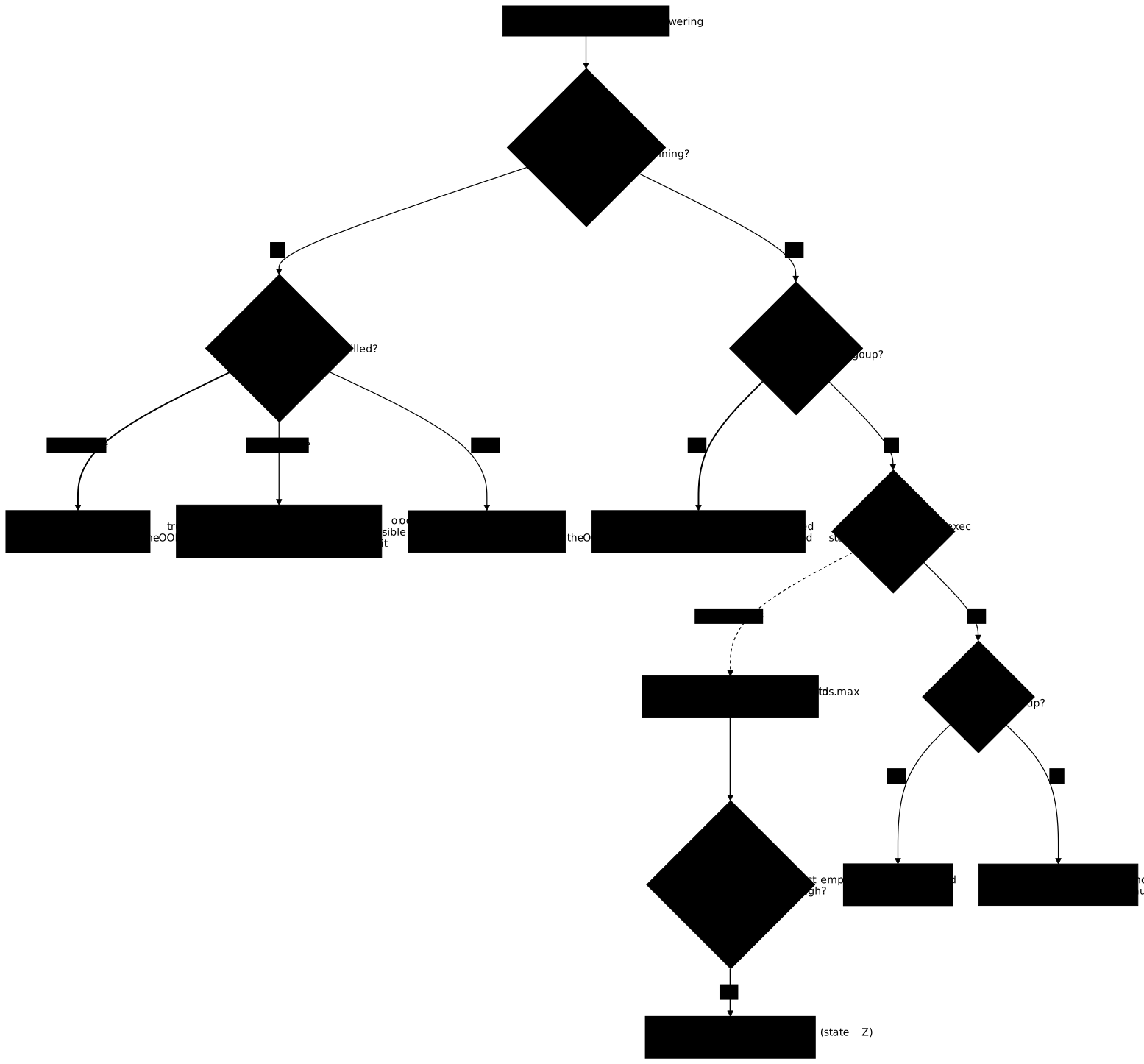
Follow the thick lines first, which form the main path of the diagnosis. The dotted line marks the case that disorients, the one where docker exec itself fails. On the stopped container branch, a 137 without OOMKilled or an oom event does not allow a conclusion; consumption close to the ceiling, read before the stop (memory.peak, docker stats), makes the OOM plausible. On a container that answers, read pids.events before concluding on another cause. The table gives the counters to read for each symptom.
| Symptom | Counter or field to read | Cause |
|---|---|---|
Container exited, code 137, OOMKilled=true | docker events: oom then die (no cgroup left to read) | OOM on PID 1 |
Container exited, code 137, OOMKilled=false | docker events (in the measured exception, die alone, no oom), consumption read before the stop (memory.peak, docker stats) | no conclusion possible; OOM plausible if usage touched the ceiling |
Container exited, other code | ExitCode and logs | cause other than the OOM |
Container running, OOMKilled=true, a job has disappeared | oom_kill going up, StartedAt unchanged | OOM on a child process |
can't fork, Resource temporarily unavailable | max of pids.events going up | task ceiling reached |
docker exec with code 128, container Running | pids.current close to pids.max | task ceiling saturated |
Same, with cgroup.procs almost empty | ps shows processes in state Z | zombies, fix with --init |
On a running container, when OOMKilled stays false and oom_kill does not move, rule out memory: a task saturation leaves no such trace. On a stopped container, there is no cgroup left to read: only docker events and the state of the daemon give the answer.
How do you clean up what the lesson left behind?
Delete only your own objects: the pl-* containers and the working folder. Do not run a global cleanup (docker system prune, docker builder prune), which would touch the objects of the other users of a shared VM.
docker rm -f pl-a pl-b pl-c pl-d pl-e pl-f pl-g pl-p pl-s pl-z pl-i pl-u 2>/dev/nullcd ~find ~/plafonds -mindepth 1 -delete && rmdir ~/plafondsdocker ps -a --format '{{.Names}}' | grep -c '^pl-'The last command must print 0. If you pulled the python:3.13-alpine image only for this lesson, remove it with docker rmi "$IMG"; on a shared VM, first check that nobody else uses it.
Practice
The first lab starts from a Compose service whose memory ceiling is too wide, and has you apply the memory budget of the brief, without swap. It then starts a bounded allocation probe in the container. The validation reads both views of the ceiling (Memory and MemorySwap in HostConfig, then memory.max and memory.swap.max in the cgroup), requires the probe to be killed (neither code 0 nor a timeout) and the oom_kill of memory.events to have gone up, then checks that the service keeps running, that its StartedAt has not changed and that a receipt written before the incident is read again afterwards. It does not check the behavior of a lone --memory, the death of PID 1, the persistence of OOMKilled, nor sizing on the peak: these gestures remain to be practiced with the probes of the lesson.
The second lab is about tasks. It has you apply the task budget of the brief to the service, keeping the memory safeguard already set, then it starts a finite burst of ephemeral processes. The validation checks PidsLimit in HostConfig and pids.max in the cgroup, which rejects a ulimit set in place of the ceiling, the refusal of the burst by the kernel (the max counter of pids.events goes up), then the survival of the service: running, StartedAt unchanged, receipt read again. If the service is stopped, the message gives its exit code, without ruling on the cause. The error message seen by the process, the explanation of ulimit, the distinction between OOM and saturation, the diagnosis when docker exec fails, zombies and docker update are not checked: they are practiced with the lesson and verified with the questions below.
Key points
- A ceiling is read on both sides: what the daemon recorded (
Memory,MemorySwap,PidsLimit) and what the kernel enforces (memory.max,memory.swap.max,pids.max). The cgroup is authoritative. MemorySwapis a memory plus swap total. A lone--memorysets it to twice (memory.swap.maxequal tomemory.max),--memory-swapequal to--memorygives 0, and-1givesmax. Our host has no swap: the overflow into swap was not measured.- On a running container, an OOM is proven by
oom_killofmemory.events, read before and after: a lone code 137 can have other causes. The kernel kills a process, not necessarily PID 1. A killed child leaves the container running, andOOMKilled=truestays true there: it does not mean "stopped". A killed PID 1 stops the container (exited, 137): there is no cgroup left to read,OOMKilledanddocker eventsgive the answer but can be missing (one exception in five measured attempts). - Size a ceiling on the peak read in
memory.peak, not on the final size: 32 MiB of doubled data required about 52 MiB. --oom-kill-disableis ignored in cgroup v2 (warning,<nil>field).--pids-limitmakes the creation of tasks fail (Resource temporarily unavailable,maxofpids.eventsgoing up) without OOM, without 137 and without stopping the service. A saturated cgroup also refusesdocker exec(code 128): readpids.current,pids.maxandpids.eventsfrom the host. A highpids.currentwith an almost emptycgroup.procsbetrays zombies, which--initfixes.ulimit -uand--ulimit nprocare per user, absent frompids.maxand without effect on root: they do not replace--pids-limit.docker updatechanges the ceilings live and without a restart. Pass--memory-swapalong with--memoryif the daemon refuses, and do not lower a ceiling below the current usage.
Knowledge check
Check that you have grasped the essentials of this lesson. The questions only cover what was just explained here.
Knowledge check
Check what you have learned with this interactive quiz
How it works
- The timer starts when you click Start
- Multiple choice, true/false and short answer questions
- You can move between questions
- Detailed results are shown at the end
Starts the quiz and the timer
Review
(0/0)Score by domain
A domain groups several guides and gets several questions, so its score is more reliable than a per-topic score, which often rests on a single question.
Summary
Strengths
No topic passed at 80% on at least two questions yet.
Weak areas
No topic below the pass mark.
Recommended next
Hints before you try again?
Continue the course: Exam: contain a runaway container
A new full quiz with random questions
Work again only on the questions you missed